Roassal 3D empty windows

Hi, what could be the reason, that any Roassal3d example from the Roassal3DTutorial.pdf only shows white empty windows? I loaded ConfigurationOfRoassal3d-RonieSalgado.10 and (Smalltalk at: #ConfigurationOfRoassal3d) loadDevelopment Any ideas? regards Nicolai

Hi Nicolai, Roassal3d works well with the last Pharo 3.0. You just need to execute the following incantation: -=-=-=-=-=-=-=-=-= Gofer new smalltalkhubUser: 'ronsaldo' project: 'roassal3d'; package: 'ConfigurationOfRoassal3d'; load. (Smalltalk at: #ConfigurationOfRoassal3d) loadDevelopment -=-=-=-=-=-=-=-=-= This does not work for you? It works well on OSX and on Linux Alexandre On Mar 15, 2014, at 10:52 AM, Nicolai Hess <nicolaihess@web.de> wrote:
Hi,
what could be the reason, that any Roassal3d example from the Roassal3DTutorial.pdf only shows white empty windows?
I loaded ConfigurationOfRoassal3d-RonieSalgado.10 and (Smalltalk at: #ConfigurationOfRoassal3d) loadDevelopment
Any ideas?
regards Nicolai
-- _,.;:~^~:;._,.;:~^~:;._,.;:~^~:;._,.;:~^~:;._,.;: Alexandre Bergel http://www.bergel.eu ^~:;._,.;:~^~:;._,.;:~^~:;._,.;:~^~:;._,.;:~^~:;.
Thank you Alexandre, this was what I tried under windows, (I wasn't sure if this is still the right way to do it, I read it the Roassal3dTutorial.pdf). But it doesn't work. Either I am getting empty windows or (with an other NBOpenGL version) Frame buffer is incomplete: GL_FRAMEBUFFER_UNSUPPORTED') I tried this once with linux too, and it didn't worked. But I am not sure how long ago :) I'll try it again and report back. (Another note, after downloading the configuration, this: (Smalltalk at: #ConfigurationOfRoassal3d) loadDevelopment takes awfully long on windows (~ 5 min). I am sure it was much faster on linux, any idea how that can be?) 2014-03-17 14:34 GMT+01:00 Alexandre Bergel <alexandre.bergel@me.com>:
Hi Nicolai,
Roassal3d works well with the last Pharo 3.0. You just need to execute the following incantation:
-=-=-=-=-=-=-=-=-= Gofer new smalltalkhubUser: 'ronsaldo' project: 'roassal3d'; package: 'ConfigurationOfRoassal3d'; load. (Smalltalk at: #ConfigurationOfRoassal3d) loadDevelopment -=-=-=-=-=-=-=-=-=
This does not work for you? It works well on OSX and on Linux
Alexandre
On Mar 15, 2014, at 10:52 AM, Nicolai Hess <nicolaihess@web.de> wrote:
Hi,
what could be the reason, that any Roassal3d example from the Roassal3DTutorial.pdf only shows white empty windows?
I loaded ConfigurationOfRoassal3d-RonieSalgado.10 and (Smalltalk at: #ConfigurationOfRoassal3d) loadDevelopment
Any ideas?
regards Nicolai
-- _,.;:~^~:;._,.;:~^~:;._,.;:~^~:;._,.;:~^~:;._,.;: Alexandre Bergel http://www.bergel.eu ^~:;._,.;:~^~:;._,.;:~^~:;._,.;:~^~:;._,.;:~^~:;.
Oh⦠Have you tried to update Athens and NBOpenGL ? Maybe you are using an old version of them. Maybe an old version of OpenGL is installed on your Window? Ronie, any idea whatâs going on? Alexandre On Mar 17, 2014, at 10:55 AM, Nicolai Hess <nicolaihess@web.de> wrote:
Thank you Alexandre, this was what I tried under windows, (I wasn't sure if this is still the right way to do it, I read it the Roassal3dTutorial.pdf). But it doesn't work. Either I am getting empty windows or (with an other NBOpenGL version) Frame buffer is incomplete: GL_FRAMEBUFFER_UNSUPPORTED')
I tried this once with linux too, and it didn't worked. But I am not sure how long ago :) I'll try it again and report back.
(Another note, after downloading the configuration, this: (Smalltalk at: #ConfigurationOfRoassal3d) loadDevelopment takes awfully long on windows (~ 5 min). I am sure it was much faster on linux, any idea how that can be?)
2014-03-17 14:34 GMT+01:00 Alexandre Bergel <alexandre.bergel@me.com>: Hi Nicolai,
Roassal3d works well with the last Pharo 3.0. You just need to execute the following incantation:
-=-=-=-=-=-=-=-=-= Gofer new smalltalkhubUser: 'ronsaldo' project: 'roassal3d'; package: 'ConfigurationOfRoassal3d'; load. (Smalltalk at: #ConfigurationOfRoassal3d) loadDevelopment -=-=-=-=-=-=-=-=-=
This does not work for you? It works well on OSX and on Linux
Alexandre
On Mar 15, 2014, at 10:52 AM, Nicolai Hess <nicolaihess@web.de> wrote:
Hi,
what could be the reason, that any Roassal3d example from the Roassal3DTutorial.pdf only shows white empty windows?
I loaded ConfigurationOfRoassal3d-RonieSalgado.10 and (Smalltalk at: #ConfigurationOfRoassal3d) loadDevelopment
Any ideas?
regards Nicolai
-- _,.;:~^~:;._,.;:~^~:;._,.;:~^~:;._,.;:~^~:;._,.;: Alexandre Bergel http://www.bergel.eu ^~:;._,.;:~^~:;._,.;:~^~:;._,.;:~^~:;._,.;:~^~:;.
-- _,.;:~^~:;._,.;:~^~:;._,.;:~^~:;._,.;:~^~:;._,.;: Alexandre Bergel http://www.bergel.eu ^~:;._,.;:~^~:;._,.;:~^~:;._,.;:~^~:;._,.;:~^~:;.

Hi Nicolai, What are your system specs?, specially your graphic card. Roassal3D requires a graphic card with at least OpenGL 2.0 support. Try updating your graphic drivers Greetings, Ronie 2014-03-17 11:03 GMT-03:00 Alexandre Bergel <alexandre.bergel@me.com>:
Oh... Have you tried to update Athens and NBOpenGL ? Maybe you are using an old version of them. Maybe an old version of OpenGL is installed on your Window?
Ronie, any idea what's going on?
Alexandre
On Mar 17, 2014, at 10:55 AM, Nicolai Hess <nicolaihess@web.de> wrote:
Thank you Alexandre, this was what I tried under windows, (I wasn't sure if this is still the right way to do it, I read it the Roassal3dTutorial.pdf). But it doesn't work. Either I am getting empty windows or (with an other NBOpenGL version) Frame buffer is incomplete: GL_FRAMEBUFFER_UNSUPPORTED')
I tried this once with linux too, and it didn't worked. But I am not sure how long ago :) I'll try it again and report back.
(Another note, after downloading the configuration, this: (Smalltalk at: #ConfigurationOfRoassal3d) loadDevelopment takes awfully long on windows (~ 5 min). I am sure it was much faster on linux, any idea how that can be?)
2014-03-17 14:34 GMT+01:00 Alexandre Bergel <alexandre.bergel@me.com>: Hi Nicolai,
Roassal3d works well with the last Pharo 3.0. You just need to execute the following incantation:
-=-=-=-=-=-=-=-=-= Gofer new smalltalkhubUser: 'ronsaldo' project: 'roassal3d'; package: 'ConfigurationOfRoassal3d'; load. (Smalltalk at: #ConfigurationOfRoassal3d) loadDevelopment -=-=-=-=-=-=-=-=-=
This does not work for you? It works well on OSX and on Linux
Alexandre
On Mar 15, 2014, at 10:52 AM, Nicolai Hess <nicolaihess@web.de> wrote:
Hi,
what could be the reason, that any Roassal3d example from the Roassal3DTutorial.pdf only shows white empty windows?
I loaded ConfigurationOfRoassal3d-RonieSalgado.10 and (Smalltalk at: #ConfigurationOfRoassal3d) loadDevelopment
Any ideas?
regards Nicolai
-- _,.;:~^~:;._,.;:~^~:;._,.;:~^~:;._,.;:~^~:;._,.;: Alexandre Bergel http://www.bergel.eu ^~:;._,.;:~^~:;._,.;:~^~:;._,.;:~^~:;._,.;:~^~:;.
-- _,.;:~^~:;._,.;:~^~:;._,.;:~^~:;._,.;:~^~:;._,.;: Alexandre Bergel http://www.bergel.eu ^~:;._,.;:~^~:;._,.;:~^~:;._,.;:~^~:;._,.;:~^~:;.
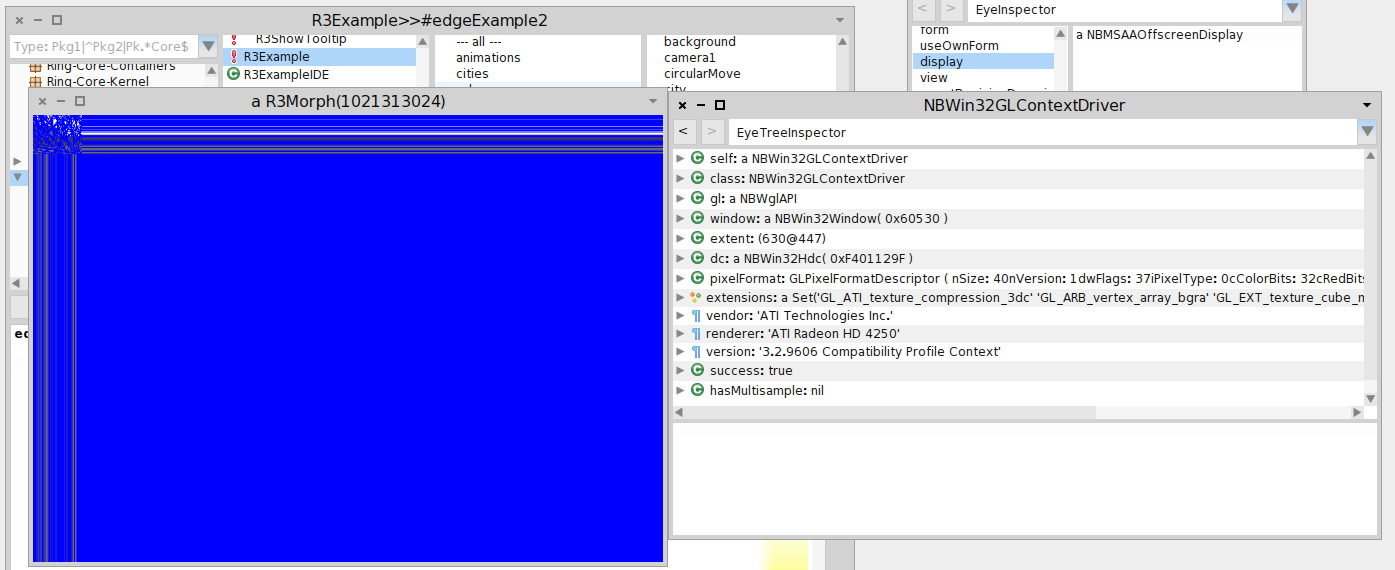
As described in the "NBOpenGL on Windows" thread, I have a windows machine where NBOpenGL can not create frame buffer objects (driver issue maybe). But on another windows machine, there is no error but strange rendering results. On that machine, Roassals 3D IDE, still only shows empty windows. And other demos shows the same strange rendering (see screenshot, includes GL context driver info). (BTW, there is some class name missmatch in NBGLCurveRenderer in this NBOpenGL version. It referse to NBGLFragmentProgram although there is only a NBGLFragmentProgramARB class in the system). 2014-03-17 15:55 GMT+01:00 Ronie Salgado <roniesalg@gmail.com>:
Hi Nicolai,
What are your system specs?, specially your graphic card. Roassal3D requires a graphic card with at least OpenGL 2.0 support. Try updating your graphic drivers
Greetings, Ronie
2014-03-17 11:03 GMT-03:00 Alexandre Bergel <alexandre.bergel@me.com>:
Oh... Have you tried to update Athens and NBOpenGL ? Maybe you are using an
old version of them. Maybe an old version of OpenGL is installed on your Window?
Ronie, any idea what's going on?
Alexandre
On Mar 17, 2014, at 10:55 AM, Nicolai Hess <nicolaihess@web.de> wrote:
Thank you Alexandre, this was what I tried under windows, (I wasn't sure if this is still the right way to do it, I read it the Roassal3dTutorial.pdf). But it doesn't work. Either I am getting empty windows or (with an other NBOpenGL version) Frame buffer is incomplete: GL_FRAMEBUFFER_UNSUPPORTED')
I tried this once with linux too, and it didn't worked. But I am not sure how long ago :) I'll try it again and report back.
(Another note, after downloading the configuration, this: (Smalltalk at: #ConfigurationOfRoassal3d) loadDevelopment takes awfully long on windows (~ 5 min). I am sure it was much faster on linux, any idea how that can be?)
2014-03-17 14:34 GMT+01:00 Alexandre Bergel <alexandre.bergel@me.com>: Hi Nicolai,
Roassal3d works well with the last Pharo 3.0. You just need to execute the following incantation:
-=-=-=-=-=-=-=-=-= Gofer new smalltalkhubUser: 'ronsaldo' project: 'roassal3d'; package: 'ConfigurationOfRoassal3d'; load. (Smalltalk at: #ConfigurationOfRoassal3d) loadDevelopment -=-=-=-=-=-=-=-=-=
This does not work for you? It works well on OSX and on Linux
Alexandre
On Mar 15, 2014, at 10:52 AM, Nicolai Hess <nicolaihess@web.de> wrote:
Hi,
what could be the reason, that any Roassal3d example from the Roassal3DTutorial.pdf only shows white empty windows?
I loaded ConfigurationOfRoassal3d-RonieSalgado.10 and (Smalltalk at: #ConfigurationOfRoassal3d) loadDevelopment
Any ideas?
regards Nicolai
-- _,.;:~^~:;._,.;:~^~:;._,.;:~^~:;._,.;:~^~:;._,.;: Alexandre Bergel http://www.bergel.eu ^~:;._,.;:~^~:;._,.;:~^~:;._,.;:~^~:;._,.;:~^~:;.
-- _,.;:~^~:;._,.;:~^~:;._,.;:~^~:;._,.;:~^~:;._,.;: Alexandre Bergel http://www.bergel.eu ^~:;._,.;:~^~:;._,.;:~^~:;._,.;:~^~:;._,.;:~^~:;.

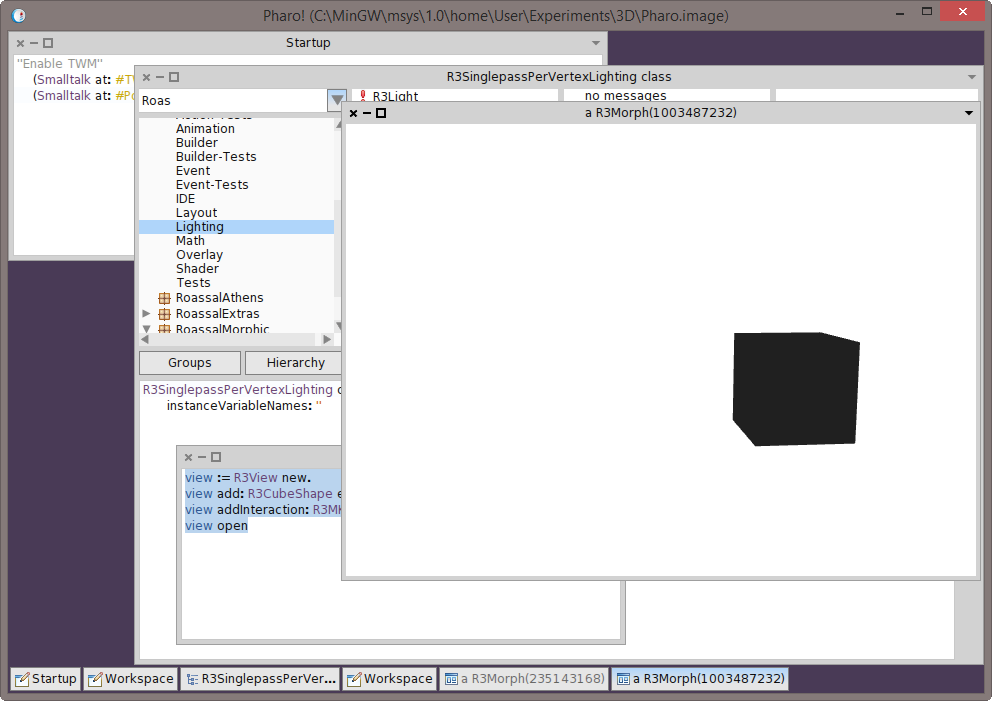
I loaded Roassal3D on my machine (Windows 8.1 Pro). Loaded fine. Then tried the tutorial basic cube. view := R3View new. view add: R3CubeShape element. view addInteraction: R3MKControl. view open Shows a cube but all black. Interaction works (on AZERTY keyboards, WSAD kinds of, well, you know...). See screenshot. Graphics drivers up to date. Card: NVidia Geforce GTX 770 ( http://www.asus.com/Graphics_Cards/GTX770DC2OC2GD5/) Phil On Mon, Mar 17, 2014 at 11:35 PM, Nicolai Hess <nicolaihess@web.de> wrote:
As described in the "NBOpenGL on Windows" thread, I have a windows machine where NBOpenGL can not create frame buffer objects (driver issue maybe).
But on another windows machine, there is no error but strange rendering results.
On that machine, Roassals 3D IDE, still only shows empty windows. And other demos shows the same strange rendering (see screenshot, includes GL context driver info).
(BTW, there is some class name missmatch in NBGLCurveRenderer in this NBOpenGL version. It referse to NBGLFragmentProgram although there is only a NBGLFragmentProgramARB class in the system).
2014-03-17 15:55 GMT+01:00 Ronie Salgado <roniesalg@gmail.com>:
Hi Nicolai,
What are your system specs?, specially your graphic card. Roassal3D requires a graphic card with at least OpenGL 2.0 support. Try updating your graphic drivers
Greetings, Ronie
2014-03-17 11:03 GMT-03:00 Alexandre Bergel <alexandre.bergel@me.com>:
Oh... Have you tried to update Athens and NBOpenGL ? Maybe you are using an
old version of them. Maybe an old version of OpenGL is installed on your Window?
Ronie, any idea what's going on?
Alexandre
On Mar 17, 2014, at 10:55 AM, Nicolai Hess <nicolaihess@web.de> wrote:
Thank you Alexandre, this was what I tried under windows, (I wasn't sure if this is still the right way to do it, I read it the Roassal3dTutorial.pdf). But it doesn't work. Either I am getting empty windows or (with an other NBOpenGL version) Frame buffer is incomplete: GL_FRAMEBUFFER_UNSUPPORTED')
I tried this once with linux too, and it didn't worked. But I am not sure how long ago :) I'll try it again and report back.
(Another note, after downloading the configuration, this: (Smalltalk at: #ConfigurationOfRoassal3d) loadDevelopment takes awfully long on windows (~ 5 min). I am sure it was much faster on linux, any idea how that can be?)
2014-03-17 14:34 GMT+01:00 Alexandre Bergel <alexandre.bergel@me.com>: Hi Nicolai,
Roassal3d works well with the last Pharo 3.0. You just need to execute the following incantation:
-=-=-=-=-=-=-=-=-= Gofer new smalltalkhubUser: 'ronsaldo' project: 'roassal3d'; package: 'ConfigurationOfRoassal3d'; load. (Smalltalk at: #ConfigurationOfRoassal3d) loadDevelopment -=-=-=-=-=-=-=-=-=
This does not work for you? It works well on OSX and on Linux
Alexandre
On Mar 15, 2014, at 10:52 AM, Nicolai Hess <nicolaihess@web.de> wrote:
Hi,
what could be the reason, that any Roassal3d example from the Roassal3DTutorial.pdf only shows white empty windows?
I loaded ConfigurationOfRoassal3d-RonieSalgado.10 and (Smalltalk at: #ConfigurationOfRoassal3d) loadDevelopment
Any ideas?
regards Nicolai
-- _,.;:~^~:;._,.;:~^~:;._,.;:~^~:;._,.;:~^~:;._,.;: Alexandre Bergel http://www.bergel.eu ^~:;._,.;:~^~:;._,.;:~^~:;._,.;:~^~:;._,.;:~^~:;.
-- _,.;:~^~:;._,.;:~^~:;._,.;:~^~:;._,.;:~^~:;._,.;: Alexandre Bergel http://www.bergel.eu ^~:;._,.;:~^~:;._,.;:~^~:;._,.;:~^~:;._,.;:~^~:;.
For me, it works now: I just have to change the default extent: GLViewportMorph>>initializeForNewSession display := NBGLDisplay extent: 800@800. "<- instead of self extent" session := NativeBoost uniqueSessionObject. form ifNotNil: [ form unhibernate ]. otherwise the display (and frame buffers ) are initialized with Morphs default extent (40@50), and after that, every change on the extent does not update the framebuffer dimension (although NBOpenGls FrameBuffer and RenderBuffer do recreate there buffers with the new extent, somehow the opengl buffers doesn't change the sizes). R3 IDE windows are still empty and I don't know what they are supposed to show. Are there any screenshots for the R3 IDE? Nicolai 2014-03-17 23:54 GMT+01:00 phil@highoctane.be <phil@highoctane.be>:
I loaded Roassal3D on my machine (Windows 8.1 Pro).
Loaded fine.
Then tried the tutorial basic cube.
view := R3View new. view add: R3CubeShape element. view addInteraction: R3MKControl. view open
Shows a cube but all black. Interaction works (on AZERTY keyboards, WSAD kinds of, well, you know...). See screenshot.
Graphics drivers up to date. Card: NVidia Geforce GTX 770 ( http://www.asus.com/Graphics_Cards/GTX770DC2OC2GD5/)
Phil
On Mon, Mar 17, 2014 at 11:35 PM, Nicolai Hess <nicolaihess@web.de> wrote:
As described in the "NBOpenGL on Windows" thread, I have a windows machine where NBOpenGL can not create frame buffer objects (driver issue maybe).
But on another windows machine, there is no error but strange rendering results.
On that machine, Roassals 3D IDE, still only shows empty windows. And other demos shows the same strange rendering (see screenshot, includes GL context driver info).
(BTW, there is some class name missmatch in NBGLCurveRenderer in this NBOpenGL version. It referse to NBGLFragmentProgram although there is only a NBGLFragmentProgramARB class in the system).
2014-03-17 15:55 GMT+01:00 Ronie Salgado <roniesalg@gmail.com>:
Hi Nicolai,
What are your system specs?, specially your graphic card. Roassal3D requires a graphic card with at least OpenGL 2.0 support. Try updating your graphic drivers
Greetings, Ronie
2014-03-17 11:03 GMT-03:00 Alexandre Bergel <alexandre.bergel@me.com>:
Oh... Have you tried to update Athens and NBOpenGL ? Maybe you are using
an old version of them. Maybe an old version of OpenGL is installed on your Window?
Ronie, any idea what's going on?
Alexandre
On Mar 17, 2014, at 10:55 AM, Nicolai Hess <nicolaihess@web.de> wrote:
Thank you Alexandre, this was what I tried under windows, (I wasn't sure if this is still the right way to do it, I read it the Roassal3dTutorial.pdf). But it doesn't work. Either I am getting empty windows or (with an other NBOpenGL version) Frame buffer is incomplete: GL_FRAMEBUFFER_UNSUPPORTED')
I tried this once with linux too, and it didn't worked. But I am not sure how long ago :) I'll try it again and report back.
(Another note, after downloading the configuration, this: (Smalltalk at: #ConfigurationOfRoassal3d) loadDevelopment takes awfully long on windows (~ 5 min). I am sure it was much faster on linux, any idea how that can be?)
2014-03-17 14:34 GMT+01:00 Alexandre Bergel <alexandre.bergel@me.com : Hi Nicolai,
Roassal3d works well with the last Pharo 3.0. You just need to execute the following incantation:
-=-=-=-=-=-=-=-=-= Gofer new smalltalkhubUser: 'ronsaldo' project: 'roassal3d'; package: 'ConfigurationOfRoassal3d'; load. (Smalltalk at: #ConfigurationOfRoassal3d) loadDevelopment -=-=-=-=-=-=-=-=-=
This does not work for you? It works well on OSX and on Linux
Alexandre
On Mar 15, 2014, at 10:52 AM, Nicolai Hess <nicolaihess@web.de> wrote:
Hi,
what could be the reason, that any Roassal3d example from the Roassal3DTutorial.pdf only shows white empty windows?
I loaded ConfigurationOfRoassal3d-RonieSalgado.10 and (Smalltalk at: #ConfigurationOfRoassal3d) loadDevelopment
Any ideas?
regards Nicolai
-- _,.;:~^~:;._,.;:~^~:;._,.;:~^~:;._,.;:~^~:;._,.;: Alexandre Bergel http://www.bergel.eu ^~:;._,.;:~^~:;._,.;:~^~:;._,.;:~^~:;._,.;:~^~:;.
-- _,.;:~^~:;._,.;:~^~:;._,.;:~^~:;._,.;:~^~:;._,.;: Alexandre Bergel http://www.bergel.eu ^~:;._,.;:~^~:;._,.;:~^~:;._,.;:~^~:;._,.;:~^~:;.
Hi! Sorry for the late reply. I do not know whether Ronie privately replied or not. The cube is black because light is missing. Check this: -=-=-=-=-=-=-=-=-=-=-=-=-=-=-= | view | view := R3View new. view add: ((R3CubeShape new color: Color red) element). view add: ((R3CubeShape new color: Color blue) element translateByX: -2). view addInteraction: R3MKControl. view addInteraction: R3KeyControlForMac. view lightingModel: R3MultipassPerVertexLighting new. view open -=-=-=-=-=-=-=-=-=-=-=-=-=-=-= Alexandre On Mar 17, 2014, at 7:54 PM, phil@highoctane.be wrote:
I loaded Roassal3D on my machine (Windows 8.1 Pro).
Loaded fine.
Then tried the tutorial basic cube.
view := R3View new. view add: R3CubeShape element. view addInteraction: R3MKControl. view open
Shows a cube but all black. Interaction works (on AZERTY keyboards, WSAD kinds of, well, you know...). See screenshot.
Graphics drivers up to date. Card: NVidia Geforce GTX 770 (http://www.asus.com/Graphics_Cards/GTX770DC2OC2GD5/)
Phil
On Mon, Mar 17, 2014 at 11:35 PM, Nicolai Hess <nicolaihess@web.de> wrote: As described in the "NBOpenGL on Windows" thread, I have a windows machine where NBOpenGL can not create frame buffer objects (driver issue maybe).
But on another windows machine, there is no error but strange rendering results.
On that machine, Roassals 3D IDE, still only shows empty windows. And other demos shows the same strange rendering (see screenshot, includes GL context driver info).
(BTW, there is some class name missmatch in NBGLCurveRenderer in this NBOpenGL version. It referse to NBGLFragmentProgram although there is only a NBGLFragmentProgramARB class in the system).
2014-03-17 15:55 GMT+01:00 Ronie Salgado <roniesalg@gmail.com>: Hi Nicolai,
What are your system specs?, specially your graphic card. Roassal3D requires a graphic card with at least OpenGL 2.0 support. Try updating your graphic drivers
Greetings, Ronie
2014-03-17 11:03 GMT-03:00 Alexandre Bergel <alexandre.bergel@me.com>:
Oh⦠Have you tried to update Athens and NBOpenGL ? Maybe you are using an old version of them. Maybe an old version of OpenGL is installed on your Window?
Ronie, any idea whatâs going on?
Alexandre
On Mar 17, 2014, at 10:55 AM, Nicolai Hess <nicolaihess@web.de> wrote:
Thank you Alexandre, this was what I tried under windows, (I wasn't sure if this is still the right way to do it, I read it the Roassal3dTutorial.pdf). But it doesn't work. Either I am getting empty windows or (with an other NBOpenGL version) Frame buffer is incomplete: GL_FRAMEBUFFER_UNSUPPORTED')
I tried this once with linux too, and it didn't worked. But I am not sure how long ago :) I'll try it again and report back.
(Another note, after downloading the configuration, this: (Smalltalk at: #ConfigurationOfRoassal3d) loadDevelopment takes awfully long on windows (~ 5 min). I am sure it was much faster on linux, any idea how that can be?)
2014-03-17 14:34 GMT+01:00 Alexandre Bergel <alexandre.bergel@me.com>: Hi Nicolai,
Roassal3d works well with the last Pharo 3.0. You just need to execute the following incantation:
-=-=-=-=-=-=-=-=-= Gofer new smalltalkhubUser: 'ronsaldo' project: 'roassal3d'; package: 'ConfigurationOfRoassal3d'; load. (Smalltalk at: #ConfigurationOfRoassal3d) loadDevelopment -=-=-=-=-=-=-=-=-=
This does not work for you? It works well on OSX and on Linux
Alexandre
On Mar 15, 2014, at 10:52 AM, Nicolai Hess <nicolaihess@web.de> wrote:
Hi,
what could be the reason, that any Roassal3d example from the Roassal3DTutorial.pdf only shows white empty windows?
I loaded ConfigurationOfRoassal3d-RonieSalgado.10 and (Smalltalk at: #ConfigurationOfRoassal3d) loadDevelopment
Any ideas?
regards Nicolai
-- _,.;:~^~:;._,.;:~^~:;._,.;:~^~:;._,.;:~^~:;._,.;: Alexandre Bergel http://www.bergel.eu ^~:;._,.;:~^~:;._,.;:~^~:;._,.;:~^~:;._,.;:~^~:;.
-- _,.;:~^~:;._,.;:~^~:;._,.;:~^~:;._,.;:~^~:;._,.;: Alexandre Bergel http://www.bergel.eu ^~:;._,.;:~^~:;._,.;:~^~:;._,.;:~^~:;._,.;:~^~:;.
<3D.png>
-- _,.;:~^~:;._,.;:~^~:;._,.;:~^~:;._,.;:~^~:;._,.;: Alexandre Bergel http://www.bergel.eu ^~:;._,.;:~^~:;._,.;:~^~:;._,.;:~^~:;._,.;:~^~:;.
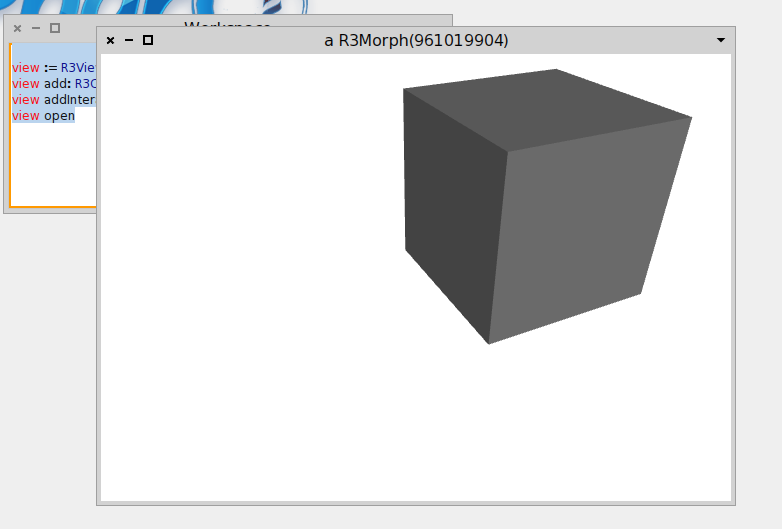
Well, On one machine I got the black cube. On another one (with a HD4000 integrated GPU), I got a lightgray cube. This is also a Windows 8.1 Pro box. On that last machine, I do get a blue and a red cube. I'll try on the other one tomorrow. Phil On Sun, Mar 30, 2014 at 10:06 PM, Alexandre Bergel <alexandre.bergel@me.com>wrote:
Hi!
Sorry for the late reply. I do not know whether Ronie privately replied or not. The cube is black because light is missing. Check this:
-=-=-=-=-=-=-=-=-=-=-=-=-=-=-= | view | view := R3View new. view add: ((R3CubeShape new color: Color red) element). view add: ((R3CubeShape new color: Color blue) element translateByX: -2). view addInteraction: R3MKControl. view addInteraction: R3KeyControlForMac. view lightingModel: R3MultipassPerVertexLighting new. view open -=-=-=-=-=-=-=-=-=-=-=-=-=-=-=
Alexandre
On Mar 17, 2014, at 7:54 PM, phil@highoctane.be wrote:
I loaded Roassal3D on my machine (Windows 8.1 Pro).
Loaded fine.
Then tried the tutorial basic cube.
view := R3View new. view add: R3CubeShape element. view addInteraction: R3MKControl. view open
Shows a cube but all black. Interaction works (on AZERTY keyboards, WSAD kinds of, well, you know...). See screenshot.
Graphics drivers up to date. Card: NVidia Geforce GTX 770 ( http://www.asus.com/Graphics_Cards/GTX770DC2OC2GD5/)
Phil
On Mon, Mar 17, 2014 at 11:35 PM, Nicolai Hess <nicolaihess@web.de> wrote: As described in the "NBOpenGL on Windows" thread, I have a windows machine where NBOpenGL can not create frame buffer objects (driver issue maybe).
But on another windows machine, there is no error but strange rendering results.
On that machine, Roassals 3D IDE, still only shows empty windows. And other demos shows the same strange rendering (see screenshot, includes GL context driver info).
(BTW, there is some class name missmatch in NBGLCurveRenderer in this NBOpenGL version. It referse to NBGLFragmentProgram although there is only a NBGLFragmentProgramARB class in the system).
2014-03-17 15:55 GMT+01:00 Ronie Salgado <roniesalg@gmail.com>: Hi Nicolai,
What are your system specs?, specially your graphic card. Roassal3D requires a graphic card with at least OpenGL 2.0 support. Try updating your graphic drivers
Greetings, Ronie
2014-03-17 11:03 GMT-03:00 Alexandre Bergel <alexandre.bergel@me.com>:
Oh... Have you tried to update Athens and NBOpenGL ? Maybe you are using an old version of them. Maybe an old version of OpenGL is installed on your Window?
Ronie, any idea what's going on?
Alexandre
On Mar 17, 2014, at 10:55 AM, Nicolai Hess <nicolaihess@web.de> wrote:
Thank you Alexandre, this was what I tried under windows, (I wasn't sure if this is still the right way to do it, I read it the Roassal3dTutorial.pdf). But it doesn't work. Either I am getting empty windows or (with an other NBOpenGL version) Frame buffer is incomplete: GL_FRAMEBUFFER_UNSUPPORTED')
I tried this once with linux too, and it didn't worked. But I am not sure how long ago :) I'll try it again and report back.
(Another note, after downloading the configuration, this: (Smalltalk at: #ConfigurationOfRoassal3d) loadDevelopment takes awfully long on windows (~ 5 min). I am sure it was much faster on linux, any idea how that can be?)
2014-03-17 14:34 GMT+01:00 Alexandre Bergel <alexandre.bergel@me.com>: Hi Nicolai,
Roassal3d works well with the last Pharo 3.0. You just need to execute the following incantation:
-=-=-=-=-=-=-=-=-= Gofer new smalltalkhubUser: 'ronsaldo' project: 'roassal3d'; package: 'ConfigurationOfRoassal3d'; load. (Smalltalk at: #ConfigurationOfRoassal3d) loadDevelopment -=-=-=-=-=-=-=-=-=
This does not work for you? It works well on OSX and on Linux
Alexandre
On Mar 15, 2014, at 10:52 AM, Nicolai Hess <nicolaihess@web.de> wrote:
Hi,
what could be the reason, that any Roassal3d example from the Roassal3DTutorial.pdf only shows white empty windows?
I loaded ConfigurationOfRoassal3d-RonieSalgado.10 and (Smalltalk at: #ConfigurationOfRoassal3d) loadDevelopment
Any ideas?
regards Nicolai
-- _,.;:~^~:;._,.;:~^~:;._,.;:~^~:;._,.;:~^~:;._,.;: Alexandre Bergel http://www.bergel.eu ^~:;._,.;:~^~:;._,.;:~^~:;._,.;:~^~:;._,.;:~^~:;.
-- _,.;:~^~:;._,.;:~^~:;._,.;:~^~:;._,.;:~^~:;._,.;: Alexandre Bergel http://www.bergel.eu ^~:;._,.;:~^~:;._,.;:~^~:;._,.;:~^~:;._,.;:~^~:;.
<3D.png>
-- _,.;:~^~:;._,.;:~^~:;._,.;:~^~:;._,.;:~^~:;._,.;: Alexandre Bergel http://www.bergel.eu ^~:;._,.;:~^~:;._,.;:~^~:;._,.;:~^~:;._,.;:~^~:;.
Sorry for no replying. That actually seems to be a shader bug in Roassal3D. I don't have a machine with a new NVIDIA card for testing, but it seems that I have to add a more flexible shader loading system that checks for the current hardware and selects an appropriate shader for it. Greetings, Ronie 2014-03-30 18:04 GMT-03:00 phil@highoctane.be <phil@highoctane.be>:
Well,
On one machine I got the black cube. On another one (with a HD4000 integrated GPU), I got a lightgray cube. This is also a Windows 8.1 Pro box. On that last machine, I do get a blue and a red cube.
I'll try on the other one tomorrow.
Phil On Sun, Mar 30, 2014 at 10:06 PM, Alexandre Bergel < alexandre.bergel@me.com> wrote:
Hi!
Sorry for the late reply. I do not know whether Ronie privately replied or not. The cube is black because light is missing. Check this:
-=-=-=-=-=-=-=-=-=-=-=-=-=-=-= | view | view := R3View new. view add: ((R3CubeShape new color: Color red) element). view add: ((R3CubeShape new color: Color blue) element translateByX: -2). view addInteraction: R3MKControl. view addInteraction: R3KeyControlForMac. view lightingModel: R3MultipassPerVertexLighting new. view open -=-=-=-=-=-=-=-=-=-=-=-=-=-=-=
Alexandre
On Mar 17, 2014, at 7:54 PM, phil@highoctane.be wrote:
I loaded Roassal3D on my machine (Windows 8.1 Pro).
Loaded fine.
Then tried the tutorial basic cube.
view := R3View new. view add: R3CubeShape element. view addInteraction: R3MKControl. view open
Shows a cube but all black. Interaction works (on AZERTY keyboards, WSAD kinds of, well, you know...). See screenshot.
Graphics drivers up to date. Card: NVidia Geforce GTX 770 ( http://www.asus.com/Graphics_Cards/GTX770DC2OC2GD5/)
Phil
On Mon, Mar 17, 2014 at 11:35 PM, Nicolai Hess <nicolaihess@web.de> wrote: As described in the "NBOpenGL on Windows" thread, I have a windows machine where NBOpenGL can not create frame buffer objects (driver issue maybe).
But on another windows machine, there is no error but strange rendering results.
On that machine, Roassals 3D IDE, still only shows empty windows. And other demos shows the same strange rendering (see screenshot, includes GL context driver info).
(BTW, there is some class name missmatch in NBGLCurveRenderer in this NBOpenGL version. It referse to NBGLFragmentProgram although there is only a NBGLFragmentProgramARB class in the system).
2014-03-17 15:55 GMT+01:00 Ronie Salgado <roniesalg@gmail.com>: Hi Nicolai,
What are your system specs?, specially your graphic card. Roassal3D requires a graphic card with at least OpenGL 2.0 support. Try updating your graphic drivers
Greetings, Ronie
2014-03-17 11:03 GMT-03:00 Alexandre Bergel <alexandre.bergel@me.com>:
Oh... Have you tried to update Athens and NBOpenGL ? Maybe you are using an old version of them. Maybe an old version of OpenGL is installed on your Window?
Ronie, any idea what's going on?
Alexandre
On Mar 17, 2014, at 10:55 AM, Nicolai Hess <nicolaihess@web.de> wrote:
Thank you Alexandre, this was what I tried under windows, (I wasn't sure if this is still the right way to do it, I read it the Roassal3dTutorial.pdf). But it doesn't work. Either I am getting empty windows or (with an other NBOpenGL version) Frame buffer is incomplete: GL_FRAMEBUFFER_UNSUPPORTED')
I tried this once with linux too, and it didn't worked. But I am not sure how long ago :) I'll try it again and report back.
(Another note, after downloading the configuration, this: (Smalltalk at: #ConfigurationOfRoassal3d) loadDevelopment takes awfully long on windows (~ 5 min). I am sure it was much faster on linux, any idea how that can be?)
2014-03-17 14:34 GMT+01:00 Alexandre Bergel <alexandre.bergel@me.com : Hi Nicolai,
Roassal3d works well with the last Pharo 3.0. You just need to execute the following incantation:
-=-=-=-=-=-=-=-=-= Gofer new smalltalkhubUser: 'ronsaldo' project: 'roassal3d'; package: 'ConfigurationOfRoassal3d'; load. (Smalltalk at: #ConfigurationOfRoassal3d) loadDevelopment -=-=-=-=-=-=-=-=-=
This does not work for you? It works well on OSX and on Linux
Alexandre
On Mar 15, 2014, at 10:52 AM, Nicolai Hess <nicolaihess@web.de> wrote:
Hi,
what could be the reason, that any Roassal3d example from the Roassal3DTutorial.pdf only shows white empty windows?
I loaded ConfigurationOfRoassal3d-RonieSalgado.10 and (Smalltalk at: #ConfigurationOfRoassal3d) loadDevelopment
Any ideas?
regards Nicolai
-- _,.;:~^~:;._,.;:~^~:;._,.;:~^~:;._,.;:~^~:;._,.;: Alexandre Bergel http://www.bergel.eu ^~:;._,.;:~^~:;._,.;:~^~:;._,.;:~^~:;._,.;:~^~:;.
-- _,.;:~^~:;._,.;:~^~:;._,.;:~^~:;._,.;:~^~:;._,.;: Alexandre Bergel http://www.bergel.eu ^~:;._,.;:~^~:;._,.;:~^~:;._,.;:~^~:;._,.;:~^~:;.
<3D.png>
-- _,.;:~^~:;._,.;:~^~:;._,.;:~^~:;._,.;:~^~:;._,.;: Alexandre Bergel http://www.bergel.eu ^~:;._,.;:~^~:;._,.;:~^~:;._,.;:~^~:;._,.;:~^~:;.
We can for sure arrange something for you to have access to my machine for tests (via Teamviewer for example) so that you can have a look. Phil On Mon, Mar 31, 2014 at 3:36 AM, Ronie Salgado <roniesalg@gmail.com> wrote:
Sorry for no replying.
That actually seems to be a shader bug in Roassal3D. I don't have a machine with a new NVIDIA card for testing, but it seems that I have to add a more flexible shader loading system that checks for the current hardware and selects an appropriate shader for it.
Greetings, Ronie
2014-03-30 18:04 GMT-03:00 phil@highoctane.be <phil@highoctane.be>:
Well,
On one machine I got the black cube. On another one (with a HD4000 integrated GPU), I got a lightgray cube. This is also a Windows 8.1 Pro box. On that last machine, I do get a blue and a red cube.
I'll try on the other one tomorrow.
Phil On Sun, Mar 30, 2014 at 10:06 PM, Alexandre Bergel < alexandre.bergel@me.com> wrote:
Hi!
Sorry for the late reply. I do not know whether Ronie privately replied or not. The cube is black because light is missing. Check this:
-=-=-=-=-=-=-=-=-=-=-=-=-=-=-= | view | view := R3View new. view add: ((R3CubeShape new color: Color red) element). view add: ((R3CubeShape new color: Color blue) element translateByX: -2). view addInteraction: R3MKControl. view addInteraction: R3KeyControlForMac. view lightingModel: R3MultipassPerVertexLighting new. view open -=-=-=-=-=-=-=-=-=-=-=-=-=-=-=
Alexandre
On Mar 17, 2014, at 7:54 PM, phil@highoctane.be wrote:
I loaded Roassal3D on my machine (Windows 8.1 Pro).
Loaded fine.
Then tried the tutorial basic cube.
view := R3View new. view add: R3CubeShape element. view addInteraction: R3MKControl. view open
Shows a cube but all black. Interaction works (on AZERTY keyboards, WSAD kinds of, well, you know...). See screenshot.
Graphics drivers up to date. Card: NVidia Geforce GTX 770 ( http://www.asus.com/Graphics_Cards/GTX770DC2OC2GD5/)
Phil
On Mon, Mar 17, 2014 at 11:35 PM, Nicolai Hess <nicolaihess@web.de> wrote: As described in the "NBOpenGL on Windows" thread, I have a windows machine where NBOpenGL can not create frame buffer objects (driver issue maybe).
But on another windows machine, there is no error but strange rendering results.
On that machine, Roassals 3D IDE, still only shows empty windows. And other demos shows the same strange rendering (see screenshot, includes GL context driver info).
(BTW, there is some class name missmatch in NBGLCurveRenderer in this NBOpenGL version. It referse to NBGLFragmentProgram although there is only a NBGLFragmentProgramARB class in the system).
2014-03-17 15:55 GMT+01:00 Ronie Salgado <roniesalg@gmail.com>: Hi Nicolai,
What are your system specs?, specially your graphic card. Roassal3D requires a graphic card with at least OpenGL 2.0 support. Try updating your graphic drivers
Greetings, Ronie
2014-03-17 11:03 GMT-03:00 Alexandre Bergel <alexandre.bergel@me.com>:
Oh... Have you tried to update Athens and NBOpenGL ? Maybe you are using an old version of them. Maybe an old version of OpenGL is installed on your Window?
Ronie, any idea what's going on?
Alexandre
On Mar 17, 2014, at 10:55 AM, Nicolai Hess <nicolaihess@web.de> wrote:
Thank you Alexandre, this was what I tried under windows, (I wasn't sure if this is still the right way to do it, I read it the Roassal3dTutorial.pdf). But it doesn't work. Either I am getting empty windows or (with an other NBOpenGL version) Frame buffer is incomplete: GL_FRAMEBUFFER_UNSUPPORTED')
I tried this once with linux too, and it didn't worked. But I am not sure how long ago :) I'll try it again and report back.
(Another note, after downloading the configuration, this: (Smalltalk at: #ConfigurationOfRoassal3d) loadDevelopment takes awfully long on windows (~ 5 min). I am sure it was much faster on linux, any idea how that can be?)
2014-03-17 14:34 GMT+01:00 Alexandre Bergel <alexandre.bergel@me.com : Hi Nicolai,
Roassal3d works well with the last Pharo 3.0. You just need to execute the following incantation:
-=-=-=-=-=-=-=-=-= Gofer new smalltalkhubUser: 'ronsaldo' project: 'roassal3d'; package: 'ConfigurationOfRoassal3d'; load. (Smalltalk at: #ConfigurationOfRoassal3d) loadDevelopment -=-=-=-=-=-=-=-=-=
This does not work for you? It works well on OSX and on Linux
Alexandre
On Mar 15, 2014, at 10:52 AM, Nicolai Hess <nicolaihess@web.de> wrote:
Hi,
what could be the reason, that any Roassal3d example from the Roassal3DTutorial.pdf only shows white empty windows?
I loaded ConfigurationOfRoassal3d-RonieSalgado.10 and (Smalltalk at: #ConfigurationOfRoassal3d) loadDevelopment
Any ideas?
regards Nicolai
-- _,.;:~^~:;._,.;:~^~:;._,.;:~^~:;._,.;:~^~:;._,.;: Alexandre Bergel http://www.bergel.eu ^~:;._,.;:~^~:;._,.;:~^~:;._,.;:~^~:;._,.;:~^~:;.
-- _,.;:~^~:;._,.;:~^~:;._,.;:~^~:;._,.;:~^~:;._,.;: Alexandre Bergel http://www.bergel.eu ^~:;._,.;:~^~:;._,.;:~^~:;._,.;:~^~:;._,.;:~^~:;.
<3D.png>
-- _,.;:~^~:;._,.;:~^~:;._,.;:~^~:;._,.;:~^~:;._,.;: Alexandre Bergel http://www.bergel.eu ^~:;._,.;:~^~:;._,.;:~^~:;._,.;:~^~:;._,.;:~^~:;.
Is this problem been solved already? Alexandre On Mar 17, 2014, at 7:35 PM, Nicolai Hess <nicolaihess@web.de> wrote:
As described in the "NBOpenGL on Windows" thread, I have a windows machine where NBOpenGL can not create frame buffer objects (driver issue maybe).
But on another windows machine, there is no error but strange rendering results.
On that machine, Roassals 3D IDE, still only shows empty windows. And other demos shows the same strange rendering (see screenshot, includes GL context driver info).
(BTW, there is some class name missmatch in NBGLCurveRenderer in this NBOpenGL version. It referse to NBGLFragmentProgram although there is only a NBGLFragmentProgramARB class in the system).
2014-03-17 15:55 GMT+01:00 Ronie Salgado <roniesalg@gmail.com>: Hi Nicolai,
What are your system specs?, specially your graphic card. Roassal3D requires a graphic card with at least OpenGL 2.0 support. Try updating your graphic drivers
Greetings, Ronie
2014-03-17 11:03 GMT-03:00 Alexandre Bergel <alexandre.bergel@me.com>:
Oh⦠Have you tried to update Athens and NBOpenGL ? Maybe you are using an old version of them. Maybe an old version of OpenGL is installed on your Window?
Ronie, any idea whatâs going on?
Alexandre
On Mar 17, 2014, at 10:55 AM, Nicolai Hess <nicolaihess@web.de> wrote:
Thank you Alexandre, this was what I tried under windows, (I wasn't sure if this is still the right way to do it, I read it the Roassal3dTutorial.pdf). But it doesn't work. Either I am getting empty windows or (with an other NBOpenGL version) Frame buffer is incomplete: GL_FRAMEBUFFER_UNSUPPORTED')
I tried this once with linux too, and it didn't worked. But I am not sure how long ago :) I'll try it again and report back.
(Another note, after downloading the configuration, this: (Smalltalk at: #ConfigurationOfRoassal3d) loadDevelopment takes awfully long on windows (~ 5 min). I am sure it was much faster on linux, any idea how that can be?)
2014-03-17 14:34 GMT+01:00 Alexandre Bergel <alexandre.bergel@me.com>: Hi Nicolai,
Roassal3d works well with the last Pharo 3.0. You just need to execute the following incantation:
-=-=-=-=-=-=-=-=-= Gofer new smalltalkhubUser: 'ronsaldo' project: 'roassal3d'; package: 'ConfigurationOfRoassal3d'; load. (Smalltalk at: #ConfigurationOfRoassal3d) loadDevelopment -=-=-=-=-=-=-=-=-=
This does not work for you? It works well on OSX and on Linux
Alexandre
On Mar 15, 2014, at 10:52 AM, Nicolai Hess <nicolaihess@web.de> wrote:
Hi,
what could be the reason, that any Roassal3d example from the Roassal3DTutorial.pdf only shows white empty windows?
I loaded ConfigurationOfRoassal3d-RonieSalgado.10 and (Smalltalk at: #ConfigurationOfRoassal3d) loadDevelopment
Any ideas?
regards Nicolai
-- _,.;:~^~:;._,.;:~^~:;._,.;:~^~:;._,.;:~^~:;._,.;: Alexandre Bergel http://www.bergel.eu ^~:;._,.;:~^~:;._,.;:~^~:;._,.;:~^~:;._,.;:~^~:;.
-- _,.;:~^~:;._,.;:~^~:;._,.;:~^~:;._,.;:~^~:;._,.;: Alexandre Bergel http://www.bergel.eu ^~:;._,.;:~^~:;._,.;:~^~:;._,.;:~^~:;._,.;:~^~:;.
<PharoScreenshot.png>
-- _,.;:~^~:;._,.;:~^~:;._,.;:~^~:;._,.;:~^~:;._,.;: Alexandre Bergel http://www.bergel.eu ^~:;._,.;:~^~:;._,.;:~^~:;._,.;:~^~:;._,.;:~^~:;.
participants (4)
-
 Alexandre Bergel
 -
 Nicolai Hess
 -
 phil@highoctane.be
 -
 Ronie Salgado