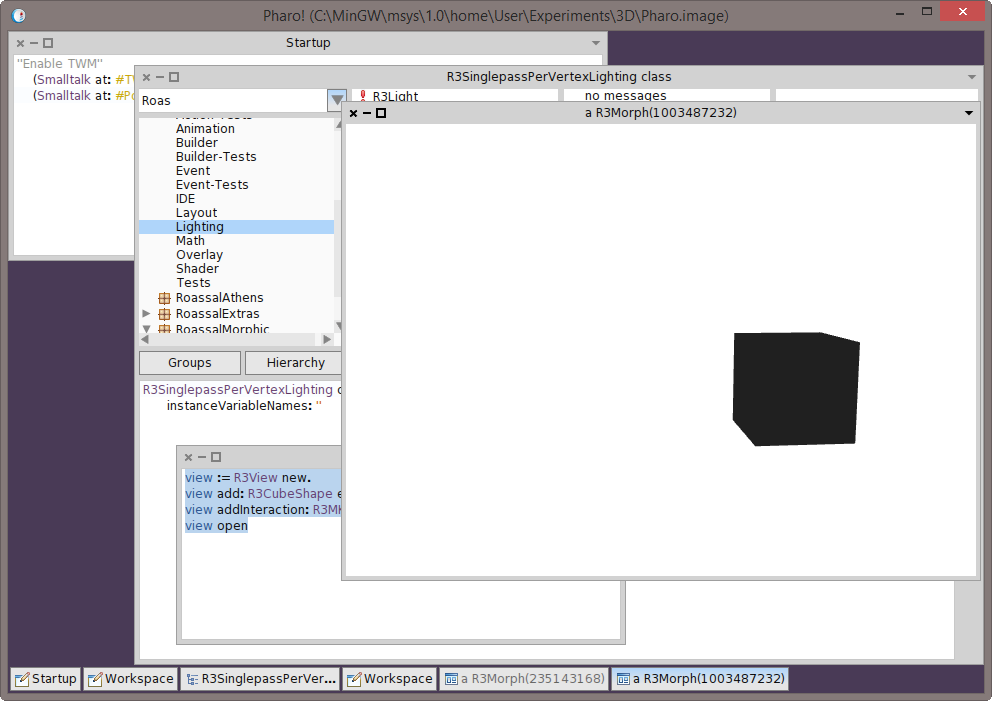
I loaded Roassal3D on my machine (Windows 8.1 Pro). Loaded fine. Then tried the tutorial basic cube. view := R3View new. view add: R3CubeShape element. view addInteraction: R3MKControl. view open Shows a cube but all black. Interaction works (on AZERTY keyboards, WSAD kinds of, well, you know...). See screenshot. Graphics drivers up to date. Card: NVidia Geforce GTX 770 ( http://www.asus.com/Graphics_Cards/GTX770DC2OC2GD5/) Phil On Mon, Mar 17, 2014 at 11:35 PM, Nicolai Hess <nicolaihess@web.de> wrote:
As described in the "NBOpenGL on Windows" thread, I have a windows machine where NBOpenGL can not create frame buffer objects (driver issue maybe).
But on another windows machine, there is no error but strange rendering results.
On that machine, Roassals 3D IDE, still only shows empty windows. And other demos shows the same strange rendering (see screenshot, includes GL context driver info).
(BTW, there is some class name missmatch in NBGLCurveRenderer in this NBOpenGL version. It referse to NBGLFragmentProgram although there is only a NBGLFragmentProgramARB class in the system).
2014-03-17 15:55 GMT+01:00 Ronie Salgado <roniesalg@gmail.com>:
Hi Nicolai,
What are your system specs?, specially your graphic card. Roassal3D requires a graphic card with at least OpenGL 2.0 support. Try updating your graphic drivers
Greetings, Ronie
2014-03-17 11:03 GMT-03:00 Alexandre Bergel <alexandre.bergel@me.com>:
Oh... Have you tried to update Athens and NBOpenGL ? Maybe you are using an
old version of them. Maybe an old version of OpenGL is installed on your Window?
Ronie, any idea what's going on?
Alexandre
On Mar 17, 2014, at 10:55 AM, Nicolai Hess <nicolaihess@web.de> wrote:
Thank you Alexandre, this was what I tried under windows, (I wasn't sure if this is still the right way to do it, I read it the Roassal3dTutorial.pdf). But it doesn't work. Either I am getting empty windows or (with an other NBOpenGL version) Frame buffer is incomplete: GL_FRAMEBUFFER_UNSUPPORTED')
I tried this once with linux too, and it didn't worked. But I am not sure how long ago :) I'll try it again and report back.
(Another note, after downloading the configuration, this: (Smalltalk at: #ConfigurationOfRoassal3d) loadDevelopment takes awfully long on windows (~ 5 min). I am sure it was much faster on linux, any idea how that can be?)
2014-03-17 14:34 GMT+01:00 Alexandre Bergel <alexandre.bergel@me.com>: Hi Nicolai,
Roassal3d works well with the last Pharo 3.0. You just need to execute the following incantation:
-=-=-=-=-=-=-=-=-= Gofer new smalltalkhubUser: 'ronsaldo' project: 'roassal3d'; package: 'ConfigurationOfRoassal3d'; load. (Smalltalk at: #ConfigurationOfRoassal3d) loadDevelopment -=-=-=-=-=-=-=-=-=
This does not work for you? It works well on OSX and on Linux
Alexandre
On Mar 15, 2014, at 10:52 AM, Nicolai Hess <nicolaihess@web.de> wrote:
Hi,
what could be the reason, that any Roassal3d example from the Roassal3DTutorial.pdf only shows white empty windows?
I loaded ConfigurationOfRoassal3d-RonieSalgado.10 and (Smalltalk at: #ConfigurationOfRoassal3d) loadDevelopment
Any ideas?
regards Nicolai
-- _,.;:~^~:;._,.;:~^~:;._,.;:~^~:;._,.;:~^~:;._,.;: Alexandre Bergel http://www.bergel.eu ^~:;._,.;:~^~:;._,.;:~^~:;._,.;:~^~:;._,.;:~^~:;.
-- _,.;:~^~:;._,.;:~^~:;._,.;:~^~:;._,.;:~^~:;._,.;: Alexandre Bergel http://www.bergel.eu ^~:;._,.;:~^~:;._,.;:~^~:;._,.;:~^~:;._,.;:~^~:;.