Starting a pool of worker images using command line parameters

tl;dr version: I'd like to be able to do something like $PATH/app/pharo-vm/pharo --nodisplay app.image st setup-worker.st --port 8091 and: $PATH/app/pharo-vm/pharo --nodisplay app.image st setup-worker.st --port 8092 etc. Do I have to define a subclass of STCommandLineHandler? How can I capture the --port argument? For what I saw, only "boolean" parameters can be defined (--quit, --save, etc, without arguments). It is, no getopts compatibility. Long version: For my apps I have a pool of worker images with Zinc+Seaside behind an nginx proxy. Each "upstream" (aka "worker") server, is started by supervisord, using a separate startup smalltalk script, where the only thing I change is the port of ZnZincServerAdaptor to start on a different port. The rest is identical. The startup is something like: $PATH/app/pharo-vm/pharo --nodisplay app.image st setup-worker1.st and for worker2: $PATH/app/pharo-vm/pharo --nodisplay app.image st setup-worker2.st and for worker3: $PATH/app/pharo-vm/pharo --nodisplay app.image st setup-worker3.st etc. Is there a better way to perform this without having to copy setup-worker1.st to setup-workerN.st for each worker image? How do you manage this? Regards, Esteban A. Maringolo

On 23 Oct 2014, at 20:16, Esteban A. Maringolo <emaringolo@gmail.com> wrote:
tl;dr version:
I'd like to be able to do something like
$PATH/app/pharo-vm/pharo --nodisplay app.image st setup-worker.st --port 8091 and: $PATH/app/pharo-vm/pharo --nodisplay app.image st setup-worker.st --port 8092 etc.
Do I have to define a subclass of STCommandLineHandler?
yes
How can I capture the --port argument? For what I saw, only "boolean" parameters can be defined (--quit, --save, etc, without arguments). It is, no getopts compatibility.
no idea⦠we can work on that⦠is necessary :) Esteban
Long version: For my apps I have a pool of worker images with Zinc+Seaside behind an nginx proxy.
Each "upstream" (aka "worker") server, is started by supervisord, using a separate startup smalltalk script, where the only thing I change is the port of ZnZincServerAdaptor to start on a different port. The rest is identical.
The startup is something like: $PATH/app/pharo-vm/pharo --nodisplay app.image st setup-worker1.st and for worker2: $PATH/app/pharo-vm/pharo --nodisplay app.image st setup-worker2.st and for worker3: $PATH/app/pharo-vm/pharo --nodisplay app.image st setup-worker3.st etc.
Is there a better way to perform this without having to copy setup-worker1.st to setup-workerN.st for each worker image?
How do you manage this?
Regards,
Esteban A. Maringolo
2014-10-23 15:19 GMT-03:00 Esteban Lorenzano <estebanlm@gmail.com>:
On 23 Oct 2014, at 20:16, Esteban A. Maringolo <emaringolo@gmail.com> wrote: Do I have to define a subclass of STCommandLineHandler? yes
I thought so.
How can I capture the --port argument? For what I saw, only "boolean" parameters can be defined (--quit, --save, etc, without arguments). It is, no getopts compatibility. no idea⦠we can work on that⦠is necessary :)
The VM itself has its own command parameters, are the parameters handled and/or passed to the image? If so, how? Regards!

Nah, you can do it way easier: $ cat run.st NonInteractiveTranscript stdout install. Transcript show: Smalltalk commandLine arguments; cr. Smalltalk quitPrimitive. $ ./pharo Pharo.image run.st 1 2 3 #('1' '2' '3') HTH, Sven
On 23 Oct 2014, at 20:52, Esteban A. Maringolo <emaringolo@gmail.com> wrote:
2014-10-23 15:19 GMT-03:00 Esteban Lorenzano <estebanlm@gmail.com>:
On 23 Oct 2014, at 20:16, Esteban A. Maringolo <emaringolo@gmail.com> wrote: Do I have to define a subclass of STCommandLineHandler? yes
I thought so.
How can I capture the --port argument? For what I saw, only "boolean" parameters can be defined (--quit, --save, etc, without arguments). It is, no getopts compatibility. no idea⦠we can work on that⦠is necessary :)
The VM itself has its own command parameters, are the parameters handled and/or passed to the image? If so, how?
Regards!
$ cat startserver.sh #! /bin/sh nohup ./pharo Pharo.image eval âno-quit âMyServerStart port: $1â & ./startserver 8080 ./startserver 8081 ./startserver 8082 but is a bit⦠âtruchoâ (in plain argentinian)⦠which means a bad quality hack :P
On 23 Oct 2014, at 21:08, Sven Van Caekenberghe <sven@stfx.eu> wrote:
Nah, you can do it way easier:
$ cat run.st NonInteractiveTranscript stdout install.
Transcript show: Smalltalk commandLine arguments; cr.
Smalltalk quitPrimitive.
$ ./pharo Pharo.image run.st 1 2 3 #('1' '2' '3')
HTH,
Sven
On 23 Oct 2014, at 20:52, Esteban A. Maringolo <emaringolo@gmail.com> wrote:
2014-10-23 15:19 GMT-03:00 Esteban Lorenzano <estebanlm@gmail.com>:
On 23 Oct 2014, at 20:16, Esteban A. Maringolo <emaringolo@gmail.com> wrote: Do I have to define a subclass of STCommandLineHandler? yes
I thought so.
How can I capture the --port argument? For what I saw, only "boolean" parameters can be defined (--quit, --save, etc, without arguments). It is, no getopts compatibility. no idea⦠we can work on that⦠is necessary :)
The VM itself has its own command parameters, are the parameters handled and/or passed to the image? If so, how?
Regards!
On 23 Oct 2014, at 21:17, Esteban Lorenzano <estebanlm@gmail.com> wrote:
$ cat startserver.sh #! /bin/sh nohup ./pharo Pharo.image eval âno-quit âMyServerStart port: $1â &
./startserver 8080 ./startserver 8081 ./startserver 8082
but is a bit⦠âtruchoâ (in plain argentinian)⦠which means a bad quality hack :P
No, I actually like it: it is explicit and simple to understand. Clean. If you think that is a ugly hack, I would not dare to ask what your opinion is of *any* shell script ;-) - and any Unix like system that we trust our daily computing to is full of those !
On 23 Oct 2014, at 21:08, Sven Van Caekenberghe <sven@stfx.eu> wrote:
Nah, you can do it way easier:
$ cat run.st NonInteractiveTranscript stdout install.
Transcript show: Smalltalk commandLine arguments; cr.
Smalltalk quitPrimitive.
$ ./pharo Pharo.image run.st 1 2 3 #('1' '2' '3')
HTH,
Sven
On 23 Oct 2014, at 20:52, Esteban A. Maringolo <emaringolo@gmail.com> wrote:
2014-10-23 15:19 GMT-03:00 Esteban Lorenzano <estebanlm@gmail.com>:
On 23 Oct 2014, at 20:16, Esteban A. Maringolo <emaringolo@gmail.com> wrote: Do I have to define a subclass of STCommandLineHandler? yes
I thought so.
How can I capture the --port argument? For what I saw, only "boolean" parameters can be defined (--quit, --save, etc, without arguments). It is, no getopts compatibility. no idea⦠we can work on that⦠is necessary :)
The VM itself has its own command parameters, are the parameters handled and/or passed to the image? If so, how?
Regards!
2014-10-23 16:08 GMT-03:00 Sven Van Caekenberghe <sven@stfx.eu>:
Nah, you can do it way easier:
$ cat run.st NonInteractiveTranscript stdout install.
Transcript show: Smalltalk commandLine arguments; cr.
Smalltalk quitPrimitive.
$ ./pharo Pharo.image run.st 1 2 3 #('1' '2' '3')
HTH,
Utterly concise. Thanks. Why do you use the pharo shell script instead of pharo-vm with --no-display? Is there any benefit other than having the pwd set to the image location? And hence, the argument script should be relative to the image. Thanks again,
On 23 Oct 2014, at 21:54, Esteban A. Maringolo <emaringolo@gmail.com> wrote:
2014-10-23 16:08 GMT-03:00 Sven Van Caekenberghe <sven@stfx.eu>:
Nah, you can do it way easier:
$ cat run.st NonInteractiveTranscript stdout install.
Transcript show: Smalltalk commandLine arguments; cr.
Smalltalk quitPrimitive.
$ ./pharo Pharo.image run.st 1 2 3 #('1' '2' '3')
HTH,
Utterly concise. Thanks.
Why do you use the pharo shell script instead of pharo-vm with --no-display? Is there any benefit other than having the pwd set to the image location? And hence, the argument script should be relative to the image.
No particular reason, mostly because I hate adding the --no-display But yes, I usually bypass the script and use the executable directly.
Thanks again,
You're welcome. All this sharing, talking & discussing, even over small issues and style is important, we can all learn a lot from each other and save time and money. Sven
2014-10-23 17:04 GMT-03:00 Sven Van Caekenberghe <sven@stfx.eu>:
Why do you use the pharo shell script instead of pharo-vm with --no-display? Is there any benefit other than having the pwd set to the image location? And hence, the argument script should be relative to the image.
No particular reason, mostly because I hate adding the --no-display But yes, I usually bypass the script and use the executable directly.
I don't know how Pharo resolves the file names by default. Pharo's FileLocator seems to provide something similar to the Dolphin's FileLocator I'm used to work with (see attached image) to avoid the "resolution guessing" of relative paths when defined in the context of a script or app code (e.g. to specify template files). I should use it more. :)
All this sharing, talking & discussing, even over small issues and style is important, we can all learn a lot from each other and save time and money.
Absolutely. I'd like to know the development process of others, from SCM to building, deploying and server provisioning. After a year o Pharo development I think I'm ready to embrace a CI server (I already use scripts to build images), but I think I will move all my repositories to git before. However, my remote server provisioning is still manual, and too rudimentary even for my own taste. If I could speed up this, I would deliver features faster to my customers. Now everything runs inside a two week sprint window. Regards, Esteban A. Maringolo
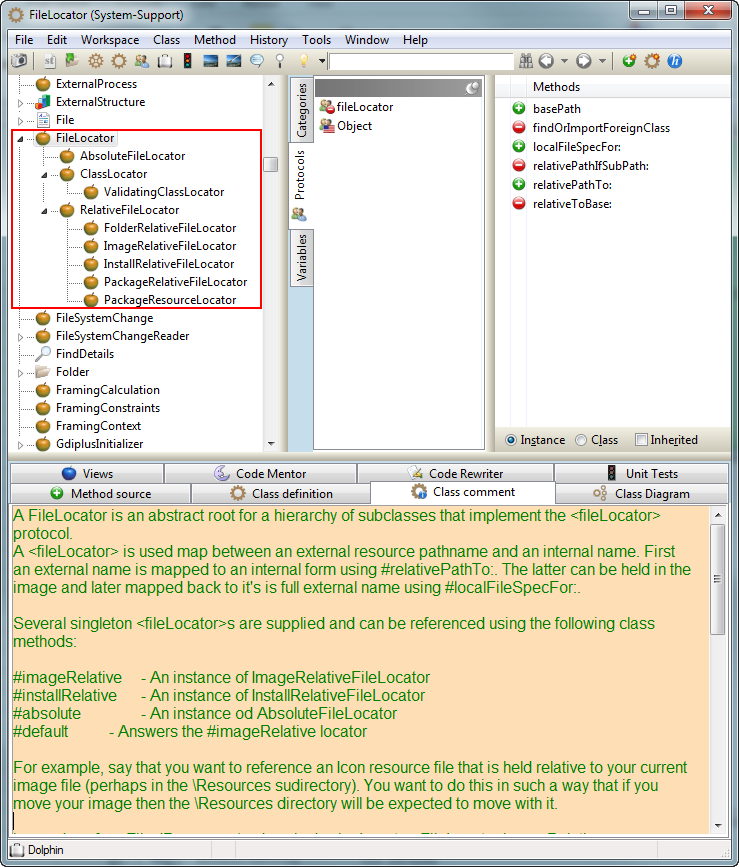
On 23 Oct 2014, at 23:11, Esteban A. Maringolo <emaringolo@gmail.com> wrote:
2014-10-23 17:04 GMT-03:00 Sven Van Caekenberghe <sven@stfx.eu>:
Why do you use the pharo shell script instead of pharo-vm with --no-display? Is there any benefit other than having the pwd set to the image location? And hence, the argument script should be relative to the image.
No particular reason, mostly because I hate adding the --no-display But yes, I usually bypass the script and use the executable directly.
I don't know how Pharo resolves the file names by default.
Pharo's FileLocator seems to provide something similar to the Dolphin's FileLocator I'm used to work with (see attached image) to avoid the "resolution guessing" of relative paths when defined in the context of a script or app code (e.g. to specify template files). I should use it more. :)
Here are some things you can try: $ ./pharo Pharo.image eval "'' asFileReference pathString" '/' $ ./pharo Pharo.image eval "'foo.txt' asFileReference pathString" '/Users/sven/Tmp/pharo4/foo.txt' It seems to be image relative, unless its empty, then it becomes root, which is weird. Using absolute, resolved paths is one way to take all doubt away. There are quite a number of known locations: $ ./pharo Pharo.image eval '(FileLocator supportedOrigins collect: [ :each | each -> (FileLocator perform: each) pathString ]) asDictionary' a Dictionary(#cache->'/Users/sven/Library/Caches' #changes->'/Users/sven/Tmp/pharo4/Pharo.changes' #desktop->'/Users/sven/Desktop' #documents->'/Users/sven/Documents' #home->'/Users/sven' #image->'/Users/sven/Tmp/pharo4/Pharo.image' #imageDirectory->'/Users/sven/Tmp/pharo4' #preferences->'/Users/sven/Library/Preferences' #systemApplicationSupport->'/Library/Application Support' #systemLibrary->'/Library' #temp->'/tmp' #userApplicationSupport->'/Users/sven/Library/Application Support' #userLibrary->'/Users/sven/Library' #vmBinary->'/Users/sven/tmp/pharo4/pharo-vm/Pharo.app/Contents/MacOS/Pharo' #vmDirectory->'/Users/sven/tmp/pharo4/pharo-vm' #workingDirectory->'/Users/sven/Tmp/pharo4' )
All this sharing, talking & discussing, even over small issues and style is important, we can all learn a lot from each other and save time and money.
Absolutely.
I'd like to know the development process of others, from SCM to building, deploying and server provisioning.
I would say the standard approach is: - use Monticello with any repo type - split your code in some big modules, some private, some from public source - have a single overarching Metacello configuration - use zeroconf to build images - optionally use a CI Note that zeroconf handlers allow you to build images incrementally (the image is saved after each build), which is way faster than always starting from scratch.
After a year o Pharo development I think I'm ready to embrace a CI server (I already use scripts to build images), but I think I will move all my repositories to git before.
These are orthogonal decisions, most CI jobs on the Pharo contribution server run against StHub.
However, my remote server provisioning is still manual, and too rudimentary even for my own taste. If I could speed up this, I would deliver features faster to my customers. Now everything runs inside a two week sprint window.
I am not into provisioning myself, but more automation is always good, though sometimes setting up and maintaining all these things takes a lot of time as well.
Regards,
Esteban A. Maringolo <filelocator.png>

Hi,
Note that zeroconf handlers allow you to build images incrementally (the image is saved after each build), which is way faster than always starting from scratch.
what are zeroconf "handlers"? because I use zeroconf to rebuild images and it is slow because it downloads the vm, the image, the mcz then installing, ... did I missed something? thx, Sven and Esteban, I like reading development and deployment processes from experienced people! #Luc
After a year o Pharo development I think I'm ready to embrace a CI server (I already use scripts to build images), but I think I will move all my repositories to git before.
These are orthogonal decisions, most CI jobs on the Pharo contribution server run against StHub.
However, my remote server provisioning is still manual, and too rudimentary even for my own taste. If I could speed up this, I would deliver features faster to my customers. Now everything runs inside a two week sprint window.
I am not into provisioning myself, but more automation is always good, though sometimes setting up and maintaining all these things takes a lot of time as well.
Regards,
Esteban A. Maringolo <filelocator.png>
On 24 Oct 2014, at 00:50, Luc Fabresse <luc.fabresse@gmail.com> wrote:
Hi,
Note that zeroconf handlers allow you to build images incrementally (the image is saved after each build), which is way faster than always starting from scratch.
what are zeroconf "handlers"? because I use zeroconf to rebuild images and it is slow because it downloads the vm, the image, the mcz then installing, ... did I missed something?
1. Setup a build directory/image $ mkdir build $ cd build $ curl get.pharo.org/30+vm | bash $ ./bin/pharo -vm-display-null Pharo.image save build 2. Load/update your stuff $ ./bin/pharo -vm-display-null build.image config http://mc.stfx.eu/XYZ XYZ --install=bleedingEdge --username=sven@beta9.be --password=secret $ ./bin/pharo -vm-display-null build.image save t3 You do step 1 only once, you can repeat step 2 many times. It uses the build.image and the local package-cache as a cache, incrementally adding only those things that changed. Try it, it is way faster. You can always reset and start over if you think that is necessary but it rarely is.
thx, Sven and Esteban, I like reading development and deployment processes from experienced people!
#Luc
After a year o Pharo development I think I'm ready to embrace a CI server (I already use scripts to build images), but I think I will move all my repositories to git before.
These are orthogonal decisions, most CI jobs on the Pharo contribution server run against StHub.
However, my remote server provisioning is still manual, and too rudimentary even for my own taste. If I could speed up this, I would deliver features faster to my customers. Now everything runs inside a two week sprint window.
I am not into provisioning myself, but more automation is always good, though sometimes setting up and maintaining all these things takes a lot of time as well.
Regards,
Esteban A. Maringolo <filelocator.png>

On Fri, Oct 24, 2014 at 12:50 AM, Luc Fabresse <luc.fabresse@gmail.com> wrote:
Hi,
Note that zeroconf handlers allow you to build images incrementally (the image is saved after each build), which is way faster than always starting from scratch.
what are zeroconf "handlers"?
the things you get in the list when you do ./pharo someimage.image --list So "save" is one. There is one in here if you like a sample. https://github.com/philippeback/Bubble
because I use zeroconf to rebuild images and it is slow because it downloads the vm, the image, the mcz then installing, ... did I missed something?
No, but as my full build takes half an hour on a powerful box, this is not practical to do like that. So: CI JOB 1 (half an hour, every once in a while) ----------- - get pharo - get image - build "baseworker" image with standard packages etc CI JOB2 (whenever a commit is done in git, lasts a minute max) ---------- - take baseworker - pull from repo - build user code upon the base worker HTH Phil
thx, Sven and Esteban, I like reading development and deployment processes from experienced people!
#Luc
After a year o Pharo development I think I'm ready to embrace a CI server (I already use scripts to build images), but I think I will move all my repositories to git before.
These are orthogonal decisions, most CI jobs on the Pharo contribution server run against StHub.
However, my remote server provisioning is still manual, and too rudimentary even for my own taste. If I could speed up this, I would deliver features faster to my customers. Now everything runs inside a two week sprint window.
I am not into provisioning myself, but more automation is always good, though sometimes setting up and maintaining all these things takes a lot of time as well.
Regards,
Esteban A. Maringolo <filelocator.png>
Hi Sven and Phil, Thanks for your answers. So I already use the zeroconf handlers ;-) The problem is that I do not benefit from the cache well enough because our command line tool (pharo-based and installed by this script http://car.mines-douai.fr/scripts/PhaROS) is dedicated to create custom images at specific path and currently I rebuild everything to have an up-to-date version at creation time (vm,pharo, code). I should probably create all images in the directory and then move them. Thanks, #Luc 2014-10-24 8:12 GMT+02:00 phil@highoctane.be <phil@highoctane.be>:
On Fri, Oct 24, 2014 at 12:50 AM, Luc Fabresse <luc.fabresse@gmail.com> wrote:
Hi,
Note that zeroconf handlers allow you to build images incrementally (the image is saved after each build), which is way faster than always starting from scratch.
what are zeroconf "handlers"?
the things you get in the list when you do ./pharo someimage.image --list
So "save" is one.
There is one in here if you like a sample. https://github.com/philippeback/Bubble
because I use zeroconf to rebuild images and it is slow because it downloads the vm, the image, the mcz then installing, ... did I missed something?
No, but as my full build takes half an hour on a powerful box, this is not practical to do like that. So:
CI JOB 1 (half an hour, every once in a while) ----------- - get pharo - get image - build "baseworker" image with standard packages etc
CI JOB2 (whenever a commit is done in git, lasts a minute max) ---------- - take baseworker - pull from repo - build user code upon the base worker
HTH Phil
thx, Sven and Esteban, I like reading development and deployment processes from experienced people!
#Luc
After a year o Pharo development I think I'm ready to embrace a CI server (I already use scripts to build images), but I think I will move all my repositories to git before.
These are orthogonal decisions, most CI jobs on the Pharo contribution server run against StHub.
However, my remote server provisioning is still manual, and too rudimentary even for my own taste. If I could speed up this, I would deliver features faster to my customers. Now everything runs inside a two week sprint window.
I am not into provisioning myself, but more automation is always good, though sometimes setting up and maintaining all these things takes a lot of time as well.
Regards,
Esteban A. Maringolo <filelocator.png>
I'd like to know the development process of others, from SCM to building, deploying and server provisioning.
I would say the standard approach is:
- use Monticello with any repo type - split your code in some big modules, some private, some from public source - have a single overarching Metacello configuration - use zeroconf to build images - optionally use a CI
Note that zeroconf handlers allow you to build images incrementally (the image is saved after each build), which is way faster than always starting from scratch.
I'm good then, I'm doing everything you listed except CI.
After a year o Pharo development I think I'm ready to embrace a CI server (I already use scripts to build images), but I think I will move all my repositories to git before.
These are orthogonal decisions, most CI jobs on the Pharo contribution server run against StHub.
I want git because I want to use BitBucket to store my code :)
However, my remote server provisioning is still manual, and too rudimentary even for my own taste. If I could speed up this, I would deliver features faster to my customers. Now everything runs inside a two week sprint window.
I am not into provisioning myself, but more automation is always good, though sometimes setting up and maintaining all these things takes a lot of time as well.
It does take time, and "in theory" it works. I have this printed in my desktop: http://xkcd.com/1319/ :) Wrapping up, I implemented your no-commandline handler solution. I added a few servers to the upstreams of my site nginx configuration like this: upstream seaside { ip_hash; server 127.0.0.1:8080; server 127.0.0.1:8081; server 127.0.0.1:8082; server 127.0.0.1:8083; } upstream apimobile { server 127.0.0.1:8180; server 127.0.0.1:8181; } And added the following to my following supervisord.conf [1] [program:app_webworker] command=/home/trentosur/app/pharo app.image webworker.st 818%(process_num)1d process_name=%(program_name)s_%(process_num)02d ; process_name expr (default %(program_name)s) numprocs=4 directory=/home/trentosur/app autostart=true autorestart=true user=trentosur stopasgroup=true killasgroup=true [program:app_apiworker] command=/home/trentosur/app/pharo app.image apiworker.st 918%(process_num)1d process_name=%(program_name)s_%(process_num)02d ; process_name expr (default %(program_name)s) numprocs=2 directory=/home/trentosur/app autostart=true autorestart=true user=trentosur stopasgroup=true killasgroup=true Then this will spawn a [numproc] number of monitored processes, using the process number (process_num, in terms of pool) as a parameter to the startup script. The good thing here is, IMO, I can add more workers without having to modify anything on the Pharo side, it is... I can delegate this to regular sysadmin :) Best regards, Esteban A. Maringolo [1] http://supervisord.org/
Ah, I forgot. The only drawback here is the 5% permanent idle load per image. Every image I add adds a 5% load to the server, even when it's only standby. That's a totally bummer, though manageable if you have less than 10 images like I do :) Esteban A. Maringolo 2014-10-24 16:29 GMT-03:00 Esteban A. Maringolo <emaringolo@gmail.com>:
I'd like to know the development process of others, from SCM to building, deploying and server provisioning.
I would say the standard approach is:
- use Monticello with any repo type - split your code in some big modules, some private, some from public source - have a single overarching Metacello configuration - use zeroconf to build images - optionally use a CI
Note that zeroconf handlers allow you to build images incrementally (the image is saved after each build), which is way faster than always starting from scratch.
I'm good then, I'm doing everything you listed except CI.
After a year o Pharo development I think I'm ready to embrace a CI server (I already use scripts to build images), but I think I will move all my repositories to git before.
These are orthogonal decisions, most CI jobs on the Pharo contribution server run against StHub.
I want git because I want to use BitBucket to store my code :)
However, my remote server provisioning is still manual, and too rudimentary even for my own taste. If I could speed up this, I would deliver features faster to my customers. Now everything runs inside a two week sprint window.
I am not into provisioning myself, but more automation is always good, though sometimes setting up and maintaining all these things takes a lot of time as well.
It does take time, and "in theory" it works. I have this printed in my desktop: http://xkcd.com/1319/ :)
Wrapping up, I implemented your no-commandline handler solution.
I added a few servers to the upstreams of my site nginx configuration like this:
upstream seaside { ip_hash; server 127.0.0.1:8080; server 127.0.0.1:8081; server 127.0.0.1:8082; server 127.0.0.1:8083; }
upstream apimobile { server 127.0.0.1:8180; server 127.0.0.1:8181; }
And added the following to my following supervisord.conf [1]
[program:app_webworker] command=/home/trentosur/app/pharo app.image webworker.st 818%(process_num)1d process_name=%(program_name)s_%(process_num)02d ; process_name expr (default %(program_name)s) numprocs=4 directory=/home/trentosur/app autostart=true autorestart=true user=trentosur stopasgroup=true killasgroup=true
[program:app_apiworker] command=/home/trentosur/app/pharo app.image apiworker.st 918%(process_num)1d process_name=%(program_name)s_%(process_num)02d ; process_name expr (default %(program_name)s) numprocs=2 directory=/home/trentosur/app autostart=true autorestart=true user=trentosur stopasgroup=true killasgroup=true
Then this will spawn a [numproc] number of monitored processes, using the process number (process_num, in terms of pool) as a parameter to the startup script. The good thing here is, IMO, I can add more workers without having to modify anything on the Pharo side, it is... I can delegate this to regular sysadmin :)
Best regards,
Esteban A. Maringolo

There is a lot of polling going on. You can't get rid of it completely. To lower the cpu usage it might be good to suspend the ui thread. You need some external trigger to resume it if you want to connect via RFB. Norbert
Am 24.10.2014 um 22:18 schrieb Esteban A. Maringolo <emaringolo@gmail.com>:
Ah, I forgot.
The only drawback here is the 5% permanent idle load per image. Every image I add adds a 5% load to the server, even when it's only standby.
That's a totally bummer, though manageable if you have less than 10 images like I do :)
Esteban A. Maringolo
2014-10-24 16:29 GMT-03:00 Esteban A. Maringolo <emaringolo@gmail.com>:
I'd like to know the development process of others, from SCM to building, deploying and server provisioning.
I would say the standard approach is:
- use Monticello with any repo type - split your code in some big modules, some private, some from public source - have a single overarching Metacello configuration - use zeroconf to build images - optionally use a CI
Note that zeroconf handlers allow you to build images incrementally (the image is saved after each build), which is way faster than always starting from scratch.
I'm good then, I'm doing everything you listed except CI.
After a year o Pharo development I think I'm ready to embrace a CI server (I already use scripts to build images), but I think I will move all my repositories to git before.
These are orthogonal decisions, most CI jobs on the Pharo contribution server run against StHub.
I want git because I want to use BitBucket to store my code :)
However, my remote server provisioning is still manual, and too rudimentary even for my own taste. If I could speed up this, I would deliver features faster to my customers. Now everything runs inside a two week sprint window.
I am not into provisioning myself, but more automation is always good, though sometimes setting up and maintaining all these things takes a lot of time as well.
It does take time, and "in theory" it works. I have this printed in my desktop: http://xkcd.com/1319/ :)
Wrapping up, I implemented your no-commandline handler solution.
I added a few servers to the upstreams of my site nginx configuration like this:
upstream seaside { ip_hash; server 127.0.0.1:8080; server 127.0.0.1:8081; server 127.0.0.1:8082; server 127.0.0.1:8083; }
upstream apimobile { server 127.0.0.1:8180; server 127.0.0.1:8181; }
And added the following to my following supervisord.conf [1]
[program:app_webworker] command=/home/trentosur/app/pharo app.image webworker.st 818%(process_num)1d process_name=%(program_name)s_%(process_num)02d ; process_name expr (default %(program_name)s) numprocs=4 directory=/home/trentosur/app autostart=true autorestart=true user=trentosur stopasgroup=true killasgroup=true
[program:app_apiworker] command=/home/trentosur/app/pharo app.image apiworker.st 918%(process_num)1d process_name=%(program_name)s_%(process_num)02d ; process_name expr (default %(program_name)s) numprocs=2 directory=/home/trentosur/app autostart=true autorestart=true user=trentosur stopasgroup=true killasgroup=true
Then this will spawn a [numproc] number of monitored processes, using the process number (process_num, in terms of pool) as a parameter to the startup script. The good thing here is, IMO, I can add more workers without having to modify anything on the Pharo side, it is... I can delegate this to regular sysadmin :)
Best regards,
Esteban A. Maringolo
2014-10-25 5:44 GMT-03:00 Norbert Hartl <norbert@hartl.name>:
There is a lot of polling going on. You can't get rid of it completely. To lower the cpu usage it might be good to suspend the ui thread. You need some external trigger to resume it if you want to connect via RFB.
I don't use RFB, is there a way to disable it? Esteban A. Maringolo
Am 25.10.2014 um 18:12 schrieb Esteban A. Maringolo <emaringolo@gmail.com>:
2014-10-25 5:44 GMT-03:00 Norbert Hartl <norbert@hartl.name>:
There is a lot of polling going on. You can't get rid of it completely. To lower the cpu usage it might be good to suspend the ui thread. You need some external trigger to resume it if you want to connect via RFB.
I don't use RFB, is there a way to disable it?
Hmmm, I just remebered that if you start an image headless the image should use a non-interactive ui manager und therefor no ui process should be started. You can always check with UIManager default what you have. If it is a Morphic one you could do UIManager default uiProcess suspend But at the same time it would be more useful to exchange it with a non-interactive on as you are not using RFB or such. Norbert
On Thu, Oct 23, 2014 at 11:11 PM, Esteban A. Maringolo <emaringolo@gmail.com
wrote:
2014-10-23 17:04 GMT-03:00 Sven Van Caekenberghe <sven@stfx.eu>:
Why do you use the pharo shell script instead of pharo-vm with --no-display? Is there any benefit other than having the pwd set to the image location? And hence, the argument script should be relative to the image.
No particular reason, mostly because I hate adding the --no-display But yes, I usually bypass the script and use the executable directly.
I don't know how Pharo resolves the file names by default.
Pharo's FileLocator seems to provide something similar to the Dolphin's FileLocator I'm used to work with (see attached image) to avoid the "resolution guessing" of relative paths when defined in the context of a script or app code (e.g. to specify template files). I should use it more. :)
All this sharing, talking & discussing, even over small issues and style is important, we can all learn a lot from each other and save time and money.
Absolutely.
I'd like to know the development process of others, from SCM to building, deploying and server provisioning.
After a year o Pharo development I think I'm ready to embrace a CI server (I already use scripts to build images), but I think I will move all my repositories to git before.
I have been using Jenkins for a while, due to Sebastian kicking my ass to do so. I am very glad I did. It brings a lot of confidence in rebuilding it all quickly.
However, my remote server provisioning is still manual, and too rudimentary even for my own taste. If I could speed up this, I would deliver features faster to my customers. Now everything runs inside a two week sprint window.
Now investigating Ansible (and the hello-pharo project on GH as a start). Takes a moment to sink in but it is very useful. I see that you use supervisord. I am looking into monit for keeping things alive. Maybe can we compare notes on these. Phil
Regards,
Esteban A. Maringolo

On Thu, Oct 23, 2014 at 8:16 PM, Esteban A. Maringolo <emaringolo@gmail.com> wrote:
How can I capture the --port argument? For what I saw, only "boolean" parameters can be defined (--quit, --save, etc, without arguments). It is, no getopts compatibility.
no; it is possible to define parameters like --to=html as we do in Pillar. Take a Pillar image from Jenkins and look at the source code. -- Damien Cassou http://damiencassou.seasidehosting.st "Success is the ability to go from one failure to another without losing enthusiasm." Winston Churchill

this nice discussion should be turned into a blog/chapter :) Any taker? Stef On 23/10/14 20:16, Esteban A. Maringolo wrote:
tl;dr version:
I'd like to be able to do something like
$PATH/app/pharo-vm/pharo --nodisplay app.image st setup-worker.st --port 8091 and: $PATH/app/pharo-vm/pharo --nodisplay app.image st setup-worker.st --port 8092 etc.
Do I have to define a subclass of STCommandLineHandler?
How can I capture the --port argument? For what I saw, only "boolean" parameters can be defined (--quit, --save, etc, without arguments). It is, no getopts compatibility.
Long version: For my apps I have a pool of worker images with Zinc+Seaside behind an nginx proxy.
Each "upstream" (aka "worker") server, is started by supervisord, using a separate startup smalltalk script, where the only thing I change is the port of ZnZincServerAdaptor to start on a different port. The rest is identical.
The startup is something like: $PATH/app/pharo-vm/pharo --nodisplay app.image st setup-worker1.st and for worker2: $PATH/app/pharo-vm/pharo --nodisplay app.image st setup-worker2.st and for worker3: $PATH/app/pharo-vm/pharo --nodisplay app.image st setup-worker3.st etc.
Is there a better way to perform this without having to copy setup-worker1.st to setup-workerN.st for each worker image?
How do you manage this?
Regards,
Esteban A. Maringolo
participants (8)
-
 Damien Cassou
 -
 Esteban A. Maringolo
 -
 Esteban Lorenzano
 -
 Luc Fabresse
 -
 Norbert Hartl
 -
 phil@highoctane.be
 -
 stepharo
 -
 Sven Van Caekenberghe