How to view hierarchy of multiple classes in a package?

Hi guys - I'm trying to get back into pharo, and check out the advances in v5. Anyway, if I look at a package in the system browser, it shows me classes in that package (i think my terminology is right here?). What confuses me, is his I can see the hire hybrid the classes in relation to each other? The hier button just shows the hierarchy of the selected class and not in relation to the others? I'm sure at some point pharo and squeak let you see the related hierarchies of all the classes in the package didn't it? This is really useful to help understand the relationship between classes and pure risky identify useful refactorings. I can't see how to do this in pharo anymore? Is this functionality that has been lost (which seems a shame)? Or am I missing another useful browsers? Tim Sent from my iPhone

Hi. 2016-12-27 17:44 GMT+01:00 Tim Mackinnon <tim@testit.works>:
What confuses me, is his I can see the hire hybrid the classes in relation to each other? The hier button just shows the hierarchy of the selected class and not in relation to the others?
I'm sure at some point pharo and squeak let you see the related hierarchies of all the classes in the package didn't it?
Could you show/describe concrete example? Because what you describe feels like what we have now: "hierarchically sorted" classes of selected package. But you probably want something else?
Hi Denis - I went to look at an early squeak version and I think I was mistaken, properly drawn hierarchies were in VA and OW Smalltalks as well as Dolphin. Pharo doesn't do this well at all - pressing the hierarchy ,button draws the hierarchy for the selected class only - even though you may be looking at 6 related classes in a package Eg, if a package had classes A, B, C, D - I wish I could see A +B +C +D And not just one of the hierarchies like it does now. Eh if B is selected you just get A + B and don't see the other classes at all. I found it useful in a single browser to visually understand (even if it's crude nesting) the relationships between classes. This greatly helps with refactoring and comprehension. And reduces clicking on everything to build that mental model. How do people figure out relationships in code in Pharo, is there some other tool? Tim Sent from my iPhone Sent from my iPhone
On 27 Dec 2016, at 17:59, Denis Kudriashov <dionisiydk@gmail.com> wrote:
Hi.
2016-12-27 17:44 GMT+01:00 Tim Mackinnon <tim@testit.works>:
What confuses me, is his I can see the hire hybrid the classes in relation to each other? The hier button just shows the hierarchy of the selected class and not in relation to the others?
I'm sure at some point pharo and squeak let you see the related hierarchies of all the classes in the package didn't it?
Could you show/describe concrete example? Because what you describe feels like what we have now: "hierarchically sorted" classes of selected package. But you probably want something else?
2016-12-27 23:27 GMT+01:00 Tim Mackinnon <tim@testit.works>:
Eg, if a package had classes A, B, C, D - I wish I could see
A +B +C +D
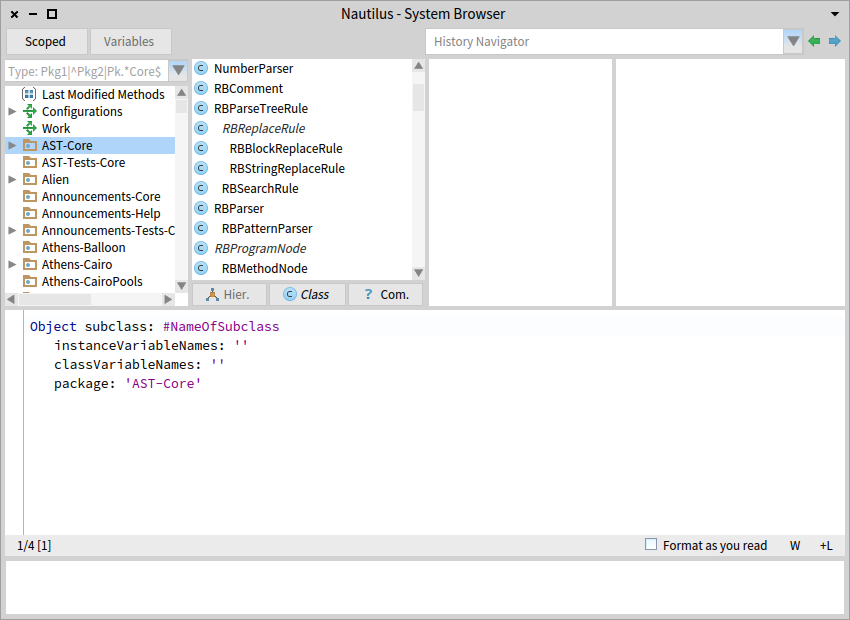
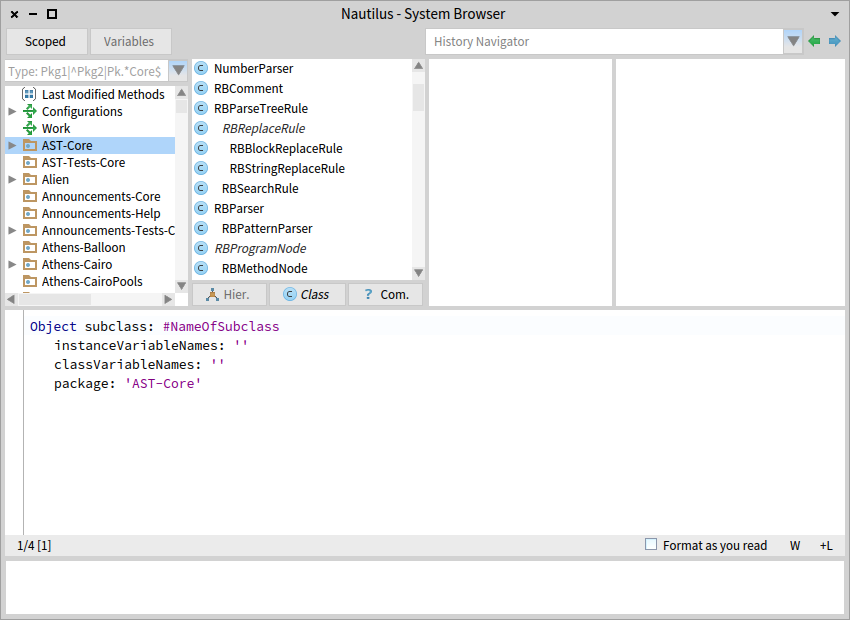
In Pharo it will be shown exactly like this by default. No need to press hier. But I guess there is something else. Anyway let's try with picture: â RBParseTreeRule subclasses looks like in your example

On Wed, Dec 28, 2016 at 6:55 AM, Denis Kudriashov <dionisiydk@gmail.com> wrote:
2016-12-27 23:27 GMT+01:00 Tim Mackinnon <tim@testit.works>:
Eg, if a package had classes A, B, C, D - I wish I could see
A +B +C +D
In Pharo it will be shown exactly like this by default. No need to press hier. But I guess there is something else.
Anyway let's try with picture: <snip>
RBParseTreeRule subclasses looks like in your example
Tim, I guess you are wanting to see the hierarchical view of classes outside the current package, but how high do you want to go? Eventually you reach Object. So are you expecting to see *every* class in the hierarchical view? cheers -ben
On Wed, Dec 28, 2016 at 5:08 PM, Ben Coman <btc@openinworld.com> wrote:
On Wed, Dec 28, 2016 at 6:55 AM, Denis Kudriashov <dionisiydk@gmail.com> wrote:
2016-12-27 23:27 GMT+01:00 Tim Mackinnon <tim@testit.works>:
Eg, if a package had classes A, B, C, D - I wish I could see
A +B +C +D
In Pharo it will be shown exactly like this by default. No need to press hier. But I guess there is something else.
Anyway let's try with picture: <snip>
RBParseTreeRule subclasses looks like in your example
Tim, I guess you are wanting to see the hierarchical view of classes outside the current package, but how high do you want to go? Eventually you reach Object. So are you expecting to see *every* class in the hierarchical view?
One thing to try that might get you some of what you want, in the Hierachical view, click a superclass at the level you want, then click the <Hier.> button twice. cheers -ben

Am 28.12.16 um 10:08 schrieb Ben Coman:
Tim, I guess you are wanting to see the hierarchical view of classes outside the current package, but how high do you want to go? Eventually you reach Object. So are you expecting to see *every* class in the hierarchical view?
Not sure if Tim wants that, but at least that is the exact way things are in VAST. Opening the hierarchy Browser on a class shows the whole tree up to Object and down the whole subtree. I use this very often and don't really see why you may think this is a bad idea? In existing code, it can be extremely important to understand all implementations of a method in the whole tree. I would guess that this is the second most used Browser in my workflow, right after the Debugger/Inspector duo. Your suggestion (in another post) to use some double-click or twice-click to see the whole hierarchy would be very harmful to my workflow. But as always, that is a question of taste and willingness to adapt new things ;-) Joachim
2016-12-28 11:01 GMT+01:00 jtuchel@objektfabrik.de <jtuchel@objektfabrik.de> :
Not sure if Tim wants that, but at least that is the exact way things are in VAST. Opening the hierarchy Browser on a class shows the whole tree up to Object and down the whole subtree. I use this very often and don't really see why you may think this is a bad idea? In existing code, it can be extremely important to understand all implementations of a method in the whole tree. I would guess that this is the second most used Browser in my workflow, right after the Debugger/Inspector duo.
I think nobody say about "bad idea". We just not understand desired view. Could you show some screenshots?
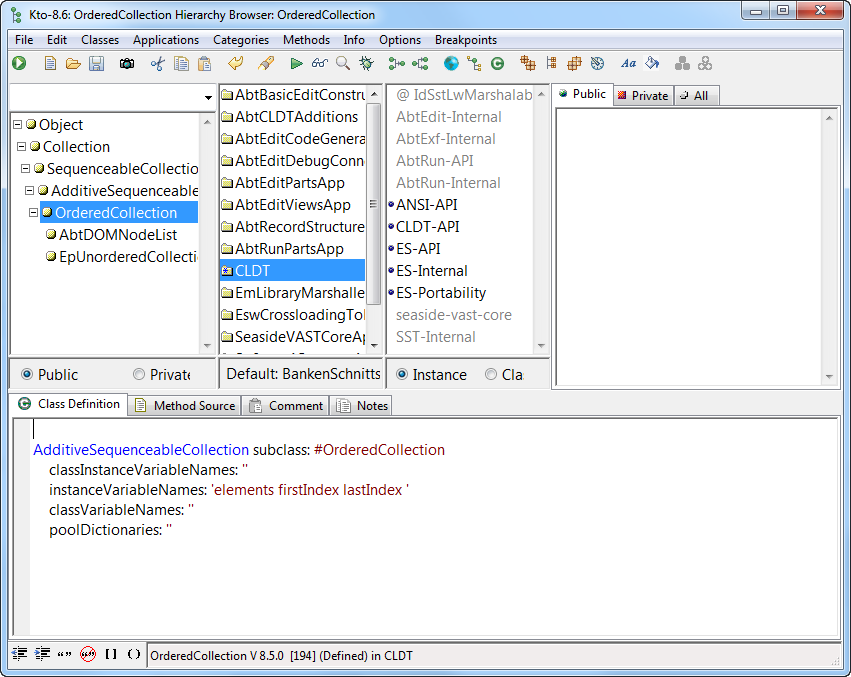
In such mode are shown subclasses of OrderedCollection depends on selected package? What will happen if you select another package? In VW for example it looks same but class hierarchy is just full hierarchy of selected class without any restriction from selected package. Selecting package just highlights class extension methods and nothing more. 2016-12-28 11:12 GMT+01:00 jtuchel@objektfabrik.de <jtuchel@objektfabrik.de> :
Denis,
Am 28.12.16 um 11:06 schrieb Denis Kudriashov:
I think nobody say about "bad idea". We just not understand desired view. Could you show some screenshots?
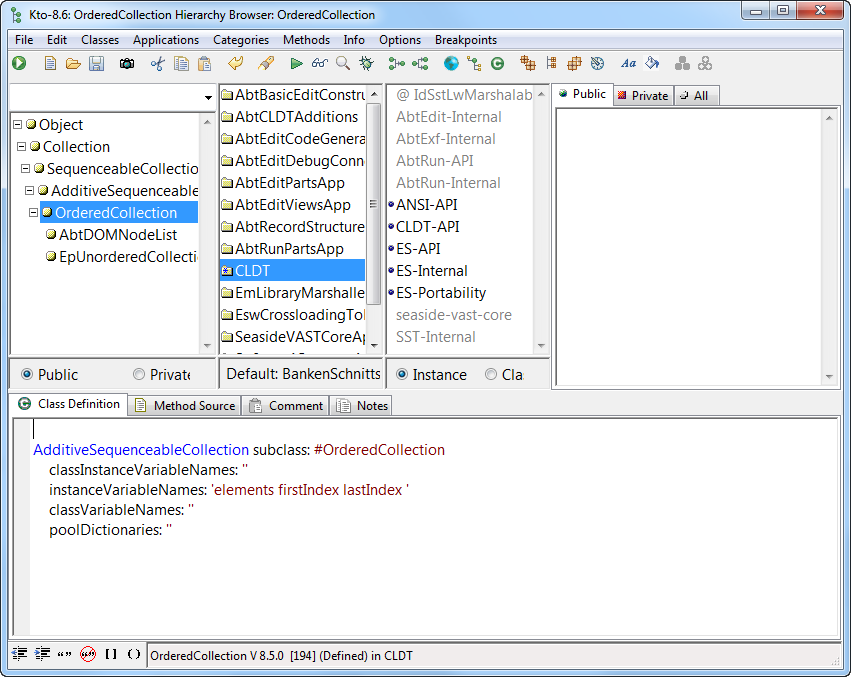
here's what you see in VA Smalltalk when you open the Hierarchy of OrderedCollection
In VA, you also see the full hierarchy, inpependent of package (which is called Application in VAST/Envy). So VAST and VW seem to be pretty similar here. I personally see little value in limiting the view, because in legacy code, it seems nobody ever cared. In additon, there is a hierarchy of Packages/Applications, so there is another dimension to this problem. This Package/Application dimension makes things extremely complicated, because inheritance doesn't work based on the dependencies between packages/applications, nor does the Compiler or Method Lookup care. For those, the only creterion is whether the Class/Method is in the image or not. Packages are completely irrelevant for the runtime. So is there any use in not seeing a superclass because it is defined in another Package? I don't think so, because the subclass wouldn't exist in this image if the package containing its superclass wasn't there, Of course there are questions that urgently need to be asked wrt packages: will this subclass or override be loadable into an image where Package X is missing? Is this package complete? So some filtering and stuff would be helpful. I must admit, however, that I rarely encountered these questions... Joachim Am 28.12.16 um 11:45 schrieb Denis Kudriashov:
In such mode are shown subclasses of OrderedCollection depends on selected package? What will happen if you select another package?
In VW for example it looks same but class hierarchy is just full hierarchy of selected class without any restriction from selected package. Selecting package just highlights class extension methods and nothing more.
2016-12-28 11:12 GMT+01:00 jtuchel@objektfabrik.de <mailto:jtuchel@objektfabrik.de> <jtuchel@objektfabrik.de <mailto:jtuchel@objektfabrik.de>>:
Denis,
Am 28.12.16 um 11:06 schrieb Denis Kudriashov:
I think nobody say about "bad idea". We just not understand desired view. Could you show some screenshots?
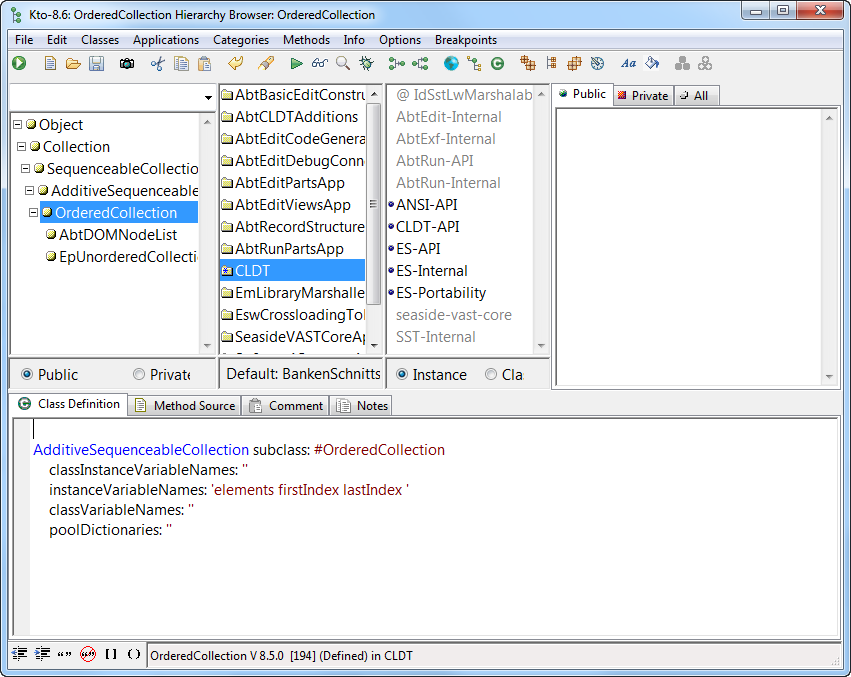
here's what you see in VA Smalltalk when you open the Hierarchy of OrderedCollection
-- ----------------------------------------------------------------------- Objektfabrik Joachim Tuchel mailto:jtuchel@objektfabrik.de Fliederweg 1 http://www.objektfabrik.de D-71640 Ludwigsburg http://joachimtuchel.wordpress.com Telefon: +49 7141 56 10 86 0 Fax: +49 7141 56 10 86 1
2016-12-28 12:23 GMT+01:00 jtuchel@objektfabrik.de <jtuchel@objektfabrik.de> :
In VA, you also see the full hierarchy, inpependent of package (which is called Application in VAST/Envy). So VAST and VW seem to be pretty similar here.
Then it is not too much different from Pharo. We just arrange things differently: When you click on Hier. of OrderedCollection you will see full hierarchy of class but in same class pane instead of left pane in your example. And class extension packages are just shown inside protocol view where you can filter methods. Actually this behavior not depends on concrete view on classes. In "flat" mode you also see extending packages in protocol view. So package view continue select package where class is defined. Class view shows full hierarchy of selected class. And protocol view shows packages which extend this class (as additional protocols with package name and special icon).
2016-12-28 13:13 GMT+01:00 Denis Kudriashov <dionisiydk@gmail.com>:
2016-12-28 12:23 GMT+01:00 jtuchel@objektfabrik.de < jtuchel@objektfabrik.de>:
In VA, you also see the full hierarchy, inpependent of package (which is called Application in VAST/Envy). So VAST and VW seem to be pretty similar here.
Then it is not too much different from Pharo. We just arrange things differently:
Which again raises question on what Tim is talking about.
On Wed, Dec 28, 2016 at 6:01 PM, jtuchel@objektfabrik.de < jtuchel@objektfabrik.de> wrote:
Am 28.12.16 um 10:08 schrieb Ben Coman:
Tim, I guess you are wanting to see the hierarchical view of classes outside the current package, but how high do you want to go? Eventually you reach Object. So are you expecting to see *every* class in the hierarchical view?
Not sure if Tim wants that,
You are right. I misread it. His example is only for packages within one package, for which Dennis is right, the standard (non-hierarchy) view actually shows via indenting the hierarchy within the package. The <Hier> button is for showing the hierarchy outside the package. On Wed, Dec 28, 2016 at 6:12 PM, jtuchel@objektfabrik.de < jtuchel@objektfabrik.de> wrote:
Denis,
Am 28.12.16 um 11:06 schrieb Denis Kudriashov:
I think nobody say about "bad idea". We just not understand desired view. Could you show some screenshots?
here's what you see in VA Smalltalk when you open the Hierarchy of OrderedCollection
Attached is a similar out-of-package hierarchy view for OrderedCollection in Pharo. The second pane looks similar to the first pane in your snapshot. What is missing from this? I can't guess what the other panes in your snapshot are.
cheers -ben
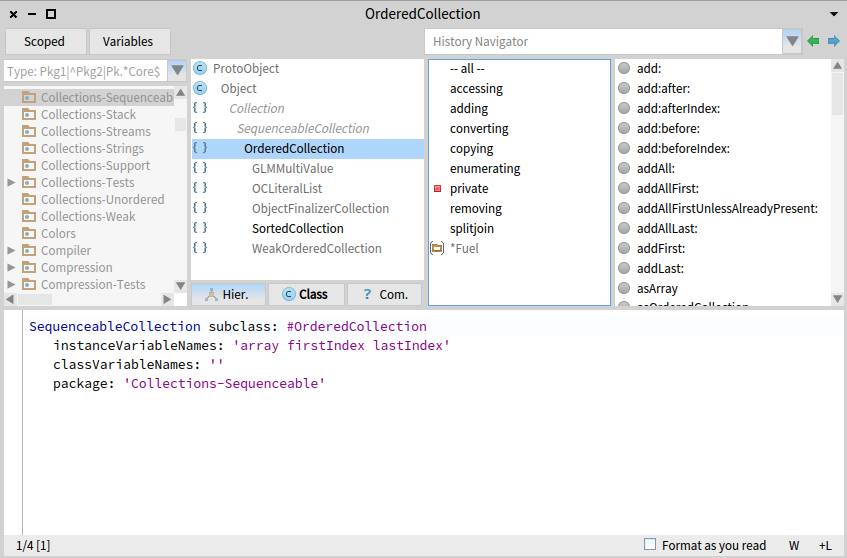
This seems to have generated a bit of conversation which has helped me quite a bit. Denis, your picture has made me realise that the System browser is a bit better than I realised. However the example I was looking at was a package that had a series of Announcement subclasses, AND what wasn't obvious was that they were all subclasses of the same parent "Announcement", as that isn't shown - you just get a series of classes not rooted under some parent (even if it was object). I'm guessing that just things that are subclasses of each other in the same package are shown? I was hoping that pane might show - Announcement + A + B + C I'm now wondering what it will show if you had a few different subclasses of the different collection classes (ok it's a bad idea to subclass them, but my point is if you had a few models at different points in a hierarchy)? I'm guessing you would see the same flat list - but I will go and try that to help me learn a bit more. Tim Sent from my iPhone
On 27 Dec 2016, at 23:55, Denis Kudriashov <dionisiydk@gmail.com> wrote:
2016-12-28 17:23 GMT+01:00 Tim Mackinnon <tim@testit.works>:
However the example I was looking at was a package that had a series of Announcement subclasses, AND what wasn't obvious was that they were all subclasses of the same parent "Announcement", as that isn't shown - you just get a series of classes not rooted under some parent (even if it was object). I'm guessing that just things that are subclasses of each other in the same package are shown?
I was hoping that pane might show -
Announcement + A + B + C
Interesting. Is it really supported in some smalltalk?
My recollection of VA is that classes in other packages show up as a lighter grey colour, if you choose to see the full hierarchy (I think dolphin and ow do something similar too) I guess what threw me was the hierarchy button in pharo just shows what I want for a single class and not for all classes in the selected package at the same time. (Which would make learning new packages a bit easier). Maybe it's something I can easily adjust myself. Or something to consider for Calypso. Tim Sent from my iPhone
On 28 Dec 2016, at 17:38, Denis Kudriashov <dionisiydk@gmail.com> wrote:
2016-12-28 17:23 GMT+01:00 Tim Mackinnon <tim@testit.works>:
However the example I was looking at was a package that had a series of Announcement subclasses, AND what wasn't obvious was that they were all subclasses of the same parent "Announcement", as that isn't shown - you just get a series of classes not rooted under some parent (even if it was object). I'm guessing that just things that are subclasses of each other in the same package are shown?
I was hoping that pane might show -
Announcement + A + B + C
Interesting. Is it really supported in some smalltalk?
2016-12-28 17:58 GMT+01:00 Tim Mackinnon <tim@testit.works>:
My recollection of VA is that classes in other packages show up as a lighter grey colour, if you choose to see the full hierarchy (I think dolphin and ow do something similar too)
I guess what threw me was the hierarchy button in pharo just shows what I want for a single class and not for all classes in the selected package at the same time. (Which would make learning new packages a bit easier).
Maybe it's something I can easily adjust myself. Or something to consider for Calypso.
Yes, new type of hierarchy should be easy to do in Calypso. It already provide trait related hierarchies for example
Hi Tim. Just remembered this thread. In latest Calypso you are able select multiple classes and switch to hierarchy. It will show "composite" hierarchy of all classes instead of single one. So if you select all classes (cmd+a) you will get desired behaviour, 2016-12-27 17:44 GMT+01:00 Tim Mackinnon <tim@testit.works>:
Hi guys - I'm trying to get back into pharo, and check out the advances in v5.
Anyway, if I look at a package in the system browser, it shows me classes in that package (i think my terminology is right here?).
What confuses me, is his I can see the hire hybrid the classes in relation to each other? The hier button just shows the hierarchy of the selected class and not in relation to the others?
I'm sure at some point pharo and squeak let you see the related hierarchies of all the classes in the package didn't it?
This is really useful to help understand the relationship between classes and pure risky identify useful refactorings.
I can't see how to do this in pharo anymore?
Is this functionality that has been lost (which seems a shame)? Or am I missing another useful browsers?
Tim
Sent from my iPhone
2017-07-07 17:52 GMT+02:00 Denis Kudriashov <dionisiydk@gmail.com>:
Hi Tim. Just remembered this thread.
In latest Calypso you are able select multiple classes and switch to hierarchy. It will show "composite" hierarchy of all classes instead of single one. So if you select all classes (cmd+a) you will get desired behaviour,
Look: â
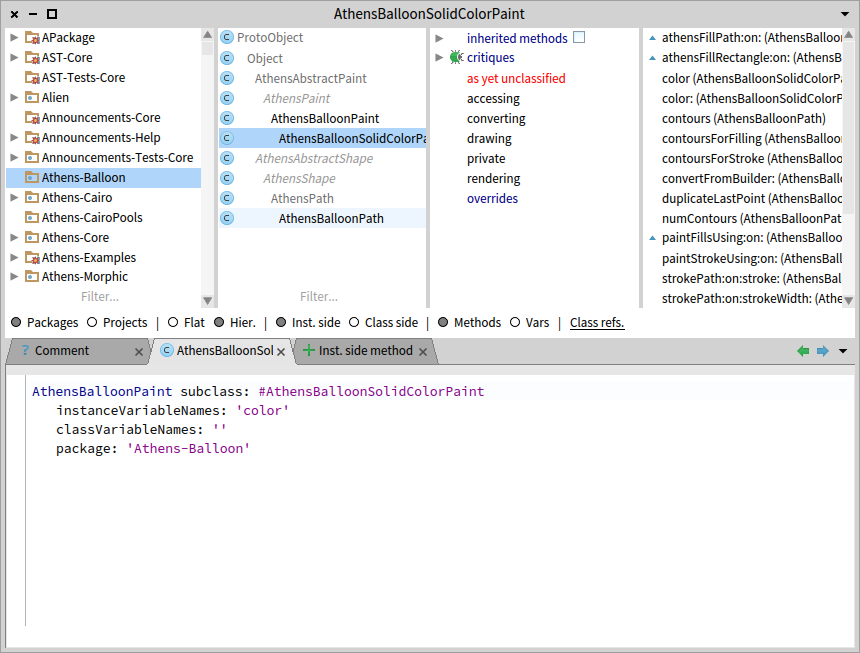
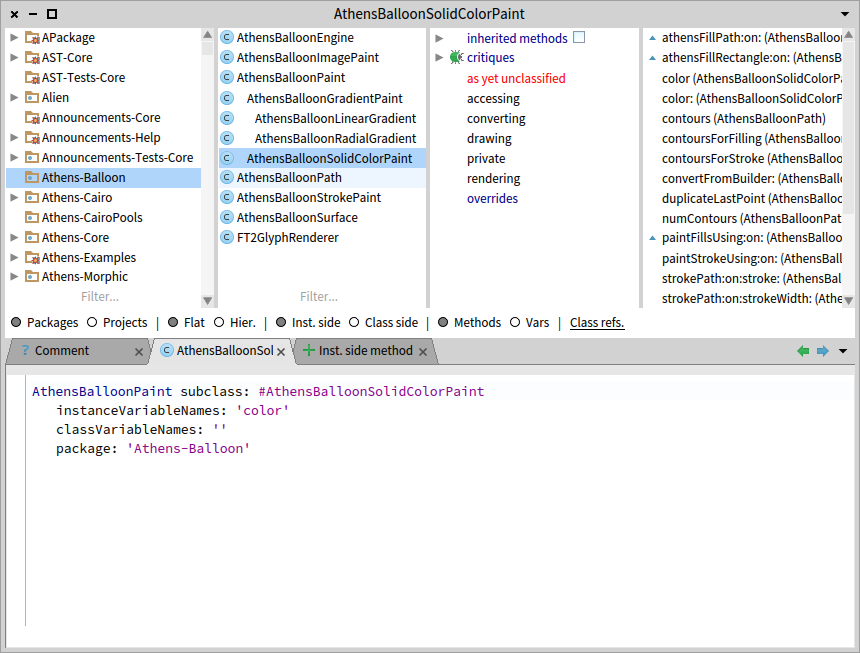
That's awesome and it reminds me that I need to make a baselineof for all my fav tools so that I load them when I grab a new image, as I don't have calypso loaded on my lambda experimental image. Tim Sent from my iPhone Sent from my iPhone
On 7 Jul 2017, at 16:55, Denis Kudriashov <dionisiydk@gmail.com> wrote:
2017-07-07 17:52 GMT+02:00 Denis Kudriashov <dionisiydk@gmail.com>:
Hi Tim. Just remembered this thread.
In latest Calypso you are able select multiple classes and switch to hierarchy. It will show "composite" hierarchy of all classes instead of single one. So if you select all classes (cmd+a) you will get desired behaviour,
Look: <CalypsoCompositeHierarchy1.png> <CalypsoCompositeHierarchy2.png> â
participants (4)
-
 Ben Coman
 -
 Denis Kudriashov
 -
 jtuchel@objektfabrik.de
 -
 Tim Mackinnon