
Hey folks! I've dabbled with smalltalk here and there over the years, but recently I've settled in to learn Pharo in earnest. A few of you might have seen the videos I've been putting up; they seem to be making the rounds on Twitter. I just want to say I've felt really welcomed by all the people who have commented with helpful tips, or offered to help with my exploration :-) I've run into my first big blocker as a newcomer. Like many programmers I'm a fan of keeping my hands on the keyboard. Now, I'm more flexible on this than some. I recognize that Pharo is a visual environment, and it makes sense to explore it with a mouse. And some interactions just make more sense with a mouse. That said, no matter what windowing environment I'm in, I find the ability to quickly cycle between windows without leaving the keyboard pretty crucial. One Windows or Ubuntu I would normally do this with Alt-Tab or Super-Tab. On MacOS it's Cmd-Tab. I've been trying to figure out how to do this in Pharo. I've looked for answers with Google, SO, and on IRC, and I've come up blank. I'm starting to think it can't be done. So, I've come here for your help. Is there a way to cycle between windows? Or is anyone working on it? Or, perhaps, am I missing an element of the Pharo programming workflow which renders it unneeded? Many thanks, -- Avdi

2015-05-16 0:52 GMT+02:00 Avdi Grimm <avdi@avdi.org>:
Hey folks! I've dabbled with smalltalk here and there over the years, but recently I've settled in to learn Pharo in earnest. A few of you might have seen the videos I've been putting up; they seem to be making the rounds on Twitter. I just want to say I've felt really welcomed by all the people who have commented with helpful tips, or offered to help with my exploration :-)
I've run into my first big blocker as a newcomer. Like many programmers I'm a fan of keeping my hands on the keyboard. Now, I'm more flexible on this than some. I recognize that Pharo is a visual environment, and it makes sense to explore it with a mouse. And some interactions just make more sense with a mouse.
That said, no matter what windowing environment I'm in, I find the ability to quickly cycle between windows without leaving the keyboard pretty crucial. One Windows or Ubuntu I would normally do this with Alt-Tab or Super-Tab. On MacOS it's Cmd-Tab.
I've been trying to figure out how to do this in Pharo. I've looked for answers with Google, SO, and on IRC, and I've come up blank. I'm starting to think it can't be done.
So, I've come here for your help. Is there a way to cycle between windows? Or is anyone working on it? Or, perhaps, am I missing an element of the Pharo programming workflow which renders it unneeded?
Many thanks,
-- Avdi
I miss this too. This worked in Pharo 1.4 (alt + left arrow / alt+right arrow). I don't know why this was removed. I often wanted to look at this and try to bring it back, but didn't find the time. nicolai
Messing around, I've gotten the impression that Morphic doesn't really have the concept of a window manager. I've even played with the "Tiling Window Manager", but it isn't really a *manager* in the usual sense, it's more of a collection of shortcuts for manually resizing windows. Without having dove into the implementation yet, it feels like Morphic is more a system where each window paints itself where it wants to be, and there isn't a centralized controller or manager of windows. Is that accurate? On Fri, May 15, 2015 at 6:58 PM Nicolai Hess <nicolaihess@web.de> wrote:
2015-05-16 0:52 GMT+02:00 Avdi Grimm <avdi@avdi.org>:
Hey folks! I've dabbled with smalltalk here and there over the years, but recently I've settled in to learn Pharo in earnest. A few of you might have seen the videos I've been putting up; they seem to be making the rounds on Twitter. I just want to say I've felt really welcomed by all the people who have commented with helpful tips, or offered to help with my exploration :-)
I've run into my first big blocker as a newcomer. Like many programmers I'm a fan of keeping my hands on the keyboard. Now, I'm more flexible on this than some. I recognize that Pharo is a visual environment, and it makes sense to explore it with a mouse. And some interactions just make more sense with a mouse.
That said, no matter what windowing environment I'm in, I find the ability to quickly cycle between windows without leaving the keyboard pretty crucial. One Windows or Ubuntu I would normally do this with Alt-Tab or Super-Tab. On MacOS it's Cmd-Tab.
I've been trying to figure out how to do this in Pharo. I've looked for answers with Google, SO, and on IRC, and I've come up blank. I'm starting to think it can't be done.
So, I've come here for your help. Is there a way to cycle between windows? Or is anyone working on it? Or, perhaps, am I missing an element of the Pharo programming workflow which renders it unneeded?
Many thanks,
-- Avdi
I miss this too.
This worked in Pharo 1.4 (alt + left arrow / alt+right arrow).
I don't know why this was removed.
I often wanted to look at this and try to bring it back, but didn't find the time.
nicolai

As far as I know you are correct in assumption of morphic windows; especially considering experiences playing with Self where it originated from. TWM is a way of managing the multiple open windows. Morphic objects are cool though especially in Squeak or Lively Kernel (Pharo less so) e.g. rotate a workspace or editor and you can edit it while rotated, or resizing it. In Squeak you could start an mpeg video in a morph and then rotate the window or duplicate it while continuing playback. Gimmicky but still cool to see what a few concepts interacting can do. On 16 May 2015, at 1:05 AM, Avdi Grimm <avdi@avdi.org> wrote: Messing around, I've gotten the impression that Morphic doesn't really have the concept of a window manager. I've even played with the "Tiling Window Manager", but it isn't really a *manager* in the usual sense, it's more of a collection of shortcuts for manually resizing windows. Without having dove into the implementation yet, it feels like Morphic is more a system where each window paints itself where it wants to be, and there isn't a centralized controller or manager of windows. Is that accurate? On Fri, May 15, 2015 at 6:58 PM Nicolai Hess <nicolaihess@web.de <mailto:nicolaihess@web.de>> wrote: 2015-05-16 0:52 GMT+02:00 Avdi Grimm <avdi@avdi.org <mailto:avdi@avdi.org>>: Hey folks! I've dabbled with smalltalk here and there over the years, but recently I've settled in to learn Pharo in earnest. A few of you might have seen the videos I've been putting up; they seem to be making the rounds on Twitter. I just want to say I've felt really welcomed by all the people who have commented with helpful tips, or offered to help with my exploration :-) I've run into my first big blocker as a newcomer. Like many programmers I'm a fan of keeping my hands on the keyboard. Now, I'm more flexible on this than some. I recognize that Pharo is a visual environment, and it makes sense to explore it with a mouse. And some interactions just make more sense with a mouse. That said, no matter what windowing environment I'm in, I find the ability to quickly cycle between windows without leaving the keyboard pretty crucial. One Windows or Ubuntu I would normally do this with Alt-Tab or Super-Tab. On MacOS it's Cmd-Tab. I've been trying to figure out how to do this in Pharo. I've looked for answers with Google, SO, and on IRC, and I've come up blank. I'm starting to think it can't be done. So, I've come here for your help. Is there a way to cycle between windows? Or is anyone working on it? Or, perhaps, am I missing an element of the Pharo programming workflow which renders it unneeded? Many thanks, -- Avdi I miss this too. This worked in Pharo 1.4 (alt + left arrow / alt+right arrow). I don't know why this was removed. I often wanted to look at this and try to bring it back, but didn't find the time. nicolai
Hi I see my earlier email was bounced again... Ok, hacked and debugged my pharo 4 image and I've got ctrl- left or right working on my mac. Two changes needed TaskListMorph>>keyStroke: event needs to change as per below to add the ctrl left or right. TaskListMorph>>keyStroke: event "Process keys to switch task." event keyCharacter = Character escape ifTrue: [^self delete]. event anyModifierKeyPressed ifFalse: [^self done]. event keyString = '<Ctrl-left>' ifTrue: [^self selectPreviousTask]. event keyString = '<Ctrl-right>' ifTrue: [^self selectNextTask]. event keyString = '<Opt-Shift-tab>' ifTrue: [^self selectPreviousTask]. event keyString = '<Opt-tab>' ifTrue: [^self selectNextTask] Then TaskListMorph>>isNavigationEvent: aKeyboardEvent needs to change as per below: isNavigationEvent: aKeyboardEvent | validCombos | validCombos := Array with: Character tab alt with: Character tab alt shift with: Character arrowLeft ctrl with: Character arrowRight ctrl . ^ validCombos contains: [:each | each = aKeyboardEvent asKeyCombination]. Ctrl-left or Ctrl-right works, and again you need to press any key to select the window on preview. Cheers Carlo On 16 May 2015, at 1:05 AM, Avdi Grimm <avdi@avdi.org> wrote: Messing around, I've gotten the impression that Morphic doesn't really have the concept of a window manager. I've even played with the "Tiling Window Manager", but it isn't really a *manager* in the usual sense, it's more of a collection of shortcuts for manually resizing windows. Without having dove into the implementation yet, it feels like Morphic is more a system where each window paints itself where it wants to be, and there isn't a centralized controller or manager of windows. Is that accurate? On Fri, May 15, 2015 at 6:58 PM Nicolai Hess <nicolaihess@web.de <mailto:nicolaihess@web.de>> wrote: 2015-05-16 0:52 GMT+02:00 Avdi Grimm <avdi@avdi.org <mailto:avdi@avdi.org>>: Hey folks! I've dabbled with smalltalk here and there over the years, but recently I've settled in to learn Pharo in earnest. A few of you might have seen the videos I've been putting up; they seem to be making the rounds on Twitter. I just want to say I've felt really welcomed by all the people who have commented with helpful tips, or offered to help with my exploration :-) I've run into my first big blocker as a newcomer. Like many programmers I'm a fan of keeping my hands on the keyboard. Now, I'm more flexible on this than some. I recognize that Pharo is a visual environment, and it makes sense to explore it with a mouse. And some interactions just make more sense with a mouse. That said, no matter what windowing environment I'm in, I find the ability to quickly cycle between windows without leaving the keyboard pretty crucial. One Windows or Ubuntu I would normally do this with Alt-Tab or Super-Tab. On MacOS it's Cmd-Tab. I've been trying to figure out how to do this in Pharo. I've looked for answers with Google, SO, and on IRC, and I've come up blank. I'm starting to think it can't be done. So, I've come here for your help. Is there a way to cycle between windows? Or is anyone working on it? Or, perhaps, am I missing an element of the Pharo programming workflow which renders it unneeded? Many thanks, -- Avdi I miss this too. This worked in Pharo 1.4 (alt + left arrow / alt+right arrow). I don't know why this was removed. I often wanted to look at this and try to bring it back, but didn't find the time. nicolai

Avdi Grimm wrote
Messing around, I've gotten the impression that Morphic doesn't really have the concept of a window manager.
Hee hee. Like most things in Smalltalk, there is much more here than meets the eye! While pharo's main window looks like a desktop with windows, it is actually a world of living objects. Morphic is in fact a simulation framework based on the values of liveness and directness [1], which we are using to simulate a window system :) Two quick initial explorations: Create a morph: 1. DoIt: Morph new openInWorld 2. Click on the Morph while pressing (on Mac) shift+alt to bring up the Morph's "halo" (like a circular menu). From here, clicking the wrench (right side, second from the top) and then "inspect morph" will open an inspector on the object, and you can manipulate it like any other object. For example, `self color: Color white` immediately turns it white. As this doesn't seems to be your first rodeo, I'm sure you can quickly imagine the power of having all one's live UI objects immediately responsive on the same level as any other object without any context switch. Treat a window as a Morph: Repeat #2 above to get the same halos around the window. This is especially cool when hacking on the IDE because you can bring up the halos on a button, see what it's action is, and duplicate/modify it. One of the easiest cool demos, which is actually so easy that it's extremely hard to grok the implications of it, is to bring up the World menu, hover over a deeply nested item, bring up the halos on the item, pick it up [2], drop it in the world, and then click it. Of course it continues to work as if you had clicked it right in the menu. [1] http://web.media.mit.edu/~jmaloney/papers/DirectnessAndLivenessInMorphic.pdf [2] black button, middle-top, looks like a picker arm in one of those toy grabbing games they have at diners ----- Cheers, Sean -- View this message in context: http://forum.world.st/Alt-tab-between-windows-tp4826593p4826731.html Sent from the Pharo Smalltalk Users mailing list archive at Nabble.com.
Hi Avdi Enjoyed listening to your ruby rogues podcasts and tapas and now finally Smalltalk;) Regarding your pain points on keyboard vs mouse; I've seen this come up before. There has been lot's of improvement, but still a way to go. I tested cycling between windows on Pharo 3 on mac and Alt-tab is working. Pharo 4 looks like someone put a 'self halt' message on the preview window; so I'm assuming there is a newer way to cycle through windows. Removing the 'self halt' still works though. Oh the alt-tab will bring up a preview window which you need to select window by pressing any other key; so 'alt-tab' until window comes up, then let it go and press any key to select it. Cheers Carlo On 16 May 2015, at 12:52 AM, Avdi Grimm <avdi@avdi.org> wrote: Hey folks! I've dabbled with smalltalk here and there over the years, but recently I've settled in to learn Pharo in earnest. A few of you might have seen the videos I've been putting up; they seem to be making the rounds on Twitter. I just want to say I've felt really welcomed by all the people who have commented with helpful tips, or offered to help with my exploration :-) I've run into my first big blocker as a newcomer. Like many programmers I'm a fan of keeping my hands on the keyboard. Now, I'm more flexible on this than some. I recognize that Pharo is a visual environment, and it makes sense to explore it with a mouse. And some interactions just make more sense with a mouse. That said, no matter what windowing environment I'm in, I find the ability to quickly cycle between windows without leaving the keyboard pretty crucial. One Windows or Ubuntu I would normally do this with Alt-Tab or Super-Tab. On MacOS it's Cmd-Tab. I've been trying to figure out how to do this in Pharo. I've looked for answers with Google, SO, and on IRC, and I've come up blank. I'm starting to think it can't be done. So, I've come here for your help. Is there a way to cycle between windows? Or is anyone working on it? Or, perhaps, am I missing an element of the Pharo programming workflow which renders it unneeded? Many thanks, -- Avdi
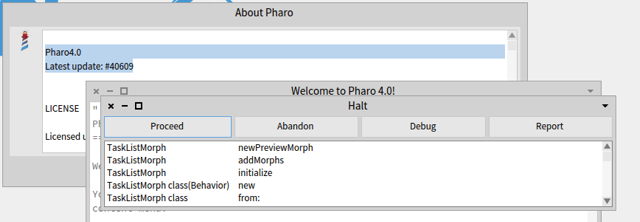
On my Pharo4.0 Latest update: #40609 Pressing Alt-Tab brings up a debugger. Debugging the method shows: newPreviewMorph "Answer a new preview holder." self halt. ^ Morph new color: Color transparent; extent: self defaultPreviewExtent; yourself. On 16 May 2015, at 1:09 AM, Avdi Grimm <avdi@avdi.org> wrote: On Fri, May 15, 2015 at 7:06 PM Carlo <snoobabk@gmail.com <mailto:snoobabk@gmail.com>> wrote: Removing the 'self halt' still works though. Can you give me a little more detail about where to find this? Thanks!
On Fri, May 15, 2015 at 7:12 PM Carlo <snoobabk@gmail.com> wrote:
Pressing Alt-Tab brings up a debugger. Debugging the method shows:
Thanks! Any idea where the keyboard shortcut is assigned? On the only systems I have handy to test this, the OS catches Alt-Tab before it ever gets to Pharo.

Le 16/5/15 01:22, Avdi Grimm a écrit :
On Fri, May 15, 2015 at 7:12 PM Carlo <snoobabk@gmail.com <mailto:snoobabk@gmail.com>> wrote:
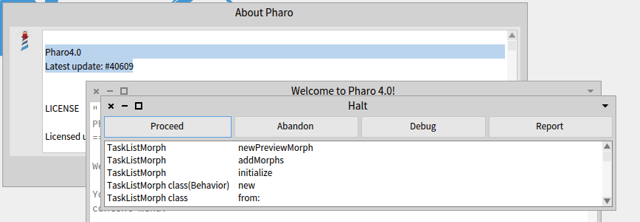
Pressing Alt-Tab brings up a debugger. Debugging the method shows:
Thanks! Any idea where the keyboard shortcut is assigned? On the only systems I have handy to test this, the OS catches Alt-Tab before it ever gets to Pharo.
We started to introduce KeyBinding a way to declare binding instead of hard-coding then. Now we need to finish to convert all the code to use keybinding. Stef
2015-05-16 1:11 GMT+02:00 Carlo <snoobabk@gmail.com>:
On my
Pharo4.0 Latest update: #40609
Pressing Alt-Tab brings up a debugger. Debugging the method shows:
But this does not work for Pharo on Windows . On windows alt+tab always switches between active applications. There was some code on older versions of pharo, that uses alt+left arrow/right arrow instead of alt+tab for the windows vm
newPreviewMorph "Answer a new preview holder." self halt. ^ Morph new color: Color transparent; extent: self defaultPreviewExtent; yourself.
On 16 May 2015, at 1:09 AM, Avdi Grimm <avdi@avdi.org> wrote:
On Fri, May 15, 2015 at 7:06 PM Carlo <snoobabk@gmail.com> wrote:
Removing the 'self halt' still works though.
Can you give me a little more detail about where to find this? Thanks!
I'd be totally cool with Alt-Left/Right. I just want *something* so I don't have to lift my hand just to switch from e.g. Browser to Playground and back. On Fri, May 15, 2015 at 7:23 PM Nicolai Hess <nicolaihess@web.de> wrote:
2015-05-16 1:11 GMT+02:00 Carlo <snoobabk@gmail.com>:
On my
Pharo4.0 Latest update: #40609
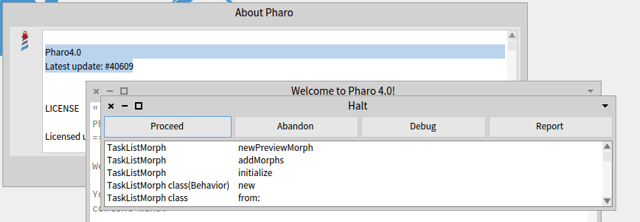
Pressing Alt-Tab brings up a debugger. Debugging the method shows:
But this does not work for Pharo on Windows . On windows alt+tab always switches between active applications. There was some code on older versions of pharo, that uses alt+left arrow/right arrow instead of alt+tab for the windows vm
newPreviewMorph "Answer a new preview holder." self halt. ^ Morph new color: Color transparent; extent: self defaultPreviewExtent; yourself.
On 16 May 2015, at 1:09 AM, Avdi Grimm <avdi@avdi.org> wrote:
On Fri, May 15, 2015 at 7:06 PM Carlo <snoobabk@gmail.com> wrote:
Removing the 'self halt' still works though.
Can you give me a little more detail about where to find this? Thanks!
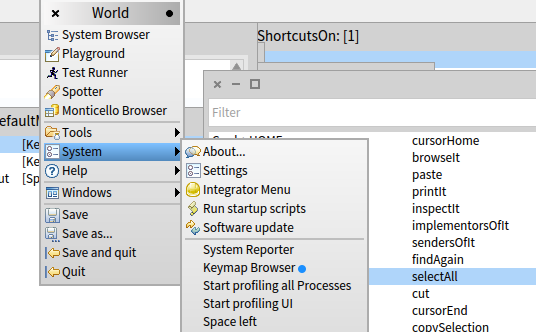
Was taking a look in my image and followed references to Character alt or ctrl and found the hooks, but changing them wasn't working. Remembered now that there is a Keymap Browser under World/System/Keymap Browser You could try looking at that or wait until someone that knows responds... Cheers Carlo On 16 May 2015, at 1:32 AM, Avdi Grimm <avdi@avdi.org> wrote: I'd be totally cool with Alt-Left/Right. I just want *something* so I don't have to lift my hand just to switch from e.g. Browser to Playground and back. On Fri, May 15, 2015 at 7:23 PM Nicolai Hess <nicolaihess@web.de <mailto:nicolaihess@web.de>> wrote: 2015-05-16 1:11 GMT+02:00 Carlo <snoobabk@gmail.com <mailto:snoobabk@gmail.com>>: On my Pharo4.0 Latest update: #40609 Pressing Alt-Tab brings up a debugger. Debugging the method shows: But this does not work for Pharo on Windows . On windows alt+tab always switches between active applications. There was some code on older versions of pharo, that uses alt+left arrow/right arrow instead of alt+tab for the windows vm newPreviewMorph "Answer a new preview holder." self halt. ^ Morph new color: Color transparent; extent: self defaultPreviewExtent; yourself. On 16 May 2015, at 1:09 AM, Avdi G<Screenshot 2015:05:16, 1:11 AM.png>rimm <avdi@avdi.org <mailto:avdi@avdi.org>> wrote: On Fri, May 15, 2015 at 7:06 PM Carlo <snoobabk@gmail.com <mailto:snoobabk@gmail.com>> wrote: Removing the 'self halt' still works though. Can you give me a little more detail about where to find this? Thanks!
On Fri, May 15, 2015 at 8:21 PM, Carlo <snoobabk@gmail.com> wrote:
Remembered now that there is a Keymap Browser under World/System/Keymap Browser You could try looking at that or wait until someone that knows responds...
Yeah, there's no listing for Alt-Tab there, which was one of the things that flummoxed me in the first place. -- Avdi Grimm http://avdi.org
Hi See my earlier email was bounced. ... Ok, hacked and debugged my pharo 4 image and I've got ctrl- left or right working on my mac. Two changes needed TaskListMorph>>keyStroke: event needs to change as per below to add the ctrl left or right. TaskListMorph>>keyStroke: event "Process keys to switch task." event keyCharacter = Character escape ifTrue: [^self delete]. event anyModifierKeyPressed ifFalse: [^self done]. event keyString = '<Ctrl-left>' ifTrue: [^self selectPreviousTask]. event keyString = '<Ctrl-right>' ifTrue: [^self selectNextTask]. event keyString = '<Opt-Shift-tab>' ifTrue: [^self selectPreviousTask]. event keyString = '<Opt-tab>' ifTrue: [^self selectNextTask] Then TaskListMorph>>isNavigationEvent: aKeyboardEvent needs to change as per below: isNavigationEvent: aKeyboardEvent | validCombos | validCombos := Array with: Character tab alt with: Character tab alt shift with: Character arrowLeft ctrl with: Character arrowRight ctrl . ^ validCombos contains: [:each | each = aKeyboardEvent asKeyCombination]. Ctrl-left or Ctrl-right works, and again you need to press any key to select the window on preview. Cheers Carlo On 16 May 2015, at 1:32 AM, Avdi Grimm <avdi@avdi.org> wrote: I'd be totally cool with Alt-Left/Right. I just want *something* so I don't have to lift my hand just to switch from e.g. Browser to Playground and back. On Fri, May 15, 2015 at 7:23 PM Nicolai Hess <nicolaihess@web.de <mailto:nicolaihess@web.de>> wrote: 2015-05-16 1:11 GMT+02:00 Carlo <snoobabk@gmail.com <mailto:snoobabk@gmail.com>>: On my Pharo4.0 Latest update: #40609 Pressing Alt-Tab brings up a debugger. Debugging the method shows: But this does not work for Pharo on Windows . On windows alt+tab always switches between active applications. There was some code on older versions of pharo, that uses alt+left arrow/right arrow instead of alt+tab for the windows vm newPreviewMorph "Answer a new preview holder." self halt. ^ Morph new color: Color transparent; extent: self defaultPreviewExtent; yourself. On 16 May 2015, at 1:09 AM, Avdi G<Screenshot 2015:05:16, 1:11 AM.png>rimm <avdi@avdi.org <mailto:avdi@avdi.org>> wrote: On Fri, May 15, 2015 at 7:06 PM Carlo <snoobabk@gmail.com <mailto:snoobabk@gmail.com>> wrote: Removing the 'self halt' still works though. Can you give me a little more detail about where to find this? Thanks!

does not work for me in macos. Ctrl+left/right is reserved by MACOS for switching workspaces but even other key combinations i tried do not work at all. Alt+Tab is also reserved in macos. On Sat, May 16, 2015 at 9:14 AM Carlo <snoobabk@gmail.com> wrote:
Hi
See my earlier email was bounced. ...
Ok, hacked and debugged my pharo 4 image and I've got ctrl- left or right working on my mac.
Two changes needed
TaskListMorph>>keyStroke: event needs to change as per below to add the ctrl left or right.
TaskListMorph>>keyStroke: event "Process keys to switch task." event keyCharacter = Character escape ifTrue: [^self delete]. event anyModifierKeyPressed ifFalse: [^self done].
event keyString = '<Ctrl-left>' ifTrue: [^self selectPreviousTask]. event keyString = '<Ctrl-right>' ifTrue: [^self selectNextTask]. event keyString = '<Opt-Shift-tab>' ifTrue: [^self selectPreviousTask]. event keyString = '<Opt-tab>' ifTrue: [^self selectNextTask]
Then TaskListMorph>>isNavigationEvent: aKeyboardEvent needs to change as per below:
isNavigationEvent: aKeyboardEvent | validCombos | validCombos := Array with: Character tab alt with: Character tab alt shift with: Character arrowLeft ctrl with: Character arrowRight ctrl . ^ validCombos contains: [:each | each = aKeyboardEvent asKeyCombination].
Ctrl-left or Ctrl-right works, and again you need to press any key to select the window on preview.
Cheers Carlo On 16 May 2015, at 1:32 AM, Avdi Grimm <avdi@avdi.org> wrote:
I'd be totally cool with Alt-Left/Right. I just want *something* so I don't have to lift my hand just to switch from e.g. Browser to Playground and back.
On Fri, May 15, 2015 at 7:23 PM Nicolai Hess <nicolaihess@web.de> wrote:
2015-05-16 1:11 GMT+02:00 Carlo <snoobabk@gmail.com>:
On my
Pharo4.0 Latest update: #40609
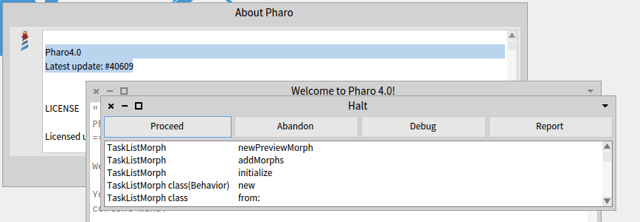
Pressing Alt-Tab brings up a debugger. Debugging the method shows:
But this does not work for Pharo on Windows . On windows alt+tab always switches between active applications. There was some code on older versions of pharo, that uses alt+left arrow/right arrow instead of alt+tab for the windows vm
newPreviewMorph "Answer a new preview holder." self halt. ^ Morph new color: Color transparent; extent: self defaultPreviewExtent; yourself.
On 16 May 2015, at 1:09 AM, Avdi G<Screenshot 2015:05:16, 1:11 AM.png>rimm <avdi@avdi.org> wrote:
On Fri, May 15, 2015 at 7:06 PM Carlo <snoobabk@gmail.com> wrote:
Removing the 'self halt' still works though.
Can you give me a little more detail about where to find this? Thanks!

my answer on stackoverflow: well... you hit one of our weaker spots :) Keybindings are not in his best shape, but: - Actually, alt+tab is already set to "switch window" activity. The problem is that does not work all the time (for example, it does not work on Playground). - This is because there are some hardcoded logic there, who we are removing slowly from the system (some of those parts have more than 15yrs since they come from before Pharo has born). - Someone (probably in a failed attempt to fix the playground, or the hardcodes) forget a halt in the method who creates a new preview window... so even if you reach that part of the system, you will have a debugger. Of course, you will be able to restore correct behaviour by just removing the breakpoint, but that will not correct the fact "switch windows" will not be available everywhere. - I opened a bug entry for it: https://pharo.fogbugz.com/f/cases/15546, in case you want to follow the issue (you will need an account there, I'm sorry for that). In any case, we are moving out this hardcode stuff, and you can check all currently available settings going to **World Menu/System/Keymap Browser** (they are a lot, we are also playing with ideas on how to show better this combinations... emacs style, popup notifications, etc.) Esteban ps: I will like to have a solution for this, if anyone can help a bit in this area⦠but it has to be a solution using the keybindings framework. I will deny integration to any hardcoded solution :)
On 16 May 2015, at 10:59, Dimitris Chloupis <kilon.alios@gmail.com> wrote:
does not work for me in macos. Ctrl+left/right is reserved by MACOS for switching workspaces but even other key combinations i tried do not work at all. Alt+Tab is also reserved in macos.
On Sat, May 16, 2015 at 9:14 AM Carlo <snoobabk@gmail.com <mailto:snoobabk@gmail.com>> wrote: Hi
See my earlier email was bounced. ...
Ok, hacked and debugged my pharo 4 image and I've got ctrl- left or right working on my mac.
Two changes needed
TaskListMorph>>keyStroke: event needs to change as per below to add the ctrl left or right.
TaskListMorph>>keyStroke: event "Process keys to switch task." event keyCharacter = Character escape ifTrue: [^self delete]. event anyModifierKeyPressed ifFalse: [^self done].
event keyString = '<Ctrl-left>' ifTrue: [^self selectPreviousTask]. event keyString = '<Ctrl-right>' ifTrue: [^self selectNextTask].
event keyString = '<Opt-Shift-tab>' ifTrue: [^self selectPreviousTask]. event keyString = '<Opt-tab>' ifTrue: [^self selectNextTask]
Then TaskListMorph>>isNavigationEvent: aKeyboardEvent needs to change as per below:
isNavigationEvent: aKeyboardEvent | validCombos | validCombos := Array with: Character tab alt with: Character tab alt shift with: Character arrowLeft ctrl with: Character arrowRight ctrl . ^ validCombos contains: [:each | each = aKeyboardEvent asKeyCombination].
Ctrl-left or Ctrl-right works, and again you need to press any key to select the window on preview.
Cheers Carlo On 16 May 2015, at 1:32 AM, Avdi Grimm <avdi@avdi.org <mailto:avdi@avdi.org>> wrote:
I'd be totally cool with Alt-Left/Right. I just want *something* so I don't have to lift my hand just to switch from e.g. Browser to Playground and back.
On Fri, May 15, 2015 at 7:23 PM Nicolai Hess <nicolaihess@web.de <mailto:nicolaihess@web.de>> wrote: 2015-05-16 1:11 GMT+02:00 Carlo <snoobabk@gmail.com <mailto:snoobabk@gmail.com>>: On my
Pharo4.0 Latest update: #40609
Pressing Alt-Tab brings up a debugger. Debugging the method shows:
But this does not work for Pharo on Windows . On windows alt+tab always switches between active applications. There was some code on older versions of pharo, that uses alt+left arrow/right arrow instead of alt+tab for the windows vm
newPreviewMorph "Answer a new preview holder." self halt. ^ Morph new color: Color transparent; extent: self defaultPreviewExtent; yourself.
On 16 May 2015, at 1:09 AM, Avdi G<Screenshot 2015:05:16, 1:11 AM.png>rimm <avdi@avdi.org <mailto:avdi@avdi.org>> wrote:
On Fri, May 15, 2015 at 7:06 PM Carlo <snoobabk@gmail.com <mailto:snoobabk@gmail.com>> wrote: Removing the 'self halt' still works though.
Can you give me a little more detail about where to find this? Thanks!

On Sat, May 16, 2015 at 5:35 PM, Esteban Lorenzano <estebanlm@gmail.com> wrote:
my answer on stackoverflow:
well... you hit one of our weaker spots :)
Keybindings are not in his best shape, but:
- Actually, alt+tab is already set to "switch window" activity. The problem is that does not work all the time (for example, it does not work on Playground). - This is because there are some hardcoded logic there, who we are removing slowly from the system (some of those parts have more than 15yrs since they come from before Pharo has born). - Someone (probably in a failed attempt to fix the playground, or the hardcodes) forget a halt in the method who creates a new preview window... so even if you reach that part of the system, you will have a debugger. Of course, you will be able to restore correct behaviour by just removing the breakpoint, but that will not correct the fact "switch windows" will not be available everywhere. - I opened a bug entry for it: https://pharo.fogbugz.com/f/cases/15546, in case you want to follow the issue (you will need an account there, I'm sorry for that).
In any case, we are moving out this hardcode stuff, and you can check all currently available settings going to **World Menu/System/Keymap Browser** (they are a lot, we are also playing with ideas on how to show better this combinations... emacs style, popup notifications, etc.)
Esteban
ps: I will like to have a solution for this, if anyone can help a bit in this area⦠but it has to be a solution using the keybindings framework. I will deny integration to any hardcoded solution :)
I thought I'd have a look at this (a reason to dip my toe into the keybindings framework for the first time). Not sure if I'm heading down the right track, but the first part of just responding to key presses was much easier than I thought it might be, so I thought there might be general interest. So far I've just done... KMCategory subclass: #TaskListGlobalShortcut instanceVariableNames: '' classVariableNames: '' category: 'Morphic-Widgets-Taskbar' TaskListGlobalShortcut >> isGlobalCategory ^true TaskListGlobalShortcut >> cycleLeft <shortcut> ^ KMKeymap shortcut: $[ command action: [ self inform: 'cycle window left' ] TaskListGlobalShortcut >> cycleRight <shortcut> ^ KMKeymap shortcut: $] command action: [ self inform: 'cycle window right' ] KMRepository reset. </feeling='small sense of achievement'> cheers -ben
On Tue, May 19, 2015 at 10:51 PM, Ben Coman <btc@openinworld.com> wrote:
On Sat, May 16, 2015 at 5:35 PM, Esteban Lorenzano <estebanlm@gmail.com> wrote:
my answer on stackoverflow:
well... you hit one of our weaker spots :)
Keybindings are not in his best shape, but:
- Actually, alt+tab is already set to "switch window" activity. The problem is that does not work all the time (for example, it does not work on Playground). - This is because there are some hardcoded logic there, who we are removing slowly from the system (some of those parts have more than 15yrs since they come from before Pharo has born). - Someone (probably in a failed attempt to fix the playground, or the hardcodes) forget a halt in the method who creates a new preview window... so even if you reach that part of the system, you will have a debugger. Of course, you will be able to restore correct behaviour by just removing the breakpoint, but that will not correct the fact "switch windows" will not be available everywhere. - I opened a bug entry for it: https://pharo.fogbugz.com/f/cases/15546, in case you want to follow the issue (you will need an account there, I'm sorry for that).
In any case, we are moving out this hardcode stuff, and you can check all currently available settings going to **World Menu/System/Keymap Browser** (they are a lot, we are also playing with ideas on how to show better this combinations... emacs style, popup notifications, etc.)
Esteban
ps: I will like to have a solution for this, if anyone can help a bit in this area⦠but it has to be a solution using the keybindings framework. I will deny integration to any hardcoded solution :)
I thought I'd have a look at this (a reason to dip my toe into the keybindings framework for the first time). Not sure if I'm heading down the right track, but the first part of just responding to key presses was much easier than I thought it might be, so I thought there might be general interest.
Here it is fully working. Note the correction moving #isGlobal to the class-side.
KMCategory subclass: #TaskListGlobalShortcut instanceVariableNames: '' classVariableNames: '' category: 'Morphic-Widgets-Taskbar'
TaskListGlobalShortcut class >> isGlobalCategory "<---whoops, correction" ^true
I discovered that to match existing method names, #selectNextTask was better than #cycleLeft. TaskListGlobalShortcut>>selectNextTask <shortcut> ^ KMKeymap shortcut: $] command action: [ World taskList selectNextTask. ] TaskListGlobalShortcut>>selectPreviousTask <shortcut> ^ KMKeymap shortcut: $[ command action: [ World taskList selectPreviousTask. ] NullTaskList>>selectNextTask self openTaskList selectNextTask NullTaskList>>selectPreviousTask self openTaskList selectPreviousTask NullTaskList>>openTaskList ^ world theme openTaskListIn: world. " Adapted from NullTaskList >> handleEvent: " UITheme>>openTaskListIn: worldMorph | taskListMorph | taskListMorph := TaskListMorph new. taskListMorph openAsIsIn: worldMorph. ^ taskListMorph "Adapted from UITheme >> openTaskListIn:from: " KMRepository reset. This was developed on Pharo 4, but I uploaded SLICE-Issue-15546-alttab-does-not-work-correctly-BenComan.2 to Pharo5Inbox per policy to integrate there first. I guess since this is not mission critical it might be queued for a while for Pharo 4. Nicolai, I didn't see your slice until after. I've left some comments on fogbugz comparing the both slices. cheers -ben
Le 16/5/15 01:05, Carlo a écrit :
Hi Avdi
Enjoyed listening to your ruby rogues podcasts and tapas and now finally Smalltalk;)
Regarding your pain points on keyboard vs mouse; I've seen this come up before. There has been lot's of improvement, but still a way to go. I tested cycling between windows on Pharo 3 on mac and Alt-tab is working. Pharo 4 looks like someone put a 'self halt' message on the preview window; so I'm assuming there is a newer way to cycle through windows. Removing the 'self halt' still works though. Oh the alt-tab will bring up a preview window which you need to select window by pressing any other key; so 'alt-tab' until window comes up, then let it go and press any key to select it.
Can you open a bug entry with a nice description if there is something that we should do? Stef
Cheers Carlo
On 16 May 2015, at 12:52 AM, Avdi Grimm <avdi@avdi.org> wrote:
Hey folks! I've dabbled with smalltalk here and there over the years, but recently I've settled in to learn Pharo in earnest. A few of you might have seen the videos I've been putting up; they seem to be making the rounds on Twitter. I just want to say I've felt really welcomed by all the people who have commented with helpful tips, or offered to help with my exploration :-)
I've run into my first big blocker as a newcomer. Like many programmers I'm a fan of keeping my hands on the keyboard. Now, I'm more flexible on this than some. I recognize that Pharo is a visual environment, and it makes sense to explore it with a mouse. And some interactions just make more sense with a mouse.
That said, no matter what windowing environment I'm in, I find the ability to quickly cycle between windows without leaving the keyboard pretty crucial. One Windows or Ubuntu I would normally do this with Alt-Tab or Super-Tab. On MacOS it's Cmd-Tab.
I've been trying to figure out how to do this in Pharo. I've looked for answers with Google, SO, and on IRC, and I've come up blank. I'm starting to think it can't be done.
So, I've come here for your help. Is there a way to cycle between windows? Or is anyone working on it? Or, perhaps, am I missing an element of the Pharo programming workflow which renders it unneeded?
Many thanks,
-- Avdi

Hi Avdi, you may be interested in http://smalltalkhub.com/#!/~LaurentLaffont/TilingWindowManager that offers more keyboard control (Emacs inspired) on window management. Regards, Laurent Laffont Le sam. 16 mai 2015 à 0:52, Avdi Grimm <avdi@avdi.org> a écrit :
Hey folks! I've dabbled with smalltalk here and there over the years, but recently I've settled in to learn Pharo in earnest. A few of you might have seen the videos I've been putting up; they seem to be making the rounds on Twitter. I just want to say I've felt really welcomed by all the people who have commented with helpful tips, or offered to help with my exploration :-)
I've run into my first big blocker as a newcomer. Like many programmers I'm a fan of keeping my hands on the keyboard. Now, I'm more flexible on this than some. I recognize that Pharo is a visual environment, and it makes sense to explore it with a mouse. And some interactions just make more sense with a mouse.
That said, no matter what windowing environment I'm in, I find the ability to quickly cycle between windows without leaving the keyboard pretty crucial. One Windows or Ubuntu I would normally do this with Alt-Tab or Super-Tab. On MacOS it's Cmd-Tab.
I've been trying to figure out how to do this in Pharo. I've looked for answers with Google, SO, and on IRC, and I've come up blank. I'm starting to think it can't be done.
So, I've come here for your help. Is there a way to cycle between windows? Or is anyone working on it? Or, perhaps, am I missing an element of the Pharo programming workflow which renders it unneeded?
Many thanks,
-- Avdi
Hey folks! I've dabbled with smalltalk here and there over the years, but recently I've settled in to learn Pharo in earnest. A few of you might have seen the videos I've been putting up; they seem to be making the rounds on Twitter. I just want to say I've felt really welcomed by all the people who have commented with helpful tips, or offered to help with my exploration :-)
Welcome
I've run into my first big blocker as a newcomer. Like many programmers I'm a fan of keeping my hands on the keyboard. Now, I'm more flexible on this than some. I recognize that Pharo is a visual environment, and it makes sense to explore it with a mouse. And some interactions just make more sense with a mouse.
That said, no matter what windowing environment I'm in, I find the ability to quickly cycle between windows without leaving the keyboard pretty crucial. One Windows or Ubuntu I would normally do this with Alt-Tab or Super-Tab. On MacOS it's Cmd-Tab.
I've been trying to figure out how to do this in Pharo. I've looked for answers with Google, SO, and on IRC, and I've come up blank. I'm starting to think it can't be done.
So, I've come here for your help. Is there a way to cycle between windows? Or is anyone working on it? Or, perhaps, am I missing an element of the Pharo programming workflow which renders it unneeded?
I'm not really happy with the state of the keybindings but too busy to be able to fix anything for now on this part. Now if people wants to help they are more then welcome. Stef

Hi Avdi, Welcome. As the others mentioned, this part of Pharo is not at all ideal. Please bare with us. Cheers, Doru On Sat, May 16, 2015 at 12:52 AM, Avdi Grimm <avdi@avdi.org> wrote:
Hey folks! I've dabbled with smalltalk here and there over the years, but recently I've settled in to learn Pharo in earnest. A few of you might have seen the videos I've been putting up; they seem to be making the rounds on Twitter. I just want to say I've felt really welcomed by all the people who have commented with helpful tips, or offered to help with my exploration :-)
I've run into my first big blocker as a newcomer. Like many programmers I'm a fan of keeping my hands on the keyboard. Now, I'm more flexible on this than some. I recognize that Pharo is a visual environment, and it makes sense to explore it with a mouse. And some interactions just make more sense with a mouse.
That said, no matter what windowing environment I'm in, I find the ability to quickly cycle between windows without leaving the keyboard pretty crucial. One Windows or Ubuntu I would normally do this with Alt-Tab or Super-Tab. On MacOS it's Cmd-Tab.
I've been trying to figure out how to do this in Pharo. I've looked for answers with Google, SO, and on IRC, and I've come up blank. I'm starting to think it can't be done.
So, I've come here for your help. Is there a way to cycle between windows? Or is anyone working on it? Or, perhaps, am I missing an element of the Pharo programming workflow which renders it unneeded?
Many thanks,
-- Avdi
-- www.tudorgirba.com "Every thing has its own flow"

Avdi, I mostly work in other Smalltalk environments than Pharo, like VA Smalltalk. It has native windows and so the ability to switch between windows using alt-tab is there. I must admit that there is a certain threshold in the number of open windows when this is not really helpful any more. I tend to hit that number pretty fast in a typical Smalltalk coding/debugging sessions. Things have changed in Win 7, because there I can use the window manager to close the windows right in the window switcher. That makes perfect sense if you have 15 inspectors open, none of which shows current data or instances any more. Or if one of them does, I can't decide which one ;-) So sometimes I wish for features like "close all windows of this kind" to kill all inspectors, for example. What I want to say with this that I am not really using alt-tab to switch between windows, but rather to kill a few to come down to a sensible number ;-) But I understand why you miss it. For Pharo, there is a special problem: it is its own windowing environment, so it should probably better not use the O/S' key combination to switch its windows, right? Joachim Am 16.05.15 um 22:11 schrieb Tudor Girba:
Hi Avdi,
Welcome.
As the others mentioned, this part of Pharo is not at all ideal. Please bare with us.
Cheers, Doru
On Sat, May 16, 2015 at 12:52 AM, Avdi Grimm <avdi@avdi.org <mailto:avdi@avdi.org>> wrote:
Hey folks! I've dabbled with smalltalk here and there over the years, but recently I've settled in to learn Pharo in earnest. A few of you might have seen the videos I've been putting up; they seem to be making the rounds on Twitter. I just want to say I've felt really welcomed by all the people who have commented with helpful tips, or offered to help with my exploration :-)
I've run into my first big blocker as a newcomer. Like many programmers I'm a fan of keeping my hands on the keyboard. Now, I'm more flexible on this than some. I recognize that Pharo is a visual environment, and it makes sense to explore it with a mouse. And some interactions just make more sense with a mouse.
That said, no matter what windowing environment I'm in, I find the ability to quickly cycle between windows without leaving the keyboard pretty crucial. One Windows or Ubuntu I would normally do this with Alt-Tab or Super-Tab. On MacOS it's Cmd-Tab.
I've been trying to figure out how to do this in Pharo. I've looked for answers with Google, SO, and on IRC, and I've come up blank. I'm starting to think it can't be done.
So, I've come here for your help. Is there a way to cycle between windows? Or is anyone working on it? Or, perhaps, am I missing an element of the Pharo programming workflow which renders it unneeded?
Many thanks,
-- Avdi
-- www.tudorgirba.com <http://www.tudorgirba.com>
"Every thing has its own flow"
-- ----------------------------------------------------------------------- Objektfabrik Joachim Tuchel mailto:jtuchel@objektfabrik.de Fliederweg 1 http://www.objektfabrik.de D-71640 Ludwigsburg http://joachimtuchel.wordpress.com Telefon: +49 7141 56 10 86 0 Fax: +49 7141 56 10 86 1
On Sat, May 16, 2015 at 4:23 PM, jtuchel@objektfabrik.de < jtuchel@objektfabrik.de> wrote:
I mostly work in other Smalltalk environments than Pharo, like VA Smalltalk. It has native windows and so the ability to switch between windows using alt-tab is there. I must admit that there is a certain threshold in the number of open windows when this is not really helpful any more. I tend to hit that number pretty fast in a typical Smalltalk coding/debugging sessions.
Things have changed in Win 7, because there I can use the window manager to close the windows right in the window switcher. That makes perfect sense if you have 15 inspectors open, none of which shows current data or instances any more. Or if one of them does, I can't decide which one ;-)
So sometimes I wish for features like "close all windows of this kind" to kill all inspectors, for example.
What I want to say with this that I am not really using alt-tab to switch between windows, but rather to kill a few to come down to a sensible number ;-) But I understand why you miss it. For Pharo, there is a special problem: it is its own windowing environment, so it should probably better not use the O/S' key combination to switch its windows, right?
Just as some food for thought for anyone contemplating this problem: Sometimes problems like this are indicative of deeper usability issues. Decades ago, it was just sort of assumed that the "right" way to deal with windows was to have a dedicated window for every "thing" in your system. To some degree, Mac OS, Wind95, and OS/2 all took this point of view. For instance, every folder you double-clicked on would open up a new file manager window, and this got to be such a mess that some OSes included "secret" shortcuts for killing them all at once. Then the web started to take off, and UX designers started rethinking the whole paradigm. They started keeping things in the same window, but adding back/forward buttons, and navigation histories, and sidebars, and address bars, and tabs, and other affordances to make it easier to switch between "things" without necessarily adding more windows. These days, most IDEs and editors have followed suit. I can't think of a single editor in common use among the programmers I know which encourages multiple windows. Whether it's Vim, Emacs, Sublime, IntelliJ, while you *can* open lots of windows if you really want to, they all focus on making it easy to manage lots of buffers in a single window rather than encouraging lots of windows. Personally, I'm a fan of this trend. I'm much happier typing a few characters to auto-complete the buffer I want to return to in Emacs, than I am hunting around in an OS window list for it. This is all a long-winded way of saying: just because this is currently a problem, doesn't mean it's the *right* problem. It would be interesting to see what a "fewer windows" approach to Smalltalk development might look like. -- Avdi Grimm http://avdi.org
On Tue, May 19, 2015 at 7:08 AM, Avdi Grimm <avdi@avdi.org> wrote:
On Sat, May 16, 2015 at 4:23 PM, jtuchel@objektfabrik.de < jtuchel@objektfabrik.de> wrote:
I mostly work in other Smalltalk environments than Pharo, like VA Smalltalk. It has native windows and so the ability to switch between windows using alt-tab is there. I must admit that there is a certain threshold in the number of open windows when this is not really helpful any more. I tend to hit that number pretty fast in a typical Smalltalk coding/debugging sessions.
Things have changed in Win 7, because there I can use the window manager to close the windows right in the window switcher. That makes perfect sense if you have 15 inspectors open, none of which shows current data or instances any more. Or if one of them does, I can't decide which one ;-)
So sometimes I wish for features like "close all windows of this kind" to kill all inspectors, for example.
What I want to say with this that I am not really using alt-tab to switch between windows, but rather to kill a few to come down to a sensible number ;-) But I understand why you miss it. For Pharo, there is a special problem: it is its own windowing environment, so it should probably better not use the O/S' key combination to switch its windows, right?
Just as some food for thought for anyone contemplating this problem:
Sometimes problems like this are indicative of deeper usability issues. Decades ago, it was just sort of assumed that the "right" way to deal with windows was to have a dedicated window for every "thing" in your system. To some degree, Mac OS, Wind95, and OS/2 all took this point of view. For instance, every folder you double-clicked on would open up a new file manager window, and this got to be such a mess that some OSes included "secret" shortcuts for killing them all at once.
Then the web started to take off, and UX designers started rethinking the whole paradigm. They started keeping things in the same window, but adding back/forward buttons, and navigation histories, and sidebars, and address bars, and tabs, and other affordances to make it easier to switch between "things" without necessarily adding more windows.
These days, most IDEs and editors have followed suit. I can't think of a single editor in common use among the programmers I know which encourages multiple windows. Whether it's Vim, Emacs, Sublime, IntelliJ, while you *can* open lots of windows if you really want to, they all focus on making it easy to manage lots of buffers in a single window rather than encouraging lots of windows.
Personally, I'm a fan of this trend. I'm much happier typing a few characters to auto-complete the buffer I want to return to in Emacs, than I am hunting around in an OS window list for it.
This is all a long-winded way of saying: just because this is currently a problem, doesn't mean it's the *right* problem. It would be interesting to see what a "fewer windows" approach to Smalltalk development might look like.
This is an interesting UI area to explore. As a step in this direction, the Window Menu (small arrow in title bar) item "Create window group" may provide part of the behaviour you are looking for. cheers -ben
On Mon, May 18, 2015 at 11:06 PM, Ben Coman <btc@openinworld.com> wrote:
As a step in this direction, the Window Menu (small arrow in title bar) item "Create window group" may provide part of the behaviour you are looking for.
Interesting! How does one add more than one window to the group? Is there more info on this somewhere? -- Avdi Grimm http://avdi.org
Le mar. 19 mai 2015 à 5:45, Avdi Grimm <avdi@avdi.org> a écrit :
On Mon, May 18, 2015 at 11:06 PM, Ben Coman <btc@openinworld.com> wrote:
As a step in this direction, the Window Menu (small arrow in title bar) item "Create window group" may provide part of the behaviour you are looking for.
Interesting! How does one add more than one window to the group? Is there more info on this somewhere?
This work comes from TilingWindowManager and has been reified into GroupWindowMorph in Pharo3. With TWM comes TWMDockingWindowMorph with opens a docking panel where you can put windows. See https://vimeo.com/26346973 and open it with: TWMDockingWindowMorph new openInWorld Laurent
-- Avdi Grimm http://avdi.org
As you linked in your blog post there are my video tutorials , one of them are about window groups https://www.youtube.com/watch?v=GGJZeajjWGU About general GUI and UI designs its not any less nightmarish to open multiple windows in Pharo than it is to open multiple buffers in emacs. The diffirence between the two is that with emacs you have the nightmare of lack of any GUI while in pharo you have the lack of sophisticated editing. My personal opinion on UIs is that I look around and all I see is a huge mess. The modern effort to turn to minimalism and try to minimise this phenomenon , fails miserably. Web is even messier because of fragmentation and lack of cohesion you ending up with a billion different UIs that fail the same way. What the modern world needs is not minimalism but rather I high complex system that can deal with complexity and extremely varied demands. That would require a large body of developers to sit down and do thorough research to solve the problem of ever increasingly complex software. I work with 3d graphics that are notorious for their inherit complexity, the situation has been getting so bad lately , that age of "one software to rule them all" has come to pass and we see more and more fragmentation that makes life even more difficult. Pharo is doing some good work on this area but realistically , the community is too small to solve such a huge problem even with pharo ease of use. On Tue, May 19, 2015 at 6:46 AM Avdi Grimm <avdi@avdi.org> wrote:
On Mon, May 18, 2015 at 11:06 PM, Ben Coman <btc@openinworld.com> wrote:
As a step in this direction, the Window Menu (small arrow in title bar) item "Create window group" may provide part of the behaviour you are looking for.
Interesting! How does one add more than one window to the group? Is there more info on this somewhere?
-- Avdi Grimm http://avdi.org
On Tue, May 19, 2015 at 3:53 AM, Dimitris Chloupis <kilon.alios@gmail.com> wrote:
About general GUI and UI designs its not any less nightmarish to open multiple windows in Pharo than it is to open multiple buffers in emacs. The diffirence between the two is that with emacs you have the nightmare of lack of any GUI while in pharo you have the lack of sophisticated editing.
With respect, this is manifestly untrue. Buffer management is a solved problem in Emacs. In fact, it's been solved and re-solved many times over, to the point where it can suit anyone's tastes. Whether you want: * To simply toggle between the last few buffers * To list, sort, and filter buffers quickly until you find the one you want * To do fuzzy-completed searches on buffers * To manage buffers in tabs and tab groups * To have sidebars listing open buffers * To kill or operate on many buffers at once based on what project they are in or some other criteria * To have a fully window-managed interface that can save, reload, and switch between different window configurations for different contexts at a keypress * To forget about buffers completely, and just navigate to the thing you want to see (and let Emacs worry about what buffers happen to be in memory) (And lest anyone say that buffer management is a different problem from window management, remember that Emacs is an application environment, and that a "buffer" may be a full application window, such as an IRC channel or even a Smalltalk-style browser.) Whether you want any of these features or many others, there are mature and well-tests solutions for all of them. Whereas as many longtime users have confirmed in this thread, Smalltalk environments don't even have the window management to match the Emacs built-in features, let alone the mature extension ecosystem. I made my original seven-minute Pharo video with the intent of getting traditionally IDE-averse Ruby programmers to realize some of the things they are missing. It's way too easy to say "oh, no one else has solved this any better". And as a result, a number of people said "wow, I usually hate IDEs but I need to check this out". But this cuts both ways.
Pharo is doing some good work on this area but realistically , the community is too small to solve such a huge problem even with pharo ease of use.
This I agree with completely. My favorite OS for programming is Linux. In linux, window management is a problem that has been solved many times over. There are dozens of window managers (hundreds, if you count inactive projects). There are high-tech compositing window managers that can do MacOS-style Expose zoom-out for quickly locating windows. There are WMs that rigidly control where windows show up, based on a policy you decide. There are all kinds of different aids for quickly listing and navigating between windows. It took thousands of programmers decades of work in many different languages to create this variety. I'd hate to see the smaller Pharo community pour tons of effort into re-inventing these solutions. Which is why I'm suggesting that it may be more helpful to re-frame the problem. General purpose window management is a problem that has been solved many times over. Do you really want to do it yet again? I suspect that with some careful examination of Pharo coding workflows, you could find a way to obviate the need for zillions of windows, and solve a simpler problem instead.

2015-05-19 11:41 GMT-03:00 Avdi Grimm <avdi@avdi.org>:
It took thousands of programmers decades of work in many different languages to create this variety. I'd hate to see the smaller Pharo community pour tons of effort into re-inventing these solutions.
Which is why I'm suggesting that it may be more helpful to re-frame the problem. General purpose window management is a problem that has been solved many times over. Do you really want to do it yet again? I suspect that with some careful examination of Pharo coding workflows, you could find a way to obviate the need for zillions of windows, and solve a simpler problem instead.
+1 Esteban A. Maringolo
On 19 May 2015, at 16:51, Esteban A. Maringolo <emaringolo@gmail.com> wrote:
2015-05-19 11:41 GMT-03:00 Avdi Grimm <avdi@avdi.org>:
It took thousands of programmers decades of work in many different languages to create this variety. I'd hate to see the smaller Pharo community pour tons of effort into re-inventing these solutions.
Which is why I'm suggesting that it may be more helpful to re-frame the problem. General purpose window management is a problem that has been solved many times over. Do you really want to do it yet again? I suspect that with some careful examination of Pharo coding workflows, you could find a way to obviate the need for zillions of windows, and solve a simpler problem instead.
+1
+1 Esteban ps: (and two Estebanâs counts exponentially :P) pps: but there are also other problems to take into account, and thatâs also community culture. I know many people finds the amount of windows opened somekind stressing when they arrive to our little world⦠but it actually fits a purpose and change it to other solutions just because âeverybody else does itâ can probably do not work. A suitable solution for LISP does not need to be a suitable solution to Pharo, just out of the box. Which of course does not means I would not want to explore more efficient workflows. ppps: And of course, there is the effort that starting in other direction goes⦠even copying an existing IDE workflow would be a lot of work for us, so sometimes is better just to incrementally enhance, even if that means we will keep some metaphors during more time than desired. pppps: as I always say in this list, human-computer interaction is not an easy field and is very studied, so is not easily solvable with our always subjective opinion. In that sense, I completely share the feeling that we need to keep studying and experimenting with other communities experiences until we find something that we can reengineer into something we need/want. ppppps: I ran out of âpsâ, but I couldnât resist to put five âp" in a line :)
Esteban A. Maringolo
ah, couple of things more (out of ps :P) I do believe Spotter will play a fundamental role in the enhancement of our IDE, but I was also thinking on some kind of âemacs style menusâ, in the sense of some guiding menus that you open with a key and you have an idea of which options you look. This could also be something integrated in the spotter in the way unity of ubuntu is going (you type âsaveâ and you have the options, etc.) Anyway⦠nothing that I found the time to test for the moment, but I will. And none of this options will heal our âwindowitisâ decease⦠and honestly I do not have any idea how we can enhance that. To hide infinite windows into infinite tabs (or buffers) does not feels like the correct solution for me (I remember beck in my java days, I sually kept more than 20 tabs open all the time⦠same with browsers here in pharo, but now I also open inspectors, playgrounds and debuggers⦠so⦠is a complicated issue). Or maybe Iâm wrong, and maybe just reducing the visual contamination is already a big step forward⦠who knows. Actually, we will not know until we try it⦠just saying ânoâ is not a very constructive opinion. But in that case, the question is âwho will bell the catâ :) Esteban
On 19 May 2015, at 19:11, Esteban Lorenzano <estebanlm@gmail.com> wrote:
On 19 May 2015, at 16:51, Esteban A. Maringolo <emaringolo@gmail.com> wrote:
2015-05-19 11:41 GMT-03:00 Avdi Grimm <avdi@avdi.org>:
It took thousands of programmers decades of work in many different languages to create this variety. I'd hate to see the smaller Pharo community pour tons of effort into re-inventing these solutions.
Which is why I'm suggesting that it may be more helpful to re-frame the problem. General purpose window management is a problem that has been solved many times over. Do you really want to do it yet again? I suspect that with some careful examination of Pharo coding workflows, you could find a way to obviate the need for zillions of windows, and solve a simpler problem instead.
+1
+1
Esteban
ps: (and two Estebanâs counts exponentially :P) pps: but there are also other problems to take into account, and thatâs also community culture. I know many people finds the amount of windows opened somekind stressing when they arrive to our little world⦠but it actually fits a purpose and change it to other solutions just because âeverybody else does itâ can probably do not work. A suitable solution for LISP does not need to be a suitable solution to Pharo, just out of the box. Which of course does not means I would not want to explore more efficient workflows. ppps: And of course, there is the effort that starting in other direction goes⦠even copying an existing IDE workflow would be a lot of work for us, so sometimes is better just to incrementally enhance, even if that means we will keep some metaphors during more time than desired. pppps: as I always say in this list, human-computer interaction is not an easy field and is very studied, so is not easily solvable with our always subjective opinion. In that sense, I completely share the feeling that we need to keep studying and experimenting with other communities experiences until we find something that we can reengineer into something we need/want. ppppps: I ran out of âpsâ, but I couldnât resist to put five âp" in a line :)
Esteban A. Maringolo
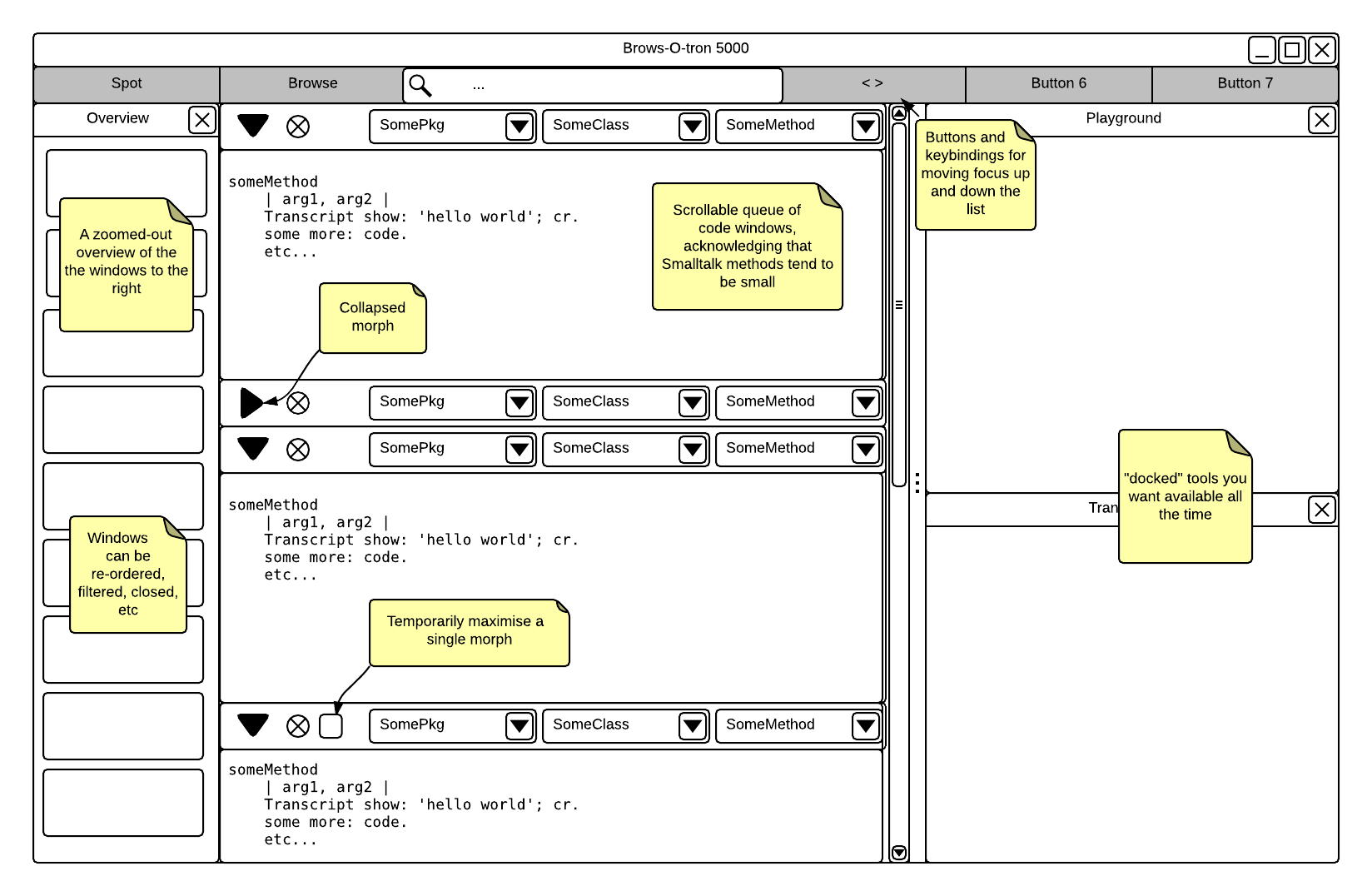
I dunno if this is useful to anyone, but I was rolling around concepts in my mind and this is something I came up with: [image: Inline image 1] This takes some queues from modern IDEs, but it also differs in that it doesn't make the assumption that you want to see just one "buffer" at a time, and that "split window mode" isn't sufficiently powerful to handle the need for lots of windows open on lots of little methods. -- Avdi Grimm http://avdi.org On Tue, May 19, 2015 at 1:40 PM, Esteban Lorenzano <estebanlm@gmail.com> wrote:
ah, couple of things more (out of ps :P)
I do believe Spotter will play a fundamental role in the enhancement of our IDE, but I was also thinking on some kind of âemacs style menusâ, in the sense of some guiding menus that you open with a key and you have an idea of which options you look. This could also be something integrated in the spotter in the way unity of ubuntu is going (you type âsaveâ and you have the options, etc.) Anyway⦠nothing that I found the time to test for the moment, but I will.
And none of this options will heal our âwindowitisâ decease⦠and honestly I do not have any idea how we can enhance that. To hide infinite windows into infinite tabs (or buffers) does not feels like the correct solution for me (I remember beck in my java days, I sually kept more than 20 tabs open all the time⦠same with browsers here in pharo, but now I also open inspectors, playgrounds and debuggers⦠so⦠is a complicated issue).
Or maybe Iâm wrong, and maybe just reducing the visual contamination is already a big step forward⦠who knows. Actually, we will not know until we try it⦠just saying ânoâ is not a very constructive opinion.
But in that case, the question is âwho will bell the catâ :)
Esteban
On 19 May 2015, at 19:11, Esteban Lorenzano <estebanlm@gmail.com> wrote:
On 19 May 2015, at 16:51, Esteban A. Maringolo <emaringolo@gmail.com> wrote:
2015-05-19 11:41 GMT-03:00 Avdi Grimm <avdi@avdi.org>:
It took thousands of programmers decades of work in many different languages to create this variety. I'd hate to see the smaller Pharo community pour tons of effort into re-inventing these solutions.
Which is why I'm suggesting that it may be more helpful to re-frame the problem. General purpose window management is a problem that has been solved many times over. Do you really want to do it yet again? I suspect that with some careful examination of Pharo coding workflows, you could find a way to obviate the need for zillions of windows, and solve a simpler problem instead.
+1
+1
Esteban
ps: (and two Estebanâs counts exponentially :P) pps: but there are also other problems to take into account, and thatâs also community culture. I know many people finds the amount of windows opened somekind stressing when they arrive to our little world⦠but it actually fits a purpose and change it to other solutions just because âeverybody else does itâ can probably do not work. A suitable solution for LISP does not need to be a suitable solution to Pharo, just out of the box. Which of course does not means I would not want to explore more efficient workflows. ppps: And of course, there is the effort that starting in other direction goes⦠even copying an existing IDE workflow would be a lot of work for us, so sometimes is better just to incrementally enhance, even if that means we will keep some metaphors during more time than desired. pppps: as I always say in this list, human-computer interaction is not an easy field and is very studied, so is not easily solvable with our always subjective opinion. In that sense, I completely share the feeling that we need to keep studying and experimenting with other communities experiences until we find something that we can reengineer into something we need/want.
ppppps: I ran out of âpsâ, but I couldnât resist to put five âp" in a line :)
Esteban A. Maringolo
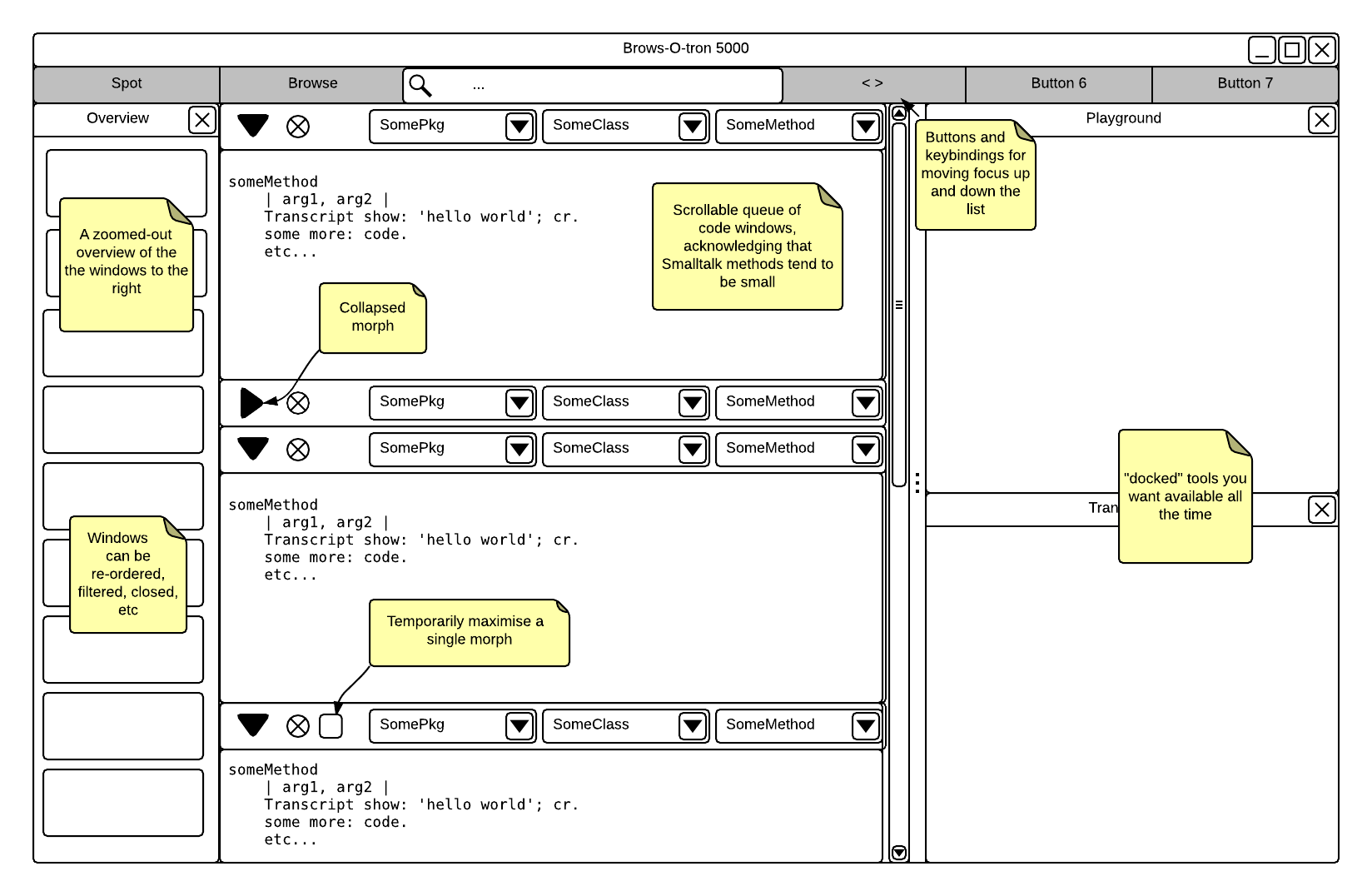
Note that what I didn't have time to address in that mockup is the idea that pop-ups like the Spotter would be the principle way to add new morphs to the central list. Also, I don't think that the list should necessarily be constrained to JUST the code half a of browser window; there could be debuggers in there, extra playgrounds, etc. -- Avdi Grimm http://avdi.org On Tue, May 19, 2015 at 3:04 PM, Avdi Grimm <avdi@avdi.org> wrote:
I dunno if this is useful to anyone, but I was rolling around concepts in my mind and this is something I came up with:
[image: Inline image 1]
This takes some queues from modern IDEs, but it also differs in that it doesn't make the assumption that you want to see just one "buffer" at a time, and that "split window mode" isn't sufficiently powerful to handle the need for lots of windows open on lots of little methods.
-- Avdi Grimm http://avdi.org
On Tue, May 19, 2015 at 1:40 PM, Esteban Lorenzano <estebanlm@gmail.com> wrote:
ah, couple of things more (out of ps :P)
I do believe Spotter will play a fundamental role in the enhancement of our IDE, but I was also thinking on some kind of âemacs style menusâ, in the sense of some guiding menus that you open with a key and you have an idea of which options you look. This could also be something integrated in the spotter in the way unity of ubuntu is going (you type âsaveâ and you have the options, etc.) Anyway⦠nothing that I found the time to test for the moment, but I will.
And none of this options will heal our âwindowitisâ decease⦠and honestly I do not have any idea how we can enhance that. To hide infinite windows into infinite tabs (or buffers) does not feels like the correct solution for me (I remember beck in my java days, I sually kept more than 20 tabs open all the time⦠same with browsers here in pharo, but now I also open inspectors, playgrounds and debuggers⦠so⦠is a complicated issue).
Or maybe Iâm wrong, and maybe just reducing the visual contamination is already a big step forward⦠who knows. Actually, we will not know until we try it⦠just saying ânoâ is not a very constructive opinion.
But in that case, the question is âwho will bell the catâ :)
Esteban
On 19 May 2015, at 19:11, Esteban Lorenzano <estebanlm@gmail.com> wrote:
On 19 May 2015, at 16:51, Esteban A. Maringolo <emaringolo@gmail.com> wrote:
2015-05-19 11:41 GMT-03:00 Avdi Grimm <avdi@avdi.org>:
It took thousands of programmers decades of work in many different languages to create this variety. I'd hate to see the smaller Pharo community pour tons of effort into re-inventing these solutions.
Which is why I'm suggesting that it may be more helpful to re-frame the problem. General purpose window management is a problem that has been solved many times over. Do you really want to do it yet again? I suspect that with some careful examination of Pharo coding workflows, you could find a way to obviate the need for zillions of windows, and solve a simpler problem instead.
+1
+1
Esteban
ps: (and two Estebanâs counts exponentially :P) pps: but there are also other problems to take into account, and thatâs also community culture. I know many people finds the amount of windows opened somekind stressing when they arrive to our little world⦠but it actually fits a purpose and change it to other solutions just because âeverybody else does itâ can probably do not work. A suitable solution for LISP does not need to be a suitable solution to Pharo, just out of the box. Which of course does not means I would not want to explore more efficient workflows. ppps: And of course, there is the effort that starting in other direction goes⦠even copying an existing IDE workflow would be a lot of work for us, so sometimes is better just to incrementally enhance, even if that means we will keep some metaphors during more time than desired. pppps: as I always say in this list, human-computer interaction is not an easy field and is very studied, so is not easily solvable with our always subjective opinion. In that sense, I completely share the feeling that we need to keep studying and experimenting with other communities experiences until we find something that we can reengineer into something we need/want.
ppppps: I ran out of âpsâ, but I couldnât resist to put five âp" in a line :)
Esteban A. Maringolo
On Wed, May 20, 2015 at 3:04 AM, Avdi Grimm <avdi@avdi.org> wrote:
I dunno if this is useful to anyone, but I was rolling around concepts in my mind and this is something I came up with:
[image: Inline image 1]
This takes some cues from modern IDEs, but it also differs in that it doesn't make the assumption that you want to see just one "buffer" at a time, and that "split window mode" isn't sufficiently powerful to handle the need for lots of windows open on lots of little methods.
Interesting idea. It might be better to use a breadcrumb rather than the three pulldowns and I think Playground tends to need more room. One idea I've contemplated, since often my many open windows result from following some path investigating senders/implementors of other senders/implementors, is that it would be useful to have a tree structure docked to the side that records that hierarchical path of investigation. This would help in cases when I want to back up a few steps to investigate another path but usually I've lost the needed window (so I just open another one). This would also help when it came time to prune an investigation, since windows often hang around longer than needed since its hard to remember which windows below to which path of investigation. Ideally you might collapse the middle items of a path. cheers -ben
On Wed, May 20, 2015 at 8:03 AM, Ben Coman <btc@openinworld.com> wrote:
Interesting idea. It might be better to use a breadcrumb rather than the three pulldowns and I think Playground tends to need more room.
Yeah I'm actually not so sure about having that part be interactive at all. The whole concept of the scrolling list of views is to embrace workflows where you open new windows rather than re-using old ones. So it might be better to have that area just be an indicator of what that view is looking at, rather than a way to re-focus it. -- Avdi Grimm http://avdi.org
Esteban A. Maringolo 2015-05-20 9:03 GMT-03:00 Ben Coman <btc@openinworld.com>:
On Wed, May 20, 2015 at 3:04 AM, Avdi Grimm <avdi@avdi.org> wrote:
I dunno if this is useful to anyone, but I was rolling around concepts in my mind and this is something I came up with:
[image: Inline image 1]
This takes some cues from modern IDEs, but it also differs in that it doesn't make the assumption that you want to see just one "buffer" at a time, and that "split window mode" isn't sufficiently powerful to handle the need for lots of windows open on lots of little methods.
Interesting idea. It might be better to use a breadcrumb rather than the three pulldowns and I think Playground tends to need more room.
One idea I've contemplated, since often my many open windows result from following some path investigating senders/implementors of other senders/implementors, is that it would be useful to have a tree structure docked to the side that records that hierarchical path of investigation. This would help in cases when I want to back up a few steps to investigate another path but usually I've lost the needed window (so I just open another one). This would also help when it came time to prune an investigation, since windows often hang around longer than needed since its hard to remember which windows below to which path of investigation. Ideally you might collapse the middle items of a path.
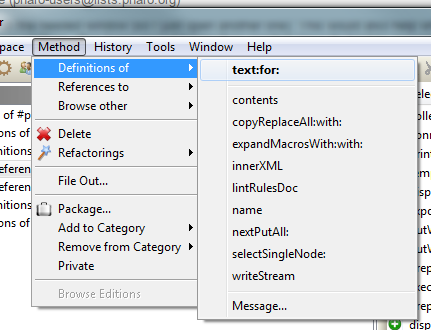
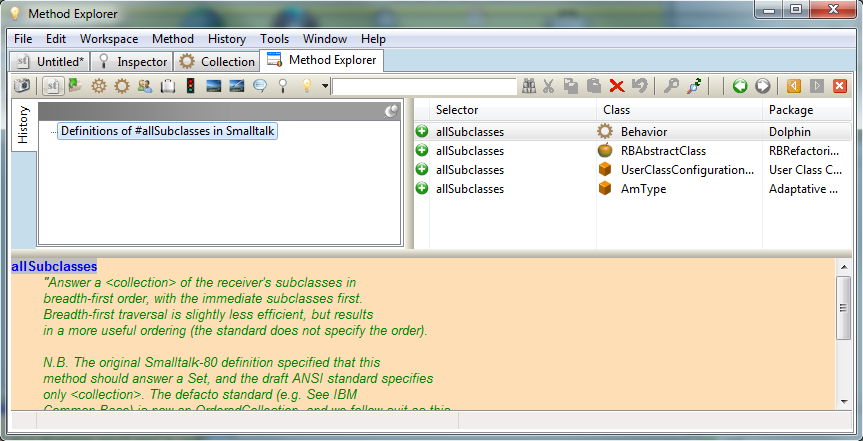
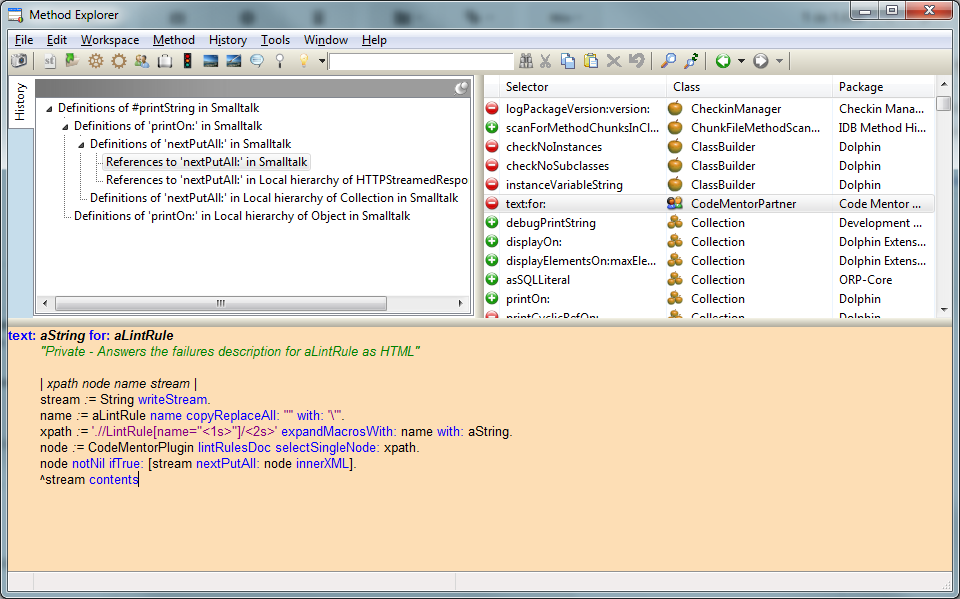
That is exactly what Dolphin Smalltalk X6 has implemented a decade ago. Once you start looking for senders/implementors the "method explorer" let you navigate through them in a single window, filtering by hierarchy too. [image: Imágenes integradas 2] It also provides you with a ready to select list of selectors in the selected method. E.g.: [image: Imágenes integradas 3] Regarding a tab based environment, Dolphin X6 also included that in a concept called "Idea Space", you can open as many idea spaces as you want, and as you browse classes, inspect objects or look for references, all the usual new windows will open inside the idea space where the command was issued. There also was the option to save the open tabs, to restore them later. And you could move between tabs using only the keyboard; in fact you could do everything without a mouse. [image: Imágenes integradas 4] If you look at the screenshots you'll see a white text input in the toolbars, it was like a quicksilver/spotter like input, you could search for classes and methods as you type with a blazing UI speed. Smalltalk used to be ahead of the mainstream, we cannot afford to have other smalltalks to be ahead of the time of Smalltalk itself. I'm not advocating the use of Dolphin over Pharo, but I think we don't even have to look outside our Smalltalk world to find better implementations of the same paradigm tools (browsers/implementors/inspectors). Regards! Esteban A. Maringolo ps: The product documentation explains some of these tools ( http://www.object-arts.com/downloads/docs/index.html), however if you have a Windows environment you can try it for yourself.
On Wed, May 20, 2015 at 10:19 AM, Esteban A. Maringolo <emaringolo@gmail.com
wrote:
Regarding a tab based environment, Dolphin X6 also included that in a concept called "Idea Space", you can open as many idea spaces as you want, and as you browse classes, inspect objects or look for references, all the usual new windows will open inside the idea space where the command was issued. There also was the option to save the open tabs, to restore them later. And you could move between tabs using only the keyboard; in fact you could do everything without a mouse.
For the record, I find tabs to be almost as much of a UI dead-end as myriad windows. They are often incompatible with the need to see several things at once, and they become unmanageable past a dozen or so. Personally I prefer environments where the number of windows/tabs/buffers is a non-issue, something managed by the environment. All I care about is: a) Navigating back and forth between the thing I'm looking at now and the last ~10 things I looked at; and b) Quickly finding and foregrounding new things by whatever searchable aspect I can remember about them. I don't want to think or care about how many old things I once looked at the environment keeps open; it is welcome to manage that on its own. Incidentally, this is exactly what it's like to use RubyMine with tabs turned off. I can navigate backwards and forwards through history, and I can find things by name, and it worries about how many buffers to keep open in the background. If I go "back" to a buffer it has closed, it re-opens it. This is complemented by the fact that it auto-saves. Having high-quality "Undo" is far more important than manually controlling when things are saved, in my experience. In the RubyMine case, it is able to visually show and undo every change that has been made since the last Git commit. -- Avdi Grimm http://avdi.org
On Wed, May 20, 2015 at 11:04 PM, Avdi Grimm <avdi@avdi.org> wrote:
On Wed, May 20, 2015 at 10:19 AM, Esteban A. Maringolo < emaringolo@gmail.com> wrote:
Regarding a tab based environment, Dolphin X6 also included that in a concept called "Idea Space", you can open as many idea spaces as you want, and as you browse classes, inspect objects or look for references, all the usual new windows will open inside the idea space where the command was issued. There also was the option to save the open tabs, to restore them later. And you could move between tabs using only the keyboard; in fact you could do everything without a mouse.
For the record, I find tabs to be almost as much of a UI dead-end as myriad windows. They are often incompatible with the need to see several things at once, and they become unmanageable past a dozen or so.
Personally I prefer environments where the number of windows/tabs/buffers is a non-issue, something managed by the environment. All I care about is:
a) Navigating back and forth between the thing I'm looking at now and the last ~10 things I looked at; and b) Quickly finding and foregrounding new things by whatever searchable aspect I can remember about them.
GTSpotter has a "history" category (not that I've used it so far, perhaps time to try). It might be an interesting experiment for GTSpotter to have an "open window" category. cheers -ben

On Wed, May 20, 2015 at 5:13 PM, Ben Coman <btc@openinworld.com> wrote:
On Wed, May 20, 2015 at 11:04 PM, Avdi Grimm <avdi@avdi.org> wrote:
On Wed, May 20, 2015 at 10:19 AM, Esteban A. Maringolo < emaringolo@gmail.com> wrote:
Regarding a tab based environment, Dolphin X6 also included that in a concept called "Idea Space", you can open as many idea spaces as you want, and as you browse classes, inspect objects or look for references, all the usual new windows will open inside the idea space where the command was issued. There also was the option to save the open tabs, to restore them later. And you could move between tabs using only the keyboard; in fact you could do everything without a mouse.
For the record, I find tabs to be almost as much of a UI dead-end as myriad windows. They are often incompatible with the need to see several things at once, and they become unmanageable past a dozen or so.
Personally I prefer environments where the number of windows/tabs/buffers is a non-issue, something managed by the environment. All I care about is:
a) Navigating back and forth between the thing I'm looking at now and the last ~10 things I looked at; and b) Quickly finding and foregrounding new things by whatever searchable aspect I can remember about them.
GTSpotter has a "history" category (not that I've used it so far, perhaps time to try).
It might be an interesting experiment for GTSpotter to have an "open window" category.
Interesting idea. Could be easily done :) Cheers, Andrei
cheers -ben

Hi, Comments below. El 20/05/15 a las 07:03, Ben Coman escribió:
On Wed, May 20, 2015 at 3:04 AM, Avdi Grimm <avdi@avdi.org <mailto:avdi@avdi.org>> wrote:
I dunno if this is useful to anyone, but I was rolling around concepts in my mind and this is something I came up with:
Inline image 1
This takes some cues from modern IDEs, but it also differs in that it doesn't make the assumption that you want to see just one "buffer" at a time, and that "split window mode" isn't sufficiently powerful to handle the need for lots of windows open on lots of little methods.
Interesting idea. It might be better to use a breadcrumb rather than the three pulldowns and I think Playground tends to need more room.
One idea I've contemplated, since often my many open windows result from following some path investigating senders/implementors of other senders/implementors, is that it would be useful to have a tree structure docked to the side that records that hierarchical path of investigation. This would help in cases when I want to back up a few steps to investigate another path but usually I've lost the needed window (so I just open another one). This would also help when it came time to prune an investigation, since windows often hang around longer than needed since its hard to remember which windows below to which path of investigation. Ideally you might collapse the middle items of a path.
cheers -ben
Attached is an screenshot[*] of my mockup for a tree-like explorative computing, which I think is in the same lines of Ben's "tree structure docked to the side that records that hierarchical path of investigation". It's wrote on Smalltalk itself and modelled as a document expressed like a tree, which can contain nested nodes of code playgrounds and documentation wrote light markup language (markdown). Its an attempt to make concrete the ideas in an old blog post[1] and I don't know how well is suited for programmers/coders (I'm not one myself), but is more about people which writes and interchanges code with prose (which is my case). [1] http://mutabit.com/offray/static/blog/output/posts/on-deepness-and-complexit... I remember finding Smalltalk in 2005 and having difficulties to be comfortable there, kind of a bittersweet sensation (still there today but in less proportion). On one hand is was a concretion of older ideas of mine about what computation could be (maleable and cognitive empowering), but on the other it was so difficult to connect with my previous experiences with documentation and scripting: The browser hierarchy and "the everything is an object" imposed to much order/paradigm for me. 10 years later, after Pharo, Moose, Leo[2], IPython[3] and others, I'm finding my place again, trying to mix the emergent nature of the tree/document/script with the more structured browser and class and object paradigm. [2] http://leoeditor.com/ [3] http://ipython.org/ If user interface is about experience, we could try to search in sharing our own experiences and mockups what Pharo could be for growing and diverse number of people, even going beyond programmers as a key about this future experience we would like to have. Cheers, Offray [*] In the screenshot you see the tree and 10 open windows, but mostly I go from playgrounds to the document tree to the class browser, switching/cycling tree windows to most of my experience.

> 2015-05-19 11:41 GMT-03:00 Avdi Grimm <avdi@avdi.org>:
>> It took thousands of programmers decades of work in many different languages
>> to create this variety. I'd hate to see the smaller Pharo community pour
>> tons of effort into re-inventing these solutions.
>>
>> Which is why I'm suggesting that it may be more helpful to re-frame the
>> problem. General purpose window management is a problem that has been solved
>> many times over. Do you really want to do it yet again? I suspect that with
>> some careful examination of Pharo coding workflows, you could find a way to
>> obviate the need for zillions of windows, and solve a simpler problem
>> instead.
Some ramblings:
1. I quite like the way the alt-browser allows you to navigate through
your code by clicking on
     methods and classes in a tree to see the code in the right-hand
pane.  Take that one step further by
     having the browser open a tab for each method that you click on, or
switch to the tab -
     if there is one open already, and you will have taken a giant step
towards most modern
     IDEs[1].

2. One way to solve the alt-tab issue is to use the OS 's window
manager, instead of managing the
     windows in the image.  This also has the added benefit of
incorporating the OS window manager's
     features and look and feel into Pharo for free.  The ability to
drag a tab out of the image window
     onto it's own display in a multi-headed setup would be very welcome
to me.

Craig

1. My reference points here are M/S Visual Studio which I use daily and
Netbeans which I use for
     mobile(Andriod) work.
The shortcut based interface has been tried and has failed. It works well for medium size complexity but to rely the whole functionality of a very complex application to shortcuts is not anything shorter than insane. So shortcuts are without any doubt useful and should be used by all apps but they can go so far. Add to that the emacs shortctus are mess , a huge mess. Many of them make zero logical sense with some really weird keyboard combinations. Emacs has not solve the problem of UI it has made severely worse and the same story goes for Vim. Both projects rely on the obsession of coders with relying on command line interfaces. Command line are of course much simpler to customise and produce but design wise they come with some inherit weakness. The thought that I need to search for a buffer, setup buffer groups , create tabs , use a weird complex shortcut etc when I just can use my mouse and in one second click the window I want is a no brainer for me. Its not just simple , its better. Bare in mind, I come from Emacs, actually it was Emacs people (at #emacs in irc) that introduced me to squeak and then to pharo. Without emacs I would not be here . I still use #emacs to edit files because is such a great editor. I love emacs . But a good UI ? Nope, definitely not in my book. Actually Emacs for me is proof why text based UIs will never be able to compete with GUIs because emacs is one of the best and still very difficult to use. Do I want some of the emacs buffer management tools in Pharo ? Sure Will they improve the workflow ? Absolutely Will they solve the problem ? Nope I think Spotter can play a very good role in the management of windows to implement functionality similar to Emacs. But no I wont trade the Pharo mess for the Emacs mess not even in a 1 million years. I was raised with text based interfaces and command lines since 1988 and I always had and will forever hate them. For me at least the future is AI GUIs , GUIs that watch user actions , understand his habbits and automate the workflow with minimum amount of manual customization. There was a tool once promoted here that watched the usage of windows and the ones least used were closed which I think is a step towards the right direction but its definitely a very long road ahead. On Tue, May 19, 2015 at 5:42 PM Avdi Grimm <avdi@avdi.org> wrote:
On Tue, May 19, 2015 at 3:53 AM, Dimitris Chloupis <kilon.alios@gmail.com> wrote:
About general GUI and UI designs its not any less nightmarish to open multiple windows in Pharo than it is to open multiple buffers in emacs. The diffirence between the two is that with emacs you have the nightmare of lack of any GUI while in pharo you have the lack of sophisticated editing.
With respect, this is manifestly untrue. Buffer management is a solved problem in Emacs. In fact, it's been solved and re-solved many times over, to the point where it can suit anyone's tastes. Whether you want:
* To simply toggle between the last few buffers * To list, sort, and filter buffers quickly until you find the one you want * To do fuzzy-completed searches on buffers * To manage buffers in tabs and tab groups * To have sidebars listing open buffers * To kill or operate on many buffers at once based on what project they are in or some other criteria * To have a fully window-managed interface that can save, reload, and switch between different window configurations for different contexts at a keypress * To forget about buffers completely, and just navigate to the thing you want to see (and let Emacs worry about what buffers happen to be in memory)
(And lest anyone say that buffer management is a different problem from window management, remember that Emacs is an application environment, and that a "buffer" may be a full application window, such as an IRC channel or even a Smalltalk-style browser.)
Whether you want any of these features or many others, there are mature and well-tests solutions for all of them. Whereas as many longtime users have confirmed in this thread, Smalltalk environments don't even have the window management to match the Emacs built-in features, let alone the mature extension ecosystem.
I made my original seven-minute Pharo video with the intent of getting traditionally IDE-averse Ruby programmers to realize some of the things they are missing. It's way too easy to say "oh, no one else has solved this any better". And as a result, a number of people said "wow, I usually hate IDEs but I need to check this out". But this cuts both ways.
Pharo is doing some good work on this area but realistically , the community is too small to solve such a huge problem even with pharo ease of use.
This I agree with completely.
My favorite OS for programming is Linux. In linux, window management is a problem that has been solved many times over. There are dozens of window managers (hundreds, if you count inactive projects). There are high-tech compositing window managers that can do MacOS-style Expose zoom-out for quickly locating windows. There are WMs that rigidly control where windows show up, based on a policy you decide. There are all kinds of different aids for quickly listing and navigating between windows.
It took thousands of programmers decades of work in many different languages to create this variety. I'd hate to see the smaller Pharo community pour tons of effort into re-inventing these solutions.
Which is why I'm suggesting that it may be more helpful to re-frame the problem. General purpose window management is a problem that has been solved many times over. Do you really want to do it yet again? I suspect that with some careful examination of Pharo coding workflows, you could find a way to obviate the need for zillions of windows, and solve a simpler problem instead.
On Tue, May 19, 2015 at 11:14 AM, Dimitris Chloupis <kilon.alios@gmail.com> wrote:
The shortcut based interface has been tried and has failed.
The thought that I need to search for a buffer, setup buffer groups , create tabs , use a weird complex shortcut etc when I just can use my mouse and in one second click the window I want is a no brainer for me. Its not just simple , its better.
You clearly have different tastes than mine, and that's fine. However, if you're going to deal with that by saying that my experiences are invalid, and compound it by talking about things you clearly haven't actually tried (what does "create tabs" or "setup buffer groups" even mean?) I'm not going to bother responding to you anymore.
No reason to be offended. I am merely stated my opinion on the subject , obviously personal taste plays a role . I never said your experiences are invalid, I can assure you if that was my intention you will be clearly reading it inside my text. Afterall I was the one that recommended you in IRC to bring this discussion about Alt+TAB in the mailing list to find a solution to your problem. I do however disagree with the idea that emacs has a good interface and I am far from the only one. Again we come down to personal opinion. But of course you are welcome to disagree, I have no problem with that nor I am here to convince people that my opinion is valid and their own is invalid. I am familiar with some of the features you described as I already said , I am an emacs users for quite some time now. Not an emacs power user , just a guy that loves to use emacs from time to time. Because of the opinion I have expressed, I try to keep as few windows or buffers open as possible. The remark on shortcuts is not just ranting, I use Blender for 3d graphics on daily basis and shortcuts have become a serious issue. The application has grown so large that is unmaintainable to demand from user to memorise 1000 shortcuts so there is a very active discussion between Blender developers how to deal with this problem. A recent addition was pie menus, right click menus that use mouse gestures to navigate as quickly as a shortcut but with no demand on memorization. Its not an easy problem to solve by any means, so yes when you said that emacs has solved it, I have to confess I wished that it was that easy for me . But I do value your opinion and your experience even If I disagree. Its important to have such discussion , if people say "emacs way of doing things is great" then so be it. Let's copy these Emacs features right away, I am all for it. Pharo is not just for me, but for all of us. I do also want more people to use Pharo and find it more user friendly. On Tue, May 19, 2015 at 6:28 PM, Avdi Grimm <avdi@avdi.org> wrote:
On Tue, May 19, 2015 at 11:14 AM, Dimitris Chloupis <kilon.alios@gmail.com
wrote:
The shortcut based interface has been tried and has failed.
The thought that I need to search for a buffer, setup buffer groups , create tabs , use a weird complex shortcut etc when I just can use my mouse and in one second click the window I want is a no brainer for me. Its not just simple , its better.
You clearly have different tastes than mine, and that's fine. However, if you're going to deal with that by saying that my experiences are invalid, and compound it by talking about things you clearly haven't actually tried (what does "create tabs" or "setup buffer groups" even mean?) I'm not going to bother responding to you anymore.
On Tue, May 19, 2015 at 11:45 AM, Avdi Grimm <avdi@avdi.org> wrote:
On Mon, May 18, 2015 at 11:06 PM, Ben Coman <btc@openinworld.com> wrote:
As a step in this direction, the Window Menu (small arrow in title bar) item "Create window group" may provide part of the behaviour you are looking for.
Interesting! How does one add more than one window to the group? Is there more info on this somewhere?
I see kilon linked to a nice video, but I just wanted to add... one nice enhancement for this would be to emulate behaviour of chrome where, while still dragging, hovering over the tab area temporarily fits the window into the group. cheers -ben

Oh, thank you for this one ! Maybe we could add a little paragraph about it on UPBE! That's really usefull On 19 May 2015 at 05:06, Ben Coman <btc@openinworld.com> wrote:
On Tue, May 19, 2015 at 7:08 AM, Avdi Grimm <avdi@avdi.org> wrote:
On Sat, May 16, 2015 at 4:23 PM, jtuchel@objektfabrik.de <jtuchel@objektfabrik.de> wrote:
I mostly work in other Smalltalk environments than Pharo, like VA Smalltalk. It has native windows and so the ability to switch between windows using alt-tab is there. I must admit that there is a certain threshold in the number of open windows when this is not really helpful any more. I tend to hit that number pretty fast in a typical Smalltalk coding/debugging sessions.
Things have changed in Win 7, because there I can use the window manager to close the windows right in the window switcher. That makes perfect sense if you have 15 inspectors open, none of which shows current data or instances any more. Or if one of them does, I can't decide which one ;-)
So sometimes I wish for features like "close all windows of this kind" to kill all inspectors, for example.
What I want to say with this that I am not really using alt-tab to switch between windows, but rather to kill a few to come down to a sensible number ;-) But I understand why you miss it. For Pharo, there is a special problem: it is its own windowing environment, so it should probably better not use the O/S' key combination to switch its windows, right?
Just as some food for thought for anyone contemplating this problem:
Sometimes problems like this are indicative of deeper usability issues. Decades ago, it was just sort of assumed that the "right" way to deal with windows was to have a dedicated window for every "thing" in your system. To some degree, Mac OS, Wind95, and OS/2 all took this point of view. For instance, every folder you double-clicked on would open up a new file manager window, and this got to be such a mess that some OSes included "secret" shortcuts for killing them all at once.
Then the web started to take off, and UX designers started rethinking the whole paradigm. They started keeping things in the same window, but adding back/forward buttons, and navigation histories, and sidebars, and address bars, and tabs, and other affordances to make it easier to switch between "things" without necessarily adding more windows.
These days, most IDEs and editors have followed suit. I can't think of a single editor in common use among the programmers I know which encourages multiple windows. Whether it's Vim, Emacs, Sublime, IntelliJ, while you *can* open lots of windows if you really want to, they all focus on making it easy to manage lots of buffers in a single window rather than encouraging lots of windows.
Personally, I'm a fan of this trend. I'm much happier typing a few characters to auto-complete the buffer I want to return to in Emacs, than I am hunting around in an OS window list for it.
This is all a long-winded way of saying: just because this is currently a problem, doesn't mean it's the *right* problem. It would be interesting to see what a "fewer windows" approach to Smalltalk development might look like.
This is an interesting UI area to explore. As a step in this direction, the Window Menu (small arrow in title bar) item "Create window group" may provide part of the behaviour you are looking for. cheers -ben
-- Cheers Cyril Ferlicot
Avdi, I wrote a series of articles on th etopic back in 2009: you can find the first article here: https://joachimtuchel.wordpress.com/2009/07/02/whats-in-a-smalltalk-browser-... Back then, I tried to share my thoughts on what I think A Smalltalk IDE should look like these days (well, those days ;-) ). I've seen some of the ideas presented and taken further at ESUG/IWST talks over the years, some of which I really liked, but - as far as I can tell - none of these projects went anywhere. None of the commercial vendors made any attempts to work on window clutter or streamlining their IDEs. Smalltalk Browsers are still the same as they were in 1981, all that's been added is a little bit of colourful button bars here and there and tabbing (most implementations even managed to get that wrong). I think the conclusion I came to was that a Smalltalk IDE has two main tasks: navgating code and editing code Actually three: debugging which adds some stuff on top of the other two. I think we all can agree on that Smalltalk's editing facilities mostly sucked for decades. The lame excuse was that real Smalltalkers write methods of no more than 6 lines. Fortnunately, we seem to have accepted that either the assumption about real Smalltalkers was wrong or that even 6 lines of code are worth syntax highlighting, code completion and all kinds of assistance for the developer. I also think that navigating code is extremely important. The fact that each browser comes with its own navigation area that takes up about 50 percent of the real estate of the browser, however, is just plain wrong. We are missing clever navigation facilities in Smalltalk. I think the GT Tools are a great start in improving things and they are much better than anything we have had for 40 years now, but it is just a step on a long stairway. Other Smalltalk implementations literally have nothing in this area that wasn't there in the 80ies. On the other hand, what Smalltalk has offered for code navigation and retrieval in the 80ies, was about 25-30 years ahead of the mainstream. So I am not saying Smalltalk's environment is bad per se. It could just be a lot better if more research or experimentation was done in the area. The GT tools show that it is worth it and can boost Smalltalk developers' productivity a lot. Joachim Am 19.05.15 um 01:08 schrieb Avdi Grimm:
On Sat, May 16, 2015 at 4:23 PM, jtuchel@objektfabrik.de <mailto:jtuchel@objektfabrik.de> <jtuchel@objektfabrik.de <mailto:jtuchel@objektfabrik.de>> wrote:
I mostly work in other Smalltalk environments than Pharo, like VA Smalltalk. It has native windows and so the ability to switch between windows using alt-tab is there. I must admit that there is a certain threshold in the number of open windows when this is not really helpful any more. I tend to hit that number pretty fast in a typical Smalltalk coding/debugging sessions.
Things have changed in Win 7, because there I can use the window manager to close the windows right in the window switcher. That makes perfect sense if you have 15 inspectors open, none of which shows current data or instances any more. Or if one of them does, I can't decide which one ;-)
So sometimes I wish for features like "close all windows of this kind" to kill all inspectors, for example.
What I want to say with this that I am not really using alt-tab to switch between windows, but rather to kill a few to come down to a sensible number ;-) But I understand why you miss it. For Pharo, there is a special problem: it is its own windowing environment, so it should probably better not use the O/S' key combination to switch its windows, right?
Just as some food for thought for anyone contemplating this problem:
Sometimes problems like this are indicative of deeper usability issues. Decades ago, it was just sort of assumed that the "right" way to deal with windows was to have a dedicated window for every "thing" in your system. To some degree, Mac OS, Wind95, and OS/2 all took this point of view. For instance, every folder you double-clicked on would open up a new file manager window, and this got to be such a mess that some OSes included "secret" shortcuts for killing them all at once.
Then the web started to take off, and UX designers started rethinking the whole paradigm. They started keeping things in the same window, but adding back/forward buttons, and navigation histories, and sidebars, and address bars, and tabs, and other affordances to make it easier to switch between "things" without necessarily adding more windows.
These days, most IDEs and editors have followed suit. I can't think of a single editor in common use among the programmers I know which encourages multiple windows. Whether it's Vim, Emacs, Sublime, IntelliJ, while you *can* open lots of windows if you really want to, they all focus on making it easy to manage lots of buffers in a single window rather than encouraging lots of windows.
Personally, I'm a fan of this trend. I'm much happier typing a few characters to auto-complete the buffer I want to return to in Emacs, than I am hunting around in an OS window list for it.
This is all a long-winded way of saying: just because this is currently a problem, doesn't mean it's the *right* problem. It would be interesting to see what a "fewer windows" approach to Smalltalk development might look like.
-- Avdi Grimm http://avdi.org
-- ----------------------------------------------------------------------- Objektfabrik Joachim Tuchel mailto:jtuchel@objektfabrik.de Fliederweg 1 http://www.objektfabrik.de D-71640 Ludwigsburg http://joachimtuchel.wordpress.com Telefon: +49 7141 56 10 86 0 Fax: +49 7141 56 10 86 1
On Mon, May 18, 2015 at 11:41 PM, jtuchel@objektfabrik.de < jtuchel@objektfabrik.de> wrote:
The fact that each browser comes with its own navigation area that takes up about 50 percent of the real estate of the browser, however, is just plain wrong.
I was just thinking about this the other day. I don't think there's anything fundamentally wrong with the four-pane approach (although there are other perfectly valid approaches as well). But once you've found what you're looking for, the panes take up *way* more screen space than is necessary just to remind you where you are. It would be neat to see a version where the panes fold away down to a "location" bar when you're not actively navigating to a new method. -- Avdi Grimm http://avdi.org

On 19-05-15 01:08, Avdi Grimm wrote:
Then the web started to take off,
throwing UI design back two decades ;),
and UX designers started rethinking the whole paradigm. They started keeping things in the same window, but adding back/forward buttons, and navigation histories, and sidebars, and address bars, and tabs, and other affordances to make it easier to switch between "things" without necessarily adding more windows.
We found that what works well for browsing and reading text not necessarily works for code. I regularly have 80 tabs open in 10 windows of more or less interesting stuff to read. Having a lot of edited buffers open at the same time is a problem, if only because "save all" might run into dependency issues. The current design stimulates working in short cycles, and keeping code well-organized. I'd like not to lose that aspect of the UI. And I also like a navigation history.
These days, most IDEs and editors have followed suit. I can't think of a single editor in common use among the programmers I know which encourages multiple windows.
Which seems like a mistake, as displays keep growing in size and the IDEs and editors in common use have no way to use the space a 4K display offers.
Whether it's Vim, Emacs, Sublime, IntelliJ, while you *can* open lots of windows if you really want to, they all focus on making it easy to manage lots of buffers in a single window rather than encouraging lots of windows.
That actually sounds like a really bad idea when you have a large display. I want to see all relevant code at the same time. Switching is slow.
Personally, I'm a fan of this trend. I'm much happier typing a few characters to auto-complete the buffer I want to return to in Emacs, than I am hunting around in an OS window list for it.
I would welcome an auto-complete based navigation to one of my open windows.
This is all a long-winded way of saying: just because this is currently a problem, doesn't mean it's the *right* problem. It would be interesting to see what a "fewer windows" approach to Smalltalk development might look like.
A simple first step is Hopscotch. https://youtu.be/d6tj6KQtD1s On a small-screen device like an iPad I like the approach taken by Cel: http://cel.inf.usi.ch/ And have you seen Gaucho? http://www.inf.usi.ch/faculty/lanza/Downloads/Oliv2013a.pdf Stephan

See, this is why I love Smalltalk.... Tell me a different environment where you can actually have such discussion. To make this a little clearer. Pharo and Squeak are solely open source. So one might say,.... well this can be done/extended/changed in Eclipse, too. How about VW and VAST? Well, you can change the development environment and it's behavior according to your needs, too. Want a putton to print something out for development purpose? Just add it :-D Try this with Visual Studio and xCode on that level. Avdi if you think the things you have seen so far are cool?! Well, that is just the beginning and you actually can make your environment easily even cooler,... once you have taken the first hurdles. With GlamourToolKit, Pharo community is even bringing this to a more abstract level and I love playing with it. I wish I was deeper into Pharo already. Isn't there somebody who could just hack a small .st file to file-in the desired behavior that Avdi is looking for? A temporary hack? Cheers! Sebastian On 2015-05-16 1:11 PM, Tudor Girba wrote:
Hi Avdi,
Welcome.
As the others mentioned, this part of Pharo is not at all ideal. Please bare with us.
Cheers, Doru
On Sat, May 16, 2015 at 12:52 AM, Avdi Grimm <avdi@avdi.org <mailto:avdi@avdi.org>> wrote:
Hey folks! I've dabbled with smalltalk here and there over the years, but recently I've settled in to learn Pharo in earnest. A few of you might have seen the videos I've been putting up; they seem to be making the rounds on Twitter. I just want to say I've felt really welcomed by all the people who have commented with helpful tips, or offered to help with my exploration :-)
I've run into my first big blocker as a newcomer. Like many programmers I'm a fan of keeping my hands on the keyboard. Now, I'm more flexible on this than some. I recognize that Pharo is a visual environment, and it makes sense to explore it with a mouse. And some interactions just make more sense with a mouse.
That said, no matter what windowing environment I'm in, I find the ability to quickly cycle between windows without leaving the keyboard pretty crucial. One Windows or Ubuntu I would normally do this with Alt-Tab or Super-Tab. On MacOS it's Cmd-Tab.
I've been trying to figure out how to do this in Pharo. I've looked for answers with Google, SO, and on IRC, and I've come up blank. I'm starting to think it can't be done.
So, I've come here for your help. Is there a way to cycle between windows? Or is anyone working on it? Or, perhaps, am I missing an element of the Pharo programming workflow which renders it unneeded?
Many thanks,
-- Avdi
-- www.tudorgirba.com <http://www.tudorgirba.com>
"Every thing has its own flow"
participants (18)
-
 Andrei Chis
 -
 Avdi Grimm
 -
 Ben Coman
 -
 Carlo
Carlo -
 Craig Johnson
 -
 Cyril Ferlicot
 -
 Dimitris Chloupis
 -
 Esteban A. Maringolo
 -
 Esteban Lorenzano
 -
 jtuchel@objektfabrik.de
 -
 Laurent
 -
 Nicolai Hess
 -
 Offray Vladimir Luna Cárdenas
 -
 Sean P. DeNigris
 -
 Sebastian Heidbrink
 -
 Stephan Eggermont
 -
 stepharo
 -
 Tudor Girba