Hi Mariano, On Mon, May 4, 2015 at 2:21 AM, Mariano Martinez Peck <marianopeck@gmail.com
wrote:
Hi guys,
I am already enjoying GTSpotter every day. I cannot believe how good it is. And I tell you....I have been using this kind of tool since the first available one we have YEARS ago (Algernon, then Spotlight etc...). And GTSpotter is a life better than those. So...thank you VERY MUCH.
We are glad you like it :)
My only problem right now is that I am afraid I am not yet using 100% of it's power. I think it has features that I read randomly in different emails and posts so I am afraid it has more...
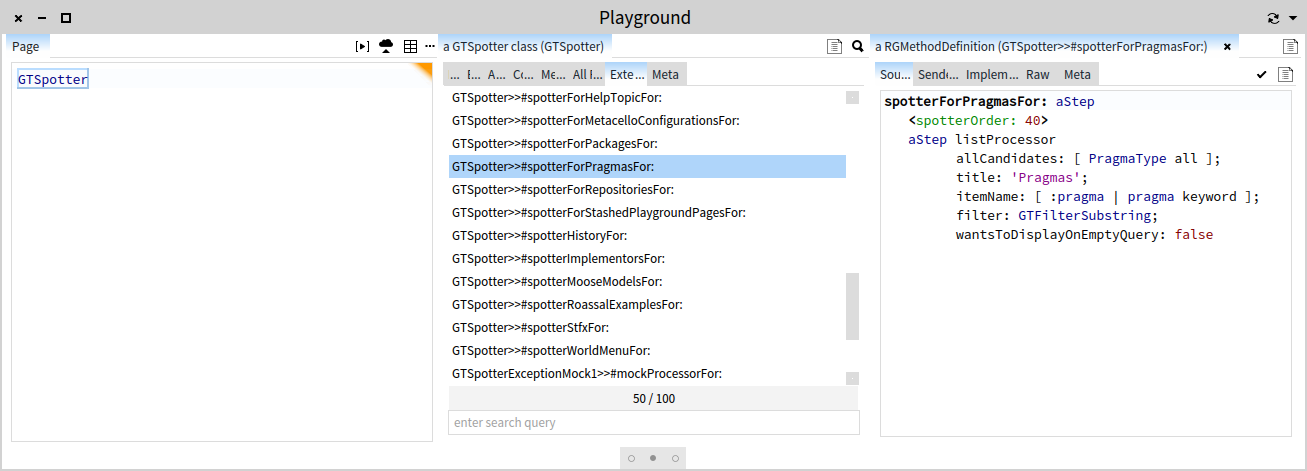
Here is a thing: there are quite a number of use cases supported out of the box, but if you did not already extend Spotter for your own domain to find specific objects, you are under using it :). This is what moldable means. But, if you want to know what Spotter extensions exists in your image, just inspect the GTSpotter class and you can browse the code and play with the extensions. For example, below is the extension that helps you search for pragmas: [image: Inline image 1] A couple of questions:
1) Is there a way to force GTSpotter preview via preferences or somehow via code so that I can build it as part of my app images? I know GTSpotter then remembers that but I would like to build images directly with that (some users of my images may now be aware of such features so I want them to see it out of the box).
See the response from Andrei.
2) How does it work regex or similar when you search? I seem to see things like "M B" or "M #a" etc...so...which are all symbols (#, * , ^ etc) allowed?
By default, the search is a simple string matching (not even multiple words). But, if you want to search for something in particular, just add an extension that matches what you are looking for. For example, in the extension that searches for pragmas, we use GTFilterSubstring. If you look in the subclass of GTStringFilter, you will see a number of other possibilities including GTFilterRegex. 3) Are there more "actions" than the default action? For example, when
browser classes, methods etc... default action opens a new system browser. So..are there OTHER possible actions? If true, which ones? How can I know all of the available ones?
Not for now. Btw, the goal of GT is to make all actions as visible as possible. We are still working on this, but GTSpotter has all actions mapped on some visual cue. That means that you can do everything with both shortcuts and mouse.
4) GTPlayground seems to have tabs and it seems I can even rename a current playground. However...I cannot seem to be able to add more tabs and then easily move across tabs. I have to open other playgrounds for it. So...I am doing something wrong? If multiple tabs are not allow then I think the tabs are a bit confusing here.
It's not possible to add more tabs. At least not yet. Glamour renders labels as "tabs" because if you think about it, there is no real distinction between having multiple tabs and having only one. In both situation you still want to label the current pane. Anyway, we will revisit this rendering in the near future. Cheers, Doru 5) What are GTPlayground "Bindings" and in which case does the "Refresh"
make sense?
I probably have more questions but I wanted to ask this at least.
Thanks in advance,
-- Mariano http://marianopeck.wordpress.com
-- www.tudorgirba.com "Every thing has its own flow"