
Hi guys, I am already enjoying GTSpotter every day. I cannot believe how good it is. And I tell you....I have been using this kind of tool since the first available one we have YEARS ago (Algernon, then Spotlight etc...). And GTSpotter is a life better than those. So...thank you VERY MUCH. My only problem right now is that I am afraid I am not yet using 100% of it's power. I think it has features that I read randomly in different emails and posts so I am afraid it has more... A couple of questions: 1) Is there a way to force GTSpotter preview via preferences or somehow via code so that I can build it as part of my app images? I know GTSpotter then remembers that but I would like to build images directly with that (some users of my images may now be aware of such features so I want them to see it out of the box). 2) How does it work regex or similar when you search? I seem to see things like "M B" or "M #a" etc...so...which are all symbols (#, * , ^ etc) allowed? 3) Are there more "actions" than the default action? For example, when browser classes, methods etc... default action opens a new system browser. So..are there OTHER possible actions? If true, which ones? How can I know all of the available ones? 4) GTPlayground seems to have tabs and it seems I can even rename a current playground. However...I cannot seem to be able to add more tabs and then easily move across tabs. I have to open other playgrounds for it. So...I am doing something wrong? If multiple tabs are not allow then I think the tabs are a bit confusing here. 5) What are GTPlayground "Bindings" and in which case does the "Refresh" make sense? I probably have more questions but I wanted to ask this at least. Thanks in advance, -- Mariano http://marianopeck.wordpress.com

I am by no means an expert but I know some things. I share a lot of your questions too. 5) What are GTPlayground "Bindings" and in which case does the "Refresh"
make sense?
The bindings show which variables have been defined in the Playground's workspace and which object are they linked to. Variables are created when you execute code such as: *number := 24.* Have you executed code like below: *| text |* *text := 'Hello ninjas'.* This wouldn't generate a binding. To know what's binded is important so you know if you are leaking objects or if you have unwittingly declared a variable and you script is working oddly.
On Sun, May 3, 2015 at 9:36 PM, Sergio Fedi <sergio.fedi@gmail.com> wrote:
I am by no means an expert but I know some things.
Part of the Pharo philosophy is that there isn't stupid questions and another is that no one should be afraid of answering.
I share a lot of your questions too.
5) What are GTPlayground "Bindings" and in which case does the "Refresh"
make sense?
The bindings show which variables have been defined in the Playground's workspace and which object are they linked to.
Variables are created when you execute code such as:
*number := 24.*
Have you executed code like below:
*| text |* *text := 'Hello ninjas'.*
This wouldn't generate a binding.
To know what's binded is important so you know if you are leaking objects or if you have unwittingly declared a variable and you script is working oddly.
Thanks Sergio, it clearly was that. And it explains why I never see it filled....because I never eve use bindings ( I always define the temp vars). But why I do that is another off topic reason ;) -- Mariano http://marianopeck.wordpress.com

On 4 May 2015 at 02:21, Mariano Martinez Peck <marianopeck@gmail.com> wrote:
Hi guys,
I am already enjoying GTSpotter every day. I cannot believe how good it is. And I tell you....I have been using this kind of tool since the first available one we have YEARS ago (Algernon, then Spotlight etc...). And GTSpotter is a life better than those. So...thank you VERY MUCH.
My only problem right now is that I am afraid I am not yet using 100% of it's power. I think it has features that I read randomly in different emails and posts so I am afraid it has more...
A couple of questions:
1) Is there a way to force GTSpotter preview via preferences or somehow via code so that I can build it as part of my app images? I know GTSpotter then remembers that but I would like to build images directly with that (some users of my images may now be aware of such features so I want them to see it out of the box).
2) How does it work regex or similar when you search? I seem to see things like "M B" or "M #a" etc...so...which are all symbols (#, * , ^ etc) allowed?
3) Are there more "actions" than the default action? For example, when browser classes, methods etc... default action opens a new system browser. So..are there OTHER possible actions? If true, which ones? How can I know all of the available ones?
4) GTPlayground seems to have tabs and it seems I can even rename a current playground. However...I cannot seem to be able to add more tabs and then easily move across tabs. I have to open other playgrounds for it. So...I am doing something wrong? If multiple tabs are not allow then I think the tabs are a bit confusing here.
Hi, for the playground I found it weird too. The tab and the name are not for multi tab. If you name a tab and save the content (alt + s), if you close the tab you can reopen it with GTSpotter. (for example if you name your tab "MarianoWorkToDo" and you look for "MarianoWorkToDo" on GTSpotter you'll fin your playground. You can apparently also name your tab "customScript" and that will save your script into you "package-stash" folder. (you can change the folder into the settings of glamour).
5) What are GTPlayground "Bindings" and in which case does the "Refresh" make sense?
I probably have more questions but I wanted to ask this at least.
Thanks in advance,
-- Mariano http://marianopeck.wordpress.com
-- Cheers Cyril Ferlicot
On Sun, May 3, 2015 at 9:51 PM, Cyril Ferlicot <cyril.ferlicot@gmail.com> wrote:
On 4 May 2015 at 02:21, Mariano Martinez Peck <marianopeck@gmail.com> wrote:
Hi guys,
I am already enjoying GTSpotter every day. I cannot believe how good it is. And I tell you....I have been using this kind of tool since the first available one we have YEARS ago (Algernon, then Spotlight etc...). And GTSpotter is a life better than those. So...thank you VERY MUCH.
My only problem right now is that I am afraid I am not yet using 100% of it's power. I think it has features that I read randomly in different emails and posts so I am afraid it has more...
A couple of questions:
1) Is there a way to force GTSpotter preview via preferences or somehow via code so that I can build it as part of my app images? I know GTSpotter then remembers that but I would like to build images directly with that (some users of my images may now be aware of such features so I want them to see it out of the box).
2) How does it work regex or similar when you search? I seem to see things like "M B" or "M #a" etc...so...which are all symbols (#, * , ^ etc) allowed?
3) Are there more "actions" than the default action? For example, when browser classes, methods etc... default action opens a new system browser. So..are there OTHER possible actions? If true, which ones? How can I know all of the available ones?
4) GTPlayground seems to have tabs and it seems I can even rename a current playground. However...I cannot seem to be able to add more tabs and then easily move across tabs. I have to open other playgrounds for it. So...I am doing something wrong? If multiple tabs are not allow then I think the tabs are a bit confusing here.
Hi, for the playground I found it weird too. The tab and the name are not for multi tab. If you name a tab and save the content (alt + s), if you close the tab you can reopen it with GTSpotter. (for example if you name your tab "MarianoWorkToDo" and you look for "MarianoWorkToDo" on GTSpotter you'll fin your playground. You can apparently also name your tab "customScript" and that will save your script into you "package-stash" folder. (you can change the folder into the settings of glamour).
Indeed. Thanks for reminding me about that. I wonder if there is a less confusing way of defining a name than using a one single tab. Cheers,
5) What are GTPlayground "Bindings" and in which case does the "Refresh" make sense?
I probably have more questions but I wanted to ask this at least.
Thanks in advance,
-- Mariano http://marianopeck.wordpress.com
-- Cheers Cyril Ferlicot
-- Mariano http://marianopeck.wordpress.com
On Sun, May 3, 2015 at 9:21 PM, Mariano Martinez Peck <marianopeck@gmail.com
wrote:
Hi guys,
I am already enjoying GTSpotter every day. I cannot believe how good it is. And I tell you....I have been using this kind of tool since the first available one we have YEARS ago (Algernon, then Spotlight etc...). And GTSpotter is a life better than those. So...thank you VERY MUCH.
What is so funny is that I was reviewing an old blog of mine: https://marianopeck.wordpress.com/2012/05/19/pharo-tips-and-tricks/ and the new gt tools and latest Pharo 4.0 almost removes half of my needed "tricks"
Does these new changes justify an edit of that blog entry? Maybe a link? â(I'm reading it right now)
On Sun, May 3, 2015 at 10:54 PM, Sergio Fedi <sergio.fedi@gmail.com> wrote:
Does these new changes justify an edit of that blog entry?
Maybe a link?
â(I'm reading it right now)
ufff yeah, should be at least half re-written hahahahaha. Lots of things have improved since then -- Mariano http://marianopeck.wordpress.com

On Mon, May 4, 2015 at 3:40 AM, Mariano Martinez Peck <marianopeck@gmail.com
wrote:
On Sun, May 3, 2015 at 9:21 PM, Mariano Martinez Peck < marianopeck@gmail.com> wrote:
Hi guys,
I am already enjoying GTSpotter every day. I cannot believe how good it is. And I tell you....I have been using this kind of tool since the first available one we have YEARS ago (Algernon, then Spotlight etc...). And GTSpotter is a life better than those. So...thank you VERY MUCH.
What is so funny is that I was reviewing an old blog of mine: https://marianopeck.wordpress.com/2012/05/19/pharo-tips-and-tricks/ and the new gt tools and latest Pharo 4.0 almost removes half of my needed "tricks"
Two more tricks from spotter just in case you missed them: - copying an URL with a smalltalk code from Sven's service for sharing code in Spotter will show you the code; on enter a playground is opened with that code (to try it out: http://ws.stfx.eu/57CRUZKXOUIO) - you also can search through all dirty packages; if you dive into a package and choose a repo on enter you can directly commit that package. Though with the new support from versioner that feature is no longer so impressive :) Cheers, Andrei

On 04 May 2015, at 11:10, Andrei Chis <chisvasileandrei@gmail.com> wrote:
- copying an URL with a smalltalk code from Sven's service for sharing code in Spotter will show you the code; on enter a playground is opened with that code (to try it out: http://ws.stfx.eu/57CRUZKXOUIO)
Ah, I always wondered how to do that. Great! But, but, impossible to figure out yourself, maybe you guys need to make more screencasts, ...
- copying an URL with a smalltalk code from Sven's service for sharing code in Spotter will show you the code; on enter a playground is opened with that code (to try it out: http://ws.stfx.eu/57CRUZKXOUIO)
Ah, I always wondered how to do that. Great!
But, but, impossible to figure out yourself, maybe you guys need to make more screencasts, ...
The solution should be that the tools are more transparent and obvious about what they can do, and the functionalitu they provide. We shouldn't rely on the user to see an external resource prior to using the tool.

On Mon, May 4, 2015 at 8:21 AM, Mariano Martinez Peck <marianopeck@gmail.com
wrote:
Hi guys,
I am already enjoying GTSpotter every day. I cannot believe how good it is. And I tell you....I have been using this kind of tool since the first available one we have YEARS ago (Algernon, then Spotlight etc...). And GTSpotter is a life better than those. So...thank you VERY MUCH.
My only problem right now is that I am afraid I am not yet using 100% of it's power. I think it has features that I read randomly in different emails and posts so I am afraid it has more...
A couple of questions:
1) Is there a way to force GTSpotter preview via preferences or somehow via code so that I can build it as part of my app images? I know GTSpotter then remembers that but I would like to build images directly with that (some users of my images may now be aware of such features so I want them to see it out of the box).
2) How does it work regex or similar when you search? I seem to see things like "M B" or "M #a" etc...so...which are all symbols (#, * , ^ etc) allowed?
3) Are there more "actions" than the default action? For example, when browser classes, methods etc... default action opens a new system browser. So..are there OTHER possible actions? If true, which ones? How can I know all of the available ones?
4) GTPlayground seems to have tabs and it seems I can even rename a current playground. However...I cannot seem to be able to add more tabs and then easily move across tabs. I have to open other playgrounds for it. So...I am doing something wrong? If multiple tabs are not allow then I think the tabs are a bit confusing here.
+1. I find myself wanting multiple tabs, even though I'm not sure of the semantics.
5) What are GTPlayground "Bindings" and in which case does the "Refresh" make sense?
Maybe even <Bindings> could create a new tab of its own. cheers -ben
Hi, On Mon, May 4, 2015 at 2:21 AM, Mariano Martinez Peck <marianopeck@gmail.com
wrote:
Hi guys,
I am already enjoying GTSpotter every day. I cannot believe how good it is. And I tell you....I have been using this kind of tool since the first available one we have YEARS ago (Algernon, then Spotlight etc...). And GTSpotter is a life better than those. So...thank you VERY MUCH.
My only problem right now is that I am afraid I am not yet using 100% of it's power. I think it has features that I read randomly in different emails and posts so I am afraid it has more...
A couple of questions:
1) Is there a way to force GTSpotter preview via preferences or somehow via code so that I can build it as part of my app images? I know GTSpotter then remembers that but I would like to build images directly with that (some users of my images may now be aware of such features so I want them to see it out of the box).
Right now there isn't a setting for that, which is a bug. You can still execute 'GTSpotter showPreview' to enable the preview
2) How does it work regex or similar when you search? I seem to see things like "M B" or "M #a" etc...so...which are all symbols (#, * , ^ etc) allowed?
For the moment the query language that does not support regex. You can just use # to filter the categories that are displayed. If you enter 'copy #i' than you will only get implementors. Still you can create your own custom searches that use regex. For example look in spotterForCachedPlaygroundPagesFor:. In your searches instead of GTFilterSubstring you can you GTFilterRegex, GTFilterAlike, etc.
3) Are there more "actions" than the default action? For example, when browser classes, methods etc... default action opens a new system browser. So..are there OTHER possible actions? If true, which ones? How can I know all of the available ones?
Again for the moment there aren't any extra actions. Just enter that opens the entity in a browser/inspector/etc, and dive-in. Specific actions for each type of element are on the way
4) GTPlayground seems to have tabs and it seems I can even rename a current playground. However...I cannot seem to be able to add more tabs and then easily move across tabs. I have to open other playgrounds for it. So...I am doing something wrong? If multiple tabs are not allow then I think the tabs are a bit confusing here.
As others said for the moment you cannot add more tabs. You can rename the tab label which will create a file with that name in the play-stash folder in the image directory. Cheers, Andrei
5) What are GTPlayground "Bindings" and in which case does the "Refresh" make sense?
I probably have more questions but I wanted to ask this at least.
Thanks in advance,
-- Mariano http://marianopeck.wordpress.com
On Mon, May 4, 2015 at 6:03 AM, Andrei Chis <chisvasileandrei@gmail.com> wrote:
Hi,
On Mon, May 4, 2015 at 2:21 AM, Mariano Martinez Peck < marianopeck@gmail.com> wrote:
Hi guys,
I am already enjoying GTSpotter every day. I cannot believe how good it is. And I tell you....I have been using this kind of tool since the first available one we have YEARS ago (Algernon, then Spotlight etc...). And GTSpotter is a life better than those. So...thank you VERY MUCH.
My only problem right now is that I am afraid I am not yet using 100% of it's power. I think it has features that I read randomly in different emails and posts so I am afraid it has more...
A couple of questions:
1) Is there a way to force GTSpotter preview via preferences or somehow via code so that I can build it as part of my app images? I know GTSpotter then remembers that but I would like to build images directly with that (some users of my images may now be aware of such features so I want them to see it out of the box).
Right now there isn't a setting for that, which is a bug. You can still execute 'GTSpotter showPreview' to enable the preview
Thanks, that works perfect.
2) How does it work regex or similar when you search? I seem to see things like "M B" or "M #a" etc...so...which are all symbols (#, * , ^ etc) allowed?
For the moment the query language that does not support regex. You can just use # to filter the categories that are displayed. If you enter 'copy #i' than you will only get implementors.
mmmm how can I filter the subclasses? I am trying "Collection #sub" and nothing. Then I try even diving into the class and then type "#sub" but still nothing. Am I doing something wrong?
Still you can create your own custom searches that use regex. For example look in spotterForCachedPlaygroundPagesFor:. In your searches instead of GTFilterSubstring you can you GTFilterRegex, GTFilterAlike, etc.
I think it would be super cool if you at least could implement by default the # and *. That would give us some power. (similar to what #matches:) does.
3) Are there more "actions" than the default action? For example, when browser classes, methods etc... default action opens a new system browser. So..are there OTHER possible actions? If true, which ones? How can I know all of the available ones?
Again for the moment there aren't any extra actions. Just enter that opens the entity in a browser/inspector/etc, and dive-in. Specific actions for each type of element are on the way
Ok, good to hear about that.
4) GTPlayground seems to have tabs and it seems I can even rename a current playground. However...I cannot seem to be able to add more tabs and then easily move across tabs. I have to open other playgrounds for it. So...I am doing something wrong? If multiple tabs are not allow then I think the tabs are a bit confusing here.
As others said for the moment you cannot add more tabs. You can rename the tab label which will create a file with that name in the play-stash folder in the image directory.
Cool thanks.
Cheers, Andrei
5) What are GTPlayground "Bindings" and in which case does the "Refresh" make sense?
I probably have more questions but I wanted to ask this at least.
Thanks in advance,
-- Mariano http://marianopeck.wordpress.com
-- Mariano http://marianopeck.wordpress.com
On Mon, May 4, 2015 at 2:52 PM, Mariano Martinez Peck <marianopeck@gmail.com
wrote:
On Mon, May 4, 2015 at 6:03 AM, Andrei Chis <chisvasileandrei@gmail.com> wrote:
Hi,
On Mon, May 4, 2015 at 2:21 AM, Mariano Martinez Peck < marianopeck@gmail.com> wrote:
Hi guys,
I am already enjoying GTSpotter every day. I cannot believe how good it is. And I tell you....I have been using this kind of tool since the first available one we have YEARS ago (Algernon, then Spotlight etc...). And GTSpotter is a life better than those. So...thank you VERY MUCH.
My only problem right now is that I am afraid I am not yet using 100% of it's power. I think it has features that I read randomly in different emails and posts so I am afraid it has more...
A couple of questions:
1) Is there a way to force GTSpotter preview via preferences or somehow via code so that I can build it as part of my app images? I know GTSpotter then remembers that but I would like to build images directly with that (some users of my images may now be aware of such features so I want them to see it out of the box).
Right now there isn't a setting for that, which is a bug. You can still execute 'GTSpotter showPreview' to enable the preview
Thanks, that works perfect.
2) How does it work regex or similar when you search? I seem to see things like "M B" or "M #a" etc...so...which are all symbols (#, * , ^ etc) allowed?
For the moment the query language that does not support regex. You can just use # to filter the categories that are displayed. If you enter 'copy #i' than you will only get implementors.
mmmm how can I filter the subclasses? I am trying "Collection #sub" and nothing. Then I try even diving into the class and then type "#sub" but still nothing. Am I doing something wrong?
To filter for the subclasses of a class you have to: - search for the class - dive in the class - enter #all Right now the category containing subclasses is labeled 'All subclasses'. Maybe a better name would be 'Subclasses (all)' Cheers, Andrei
Still you can create your own custom searches that use regex. For example look in spotterForCachedPlaygroundPagesFor:. In your searches instead of GTFilterSubstring you can you GTFilterRegex, GTFilterAlike, etc.
I think it would be super cool if you at least could implement by default the # and *. That would give us some power. (similar to what #matches:) does.
3) Are there more "actions" than the default action? For example, when browser classes, methods etc... default action opens a new system browser. So..are there OTHER possible actions? If true, which ones? How can I know all of the available ones?
Again for the moment there aren't any extra actions. Just enter that opens the entity in a browser/inspector/etc, and dive-in. Specific actions for each type of element are on the way
Ok, good to hear about that.
4) GTPlayground seems to have tabs and it seems I can even rename a current playground. However...I cannot seem to be able to add more tabs and then easily move across tabs. I have to open other playgrounds for it. So...I am doing something wrong? If multiple tabs are not allow then I think the tabs are a bit confusing here.
As others said for the moment you cannot add more tabs. You can rename the tab label which will create a file with that name in the play-stash folder in the image directory.
Cool thanks.
Cheers, Andrei
5) What are GTPlayground "Bindings" and in which case does the "Refresh" make sense?
I probably have more questions but I wanted to ask this at least.
Thanks in advance,
-- Mariano http://marianopeck.wordpress.com
-- Mariano http://marianopeck.wordpress.com
On Mon, May 4, 2015 at 10:01 AM, Andrei Chis <chisvasileandrei@gmail.com> wrote:
On Mon, May 4, 2015 at 2:52 PM, Mariano Martinez Peck < marianopeck@gmail.com> wrote:
On Mon, May 4, 2015 at 6:03 AM, Andrei Chis <chisvasileandrei@gmail.com> wrote:
Hi,
On Mon, May 4, 2015 at 2:21 AM, Mariano Martinez Peck < marianopeck@gmail.com> wrote:
Hi guys,
I am already enjoying GTSpotter every day. I cannot believe how good it is. And I tell you....I have been using this kind of tool since the first available one we have YEARS ago (Algernon, then Spotlight etc...). And GTSpotter is a life better than those. So...thank you VERY MUCH.
My only problem right now is that I am afraid I am not yet using 100% of it's power. I think it has features that I read randomly in different emails and posts so I am afraid it has more...
A couple of questions:
1) Is there a way to force GTSpotter preview via preferences or somehow via code so that I can build it as part of my app images? I know GTSpotter then remembers that but I would like to build images directly with that (some users of my images may now be aware of such features so I want them to see it out of the box).
Right now there isn't a setting for that, which is a bug. You can still execute 'GTSpotter showPreview' to enable the preview
Thanks, that works perfect.
2) How does it work regex or similar when you search? I seem to see things like "M B" or "M #a" etc...so...which are all symbols (#, * , ^ etc) allowed?
For the moment the query language that does not support regex. You can just use # to filter the categories that are displayed. If you enter 'copy #i' than you will only get implementors.
mmmm how can I filter the subclasses? I am trying "Collection #sub" and nothing. Then I try even diving into the class and then type "#sub" but still nothing. Am I doing something wrong?
To filter for the subclasses of a class you have to: - search for the class - dive in the class - enter #all
Ohh right. Stupid me.
Right now the category containing subclasses is labeled 'All subclasses'. Maybe a better name would be 'Subclasses (all)'
I would yes. In fact, filtering by "All" brings everything filtering by all...including superclasses and others..
Cheers, Andrei
Still you can create your own custom searches that use regex. For example look in spotterForCachedPlaygroundPagesFor:. In your searches instead of GTFilterSubstring you can you GTFilterRegex, GTFilterAlike, etc.
I think it would be super cool if you at least could implement by default the # and *. That would give us some power. (similar to what #matches:) does.
3) Are there more "actions" than the default action? For example, when browser classes, methods etc... default action opens a new system browser. So..are there OTHER possible actions? If true, which ones? How can I know all of the available ones?
Again for the moment there aren't any extra actions. Just enter that opens the entity in a browser/inspector/etc, and dive-in. Specific actions for each type of element are on the way
Ok, good to hear about that.
4) GTPlayground seems to have tabs and it seems I can even rename a current playground. However...I cannot seem to be able to add more tabs and then easily move across tabs. I have to open other playgrounds for it. So...I am doing something wrong? If multiple tabs are not allow then I think the tabs are a bit confusing here.
As others said for the moment you cannot add more tabs. You can rename the tab label which will create a file with that name in the play-stash folder in the image directory.
Cool thanks.
Cheers, Andrei
5) What are GTPlayground "Bindings" and in which case does the "Refresh" make sense?
I probably have more questions but I wanted to ask this at least.
Thanks in advance,
-- Mariano http://marianopeck.wordpress.com
-- Mariano http://marianopeck.wordpress.com
-- Mariano http://marianopeck.wordpress.com

Hi Mariano, On Mon, May 4, 2015 at 2:21 AM, Mariano Martinez Peck <marianopeck@gmail.com
wrote:
Hi guys,
I am already enjoying GTSpotter every day. I cannot believe how good it is. And I tell you....I have been using this kind of tool since the first available one we have YEARS ago (Algernon, then Spotlight etc...). And GTSpotter is a life better than those. So...thank you VERY MUCH.
We are glad you like it :)
My only problem right now is that I am afraid I am not yet using 100% of it's power. I think it has features that I read randomly in different emails and posts so I am afraid it has more...
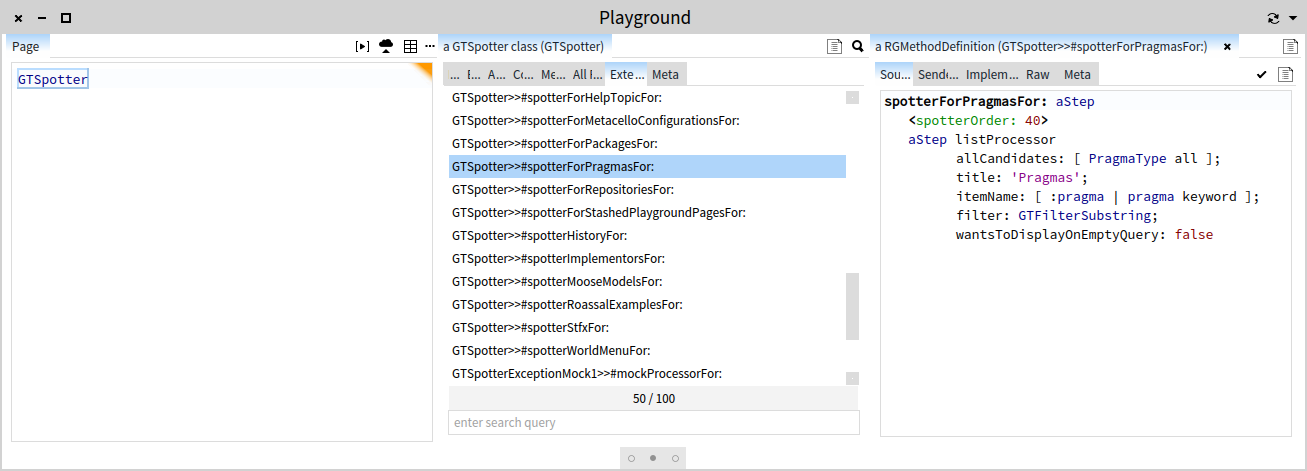
Here is a thing: there are quite a number of use cases supported out of the box, but if you did not already extend Spotter for your own domain to find specific objects, you are under using it :). This is what moldable means. But, if you want to know what Spotter extensions exists in your image, just inspect the GTSpotter class and you can browse the code and play with the extensions. For example, below is the extension that helps you search for pragmas: [image: Inline image 1] A couple of questions:
1) Is there a way to force GTSpotter preview via preferences or somehow via code so that I can build it as part of my app images? I know GTSpotter then remembers that but I would like to build images directly with that (some users of my images may now be aware of such features so I want them to see it out of the box).
See the response from Andrei.
2) How does it work regex or similar when you search? I seem to see things like "M B" or "M #a" etc...so...which are all symbols (#, * , ^ etc) allowed?
By default, the search is a simple string matching (not even multiple words). But, if you want to search for something in particular, just add an extension that matches what you are looking for. For example, in the extension that searches for pragmas, we use GTFilterSubstring. If you look in the subclass of GTStringFilter, you will see a number of other possibilities including GTFilterRegex. 3) Are there more "actions" than the default action? For example, when
browser classes, methods etc... default action opens a new system browser. So..are there OTHER possible actions? If true, which ones? How can I know all of the available ones?
Not for now. Btw, the goal of GT is to make all actions as visible as possible. We are still working on this, but GTSpotter has all actions mapped on some visual cue. That means that you can do everything with both shortcuts and mouse.
4) GTPlayground seems to have tabs and it seems I can even rename a current playground. However...I cannot seem to be able to add more tabs and then easily move across tabs. I have to open other playgrounds for it. So...I am doing something wrong? If multiple tabs are not allow then I think the tabs are a bit confusing here.
It's not possible to add more tabs. At least not yet. Glamour renders labels as "tabs" because if you think about it, there is no real distinction between having multiple tabs and having only one. In both situation you still want to label the current pane. Anyway, we will revisit this rendering in the near future. Cheers, Doru 5) What are GTPlayground "Bindings" and in which case does the "Refresh"
make sense?
I probably have more questions but I wanted to ask this at least.
Thanks in advance,
-- Mariano http://marianopeck.wordpress.com
-- www.tudorgirba.com "Every thing has its own flow"
participants (7)
-
 Andrei Chis
 -
 Ben Coman
 -
 Cyril Ferlicot
 -
 Mariano Martinez Peck
 -
 Sergio Fedi
 -
 Sven Van Caekenberghe
 -
 Tudor Girba