David with the script Stef showed you just downloaded the VM. If you want to download the image also you can use https://get.pharo.org/90+vmLatest . By the way, going to http://get.pharo.org/ you will get a complete list of the available options. On Sat, May 22, 2021 at 1:39 PM David Pennington <david@totallyobjects.com> wrote:
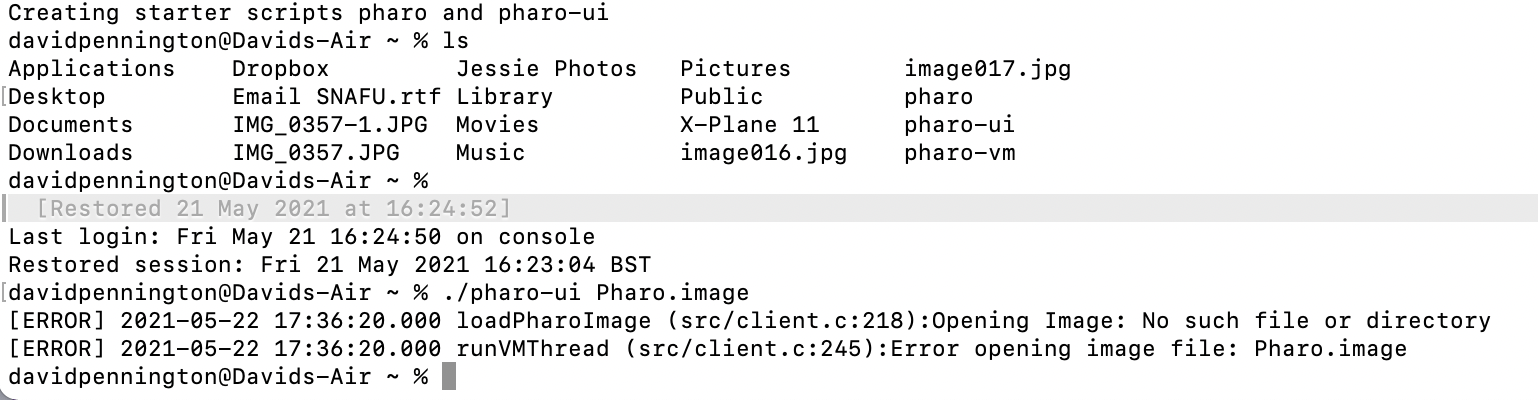
Here is a crop from my Terminal app.
As you can see it has an error. Sorry to keep bothering you but what next please? David
On 21 May 2021, at 17:01, Sven Van Caekenberghe <sven@stfx.eu> wrote:
You start an image by typing the following in the Terminal
./pharo-ui Pharo.image
On 21 May 2021, at 16:31, David Pennington <david@totallyobjects.com> wrote:
This is a bit like pulling teeth.
I have done what you said. I now have the following in Terminal
davidpennington@Davids-Air ~ % wget -O - https://get.pharo.org/vmLatest90 | bash --2021-05-21 15:24:47-- https://get.pharo.org/vmLatest90 Resolving get.pharo.org (get.pharo.org)... 2001:41d0:301::23, 164.132.235.17 Connecting to get.pharo.org (get.pharo.org)|2001:41d0:301::23|:443... connected. HTTP request sent, awaiting response... 200 OK Length: 5177 (5.1K) Saving to: âSTDOUTâ
- 100%[===================>] 5.06K --.-KB/s in 0s
2021-05-21 15:24:47 (823 MB/s) - written to stdout [5177/5177]
Downloading the latest pharoVM: http://files.pharo.org/get-files/90/pharo-vm-Darwin-arm64-latest.zip pharo-vm/Pharo.app/Contents/MacOS/Pharo Creating starter scripts pharo and pharo-ui
Where do I go next?
On 21 May 2021, at 12:31, Stéphane Ducasse <stephane.ducasse@inria.fr> wrote:
you execute on a unix shell
wget -O - https://get.pharo.org/vmLatest90 | bash
S
On 21 May 2021, at 13:16, David Pennington <david@totallyobjects.com> wrote:
I am sorry but, being a newbie to Pharo, a lot of what you say goes over my head.
How do I use Zero Conf?
I have loaded up the latest 9.0 from Pharo launcher. How do I get the <1 VM for that?
Sorry for being stupid.
David P.S. 31 years a Smalltalker so its just the underlying bits that pass over me - smile.
On 19 May 2021, at 08:38, tesonep@gmail.com wrote:
Hi David,
for M1 we have Pharo 9 compatible VMs, you can download them using Zero Conf or directly.
For the latest: - wget -O - https://get.pharo.org/vmLatest90 | bash - http://files.pharo.org/get-files/90/pharo-vm-Darwin-arm64-latest.zip
For the stable: - wget -O - https://get.pharo.org/vm90 | bash - http://files.pharo.org/get-files/90/pharo-vm-Darwin-arm64-stable.zip
If you are scripting the download I recommend using ZeroConf.
For Pharo 8, we don't have a M1 native version, because Pharo 8 requires changes in the image to support the newer VMs. We have plans to backport the changes in the future, now we are putting all efforts in the release of Pharo 9. However, if the community consider it, we can switch priorities but it is not magical; we will need to leave something aside. Also, future versions of the Pharo Launcher will have support for detecting the architecture.
In the meantime, Pharo 8 / 9 can be used without a problem with Rossetta, although the performance is not ideal.
Tell me if you have any problem. Cheers, Pablo
On Tue, May 18, 2021 at 3:54 PM David Pennington <david@totallyobjects.com> wrote: Hi there. I am currently using v8.0 on a new M1 MacBookAir. When I save the image I keep getting a message telling me that my VM is too old and to download a new one. I have looked in my Pharo Launcher but there is no new one there. What do I do please?
David
-- Pablo Tesone. tesonep@gmail.com
-------------------------------------------- Stéphane Ducasse http://stephane.ducasse.free.fr / http://www.pharo.org 03 59 35 87 52 Assistant: Aurore Dalle FAX 03 59 57 78 50 TEL 03 59 35 86 16 S. Ducasse - Inria 40, avenue Halley, Parc Scientifique de la Haute Borne, Bât.A, Park Plaza Villeneuve d'Ascq 59650 France