Hi Thomas, 2016-04-15 17:19 GMT+02:00 Thomas Heniart <heniart.thomas@gmail.com>:
I have another question question
My project is now perfectly loaded
Assuming that I want to work from this image, how can I commit, push to my repository without using Git command lines or a Git desktop client
I've seen some threads about GitFileTree but I don't understand how to use it :/
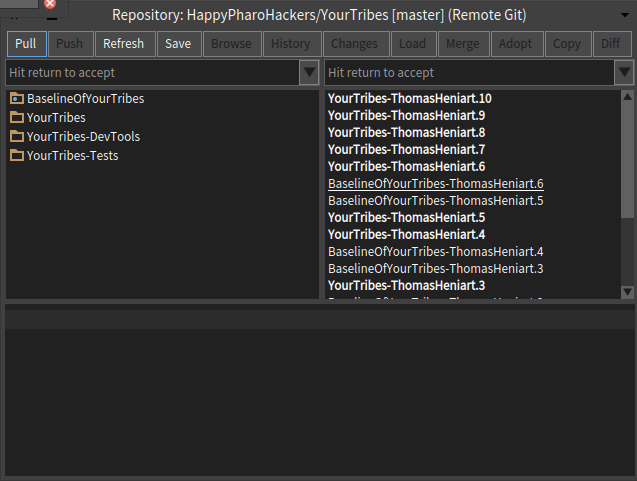
Using GitFileTree is simply a matter of: Installing GitFileTree with the configuration browser or with: Metacello new baseline: 'FileTree'; repository: 'github://dalehenrich/filetree:pharo5.0_dev/repository'; load: 'Git' And then you can load your project with: Metacello new baseline: 'YourTribes'; repository: 'gitfiletree://github.com/HappyPharoHackers/YourTribes'; load: #(tests) Once you open the repository YourTribes from inside Pharo, you will see buttons to push and pull :) [image: Images intégrées 1] Regards, Thierry
Cheers, Thomas
2016-04-15 16:11 GMT+02:00 Thomas Heniart <heniart.thomas@gmail.com>:
2016-04-15 15:59 GMT+02:00 Esteban Lorenzano <estebanlm@gmail.com>:
you are not saving the image after eval:
Works perfectly :)
./pharo Pharo.image eval --save â Metacello new baseline: #YourTribes; repository: 'github://HappyPharoHackers/YourTribes'; load: #(tests)"
(also your line has a syntax error but I suppose thatâs a transcription error)
Esteban
On 15 Apr 2016, at 10:51, Thomas Heniart <heniart.thomas@gmail.com> wrote:
Hello,
I tried this: ./pharo Pharo.image eval "Metacello new baseline: #YourTribes; repository: 'github://HappyPharoHackers/YourTribes; load: #(tests)'
It seems to load everything but unfortunately when I open the image, I don't see my packages
And when I evaluate the Metacello expression in the playground then it works.
What is the problem ?
Cheers, Thomas
Thanks a lot
Cheers, Thomas