Load a project from GitHub with command line

Hello, I tried this: ./pharo Pharo.image eval "Metacello new baseline: #YourTribes; repository: 'github://HappyPharoHackers/YourTribes; load: #(tests)' It seems to load everything but unfortunately when I open the image, I don't see my packages And when I evaluate the Metacello expression in the playground then it works. What is the problem ? Cheers, Thomas

Hi Thomas, 2016-04-15 15:51 GMT+02:00 Thomas Heniart <heniart.thomas@gmail.com>:
Hello,
I tried this: ./pharo Pharo.image eval "Metacello new baseline: #YourTribes; repository: 'github://HappyPharoHackers/YourTribes; load: #(tests)'
You need to ask your eval to save the image with: eval --save Thierry
It seems to load everything but unfortunately when I open the image, I don't see my packages
And when I evaluate the Metacello expression in the playground then it works.
What is the problem ?
Cheers, Thomas

you are not saving the image after eval: ./pharo Pharo.image eval --save â Metacello new baseline: #YourTribes; repository: 'github://HappyPharoHackers/YourTribes'; load: #(tests)" (also your line has a syntax error but I suppose thatâs a transcription error) Esteban
On 15 Apr 2016, at 10:51, Thomas Heniart <heniart.thomas@gmail.com> wrote:
Hello,
I tried this: ./pharo Pharo.image eval "Metacello new baseline: #YourTribes; repository: 'github://HappyPharoHackers/YourTribes; load: #(tests)'
It seems to load everything but unfortunately when I open the image, I don't see my packages
And when I evaluate the Metacello expression in the playground then it works.
What is the problem ?
Cheers, Thomas
2016-04-15 15:59 GMT+02:00 Esteban Lorenzano <estebanlm@gmail.com>:
you are not saving the image after eval:
Works perfectly :)
./pharo Pharo.image eval --save â Metacello new baseline: #YourTribes; repository: 'github://HappyPharoHackers/YourTribes'; load: #(tests)"
(also your line has a syntax error but I suppose thatâs a transcription error)
Esteban
On 15 Apr 2016, at 10:51, Thomas Heniart <heniart.thomas@gmail.com> wrote:
Hello,
I tried this: ./pharo Pharo.image eval "Metacello new baseline: #YourTribes; repository: 'github://HappyPharoHackers/YourTribes; load: #(tests)'
It seems to load everything but unfortunately when I open the image, I don't see my packages
And when I evaluate the Metacello expression in the playground then it works.
What is the problem ?
Cheers, Thomas
Thanks a lot
Cheers, Thomas
I have another question question My project is now perfectly loaded Assuming that I want to work from this image, how can I commit, push to my repository without using Git command lines or a Git desktop client I've seen some threads about GitFileTree but I don't understand how to use it :/ Cheers, Thomas 2016-04-15 16:11 GMT+02:00 Thomas Heniart <heniart.thomas@gmail.com>:
2016-04-15 15:59 GMT+02:00 Esteban Lorenzano <estebanlm@gmail.com>:
you are not saving the image after eval:
Works perfectly :)
./pharo Pharo.image eval --save â Metacello new baseline: #YourTribes; repository: 'github://HappyPharoHackers/YourTribes'; load: #(tests)"
(also your line has a syntax error but I suppose thatâs a transcription error)
Esteban
On 15 Apr 2016, at 10:51, Thomas Heniart <heniart.thomas@gmail.com> wrote:
Hello,
I tried this: ./pharo Pharo.image eval "Metacello new baseline: #YourTribes; repository: 'github://HappyPharoHackers/YourTribes; load: #(tests)'
It seems to load everything but unfortunately when I open the image, I don't see my packages
And when I evaluate the Metacello expression in the playground then it works.
What is the problem ?
Cheers, Thomas
Thanks a lot
Cheers, Thomas
Hi Thomas, 2016-04-15 17:19 GMT+02:00 Thomas Heniart <heniart.thomas@gmail.com>:
I have another question question
My project is now perfectly loaded
Assuming that I want to work from this image, how can I commit, push to my repository without using Git command lines or a Git desktop client
I've seen some threads about GitFileTree but I don't understand how to use it :/
Using GitFileTree is simply a matter of: Installing GitFileTree with the configuration browser or with: Metacello new baseline: 'FileTree'; repository: 'github://dalehenrich/filetree:pharo5.0_dev/repository'; load: 'Git' And then you can load your project with: Metacello new baseline: 'YourTribes'; repository: 'gitfiletree://github.com/HappyPharoHackers/YourTribes'; load: #(tests) Once you open the repository YourTribes from inside Pharo, you will see buttons to push and pull :) [image: Images intégrées 1] Regards, Thierry
Cheers, Thomas
2016-04-15 16:11 GMT+02:00 Thomas Heniart <heniart.thomas@gmail.com>:
2016-04-15 15:59 GMT+02:00 Esteban Lorenzano <estebanlm@gmail.com>:
you are not saving the image after eval:
Works perfectly :)
./pharo Pharo.image eval --save â Metacello new baseline: #YourTribes; repository: 'github://HappyPharoHackers/YourTribes'; load: #(tests)"
(also your line has a syntax error but I suppose thatâs a transcription error)
Esteban
On 15 Apr 2016, at 10:51, Thomas Heniart <heniart.thomas@gmail.com> wrote:
Hello,
I tried this: ./pharo Pharo.image eval "Metacello new baseline: #YourTribes; repository: 'github://HappyPharoHackers/YourTribes; load: #(tests)'
It seems to load everything but unfortunately when I open the image, I don't see my packages
And when I evaluate the Metacello expression in the playground then it works.
What is the problem ?
Cheers, Thomas
Thanks a lot
Cheers, Thomas
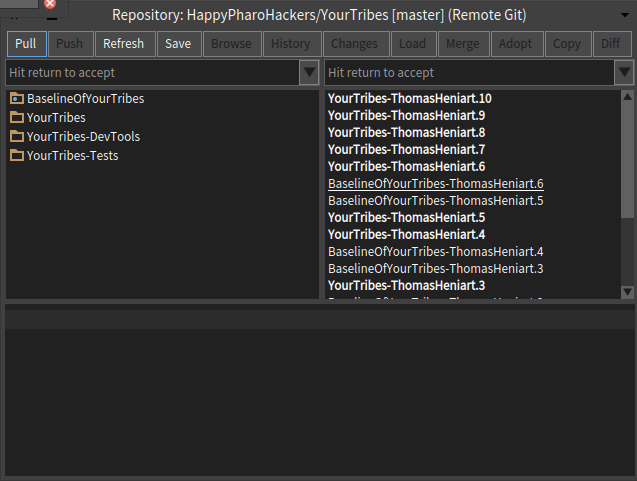

On 15 April 2016 at 17:39, Thierry Goubier <thierry.goubier@gmail.com> wrote:
And then you can load your project with:
Metacello new baseline: 'YourTribes'; repository: 'gitfiletree://github.com/HappyPharoHackers/YourTribes'; load: #(tests)
So this does the clone directly from github? YAY :D
Le 15/04/2016 18:49, Damien Pollet a écrit :
On 15 April 2016 at 17:39, Thierry Goubier <thierry.goubier@gmail.com <mailto:thierry.goubier@gmail.com>> wrote:
And then you can load your project with:
Metacello new baseline: 'YourTribes'; repository: 'gitfiletree://github.com/HappyPharoHackers/YourTribes'; load: #(tests)
So this does the clone directly from github? YAY :D
Yes :) Thierry
Thanks a lot for your help Thierry, this is just perfect :D Cheers, Thomas 2016-04-15 19:08 GMT+02:00 Thierry Goubier <thierry.goubier@gmail.com>:
Le 15/04/2016 18:49, Damien Pollet a écrit :
On 15 April 2016 at 17:39, Thierry Goubier <thierry.goubier@gmail.com <mailto:thierry.goubier@gmail.com>> wrote:
And then you can load your project with:
Metacello new baseline: 'YourTribes'; repository: 'gitfiletree:// github.com/HappyPharoHackers/YourTribes'; load: #(tests)
So this does the clone directly from github? YAY :D
Yes :)
Thierry

Yes it looks like :) Le 15/4/16 20:06, Thomas Heniart a écrit :
Thanks a lot for your help Thierry, this is just perfect :D
Cheers, Thomas
2016-04-15 19:08 GMT+02:00 Thierry Goubier <thierry.goubier@gmail.com <mailto:thierry.goubier@gmail.com>>:
Le 15/04/2016 18:49, Damien Pollet a écrit :
On 15 April 2016 at 17:39, Thierry Goubier <thierry.goubier@gmail.com <mailto:thierry.goubier@gmail.com> <mailto:thierry.goubier@gmail.com <mailto:thierry.goubier@gmail.com>>> wrote:
And then you can load your project with:
Metacello new baseline: 'YourTribes'; repository: 'gitfiletree://github.com/HappyPharoHackers/YourTribes <http://github.com/HappyPharoHackers/YourTribes>'; load: #(tests)
So this does the clone directly from github? YAY :D
Yes :)
Thierry
Is there a convenient way to control where the clone will be made in the local filesystem? Meaning: using something else than the implicit value for $WHERE: git clone $GITHUB_CLONE_URL $WHERE On 15 April 2016 at 19:08, Thierry Goubier <thierry.goubier@gmail.com> wrote:
Le 15/04/2016 18:49, Damien Pollet a écrit :
On 15 April 2016 at 17:39, Thierry Goubier <thierry.goubier@gmail.com <mailto:thierry.goubier@gmail.com>> wrote:
And then you can load your project with:
Metacello new baseline: 'YourTribes'; repository: 'gitfiletree:// github.com/HappyPharoHackers/YourTribes'; load: #(tests)
So this does the clone directly from github? YAY :D
Yes :)
Thierry
Le 17/04/2016 16:31, Damien Pollet a écrit :
Is there a convenient way to control where the clone will be made in the local filesystem? Meaning: using something else than the implicit value for $WHERE:
git clone $GITHUB_CLONE_URL $WHERE
In fact it is there, but indirect (you can give a $WHERE when you create a remote git repository with Monticello: it's the name parameter). But, if we focus on the $WHERE more directly, what would you like? - A per-url/per-project SWHERE? It could make the url syntax a bit hard (there is already a $: to indicate branch and, implicitely, subdirectory inside the git repo) but there is nothing forbidding it. Something like: 'gitfiletree://github.com/dalehenrich/filetree:pharo5.0/repository/?where=/home/username/project/filetree' (is that a correct url syntax?) - Note that I have a procedure for having the Pharo build environment integrated inside the git, if you'd like (i.e. git clone download also the build command for the right Pharo image: this is my professional setup). - A per-image $WHERE? - Reusing the Monticello default local repository directory setting? (current behavior, actually). Thierry
On 15 April 2016 at 19:08, Thierry Goubier <thierry.goubier@gmail.com <mailto:thierry.goubier@gmail.com>> wrote:
Le 15/04/2016 18:49, Damien Pollet a écrit :
On 15 April 2016 at 17:39, Thierry Goubier <thierry.goubier@gmail.com <mailto:thierry.goubier@gmail.com> <mailto:thierry.goubier@gmail.com <mailto:thierry.goubier@gmail.com>>> wrote:
And then you can load your project with:
Metacello new baseline: 'YourTribes'; repository: 'gitfiletree://github.com/HappyPharoHackers/YourTribes <http://github.com/HappyPharoHackers/YourTribes>'; load: #(tests)
So this does the clone directly from github? YAY :D
Yes :)
Thierry

'gitfiletree:// github.com/dalehenrich/filetree:pharo5.0/repository/?where=/home/username/project/filetree' (is that a correct url syntax?)
Isn't this overloading the url a bit? Why not: Metacello new baseline: 'FT'; repository: 'gitfiletree:// github.com/dalehenrich/filetree:pharo5.0/repository'; workingDirectory: '/home/username/project/filetree'; (or #localClone, or #localRepository, or #something) load Or (using git terminology): Metacello new baseline: 'FT'; repository: '/home/username/project/filetree'; origin: 'gitfiletree:// github.com/dalehenrich/filetree:pharo5.0/repository'; load On Sun, Apr 17, 2016 at 4:47 PM, Thierry Goubier <thierry.goubier@gmail.com> wrote:
Le 17/04/2016 16:31, Damien Pollet a écrit :
Is there a convenient way to control where the clone will be made in the local filesystem? Meaning: using something else than the implicit value for $WHERE:
git clone $GITHUB_CLONE_URL $WHERE
In fact it is there, but indirect (you can give a $WHERE when you create a remote git repository with Monticello: it's the name parameter).
But, if we focus on the $WHERE more directly, what would you like?
- A per-url/per-project SWHERE? It could make the url syntax a bit hard (there is already a $: to indicate branch and, implicitely, subdirectory inside the git repo) but there is nothing forbidding it. Something like: 'gitfiletree:// github.com/dalehenrich/filetree:pharo5.0/repository/?where=/home/username/project/filetree' (is that a correct url syntax?)
- Note that I have a procedure for having the Pharo build environment integrated inside the git, if you'd like (i.e. git clone download also the build command for the right Pharo image: this is my professional setup).
- A per-image $WHERE?
- Reusing the Monticello default local repository directory setting? (current behavior, actually).
Thierry
On 15 April 2016 at 19:08, Thierry Goubier <thierry.goubier@gmail.com <mailto:thierry.goubier@gmail.com>> wrote:
Le 15/04/2016 18:49, Damien Pollet a écrit :
On 15 April 2016 at 17:39, Thierry Goubier <thierry.goubier@gmail.com <mailto:thierry.goubier@gmail.com> <mailto:thierry.goubier@gmail.com <mailto:thierry.goubier@gmail.com>>> wrote:
And then you can load your project with:
Metacello new baseline: 'YourTribes'; repository: 'gitfiletree://github.com/HappyPharoHackers/YourTribes <http://github.com/HappyPharoHackers/YourTribes>'; load: #(tests)
So this does the clone directly from github? YAY :D
Yes :)
Thierry
Le 17/04/2016 16:59, Peter Uhnák a écrit :
'gitfiletree://github.com/dalehenrich/filetree:pharo5.0/repository/?where=/home/username/project/filetree <http://github.com/dalehenrich/filetree:pharo5.0/repository/?where=/home/user...>' (is that a correct url syntax?)
Isn't this overloading the url a bit?
;) That's why I described the url. But you may be indicating below a better counter argument: $WHERE should not be a feature of the url; it is an element of the local copy (in short, you don't want the repository owner to control the $WHERE).
Why not:
Metacello new baseline: 'FT'; repository: 'gitfiletree://github.com/dalehenrich/filetree:pharo5.0/repository <http://github.com/dalehenrich/filetree:pharo5.0/repository>'; workingDirectory: '/home/username/project/filetree'; (or #localClone, or #localRepository, or #something) load
Or (using git terminology):
Metacello new baseline: 'FT'; repository: '/home/username/project/filetree'; origin: 'gitfiletree://github.com/dalehenrich/filetree:pharo5.0/repository <http://github.com/dalehenrich/filetree:pharo5.0/repository>'; load
Yes, this would work. The first one is closer to the way the MCFileTreeGitRepository API represent it, but both may well already be usable (read: already implemented on the GitFileTree side) as soon as Metacello get that API. Thierry
On Sun, Apr 17, 2016 at 4:47 PM, Thierry Goubier <thierry.goubier@gmail.com <mailto:thierry.goubier@gmail.com>> wrote:
Le 17/04/2016 16:31, Damien Pollet a écrit :
Is there a convenient way to control where the clone will be made in the local filesystem? Meaning: using something else than the implicit value for $WHERE:
git clone $GITHUB_CLONE_URL $WHERE
In fact it is there, but indirect (you can give a $WHERE when you create a remote git repository with Monticello: it's the name parameter).
But, if we focus on the $WHERE more directly, what would you like?
- A per-url/per-project SWHERE? It could make the url syntax a bit hard (there is already a $: to indicate branch and, implicitely, subdirectory inside the git repo) but there is nothing forbidding it. Something like: 'gitfiletree://github.com/dalehenrich/filetree:pharo5.0/repository/?where=/home/username/project/filetree <http://github.com/dalehenrich/filetree:pharo5.0/repository/?where=/home/user...>' (is that a correct url syntax?)
- Note that I have a procedure for having the Pharo build environment integrated inside the git, if you'd like (i.e. git clone download also the build command for the right Pharo image: this is my professional setup).
- A per-image $WHERE?
- Reusing the Monticello default local repository directory setting? (current behavior, actually).
Thierry
On 17 April 2016 at 16:47, Thierry Goubier <thierry.goubier@gmail.com> wrote:
In fact it is there, but indirect (you can give a $WHERE when you create a remote git repository with Monticello: it's the name parameter).
But I'd have to somehow create the monticello repo then pass it to metacello?
But, if we focus on the $WHERE more directly, what would you like?
- A per-url/per-project SWHERE? It could make the url syntax a bit hard (there is already a $: to indicate branch and, implicitely, subdirectory inside the git repo) but there is nothing forbidding it. Something like: 'gitfiletree:// github.com/dalehenrich/filetree:pharo5.0/repository/?where=/home/username/project/filetree' (is that a correct url syntax?)
Yes, per-project. My use-case is I often clone repos with a different name than they have on github (e.g. I took the convention that my github repos are named pharo-something so that they stand out, but locally I don't care too much about the pharo- prefix. I could also imagine a myproject/dependencies/ subdirectory, where all clones of accessory projects would go. About the URL, I'm not sure the colon used for branch/subdir is really correct; usually that's the role of the fragment, no? https://url.spec.whatwg.org/#url-syntax Does this have to be specified in the URL? Conceptually, the monticello repo that should be created/used is gitfiletree://imageDirectory/$WHERE. Metacello does have to know from which git remote URL to do the clone, but that's not the same thing as the filetree repo per se.
- Note that I have a procedure for having the Pharo build environment integrated inside the git, if you'd like (i.e. git clone download also the build command for the right Pharo image: this is my professional setup).
In fact my current project is trying to do exactly that: a command-line tool that knows which base image to get, which VM to run it with, which baselines to get / load, etc. â and as a preemptive heads-up, I already have a name for it: fari (italian for "lighthouses" and esperanto for "to do"; fari.st would even look like faristo = maker
Le 17/04/2016 17:17, Damien Pollet a écrit :
On 17 April 2016 at 16:47, Thierry Goubier <thierry.goubier@gmail.com <mailto:thierry.goubier@gmail.com>> wrote:
In fact it is there, but indirect (you can give a $WHERE when you create a remote git repository with Monticello: it's the name parameter).
But I'd have to somehow create the monticello repo then pass it to metacello?
No. When GitFileTree prepares for a clone, it already manipulates a $WHERE (which is, by default, the repository name, i.e. filetree) and checks a few things about it (does it exists, is it a git repo?) before calling git clone $WHERE.
But, if we focus on the $WHERE more directly, what would you like?
- A per-url/per-project SWHERE? It could make the url syntax a bit hard (there is already a $: to indicate branch and, implicitely, subdirectory inside the git repo) but there is nothing forbidding it. Something like: 'gitfiletree://github.com/dalehenrich/filetree:pharo5.0/repository/?where=/home/username/project/filetree <http://github.com/dalehenrich/filetree:pharo5.0/repository/?where=/home/user...>' (is that a correct url syntax?)
Yes, per-project.
My use-case is I often clone repos with a different name than they have on github (e.g. I took the convention that my github repos are named pharo-something so that they stand out, but locally I don't care too much about the pharo- prefix. I could also imagine a myproject/dependencies/ subdirectory, where all clones of accessory projects would go.
Ok.
About the URL, I'm not sure the colon used for branch/subdir is really correct; usually that's the role of the fragment, no? https://url.spec.whatwg.org/#url-syntax
Hum: one could use a fragment, but we'd be limited to one? The current syntax is the one used in github:// urls, so this is one we're quite familiar with.
Does this have to be specified in the URL? Conceptually, the monticello repo that should be created/used is gitfiletree://imageDirectory/$WHERE. Metacello does have to know from which git remote URL to do the clone, but that's not the same thing as the filetree repo per se.
The problem is that Metacello doesn't clone; it is delegated to Monticello(GitFileTree) (which allows for a clean extension of Metacello). This is different from the implementation of github/bitbucket urls (and even in thoses, Metacello sees only a "repository" spec).
- Note that I have a procedure for having the Pharo build environment integrated inside the git, if you'd like (i.e. git clone download also the build command for the right Pharo image: this is my professional setup).
In fact my current project is trying to do exactly that: a command-line tool that knows which base image to get, which VM to run it with, which baselines to get / load, etc. â and as a preemptive heads-up, I already have a name for it: fari (italian for "lighthouses" and esperanto for "to do"; fari.st <http://fari.st> would even look like faristo = maker
Oh. I just use makefiles and `pwd` to recover where is the gitfiletree repo (and download the right image and setup everything). I even have a Makefile that detects that you are either within git or inside a release, and toggles appropriately between GitFileTree and FileTree. What was important to me was to version the Makefile within the project. And to be able to be multi-language: build a C library and a Pharo image, in a project mixing C and Smalltalk. Thierry
participants (6)
-
 Damien Pollet
 -
 Esteban Lorenzano
 -
 Peter Uhnák
 -
 stepharo
 -
 Thierry Goubier
 -
 Thomas Heniart