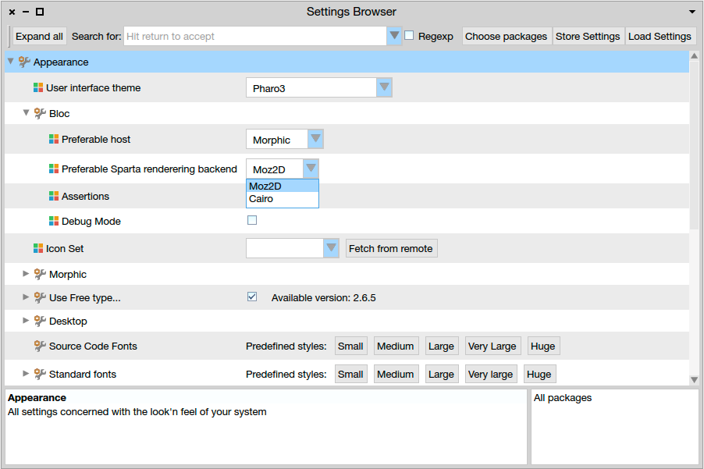
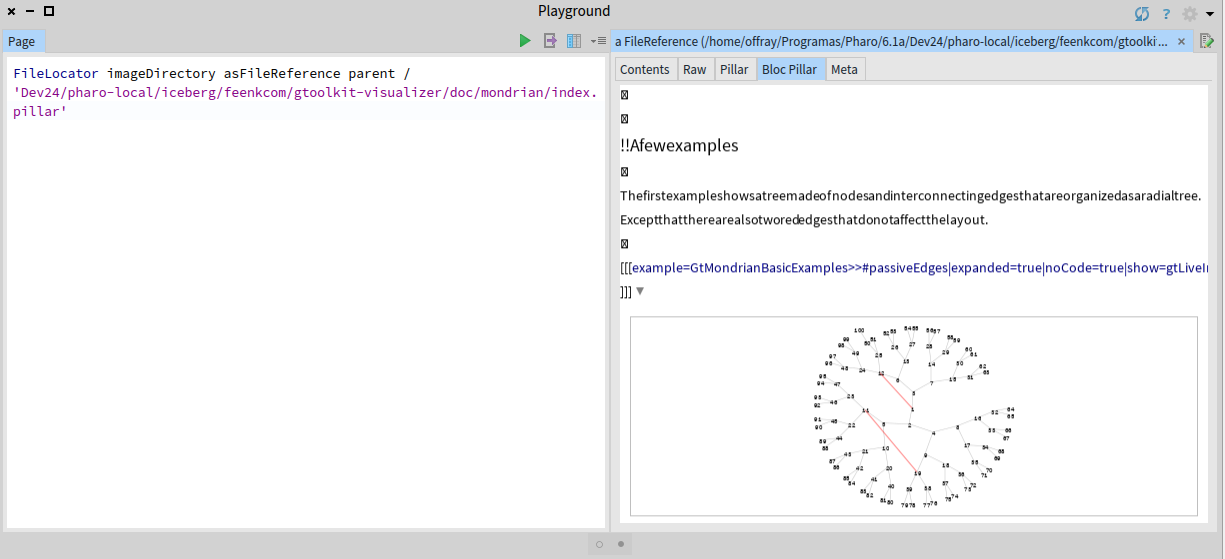
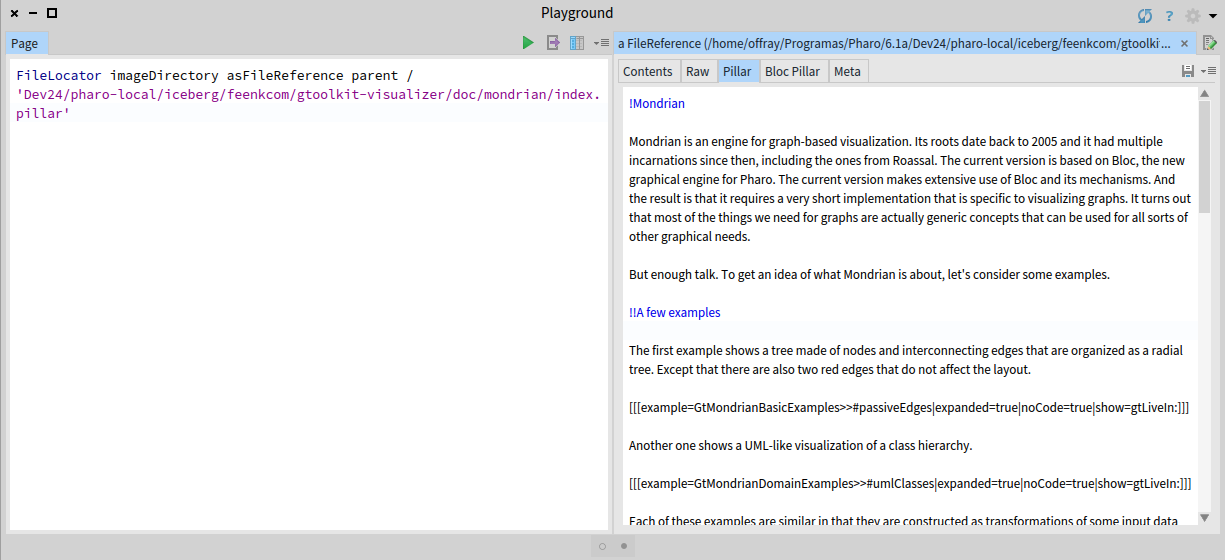
Here is a page with a set of scripts to install Moz2d for various *nixes (different Linux distros, OS X) https://github.com/syrel/Moz2D Sent from Mail for Windows 10 From: Aliaksei Syrel Sent: Monday, November 20, 2017 8:32 PM To: Any question about pharo is welcome Subject: Re: [Pharo-users] Bloc installation on Linux [WAS: Re: Aboutimplementing a "Mini Pillar" in-image renderer for Pharo ...] If Sparta is an external library that can work in 64 bits Pharo without any external prerequisite, why it can not be installed by the GT Documenter install procedure in Linux (64 bits Manjaro/Arch)? It will be :) The problem is that I got a first confirmation that it works just a week ago. I am in the process of collecting more feedback from people using various linux distros. Also, I work on a smarter Sparta installer that first tries to actually install Moz2D, checks whether it works and if not falls back to Cairo. Hopefully we will ship installer soon. Cheers, Alex On 21 November 2017 at 02:18, Aliaksei Syrel <alex.syrel@gmail.com> wrote: Hi Offray, That is great news! Now since Moz2D is installed we can continue and enable Moz2D in Bloc settings: Here is a screenshot of how to switch rendering backend: (After changing the backend, please reopen the editor.) Cheers, Alex On 21 November 2017 at 02:09, Offray Vladimir Luna Cárdenas <offray.luna@mutabit.com> wrote: Hi Alex, I have installed Sparta as you told me. Still I have problems with Pillar Bloc rendering as show in the screenshots bellow (I forgot to add them to my previous mail). If Sparta is an external library that can work in 64 bits Pharo without any external prerequisite, why it can not be installed by the GT Documenter install procedure in Linux (64 bits Manjaro/Arch)? Thanks, Offray On 20/11/17 19:26, Aliaksei Syrel wrote: Hi Offray, === This package depends on the following classes:  BrTextEditorPieceElement You must resolve these dependencies before you will be able to load these definitions:  BrTextEditorPieceElement>>#drawOnSpartaCanvas: === We should also create a stable baseline of Brick... I work on text rendering improvements and 3 hours ago committed a faulty class (BrTextEditorPieceElement) and then removed it some time ago. You installed GToolkit exactly within that not-working windows :) This class is not used anywhere, so don't worry. Sorry for the noise. - Which are the requisites for Moz2D on a Linux environment. It can be on Ubuntu/Debian. I can try to translate them to Manjaro/Arch. If you use 64bit Pharo then there are none. It should work out of box. If not, let us know. Metacello new baseline: 'Sparta'; repository: 'github://syrel/sparta:v1.1/src'; load: #development I will let Doru answer the other questions. Cheers, Alex On 21 November 2017 at 00:56, Offray Vladimir Luna Cárdenas <offray.luna@mutabit.com> wrote: Hi Doru & Alex, Installation works now. During installation process I get this message: === This package depends on the following classes:  BrTextEditorPieceElement You must resolve these dependencies before you will be able to load these definitions:  BrTextEditorPieceElement>>#drawOnSpartaCanvas: === That I imagine, is related with the absence of Moz2D. Also, Pillar syntax works now as shown in the first screenshot, but the bloc preview looks strange, without preserving proper spacing between characters and using crossed boxes for character returns (I imagine that is related with Moz2D, but cairo is working, as you can see in the code previews). So, some old questions for my response to the feedback request a year ago remain and new questions arise. The old ones: - How can font size of the pillar preview can be increased/decreased on demand? Having proper text size for reading and writing text is important in a text editor. - How Pillar markup can be extended/changed to support Markdown? The new ones: - Which are the requisites for Moz2D on a Linux environment. It can be on Ubuntu/Debian. I can try to translate them to Manjaro/Arch. - How add line numbers to the "Pillar" tab (similarly to "Contents" tab and how to make it the default tab view. - How to make the Pillar tab to autosave any changes, in a similar way to a spec text widget. Cheers, Offray On 16/11/17 16:32, Tudor Girba wrote:
Hi Offray,
Please do not forget to try and let us know if it works now.
Cheers, Doru
On Nov 15, 2017, at 9:20 AM, Tudor Girba <tudor@tudorgirba.com> wrote:
Hi Offray,
Alex took a look at your specific distro and he found and fixed your issue.
Please try again installing GT/Bloc from scratch in a fresh Pharo 6.1 image.
Please also note that the rendering on Linux is not using Moz2D so it will not be as beautiful as in pictures. The reason for this is that there are external dependencies that are required and we would need help to figure that setup.
Cheers, Doru
On Nov 14, 2017, at 10:07 PM, Offray Vladimir Luna Cárdenas <offray.luna@mutabit.com> wrote:
Hi,
The readme is clearer now about Iceberg integration as an option not as prerequisite. Installation works, but Pillar preview tab is grey and clicking on it rises: "Instance of FFIExternalResourceManager class did not understand #removeResource:". Also the syntax highlighting in the (plain) Pillar tab is not working and neither the image preview. A plain installation of just Pillar (without GT Documenter) got those two working once.
Cheers,
Offray
On 14/11/17 12:37, Tudor Girba wrote:
Hi,
We changed the baseline to not require Moz2D on Linux. Could you please try again?
I also updated the README.
Cheers, Doru