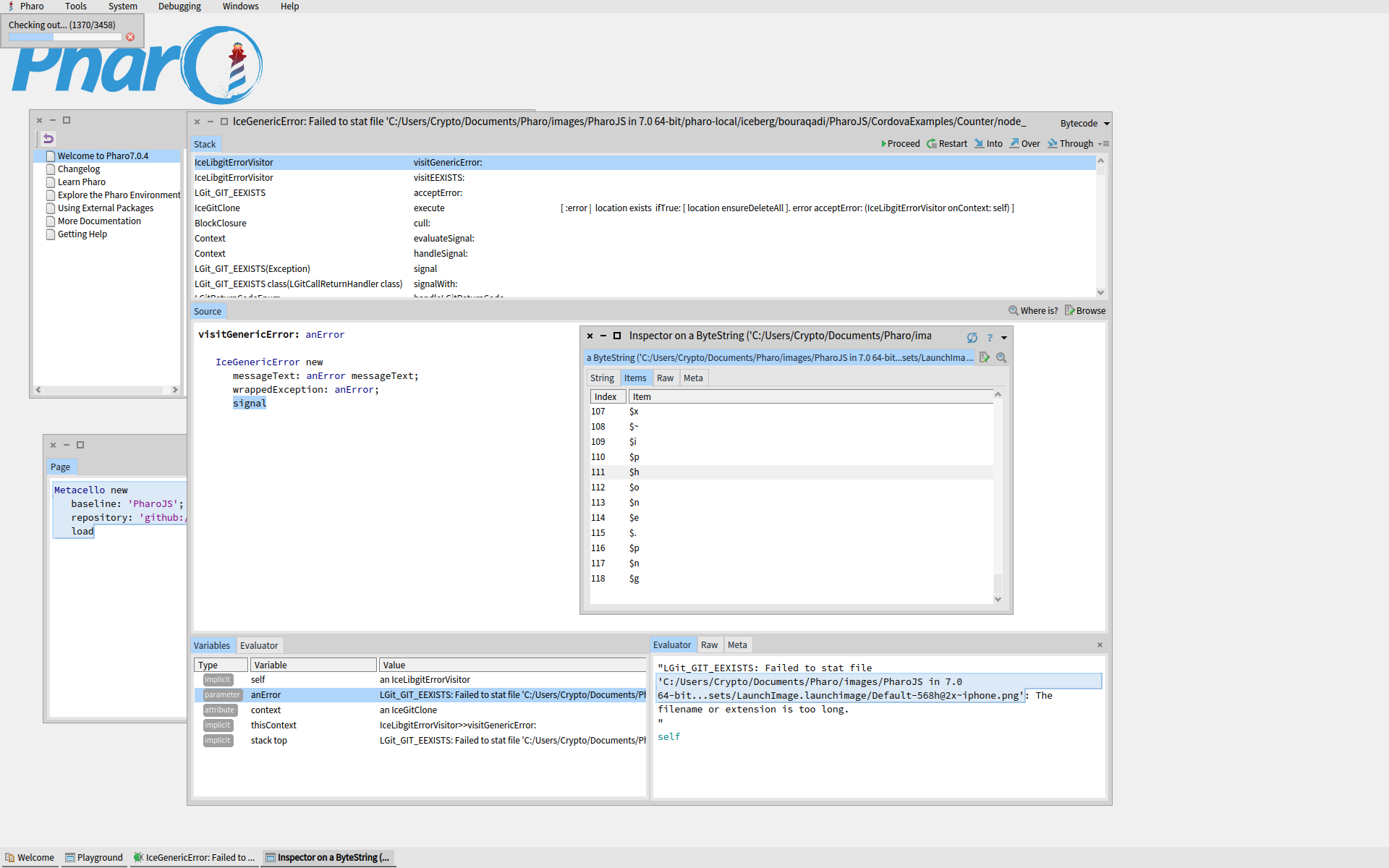
Registry entries seem to specify directories for VMs and images after the Launcher is installed. These cause it to write the next image to the documents subdirectory instead of to the one into which I copied the initial Pharo directory contents, and then pointed the Launcher Settings to. Whatâs confusing is that we have, on the one hand, the installation directories in the registry, but, on the other, a potentially different set of folders in the 3 fields of Launcher Settings in an image (the Launcher image) that cannot be saved apparently. If someone knows a way to save it, please share. It warns you when you close, but there is no option for saving. There is the bigger issue of which set of folders becomes the reference structure of the install. The launcher image is not updating the registry entries. And I canât save the Launcher image anyway. In particular, there is no way to move sources.list to the new directory and reference it from Launcher Settings, without causing major breakage in the Launcher Settings window (directory field turns red with a big X). Can we make a more flexible installer? If someone knows how to make this move from the documents subfolder happen with the existing Launcher, please share the details. There is no way to specify where the initial install goes in the Launcher installer. It defaults to the userâs documents directory. -------------------- Correction length is 264. The debugger abbreviates the string with an ellipsis. Registry entry removes the 260-character limit. Not sure why this does not work: 'C:/Users/Crypto/Documents/Pharo/images/PharoJS in 7.0 64-bit/pharo-local/iceberg/bouraqadi/PharoJS/CordovaExamples/Counter/node_modules/cordova-ios/tests/spec/unit/fixtures/ios-config-xml/SampleApp/Images.xcassets/LaunchImage.launchimage/Default-568h@2x~iphone.png' size "264" Iâve installed PharoLauncher on the root of C. I need to move the images to the root too or to my RAID. Iâm not able to move the folder from documents to another drive with a shorter path, without doing folder surgery. Also, I donât see a way to save the launcher image after Iâve tweaked the settings to point to the new directories. Further when I specify the new directory, the specific image folder is moved (or regenerated) but no new /image folder is created. Do the new directory location does not reflect the old folder structure (in the user documents folder), and requires manual work to be synced. We probably donât want that. Is there a more convenient and reliable way to have Launcher just move all images and VMs to a new folder? -------------- File name or extension is too long, but length is 118, well under 260. Soâ¦. Failed to stat file? Is that supposed to be âstartâ? From: Pharo-users [mailto:pharo-users-bounces@lists.pharo.org] On Behalf Of Christopher Fuhrman Sent: Sunday, 6 October, 2019 11:34 To: Any question about pharo is welcome <pharo-users@lists.pharo.org> Subject: Re: [Pharo-users] Installing PharoJS Hello, The screenshot cuts off the error, but it may be the problem with file names that are too long in libgit2. It's a controversial problem in libgit2 for at least six years. https://github.com/libgit2/libgit2/issues/1899 Hitting this problem is what drove me to install WSL on Windows 10 and use Pharo that way, effectively not using Windows 10 for Pharo. Other workarounds exist, including a short image name in the launcher, putting image folders at the root level, telling Pharo to put iceberg repos in a fixed directory closer to the root, etc. You want a way to prevent a Pharo file path that's longer than 260 chars. Cheers, Cris On Sun, Oct 6, 2019, 10:52 Shaping <shaping@uurda.org <mailto:shaping@uurda.org> > wrote: All you need to do is evaluating the following expression in a playground. I suggest you do it in a fresh image. Metacello new baseline: 'PharoJS'; repository: 'github://bouraqadi/PharoJS'; load That was one of the tests mentioned. See the screenshot below. The problem seems Git-related: Shaping On 6 Oct 2019, at 14:49, Shaping <shaping@uurda.org <mailto:shaping@uurda.org> > wrote: Hi. Can someone explain exactly how to install the latest version of PharoJS, and verify that the proedure really works? I've tried: 1) cloning the PharoJS repo in Pharo 8.0 with Iceberg, and get a Not Loaded final state for the repo. 2) loading into Pharo 7, 6.1, and 5 using Metacello new baseline: 'PharoJS'; repository: 'github://bouraqadi/PharoJS'; load All tries fail with a walkback. 3) loading into Pharo 4.0 using Gofer it smalltalkhubUser: 'noury' project: 'PharoJS'; addPackage: #ConfigurationOfPharoJS ; loadStable. The walkback here mentions missing dependency RBGlobalNode. Suggestions are welcome. Thanks. Shaping