
Hi. Can someone explain exactly how to install the latest version of PharoJS, and verify that the proedure really works? I've tried: 1) cloning the PharoJS repo in Pharo 8.0 with Iceberg, and get a Not Loaded final state for the repo. 2) loading into Pharo 7, 6.1, and 5 using Metacello new baseline: 'PharoJS'; repository: 'github://bouraqadi/PharoJS'; load All tries fail with a walkback. 3) loading into Pharo 4.0 using Gofer it smalltalkhubUser: 'noury' project: 'PharoJS'; addPackage: #ConfigurationOfPharoJS ; loadStable. The walkback here mentions missing dependency RBGlobalNode. Suggestions are welcome. Thanks. Shaping

Hi, Cloning a repo (for any project) is not enough. You need to load the baseline. All you need to do is evaluating the following expression in a playground. I suggest you do it in a fresh image.
Metacello new baseline: 'PharoJS'; repository: 'github://bouraqadi/PharoJS'; load
This is the officiel way of loading PharoJS as stated in Github and pharojs.org <http://pharojs.org/>. It should work just fine but ONLY with Pharo 7. Noury
On 6 Oct 2019, at 14:49, Shaping <shaping@uurda.org> wrote:
Hi.
Can someone explain exactly how to install the latest version of PharoJS, and verify that the proedure really works?
I've tried:
1) cloning the PharoJS repo in Pharo 8.0 with Iceberg, and get a Not Loaded final state for the repo. 2) loading into Pharo 7, 6.1, and 5 using
Metacello new baseline: 'PharoJS'; repository: 'github://bouraqadi/PharoJS'; load
All tries fail with a walkback.
3) loading into Pharo 4.0 using
Gofer it smalltalkhubUser: 'noury' project: 'PharoJS'; addPackage: #ConfigurationOfPharoJS ; loadStable.
The walkback here mentions missing dependency RBGlobalNode.
Suggestions are welcome.
Thanks.
Shaping
All you need to do is evaluating the following expression in a playground. I suggest you do it in a fresh image. Metacello new baseline: 'PharoJS'; repository: 'github://bouraqadi/PharoJS'; load That was one of the tests mentioned. See the screenshot below. The problem seems Git-related: Shaping On 6 Oct 2019, at 14:49, Shaping <shaping@uurda.org <mailto:shaping@uurda.org> > wrote: Hi. Can someone explain exactly how to install the latest version of PharoJS, and verify that the proedure really works? I've tried: 1) cloning the PharoJS repo in Pharo 8.0 with Iceberg, and get a Not Loaded final state for the repo. 2) loading into Pharo 7, 6.1, and 5 using Metacello new baseline: 'PharoJS'; repository: 'github://bouraqadi/PharoJS'; load All tries fail with a walkback. 3) loading into Pharo 4.0 using Gofer it smalltalkhubUser: 'noury' project: 'PharoJS'; addPackage: #ConfigurationOfPharoJS ; loadStable. The walkback here mentions missing dependency RBGlobalNode. Suggestions are welcome. Thanks. Shaping

Hello, The screenshot cuts off the error, but it may be the problem with file names that are too long in libgit2. It's a controversial problem in libgit2 for at least six years. https://github.com/libgit2/libgit2/issues/1899 Hitting this problem is what drove me to install WSL on Windows 10 and use Pharo that way, effectively not using Windows 10 for Pharo. Other workarounds exist, including a short image name in the launcher, putting image folders at the root level, telling Pharo to put iceberg repos in a fixed directory closer to the root, etc. You want a way to prevent a Pharo file path that's longer than 260 chars. Cheers, Cris On Sun, Oct 6, 2019, 10:52 Shaping <shaping@uurda.org> wrote:
All you need to do is evaluating the following expression in a playground.
I suggest you do it in a fresh image.
Metacello new baseline: 'PharoJS'; repository: 'github://bouraqadi/PharoJS'; load
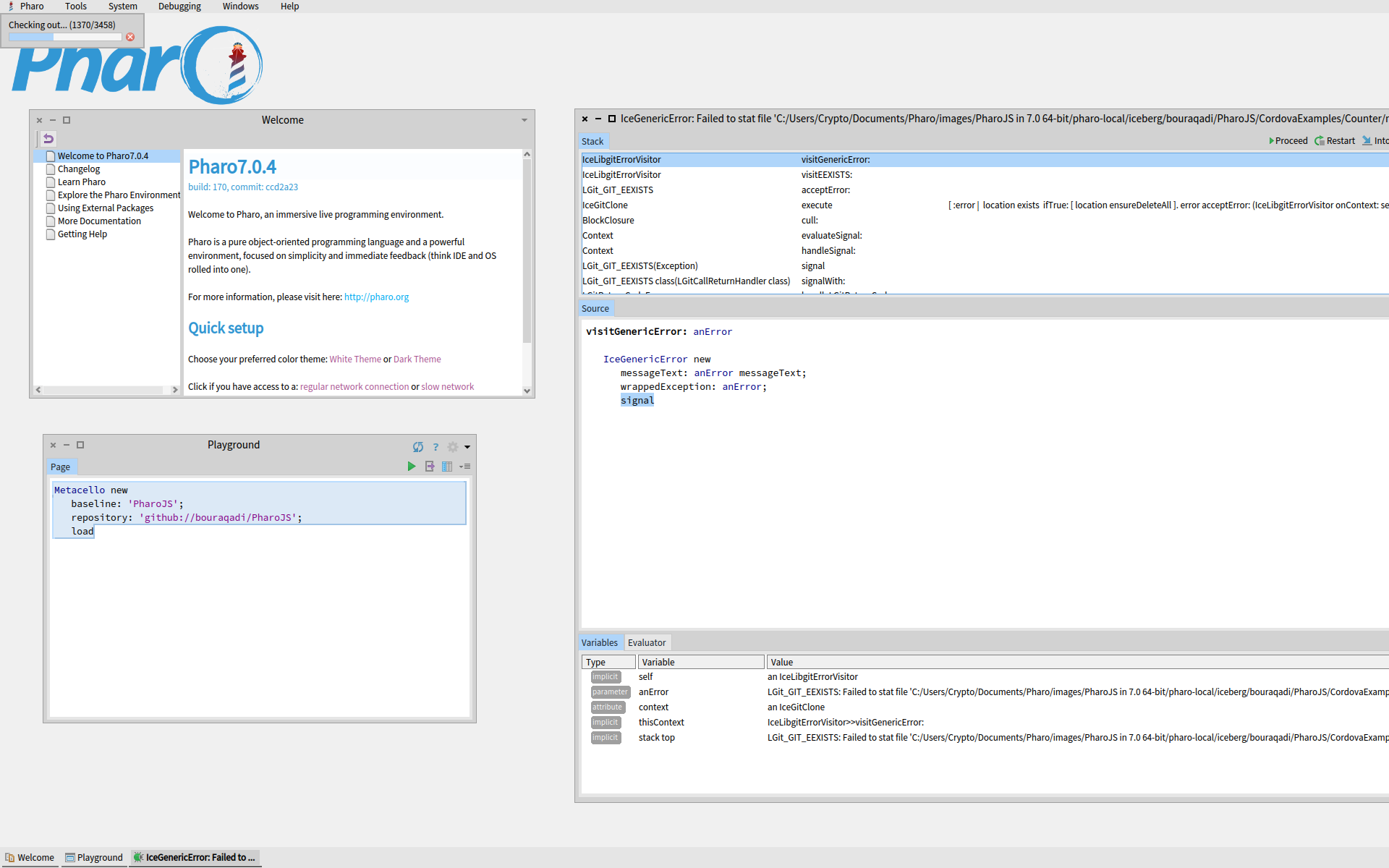
That was one of the tests mentioned. See the screenshot below. The problem seems Git-related:
Shaping
On 6 Oct 2019, at 14:49, Shaping <shaping@uurda.org> wrote:
Hi.
Can someone explain exactly how to install the latest version of PharoJS, and verify that the proedure really works?
I've tried:
1) cloning the PharoJS repo in Pharo 8.0 with Iceberg, and get a Not Loaded final state for the repo. 2) loading into Pharo 7, 6.1, and 5 using
Metacello new baseline: 'PharoJS'; repository: 'github://bouraqadi/PharoJS'; load
All tries fail with a walkback.
3) loading into Pharo 4.0 using
Gofer it smalltalkhubUser: 'noury' project: 'PharoJS'; addPackage: #ConfigurationOfPharoJS ; loadStable.
The walkback here mentions missing dependency RBGlobalNode.
Suggestions are welcome.
Thanks.
Shaping
File name or extension is too long, but length is 118, well under 260. Soâ¦. Failed to stat file? Is that supposed to be âstartâ? From: Pharo-users [mailto:pharo-users-bounces@lists.pharo.org] On Behalf Of Christopher Fuhrman Sent: Sunday, 6 October, 2019 11:34 To: Any question about pharo is welcome <pharo-users@lists.pharo.org> Subject: Re: [Pharo-users] Installing PharoJS Hello, The screenshot cuts off the error, but it may be the problem with file names that are too long in libgit2. It's a controversial problem in libgit2 for at least six years. https://github.com/libgit2/libgit2/issues/1899 Hitting this problem is what drove me to install WSL on Windows 10 and use Pharo that way, effectively not using Windows 10 for Pharo. Other workarounds exist, including a short image name in the launcher, putting image folders at the root level, telling Pharo to put iceberg repos in a fixed directory closer to the root, etc. You want a way to prevent a Pharo file path that's longer than 260 chars. Cheers, Cris On Sun, Oct 6, 2019, 10:52 Shaping <shaping@uurda.org <mailto:shaping@uurda.org> > wrote: All you need to do is evaluating the following expression in a playground. I suggest you do it in a fresh image. Metacello new baseline: 'PharoJS'; repository: 'github://bouraqadi/PharoJS'; load That was one of the tests mentioned. See the screenshot below. The problem seems Git-related: Shaping On 6 Oct 2019, at 14:49, Shaping <shaping@uurda.org <mailto:shaping@uurda.org> > wrote: Hi. Can someone explain exactly how to install the latest version of PharoJS, and verify that the proedure really works? I've tried: 1) cloning the PharoJS repo in Pharo 8.0 with Iceberg, and get a Not Loaded final state for the repo. 2) loading into Pharo 7, 6.1, and 5 using Metacello new baseline: 'PharoJS'; repository: 'github://bouraqadi/PharoJS'; load All tries fail with a walkback. 3) loading into Pharo 4.0 using Gofer it smalltalkhubUser: 'noury' project: 'PharoJS'; addPackage: #ConfigurationOfPharoJS ; loadStable. The walkback here mentions missing dependency RBGlobalNode. Suggestions are welcome. Thanks. Shaping

On Mon, 7 Oct 2019 at 09:57, Shaping <shaping@uurda.org> wrote:
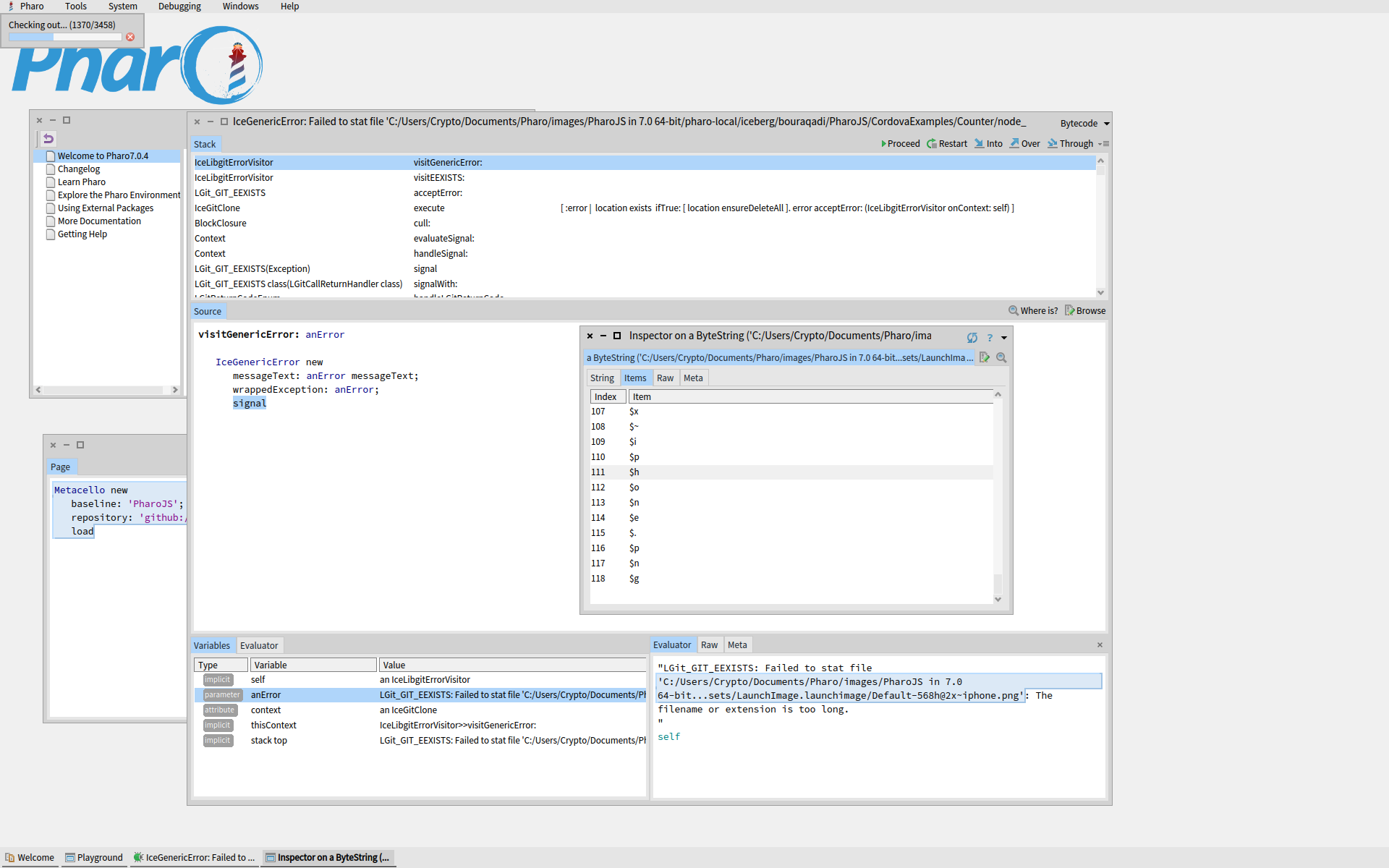
File name or extension is too long, but length is 118, well under 260. Soâ¦.
Failed to *stat* file? Is that supposed to be âstartâ?
No. Its from the Cygwin stat() system call ... https://en.wikipedia.org/wiki/Stat_(system_call) cheer s-ben
Thanks, Ben. From: Pharo-users [mailto:pharo-users-bounces@lists.pharo.org] On Behalf Of Ben Coman Sent: Monday, 7 October, 2019 06:16 To: Any question about pharo is welcome <pharo-users@lists.pharo.org> Subject: Re: [Pharo-users] Installing PharoJS On Mon, 7 Oct 2019 at 09:57, Shaping <shaping@uurda.org <mailto:shaping@uurda.org> > wrote: File name or extension is too long, but length is 118, well under 260. Soâ¦. Failed to stat file? Is that supposed to be âstartâ? No. Its from the Cygwin stat() system call ... https://en.wikipedia.org/wiki/Stat_(system_call) cheer s-ben
Correction length is 264. The debugger abbreviates the string with an ellipsis. Registry entry removes the 260-character limit. Not sure why this does not work: 'C:/Users/Crypto/Documents/Pharo/images/PharoJS in 7.0 64-bit/pharo-local/iceberg/bouraqadi/PharoJS/CordovaExamples/Counter/node_modules/cordova-ios/tests/spec/unit/fixtures/ios-config-xml/SampleApp/Images.xcassets/LaunchImage.launchimage/Default-568h@2x~iphone.png' size "264" Iâve installed PharoLauncher on the root of C. I need to move the images to the root too or to my RAID. Iâm not able to move the folder from documents to another drive with a shorter path, without doing folder surgery. Also, I donât see a way to save the launcher image after Iâve tweaked the settings to point to the new directories. Further when I specify the new directory, the specific image folder is moved (or regenerated) but no new /image folder is created. Do the new directory location does not reflect the old folder structure (in the user documents folder), and requires manual work to be synced. We probably donât want that. Is there a more convenient and reliable way to have Launcher just move all images and VMs to a new folder? -------------- File name or extension is too long, but length is 118, well under 260. Soâ¦. Failed to stat file? Is that supposed to be âstartâ? From: Pharo-users [mailto:pharo-users-bounces@lists.pharo.org] On Behalf Of Christopher Fuhrman Sent: Sunday, 6 October, 2019 11:34 To: Any question about pharo is welcome <pharo-users@lists.pharo.org> Subject: Re: [Pharo-users] Installing PharoJS Hello, The screenshot cuts off the error, but it may be the problem with file names that are too long in libgit2. It's a controversial problem in libgit2 for at least six years. https://github.com/libgit2/libgit2/issues/1899 Hitting this problem is what drove me to install WSL on Windows 10 and use Pharo that way, effectively not using Windows 10 for Pharo. Other workarounds exist, including a short image name in the launcher, putting image folders at the root level, telling Pharo to put iceberg repos in a fixed directory closer to the root, etc. You want a way to prevent a Pharo file path that's longer than 260 chars. Cheers, Cris On Sun, Oct 6, 2019, 10:52 Shaping <shaping@uurda.org <mailto:shaping@uurda.org> > wrote: All you need to do is evaluating the following expression in a playground. I suggest you do it in a fresh image. Metacello new baseline: 'PharoJS'; repository: 'github://bouraqadi/PharoJS'; load That was one of the tests mentioned. See the screenshot below. The problem seems Git-related: Shaping On 6 Oct 2019, at 14:49, Shaping <shaping@uurda.org <mailto:shaping@uurda.org> > wrote: Hi. Can someone explain exactly how to install the latest version of PharoJS, and verify that the proedure really works? I've tried: 1) cloning the PharoJS repo in Pharo 8.0 with Iceberg, and get a Not Loaded final state for the repo. 2) loading into Pharo 7, 6.1, and 5 using Metacello new baseline: 'PharoJS'; repository: 'github://bouraqadi/PharoJS'; load All tries fail with a walkback. 3) loading into Pharo 4.0 using Gofer it smalltalkhubUser: 'noury' project: 'PharoJS'; addPackage: #ConfigurationOfPharoJS ; loadStable. The walkback here mentions missing dependency RBGlobalNode. Suggestions are welcome. Thanks. Shaping
Some of my students reported similar errors with gitlib on Windows on other projects (not PharoJS). Removing spaces from the image name helps. Noury
On 7 Oct 2019, at 14:23, Shaping <shaping@uurda.org> wrote:
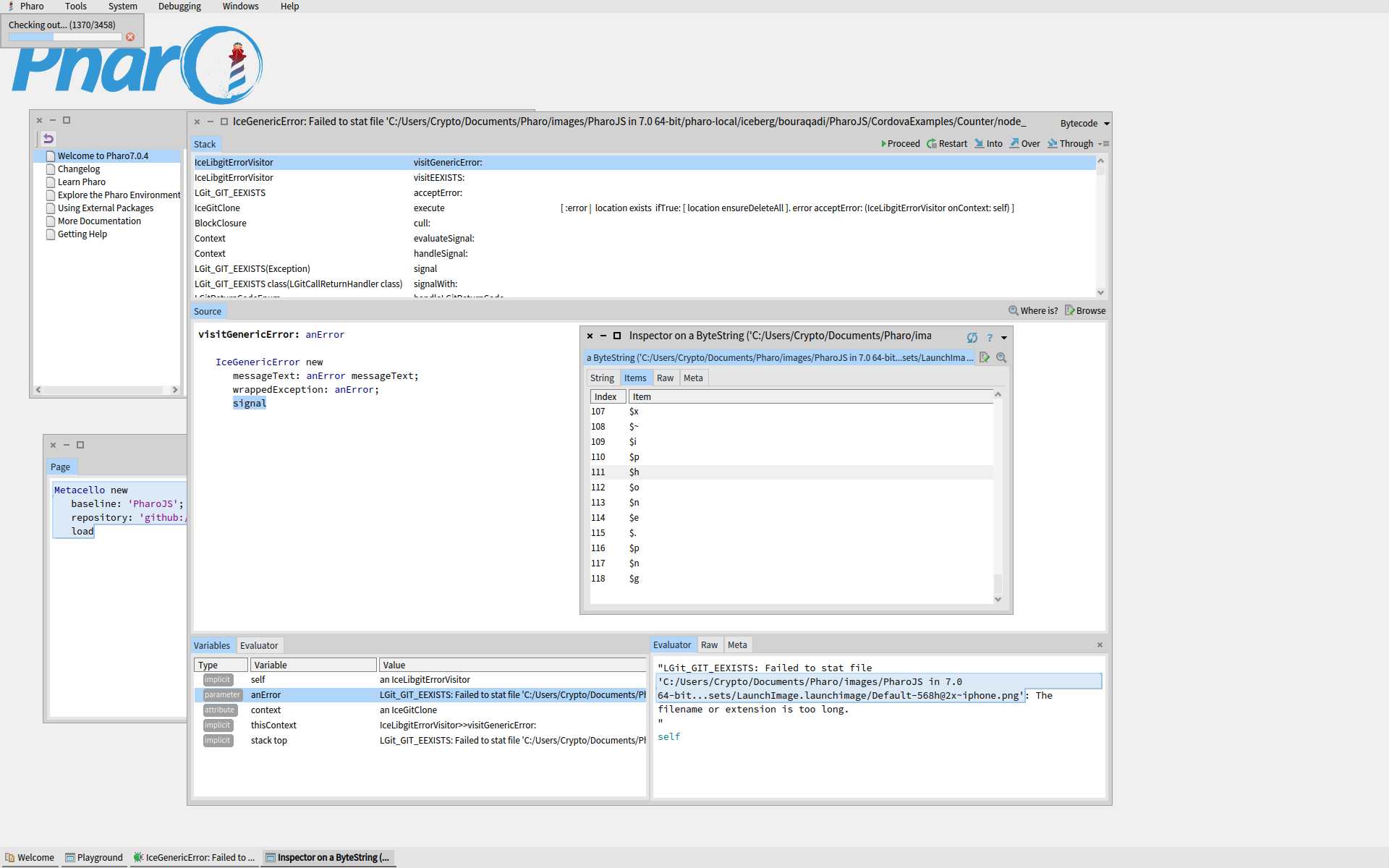
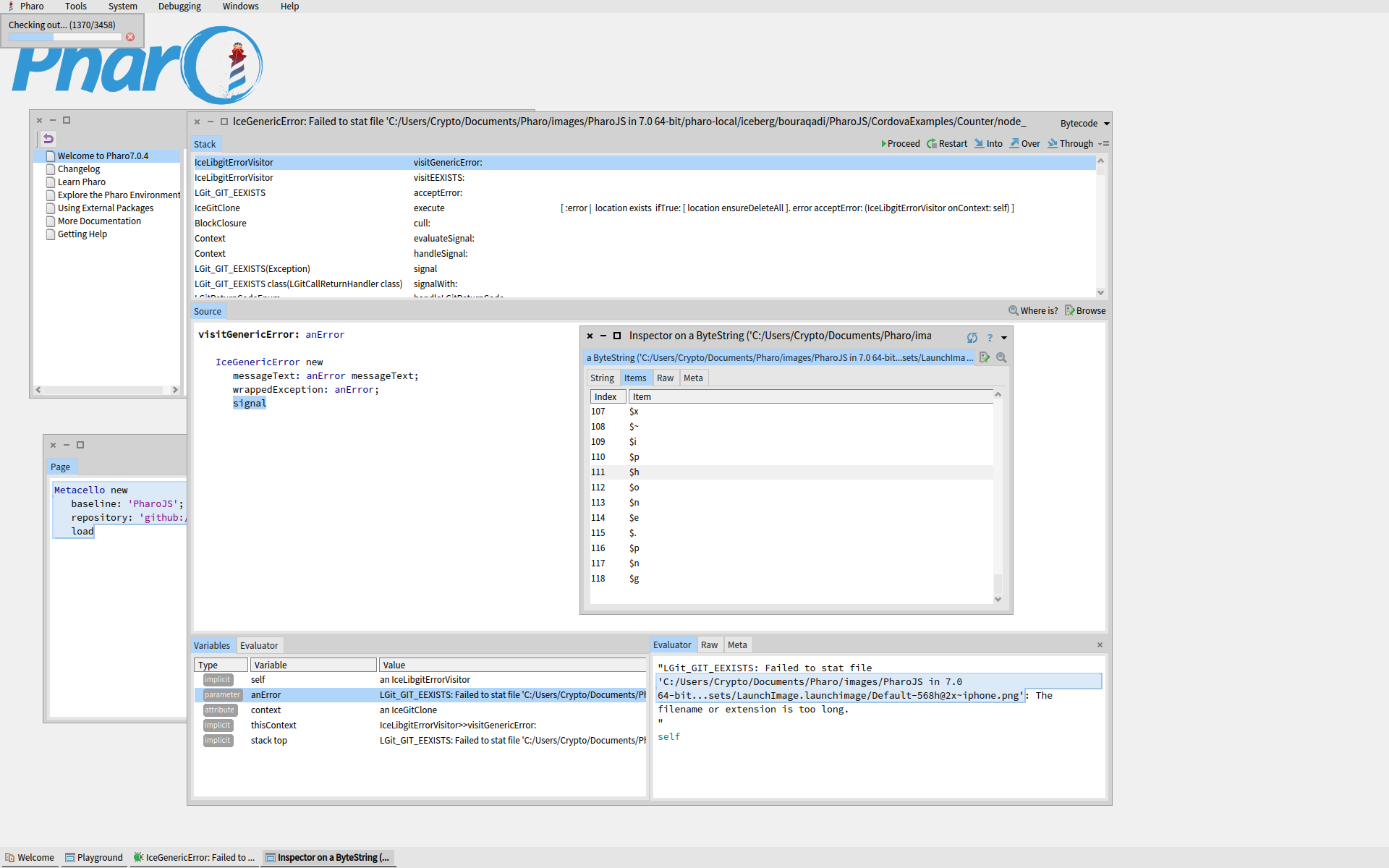
Correction length is 264. The debugger abbreviates the string with an ellipsis. Registry entry removes the 260-character limit. Not sure why this does not work:
'C:/Users/Crypto/Documents/Pharo/images/PharoJS in 7.0 64-bit/pharo-local/iceberg/bouraqadi/PharoJS/CordovaExamples/Counter/node_modules/cordova-ios/tests/spec/unit/fixtures/ios-config-xml/SampleApp/Images.xcassets/LaunchImage.launchimage/Default-568h@2x~iphone.png' size "264"
Iâve installed PharoLauncher on the root of C.
I need to move the images to the root too or to my RAID.
Iâm not able to move the folder from documents to another drive with a shorter path, without doing folder surgery. Also, I donât see a way to save the launcher image after Iâve tweaked the settings to point to the new directories. Further when I specify the new directory, the specific image folder is moved (or regenerated) but no new /image folder is created. Do the new directory location does not reflect the old folder structure (in the user documents folder), and requires manual work to be synced. We probably donât want that. Is there a more convenient and reliable way to have Launcher just move all images and VMs to a new folder?
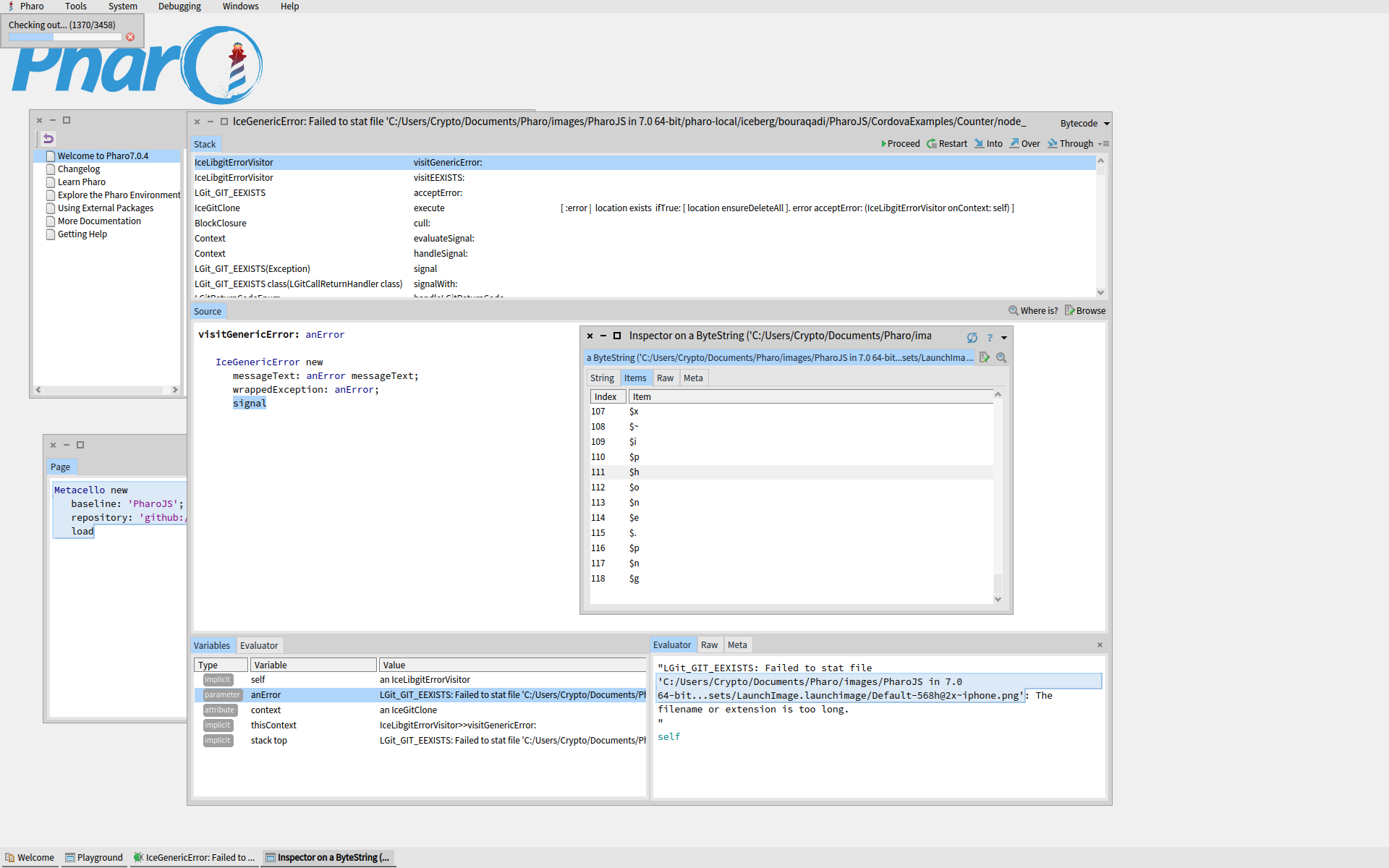
-------------- File name or extension is too long, but length is 118, well under 260. Soâ¦.
Failed to stat file? Is that supposed to be âstartâ?
<image001.png>
From: Pharo-users [mailto:pharo-users-bounces@lists.pharo.org] On Behalf Of Christopher Fuhrman Sent: Sunday, 6 October, 2019 11:34 To: Any question about pharo is welcome <pharo-users@lists.pharo.org> Subject: Re: [Pharo-users] Installing PharoJS
Hello,
The screenshot cuts off the error, but it may be the problem with file names that are too long in libgit2.
It's a controversial problem in libgit2 for at least six years. https://github.com/libgit2/libgit2/issues/1899 <https://github.com/libgit2/libgit2/issues/1899>
Hitting this problem is what drove me to install WSL on Windows 10 and use Pharo that way, effectively not using Windows 10 for Pharo.
Other workarounds exist, including a short image name in the launcher, putting image folders at the root level, telling Pharo to put iceberg repos in a fixed directory closer to the root, etc. You want a way to prevent a Pharo file path that's longer than 260 chars.
Cheers,
Cris
On Sun, Oct 6, 2019, 10:52 Shaping <shaping@uurda.org <mailto:shaping@uurda.org>> wrote:
All you need to do is evaluating the following expression in a playground. I suggest you do it in a fresh image.
Metacello new baseline: 'PharoJS'; repository: 'github://bouraqadi/PharoJS'; load
That was one of the tests mentioned. See the screenshot below. The problem seems Git-related:
Shaping
On 6 Oct 2019, at 14:49, Shaping <shaping@uurda.org <mailto:shaping@uurda.org>> wrote:
Hi.
Can someone explain exactly how to install the latest version of PharoJS, and verify that the proedure really works?
I've tried:
1) cloning the PharoJS repo in Pharo 8.0 with Iceberg, and get a Not Loaded final state for the repo. 2) loading into Pharo 7, 6.1, and 5 using
Metacello new baseline: 'PharoJS'; repository: 'github://bouraqadi/PharoJS'; load
All tries fail with a walkback.
3) loading into Pharo 4.0 using
Gofer it smalltalkhubUser: 'noury' project: 'PharoJS'; addPackage: #ConfigurationOfPharoJS ; loadStable.
The walkback here mentions missing dependency RBGlobalNode.
Suggestions are welcome.
Thanks.
Shaping
Registry entries seem to specify directories for VMs and images after the Launcher is installed. These cause it to write the next image to the documents subdirectory instead of to the one into which I copied the initial Pharo directory contents, and then pointed the Launcher Settings to. Whatâs confusing is that we have, on the one hand, the installation directories in the registry, but, on the other, a potentially different set of folders in the 3 fields of Launcher Settings in an image (the Launcher image) that cannot be saved apparently. If someone knows a way to save it, please share. It warns you when you close, but there is no option for saving. There is the bigger issue of which set of folders becomes the reference structure of the install. The launcher image is not updating the registry entries. And I canât save the Launcher image anyway. In particular, there is no way to move sources.list to the new directory and reference it from Launcher Settings, without causing major breakage in the Launcher Settings window (directory field turns red with a big X). Can we make a more flexible installer? If someone knows how to make this move from the documents subfolder happen with the existing Launcher, please share the details. There is no way to specify where the initial install goes in the Launcher installer. It defaults to the userâs documents directory. -------------------- Correction length is 264. The debugger abbreviates the string with an ellipsis. Registry entry removes the 260-character limit. Not sure why this does not work: 'C:/Users/Crypto/Documents/Pharo/images/PharoJS in 7.0 64-bit/pharo-local/iceberg/bouraqadi/PharoJS/CordovaExamples/Counter/node_modules/cordova-ios/tests/spec/unit/fixtures/ios-config-xml/SampleApp/Images.xcassets/LaunchImage.launchimage/Default-568h@2x~iphone.png' size "264" Iâve installed PharoLauncher on the root of C. I need to move the images to the root too or to my RAID. Iâm not able to move the folder from documents to another drive with a shorter path, without doing folder surgery. Also, I donât see a way to save the launcher image after Iâve tweaked the settings to point to the new directories. Further when I specify the new directory, the specific image folder is moved (or regenerated) but no new /image folder is created. Do the new directory location does not reflect the old folder structure (in the user documents folder), and requires manual work to be synced. We probably donât want that. Is there a more convenient and reliable way to have Launcher just move all images and VMs to a new folder? -------------- File name or extension is too long, but length is 118, well under 260. Soâ¦. Failed to stat file? Is that supposed to be âstartâ? From: Pharo-users [mailto:pharo-users-bounces@lists.pharo.org] On Behalf Of Christopher Fuhrman Sent: Sunday, 6 October, 2019 11:34 To: Any question about pharo is welcome <pharo-users@lists.pharo.org> Subject: Re: [Pharo-users] Installing PharoJS Hello, The screenshot cuts off the error, but it may be the problem with file names that are too long in libgit2. It's a controversial problem in libgit2 for at least six years. https://github.com/libgit2/libgit2/issues/1899 Hitting this problem is what drove me to install WSL on Windows 10 and use Pharo that way, effectively not using Windows 10 for Pharo. Other workarounds exist, including a short image name in the launcher, putting image folders at the root level, telling Pharo to put iceberg repos in a fixed directory closer to the root, etc. You want a way to prevent a Pharo file path that's longer than 260 chars. Cheers, Cris On Sun, Oct 6, 2019, 10:52 Shaping <shaping@uurda.org <mailto:shaping@uurda.org> > wrote: All you need to do is evaluating the following expression in a playground. I suggest you do it in a fresh image. Metacello new baseline: 'PharoJS'; repository: 'github://bouraqadi/PharoJS'; load That was one of the tests mentioned. See the screenshot below. The problem seems Git-related: Shaping On 6 Oct 2019, at 14:49, Shaping <shaping@uurda.org <mailto:shaping@uurda.org> > wrote: Hi. Can someone explain exactly how to install the latest version of PharoJS, and verify that the proedure really works? I've tried: 1) cloning the PharoJS repo in Pharo 8.0 with Iceberg, and get a Not Loaded final state for the repo. 2) loading into Pharo 7, 6.1, and 5 using Metacello new baseline: 'PharoJS'; repository: 'github://bouraqadi/PharoJS'; load All tries fail with a walkback. 3) loading into Pharo 4.0 using Gofer it smalltalkhubUser: 'noury' project: 'PharoJS'; addPackage: #ConfigurationOfPharoJS ; loadStable. The walkback here mentions missing dependency RBGlobalNode. Suggestions are welcome. Thanks. Shaping

Hi Shaping,  This is a git problem on Windows only with nested directories resulting in long path names, not a problem of Pharo directly.  Usually you should not have it since most projects should already be in Tonel format now (Tonel saves some space on the path length). Dont know if PharoJS and all dependencies are already in Tonel format. I guess it is because your image already is in "c:/Users/Crypto/Documents/Pharo/images/PharoJS in 7.0.64-bit" and then the usual "pharo-local/iceberg/..." gets added when cloning through iceberg. Depending on project this leads to a long path for git.  Several options you could try to resolve this: ============================  a) Install Pharo Launcher on a short path like "c:\pharo" (instead of the long user directory default).    When you then download for instance a Pharo 7 64 bit image using Pharo Launcher just use a short name    for the image itself like "PJS7-64". This usually reduces the path size already.  b) If you have a local git client already (like the one from https://git-scm.com[https://git-scm.com/download/win]) then configure your local git like:      git config --system core.longpaths true  and clone the project from commandline on a short path:  cd c:\pharo  git clone https://github.com/bouraqadi/PharoJS.git   You can then use Iceberg to connect to it via "Add" -> "Import from existing clone" and load the baseline from there. c) Go to "Pharo" -> "Settings Browser", select "Tools" -> "Software Configuration Management" -> "Iceberg"   and choose "Share repositories between images". Then set the "Location for shared repositories" to a   short path name like "c:\pharo". Dont forget to hit enter.   You can double check by inspecting:       IceLibgitRepository sharedRepositoriesLocationString inspect   in a Playground. Iceberg will use this directory to clone project - using a short path will shorten the   overall path length for the cloned PharoJS project.  Some of this might help - if not use Ubuntu or OSX ;)  Bye T.
This is a git problem on Windows only with nested directories resulting in long path names, not a problem of Pharo directly. Usually you should not have it since most projects should already be in Tonel format now (Tonel saves some space on the path length). Dont know if PharoJS and all dependencies are already in Tonel format. I guess it is because your image already is in "c:/Users/Crypto/Documents/Pharo/images/PharoJS in 7.0.64-bit" and then the usual "pharo-local/iceberg/..." gets added when cloning through iceberg. Depending on project this leads to a long path for git. Several options you could try to resolve this: ============================ a) Install Pharo Launcher on a short path like "c:\pharo" (instead of the long user directory default). When you then download for instance a Pharo 7 64 bit image using Pharo Launcher just use a short name for the image itself like "PJS7-64". This usually reduces the path size already. I wanted to install the Launcher in Program Files and had a permissions problems I needed to fix. It was doable, but I did not want to continue the practice with each new install of Launcher. So I gave up and accepted the default in the user folder, which I do not want. I donât want my images and VMs in the usual âuser documentsâ area. I want that on another drive (RAID). The installer and launcher seem rigid. Not to broaden the topic, but does anyone know how to install Launcher and then the new images anywhere without any problems? I think the main problem was Launcher and the default location for all Pharo git files. I prefer also to have my own separate collection of Git projects on another drive. I donât want anything on the system drive but exes, dlls and related config files that I can be replaced with an installer. All else, my images and Git repos, are placed elsewhere, and the installer seems awkward if I use this pattern. If someone has a favorite scheme that supports this pattern, please do share. b) If you have a local git client already (like the one from <https://git-scm.com[https:/git-scm.com/download/win> https://git-scm.com[https://git-scm.com/download/win]) then configure your local git like: git config --system core.longpaths true The command worked. However, I got the same walkback with the Monticello baseline load. Should this work? Does one need always to load the baseline first? Why would the entire PharoJS repo not be enough? My default assumption would be to assume the PharoJS repo has all I need. I have enough trouble with Iceberg (the GUI seem deeply wrong and confused like the designer canât decided whether to mirror Git (repo menu item) or wrap and improve it [the rest of the GUI]) that I try to avoid using it. I use GitKraken to load the repo, then I point to it with Iceberg, but the options given for reconciling the cloned repo with whatâs in the image donât seem to work. and clone the project from commandline on a short path: cd c:\pharo git clone <https://github.com/bouraqadi/PharoJS.git> https://github.com/bouraqadi/PharoJS.git You can then use Iceberg to connect to it via "Add" -> "Import from existing clone" and load the baseline from there. I did this with the PharoJS repo I cloned earlier with GitKraken: I get proxiesForGlobals and state Not Loaded. c) Go to "Pharo" -> "Settings Browser", select "Tools" -> "Software Configuration Management" -> "Iceberg" and choose "Share repositories between images". Then set the "Location for shared repositories" to a short path name like "c:\pharo". Dont forget to hit enter. Okay, but I find the whole notion of sharing repos between images something that should just work and not be special like this. I just want to connect the one image to the one repo and have it work coherently. Why does Settings introduce the idea of sharing the repo between images. Iâm trying to do the more basic thing and it doesnât work. (Thereâs no file dialog for Default Code Subdirectory.) You can double check by inspecting: IceLibgitRepository sharedRepositoriesLocationString inspect Itâs correct. in a Playground. Iceberg will use this directory to clone project - using a short path will shorten the overall path length for the cloned PharoJS project. Some of this might help - if not use Ubuntu or OSX ;) Same Not Loaded state results. Thanks. Shaping
Metacello new baseline: 'PharoJS'; repository: 'github://bouraqadi/PharoJS'; load This is the officiel way of loading PharoJS as stated in Github and pharojs.org <http://pharojs.org> . It should work just fine but ONLY with Pharo 7. I got the above baseline to load into Pharo 7.0 on Ubuntu, which is running in a Virtual Box VM, which, in turn, has its own little speed problems compounding those of Pharo. I'll try to reinstall Launcher on Windows at some location closer to the root. I don't think this is the problem. I've done the registry tweak to remove the 260-character limit on file names. Shaping On 6 Oct 2019, at 14:49, Shaping <shaping@uurda.org <mailto:shaping@uurda.org> > wrote: Hi. Can someone explain exactly how to install the latest version of PharoJS, and verify that the proedure really works? I've tried: 1) cloning the PharoJS repo in Pharo 8.0 with Iceberg, and get a Not Loaded final state for the repo. 2) loading into Pharo 7, 6.1, and 5 using Metacello new baseline: 'PharoJS'; repository: 'github://bouraqadi/PharoJS'; load All tries fail with a walkback. 3) loading into Pharo 4.0 using Gofer it smalltalkhubUser: 'noury' project: 'PharoJS'; addPackage: #ConfigurationOfPharoJS ; loadStable. The walkback here mentions missing dependency RBGlobalNode. Suggestions are welcome. Thanks. Shaping
participants (5)
-
 Ben Coman
 -
 Christopher Fuhrman
 -
 Noury Bouraqadi
 -
 Shaping
 -
 Torsten Bergmann