On 27 Nov 2013, at 10:25, vmusulainen <vmusulainen@mail.ru> wrote:
Sven Van Caekenberghe-2 wrote
I have "Allow apps downloaded from:" to âMac App Store and identified developersâ set permanently. Then you have to manually approve a new application launch âOpenâ by using control/right-click âOpenâ and then confirming that you know what you are doing. Once done, you can next double-click like before.
It doesn't work for me. What version OS you have? Mountain Lion or Mavericks?
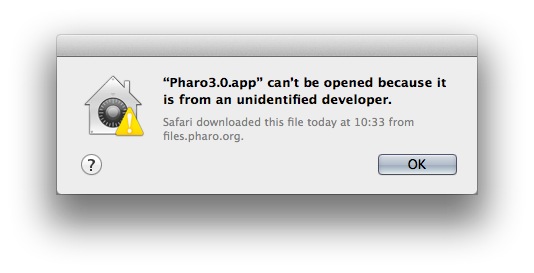
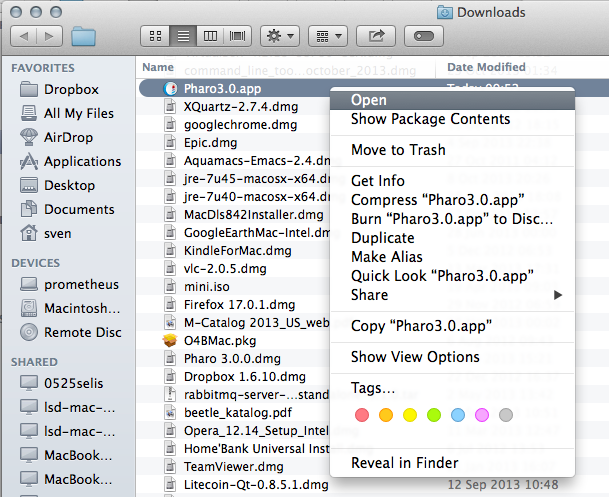
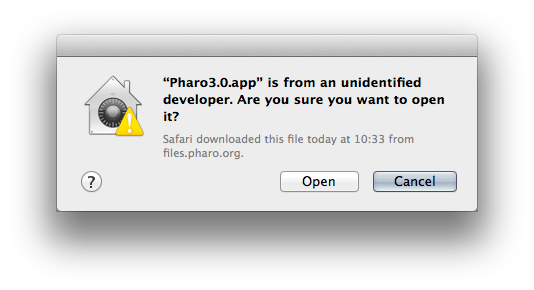
I am on 10.9 Mavericks I just downloaded http://files.pharo.org/platform/Pharo3.0-mac.zip If you then double-click, it does not work Next, right-click or command-click to get the menu Next you get a dialog Now click Open and you are good. Next time, you can just double-click like you normally would. HTH, Sven
-- View this message in context: http://forum.world.st/Fresh-downloaded-Pharo-2-0-and-Pharo-3-0-doesn-t-run-o... Sent from the Pharo Smalltalk Users mailing list archive at Nabble.com.