Re: [Pharo-users] Fresh downloaded Pharo 2.0 and Pharo 3.0 doesn't run on macos (mavericks)

Hi That's gatekeepers way of telling you the app is not from a certified developer. You need to start it once with ctrl-click and answer yes Joachim vmusulainen <vmusulainen@mail.ru> schrieb:
Hi all,
I downloaded pharo 3.0 and pharo 2.0 right now and I can't run both apps. I get following message for Pharo 2.0 (For Pharo 3.0 appears same message):
"âPharo2.0.appâ is damaged and canât be opened. You should move it to the Trash. Google Chrome.app downloaded this file today at 2:39 from www.pharo-project.org."
Have someone similar problems?
-- View this message in context: http://forum.world.st/Fresh-downloaded-Pharo-2-0-and-Pharo-3-0-doesn-t-run-o... Sent from the Pharo Smalltalk Users mailing list archive at Nabble.com.

Hi Joachim, Yes, you are right - system doesn't allow run app from uncertified developer. But in my case, "ctrl + Open" isn't helping me. My solution: open system preferences -> Security & Privacy -> general tab and set option "Allow apps downloaded from:" to "anywhere". After opening app at first time, you can set back this option to "App store and identified developers". This problem exists on OS Mavericks and doesn't appear on OS Mountain Lion, -- View this message in context: http://forum.world.st/Fresh-downloaded-Pharo-2-0-and-Pharo-3-0-doesn-t-run-o... Sent from the Pharo Smalltalk Users mailing list archive at Nabble.com.

On 27 Nov 2013, at 06:05, vmusulainen <vmusulainen@mail.ru> wrote:
Hi Joachim,
Yes, you are right - system doesn't allow run app from uncertified developer. But in my case, "ctrl + Open" isn't helping me. My solution: open system preferences -> Security & Privacy -> general tab and set option "Allow apps downloaded from:" to "anywhereâ.
I have "Allow apps downloaded from:" to âMac App Store and identified developersâ set permanently. Then you have to manually approve a new application launch âOpenâ by using control/right-click âOpenâ and then confirming that you know what you are doing. Once done, you can next double-click like before.
After opening app at first time, you can set back this option to "App store and identified developers".
This problem exists on OS Mavericks and doesn't appear on OS Mountain Lion,
-- View this message in context: http://forum.world.st/Fresh-downloaded-Pharo-2-0-and-Pharo-3-0-doesn-t-run-o... Sent from the Pharo Smalltalk Users mailing list archive at Nabble.com.
Sven Van Caekenberghe-2 wrote
I have "Allow apps downloaded from:" to âMac App Store and identified developersâ set permanently. Then you have to manually approve a new application launch âOpenâ by using control/right-click âOpenâ and then confirming that you know what you are doing. Once done, you can next double-click like before.
It doesn't work for me. What version OS you have? Mountain Lion or Mavericks? -- View this message in context: http://forum.world.st/Fresh-downloaded-Pharo-2-0-and-Pharo-3-0-doesn-t-run-o... Sent from the Pharo Smalltalk Users mailing list archive at Nabble.com.
On 27 Nov 2013, at 10:25, vmusulainen <vmusulainen@mail.ru> wrote:
Sven Van Caekenberghe-2 wrote
I have "Allow apps downloaded from:" to âMac App Store and identified developersâ set permanently. Then you have to manually approve a new application launch âOpenâ by using control/right-click âOpenâ and then confirming that you know what you are doing. Once done, you can next double-click like before.
It doesn't work for me. What version OS you have? Mountain Lion or Mavericks?
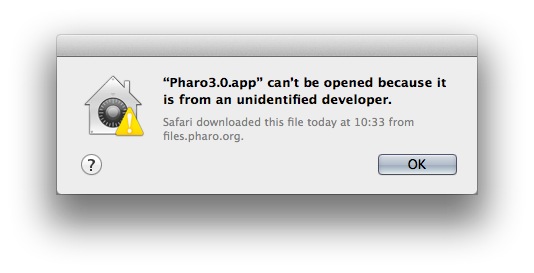
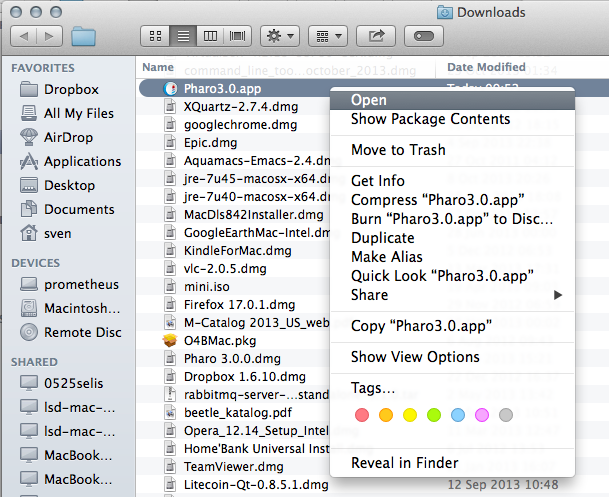
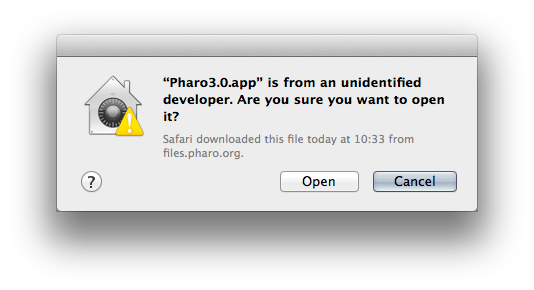
I am on 10.9 Mavericks I just downloaded http://files.pharo.org/platform/Pharo3.0-mac.zip If you then double-click, it does not work Next, right-click or command-click to get the menu Next you get a dialog Now click Open and you are good. Next time, you can just double-click like you normally would. HTH, Sven
-- View this message in context: http://forum.world.st/Fresh-downloaded-Pharo-2-0-and-Pharo-3-0-doesn-t-run-o... Sent from the Pharo Smalltalk Users mailing list archive at Nabble.com.

On 27 Nov 2013, at 10:46, Sven Van Caekenberghe <sven@stfx.eu> wrote:
On 27 Nov 2013, at 10:25, vmusulainen <vmusulainen@mail.ru> wrote:
Sven Van Caekenberghe-2 wrote
I have "Allow apps downloaded from:" to âMac App Store and identified developersâ set permanently. Then you have to manually approve a new application launch âOpenâ by using control/right-click âOpenâ and then confirming that you know what you are doing. Once done, you can next double-click like before.
It doesn't work for me. What version OS you have? Mountain Lion or Mavericks?
I am on 10.9 Mavericks
Yes, we need to compile with a certificate⦠there is already a bug entry for that (of course). 12089 OS X VM unsigned https://pharo.fogbugz.com/f/cases/12089 Marcus
Once again - this is not my case. IN following cases: double click, ctrl+open i get same dialog <http://forum.world.st/file/n4725555/Screen_Shot_2013-11-27_at_16.14.26.png> Clicking on the question mark gives the following information: "/The app has been modified, and itâs code does not match the original signed code. The app may be broken or corrupted, or it may have been tampered with. If you feel that an app has been damaged or tampered with, you should delete it by dragging it to the Trash. Some apps and tools, such as AppleScript applications and some legacy tools, modify themselves after signing. These types of apps cannot be opened unless the Gatekeeper setting in Security & Privacy preferences is set to Anywhere./" -- View this message in context: http://forum.world.st/Fresh-downloaded-Pharo-2-0-and-Pharo-3-0-doesn-t-run-o... Sent from the Pharo Smalltalk Users mailing list archive at Nabble.com.
On 27 Nov 2013, at 13:22, vmusulainen <vmusulainen@mail.ru> wrote:
Once again - this is not my case.
IN following cases: double click, ctrl+open i get same dialog
<http://forum.world.st/file/n4725555/Screen_Shot_2013-11-27_at_16.14.26.png>
Clicking on the question mark gives the following information:
"/The app has been modified, and itâs code does not match the original signed code. The app may be broken or corrupted, or it may have been tampered with. If you feel that an app has been damaged or tampered with, you should delete it by dragging it to the Trash.
Some apps and tools, such as AppleScript applications and some legacy tools, modify themselves after signing. These types of apps cannot be opened unless the Gatekeeper setting in Security & Privacy preferences is set to Anywhere./â
I know which dialog you see, it just doesnât happen for me. The question thus is, what are you doing differently ? Did you take this download http://files.pharo.org/platform/Pharo3.0-mac.zip ?
-- View this message in context: http://forum.world.st/Fresh-downloaded-Pharo-2-0-and-Pharo-3-0-doesn-t-run-o... Sent from the Pharo Smalltalk Users mailing list archive at Nabble.com.
Yes, I tried again with pharo 2.0 and pharo 3.0 a hour ago with same result. I solved problem changed "Security & Privacy preferencesâ and it is not actual for me right now. But it's interesting in the general case -- View this message in context: http://forum.world.st/Fresh-downloaded-Pharo-2-0-and-Pharo-3-0-doesn-t-run-o... Sent from the Pharo Smalltalk Users mailing list archive at Nabble.com.
participants (4)
-
 Joachim Tuchel
 -
 Marcus Denker
 -
 Sven Van Caekenberghe
 -
 vmusulainen