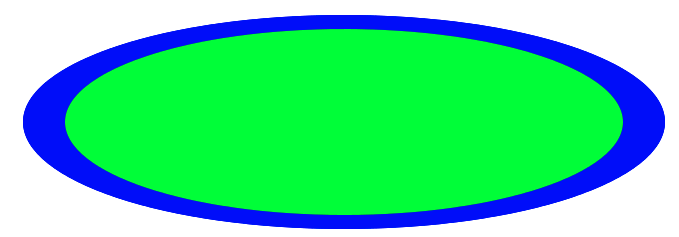
yes, you using stroke for 2nd ellipse, but stroke width is also subject of scaling, that's why it has different width, because of non-uniform scaling (x/y). instead you can first, draw a filled ellipse (blue) and then draw green one over it. On 11 April 2014 21:33, Juraj Kubelka <juraj.kubelka@gmail.com> wrote:
Hi Igor, hi all!
I am not sure how to properly draw ellipse. Right now I draw a path like this:
The path is created that way: -=-=-=-=- computePath path := self athensCanvas createPath: [ :builder | builder absolute; moveTo: 0 @ 0.5; ccwArcTo: 0.5 @ 0.0 angle: 90 degreesToRadians; ccwArcTo: 0.0 @ -0.5 angle: 90 degreesToRadians; ccwArcTo: -0.5 @ 0.0 angle: 90 degreesToRadians; ccwArcTo: 0 @ 0.5 angle: 90 degreesToRadians ] -=-=-=-=-
And draw it like this: -=-=-=-=- drawOn: athensCanvas athensCanvas pathTransform restoreAfter: [ athensCanvas pathTransform scaleBy: rectangle extent asFloatPoint athensCanvas setPaint: color; drawShape: self path. (athensCanvas setStrokePaint: strokePaint) width: (self strokeWidth / self scale) asFloat. athensCanvas drawShape: self path ] -=-=-=-=-
But with a different shapes, the border does not have same width all around the ellipse. See the image:
Is there better way to draw it? Thank you, Jura
-- Best regards, Igor Stasenko.