
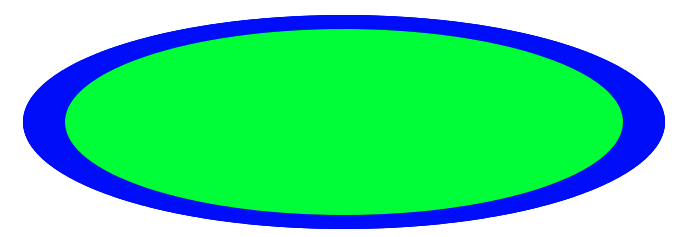
Hi Igor, hi all! I am not sure how to properly draw ellipse. Right now I draw a path like this: The path is created that way: -=-=-=-=- computePath path := self athensCanvas createPath: [ :builder | builder absolute; moveTo: 0 @ 0.5; ccwArcTo: 0.5 @ 0.0 angle: 90 degreesToRadians; ccwArcTo: 0.0 @ -0.5 angle: 90 degreesToRadians; ccwArcTo: -0.5 @ 0.0 angle: 90 degreesToRadians; ccwArcTo: 0 @ 0.5 angle: 90 degreesToRadians ] -=-=-=-=- And draw it like this: -=-=-=-=- drawOn: athensCanvas athensCanvas pathTransform restoreAfter: [ athensCanvas pathTransform scaleBy: rectangle extent asFloatPoint athensCanvas setPaint: color; drawShape: self path. (athensCanvas setStrokePaint: strokePaint) width: (self strokeWidth / self scale) asFloat. athensCanvas drawShape: self path ] -=-=-=-=- But with a different shapes, the border does not have same width all around the ellipse. See the image: Is there better way to draw it? Thank you, Jura

yes, you using stroke for 2nd ellipse, but stroke width is also subject of scaling, that's why it has different width, because of non-uniform scaling (x/y). instead you can first, draw a filled ellipse (blue) and then draw green one over it. On 11 April 2014 21:33, Juraj Kubelka <juraj.kubelka@gmail.com> wrote:
Hi Igor, hi all!
I am not sure how to properly draw ellipse. Right now I draw a path like this:
The path is created that way: -=-=-=-=- computePath path := self athensCanvas createPath: [ :builder | builder absolute; moveTo: 0 @ 0.5; ccwArcTo: 0.5 @ 0.0 angle: 90 degreesToRadians; ccwArcTo: 0.0 @ -0.5 angle: 90 degreesToRadians; ccwArcTo: -0.5 @ 0.0 angle: 90 degreesToRadians; ccwArcTo: 0 @ 0.5 angle: 90 degreesToRadians ] -=-=-=-=-
And draw it like this: -=-=-=-=- drawOn: athensCanvas athensCanvas pathTransform restoreAfter: [ athensCanvas pathTransform scaleBy: rectangle extent asFloatPoint athensCanvas setPaint: color; drawShape: self path. (athensCanvas setStrokePaint: strokePaint) width: (self strokeWidth / self scale) asFloat. athensCanvas drawShape: self path ] -=-=-=-=-
But with a different shapes, the border does not have same width all around the ellipse. See the image:
Is there better way to draw it? Thank you, Jura
-- Best regards, Igor Stasenko.
Thank you Igor, I suspect there is no better solution. But anyway I am surprised, every simple drawing application manages ellipses. Thank you anyway. Juraj El 11-04-2014, a las 17:35, Igor Stasenko <siguctua@gmail.com> escribió:
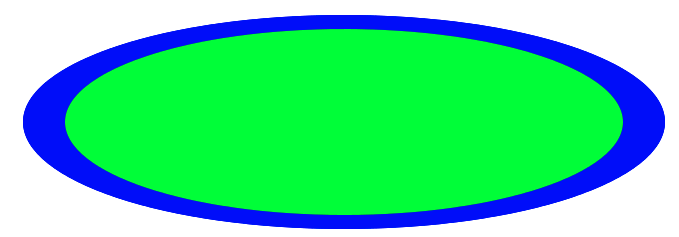
yes, you using stroke for 2nd ellipse, but stroke width is also subject of scaling, that's why it has different width, because of non-uniform scaling (x/y). instead you can first, draw a filled ellipse (blue) and then draw green one over it.
On 11 April 2014 21:33, Juraj Kubelka <juraj.kubelka@gmail.com> wrote: Hi Igor, hi all!
I am not sure how to properly draw ellipse. Right now I draw a path like this:
The path is created that way: -=-=-=-=- computePath path := self athensCanvas createPath: [ :builder | builder absolute; moveTo: 0 @ 0.5; ccwArcTo: 0.5 @ 0.0 angle: 90 degreesToRadians; ccwArcTo: 0.0 @ -0.5 angle: 90 degreesToRadians; ccwArcTo: -0.5 @ 0.0 angle: 90 degreesToRadians; ccwArcTo: 0 @ 0.5 angle: 90 degreesToRadians ] -=-=-=-=-
And draw it like this: -=-=-=-=- drawOn: athensCanvas athensCanvas pathTransform restoreAfter: [ athensCanvas pathTransform scaleBy: rectangle extent asFloatPoint athensCanvas setPaint: color; drawShape: self path. (athensCanvas setStrokePaint: strokePaint) width: (self strokeWidth / self scale) asFloat. athensCanvas drawShape: self path ] -=-=-=-=-
But with a different shapes, the border does not have same width all around the ellipse. See the image:
<Captura de pantalla 2014-04-11 a la(s) 16.29.13.png>
Is there better way to draw it? Thank you, Jura
-- Best regards, Igor Stasenko.
On 12 April 2014 01:37, Juraj Kubelka <juraj.kubelka@gmail.com> wrote:
Thank you Igor,
I suspect there is no better solution. But anyway I am surprised, every simple drawing application manages ellipses.
Athens is not an application, it is framework. And why you think that every framework supports drawing ellipses as a basic command/primitive..for instance? I know of at least one, which doesn't - try drawing it with OpenGL. ;)
Thank you anyway. Juraj
El 11-04-2014, a las 17:35, Igor Stasenko <siguctua@gmail.com> escribió:
yes, you using stroke for 2nd ellipse, but stroke width is also subject of scaling, that's why it has different width, because of non-uniform scaling (x/y). instead you can first, draw a filled ellipse (blue) and then draw green one over it.
On 11 April 2014 21:33, Juraj Kubelka <juraj.kubelka@gmail.com> wrote:
Hi Igor, hi all!
I am not sure how to properly draw ellipse. Right now I draw a path like this:
The path is created that way: -=-=-=-=- computePath path := self athensCanvas createPath: [ :builder | builder absolute; moveTo: 0 @ 0.5; ccwArcTo: 0.5 @ 0.0 angle: 90 degreesToRadians; ccwArcTo: 0.0 @ -0.5 angle: 90 degreesToRadians; ccwArcTo: -0.5 @ 0.0 angle: 90 degreesToRadians; ccwArcTo: 0 @ 0.5 angle: 90 degreesToRadians ] -=-=-=-=-
And draw it like this: -=-=-=-=- drawOn: athensCanvas athensCanvas pathTransform restoreAfter: [ athensCanvas pathTransform scaleBy: rectangle extent asFloatPoint athensCanvas setPaint: color; drawShape: self path. (athensCanvas setStrokePaint: strokePaint) width: (self strokeWidth / self scale) asFloat. athensCanvas drawShape: self path ] -=-=-=-=-
But with a different shapes, the border does not have same width all around the ellipse. See the image:
<Captura de pantalla 2014-04-11 a la(s) 16.29.13.png>
Is there better way to draw it? Thank you, Jura
-- Best regards, Igor Stasenko.
-- Best regards, Igor Stasenko.
El 11-04-2014, a las 20:56, Igor Stasenko <siguctua@gmail.com> escribió:
On 12 April 2014 01:37, Juraj Kubelka <juraj.kubelka@gmail.com> wrote: Thank you Igor,
I suspect there is no better solution. But anyway I am surprised, every simple drawing application manages ellipses.
Athens is not an application, it is framework. And why you think that every framework supports drawing ellipses as a basic command/primitive..for instance? I know of at least one, which doesn't - try drawing it with OpenGL. ;)
This is my new experience, so something what the others accepts and live with that, newcomers do not understand :-D Cheers, Jura
Thank you anyway. Juraj
El 11-04-2014, a las 17:35, Igor Stasenko <siguctua@gmail.com> escribió:
yes, you using stroke for 2nd ellipse, but stroke width is also subject of scaling, that's why it has different width, because of non-uniform scaling (x/y). instead you can first, draw a filled ellipse (blue) and then draw green one over it.
On 11 April 2014 21:33, Juraj Kubelka <juraj.kubelka@gmail.com> wrote: Hi Igor, hi all!
I am not sure how to properly draw ellipse. Right now I draw a path like this:
The path is created that way: -=-=-=-=- computePath path := self athensCanvas createPath: [ :builder | builder absolute; moveTo: 0 @ 0.5; ccwArcTo: 0.5 @ 0.0 angle: 90 degreesToRadians; ccwArcTo: 0.0 @ -0.5 angle: 90 degreesToRadians; ccwArcTo: -0.5 @ 0.0 angle: 90 degreesToRadians; ccwArcTo: 0 @ 0.5 angle: 90 degreesToRadians ] -=-=-=-=-
And draw it like this: -=-=-=-=- drawOn: athensCanvas athensCanvas pathTransform restoreAfter: [ athensCanvas pathTransform scaleBy: rectangle extent asFloatPoint athensCanvas setPaint: color; drawShape: self path. (athensCanvas setStrokePaint: strokePaint) width: (self strokeWidth / self scale) asFloat. athensCanvas drawShape: self path ] -=-=-=-=-
But with a different shapes, the border does not have same width all around the ellipse. See the image:
<Captura de pantalla 2014-04-11 a la(s) 16.29.13.png>
Is there better way to draw it? Thank you, Jura
-- Best regards, Igor Stasenko.
-- Best regards, Igor Stasenko.
El 11-04-2014, a las 20:56, Igor Stasenko <siguctua@gmail.com> escribió:
On 12 April 2014 01:37, Juraj Kubelka <juraj.kubelka@gmail.com> wrote: Thank you Igor,
I suspect there is no better solution. But anyway I am surprised, every simple drawing application manages ellipses.
Athens is not an application, it is framework. And why you think that every framework supports drawing ellipses as a basic command/primitive..for instance? I know of at least one, which doesn't - try drawing it with OpenGL. ;)
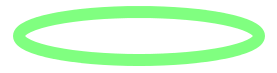
There is an example where it looks as I expect. The strike has the same width along the entire length. It is Cairo. So I think it is possible. I have tried to write equivalent code for ellipse in Smalltalk, but I have not succeeded. Image from the page: My image: Thanks for any help, Juraj
Thank you anyway. Juraj
El 11-04-2014, a las 17:35, Igor Stasenko <siguctua@gmail.com> escribió:
yes, you using stroke for 2nd ellipse, but stroke width is also subject of scaling, that's why it has different width, because of non-uniform scaling (x/y). instead you can first, draw a filled ellipse (blue) and then draw green one over it.
On 11 April 2014 21:33, Juraj Kubelka <juraj.kubelka@gmail.com> wrote: Hi Igor, hi all!
I am not sure how to properly draw ellipse. Right now I draw a path like this:
The path is created that way: -=-=-=-=- computePath path := self athensCanvas createPath: [ :builder | builder absolute; moveTo: 0 @ 0.5; ccwArcTo: 0.5 @ 0.0 angle: 90 degreesToRadians; ccwArcTo: 0.0 @ -0.5 angle: 90 degreesToRadians; ccwArcTo: -0.5 @ 0.0 angle: 90 degreesToRadians; ccwArcTo: 0 @ 0.5 angle: 90 degreesToRadians ] -=-=-=-=-
And draw it like this: -=-=-=-=- drawOn: athensCanvas athensCanvas pathTransform restoreAfter: [ athensCanvas pathTransform scaleBy: rectangle extent asFloatPoint athensCanvas setPaint: color; drawShape: self path. (athensCanvas setStrokePaint: strokePaint) width: (self strokeWidth / self scale) asFloat. athensCanvas drawShape: self path ] -=-=-=-=-
But with a different shapes, the border does not have same width all around the ellipse. See the image:
<Captura de pantalla 2014-04-11 a la(s) 16.29.13.png>
Is there better way to draw it? Thank you, Jura
-- Best regards, Igor Stasenko.
-- Best regards, Igor Stasenko.
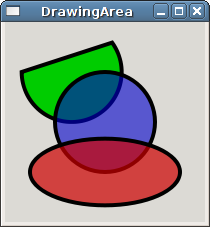
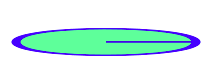

AthensSceneView new scene: [ :can | | path | path := can createPath: [ :builder | builder absolute; moveTo: 0 @ 0.5; ccwArcTo: 0.5 @ 0.0 angle: 90 degreesToRadians; ccwArcTo: 0.0 @ -0.5 angle: 90 degreesToRadians; ccwArcTo: -0.5 @ 0.0 angle: 90 degreesToRadians; ccwArcTo: 0 @ 0.5 angle: 90 degreesToRadians ]. can pathTransform restoreAfter: [ can pathTransform scaleBy: 200 . can setPaint: Color red ; drawShape: path. "(athensCanvas setStrokePaint: strokePaint) width: (self strokeWidth / self scale) asFloat." can drawShape: path.]. can pathTransform restoreAfter: [ can pathTransform scaleBy: 190 . can setPaint: Color blue ; drawShape: path. "(athensCanvas setStrokePaint: strokePaint) width: (self strokeWidth / self scale) asFloat." can drawShape: path ] ] ; openInWindow
Thank you Stef, the example helped me a lot to understand how to play with Athens. The solution is not what I am looking for. If someone starts to play with alpha canal, s/he will get unexpected results. I have finally found an example in C language. It look like this: -=-=-=-=- cairo_set_line_width (cr, 0.1); cairo_save (cr); cairo_scale (cr, 1, 0.2); cairo_arc (cr, 1.5, 1.5, 1, 0, 2 * M_PI); cairo_restore (cr); cairo_set_source_rgba (cr, 0, 1, 0, 0.50); cairo_stroke (cr); -=-=-=-=- I do not know how to write the same instructions with Athens. First, they draw one arc (cairo_arc (cr, 1.5, 1.5, 1, 0, 2 * M_PI);), I draw 4 arcs: -=-=-=-=- canvas createPath: [ :builder | builder absolute; moveTo: 0 @ 0.5; ccwArcTo: 0.5 @ 0.0 angle: 90 degreesToRadians; ccwArcTo: 0.0 @ -0.5 angle: 90 degreesToRadians; ccwArcTo: -0.5 @ 0.0 angle: 90 degreesToRadians; ccwArcTo: 0 @ 0.5 angle: 90 degreesToRadians ]. -=-=-=-=- Second, they set line width, before any other action (like cairo_save). I do: -=-=-=-=- canvas pathTransform scaleBy: 200 @ 50. (can setStrokePaint: Color red) width: 0.1. can drawShape: path. -=-=-=-=- So, my result in Athens is like this: Any idea? The example is explained here, C source code is here (by clicking on the image in the page). Thank you, Jura El 12-04-2014, a las 4:01, Pharo4Stef <pharo4Stef@free.fr> escribió:
AthensSceneView new scene: [ :can | | path | path := can createPath: [ :builder | builder absolute; moveTo: 0 @ 0.5; ccwArcTo: 0.5 @ 0.0 angle: 90 degreesToRadians; ccwArcTo: 0.0 @ -0.5 angle: 90 degreesToRadians; ccwArcTo: -0.5 @ 0.0 angle: 90 degreesToRadians; ccwArcTo: 0 @ 0.5 angle: 90 degreesToRadians ].
can pathTransform restoreAfter: [ can pathTransform scaleBy: 200 . can setPaint: Color red ; drawShape: path. "(athensCanvas setStrokePaint: strokePaint) width: (self strokeWidth / self scale) asFloat." can drawShape: path.]. can pathTransform restoreAfter: [ can pathTransform scaleBy: 190 . can setPaint: Color blue ; drawShape: path. "(athensCanvas setStrokePaint: strokePaint) width: (self strokeWidth / self scale) asFloat." can drawShape: path
] ] ; openInWindow
<Screen Shot 2014-04-12 at 09.01.09.pdf>

El 14-04-2014, a las 8:21, Juraj Kubelka <juraj.kubelka@gmail.com> escribió:
Thank you Stef,
the example helped me a lot to understand how to play with Athens.
The solution is not what I am looking for. If someone starts to play with alpha canal, s/he will get unexpected results.
I have finally found an example in C language. It look like this: -=-=-=-=- cairo_set_line_width (cr, 0.1); cairo_save (cr); cairo_scale (cr, 1, 0.2); cairo_arc (cr, 1.5, 1.5, 1, 0, 2 * M_PI); cairo_restore (cr); cairo_set_source_rgba (cr, 0, 1, 0, 0.50); cairo_stroke (cr); -=-=-=-=- <tips-ellipse.png>
I do not know how to write the same instructions with Athens.
First, they draw one arc (cairo_arc (cr, 1.5, 1.5, 1, 0, 2 * M_PI);), I draw 4 arcs: -=-=-=-=- canvas createPath: [ :builder | builder absolute; moveTo: 0 @ 0.5; ccwArcTo: 0.5 @ 0.0 angle: 90 degreesToRadians; ccwArcTo: 0.0 @ -0.5 angle: 90 degreesToRadians; ccwArcTo: -0.5 @ 0.0 angle: 90 degreesToRadians; ccwArcTo: 0 @ 0.5 angle: 90 degreesToRadians ]. -=-=-=-=-
OK, now I can draw ellipse with just one arc: -=-=-=- canvas createPath: [ :builder | builder absolute; moveTo: 0.5 @ 0; arcCenterX: 0 centerY: 0 radius: 0.5 startAngle: 0 endAngle: Float twoPi -=-=-=- Why is this method in private protocol? Why I should not use it? Why I have to use âmoveTo:â? In C-example they do not use it. But I have to, otherwise there is an extra line on the canvas: Well, I see in AthensCairoPathBuilder>>createPath:, there is call of "self moveToX: 0 Y: 0.â. If I remove it, I do not have to write âmoveTo: 0.5@0â. So, I understand why I have to write it in my code. The question is what is the purpose of "self moveToX: 0 Y: 0.â? I guess it simplify some situations, am I right? Which one? There is actual Athens example: -=-=-=- AthensSceneView new scene: [ :can | | path | path := can createPath: [ :builder | builder absolute; moveTo: 0.5 @ 0; arcCenterX: 0 centerY: 0 radius: 0.5 startAngle: 0 endAngle: Float twoPi ]. can pathTransform restoreAfter: [ can pathTransform scaleBy: 200 @ 50. (can setStrokePaint: Color red) width: 0.1. can drawShape: path. ]. ] ; openInWindow -=-=-=- Thank you, Juraj
Second, they set line width, before any other action (like cairo_save). I do: -=-=-=-=- canvas pathTransform scaleBy: 200 @ 50. (can setStrokePaint: Color red) width: 0.1. can drawShape: path. -=-=-=-=-
So, my result in Athens is like this: <Captura de pantalla 2014-04-14 a la(s) 8.18.38.png>
Any idea? The example is explained here, C source code is here (by clicking on the image in the page).
Thank you, Jura
El 12-04-2014, a las 4:01, Pharo4Stef <pharo4Stef@free.fr> escribió:
AthensSceneView new scene: [ :can | | path | path := can createPath: [ :builder | builder absolute; moveTo: 0 @ 0.5; ccwArcTo: 0.5 @ 0.0 angle: 90 degreesToRadians; ccwArcTo: 0.0 @ -0.5 angle: 90 degreesToRadians; ccwArcTo: -0.5 @ 0.0 angle: 90 degreesToRadians; ccwArcTo: 0 @ 0.5 angle: 90 degreesToRadians ].
can pathTransform restoreAfter: [ can pathTransform scaleBy: 200 . can setPaint: Color red ; drawShape: path. "(athensCanvas setStrokePaint: strokePaint) width: (self strokeWidth / self scale) asFloat." can drawShape: path.]. can pathTransform restoreAfter: [ can pathTransform scaleBy: 190 . can setPaint: Color blue ; drawShape: path. "(athensCanvas setStrokePaint: strokePaint) width: (self strokeWidth / self scale) asFloat." can drawShape: path
] ] ; openInWindow
<Screen Shot 2014-04-12 at 09.01.09.pdf>

On 14 April 2014 13:53, Juraj Kubelka <juraj.kubelka@gmail.com> wrote:
El 14-04-2014, a las 8:21, Juraj Kubelka <juraj.kubelka@gmail.com> escribió:
Thank you Stef,
the example helped me a lot to understand how to play with Athens.
The solution is not what I am looking for. If someone starts to play with alpha canal, s/he will get unexpected results.
I have finally found an example in C language. It look like this: -=-=-=-=- cairo_set_line_width (cr, 0.1); cairo_save (cr); cairo_scale (cr, 1, 0.2); cairo_arc (cr, 1.5, 1.5, 1, 0, 2 * M_PI); cairo_restore (cr); cairo_set_source_rgba (cr, 0, 1, 0, 0.50); cairo_stroke (cr); -=-=-=-=- <tips-ellipse.png>
I do not know how to write the same instructions with Athens.
First, they draw one arc (cairo_arc (cr, 1.5, 1.5, 1, 0, 2 * M_PI);), I draw 4 arcs: -=-=-=-=- canvas createPath: [ :builder | builder absolute; moveTo: 0 @ 0.5; ccwArcTo: 0.5 @ 0.0 angle: 90 degreesToRadians; ccwArcTo: 0.0 @ -0.5 angle: 90 degreesToRadians; ccwArcTo: -0.5 @ 0.0 angle: 90 degreesToRadians; ccwArcTo: 0 @ 0.5 angle: 90 degreesToRadians ]. -=-=-=-=-
OK, now I can draw ellipse with just one arc: -=-=-=- canvas createPath: [ :builder | builder absolute; moveTo: 0.5 @ 0; arcCenterX: 0 centerY: 0 radius: 0.5 startAngle: 0 endAngle: Float twoPi -=-=-=-
Why is this method in private protocol? Why I should not use it?
because its private.. and implementation specific. other implementations may not have this method at all, and your code will simply throw DNU. And that's why you got the horizontal line btw.. because of using private protocol bypassing coordinate tracking.
Why I have to use âmoveTo:â? In C-example they do not use it. But I have to, otherwise there is an extra line on the canvas:
Well, I see in AthensCairoPathBuilder>>createPath:, there is call of "self moveToX: 0 Y: 0.â. If I remove it, I do not have to write âmoveTo: 0.5@0â. So, I understand why I have to write it in my code. The question is what is the purpose of "self moveToX: 0 Y: 0.â? I guess it simplify some situations, am I right? Which one?
the initial moveTo: command lets you set the origin (starting point) of your path. if you don't start path with moveTo: command, it is implicitly set to 0@0.
There is actual Athens example: -=-=-=- AthensSceneView new scene: [ :can | | path | path := can createPath: [ :builder | builder absolute; moveTo: 0.5 @ 0; arcCenterX: 0 centerY: 0 radius: 0.5 startAngle: 0 endAngle: Float twoPi ]. can pathTransform restoreAfter: [ can pathTransform scaleBy: 200 @ 50.
(can setStrokePaint: Color red) width: 0.1. can drawShape: path. ]. ] ; openInWindow -=-=-=-
Thank you, Juraj
Second, they set line width, before any other action (like cairo_save). I do: -=-=-=-=- canvas pathTransform scaleBy: 200 @ 50. (can setStrokePaint: Color red) *width: 0.1*. can drawShape: path. -=-=-=-=-
So, my result in Athens is like this: <Captura de pantalla 2014-04-14 a la(s) 8.18.38.png>
Any idea? The example is explained here<http://cairographics.org/tutorial/#L2linewidth>, C source code is here <http://cairographics.org/tutorial/tips-ellipse.c> (by clicking on the image in the page<http://cairographics.org/tutorial/#L2linewidth> ).
Thank you, Jura
El 12-04-2014, a las 4:01, Pharo4Stef <pharo4Stef@free.fr> escribió:
AthensSceneView new scene: [ :can | | path | path := can createPath: [ :builder | builder absolute; moveTo: 0 @ 0.5; ccwArcTo: 0.5 @ 0.0 angle: 90 degreesToRadians; ccwArcTo: 0.0 @ -0.5 angle: 90 degreesToRadians; ccwArcTo: -0.5 @ 0.0 angle: 90 degreesToRadians; ccwArcTo: 0 @ 0.5 angle: 90 degreesToRadians ].
can pathTransform restoreAfter: [ can pathTransform scaleBy: 200 . can setPaint: Color red ; drawShape: path. "(athensCanvas setStrokePaint: strokePaint) width: (self strokeWidth / self scale) asFloat." can drawShape: path.]. can pathTransform restoreAfter: [ can pathTransform scaleBy: 190 . can setPaint: Color blue ; drawShape: path. "(athensCanvas setStrokePaint: strokePaint) width: (self strokeWidth / self scale) asFloat." can drawShape: path
] ] ; openInWindow
<Screen Shot 2014-04-12 at 09.01.09.pdf>
-- Best regards, Igor Stasenko.

as for why there's 4 arc segments instead of one, its because of bad approximation, when drawing more that 90 degree arcs. also, in athens, arc segment is defined with following inputs: - end point of previous segment (implicit) - angle - direction (clockwise/counterclockwise) - end point the radius, therefore calculated automatically, because with given set of parameters there's only one way to draw an arc connecting given points. Now if you put angle of 360 degrees, you cannot draw arc without specifying radius, because your end points will coincide, which means there's infinite number of ways to draw full circle passing through a single point, with any radius. cairo using different inputs for specifying arc segments.. - center, radius, start angle, end angle the problem with such parametrization is that it is completely separate from rest of commands (line/move/bezier etc).. and you will be very lucky if your arc will be connected with rest of your path.. because arc's starting point depends on start angle, instead of last point of previous path segment. this was the main reason to use more appropriate parametrization to get rid of inconsistency.. while losing ability to draw full circle with single command.. On 22 April 2014 14:05, Igor Stasenko <siguctua@gmail.com> wrote:
On 14 April 2014 13:53, Juraj Kubelka <juraj.kubelka@gmail.com> wrote:
El 14-04-2014, a las 8:21, Juraj Kubelka <juraj.kubelka@gmail.com> escribió:
Thank you Stef,
the example helped me a lot to understand how to play with Athens.
The solution is not what I am looking for. If someone starts to play with alpha canal, s/he will get unexpected results.
I have finally found an example in C language. It look like this: -=-=-=-=- cairo_set_line_width (cr, 0.1); cairo_save (cr); cairo_scale (cr, 1, 0.2); cairo_arc (cr, 1.5, 1.5, 1, 0, 2 * M_PI); cairo_restore (cr); cairo_set_source_rgba (cr, 0, 1, 0, 0.50); cairo_stroke (cr); -=-=-=-=- <tips-ellipse.png>
I do not know how to write the same instructions with Athens.
First, they draw one arc (cairo_arc (cr, 1.5, 1.5, 1, 0, 2 * M_PI);), I draw 4 arcs: -=-=-=-=- canvas createPath: [ :builder | builder absolute; moveTo: 0 @ 0.5; ccwArcTo: 0.5 @ 0.0 angle: 90 degreesToRadians; ccwArcTo: 0.0 @ -0.5 angle: 90 degreesToRadians; ccwArcTo: -0.5 @ 0.0 angle: 90 degreesToRadians; ccwArcTo: 0 @ 0.5 angle: 90 degreesToRadians ]. -=-=-=-=-
OK, now I can draw ellipse with just one arc: -=-=-=- canvas createPath: [ :builder | builder absolute; moveTo: 0.5 @ 0; arcCenterX: 0 centerY: 0 radius: 0.5 startAngle: 0 endAngle: Float twoPi -=-=-=-
Why is this method in private protocol? Why I should not use it?
because its private.. and implementation specific. other implementations may not have this method at all, and your code will simply throw DNU. And that's why you got the horizontal line btw.. because of using private protocol bypassing coordinate tracking.
Why I have to use âmoveTo:â? In C-example they do not use it. But I have to, otherwise there is an extra line on the canvas:
Well, I see in AthensCairoPathBuilder>>createPath:, there is call of "self moveToX: 0 Y: 0.â. If I remove it, I do not have to write âmoveTo: 0.5@0â. So, I understand why I have to write it in my code. The question is what is the purpose of "self moveToX: 0 Y: 0.â? I guess it simplify some situations, am I right? Which one?
the initial moveTo: command lets you set the origin (starting point) of your path. if you don't start path with moveTo: command, it is implicitly set to 0@0.
There is actual Athens example: -=-=-=- AthensSceneView new scene: [ :can | | path | path := can createPath: [ :builder | builder absolute; moveTo: 0.5 @ 0; arcCenterX: 0 centerY: 0 radius: 0.5 startAngle: 0 endAngle: Float twoPi ]. can pathTransform restoreAfter: [ can pathTransform scaleBy: 200 @ 50.
(can setStrokePaint: Color red) width: 0.1. can drawShape: path. ]. ] ; openInWindow -=-=-=-
Thank you, Juraj
Second, they set line width, before any other action (like cairo_save). I do: -=-=-=-=- canvas pathTransform scaleBy: 200 @ 50. (can setStrokePaint: Color red) *width: 0.1*. can drawShape: path. -=-=-=-=-
So, my result in Athens is like this: <Captura de pantalla 2014-04-14 a la(s) 8.18.38.png>
Any idea? The example is explained here<http://cairographics.org/tutorial/#L2linewidth>, C source code is here <http://cairographics.org/tutorial/tips-ellipse.c> (by clicking on the image in the page<http://cairographics.org/tutorial/#L2linewidth> ).
Thank you, Jura
El 12-04-2014, a las 4:01, Pharo4Stef <pharo4Stef@free.fr> escribió:
AthensSceneView new scene: [ :can | | path | path := can createPath: [ :builder | builder absolute; moveTo: 0 @ 0.5; ccwArcTo: 0.5 @ 0.0 angle: 90 degreesToRadians; ccwArcTo: 0.0 @ -0.5 angle: 90 degreesToRadians; ccwArcTo: -0.5 @ 0.0 angle: 90 degreesToRadians; ccwArcTo: 0 @ 0.5 angle: 90 degreesToRadians ].
can pathTransform restoreAfter: [ can pathTransform scaleBy: 200 . can setPaint: Color red ; drawShape: path. "(athensCanvas setStrokePaint: strokePaint) width: (self strokeWidth / self scale) asFloat." can drawShape: path.]. can pathTransform restoreAfter: [ can pathTransform scaleBy: 190 . can setPaint: Color blue ; drawShape: path. "(athensCanvas setStrokePaint: strokePaint) width: (self strokeWidth / self scale) asFloat." can drawShape: path
] ] ; openInWindow
<Screen Shot 2014-04-12 at 09.01.09.pdf>
-- Best regards, Igor Stasenko.
-- Best regards, Igor Stasenko.


On 22 Apr 2014, at 2:23 , Igor Stasenko <siguctua@gmail.com> wrote:
as for why there's 4 arc segments instead of one, its because of bad approximation, when drawing more that 90 degree arcs.
also, in athens, arc segment is defined with following inputs: - end point of previous segment (implicit) - angle - direction (clockwise/counterclockwise) - end point
the radius, therefore calculated automatically, because with given set of parameters there's only one way to draw an arc connecting given points.
Now if you put angle of 360 degrees, you cannot draw arc without specifying radius, because your end points will coincide, which means there's infinite number of ways to draw full circle passing through a single point, with any radius.
cairo using different inputs for specifying arc segments.. - center, radius, start angle, end angle
the problem with such parametrization is that it is completely separate from rest of commands (line/move/bezier etc).. and you will be very lucky if your arc will be connected with rest of your path.. because arc's starting point depends on start angle, instead of last point of previous path segment.
this was the main reason to use more appropriate parametrization to get rid of inconsistency.. while losing ability to draw full circle with single command..
AFAICT, still doesnât explain how to draw an ellipse with constant stroke path width, which was the original question :) One way is to not use a transformed circle path altogether, but draw the actual ellipsis path using cubic beziers: http://www.charlespetzold.com/blog/2012/12/Bezier-Circles-and-Bezier-Ellipse... ellipsisOfExtent := [:builder :anExtent | | halfX halfY | halfX := anExtent x / 2. halfY := anExtent y / 2. âWe expect relative builder, and start the ellipsis at anExtent x / 2 @ 0" builder curveVia: 0@(halfY negated * 0.55) and: (0.45 * halfX)@halfY negated to: halfX@ halfY negated; curveVia: halfX* 0.55 @ 0 and: halfX@ (0.45 * halfY) to: halfX @ halfY; curveVia: 0 @ (halfY * 0.55 ) and: (0.45 * halfX negated @ halfY) to: halfX negated @ halfY; curveVia: (halfX negated * 0.55) @ 0 and: halfX negated @ (halfY negated * 0.45) to: halfX negated @ halfY negated; close]. AthensSceneView new scene: [ :can | | path | path := can createPath: [ :builder | builder moveTo: 10@60. ellipsisOfExtent value: builder value: 200@100 ]. (can setStrokePaint: Color red) width: 8 asFloat. can drawShape: path ] ; openInWindow Cheers, Henry
On 23 April 2014 13:17, Henrik Johansen <henrik.s.johansen@veloxit.no>wrote:
On 22 Apr 2014, at 2:23 , Igor Stasenko <siguctua@gmail.com> wrote:
as for why there's 4 arc segments instead of one, its because of bad approximation, when drawing more that 90 degree arcs.
also, in athens, arc segment is defined with following inputs: - end point of previous segment (implicit) - angle - direction (clockwise/counterclockwise) - end point
the radius, therefore calculated automatically, because with given set of parameters there's only one way to draw an arc connecting given points.
Now if you put angle of 360 degrees, you cannot draw arc without specifying radius, because your end points will coincide, which means there's infinite number of ways to draw full circle passing through a single point, with any radius.
cairo using different inputs for specifying arc segments.. - center, radius, start angle, end angle
the problem with such parametrization is that it is completely separate from rest of commands (line/move/bezier etc).. and you will be very lucky if your arc will be connected with rest of your path.. because arc's starting point depends on start angle, instead of last point of previous path segment.
this was the main reason to use more appropriate parametrization to get rid of inconsistency.. while losing ability to draw full circle with single command..
AFAICT, still doesnât explain how to draw an ellipse with constant stroke path width, which was the original question :)
Right, what is missing is elliptical arc segment type. And there's no direct support for it in Cairo.. so it can be only approximated by other segment types, like lines or bezier curves. There's a work started on calculating path geometry using approximation with line segments.. it can be used to represent any kind of curves defined parametrically. But it is not yet plugged into the API. One way is to not use a transformed circle path altogether, but draw the
actual ellipsis path using cubic beziers:
http://www.charlespetzold.com/blog/2012/12/Bezier-Circles-and-Bezier-Ellipse...
ellipsisOfExtent := [:builder :anExtent | | halfX halfY | halfX := anExtent x / 2. halfY := anExtent y / 2. âWe expect relative builder, and start the ellipsis at anExtent x / 2 @ 0" builder curveVia: 0@(halfY negated * 0.55) and: (0.45 * halfX)@halfY negated to: halfX@ halfY negated; curveVia: halfX* 0.55 @ 0 and: halfX@ (0.45 * halfY) to: halfX @ halfY; curveVia: 0 @ (halfY * 0.55 ) and: (0.45 * halfX negated @ halfY) to: halfX negated @ halfY; curveVia: (halfX negated * 0.55) @ 0 and: halfX negated @ (halfY negated * 0.45) to: halfX negated @ halfY negated; close].
AthensSceneView new scene: [ :can | | path |
path := can createPath: [ :builder | builder moveTo: 10@60. ellipsisOfExtent value: builder value: 200@100 ]. (can
setStrokePaint: Color red) width: 8 asFloat. can drawShape: path ] ; openInWindow
quite nice approximation. What is an error measure comparing to true ellipse?
Cheers, Henry
-- Best regards, Igor Stasenko.
On 23 Apr 2014, at 2:31 , Igor Stasenko <siguctua@gmail.com> wrote:
On 23 April 2014 13:17, Henrik Johansen <henrik.s.johansen@veloxit.no> wrote:
On 22 Apr 2014, at 2:23 , Igor Stasenko <siguctua@gmail.com> wrote:
as for why there's 4 arc segments instead of one, its because of bad approximation, when drawing more that 90 degree arcs.
also, in athens, arc segment is defined with following inputs: - end point of previous segment (implicit) - angle - direction (clockwise/counterclockwise) - end point
the radius, therefore calculated automatically, because with given set of parameters there's only one way to draw an arc connecting given points.
Now if you put angle of 360 degrees, you cannot draw arc without specifying radius, because your end points will coincide, which means there's infinite number of ways to draw full circle passing through a single point, with any radius.
cairo using different inputs for specifying arc segments.. - center, radius, start angle, end angle
the problem with such parametrization is that it is completely separate from rest of commands (line/move/bezier etc).. and you will be very lucky if your arc will be connected with rest of your path.. because arc's starting point depends on start angle, instead of last point of previous path segment.
this was the main reason to use more appropriate parametrization to get rid of inconsistency.. while losing ability to draw full circle with single command..
AFAICT, still doesnât explain how to draw an ellipse with constant stroke path width, which was the original question :)
Right, what is missing is elliptical arc segment type. And there's no direct support for it in Cairo.. so it can be only approximated by other segment types, like lines or bezier curves. There's a work started on calculating path geometry using approximation with line segments.. it can be used to represent any kind of curves defined parametrically. But it is not yet plugged into the API.
One way is to not use a transformed circle path altogether, but draw the actual ellipsis path using cubic beziers: http://www.charlespetzold.com/blog/2012/12/Bezier-Circles-and-Bezier-Ellipse...
ellipsisOfExtent := [:builder :anExtent | | halfX halfY | halfX := anExtent x / 2. halfY := anExtent y / 2. âWe expect relative builder, and start the ellipsis at anExtent x / 2 @ 0" builder curveVia: 0@(halfY negated * 0.55) and: (0.45 * halfX)@halfY negated to: halfX@ halfY negated; curveVia: halfX* 0.55 @ 0 and: halfX@ (0.45 * halfY) to: halfX @ halfY; curveVia: 0 @ (halfY * 0.55 ) and: (0.45 * halfX negated @ halfY) to: halfX negated @ halfY; curveVia: (halfX negated * 0.55) @ 0 and: halfX negated @ (halfY negated * 0.45) to: halfX negated @ halfY negated; close].
AthensSceneView new scene: [ :can | | path |
path := can createPath: [ :builder | builder moveTo: 10@60. ellipsisOfExtent value: builder value: 200@100 ]. (can
setStrokePaint: Color red) width: 8 asFloat. can drawShape: path ] ; openInWindow
quite nice approximation. What is an error measure comparing to true ellipse?
From the abstract of the paper cited in the linked site:
We provide a surprisingly simple cubic Bézier curve which gives a very accurate approximation to a segment of a circle. Joining the Bézier segments we obtain an approximation to the circle with continuous tangent and curvature. For 45° segments the error is approximately 2·10-6, and in general the approximation is sixth order accurate. Considering the code simply stretches a bezier circleâs control points, Iâd say quite. In fact, Iâd be surprised if the arc primitive in cairo is implemented using a different method. (Of course, even less error using the actual value of the formula for 90 degrees, instead of approximate values .55 / 1- 0.55.) Cheers, Henry

in (pure) cairo it is possible to stroke a path, after restoring the current state/transformation: cairo_set_line_width (cr, 0.1); cairo_save (cr); cairo_scale (cr, 0.5, 1); cairo_arc (cr, 0.5, 0.5, 0.40, 0, 2 * M_PI); cairo_restore (cr); cairo_stroke (cr); So we can scale the circle arc to an elliptic one, without scaling the stroke width.
From my observation, this is not possible with the current athens rendering scheme:
steps in AthensCanvas draw-> setPathTransform loadpath stroke/fill Igor, did I miss something, is it possible with the Athens API ? nicolai 2014-04-23 14:54 GMT+02:00 Henrik Johansen <henrik.s.johansen@veloxit.no>:
On 23 Apr 2014, at 2:31 , Igor Stasenko <siguctua@gmail.com> wrote:
On 23 April 2014 13:17, Henrik Johansen <henrik.s.johansen@veloxit.no> wrote:
On 22 Apr 2014, at 2:23 , Igor Stasenko <siguctua@gmail.com> wrote:
as for why there's 4 arc segments instead of one, its because of bad approximation, when drawing more that 90 degree arcs.
also, in athens, arc segment is defined with following inputs: - end point of previous segment (implicit) - angle - direction (clockwise/counterclockwise) - end point
the radius, therefore calculated automatically, because with given set of parameters there's only one way to draw an arc connecting given points.
Now if you put angle of 360 degrees, you cannot draw arc without specifying radius, because your end points will coincide, which means there's infinite number of ways to draw full circle passing through a single point, with any radius.
cairo using different inputs for specifying arc segments.. - center, radius, start angle, end angle
the problem with such parametrization is that it is completely separate from rest of commands (line/move/bezier etc).. and you will be very lucky if your arc will be connected with rest of your path.. because arc's starting point depends on start angle, instead of last point of previous path segment.
this was the main reason to use more appropriate parametrization to get rid of inconsistency.. while losing ability to draw full circle with single command..
AFAICT, still doesnât explain how to draw an ellipse with constant stroke path width, which was the original question :)
Right, what is missing is elliptical arc segment type. And there's no direct support for it in Cairo.. so it can be only approximated by other segment types, like lines or bezier curves. There's a work started on calculating path geometry using approximation with line segments.. it can be used to represent any kind of curves defined parametrically. But it is not yet plugged into the API.
One way is to not use a transformed circle path altogether, but draw the
actual ellipsis path using cubic beziers:
http://www.charlespetzold.com/blog/2012/12/Bezier-Circles-and-Bezier-Ellipse...
ellipsisOfExtent := [:builder :anExtent | | halfX halfY | halfX := anExtent x / 2. halfY := anExtent y / 2. âWe expect relative builder, and start the ellipsis at anExtent x / 2 @ 0" builder curveVia: 0@(halfY negated * 0.55) and: (0.45 * halfX)@halfY negated to: halfX@ halfY negated; curveVia: halfX* 0.55 @ 0 and: halfX@ (0.45 * halfY) to: halfX @ halfY; curveVia: 0 @ (halfY * 0.55 ) and: (0.45 * halfX negated @ halfY) to: halfX negated @ halfY; curveVia: (halfX negated * 0.55) @ 0 and: halfX negated @ (halfY negated * 0.45) to: halfX negated @ halfY negated; close].
AthensSceneView new scene: [ :can | | path |
path := can createPath: [ :builder | builder moveTo: 10@60. ellipsisOfExtent value: builder value: 200@100 ]. (can
setStrokePaint: Color red) width: 8 asFloat. can drawShape: path ] ; openInWindow
quite nice approximation. What is an error measure comparing to true ellipse?
From the abstract of the paper cited in the linked site:
*We provide a surprisingly simple cubic Bézier curve which gives a very accurate approximation to a segment of a circle. Joining the Bézier segments we obtain an approximation to the circle with continuous tangent and curvature. For 45° segments the error is approximately 2·10-6, and in general the approximation is sixth order accurate.*
Considering the code simply stretches a bezier circleâs control points, Iâd say quite. In fact, Iâd be surprised if the arc primitive in cairo is implemented using a different method.
(Of course, even less error using the actual value of the formula for 90 degrees, instead of approximate values .55 / 1- 0.55.)
Cheers, Henry
I have understood it is not possible. Cheers, Juraj -- View this message in context: http://forum.world.st/Athens-and-ellipse-drawing-tp4754256p4764784.html Sent from the Pharo Smalltalk Users mailing list archive at Nabble.com.
Igor, what do you think. Is it possible or should it be possible to draw a non-uniform scaled path with an unscaled (stroke-)paint? Nicolai 2014-06-25 21:35 GMT+02:00 Juraj Kubelka <juraj.kubelka@gmail.com>:
I have understood it is not possible.
Cheers, Juraj
-- View this message in context: http://forum.world.st/Athens-and-ellipse-drawing-tp4754256p4764784.html Sent from the Pharo Smalltalk Users mailing list archive at Nabble.com.

Thanks for the explanation I will add them to the chapter. On 22/4/14 14:05, Igor Stasenko wrote:
On 14 April 2014 13:53, Juraj Kubelka <juraj.kubelka@gmail.com <mailto:juraj.kubelka@gmail.com>> wrote:
El 14-04-2014, a las 8:21, Juraj Kubelka <juraj.kubelka@gmail.com <mailto:juraj.kubelka@gmail.com>> escribió:
Thank you Stef,
the example helped me a lot to understand how to play with Athens.
The solution is not what I am looking for. If someone starts to play with alpha canal, s/he will get unexpected results.
I have finally found an example in C language. It look like this: -=-=-=-=- cairo_set_line_width (cr, 0.1); cairo_save (cr); cairo_scale (cr, 1, 0.2); cairo_arc (cr, 1.5, 1.5, 1, 0, 2 * M_PI); cairo_restore (cr); cairo_set_source_rgba (cr, 0, 1, 0, 0.50); cairo_stroke (cr); -=-=-=-=- <tips-ellipse.png>
I do not know how to write the same instructions with Athens.
First, they draw one arc (cairo_arc (cr, 1.5, 1.5, 1, 0, 2 * M_PI);), I draw 4 arcs: -=-=-=-=- canvas createPath: [ :builder | builder absolute; moveTo: 0 @ 0.5; ccwArcTo: 0.5 @ 0.0 angle: 90 degreesToRadians; ccwArcTo: 0.0 @ -0.5 angle: 90 degreesToRadians; ccwArcTo: -0.5 @ 0.0 angle: 90 degreesToRadians; ccwArcTo: 0 @ 0.5 angle: 90 degreesToRadians ]. -=-=-=-=-
OK, now I can draw ellipse with just one arc: -=-=-=- canvas createPath: [ :builder | builder absolute; moveTo: 0.5 @ 0; arcCenterX: 0 centerY: 0 radius: 0.5 startAngle: 0 endAngle: Float twoPi -=-=-=-
Why is this method in private protocol? Why I should not use it?
because its private.. and implementation specific. other implementations may not have this method at all, and your code will simply throw DNU. And that's why you got the horizontal line btw.. because of using private protocol bypassing coordinate tracking.
Why I have to use âmoveTo:â? In C-example they do not use it. But I have to, otherwise there is an extra line on the canvas:
Well, I see in AthensCairoPathBuilder>>createPath:, there is call of "self moveToX: 0 Y: 0.â. If I remove it, I do not have to write âmoveTo: 0.5@0â. So, I understand why I have to write it in my code. The question is what is the purpose of "self moveToX: 0 Y: 0.â? I guess it simplify some situations, am I right? Which one?
the initial moveTo: command lets you set the origin (starting point) of your path. if you don't start path with moveTo: command, it is implicitly set to 0@0.
There is actual Athens example: -=-=-=- AthensSceneView new scene: [ :can | | path | path := can createPath: [ :builder | builder absolute; moveTo: 0.5 @ 0; arcCenterX: 0 centerY: 0 radius: 0.5 startAngle: 0 endAngle: Float twoPi ]. can pathTransform restoreAfter: [ can pathTransform scaleBy: 200 @ 50.
(can setStrokePaint: Color red) width: 0.1. can drawShape: path. ]. ] ; openInWindow -=-=-=-
Thank you, Juraj
Second, they set line width, before any other action (like cairo_save). I do: -=-=-=-=- canvas pathTransform scaleBy: 200 @ 50. (can setStrokePaint: Color red) *width: 0.1*. can drawShape: path. -=-=-=-=-
So, my result in Athens is like this: <Captura de pantalla 2014-04-14 a la(s) 8.18.38.png>
Any idea? The example is explained here <http://cairographics.org/tutorial/#L2linewidth>, C source code is here <http://cairographics.org/tutorial/tips-ellipse.c> (by clicking on the image in the page <http://cairographics.org/tutorial/#L2linewidth>).
Thank you, Jura
El 12-04-2014, a las 4:01, Pharo4Stef <pharo4Stef@free.fr <mailto:pharo4Stef@free.fr>> escribió:
AthensSceneView new scene: [ :can | | path | path := can createPath: [ :builder | builder absolute; moveTo: 0 @ 0.5; ccwArcTo: 0.5 @ 0.0 angle: 90 degreesToRadians; ccwArcTo: 0.0 @ -0.5 angle: 90 degreesToRadians; ccwArcTo: -0.5 @ 0.0 angle: 90 degreesToRadians; ccwArcTo: 0 @ 0.5 angle: 90 degreesToRadians ].
can pathTransform restoreAfter: [ can pathTransform scaleBy: 200 . can setPaint: Color red ; drawShape: path. "(athensCanvas setStrokePaint: strokePaint) width: (self strokeWidth / self scale) asFloat." can drawShape: path.]. can pathTransform restoreAfter: [ can pathTransform scaleBy: 190 . can setPaint: Color blue ; drawShape: path. "(athensCanvas setStrokePaint: strokePaint) width: (self strokeWidth / self scale) asFloat." can drawShape: path
] ] ; openInWindow
<Screen Shot 2014-04-12 at 09.01.09.pdf>
-- Best regards, Igor Stasenko.

participants (6)
-
 Henrik Johansen
 -
 Igor Stasenko
 -
 Juraj Kubelka
 -
 Nicolai Hess
 -
 Pharo4Stef
 -
 stepharo