
Hi all, Another announcement for Christmas. Do you know Lego MindStorms ? The last one is the Ev3 serie (http://www.lego.com/fr-fr/mindstorms/). One particularity of this version compared to the previous ones is the possibility to plug a Wifi key and connect via TCP. So, if you have this material (one Mindstorms Ev3, one compatible Wifi key), a wireshark to obtain the TCP port to connect to Ev3 (See the process here, only to understand why we need a wireshark to know the port: http://www.monobrick.dk/guides/how-to-establish-a-wifi-connection-with-the-e...). Now, you can control your robot with Pharo ! Just load these lines: â Gofer it url: 'http://smalltalkhub.com/mc/JLaval/JetStorm/main' username: '' password: ''; package: 'ConfigurationOfJetStorm'; load. (Smalltalk at: #ConfigurationOfJetStorm) loadBleedingEdge. â I know also that for Christmas, it is not possible to learn a new API, we all have a lot of other things to do ! So, you can play with it into Phratch. For that, just load Phratch and the package EV3Phratch as following. â Gofer it url: 'http://smalltalkhub.com/mc/JLaval/Phratch/main' username: '' password: ''; package: 'ConfigurationOfPhratch'; load. (Smalltalk at: #ConfigurationOfPhratch) loadBleedingEdge. Gofer it url: 'http://smalltalkhub.com/mc/JLaval/JetStorm/main' username: '' password: ''; package: 'EV3Phratch'; load. â Have fun ! Jannik PS: for now, this package in prototype, it can change a lot and can have bugs. Do not hesitate to give feedbacks. PS2: I hope to write a doc for it !

This is really amazing! Thanks Jannik! Uko On 18 Dec 2013, at 10:09, jannik.laval <jannik.laval@gmail.com> wrote:
Hi all, Another announcement for Christmas.
Do you know Lego MindStorms ? The last one is the Ev3 serie (http://www.lego.com/fr-fr/mindstorms/). One particularity of this version compared to the previous ones is the possibility to plug a Wifi key and connect via TCP.
So, if you have this material (one Mindstorms Ev3, one compatible Wifi key), a wireshark to obtain the TCP port to connect to Ev3 (See the process here, only to understand why we need a wireshark to know the port: http://www.monobrick.dk/guides/how-to-establish-a-wifi-connection-with-the-e...).
Now, you can control your robot with Pharo ! Just load these lines: â Gofer it url: 'http://smalltalkhub.com/mc/JLaval/JetStorm/main' username: '' password: ''; package: 'ConfigurationOfJetStorm'; load. (Smalltalk at: #ConfigurationOfJetStorm) loadBleedingEdge. â
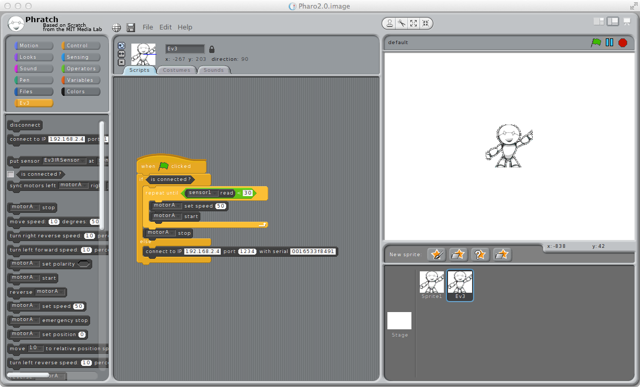
I know also that for Christmas, it is not possible to learn a new API, we all have a lot of other things to do ! So, you can play with it into Phratch. For that, just load Phratch and the package EV3Phratch as following.
â Gofer it url: 'http://smalltalkhub.com/mc/JLaval/Phratch/main' username: '' password: ''; package: 'ConfigurationOfPhratch'; load. (Smalltalk at: #ConfigurationOfPhratch) loadBleedingEdge.
Gofer it url: 'http://smalltalkhub.com/mc/JLaval/JetStorm/main' username: '' password: ''; package: 'EV3Phratch'; load. â
Have fun ! Jannik
PS: for now, this package in prototype, it can change a lot and can have bugs. Do not hesitate to give feedbacks. PS2: I hope to write a doc for it ! <ev3.png>

Amazing is indeed the right word! Doru On Wed, Dec 18, 2013 at 10:28 AM, Yuriy Tymchuk <yuriy.tymchuk@me.com>wrote:
This is really amazing! Thanks Jannik!
Uko
On 18 Dec 2013, at 10:09, jannik.laval <jannik.laval@gmail.com> wrote:
Hi all, Another announcement for Christmas.
Do you know Lego MindStorms ? The last one is the Ev3 serie ( http://www.lego.com/fr-fr/mindstorms/). One particularity of this version compared to the previous ones is the possibility to plug a Wifi key and connect via TCP.
So, if you have this material (one Mindstorms Ev3, one compatible Wifi key), a wireshark to obtain the TCP port to connect to Ev3 (See the process here, only to understand why we need a wireshark to know the port: http://www.monobrick.dk/guides/how-to-establish-a-wifi-connection-with-the-e... ).
Now, you can control your robot with Pharo ! Just load these lines: â Gofer it url: 'http://smalltalkhub.com/mc/JLaval/JetStorm/main' username: '' password: ''; package: 'ConfigurationOfJetStorm'; load. (Smalltalk at: #ConfigurationOfJetStorm) loadBleedingEdge. â
I know also that for Christmas, it is not possible to learn a new API, we all have a lot of other things to do ! So, you can play with it into Phratch. For that, just load Phratch and the package EV3Phratch as following.
â Gofer it url: 'http://smalltalkhub.com/mc/JLaval/Phratch/main' username: '' password: ''; package: 'ConfigurationOfPhratch'; load. (Smalltalk at: #ConfigurationOfPhratch) loadBleedingEdge.
Gofer it url: 'http://smalltalkhub.com/mc/JLaval/JetStorm/main' username: '' password: ''; package: 'EV3Phratch'; load. â
Have fun ! Jannik
PS: for now, this package in prototype, it can change a lot and can have bugs. Do not hesitate to give feedbacks. PS2: I hope to write a doc for it ! <ev3.png>
-- www.tudorgirba.com "Every thing has its own flow"

Wow! Go go go! Some people at the University of Chile are closely looking at what you are doing... Alexandre On Dec 18, 2013, at 10:09 AM, jannik.laval <jannik.laval@gmail.com> wrote:
Hi all, Another announcement for Christmas.
Do you know Lego MindStorms ? The last one is the Ev3 serie (http://www.lego.com/fr-fr/mindstorms/). One particularity of this version compared to the previous ones is the possibility to plug a Wifi key and connect via TCP.
So, if you have this material (one Mindstorms Ev3, one compatible Wifi key), a wireshark to obtain the TCP port to connect to Ev3 (See the process here, only to understand why we need a wireshark to know the port: http://www.monobrick.dk/guides/how-to-establish-a-wifi-connection-with-the-e...).
Now, you can control your robot with Pharo ! Just load these lines: â Gofer it url: 'http://smalltalkhub.com/mc/JLaval/JetStorm/main' username: '' password: ''; package: 'ConfigurationOfJetStorm'; load. (Smalltalk at: #ConfigurationOfJetStorm) loadBleedingEdge. â
I know also that for Christmas, it is not possible to learn a new API, we all have a lot of other things to do ! So, you can play with it into Phratch. For that, just load Phratch and the package EV3Phratch as following.
â Gofer it url: 'http://smalltalkhub.com/mc/JLaval/Phratch/main' username: '' password: ''; package: 'ConfigurationOfPhratch'; load. (Smalltalk at: #ConfigurationOfPhratch) loadBleedingEdge.
Gofer it url: 'http://smalltalkhub.com/mc/JLaval/JetStorm/main' username: '' password: ''; package: 'EV3Phratch'; load. â
Have fun ! Jannik
PS: for now, this package in prototype, it can change a lot and can have bugs. Do not hesitate to give feedbacks. PS2: I hope to write a doc for it ! <ev3.png>
-- _,.;:~^~:;._,.;:~^~:;._,.;:~^~:;._,.;:~^~:;._,.;: Alexandre Bergel http://www.bergel.eu ^~:;._,.;:~^~:;._,.;:~^~:;._,.;:~^~:;._,.;:~^~:;.

Mmmh, looks like an Ev3 upgrade for my old RCX is in order. Phil On Wed, Dec 18, 2013 at 1:04 PM, Alexandre Bergel <alexandre.bergel@me.com>wrote:
Wow! Go go go!
Some people at the University of Chile are closely looking at what you are doing...
Alexandre
On Dec 18, 2013, at 10:09 AM, jannik.laval <jannik.laval@gmail.com> wrote:
Hi all, Another announcement for Christmas.
Do you know Lego MindStorms ? The last one is the Ev3 serie ( http://www.lego.com/fr-fr/mindstorms/). One particularity of this version compared to the previous ones is the possibility to plug a Wifi key and connect via TCP.
So, if you have this material (one Mindstorms Ev3, one compatible Wifi key), a wireshark to obtain the TCP port to connect to Ev3 (See the process here, only to understand why we need a wireshark to know the port: http://www.monobrick.dk/guides/how-to-establish-a-wifi-connection-with-the-e... ).
Now, you can control your robot with Pharo ! Just load these lines: â Gofer it url: 'http://smalltalkhub.com/mc/JLaval/JetStorm/main' username: '' password: ''; package: 'ConfigurationOfJetStorm'; load. (Smalltalk at: #ConfigurationOfJetStorm) loadBleedingEdge. â
I know also that for Christmas, it is not possible to learn a new API, we all have a lot of other things to do ! So, you can play with it into Phratch. For that, just load Phratch and the package EV3Phratch as following.
â Gofer it url: 'http://smalltalkhub.com/mc/JLaval/Phratch/main' username: '' password: ''; package: 'ConfigurationOfPhratch'; load. (Smalltalk at: #ConfigurationOfPhratch) loadBleedingEdge.
Gofer it url: 'http://smalltalkhub.com/mc/JLaval/JetStorm/main' username: '' password: ''; package: 'EV3Phratch'; load. â
Have fun ! Jannik
PS: for now, this package in prototype, it can change a lot and can have bugs. Do not hesitate to give feedbacks. PS2: I hope to write a doc for it ! <ev3.png>
-- _,.;:~^~:;._,.;:~^~:;._,.;:~^~:;._,.;:~^~:;._,.;: Alexandre Bergel http://www.bergel.eu ^~:;._,.;:~^~:;._,.;:~^~:;._,.;:~^~:;._,.;:~^~:;.

Would'nt it make sense to switch from a private repo to a public one then STHub Error: you are forbidden to access "/mc/JLaval/JetStorm/main" ;) Bye T.

Fantastic work. Maybe you should try talking with these guys: http://www.kickstarter.com/projects/1039674461/primo-teaching-programming-lo... Sounds like there is space for an intermediate product to ease the learning curve there sebastian o/ On Dec 18, 2013, at 7:09 AM, jannik.laval <jannik.laval@gmail.com> wrote:
Hi all, Another announcement for Christmas.
Do you know Lego MindStorms ? The last one is the Ev3 serie (http://www.lego.com/fr-fr/mindstorms/). One particularity of this version compared to the previous ones is the possibility to plug a Wifi key and connect via TCP.
So, if you have this material (one Mindstorms Ev3, one compatible Wifi key), a wireshark to obtain the TCP port to connect to Ev3 (See the process here, only to understand why we need a wireshark to know the port: http://www.monobrick.dk/guides/how-to-establish-a-wifi-connection-with-the-e...).
Now, you can control your robot with Pharo ! Just load these lines: â Gofer it url: 'http://smalltalkhub.com/mc/JLaval/JetStorm/main' username: '' password: ''; package: 'ConfigurationOfJetStorm'; load. (Smalltalk at: #ConfigurationOfJetStorm) loadBleedingEdge. â
I know also that for Christmas, it is not possible to learn a new API, we all have a lot of other things to do ! So, you can play with it into Phratch. For that, just load Phratch and the package EV3Phratch as following.
â Gofer it url: 'http://smalltalkhub.com/mc/JLaval/Phratch/main' username: '' password: ''; package: 'ConfigurationOfPhratch'; load. (Smalltalk at: #ConfigurationOfPhratch) loadBleedingEdge.
Gofer it url: 'http://smalltalkhub.com/mc/JLaval/JetStorm/main' username: '' password: ''; package: 'EV3Phratch'; load. â
Have fun ! Jannik
PS: for now, this package in prototype, it can change a lot and can have bugs. Do not hesitate to give feedbacks. PS2: I hope to write a doc for it ! <ev3.png>

Argh, I saw the project too late. It is interesting, I will se that. Cheers, Jannik On Dec 20, 2013, at 12:53 PM, Sebastian Sastre <sebastian@flowingconcept.com> wrote:
Fantastic work.
Maybe you should try talking with these guys: http://www.kickstarter.com/projects/1039674461/primo-teaching-programming-lo...
Sounds like there is space for an intermediate product to ease the learning curve there
sebastian
o/
On Dec 18, 2013, at 7:09 AM, jannik.laval <jannik.laval@gmail.com> wrote:
Hi all, Another announcement for Christmas.
Do you know Lego MindStorms ? The last one is the Ev3 serie (http://www.lego.com/fr-fr/mindstorms/). One particularity of this version compared to the previous ones is the possibility to plug a Wifi key and connect via TCP.
So, if you have this material (one Mindstorms Ev3, one compatible Wifi key), a wireshark to obtain the TCP port to connect to Ev3 (See the process here, only to understand why we need a wireshark to know the port: http://www.monobrick.dk/guides/how-to-establish-a-wifi-connection-with-the-e...).
Now, you can control your robot with Pharo ! Just load these lines: â Gofer it url: 'http://smalltalkhub.com/mc/JLaval/JetStorm/main' username: '' password: ''; package: 'ConfigurationOfJetStorm'; load. (Smalltalk at: #ConfigurationOfJetStorm) loadBleedingEdge. â
I know also that for Christmas, it is not possible to learn a new API, we all have a lot of other things to do ! So, you can play with it into Phratch. For that, just load Phratch and the package EV3Phratch as following.
â Gofer it url: 'http://smalltalkhub.com/mc/JLaval/Phratch/main' username: '' password: ''; package: 'ConfigurationOfPhratch'; load. (Smalltalk at: #ConfigurationOfPhratch) loadBleedingEdge.
Gofer it url: 'http://smalltalkhub.com/mc/JLaval/JetStorm/main' username: '' password: ''; package: 'EV3Phratch'; load. â
Have fun ! Jannik
PS: for now, this package in prototype, it can change a lot and can have bugs. Do not hesitate to give feedbacks. PS2: I hope to write a doc for it ! <ev3.png>
participants (8)
-
 Alexandre Bergel
 -
 btc@openinworld.com
 -
 jannik.laval
 -
 phil@highoctane.be
 -
 Sebastian Sastre
 -
 Torsten Bergmann
 -
 Tudor Girba
 -
 Yuriy Tymchuk