
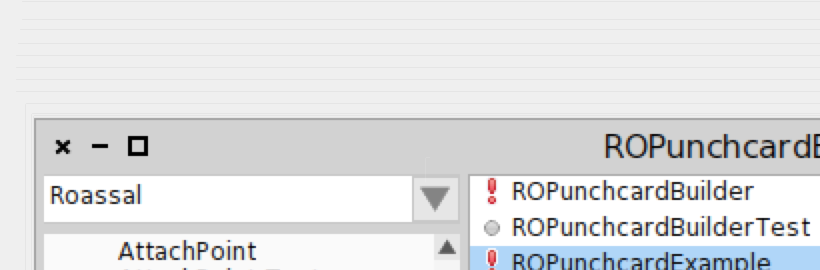
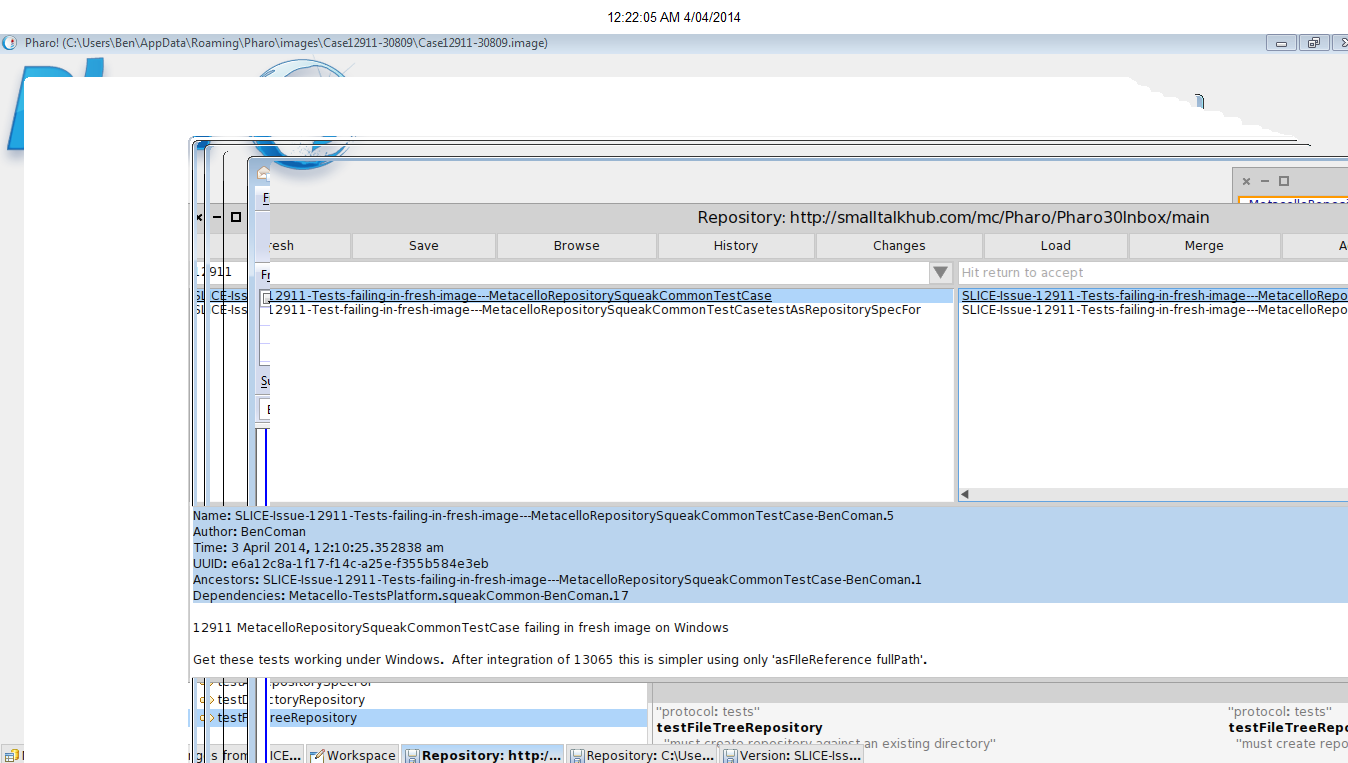
Hi all do you see a glitch when I resize a window? Because it is not really nice. Stef

I see it on Mac. On Windows it works fine. I thought this was a known issue. Doru On Thu, Apr 3, 2014 at 1:54 PM, Pharo4Stef <pharo4Stef@free.fr> wrote:
Hi all
do you see a glitch when I resize a window? Because it is not really nice. Stef
-- www.tudorgirba.com "Every thing has its own flow"

On 3 avr. 2014, at 14:15, Tudor Girba <tudor@tudorgirba.com> wrote:
I see it on Mac. On Windows it works fine. I thought this was a known issue.
Weird I'm on osx too and I see nothing. In what image/VM does it happen for you?
Doru
On Thu, Apr 3, 2014 at 1:54 PM, Pharo4Stef <pharo4Stef@free.fr> wrote: Hi all
do you see a glitch when I resize a window? Because it is not really nice. Stef
-- www.tudorgirba.com
"Every thing has its own flow"
It happens all the time on Mac. It is not so obvious in the default Pharo image because of the background. In the Moose image, the background is white and you see it immediately when resizing or dragging a window. Doru On Thu, Apr 3, 2014 at 2:16 PM, Camille Teruel <camille.teruel@gmail.com>wrote:
On 3 avr. 2014, at 13:54, Pharo4Stef <pharo4Stef@free.fr> wrote:
Hi all
do you see a glitch when I resize a window? Because it is not really nice.
Nope, nothing in latest image at least. Does it happen in a fresh image?
Stef
-- www.tudorgirba.com "Every thing has its own flow"
On 3 avr. 2014, at 14:21, Tudor Girba <tudor@tudorgirba.com> wrote:
It happens all the time on Mac. It is not so obvious in the default Pharo image because of the background. In the Moose image, the background is white and you see it immediately when resizing or dragging a window.
I tried with many windows in the latest Moose image and I still see nothing. I'm on mavericks. Smalltalk vm version --> 'NBCoInterpreter NativeBoost-CogPlugin-EstebanLorenzano.18 uuid: a53445f9-c0c0-4015-97a3-be7db8d9ed6b Mar 13 2013 NBCogit NativeBoost-CogPlugin-EstebanLorenzano.18 uuid: a53445f9-c0c0-4015-97a3-be7db8d9ed6b Mar 13 2013 git://gitorious.org/cogvm/blessed.git Commit: 412abef33cbed05cf1d75329e451d71c0c6aa5a7 Date: 2013-03-13 17:48:50 +0100 By: Esteban Lorenzano <estebanlm@gmail.com> Jenkins build #14535 '
Doru
On Thu, Apr 3, 2014 at 2:16 PM, Camille Teruel <camille.teruel@gmail.com> wrote:
On 3 avr. 2014, at 13:54, Pharo4Stef <pharo4Stef@free.fr> wrote:
Hi all
do you see a glitch when I resize a window? Because it is not really nice.
Nope, nothing in latest image at least. Does it happen in a fresh image?
Stef
-- www.tudorgirba.com
"Every thing has its own flow"
Hi, Here it is on the very latest of Pharo 3: https://www.dropbox.com/s/hfi5j64e9kyim14/Screenshot%202014-04-03%2014.56.33... Pharo3.0 Latest update: #30811 'NBCoInterpreter NativeBoost-CogPlugin-GuillermoPolito.19 uuid: acc98e51-2fba-4841-a965-2975997bba66 Mar 20 2014 NBCogit NativeBoost-CogPlugin-GuillermoPolito.19 uuid: acc98e51-2fba-4841-a965-2975997bba66 Mar 20 2014 https://github.com/pharo-project/pharo-vm.git Commit: 6e08ad296c0df6c1a4215a5dada5380c897dc2fe Date: 2014-03-17 14:45:12 +0100 By: Esteban Lorenzano <estebanlm@gmail.com> Jenkins build #14812' Cheers, Doru On Thu, Apr 3, 2014 at 2:33 PM, Camille Teruel <camille.teruel@gmail.com>wrote:
On 3 avr. 2014, at 14:21, Tudor Girba <tudor@tudorgirba.com> wrote:
It happens all the time on Mac. It is not so obvious in the default Pharo image because of the background. In the Moose image, the background is white and you see it immediately when resizing or dragging a window.
I tried with many windows in the latest Moose image and I still see nothing. I'm on mavericks.
Smalltalk vm version -->
'NBCoInterpreter NativeBoost-CogPlugin-EstebanLorenzano.18 uuid: a53445f9-c0c0-4015-97a3-be7db8d9ed6b Mar 13 2013 NBCogit NativeBoost-CogPlugin-EstebanLorenzano.18 uuid: a53445f9-c0c0-4015-97a3-be7db8d9ed6b Mar 13 2013 git://gitorious.org/cogvm/blessed.git Commit: 412abef33cbed05cf1d75329e451d71c0c6aa5a7 Date: 2013-03-13 17:48:50 +0100 By: Esteban Lorenzano <estebanlm@gmail.com> Jenkins build #14535 '
Doru
On Thu, Apr 3, 2014 at 2:16 PM, Camille Teruel <camille.teruel@gmail.com>wrote:
On 3 avr. 2014, at 13:54, Pharo4Stef <pharo4Stef@free.fr> wrote:
Hi all
do you see a glitch when I resize a window? Because it is not really nice.
Nope, nothing in latest image at least. Does it happen in a fresh image?
Stef
-- www.tudorgirba.com
"Every thing has its own flow"
-- www.tudorgirba.com "Every thing has its own flow"
On 3 avr. 2014, at 14:58, Tudor Girba <tudor@tudorgirba.com> wrote:
Hi,
Here it is on the very latest of Pharo 3: https://www.dropbox.com/s/hfi5j64e9kyim14/Screenshot%202014-04-03%2014.56.33...
Ok, now I remember that I had that once several months ago, but I don't remember under which setting. I solved it with 'start drawing/stepping again' as Sergi said. We should find a way to reproduce it.
Pharo3.0 Latest update: #30811 'NBCoInterpreter NativeBoost-CogPlugin-GuillermoPolito.19 uuid: acc98e51-2fba-4841-a965-2975997bba66 Mar 20 2014 NBCogit NativeBoost-CogPlugin-GuillermoPolito.19 uuid: acc98e51-2fba-4841-a965-2975997bba66 Mar 20 2014 https://github.com/pharo-project/pharo-vm.git Commit: 6e08ad296c0df6c1a4215a5dada5380c897dc2fe Date: 2014-03-17 14:45:12 +0100 By: Esteban Lorenzano <estebanlm@gmail.com> Jenkins build #14812'
Cheers, Doru
On Thu, Apr 3, 2014 at 2:33 PM, Camille Teruel <camille.teruel@gmail.com> wrote:
On 3 avr. 2014, at 14:21, Tudor Girba <tudor@tudorgirba.com> wrote:
It happens all the time on Mac. It is not so obvious in the default Pharo image because of the background. In the Moose image, the background is white and you see it immediately when resizing or dragging a window.
I tried with many windows in the latest Moose image and I still see nothing. I'm on mavericks.
Smalltalk vm version -->
'NBCoInterpreter NativeBoost-CogPlugin-EstebanLorenzano.18 uuid: a53445f9-c0c0-4015-97a3-be7db8d9ed6b Mar 13 2013 NBCogit NativeBoost-CogPlugin-EstebanLorenzano.18 uuid: a53445f9-c0c0-4015-97a3-be7db8d9ed6b Mar 13 2013 git://gitorious.org/cogvm/blessed.git Commit: 412abef33cbed05cf1d75329e451d71c0c6aa5a7 Date: 2013-03-13 17:48:50 +0100 By: Esteban Lorenzano <estebanlm@gmail.com> Jenkins build #14535 '
Doru
On Thu, Apr 3, 2014 at 2:16 PM, Camille Teruel <camille.teruel@gmail.com> wrote:
On 3 avr. 2014, at 13:54, Pharo4Stef <pharo4Stef@free.fr> wrote:
Hi all
do you see a glitch when I resize a window? Because it is not really nice.
Nope, nothing in latest image at least. Does it happen in a fresh image?
Stef
-- www.tudorgirba.com
"Every thing has its own flow"
-- www.tudorgirba.com
"Every thing has its own flow"
Funny that you do not see the same issues. I reproduce it consistently like this: - On 10.9.2 on a MacBook Pro with Retina display - Download the latest Pharo 3 and the latest VM and run it: curl -L get.pharo.org/30+vmLatest | sh - Open a workspace or any other window and drag it around Doru Doru On Thu, Apr 3, 2014 at 3:04 PM, Camille Teruel <camille.teruel@gmail.com>wrote:
On 3 avr. 2014, at 14:58, Tudor Girba <tudor@tudorgirba.com> wrote:
Hi,
Here it is on the very latest of Pharo 3:
https://www.dropbox.com/s/hfi5j64e9kyim14/Screenshot%202014-04-03%2014.56.33...
Ok, now I remember that I had that once several months ago, but I don't remember under which setting. I solved it with 'start drawing/stepping again' as Sergi said. We should find a way to reproduce it.
Pharo3.0 Latest update: #30811 'NBCoInterpreter NativeBoost-CogPlugin-GuillermoPolito.19 uuid: acc98e51-2fba-4841-a965-2975997bba66 Mar 20 2014 NBCogit NativeBoost-CogPlugin-GuillermoPolito.19 uuid: acc98e51-2fba-4841-a965-2975997bba66 Mar 20 2014 https://github.com/pharo-project/pharo-vm.git Commit: 6e08ad296c0df6c1a4215a5dada5380c897dc2fe Date: 2014-03-17 14:45:12 +0100 By: Esteban Lorenzano <estebanlm@gmail.com> Jenkins build #14812'
Cheers, Doru
On Thu, Apr 3, 2014 at 2:33 PM, Camille Teruel <camille.teruel@gmail.com>wrote:
On 3 avr. 2014, at 14:21, Tudor Girba <tudor@tudorgirba.com> wrote:
It happens all the time on Mac. It is not so obvious in the default Pharo image because of the background. In the Moose image, the background is white and you see it immediately when resizing or dragging a window.
I tried with many windows in the latest Moose image and I still see nothing. I'm on mavericks.
Smalltalk vm version -->
'NBCoInterpreter NativeBoost-CogPlugin-EstebanLorenzano.18 uuid: a53445f9-c0c0-4015-97a3-be7db8d9ed6b Mar 13 2013 NBCogit NativeBoost-CogPlugin-EstebanLorenzano.18 uuid: a53445f9-c0c0-4015-97a3-be7db8d9ed6b Mar 13 2013 git://gitorious.org/cogvm/blessed.git Commit: 412abef33cbed05cf1d75329e451d71c0c6aa5a7 Date: 2013-03-13 17:48:50 +0100 By: Esteban Lorenzano <estebanlm@gmail.com> Jenkins build #14535 '
Doru
On Thu, Apr 3, 2014 at 2:16 PM, Camille Teruel <camille.teruel@gmail.com>wrote:
On 3 avr. 2014, at 13:54, Pharo4Stef <pharo4Stef@free.fr> wrote:
Hi all
do you see a glitch when I resize a window? Because it is not really nice.
Nope, nothing in latest image at least. Does it happen in a fresh image?
Stef
-- www.tudorgirba.com
"Every thing has its own flow"
-- www.tudorgirba.com
"Every thing has its own flow"
-- www.tudorgirba.com "Every thing has its own flow"

This is this kind of glitches (see screenshot) ? I already talk about that some months ago in the mailing-list. On Thu, Apr 3, 2014 at 3:11 PM, Tudor Girba <tudor@tudorgirba.com> wrote:
Funny that you do not see the same issues.
I reproduce it consistently like this: - On 10.9.2 on a MacBook Pro with Retina display - Download the latest Pharo 3 and the latest VM and run it: curl -L get.pharo.org/30+vmLatest | sh - Open a workspace or any other window and drag it around
Doru
Doru
On Thu, Apr 3, 2014 at 3:04 PM, Camille Teruel <camille.teruel@gmail.com> wrote:
On 3 avr. 2014, at 14:58, Tudor Girba <tudor@tudorgirba.com> wrote:
Hi,
Here it is on the very latest of Pharo 3:
https://www.dropbox.com/s/hfi5j64e9kyim14/Screenshot%202014-04-03%2014.56.33...
Ok, now I remember that I had that once several months ago, but I don't remember under which setting. I solved it with 'start drawing/stepping again' as Sergi said. We should find a way to reproduce it.
Pharo3.0 Latest update: #30811 'NBCoInterpreter NativeBoost-CogPlugin-GuillermoPolito.19 uuid: acc98e51-2fba-4841-a965-2975997bba66 Mar 20 2014 NBCogit NativeBoost-CogPlugin-GuillermoPolito.19 uuid: acc98e51-2fba-4841-a965-2975997bba66 Mar 20 2014 https://github.com/pharo-project/pharo-vm.git Commit: 6e08ad296c0df6c1a4215a5dada5380c897dc2fe Date: 2014-03-17 14:45:12 +0100 By: Esteban Lorenzano <estebanlm@gmail.com> Jenkins build #14812'
Cheers, Doru
On Thu, Apr 3, 2014 at 2:33 PM, Camille Teruel <camille.teruel@gmail.com> wrote:
On 3 avr. 2014, at 14:21, Tudor Girba <tudor@tudorgirba.com> wrote:
It happens all the time on Mac. It is not so obvious in the default Pharo image because of the background. In the Moose image, the background is white and you see it immediately when resizing or dragging a window.
I tried with many windows in the latest Moose image and I still see nothing. I'm on mavericks.
Smalltalk vm version -->
'NBCoInterpreter NativeBoost-CogPlugin-EstebanLorenzano.18 uuid: a53445f9-c0c0-4015-97a3-be7db8d9ed6b Mar 13 2013 NBCogit NativeBoost-CogPlugin-EstebanLorenzano.18 uuid: a53445f9-c0c0-4015-97a3-be7db8d9ed6b Mar 13 2013 git://gitorious.org/cogvm/blessed.git Commit: 412abef33cbed05cf1d75329e451d71c0c6aa5a7 Date: 2013-03-13 17:48:50 +0100 By: Esteban Lorenzano <estebanlm@gmail.com> Jenkins build #14535 '
Doru
On Thu, Apr 3, 2014 at 2:16 PM, Camille Teruel <camille.teruel@gmail.com> wrote:
On 3 avr. 2014, at 13:54, Pharo4Stef <pharo4Stef@free.fr> wrote:
Hi all
do you see a glitch when I resize a window? Because it is not really nice.
Nope, nothing in latest image at least. Does it happen in a fresh image?
Stef
-- www.tudorgirba.com
"Every thing has its own flow"
-- www.tudorgirba.com
"Every thing has its own flow"
-- www.tudorgirba.com
"Every thing has its own flow"
-- Serge Stinckwich UCBN & UMI UMMISCO 209 (IRD/UPMC) Every DSL ends up being Smalltalk http://www.doesnotunderstand.org/

2014-04-03 15:32 GMT+01:00 Serge Stinckwich <serge.stinckwich@gmail.com>:
This is this kind of glitches (see screenshot) ? I already talk about that some months ago in the mailing-list.
Mine are usually more noticeable, but yes, something on those lines (pun absolutely intended). Cheers, Sergi

that happens in retina displays. Iâm aware⦠no time yet to fix it :( Esteban, still on holidays On 03 Apr 2014, at 11:32, Serge Stinckwich <serge.stinckwich@gmail.com> wrote:
This is this kind of glitches (see screenshot) ? I already talk about that some months ago in the mailing-list.
On Thu, Apr 3, 2014 at 3:11 PM, Tudor Girba <tudor@tudorgirba.com> wrote:
Funny that you do not see the same issues.
I reproduce it consistently like this: - On 10.9.2 on a MacBook Pro with Retina display - Download the latest Pharo 3 and the latest VM and run it: curl -L get.pharo.org/30+vmLatest | sh - Open a workspace or any other window and drag it around
Doru
Doru
On Thu, Apr 3, 2014 at 3:04 PM, Camille Teruel <camille.teruel@gmail.com> wrote:
On 3 avr. 2014, at 14:58, Tudor Girba <tudor@tudorgirba.com> wrote:
Hi,
Here it is on the very latest of Pharo 3:
https://www.dropbox.com/s/hfi5j64e9kyim14/Screenshot%202014-04-03%2014.56.33...
Ok, now I remember that I had that once several months ago, but I don't remember under which setting. I solved it with 'start drawing/stepping again' as Sergi said. We should find a way to reproduce it.
Pharo3.0 Latest update: #30811 'NBCoInterpreter NativeBoost-CogPlugin-GuillermoPolito.19 uuid: acc98e51-2fba-4841-a965-2975997bba66 Mar 20 2014 NBCogit NativeBoost-CogPlugin-GuillermoPolito.19 uuid: acc98e51-2fba-4841-a965-2975997bba66 Mar 20 2014 https://github.com/pharo-project/pharo-vm.git Commit: 6e08ad296c0df6c1a4215a5dada5380c897dc2fe Date: 2014-03-17 14:45:12 +0100 By: Esteban Lorenzano <estebanlm@gmail.com> Jenkins build #14812'
Cheers, Doru
On Thu, Apr 3, 2014 at 2:33 PM, Camille Teruel <camille.teruel@gmail.com> wrote:
On 3 avr. 2014, at 14:21, Tudor Girba <tudor@tudorgirba.com> wrote:
It happens all the time on Mac. It is not so obvious in the default Pharo image because of the background. In the Moose image, the background is white and you see it immediately when resizing or dragging a window.
I tried with many windows in the latest Moose image and I still see nothing. I'm on mavericks.
Smalltalk vm version -->
'NBCoInterpreter NativeBoost-CogPlugin-EstebanLorenzano.18 uuid: a53445f9-c0c0-4015-97a3-be7db8d9ed6b Mar 13 2013 NBCogit NativeBoost-CogPlugin-EstebanLorenzano.18 uuid: a53445f9-c0c0-4015-97a3-be7db8d9ed6b Mar 13 2013 git://gitorious.org/cogvm/blessed.git Commit: 412abef33cbed05cf1d75329e451d71c0c6aa5a7 Date: 2013-03-13 17:48:50 +0100 By: Esteban Lorenzano <estebanlm@gmail.com> Jenkins build #14535 '
Doru
On Thu, Apr 3, 2014 at 2:16 PM, Camille Teruel <camille.teruel@gmail.com> wrote:
On 3 avr. 2014, at 13:54, Pharo4Stef <pharo4Stef@free.fr> wrote:
Hi all
do you see a glitch when I resize a window? Because it is not really nice.
Nope, nothing in latest image at least. Does it happen in a fresh image?
Stef
-- www.tudorgirba.com
"Every thing has its own flow"
-- www.tudorgirba.com
"Every thing has its own flow"
-- www.tudorgirba.com
"Every thing has its own flow"
-- Serge Stinckwich UCBN & UMI UMMISCO 209 (IRD/UPMC) Every DSL ends up being Smalltalk http://www.doesnotunderstand.org/ <Screen Shot 2014-04-03 at 16.30.05.png>
On 03 Apr 2014, at 16:42, Esteban Lorenzano <estebanlm@gmail.com> wrote:
that happens in retina displays. Iâm aware⦠no time yet to fix it :(
esteban do you think that this is related to the VM? I would find that strange.
Esteban, still on holidays
On 03 Apr 2014, at 11:32, Serge Stinckwich <serge.stinckwich@gmail.com> wrote:
This is this kind of glitches (see screenshot) ? I already talk about that some months ago in the mailing-list.
On Thu, Apr 3, 2014 at 3:11 PM, Tudor Girba <tudor@tudorgirba.com> wrote:
Funny that you do not see the same issues.
I reproduce it consistently like this: - On 10.9.2 on a MacBook Pro with Retina display - Download the latest Pharo 3 and the latest VM and run it: curl -L get.pharo.org/30+vmLatest | sh - Open a workspace or any other window and drag it around
Doru
Doru
On Thu, Apr 3, 2014 at 3:04 PM, Camille Teruel <camille.teruel@gmail.com> wrote:
On 3 avr. 2014, at 14:58, Tudor Girba <tudor@tudorgirba.com> wrote:
Hi,
Here it is on the very latest of Pharo 3:
https://www.dropbox.com/s/hfi5j64e9kyim14/Screenshot%202014-04-03%2014.56.33...
Ok, now I remember that I had that once several months ago, but I don't remember under which setting. I solved it with 'start drawing/stepping again' as Sergi said. We should find a way to reproduce it.
Pharo3.0 Latest update: #30811 'NBCoInterpreter NativeBoost-CogPlugin-GuillermoPolito.19 uuid: acc98e51-2fba-4841-a965-2975997bba66 Mar 20 2014 NBCogit NativeBoost-CogPlugin-GuillermoPolito.19 uuid: acc98e51-2fba-4841-a965-2975997bba66 Mar 20 2014 https://github.com/pharo-project/pharo-vm.git Commit: 6e08ad296c0df6c1a4215a5dada5380c897dc2fe Date: 2014-03-17 14:45:12 +0100 By: Esteban Lorenzano <estebanlm@gmail.com> Jenkins build #14812'
Cheers, Doru
On Thu, Apr 3, 2014 at 2:33 PM, Camille Teruel <camille.teruel@gmail.com> wrote:
On 3 avr. 2014, at 14:21, Tudor Girba <tudor@tudorgirba.com> wrote:
It happens all the time on Mac. It is not so obvious in the default Pharo image because of the background. In the Moose image, the background is white and you see it immediately when resizing or dragging a window.
I tried with many windows in the latest Moose image and I still see nothing. I'm on mavericks.
Smalltalk vm version -->
'NBCoInterpreter NativeBoost-CogPlugin-EstebanLorenzano.18 uuid: a53445f9-c0c0-4015-97a3-be7db8d9ed6b Mar 13 2013 NBCogit NativeBoost-CogPlugin-EstebanLorenzano.18 uuid: a53445f9-c0c0-4015-97a3-be7db8d9ed6b Mar 13 2013 git://gitorious.org/cogvm/blessed.git Commit: 412abef33cbed05cf1d75329e451d71c0c6aa5a7 Date: 2013-03-13 17:48:50 +0100 By: Esteban Lorenzano <estebanlm@gmail.com> Jenkins build #14535 '
Doru
On Thu, Apr 3, 2014 at 2:16 PM, Camille Teruel <camille.teruel@gmail.com> wrote:
On 3 avr. 2014, at 13:54, Pharo4Stef <pharo4Stef@free.fr> wrote:
Hi all
do you see a glitch when I resize a window? Because it is not really nice.
Nope, nothing in latest image at least. Does it happen in a fresh image?
Stef
-- www.tudorgirba.com
"Every thing has its own flow"
-- www.tudorgirba.com
"Every thing has its own flow"
-- www.tudorgirba.com
"Every thing has its own flow"
-- Serge Stinckwich UCBN & UMI UMMISCO 209 (IRD/UPMC) Every DSL ends up being Smalltalk http://www.doesnotunderstand.org/ <Screen Shot 2014-04-03 at 16.30.05.png>

On 3 April 2014 16:42, Esteban Lorenzano <estebanlm@gmail.com> wrote:
that happens in retina displays. Iâm aware⦠no time yet to fix it :(
Esteban, still on holidays
btw, again and again i forgetting ask you to show me what i should change to disable "half resolution" mode while on retina displays.. i wanna use full resolution, for aestetical testing of font rendering without subpixel(s).. by athens/cairo :)
On 03 Apr 2014, at 11:32, Serge Stinckwich <serge.stinckwich@gmail.com> wrote:
This is this kind of glitches (see screenshot) ? I already talk about that some months ago in the mailing-list.
On Thu, Apr 3, 2014 at 3:11 PM, Tudor Girba <tudor@tudorgirba.com> wrote:
Funny that you do not see the same issues.
I reproduce it consistently like this: - On 10.9.2 on a MacBook Pro with Retina display - Download the latest Pharo 3 and the latest VM and run it: curl -L get.pharo.org/30+vmLatest | sh - Open a workspace or any other window and drag it around
Doru
Doru
On Thu, Apr 3, 2014 at 3:04 PM, Camille Teruel < camille.teruel@gmail.com> wrote:
On 3 avr. 2014, at 14:58, Tudor Girba <tudor@tudorgirba.com> wrote:
Hi,
Here it is on the very latest of Pharo 3:
https://www.dropbox.com/s/hfi5j64e9kyim14/Screenshot%202014-04-03%2014.56.33...
Ok, now I remember that I had that once several months ago, but I don't remember under which setting. I solved it with 'start drawing/stepping again' as Sergi said. We should find a way to reproduce it.
Pharo3.0 Latest update: #30811 'NBCoInterpreter NativeBoost-CogPlugin-GuillermoPolito.19 uuid: acc98e51-2fba-4841-a965-2975997bba66 Mar 20 2014 NBCogit NativeBoost-CogPlugin-GuillermoPolito.19 uuid: acc98e51-2fba-4841-a965-2975997bba66 Mar 20 2014 https://github.com/pharo-project/pharo-vm.git Commit: 6e08ad296c0df6c1a4215a5dada5380c897dc2fe Date: 2014-03-17 14:45:12
+0100 By:
Esteban Lorenzano <estebanlm@gmail.com> Jenkins build #14812'
Cheers, Doru
On Thu, Apr 3, 2014 at 2:33 PM, Camille Teruel < camille.teruel@gmail.com> wrote:
On 3 avr. 2014, at 14:21, Tudor Girba <tudor@tudorgirba.com> wrote:
It happens all the time on Mac. It is not so obvious in the default
Pharo
image because of the background. In the Moose image, the background is white and you see it immediately when resizing or dragging a window.
I tried with many windows in the latest Moose image and I still see nothing. I'm on mavericks.
Smalltalk vm version -->
'NBCoInterpreter NativeBoost-CogPlugin-EstebanLorenzano.18 uuid: a53445f9-c0c0-4015-97a3-be7db8d9ed6b Mar 13 2013 NBCogit NativeBoost-CogPlugin-EstebanLorenzano.18 uuid: a53445f9-c0c0-4015-97a3-be7db8d9ed6b Mar 13 2013 git://gitorious.org/cogvm/blessed.git Commit: 412abef33cbed05cf1d75329e451d71c0c6aa5a7 Date: 2013-03-13 17:48:50 +0100 By: Esteban Lorenzano <estebanlm@gmail.com> Jenkins build #14535 '
Doru
On Thu, Apr 3, 2014 at 2:16 PM, Camille Teruel < camille.teruel@gmail.com> wrote:
On 3 avr. 2014, at 13:54, Pharo4Stef <pharo4Stef@free.fr> wrote:
Hi all
do you see a glitch when I resize a window? Because it is not really nice.
Nope, nothing in latest image at least. Does it happen in a fresh image?
Stef
-- www.tudorgirba.com
"Every thing has its own flow"
-- www.tudorgirba.com
"Every thing has its own flow"
-- www.tudorgirba.com
"Every thing has its own flow"
-- Serge Stinckwich UCBN & UMI UMMISCO 209 (IRD/UPMC) Every DSL ends up being Smalltalk http://www.doesnotunderstand.org/ <Screen Shot 2014-04-03 at 16.30.05.png>
-- Best regards, Igor Stasenko.
On 03 Apr 2014, at 17:44, Igor Stasenko <siguctua@gmail.com> wrote:
On 3 April 2014 16:42, Esteban Lorenzano <estebanlm@gmail.com> wrote: that happens in retina displays. Iâm aware⦠no time yet to fix it :(
Esteban, still on holidays
btw, again and again i forgetting ask you to show me what i should change to disable "half resolution" mode while on retina displays.. i wanna use full resolution, for aestetical testing of font rendering without subpixel(s).. by athens/cairo :)
basically, we have to change the scale of the NSView who contains the world. probably trivial⦠but one of those small things I never found the time to fix (always something more urgent). Esteban (yep⦠still on holidays :P)
On 03 Apr 2014, at 11:32, Serge Stinckwich <serge.stinckwich@gmail.com> wrote:
This is this kind of glitches (see screenshot) ? I already talk about that some months ago in the mailing-list.
On Thu, Apr 3, 2014 at 3:11 PM, Tudor Girba <tudor@tudorgirba.com> wrote:
Funny that you do not see the same issues.
I reproduce it consistently like this: - On 10.9.2 on a MacBook Pro with Retina display - Download the latest Pharo 3 and the latest VM and run it: curl -L get.pharo.org/30+vmLatest | sh - Open a workspace or any other window and drag it around
Doru
Doru
On Thu, Apr 3, 2014 at 3:04 PM, Camille Teruel <camille.teruel@gmail.com> wrote:
On 3 avr. 2014, at 14:58, Tudor Girba <tudor@tudorgirba.com> wrote:
Hi,
Here it is on the very latest of Pharo 3:
https://www.dropbox.com/s/hfi5j64e9kyim14/Screenshot%202014-04-03%2014.56.33...
Ok, now I remember that I had that once several months ago, but I don't remember under which setting. I solved it with 'start drawing/stepping again' as Sergi said. We should find a way to reproduce it.
Pharo3.0 Latest update: #30811 'NBCoInterpreter NativeBoost-CogPlugin-GuillermoPolito.19 uuid: acc98e51-2fba-4841-a965-2975997bba66 Mar 20 2014 NBCogit NativeBoost-CogPlugin-GuillermoPolito.19 uuid: acc98e51-2fba-4841-a965-2975997bba66 Mar 20 2014 https://github.com/pharo-project/pharo-vm.git Commit: 6e08ad296c0df6c1a4215a5dada5380c897dc2fe Date: 2014-03-17 14:45:12 +0100 By: Esteban Lorenzano <estebanlm@gmail.com> Jenkins build #14812'
Cheers, Doru
On Thu, Apr 3, 2014 at 2:33 PM, Camille Teruel <camille.teruel@gmail.com> wrote:
On 3 avr. 2014, at 14:21, Tudor Girba <tudor@tudorgirba.com> wrote:
It happens all the time on Mac. It is not so obvious in the default Pharo image because of the background. In the Moose image, the background is white and you see it immediately when resizing or dragging a window.
I tried with many windows in the latest Moose image and I still see nothing. I'm on mavericks.
Smalltalk vm version -->
'NBCoInterpreter NativeBoost-CogPlugin-EstebanLorenzano.18 uuid: a53445f9-c0c0-4015-97a3-be7db8d9ed6b Mar 13 2013 NBCogit NativeBoost-CogPlugin-EstebanLorenzano.18 uuid: a53445f9-c0c0-4015-97a3-be7db8d9ed6b Mar 13 2013 git://gitorious.org/cogvm/blessed.git Commit: 412abef33cbed05cf1d75329e451d71c0c6aa5a7 Date: 2013-03-13 17:48:50 +0100 By: Esteban Lorenzano <estebanlm@gmail.com> Jenkins build #14535 '
Doru
On Thu, Apr 3, 2014 at 2:16 PM, Camille Teruel <camille.teruel@gmail.com> wrote:
On 3 avr. 2014, at 13:54, Pharo4Stef <pharo4Stef@free.fr> wrote:
Hi all
do you see a glitch when I resize a window? Because it is not really nice.
Nope, nothing in latest image at least. Does it happen in a fresh image?
Stef
-- www.tudorgirba.com
"Every thing has its own flow"
-- www.tudorgirba.com
"Every thing has its own flow"
-- www.tudorgirba.com
"Every thing has its own flow"
-- Serge Stinckwich UCBN & UMI UMMISCO 209 (IRD/UPMC) Every DSL ends up being Smalltalk http://www.doesnotunderstand.org/ <Screen Shot 2014-04-03 at 16.30.05.png>
-- Best regards, Igor Stasenko.

2014-04-03 13:21 GMT+01:00 Tudor Girba <tudor@tudorgirba.com>:
It happens all the time on Mac. It is not so obvious in the default Pharo image because of the background. In the Moose image, the background is white and you see it immediately when resizing or dragging a window.
Doru
On Thu, Apr 3, 2014 at 2:16 PM, Camille Teruel <camille.teruel@gmail.com>wrote:
On 3 avr. 2014, at 13:54, Pharo4Stef <pharo4Stef@free.fr> wrote:
Hi all
do you see a glitch when I resize a window? Because it is not really nice.
If you are referring to a bit of window "left behind", I sometimes have that and other times I don´t (on Gentoo Linux). Sometimes it´s very annoying and persistent, other times selecting 'start drawing/stepping again' or 'restore display' makes the issue go away. But don´t quote me on that :) Cheers, Sergi
participants (8)
-
 Ben Coman
 -
 Camille Teruel
 -
 Esteban Lorenzano
 -
 Igor Stasenko
 -
 Pharo4Stef
 -
 Serge Stinckwich
 -
 Sergi Reyner
 -
 Tudor Girba