Le 17/11/2010 21:29, Fernando Olivero a écrit : Hi Fernando
Hi Alain, this is great work! Improving text editor is must. I'm looking forward to see your changes.
Just one remark, please use english next time! Fernando yes, sorry Here is the english version. The primary intention was to make undo/redo work with System-Undo integrated recently. (With Serge Stinckwich, we've started to work on this during the Pharo sprint at ESUG this year).
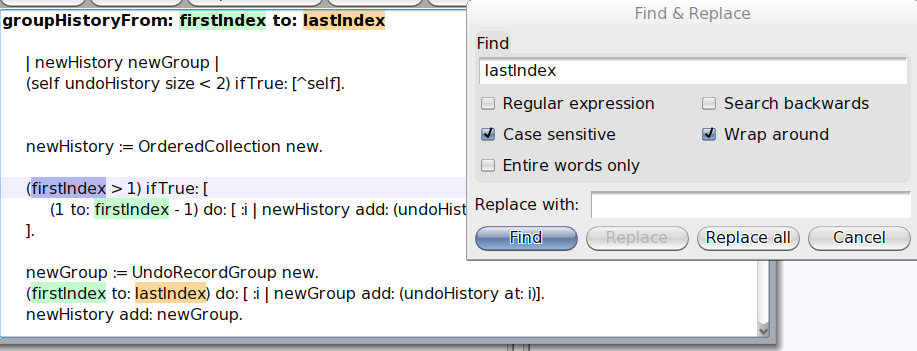
Here is the list of what is in the box: * infinite undo/redo cmd-z/cmd-j * redesign of the find and replace (cmd-f). Just look at the dialog screenshot, it is sufficient to understand what is available. * new design for the basic completion (cmd-q for now but should be mapped soon to cmd-tab, cmd-space or something like that) * a secondary selection (when you select a portin of the text, the other portions that match the selection are enlighted) * a find&replace selection (when typein a text in the find & replace dialog or set the search text with cmd-h, then, all matching portion of text are directly enlighted) * a selection bar (the line where is the caret is also enlighted) * and finally, the use of the menu-builder framework for the declaration of the editors menus (as for the world menu). All these changes come with a deep cleaning of the editors code. Hope you will enjoy. Note that if you don't like the secondary selection, the find & replace one and/or the selection bar, then you can switch them off from the settings browser. You can also change the colors. In the screenshot you can see all these selections in action: you see the (primary) selection in blue as usual, the secondary one in light green and the find&replace one in light orange. Cheers Alain