[Pharo-project] Issue 3266 in pharo: Clean TextEditor

Status: Accepted Owner: stephane.ducasse CC: aplantec Labels: Milestone-1.2 New issue 3266 by stephane.ducasse: Clean TextEditor http://code.google.com/p/pharo/issues/detail?id=3266 voila ce que j'ai fait: * nettoyage de TextEditor (plus que 2 variables d'instances, plus de variables de classe pour gérer find&replace etc..) * undo/redo infini qui semble bien marcher (cmd z /cmd j) * nouvelle interface find & replace (cmd f) * une interface pour la completion * une selection secondaire (bleu très clair) selectionne les parties de texte identique à la selection primaire. très cool pour chercher les doublons. * une selection find/replace (jaune) essaye cmd-h sur un token à chercher, puis cmd g * declaration des menus avec le menu builder (idem que pour world menu) -> plus de variable d'instance de classe pour les menus Available in PharoTaskForces/Slice-2-editor.
Comment #1 on issue 3266 by stephane.ducasse: Clean TextEditor http://code.google.com/p/pharo/issues/detail?id=3266 Did you make the changes parametrized?
Updates: Status: Closed Comment #2 on issue 3266 by stephane.ducasse: Clean TextEditor http://code.google.com/p/pharo/issues/detail?id=3266 integrated in 12243

Hi Alain, this is great work! Improving text editor is must. I'm looking forward to see your changes. Just one remark, please use english next time! Fernando 2010/11/17 pharo@googlecode.com <pharo@googlecode.com>:
Status: Accepted Owner: stephane.ducasse CC: aplantec Labels: Milestone-1.2
New issue 3266 by stephane.ducasse: Clean TextEditor http://code.google.com/p/pharo/issues/detail?id=3266
voila ce que j'ai fait: * nettoyage de TextEditor (plus que 2 variables d'instances, plus de variables de classe pour gérer find&replace etc..) * undo/redo infini qui semble bien marcher (cmd z /cmd j) * nouvelle interface find & replace (cmd f) * une interface pour la completion * une selection secondaire (bleu très clair) selectionne les parties de texte identique à la selection primaire. très cool pour chercher les doublons. * une selection find/replace (jaune) essaye cmd-h sur un token à chercher, puis cmd g * declaration des menus avec le menu builder (idem que pour world menu) -> plus de variable d'instance de classe pour les menus
Available in PharoTaskForces/Slice-2-editor.

Le 17/11/2010 21:29, Fernando Olivero a écrit : Hi Fernando
Hi Alain, this is great work! Improving text editor is must. I'm looking forward to see your changes.
Just one remark, please use english next time! Fernando yes, sorry Here is the english version. The primary intention was to make undo/redo work with System-Undo integrated recently. (With Serge Stinckwich, we've started to work on this during the Pharo sprint at ESUG this year).
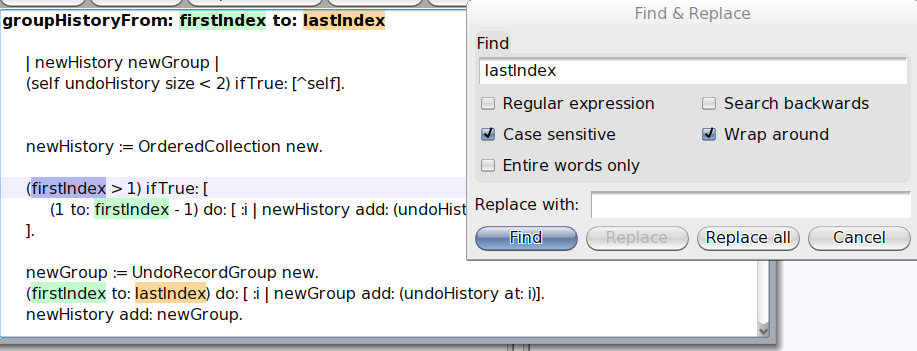
Here is the list of what is in the box: * infinite undo/redo cmd-z/cmd-j * redesign of the find and replace (cmd-f). Just look at the dialog screenshot, it is sufficient to understand what is available. * new design for the basic completion (cmd-q for now but should be mapped soon to cmd-tab, cmd-space or something like that) * a secondary selection (when you select a portin of the text, the other portions that match the selection are enlighted) * a find&replace selection (when typein a text in the find & replace dialog or set the search text with cmd-h, then, all matching portion of text are directly enlighted) * a selection bar (the line where is the caret is also enlighted) * and finally, the use of the menu-builder framework for the declaration of the editors menus (as for the world menu). All these changes come with a deep cleaning of the editors code. Hope you will enjoy. Note that if you don't like the secondary selection, the find & replace one and/or the selection bar, then you can switch them off from the settings browser. You can also change the colors. In the screenshot you can see all these selections in action: you see the (primary) selection in blue as usual, the secondary one in light green and the find&replace one in light orange. Cheers Alain

Wow this looks great, thanks! On Wed, Nov 17, 2010 at 6:09 PM, Alain Plantec <alain.plantec@free.fr>wrote:
Le 17/11/2010 21:29, Fernando Olivero a écrit :
Hi Fernando
Hi Alain, this is great work! Improving text editor is must.
I'm looking forward to see your changes.
Just one remark, please use english next time! Fernando
yes, sorry Here is the english version. The primary intention was to make undo/redo work with System-Undo integrated recently. (With Serge Stinckwich, we've started to work on this during the Pharo sprint at ESUG this year).
Here is the list of what is in the box:
* infinite undo/redo cmd-z/cmd-j * redesign of the find and replace (cmd-f). Just look at the dialog screenshot, it is sufficient to understand what is available. * new design for the basic completion (cmd-q for now but should be mapped soon to cmd-tab, cmd-space or something like that) * a secondary selection (when you select a portin of the text, the other portions that match the selection are enlighted) * a find&replace selection (when typein a text in the find & replace dialog or set the search text with cmd-h, then, all matching portion of text are directly enlighted) * a selection bar (the line where is the caret is also enlighted) * and finally, the use of the menu-builder framework for the declaration of the editors menus (as for the world menu).
All these changes come with a deep cleaning of the editors code. Hope you will enjoy. Note that if you don't like the secondary selection, the find & replace one and/or the selection bar, then you can switch them off from the settings browser. You can also change the colors. In the screenshot you can see all these selections in action: you see the (primary) selection in blue as usual, the secondary one in light green and the find&replace one in light orange.
Cheers Alain
Due to a change in PragmaMenuBuilder, the world menu is not well updated anymore. Simply evaluating World resetWorldMenu fixes that. So it should be done before the next release is published. Cheers Alain
Hi Alain, i took a better look at the changes and have to say...once again..excellent! I think the next step is to improve the keybindings hardcoding in TextEditor>>initialize self initializeCmdKeyShortcuts. self initializeShiftCmdKeyShortcuts. I have a keybindings/command model in Gaucho, for applying a keybinding to any morph. I will work on decoupling it from GauchoMorph into Morph. And later rewrite the Morphs for textediting to use this. So for example, if you want to delete any GauchoMorph from the system by pressing cmd-w, you have to: binding := GMKeyBinding actingOn: $w asciiValue modifiedBy: #(#command) satisfying: ( GMCondition compositeWith: #( #understandsKeyBindingCommandCondition #uneditedCondition ) ) applying: #close. m := NewTextMorph new. m addKeyBinding: binding . If people agree, i will create an issue and start working on it. Fernando On Thu, Nov 18, 2010 at 9:23 AM, Alain Plantec <alain.plantec@free.fr> wrote:
Due to a change in PragmaMenuBuilder, the world menu is not well updated anymore. Simply evaluating World resetWorldMenu fixes that. So it should be done before the next release is published. Cheers Alain

I agree :). Doru On 19 Nov 2010, at 08:21, Fernando Olivero wrote:
Hi Alain, i took a better look at the changes and have to say...once again..excellent!
I think the next step is to improve the keybindings hardcoding in TextEditor>>initialize self initializeCmdKeyShortcuts. self initializeShiftCmdKeyShortcuts.
I have a keybindings/command model in Gaucho, for applying a keybinding to any morph. I will work on decoupling it from GauchoMorph into Morph. And later rewrite the Morphs for textediting to use this.
So for example, if you want to delete any GauchoMorph from the system by pressing cmd-w, you have to:
binding := GMKeyBinding actingOn: $w asciiValue modifiedBy: #(#command) satisfying: ( GMCondition compositeWith: #( #understandsKeyBindingCommandCondition #uneditedCondition ) ) applying: #close. m := NewTextMorph new. m addKeyBinding: binding .
If people agree, i will create an issue and start working on it.
Fernando
On Thu, Nov 18, 2010 at 9:23 AM, Alain Plantec <alain.plantec@free.fr> wrote:
Due to a change in PragmaMenuBuilder, the world menu is not well updated anymore. Simply evaluating World resetWorldMenu fixes that. So it should be done before the next release is published. Cheers Alain
-- www.tudorgirba.com "It's not what we do that matters most, it's how we do it."
Le 19/11/2010 08:21, Fernando Olivero a écrit :
Hi Alain, i took a better look at the changes and have to say...once again..excellent! Thanks Fernando! I think the next step is to improve the keybindings hardcoding in TextEditor>>initialize self initializeCmdKeyShortcuts. self initializeShiftCmdKeyShortcuts. yes yes! I have a keybindings/command model in Gaucho, for applying a keybinding to any morph. I will work on decoupling it from GauchoMorph into Morph. And later rewrite the Morphs for textediting to use this. I was thinking of something like your KeyBinding.. so, very good. What I would like is to be able to control all alt-ctrl-cmd-shift etc possible combinations for any morph. It implies to review the way events are handled by Morph/HandMorph and to remove the ugly "control and alt key" setting (Full matching, partial matching, Swapped).
Cheers Alain
What I would like is to be able to control all alt-ctrl-cmd-shift etc possible combinations for any morph. It implies to review the way events are handled by Morph/HandMorph and to remove the ugly "control and alt key" setting (Full matching, partial matching, Swapped).
For example, it is currently impossible to map ctrl-space or ctrl-tab for #querySymbol:
Cheers Alain
participants (5)
-
 Alain Plantec
 -
 Fernando Olivero
 -
 Francisco Ortiz Peñaloza
 -
 pharo@googlecode.com
 -
 Tudor Girba