A keyboard controlled code editor, how difficult would that be?

When experienced (non-smalltalk) developers come to Pharo, they often complain about the (perceived) lack of keyboard control. Spotter has made it easy to open new browsers and inspectors, but navigating between all the open windows is still mostly done with the mouse. What would happen if we create an state-full interface, showing code as cards, and explicitly switch between navigating and editing? https://vimeo.com/139960287 Drag some methods to the code panel, click on it and start editing. Esc switches between navigation and editing, when navigating switches enter between the collapsed and expanded view of a card. The arrow keys select other cards, and using shift a card can be moved. How much code do we need for that? Well, the prototype fits in 6 columns on an UHD screen. Gofer it smalltalkhubUser: 'StephanEggermont' project: 'Documentation'; configurationOf: 'NewUI'; load. CodePanel new openInWindowLabeled: 'CodePanel' What needs fixing: navigating over empty columns. Stephan

I'm not sure that those developers will ever be happy with Smallltalk. Unless you can do everything in VI and compile on the command line, they feel there's something wrong. On September 21, 2015 08:57:21 PM Stephan Eggermont wrote:
When experienced (non-smalltalk) developers come to Pharo, they often complain about the (perceived) lack of keyboard control. Spotter has made it easy to open new browsers and inspectors, but navigating between all the open windows is still mostly done with the mouse.
What would happen if we create an state-full interface, showing code as cards, and explicitly switch between navigating and editing?
Drag some methods to the code panel, click on it and start editing. Esc switches between navigation and editing, when navigating switches enter between the collapsed and expanded view of a card. The arrow keys select other cards, and using shift a card can be moved.
How much code do we need for that? Well, the prototype fits in 6 columns on an UHD screen.
Gofer it smalltalkhubUser: 'StephanEggermont' project: 'Documentation'; configurationOf: 'NewUI'; load.
CodePanel new openInWindowLabeled: 'CodePanel'
What needs fixing: navigating over empty columns.
Stephan

On Mon, Sep 21, 2015 at 9:05 PM, Andrew Glynn <aglynn42@gmail.com> wrote:
I'm not sure that those developers will ever be happy with Smallltalk. Unless you can do everything in VI and compile on the command line, they feel there's something wrong.
Perhaps you need to widen your perspective. Just because there are fundamentalists on one side doesn't mean that you have to became fundamentalist on the other side to balance it out... Pharo is full of shortcuts, because they are very useful. (And if you are not using them you are only hurting yourself.) The point is not to take everything to extreme, but to see what's valuable and explore. Peter

On Mon, Sep 21, 2015 at 9:32 PM, Peter Uhnák <i.uhnak@gmail.com> wrote:
On Mon, Sep 21, 2015 at 9:05 PM, Andrew Glynn <aglynn42@gmail.com> wrote:
I'm not sure that those developers will ever be happy with Smallltalk. Unless you can do everything in VI and compile on the command line, they feel there's something wrong.
Perhaps you need to widen your perspective. Just because there are fundamentalists on one side doesn't mean that you have to became fundamentalist on the other side to balance it out...
Pharo is full of shortcuts, because they are very useful. (And if you are not using them you are only hurting yourself.) The point is not to take everything to extreme, but to see what's valuable and explore.
The main issue is that the shortcuts aren't consistent across platforms (or sometimes just conflict or do not work). Like in Pharo 5/Windows, some things are okay with Ctl-key, and not Alt-key (they were in the past). And some Alt-key works in specific contexts. Or in Linux, some things are giving problems. I like the new $r command | $r control | ... scheme. Much cleaner. What is not nice is that GTInspector isn't picking up the new combos as it displays the KM class and not the shortcut. Back to keyboard, the TilingWindowManager (working back on that atm) has potential. I am a vim and tmux user, and Ctl-W hjkl is really useful, as is Ctl-PgUp/PgDown, Or Ctl-z etc. One of the features I am going to add is that Ctl-W hjkl window selection as it is too good to pass. I am mousing a lot in Pharo (even if I know about the shortcuts). It is nice to be able to search around by point and click. Now, we need to rationalize some wordings, especially "Users of X", "References to X". Confuses people. With such keyboard movements, the desktop manager, a good TWM, and spotter, that's a great thing. Playground needs to be integrated closer with spotter. I want to launch a playground from there, using what I typed as a command (yes, I know there were discussions for/against that one. Still, I find myself retyping into Playground what typed into Spotter. Frustrating.) There is a lot of power in Pharo keybindings, we need to streamline this. What an awesome tool we have here! Excited by Pharo more than ever. Phil
Peter

I second Phil's argument on the main problem being the lack of consistency of shorcuts between platforms and contexts. Ctrl+c, Ctrl+v is the most felt one, particularly on apps that use GT toolkit. Seeing Stephan experiments' is inspiring. Cheers, Offray On 21/09/15 15:29, phil@highoctane.be wrote:
On Mon, Sep 21, 2015 at 9:32 PM, Peter Uhnák <i.uhnak@gmail.com <mailto:i.uhnak@gmail.com>> wrote:
On Mon, Sep 21, 2015 at 9:05 PM, Andrew Glynn <aglynn42@gmail.com <mailto:aglynn42@gmail.com>> wrote: > I'm not sure that those developers will ever be happy with Smallltalk. > Unless you can do everything in VI and compile on the command line, they > feel there's something wrong.
Perhaps you need to widen your perspective. Just because there are fundamentalists on one side doesn't mean that you have to became fundamentalist on the other side to balance it out...
Pharo is full of shortcuts, because they are very useful. (And if you are not using them you are only hurting yourself.) The point is not to take everything to extreme, but to see what's valuable and explore.
The main issue is that the shortcuts aren't consistent across platforms (or sometimes just conflict or do not work). Like in Pharo 5/Windows, some things are okay with Ctl-key, and not Alt-key (they were in the past). And some Alt-key works in specific contexts. Or in Linux, some things are giving problems.
I like the new $r command | $r control | ... scheme. Much cleaner. What is not nice is that GTInspector isn't picking up the new combos as it displays the KM class and not the shortcut.
Back to keyboard, the TilingWindowManager (working back on that atm) has potential. I am a vim and tmux user, and Ctl-W hjkl is really useful, as is Ctl-PgUp/PgDown, Or Ctl-z etc. One of the features I am going to add is that Ctl-W hjkl window selection as it is too good to pass.
I am mousing a lot in Pharo (even if I know about the shortcuts). It is nice to be able to search around by point and click.
Now, we need to rationalize some wordings, especially "Users of X", "References to X". Confuses people.
With such keyboard movements, the desktop manager, a good TWM, and spotter, that's a great thing. Playground needs to be integrated closer with spotter. I want to launch a playground from there, using what I typed as a command (yes, I know there were discussions for/against that one. Still, I find myself retyping into Playground what typed into Spotter. Frustrating.)
There is a lot of power in Pharo keybindings, we need to streamline this. What an awesome tool we have here!
Excited by Pharo more than ever.
Phil
Peter
On 21-09-15 21:05, Andrew Glynn wrote:
I'm not sure that those developers will ever be happy with Smallltalk. Unless you can do everything in VI and compile on the command line, they feel there's something wrong.
To me the prototype confirms that we could create an interface that is mostly keyboard controlled and still makes reasonable use of the large amount of screen real estate that a modern desktop offers. I was inspired by the old user interface of MindManager that supported editing and navigating a mindmap totally with the keyboard, switching between navigation and editing mode. On a large screen, we'll be able to provide enough hints on what keys do what, to make the interface discoverable. Stephan

Wow!! This is impressive! Alexandre
On Sep 21, 2015, at 3:57 PM, Stephan Eggermont <stephan@stack.nl> wrote:
When experienced (non-smalltalk) developers come to Pharo, they often complain about the (perceived) lack of keyboard control. Spotter has made it easy to open new browsers and inspectors, but navigating between all the open windows is still mostly done with the mouse.
What would happen if we create an state-full interface, showing code as cards, and explicitly switch between navigating and editing?
Drag some methods to the code panel, click on it and start editing. Esc switches between navigation and editing, when navigating switches enter between the collapsed and expanded view of a card. The arrow keys select other cards, and using shift a card can be moved.
How much code do we need for that? Well, the prototype fits in 6 columns on an UHD screen.
Gofer it smalltalkhubUser: 'StephanEggermont' project: 'Documentation'; configurationOf: 'NewUI'; load.
CodePanel new openInWindowLabeled: 'CodePanel'
What needs fixing: navigating over empty columns.
Stephan
-- _,.;:~^~:;._,.;:~^~:;._,.;:~^~:;._,.;:~^~:;._,.;: Alexandre Bergel http://www.bergel.eu ^~:;._,.;:~^~:;._,.;:~^~:;._,.;:~^~:;._,.;:~^~:;.

Very nice experiment. Please, do keep this up. Cheers, Doru On Mon, Sep 21, 2015 at 8:57 PM, Stephan Eggermont <stephan@stack.nl> wrote:
When experienced (non-smalltalk) developers come to Pharo, they often complain about the (perceived) lack of keyboard control. Spotter has made it easy to open new browsers and inspectors, but navigating between all the open windows is still mostly done with the mouse.
What would happen if we create an state-full interface, showing code as cards, and explicitly switch between navigating and editing?
Drag some methods to the code panel, click on it and start editing. Esc switches between navigation and editing, when navigating switches enter between the collapsed and expanded view of a card. The arrow keys select other cards, and using shift a card can be moved.
How much code do we need for that? Well, the prototype fits in 6 columns on an UHD screen.
Gofer it smalltalkhubUser: 'StephanEggermont' project: 'Documentation'; configurationOf: 'NewUI'; load.
CodePanel new openInWindowLabeled: 'CodePanel'
What needs fixing: navigating over empty columns.
Stephan
-- www.tudorgirba.com "Every thing has its own flow"
One needed feature: drag and drop a protocol on a column... Or a full class. Opens one protocol per column. I found myself trying :-) Phil On Mon, Sep 21, 2015 at 9:20 PM, Tudor Girba <tudor@tudorgirba.com> wrote:
Very nice experiment. Please, do keep this up.
Cheers, Doru
On Mon, Sep 21, 2015 at 8:57 PM, Stephan Eggermont <stephan@stack.nl> wrote:
When experienced (non-smalltalk) developers come to Pharo, they often complain about the (perceived) lack of keyboard control. Spotter has made it easy to open new browsers and inspectors, but navigating between all the open windows is still mostly done with the mouse.
What would happen if we create an state-full interface, showing code as cards, and explicitly switch between navigating and editing?
Drag some methods to the code panel, click on it and start editing. Esc switches between navigation and editing, when navigating switches enter between the collapsed and expanded view of a card. The arrow keys select other cards, and using shift a card can be moved.
How much code do we need for that? Well, the prototype fits in 6 columns on an UHD screen.
Gofer it smalltalkhubUser: 'StephanEggermont' project: 'Documentation'; configurationOf: 'NewUI'; load.
CodePanel new openInWindowLabeled: 'CodePanel'
What needs fixing: navigating over empty columns.
Stephan
-- www.tudorgirba.com
"Every thing has its own flow"
On Mon, Sep 21, 2015 at 8:57 PM, Stephan Eggermont <stephan@stack.nl> wrote:
When experienced (non-smalltalk) developers come to Pharo, they often complain about the (perceived) lack of keyboard control. Spotter has made it easy to open new browsers and inspectors, but navigating between all the open windows is still mostly done with the mouse.
At least in Nautilus the problem is more related to inability to break focus out of code pane... because the shortcuts are there, but can't be used when the focus is on code pane.
What would happen if we create an state-full interface, showing code as cards, and explicitly switch between navigating and editing?
Drag some methods to the code panel, click on it and start editing. Esc switches between navigation and editing, when navigating switches enter between the collapsed and expanded view of a card. The arrow keys select other cards, and using shift a card can be moved.
This is really cool. Because even on my 24" screen I can comfortably have only couple (4) of system browser opened at once (and I am interested only in the method). It would be interesting to integrate it with MessageBrowser and Spotter, so I could (with shift+enter or something) open your card instead of Nautilus. For example I have scoped view of my package and I ctrl+b+n on a selector and it opens cards with the senders. Peter
On 21-09-15 21:25, Peter Uhnák wrote:
This is really cool. Because even on my 24" screen I can comfortably have only couple (4) of system browser opened at once (and I am interested only in the method).
The code card trick with expanded and compact view could easily be integrated in Nautilus.
It would be interesting to integrate it with MessageBrowser and Spotter, so I could (with shift+enter or something) open your card instead of Nautilus. For example I have scoped view of my package and I ctrl+b+n on a selector and it opens cards with the senders.
I'll need to think through the navigation one might want,i.e. From the navigation point of a card (esc out of editing), - create a new card - replace the current card - delete the current card When creating or replacing - use spotter - new package, class, or method - senders or implementers - playground etc. Stephan
This is great, I'm really enjoying it! Understanding behavior spread across several methods can now be done trivially at a glance instead of remembering everything, making paper notes, and slouching through billion browsers. Also I can finally see long methods at once. :p Couple notes: 1. The theme is not respected. (Also it's 2:15 AM here ;) 2. When method is reformatted, or code added the height doesn't change -- I would expect it to adapt automatically And as I've mentioned originally, it would be great to further encourage exploration. Currently when I want to add a new card from method I do "select code" -> "browse senders/implementors" -> "select what I want" -> "browse" -> "drag". It would be great if I could drag directly from the Message Browser (or even add it via shortcut from Message Browser). Thanks!! Peter On Mon, Sep 21, 2015 at 11:52 PM, Stephan Eggermont <stephan@stack.nl> wrote:
On 21-09-15 21:25, Peter Uhnák wrote:
This is really cool. Because even on my 24" screen I can comfortably have only couple (4) of system browser opened at once (and I am interested only in the method).
The code card trick with expanded and compact view could easily be integrated in Nautilus.
It would be interesting to integrate it with MessageBrowser and
Spotter, so I could (with shift+enter or something) open your card instead of Nautilus. For example I have scoped view of my package and I ctrl+b+n on a selector and it opens cards with the senders.
I'll need to think through the navigation one might want,i.e. From the navigation point of a card (esc out of editing), - create a new card - replace the current card - delete the current card
When creating or replacing - use spotter - new package, class, or method - senders or implementers - playground
etc.
Stephan
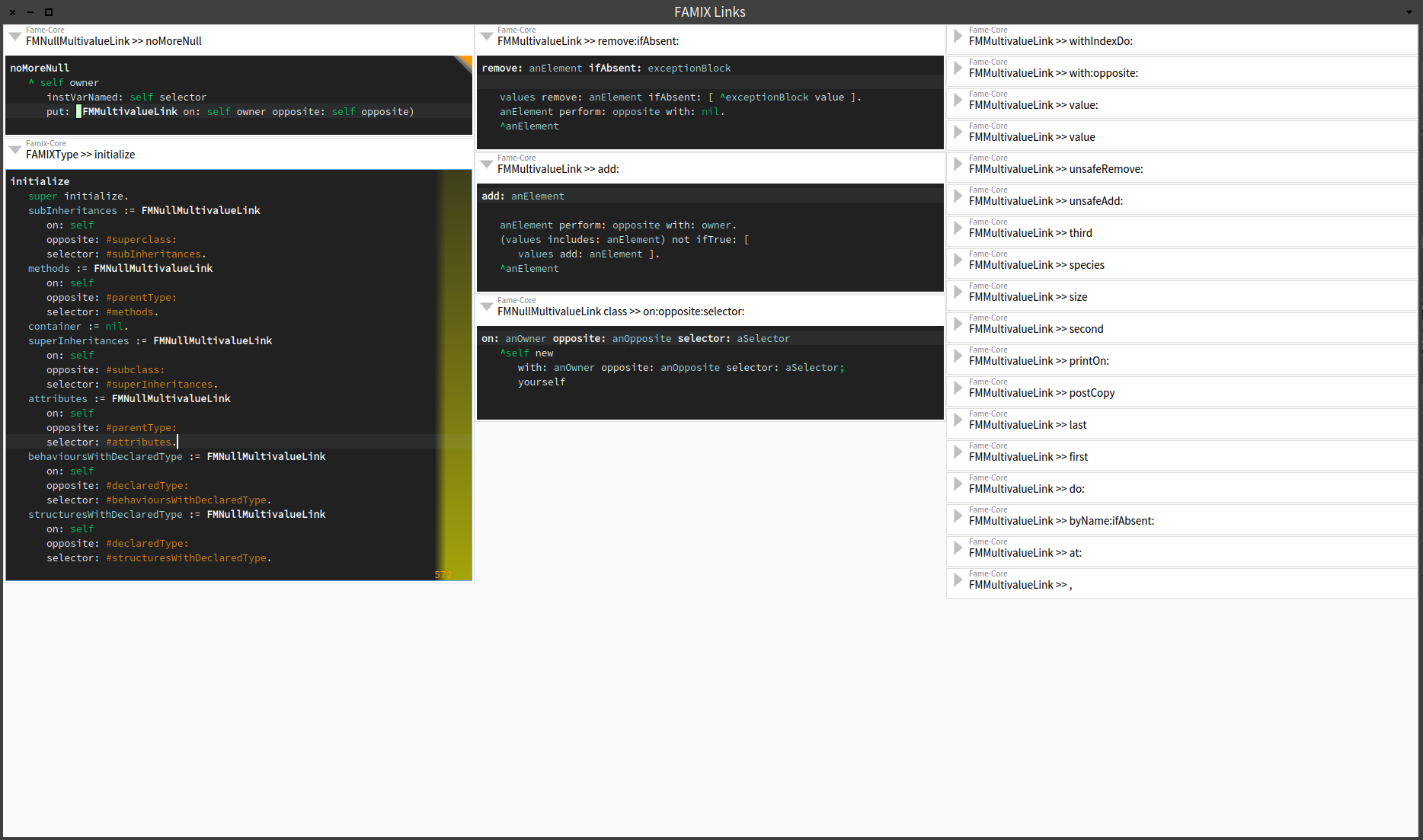
On 22-09-15 02:21, Peter Uhnák wrote:
Couple notes: 1. The theme is not respected. (Also it's 2:15 AM here ;)
Yep,a real hard-coded prototype. I'll at least pick up the text, focus and background colors.
2. When method is reformatted, or code added the height doesn't change -- I would expect it to adapt automatically
Here is a workaround: <Esc> <Enter> <Enter> <Esc> :) And there are also no updates from system changes. Stephan
Peter, Could you share a link to a bigger screenshot of your workflow with code cards? Just curious about this feature. Thanks, Offray On 21/09/15 19:21, Peter Uhnák wrote:
This is great, I'm really enjoying it!
Understanding behavior spread across several methods can now be done trivially at a glance instead of remembering everything, making paper notes, and slouching through billion browsers. Also I can finally see long methods at once. :p
Couple notes: 1. The theme is not respected. (Also it's 2:15 AM here ;) 2. When method is reformatted, or code added the height doesn't change -- I would expect it to adapt automatically
And as I've mentioned originally, it would be great to further encourage exploration. Currently when I want to add a new card from method I do "select code" -> "browse senders/implementors" -> "select what I want" -> "browse" -> "drag". It would be great if I could drag directly from the Message Browser (or even add it via shortcut from Message Browser).
Thanks!!
Peter
On Mon, Sep 21, 2015 at 11:52 PM, Stephan Eggermont <stephan@stack.nl <mailto:stephan@stack.nl>> wrote:
On 21-09-15 21:25, Peter Uhnák wrote:
This is really cool. Because even on my 24" screen I can comfortably have only couple (4) of system browser opened at once (and I am interested only in the method).
The code card trick with expanded and compact view could easily be integrated in Nautilus.
It would be interesting to integrate it with MessageBrowser and Spotter, so I could (with shift+enter or something) open your card instead of Nautilus. For example I have scoped view of my package and I ctrl+b+n on a selector and it opens cards with the senders.
I'll need to think through the navigation one might want,i.e. >From the navigation point of a card (esc out of editing), - create a new card - replace the current card - delete the current card
When creating or replacing - use spotter - new package, class, or method - senders or implementers - playground
etc.
Stephan
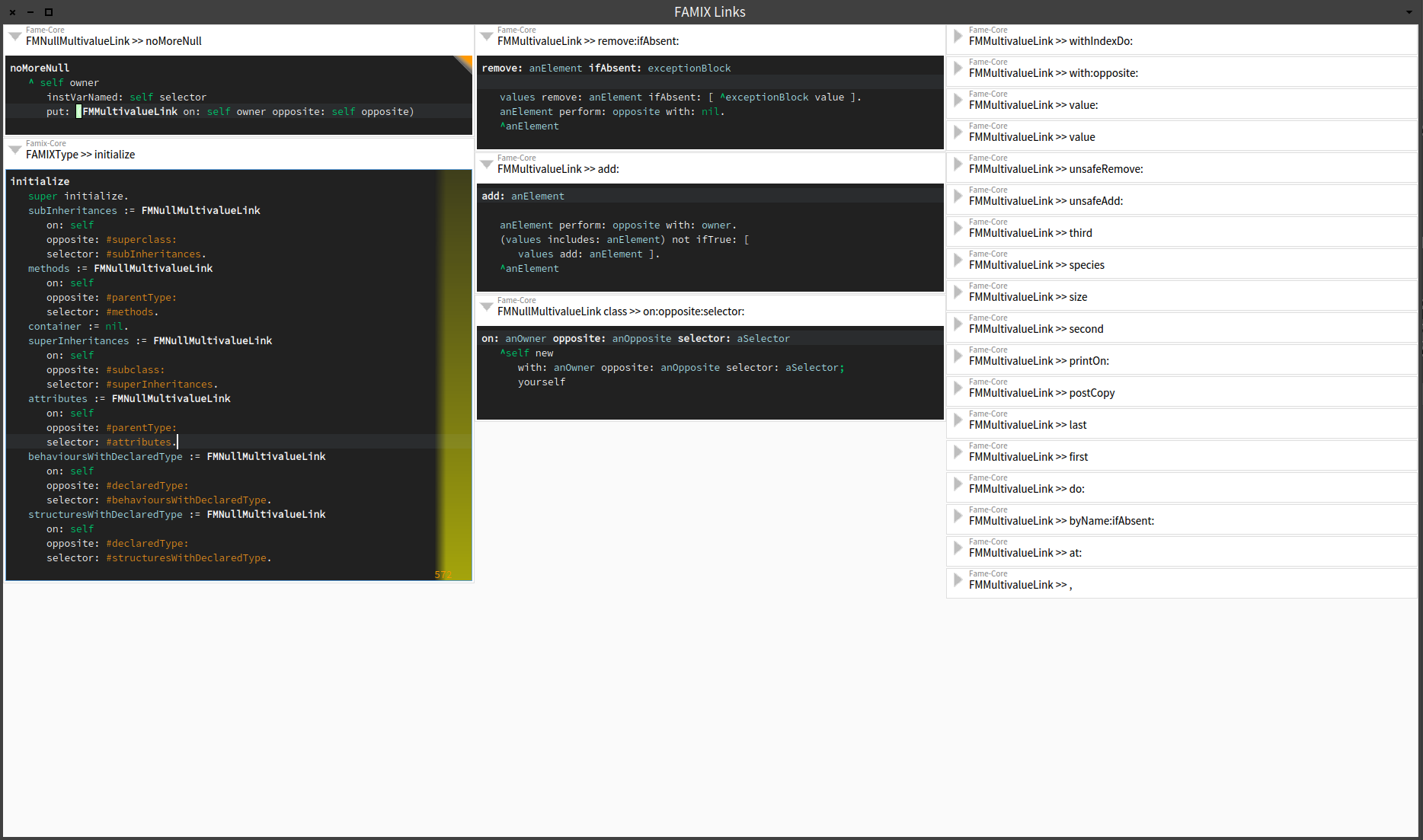
On Mon, Sep 28, 2015 at 4:25 PM, Offray Vladimir Luna Cárdenas < offray@riseup.net> wrote:
Peter, Could you share a link to a bigger screenshot of your workflow with code cards? Just curious about this feature.
Hmm, what email client are you using? Because the image was not resized. world.st shows the image downscaled http://forum.world.st/A-keyboard-controlled-code-editor-how-difficult-would-... but if you right-click and "open image in new tab" it is in original size, the same for the actual record in the mailing list http://lists.pharo.org/pipermail/pharo-users_lists.pharo.org/2015-September/... at the end of the email there are links to attachments http://lists.pharo.org/pipermail/pharo-users_lists.pharo.org/attachments/201... And finally gmail shows the image also downscaled, but I can simply click on it to show it enlarged. So if you see the image small, blame your mail client. :) (and click the link above) Peter
Thanks Peter, seems a problem related with thunderbird. I will see what's happening. Cheers, Offray On 28/09/15 09:55, Peter Uhnák wrote:
On Mon, Sep 28, 2015 at 4:25 PM, Offray Vladimir Luna Cárdenas <offray@riseup.net <mailto:offray@riseup.net>> wrote:
Peter, Could you share a link to a bigger screenshot of your workflow with code cards? Just curious about this feature.
Hmm, what email client are you using? Because the image was not resized.
world.st <http://world.st> shows the image downscaled http://forum.world.st/A-keyboard-controlled-code-editor-how-difficult-would-... but if you right-click and "open image in new tab" it is in original size,
the same for the actual record in the mailing list http://lists.pharo.org/pipermail/pharo-users_lists.pharo.org/2015-September/... at the end of the email there are links to attachments http://lists.pharo.org/pipermail/pharo-users_lists.pharo.org/attachments/201...
And finally gmail shows the image also downscaled, but I can simply click on it to show it enlarged.
So if you see the image small, blame your mail client. :) (and click the link above)
Peter
As for changing/updating the code in the cards... maybe we can look at MessageBrowser because it should have all the necessary behavior. Peter On Mon, Sep 28, 2015 at 4:58 PM, Offray Vladimir Luna Cárdenas < offray@riseup.net> wrote:
Thanks Peter, seems a problem related with thunderbird. I will see what's happening. Cheers,
Offray
On 28/09/15 09:55, Peter Uhnák wrote:
On Mon, Sep 28, 2015 at 4:25 PM, Offray Vladimir Luna Cárdenas < <offray@riseup.net>offray@riseup.net> wrote:
Peter, Could you share a link to a bigger screenshot of your workflow with code cards? Just curious about this feature.
Hmm, what email client are you using? Because the image was not resized.
world.st shows the image downscaled http://forum.world.st/A-keyboard-controlled-code-editor-how-difficult-would-... but if you right-click and "open image in new tab" it is in original size,
the same for the actual record in the mailing list <http://lists.pharo.org/pipermail/pharo-users_lists.pharo.org/2015-September/...> http://lists.pharo.org/pipermail/pharo-users_lists.pharo.org/2015-September/... at the end of the email there are links to attachments http://lists.pharo.org/pipermail/pharo-users_lists.pharo.org/attachments/201...
And finally gmail shows the image also downscaled, but I can simply click on it to show it enlarged.
So if you see the image small, blame your mail client. :) (and click the link above)
Peter
On 29-09-15 01:28, Peter Uhnák wrote:
As for changing/updating the code in the cards...
maybe we can look at MessageBrowser because it should have all the necessary behavior.
That is difficult. MessageBrowser uses Spec, so there are some abstractions in the way. Do you know if RubMethodEditingExample ever worked to commit? It does not now. Stephan
MessageBrowser uses Spec, so there are some abstractions in the way. Do you know if RubMethodEditingExample ever worked to commit? I have no idea (and very limited Rubric/Morphic knowledge).
But if it worked before it should be reported as bug to the tracker? Is there a reason why this is not in the catalog browser? Do you feel it's not production-ready (missing editing)? Because I am very happy consumer even in this state. :) Peter On Tue, Sep 29, 2015 at 9:33 PM, Stephan Eggermont <stephan@stack.nl> wrote:
On 29-09-15 01:28, Peter Uhnák wrote:
As for changing/updating the code in the cards...
maybe we can look at MessageBrowser because it should have all the necessary behavior.
That is difficult. MessageBrowser uses Spec, so there are some abstractions in the way. Do you know if RubMethodEditingExample ever worked to commit? It does not now.
Stephan
On 05-10-15 21:11, Peter Uhnák wrote:
Is there a reason why this is not in the catalog browser? Do you feel it's not production-ready (missing editing)? Because I am very happy consumer even in this state. :)
I'll add a configuration as soon as editing works and the spotter improvements make it to Pharo 5. It is just very much a prototype. Some parts I like, others not so much, and a lot has not gotten much thought. Stephan

Le 21/09/2015 20:57, Stephan Eggermont a écrit :
When experienced (non-smalltalk) developers come to Pharo, they often complain about the (perceived) lack of keyboard control. Spotter has made it easy to open new browsers and inspectors, but navigating between all the open windows is still mostly done with the mouse.
What would happen if we create an state-full interface, showing code as cards, and explicitly switch between navigating and editing?
Drag some methods to the code panel, click on it and start editing. Esc switches between navigation and editing, when navigating switches enter between the collapsed and expanded view of a card. The arrow keys select other cards, and using shift a card can be moved.
Interesting. Shows a different side of the code as well, not only keyboard navigation, IMO. Thierry
How much code do we need for that? Well, the prototype fits in 6 columns on an UHD screen.
Gofer it smalltalkhubUser: 'StephanEggermont' project: 'Documentation'; configurationOf: 'NewUI'; load.
CodePanel new openInWindowLabeled: 'CodePanel'
What needs fixing: navigating over empty columns.
Stephan
Hi Stephan, I made it work nicer with the dark theme. [image: Inline image 1] I used a it to do that, and faced a couple issues: - there was a MNU popping up for some selected thing, I implemented the missing thing by copying it from workspace and it went smooth, autocompletion working. - the cards aren't picking up changes done elsewhere, nor are they saving the contents back to the system. Ah, I wanted to use it for a lot of coding already! Peter is right, no more picking around when focusing on one interaction. - I'd love being able to move to the class of the selected card There is a lot of good stuff in this thing, please push forward! I've put the code in: http://www.smalltalkhub.com/#!/~philippeback/HOExtras/packages/NewUI Phil On Mon, Sep 21, 2015 at 8:57 PM, Stephan Eggermont <stephan@stack.nl> wrote:
When experienced (non-smalltalk) developers come to Pharo, they often complain about the (perceived) lack of keyboard control. Spotter has made it easy to open new browsers and inspectors, but navigating between all the open windows is still mostly done with the mouse.
What would happen if we create an state-full interface, showing code as cards, and explicitly switch between navigating and editing?
Drag some methods to the code panel, click on it and start editing. Esc switches between navigation and editing, when navigating switches enter between the collapsed and expanded view of a card. The arrow keys select other cards, and using shift a card can be moved.
How much code do we need for that? Well, the prototype fits in 6 columns on an UHD screen.
Gofer it smalltalkhubUser: 'StephanEggermont' project: 'Documentation'; configurationOf: 'NewUI'; load.
CodePanel new openInWindowLabeled: 'CodePanel'
What needs fixing: navigating over empty columns.
Stephan
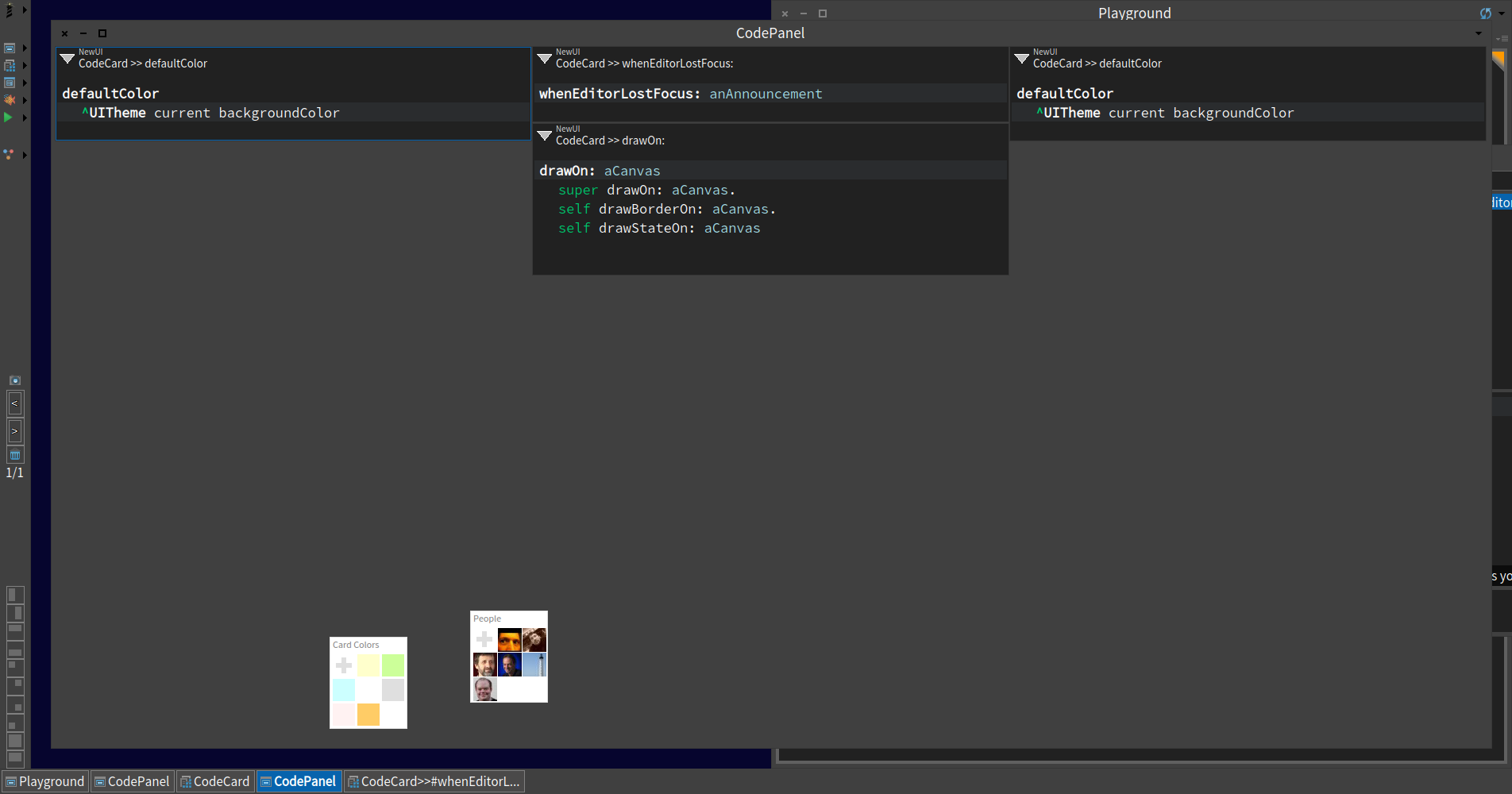
On 22-09-15 09:59, phil@highoctane.be wrote:
Hi Stephan,
I made it work nicer with the dark theme.
Thanks. I adopted the changes and tuned them to work better with both themes. Anyone know how to get a good result for the package name that is shown above the method name? I need a less prominent variant of the textColor. CodeCard>>packageColor Smalltalk ui theme class = Pharo3Theme ifTrue: [ ^Smalltalk ui theme borderColor ] ifFalse: [ ^Color veryLightGray ]
- the cards aren't picking up changes done elsewhere, nor are they saving the contents back to the system. Ah, I wanted to use it for a lot of coding already! Peter is right, no more picking around when focusing on one interaction.
Hmm, I thought I had that working at some moment. I have fought with Rubric a lot the last days, so I probably broke it. Stephan
I made it work nicer with the dark theme.
Thanks!
Anyone know how to get a good result for the package name that is shown above the method name?
Nautilus is using this for extension methods (interestingly it ignores Theme, but it works for both) ~~~~~~~~~~~~~~~~~~~~~~~~~~~ AbstractNautilusUI>>extensionColor ^ Color gray darker ~~~~~~~~~~~~~~~~~~~~~~~~~~~ Could it be also added to the world menu? ~~~~~~~~~~~~~~~~~~~~~~~~~~~~~~~ CodePanel>>menuCommandOn: aBuilder <worldMenu> (aBuilder item: #CodePanel) order: 0; "something meaningful, perhaps not the first one" parent: #MostUsedTools; action: [ self new openInWindow ] ~~~~~~~~~~~~~~~~~~~~~~~~~~~~~~~ Peter
Yes, in the world menu Alexandre
On Sep 22, 2015, at 8:02 PM, Peter Uhnák <i.uhnak@gmail.com> wrote:
I made it work nicer with the dark theme.
Thanks!
Anyone know how to get a good result for the package name that is shown above the method name?
Nautilus is using this for extension methods (interestingly it ignores Theme, but it works for both) ~~~~~~~~~~~~~~~~~~~~~~~~~~~ AbstractNautilusUI>>extensionColor ^ Color gray darker ~~~~~~~~~~~~~~~~~~~~~~~~~~~
Could it be also added to the world menu?
~~~~~~~~~~~~~~~~~~~~~~~~~~~~~~~ CodePanel>>menuCommandOn: aBuilder <worldMenu> (aBuilder item: #CodePanel) order: 0; "something meaningful, perhaps not the first one" parent: #MostUsedTools; action: [ self new openInWindow ] ~~~~~~~~~~~~~~~~~~~~~~~~~~~~~~~
Peter
-- _,.;:~^~:;._,.;:~^~:;._,.;:~^~:;._,.;:~^~:;._,.;: Alexandre Bergel http://www.bergel.eu ^~:;._,.;:~^~:;._,.;:~^~:;._,.;:~^~:;._,.;:~^~:;.
Adding classes is easy enough ~~~~~~~~~~~~~~~~ CodeColumn>>acceptDroppingMorph: aMorph event: anEvent aMorph isTransferable ifTrue: [ aMorph passenger do: [ :each | each isClass ifTrue: [ each methods do: [ :method | self addMorph: (CodeCard class: method methodClass selector: method selector) ] ]. each isCompiledMethod ifTrue: [ self addMorph: (CodeCard class: each methodClass selector: each selector) ] ] ] ifFalse: [ super acceptDroppingMorph: aMorph event: anEvent. aMorph width: self width ] ~~~~~~~~~~~~~~~~~~~~~~~ Drag'n'dropping protocols is tad bit more complicated because Nautilus sends only symbol and not a useful object (so we would have to ask Nautilus back to ask it about the associated class... maybe morphic dnd can do double dispatch?)
- the cards aren't picking up changes done elsewhere
I'm not sure about the current status, but Nautilus was going through update hell (I still see several open issues in the tracker), so it was broken even there; however maybe the events/announcements could be reused. Peter On Wed, Sep 23, 2015 at 1:48 AM, Alexandre Bergel <alexandre.bergel@me.com> wrote:
Yes, in the world menu
Alexandre
On Sep 22, 2015, at 8:02 PM, Peter Uhnák <i.uhnak@gmail.com> wrote:
I made it work nicer with the dark theme.
Thanks!
Anyone know how to get a good result for the package name that is shown above the method name?
Nautilus is using this for extension methods (interestingly it ignores Theme, but it works for both) ~~~~~~~~~~~~~~~~~~~~~~~~~~~ AbstractNautilusUI>>extensionColor ^ Color gray darker ~~~~~~~~~~~~~~~~~~~~~~~~~~~
Could it be also added to the world menu?
~~~~~~~~~~~~~~~~~~~~~~~~~~~~~~~ CodePanel>>menuCommandOn: aBuilder <worldMenu> (aBuilder item: #CodePanel) order: 0; "something meaningful, perhaps not the first one" parent: #MostUsedTools; action: [ self new openInWindow ] ~~~~~~~~~~~~~~~~~~~~~~~~~~~~~~~
Peter
-- _,.;:~^~:;._,.;:~^~:;._,.;:~^~:;._,.;:~^~:;._,.;: Alexandre Bergel http://www.bergel.eu ^~:;._,.;:~^~:;._,.;:~^~:;._,.;:~^~:;._,.;:~^~:;.
I have not tried, but can you compile methods? This is really nice to see an effort that goes away from the old code browser. Alexandre
On Sep 22, 2015, at 10:21 PM, Peter Uhnák <i.uhnak@gmail.com> wrote:
Adding classes is easy enough
~~~~~~~~~~~~~~~~ CodeColumn>>acceptDroppingMorph: aMorph event: anEvent aMorph isTransferable ifTrue: [ aMorph passenger do: [ :each | each isClass ifTrue: [ each methods do: [ :method | self addMorph: (CodeCard class: method methodClass selector: method selector) ] ]. each isCompiledMethod ifTrue: [ self addMorph: (CodeCard class: each methodClass selector: each selector) ] ] ] ifFalse: [ super acceptDroppingMorph: aMorph event: anEvent. aMorph width: self width ] ~~~~~~~~~~~~~~~~~~~~~~~
Drag'n'dropping protocols is tad bit more complicated because Nautilus sends only symbol and not a useful object (so we would have to ask Nautilus back to ask it about the associated class... maybe morphic dnd can do double dispatch?)
- the cards aren't picking up changes done elsewhere
I'm not sure about the current status, but Nautilus was going through update hell (I still see several open issues in the tracker), so it was broken even there; however maybe the events/announcements could be reused.
Peter
On Wed, Sep 23, 2015 at 1:48 AM, Alexandre Bergel <alexandre.bergel@me.com> wrote:
Yes, in the world menu
Alexandre
On Sep 22, 2015, at 8:02 PM, Peter Uhnák <i.uhnak@gmail.com> wrote:
I made it work nicer with the dark theme.
Thanks!
Anyone know how to get a good result for the package name that is shown above the method name?
Nautilus is using this for extension methods (interestingly it ignores Theme, but it works for both) ~~~~~~~~~~~~~~~~~~~~~~~~~~~ AbstractNautilusUI>>extensionColor ^ Color gray darker ~~~~~~~~~~~~~~~~~~~~~~~~~~~
Could it be also added to the world menu?
~~~~~~~~~~~~~~~~~~~~~~~~~~~~~~~ CodePanel>>menuCommandOn: aBuilder <worldMenu> (aBuilder item: #CodePanel) order: 0; "something meaningful, perhaps not the first one" parent: #MostUsedTools; action: [ self new openInWindow ] ~~~~~~~~~~~~~~~~~~~~~~~~~~~~~~~
Peter
-- _,.;:~^~:;._,.;:~^~:;._,.;:~^~:;._,.;:~^~:;._,.;: Alexandre Bergel http://www.bergel.eu ^~:;._,.;:~^~:;._,.;:~^~:;._,.;:~^~:;._,.;:~^~:;.
-- _,.;:~^~:;._,.;:~^~:;._,.;:~^~:;._,.;:~^~:;._,.;: Alexandre Bergel http://www.bergel.eu ^~:;._,.;:~^~:;._,.;:~^~:;._,.;:~^~:;._,.;:~^~:;.
Looks like an important step in my opinion. Keep pushing:-) Cheers, Alexandre
On Sep 23, 2015, at 6:04 AM, Peter Uhnák <i.uhnak@gmail.com> wrote:
On Wed, Sep 23, 2015 at 4:21 AM, Alexandre Bergel <alexandre.bergel@me.com> wrote:
I have not tried, but can you compile methods?
Not yet.
-- _,.;:~^~:;._,.;:~^~:;._,.;:~^~:;._,.;:~^~:;._,.;: Alexandre Bergel http://www.bergel.eu ^~:;._,.;:~^~:;._,.;:~^~:;._,.;:~^~:;._,.;:~^~:;.
On 23-09-15 11:04, Peter Uhnák wrote:
On Wed, Sep 23, 2015 at 4:21 AM, Alexandre Bergel <alexandre.bergel@me.com> wrote:
I have not tried, but can you compile methods?
Not yet.
Would be great if someone would take a look. I'm probably doing something silly. Added support for mouse based column manipulation When navigating, I opens a spotter on implementors (not yet the right one) and adds a card (not yet in the right position) Stephan
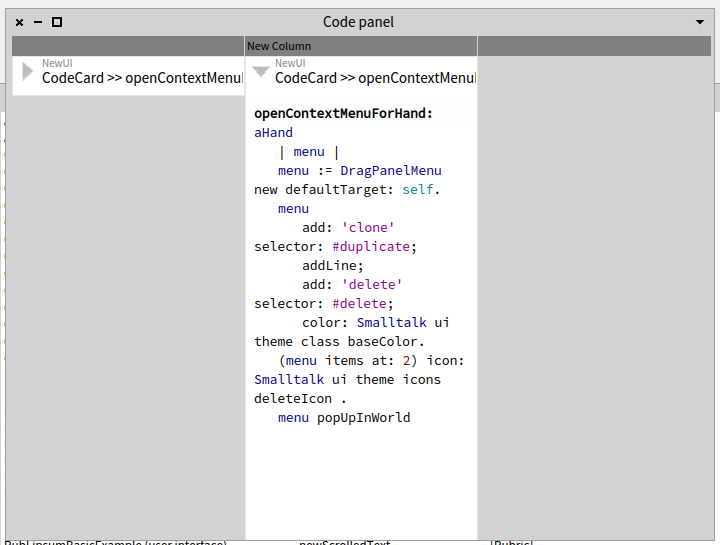
On 23-09-15 03:21, Peter Uhnák wrote:
aMorph passenger do: [ :each | each isClass ifTrue: [ each methods do: [ :method | self addMorph: (CodeCard class: method methodClass selector: method selector) ] ]. each isCompiledMethod ifTrue: [ self addMorph: (CodeCard class: each methodClass selector: each selector) ] ]
Takes 14 seconds with Morph, and the result is not exactly usable. For the method category, I suppose I can ask the TransferMorph for the dragSource which I can ask for the currrent selection to find out which class is meant. Stephan
participants (8)
-
 Alexandre Bergel
 -
 Andrew Glynn
 -
 Offray Vladimir Luna Cárdenas
 -
 Peter Uhnák
 -
 phil@highoctane.be
 -
 Stephan Eggermont
 -
 Thierry Goubier
 -
 Tudor Girba