
Hi all. I would like to made one of my images available through Pharo Launcher. Anyone knows where I can find documentation about this? I can't find anything on the StHub page for the project. Thanks, Offray

Images available through PharoLauncher are images on the CI server : https://ci.inria.fr/pharo-contribution/ You need to add a CI job. Sent from my iPhone
On 3 mai 2016, at 02:14, Offray Vladimir Luna Cárdenas <offray.luna@mutabit.com> wrote:
Hi all.
I would like to made one of my images available through Pharo Launcher. Anyone knows where I can find documentation about this? I can't find anything on the StHub page for the project.
Thanks,
Offray

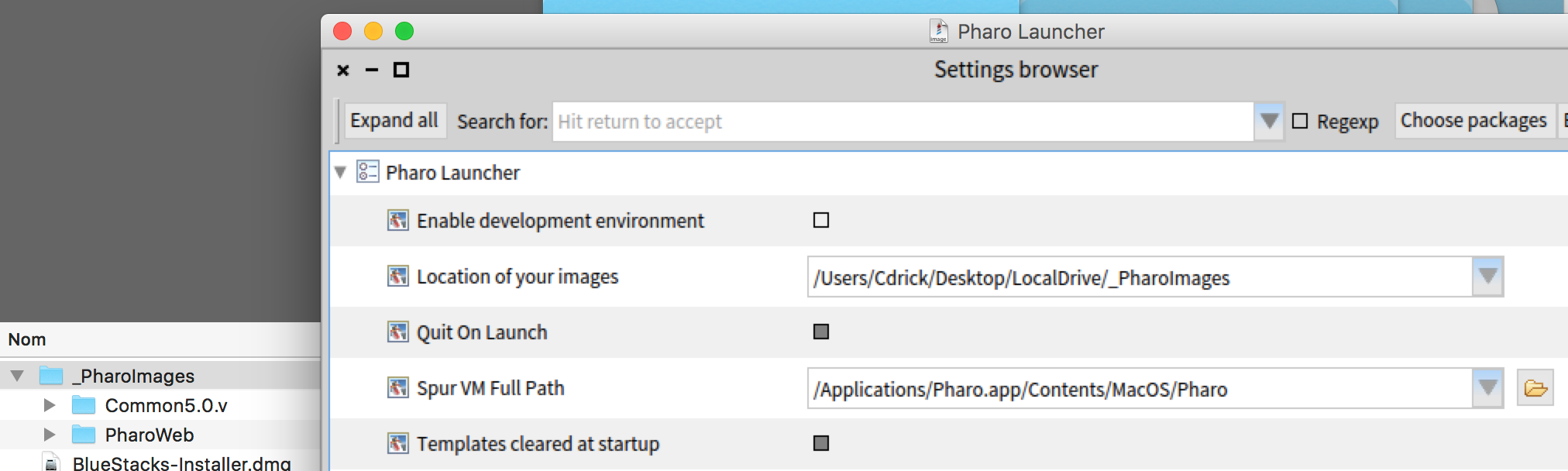
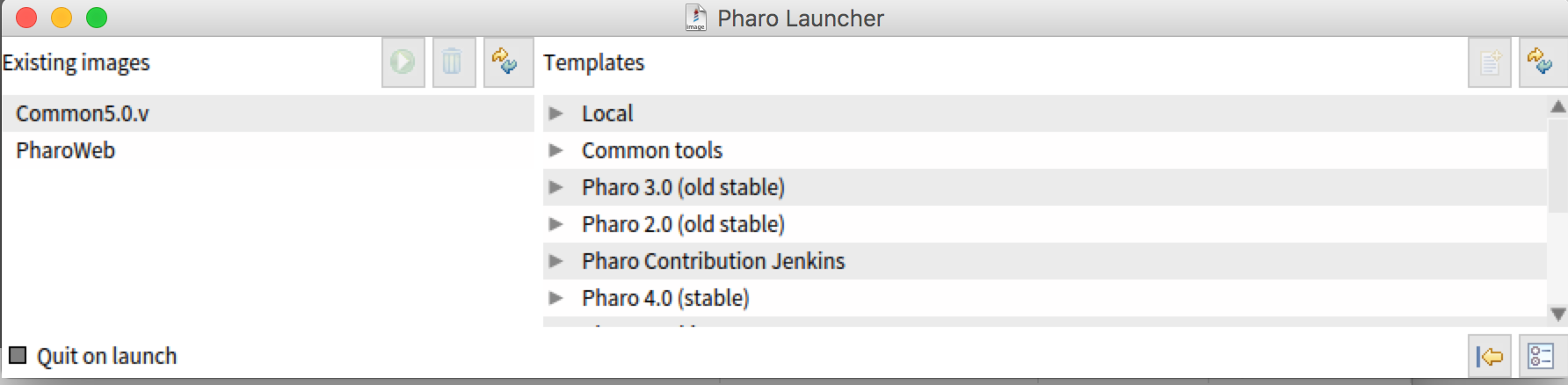
Another solution (incomplete) is to put you image in the default directory of images (you can change it and images will migrate). Settings can be accessed but the right bottom icon. Eventually change the path as I did. Then put tour image + change (in a directory like PharoWeb). Hope this help, Cheers, Cédrik

On Tue, May 3, 2016 at 8:14 AM, Offray Vladimir Luna Cárdenas <offray.luna@mutabit.com> wrote:
Hi all.
I would like to made one of my images available through Pharo Launcher. Anyone knows where I can find documentation about this? I can't find anything on the StHub page for the project.
Thanks,
Offray
Do you mean for your own use? Or so others can download them using PharoLauncher? cheers -ben
Hi Ben, I mean for others to use. My idea is to use PharoLauncher to package and execute an image with preloaded stuff. I will check the suggestions of Cédrick and Serge. Thanks, Offray On 03/05/16 05:30, Ben Coman wrote:
On Tue, May 3, 2016 at 8:14 AM, Offray Vladimir Luna Cárdenas <offray.luna@mutabit.com> wrote:
Hi all.
I would like to made one of my images available through Pharo Launcher. Anyone knows where I can find documentation about this? I can't find anything on the StHub page for the project.
Thanks,
Offray
Do you mean for your own use? Or so others can download them using PharoLauncher? cheers -ben

Maybe a silly question, but why donât you make a 1-file download like the default options provided for Pharo 4.0 on http://pharo.org/download For example, on MacOS it gives you an .app file that you just double-click.
On May 3, 2016, at 11:43, Offray Vladimir Luna Cárdenas <offray.luna@mutabit.com> wrote:
Hi Ben,
I mean for others to use. My idea is to use PharoLauncher to package and execute an image with preloaded stuff. I will check the suggestions of Cédrick and Serge.
Thanks,
Offray
On 03/05/16 05:30, Ben Coman wrote:
On Tue, May 3, 2016 at 8:14 AM, Offray Vladimir Luna Cárdenas <offray.luna@mutabit.com> wrote:
Hi all.
I would like to made one of my images available through Pharo Launcher. Anyone knows where I can find documentation about this? I can't find anything on the StHub page for the project.
Thanks,
Offray
Do you mean for your own use? Or so others can download them using PharoLauncher? cheers -ben
---> Save our in-boxes! http://emailcharter.org <--- Johan Fabry - http://pleiad.cl/~jfabry PLEIAD and RyCh labs - Computer Science Department (DCC) - University of Chile

On Tue, May 3, 2016 at 4:55 PM, Johan Fabry <jfabry@dcc.uchile.cl> wrote:
Maybe a silly question, but why donât you make a 1-file download like the default options provided for Pharo 4.0 on http://pharo.org/download For example, on MacOS it gives you an .app file that you just double-click.
How does that play with Pharo Launcher? Can you add arbitrary images and Pharo Launcher will just manage them?
On May 3, 2016, at 12:08, Peter Uhnák <i.uhnak@gmail.com> wrote:
On Tue, May 3, 2016 at 4:55 PM, Johan Fabry <jfabry@dcc.uchile.cl <mailto:jfabry@dcc.uchile.cl>> wrote:
Maybe a silly question, but why donât you make a 1-file download like the default options provided for Pharo 4.0 on http://pharo.org/download <http://pharo.org/download> For example, on MacOS it gives you an .app file that you just double-click.
How does that play with Pharo Launcher? Can you add arbitrary images and Pharo Launcher will just manage them?
No idea, sorry. This is an alternative to Pharo Launcher, I do not know how (if?) it would combine with the launcher. ---> Save our in-boxes! http://emailcharter.org <--- Johan Fabry - http://pleiad.cl/~jfabry PLEIAD and RyCh labs - Computer Science Department (DCC) - University of Chile
Hi Johan, At this moment I would like the quickest alternative, and maybe what you propose is the path to follow. I have downloaded the Windows and Mac bundles. I imagine that creating my own variant would mean to change the pharo binary, image, sources and changes file in each of them to provide the versions that support the development version of Moose 6, that I'm using now. After that I'll try a better approach using Pharo Launcher. Cheers, Offray On 03/05/16 09:55, Johan Fabry wrote:
Maybe a silly question, but why donât you make a 1-file download like the default options provided for Pharo 4.0 on http://pharo.org/download For example, on MacOS it gives you an .app file that you just double-click.
On May 3, 2016, at 11:43, Offray Vladimir Luna Cárdenas <offray.luna@mutabit.com> wrote:
Hi Ben,
I mean for others to use. My idea is to use PharoLauncher to package and execute an image with preloaded stuff. I will check the suggestions of Cédrick and Serge.
Thanks,
Offray
On 03/05/16 05:30, Ben Coman wrote:
On Tue, May 3, 2016 at 8:14 AM, Offray Vladimir Luna Cárdenas <offray.luna@mutabit.com> wrote:
Hi all.
I would like to made one of my images available through Pharo Launcher. Anyone knows where I can find documentation about this? I can't find anything on the StHub page for the project.
Thanks,
Offray
Do you mean for your own use? Or so others can download them using PharoLauncher? cheers -ben
---> Save our in-boxes! http://emailcharter.org <---
Johan Fabry - http://pleiad.cl/~jfabry PLEIAD and RyCh labs - Computer Science Department (DCC) - University of Chile
Hola, A thought: you can probably just open an image of a working version of yours and do a save-as inside the bundle or zip, overwriting the image that is there.
On May 3, 2016, at 14:03, Offray Vladimir Luna Cárdenas <offray.luna@mutabit.com> wrote:
Hi Johan,
At this moment I would like the quickest alternative, and maybe what you propose is the path to follow. I have downloaded the Windows and Mac bundles. I imagine that creating my own variant would mean to change the pharo binary, image, sources and changes file in each of them to provide the versions that support the development version of Moose 6, that I'm using now.
After that I'll try a better approach using Pharo Launcher.
Cheers,
Offray
On 03/05/16 09:55, Johan Fabry wrote:
Maybe a silly question, but why donât you make a 1-file download like the default options provided for Pharo 4.0 on http://pharo.org/download For example, on MacOS it gives you an .app file that you just double-click.
On May 3, 2016, at 11:43, Offray Vladimir Luna Cárdenas <offray.luna@mutabit.com> wrote:
Hi Ben,
I mean for others to use. My idea is to use PharoLauncher to package and execute an image with preloaded stuff. I will check the suggestions of Cédrick and Serge.
Thanks,
Offray
On 03/05/16 05:30, Ben Coman wrote:
On Tue, May 3, 2016 at 8:14 AM, Offray Vladimir Luna Cárdenas <offray.luna@mutabit.com> wrote:
Hi all.
I would like to made one of my images available through Pharo Launcher. Anyone knows where I can find documentation about this? I can't find anything on the StHub page for the project.
Thanks,
Offray
Do you mean for your own use? Or so others can download them using PharoLauncher? cheers -ben
---> Save our in-boxes! http://emailcharter.org <---
Johan Fabry - http://pleiad.cl/~jfabry PLEIAD and RyCh labs - Computer Science Department (DCC) - University of Chile
---> Save our in-boxes! http://emailcharter.org <--- Johan Fabry - http://pleiad.cl/~jfabry PLEIAD and RyCh labs - Computer Science Department (DCC) - University of Chile
Yes, that would be nice and easier, but I don't know if we have a prepackaged version of Moose 6 for Windows, Linux y Mac or where I can get it. Pointers anyone? Cheers, Offray On 03/05/16 12:33, Johan Fabry wrote:
Hola,
A thought: you can probably just open an image of a working version of yours and do a save-as inside the bundle or zip, overwriting the image that is there.
On May 3, 2016, at 14:03, Offray Vladimir Luna Cárdenas <offray.luna@mutabit.com> wrote:
Hi Johan,
At this moment I would like the quickest alternative, and maybe what you propose is the path to follow. I have downloaded the Windows and Mac bundles. I imagine that creating my own variant would mean to change the pharo binary, image, sources and changes file in each of them to provide the versions that support the development version of Moose 6, that I'm using now.
After that I'll try a better approach using Pharo Launcher.
Cheers,
Offray
On 03/05/16 09:55, Johan Fabry wrote:
Maybe a silly question, but why donât you make a 1-file download like the default options provided for Pharo 4.0 on http://pharo.org/download For example, on MacOS it gives you an .app file that you just double-click.
On May 3, 2016, at 11:43, Offray Vladimir Luna Cárdenas <offray.luna@mutabit.com> wrote:
Hi Ben,
I mean for others to use. My idea is to use PharoLauncher to package and execute an image with preloaded stuff. I will check the suggestions of Cédrick and Serge.
Thanks,
Offray
On 03/05/16 05:30, Ben Coman wrote:
On Tue, May 3, 2016 at 8:14 AM, Offray Vladimir Luna Cárdenas <offray.luna@mutabit.com> wrote:
Hi all.
I would like to made one of my images available through Pharo Launcher. Anyone knows where I can find documentation about this? I can't find anything on the StHub page for the project.
Thanks,
Offray
Do you mean for your own use? Or so others can download them using PharoLauncher? cheers -ben
---> Save our in-boxes! http://emailcharter.org <---
Johan Fabry - http://pleiad.cl/~jfabry PLEIAD and RyCh labs - Computer Science Department (DCC) - University of Chile
---> Save our in-boxes! http://emailcharter.org <---
Johan Fabry - http://pleiad.cl/~jfabry PLEIAD and RyCh labs - Computer Science Department (DCC) - University of Chile
prepackaged version of Moose 6 for Windows, Linux y Mac
Moose is just Pharo image + changes; you can use the same Moose image on all platforms. And moose is just installed on top of Pharo 5 image (it's just a bunch of commands executed on top of Pharo 5 image https://ci.inria.fr/moose/job/moose-6.0/lastSuccessfulBuild/console ) So you can do it by hand, which is easy, you can download the VMs and sources here http://files.pharo.org/get-files/50/ and just copy there the moose image. I have a bundler that can take a Pharo image and create distribution for each platform together with the correct vm and platform-specific launchers, but I don't really have time right now to clean it up and make it generic (it's for one of my projects)⦠unless you can wait until after May 15. But you can probably write it yourself⦠it's a bunch of bash, makefiles, C, cross-compilation, and AppleScript. :) Peter On Tue, May 3, 2016 at 7:57 PM, Offray Vladimir Luna Cárdenas < offray.luna@mutabit.com> wrote:
Yes, that would be nice and easier, but I don't know if we have a prepackaged version of Moose 6 for Windows, Linux y Mac or where I can get it. Pointers anyone?
Cheers,
Offray
On 03/05/16 12:33, Johan Fabry wrote:
Hola,
A thought: you can probably just open an image of a working version of yours and do a save-as inside the bundle or zip, overwriting the image that is there.
On May 3, 2016, at 14:03, Offray Vladimir Luna Cárdenas <
offray.luna@mutabit.com> wrote:
Hi Johan,
At this moment I would like the quickest alternative, and maybe what you propose is the path to follow. I have downloaded the Windows and Mac bundles. I imagine that creating my own variant would mean to change the pharo binary, image, sources and changes file in each of them to provide the versions that support the development version of Moose 6, that I'm using now.
After that I'll try a better approach using Pharo Launcher.
Cheers,
Offray
On 03/05/16 09:55, Johan Fabry wrote:
Maybe a silly question, but why donât you make a 1-file download like the default options provided for Pharo 4.0 on http://pharo.org/download For example, on MacOS it gives you an .app file that you just double-click.
On May 3, 2016, at 11:43, Offray Vladimir Luna Cárdenas <
offray.luna@mutabit.com> wrote:
Hi Ben,
I mean for others to use. My idea is to use PharoLauncher to package and execute an image with preloaded stuff. I will check the suggestions of Cédrick and Serge.
Thanks,
Offray
On 03/05/16 05:30, Ben Coman wrote:
On Tue, May 3, 2016 at 8:14 AM, Offray Vladimir Luna Cárdenas <offray.luna@mutabit.com> wrote:
Hi all.
I would like to made one of my images available through Pharo Launcher. Anyone knows where I can find documentation about this? I can't find anything on the StHub page for the project.
Thanks,
Offray
Do you mean for your own use? Or so others can download them using PharoLauncher? cheers -ben
---> Save our in-boxes! http://emailcharter.org <---
Johan Fabry - http://pleiad.cl/~jfabry PLEIAD and RyCh labs - Computer Science Department (DCC) - University of Chile
---> Save our in-boxes! http://emailcharter.org <---
Johan Fabry - http://pleiad.cl/~jfabry PLEIAD and RyCh labs - Computer Science Department (DCC) - University of Chile
If you want to reproduce the "preloaded stuff » (build one image everyday for instance), youâll have to create first a ConfigurationOfYouApplication describing your dependencies/requirements. Then 2 choices: - you load the configuration in a base image and then you load from the configuration in 1 command (it can be quite quick or take some more time if for instance you need seaside). - if it takes too much time to reproduce or if you want something more « serious », then once you ConfigurationOf is done, you can setup a job in jenkins (ci.inria.fr - first you need to create an account) so that every night, a new image is created and if no pb, it will be accessible through « Pharo Contribution Jenkins" in the Launcher. Anyway, I think you first need to get used to ConfigurationOf⦠A convenient tool in Pharo is the Versioner that is a UI around Metacello configuration (=>generating ConfigurationOf). HTH, Cédrik

Offray Vladimir Luna Cárdenas <offray.luna@mutabit.com> writes:
I would like to made one of my images available through Pharo Launcher. Anyone knows where I can find documentation about this? I can't find anything on the StHub page for the project.
I agree with both Serge and Cédrick. Their solution is easy and the best practice for any Pharo development (regardless of the launcher): - write a ConfigurationOf using Versionner - add a job to https://ci.inria.fr/pharo-contribution/ (just create an account at http://ci.inria.fr and request to join pharo-contribution). As soon as the job builds successfully, you will see it in the Launcher. -- Damien Cassou http://damiencassou.seasidehosting.st "Success is the ability to go from one failure to another without losing enthusiasm." --Winston Churchill

Suppose I have a web page with 50 small photos; when I click on a photo, appears a window where I can further click on a link to open a full profile of the person on a photo. I need to open a full profile for every person in that page, each in a separate browser tab. How can I automate this clicking, so that I would not need to click at every link manually? Does Pharo have tools for such tasks?
As far as I know: Pharo has event recorder that helps automate within image⦠however the bigger problem here is interaction with the environment, which is a big problem cross-platform. This is all assuming that you _must_ click on it and you can't just retrieve-html/parse/extract/download/repeat which is doable in Pharo with Zinc and some non-validating parser. If you don't find anything, you can take a look at PyAutoGUI https://pyautogui.readthedocs.io/en/latest/ (or xdotool on linux). I believe Kilon worked on some python bindings from Pharo? It would be interesting to ask him what was that exactly⦠maybe it could be connected to this lib. Peter On Wed, May 4, 2016 at 1:04 PM, Grigory Hatsevich <g.hatsevich@gmail.com> wrote:
Suppose I have a web page with 50 small photos; when I click on a photo, appears a window where I can further click on a link to open a full profile of the person on a photo. I need to open a full profile for every person in that page, each in a separate browser tab. How can I automate this clicking, so that I would not need to click at every link manually? Does Pharo have tools for such tasks?
Thanks. I will be happy with either way - clicks automation or "retrieve-html/parse/extract/download/repeat"; I just want to find the most convenient way (e.g. quick and simple). I do not have any experience with html parsing; maybe you could point at some relevant examples / tutorial? Peter Uhnák <i.uhnak@gmail.com> пиÑал(а) в ÑвоÑм пиÑÑме Wed, 04 May 2016 14:11:01 +0300:
As far as I know:
Pharo has event recorder that helps automate within image⦠however the bigger problem here is interaction with the environment, which is a big
problem cross-platform.
This is all assuming that you _must_ click on it and you can't just retrieve-html/parse/extract/download/repeat which is doable in Pharo with Zinc >and some non-validating parser.
If you don't find anything, you can take a look at PyAutoGUI https://pyautogui.readthedocs.io/en/latest/ (or xdotool on linux).
I believe Kilon worked on some python bindings from Pharo? It would be interesting to ask him what was that exactly⦠maybe it could be
connected to this lib.
Peter
On Wed, May 4, 2016 at 1:04 PM, Grigory Hatsevich <g.hatsevich@gmail.com> wrote:
Suppose I have a web page with 50 small photos; when I click on a photo, appears a window where I can further click on a link to open a full >>profile of the person on a photo. I need to open a full profile for every person in that page, each in a separate browser tab. How can I automate >>this clicking, so that I would not need to click at every link manually? Does Pharo have tools for such tasks?

My project is basically a unification of python and pharo by allowing pharo to use python libraries. That means that one would have to have knowledge of python and the python library used. Its a simple socket bridge with which pharo can communicate with python and say "hey python do this for me and return me the result". This problem seems to me to be more suitable for BeautifulSoup https://www.crummy.com/software/BeautifulSoup/bs4/doc/ which has been ported to Pharo but it seems to no longer be in SmalltalkHub I can only find it here http://www.squeaksource.com/@-SEx5I4XPThwdDpe/-yS8D9eS On Wed, May 4, 2016 at 2:12 PM Peter Uhnák <i.uhnak@gmail.com> wrote:
As far as I know:
Pharo has event recorder that helps automate within image⦠however the bigger problem here is interaction with the environment, which is a big problem cross-platform.
This is all assuming that you _must_ click on it and you can't just retrieve-html/parse/extract/download/repeat which is doable in Pharo with Zinc and some non-validating parser.
If you don't find anything, you can take a look at PyAutoGUI https://pyautogui.readthedocs.io/en/latest/ (or xdotool on linux).
I believe Kilon worked on some python bindings from Pharo? It would be interesting to ask him what was that exactly⦠maybe it could be connected to this lib.
Peter
On Wed, May 4, 2016 at 1:04 PM, Grigory Hatsevich <g.hatsevich@gmail.com> wrote:
Suppose I have a web page with 50 small photos; when I click on a photo, appears a window where I can further click on a link to open a full profile of the person on a photo. I need to open a full profile for every person in that page, each in a separate browser tab. How can I automate this clicking, so that I would not need to click at every link manually? Does Pharo have tools for such tasks?
I think you have several possibilities : 1. testing user interactions by real click automations: donât know what is up todays but there were Albatross back in 2006 [1] or SeasideTesting [2]. Probably, there are other options. 2. Simulate client requests programmatically. You could do that in Zinc quite easily if you know the different url. Have a look at the book « Enterprise Pharo » [3] 3. BeautifulSoup is called Soup and is accessible through the catalog or SmalltalkHub [5]. Works well (note to pharoers: but I think that be nice to have an interface like scrappy instead). Now, as you say "Its a simple socket bridge with which pharo can communicate with python and say "hey python do this for me and return me the result ». Iâd say the second option with Zinc seems to be the best approach, start with the chapter about client but youâll probably need the server chapter so as to get bidirectional connections. My guess⦠and interesting project btw :) HTH, Cédrik [1] http://scg.unibe.ch/archive/projects/Brue06a.pdf [2] http://www.shaffer-consulting.com/david/Seaside/TestingComponents/TestingCom... [3] http://files.pharo.org/books/enterprise-pharo/ [4] https://ci.inria.fr/pharo-contribution/job/EnterprisePharoBook/lastSuccessfu... [5] http://www.smalltalkhub.com/#!/~PharoExtras/Soup
Soup is quite easy to use (event if I would prefer an API that uses jQuery/CSS likes navigation selectors. Easier way is doing it interactively (in a debugger). Just to give an example so that you can start quickly, I just did something to scrap info from this web site db-ip. Info is in a table and I want its content: https://db-ip.com/8.8.8.8 So here is the sample code (soup has lots of examples too): self cache ''a dictionary to avoid scrapping again'' at: anIPString ifAbsent: [ soup := Soup fromUrl: 'https://db-ip.com/', anIPString. soupTable := soup findAllTags: 'table'. "ensure size =1" geolocDict := Dictionary new. soupTable first childTagsDo: [ :tag | geolocDict at: (tag children first next contents) put: (tag children second next contents) ]. self cache at: anIPString put: geolocDict]. Cheers, Cédrik

On 04/05/16 13:04, Grigory Hatsevich wrote:
Suppose I have a web page with 50 small photos; when I click on a photo, appears a window where I can further click on a link to open a full profile of the person on a photo. I need to open a full profile for every person in that page, each in a separate browser tab. How can I automate this clicking, so that I would not need to click at every link manually? Does Pharo have tools for such tasks?
Beach Parasol, selenium integration for Seaside http://ss3.gemstone.com/ss/Parasol.html Stephan
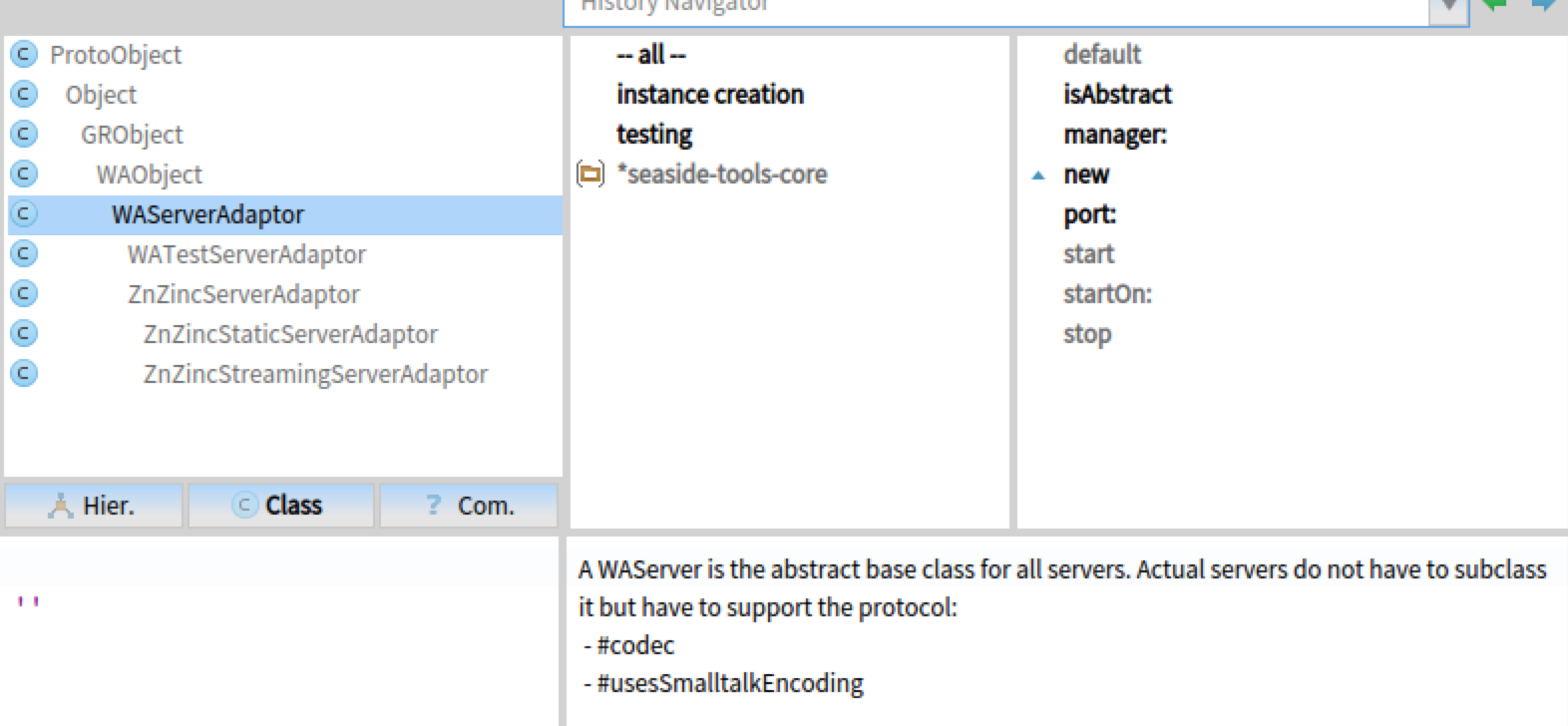
I have a problem installing Beach Parasol. I follow the guidelines from http://ss3.gemstone.com/ss/Parasol.html/Wiki and Pharo says that WAKomEncoded is unknown variable. Stephan Eggermont <stephan@stack.nl> пиÑал(а) в ÑвоÑм пиÑÑме Wed, 04 May 2016 17:08:52 +0300:
On 04/05/16 13:04, Grigory Hatsevich wrote:
Suppose I have a web page with 50 small photos; when I click on a photo, appears a window where I can further click on a link to open a full profile of the person on a photo. I need to open a full profile for every person in that page, each in a separate browser tab. How can I automate this clicking, so that I would not need to click at every link manually? Does Pharo have tools for such tasks?
Beach Parasol, selenium integration for Seaside
http://ss3.gemstone.com/ss/Parasol.html
Stephan
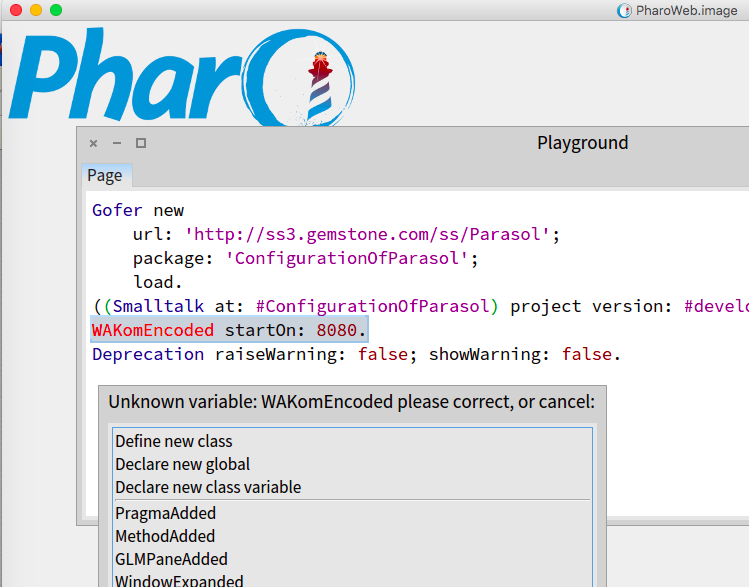
not sure, but WAKomAdaptor is I speak specific. You have to use Pharo variant, one subclass of WAAdaptor. Iâll try ZnZincServer adaptor. Cheers, Cédrik
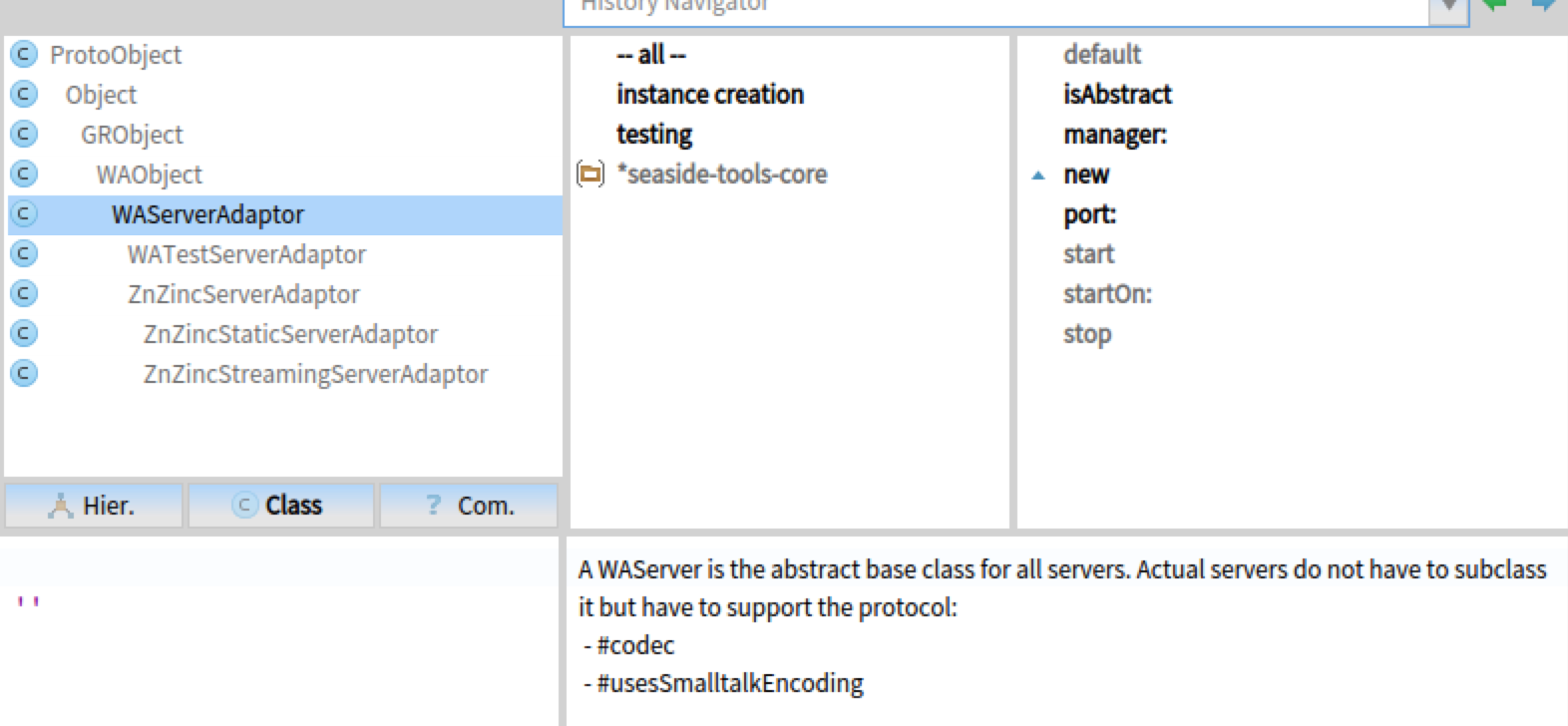
Thanks, "ZnZincServerAdaptor startOn: 8080" made it to work (after I added /Applications/Firefox.app/Contents/MacOS to PATH). Cédrick Béler <cdrick65@gmail.com> пиÑал(а) в ÑвоÑм пиÑÑме Wed, 04 May 2016 19:29:17 +0300:
not sure, but WAKomAdaptor is I speak specific.
You have to use Pharo variant, one subclass of WAAdaptor.
Iâll try ZnZincServer adaptor.
Cheers, Cédrik
On 04/05/16 17:44, Grigory Hatsevich wrote:
I have a problem installing Beach Parasol. I follow the guidelines from http://ss3.gemstone.com/ss/Parasol.html/Wiki and Pharo says that WAKomEncoded is unknown variable.
Sorry about that, that's a text that is outdated. The ZnServerAdapter version should work fine Stephan
Hi Damien, I will use a modified version of the Pharo 5 environment packaged for the current MOOC for a quick building and with more time I will create new ConfigurationOf for my projects and debug the current ones. Thanks, Offray On 04/05/16 04:50, Damien Cassou wrote:
Offray Vladimir Luna Cárdenas <offray.luna@mutabit.com> writes:
I would like to made one of my images available through Pharo Launcher. Anyone knows where I can find documentation about this? I can't find anything on the StHub page for the project. I agree with both Serge and Cédrick. Their solution is easy and the best practice for any Pharo development (regardless of the launcher):
- write a ConfigurationOf using Versionner
- add a job to https://ci.inria.fr/pharo-contribution/ (just create an account at http://ci.inria.fr and request to join pharo-contribution).
As soon as the job builds successfully, you will see it in the Launcher.
participants (10)
-
 Ben Coman
 -
 Cédrick Béler
 -
 Damien Cassou
 -
 Dimitris Chloupis
 -
 Grigory Hatsevich
 -
 Johan Fabry
 -
 Offray Vladimir Luna Cárdenas
 -
 Peter Uhnák
 -
 serge.stinckwich@gmail.com
 -
 Stephan Eggermont