How to create a red box with text in a big font?

Hi guys - Iâm a bit stumped on how to create things in big text with a set background colour. I thought I understood - but it just doesnât seem to work. I was thinking I could create a container morph, set its background colour (which works), and then put a StringMorph inside it with a set font. This last bit I canât get to work - I can do bold, but not a bigger font size. Iâve tried different things but am missing the magic sauce - can someone spot my mistake? Below, Iâve tried using a font name that I can see in the Pharo settings dialog but it doesnât work? I also tried using LogicalFont with no success either. tMorph := StringMorph new. font1 := LogicalFont familyName: 'Arial' pointSize: 24. tMorph contents: 'Hello World'; fontName: 'Open Sans' size: 24; emphasis: TextEmphasis bold emphasisCode. bMorph := Morph new color: Color red; addMorph: tMorph. bMorph openInWorld. Tim

Using Roassal, I would do: -=-=-=-=-=-=-=-=-= v := RTView new. s := RTMultiCompositeShape new. s add: (RTBox new color: Color red; size: 500). s add: (RTLabel new height: 70). v add: (s elementOn: 'Hello World'). v open -=-=-=-=-=-=-=-=-= Cheers, Alexandre -- _,.;:~^~:;._,.;:~^~:;._,.;:~^~:;._,.;:~^~:;._,.;: Alexandre Bergel http://www.bergel.eu ^~:;._,.;:~^~:;._,.;:~^~:;._,.;:~^~:;._,.;:~^~:;. On Sep 4, 2014, at 9:27 AM, Tim Mackinnon <tim@testit.works> wrote:
Hi guys - Iâm a bit stumped on how to create things in big text with a set background colour. I thought I understood - but it just doesnât seem to work. I was thinking I could create a container morph, set its background colour (which works), and then put a StringMorph inside it with a set font. This last bit I canât get to work - I can do bold, but not a bigger font size. Iâve tried different things but am missing the magic sauce - can someone spot my mistake? Below, Iâve tried using a font name that I can see in the Pharo settings dialog but it doesnât work? I also tried using LogicalFont with no success either.
tMorph := StringMorph new. font1 := LogicalFont familyName: 'Arial' pointSize: 24.
tMorph contents: 'Hello World'; fontName: 'Open Sans' size: 24; emphasis: TextEmphasis bold emphasisCode.
bMorph := Morph new color: Color red; addMorph: tMorph.
bMorph openInWorld.
Tim
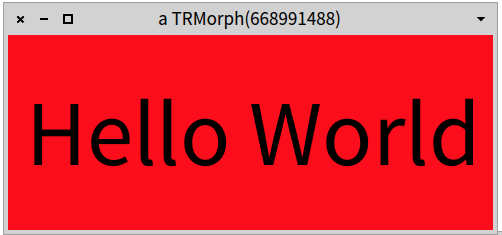
Cool - thatâs handy to know it works somewhere (and in fact, it was when playing with GT-Inspector I noticed this - so that solution would work). Iâm still curious how you do it in Morphic? Tim On 4 Sep 2014, at 17:10, Alexandre Bergel <alexandre.bergel@me.com> wrote:
Using Roassal, I would do: -=-=-=-=-=-=-=-=-= v := RTView new. s := RTMultiCompositeShape new. s add: (RTBox new color: Color red; size: 500). s add: (RTLabel new height: 70). v add: (s elementOn: 'Hello World'). v open -=-=-=-=-=-=-=-=-=
<Screen Shot 2014-09-04 at 12.10.14 PM.png>
Cheers, Alexandre
-- _,.;:~^~:;._,.;:~^~:;._,.;:~^~:;._,.;:~^~:;._,.;: Alexandre Bergel http://www.bergel.eu ^~:;._,.;:~^~:;._,.;:~^~:;._,.;:~^~:;._,.;:~^~:;.
On Sep 4, 2014, at 9:27 AM, Tim Mackinnon <tim@testit.works> wrote:
Hi guys - Iâm a bit stumped on how to create things in big text with a set background colour. I thought I understood - but it just doesnât seem to work. I was thinking I could create a container morph, set its background colour (which works), and then put a StringMorph inside it with a set font. This last bit I canât get to work - I can do bold, but not a bigger font size. Iâve tried different things but am missing the magic sauce - can someone spot my mistake? Below, Iâve tried using a font name that I can see in the Pharo settings dialog but it doesnât work? I also tried using LogicalFont with no success either.
tMorph := StringMorph new. font1 := LogicalFont familyName: 'Arial' pointSize: 24.
tMorph contents: 'Hello World'; fontName: 'Open Sans' size: 24; emphasis: TextEmphasis bold emphasisCode.
bMorph := Morph new color: Color red; addMorph: tMorph.
bMorph openInWorld.
Tim
No idea :-) Alexandre -- _,.;:~^~:;._,.;:~^~:;._,.;:~^~:;._,.;:~^~:;._,.;: Alexandre Bergel http://www.bergel.eu ^~:;._,.;:~^~:;._,.;:~^~:;._,.;:~^~:;._,.;:~^~:;. On Sep 4, 2014, at 12:18 PM, Tim Mackinnon <tim@testit.works> wrote:
Iâm still curious how you do it in Morphic?

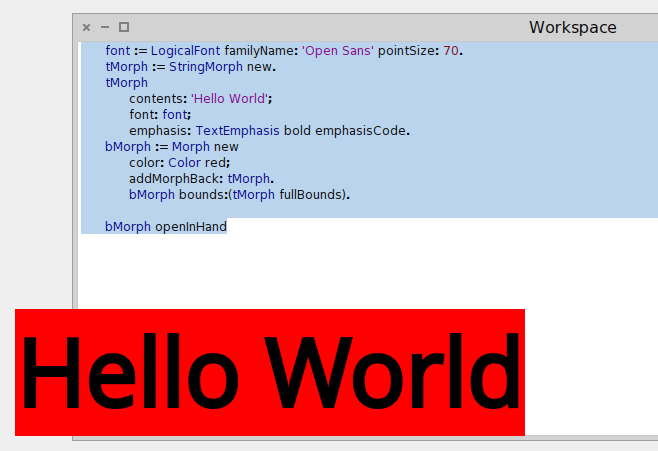
Don't use fontName: fontName size: fontSize as it only creates StrikeFont font, where the max size is 24 (I think). This works .... font := LogicalFont familyName: 'Open Sans' pointSize: 70. tMorph := StringMorph new. tMorph contents: 'Hello World'; font: font; emphasis: TextEmphasis bold emphasisCode. bMorph := Morph new color: Color red; addMorphBack: tMorph. bMorph bounds:(tMorph fullBounds). bMorph openInHand ... but it seems we have a problem with the free type fonts (again). Since Pharo 40195 I can not select any other fonts in Settings, only Bitmap DejaVu Sans. 2014-09-04 22:04 GMT+02:00 Alexandre Bergel <alexandre.bergel@me.com>:
No idea :-)
Alexandre -- _,.;:~^~:;._,.;:~^~:;._,.;:~^~:;._,.;:~^~:;._,.;: Alexandre Bergel http://www.bergel.eu ^~:;._,.;:~^~:;._,.;:~^~:;._,.;:~^~:;._,.;:~^~:;.
On Sep 4, 2014, at 12:18 PM, Tim Mackinnon <tim@testit.works> wrote:
Iâm still curious how you do it in Morphic?

Le 04/09/2014 18:18, Tim Mackinnon a écrit :
Cool - thatâs handy to know it works somewhere (and in fact, it was when playing with GT-Inspector I noticed this - so that solution would work).
Iâm still curious how you do it in Morphic? Like that:
Morph new color: Color red; hResizing: #shrinkWrap; addMorph: ( 'Hello World' asMorph fontName: 'Open Sans' size: 75; emphasis: TextEmphasis bold emphasisCode); openInWorld Thierry
Tim
On 4 Sep 2014, at 17:10, Alexandre Bergel <alexandre.bergel@me.com <mailto:alexandre.bergel@me.com>> wrote:
Using Roassal, I would do: -=-=-=-=-=-=-=-=-= v := RTView new. s := RTMultiCompositeShape new. s add: (RTBox new color: Color red; size: 500). s add: (RTLabel new height: 70). v add: (s elementOn: 'Hello World'). v open -=-=-=-=-=-=-=-=-=
<Screen Shot 2014-09-04 at 12.10.14 PM.png>
Cheers, Alexandre
-- _,.;:~^~:;._,.;:~^~:;._,.;:~^~:;._,.;:~^~:;._,.;: Alexandre Bergel http://www.bergel.eu <http://www.bergel.eu/> ^~:;._,.;:~^~:;._,.;:~^~:;._,.;:~^~:;._,.;:~^~:;.
On Sep 4, 2014, at 9:27 AM, Tim Mackinnon <tim@testit.works <mailto:tim@testit.works>> wrote:
Hi guys - Iâm a bit stumped on how to create things in big text with a set background colour. I thought I understood - but it just doesnât seem to work. I was thinking I could create a container morph, set its background colour (which works), and then put a StringMorph inside it with a set font. This last bit I canât get to work - I can do bold, but not a bigger font size. Iâve tried different things but am missing the magic sauce - can someone spot my mistake? Below, Iâve tried using a font name that I can see in the Pharo settings dialog but it doesnât work? I also tried using LogicalFont with no success either.
tMorph := StringMorph new. font1 := LogicalFont familyName: 'Arial' pointSize: 24.
tMorph contents: 'Hello World'; fontName: 'Open Sans' size: 24; emphasis: TextEmphasis bold emphasisCode.
bMorph := Morph new color: Color red; addMorph: tMorph.
bMorph openInWorld.
Tim


but if I try to do openInWindow instead of openInWorld in the end it turns it to white box , why ? On Thu, Sep 4, 2014 at 11:56 PM, Thierry Goubier <thierry.goubier@gmail.com> wrote:
Le 04/09/2014 18:18, Tim Mackinnon a écrit :
Cool - thatâs handy to know it works somewhere (and in fact, it was when playing with GT-Inspector I noticed this - so that solution would work).
Iâm still curious how you do it in Morphic?
Like that:
Morph new color: Color red; hResizing: #shrinkWrap; addMorph: ( 'Hello World' asMorph fontName: 'Open Sans' size: 75; emphasis: TextEmphasis bold emphasisCode); openInWorld
Thierry
Tim
On 4 Sep 2014, at 17:10, Alexandre Bergel <alexandre.bergel@me.com> wrote:
Using Roassal, I would do: -=-=-=-=-=-=-=-=-= v := RTView new. s := RTMultiCompositeShape new. s add: (RTBox new color: Color red; size: 500). s add: (RTLabel new height: 70). v add: (s elementOn: 'Hello World'). v open -=-=-=-=-=-=-=-=-=
<Screen Shot 2014-09-04 at 12.10.14 PM.png>
Cheers, Alexandre
-- _,.;:~^~:;._,.;:~^~:;._,.;:~^~:;._,.;:~^~:;._,.;: Alexandre Bergel http://www.bergel.eu ^~:;._,.;:~^~:;._,.;:~^~:;._,.;:~^~:;._,.;:~^~:;.
On Sep 4, 2014, at 9:27 AM, Tim Mackinnon <tim@testit.works> wrote:
Hi guys - Iâm a bit stumped on how to create things in big text with a set background colour. I thought I understood - but it just doesnât seem to work. I was thinking I could create a container morph, set its background colour (which works), and then put a StringMorph inside it with a set font. This last bit I canât get to work - I can do bold, but not a bigger font size. Iâve tried different things but am missing the magic sauce - can someone spot my mistake? Below, Iâve tried using a font name that I can see in the Pharo settings dialog but it doesnât work? I also tried using LogicalFont with no success either.
tMorph := StringMorph new. font1 := LogicalFont familyName: 'Arial' pointSize: 24.
tMorph contents: 'Hello World'; fontName: 'Open Sans' size: 24; emphasis: TextEmphasis bold emphasisCode.
bMorph := Morph new color: Color red; addMorph: tMorph.
bMorph openInWorld.
Tim
Le 04/09/2014 23:12, kilon alios a écrit :
but if I try to do openInWindow instead of openInWorld in the end it turns it to white box , why ?
Adding the morph inside the window changes the morph color to white :( (What the heck?) If the color is changed after the openInWindow, then that works. Morph new hResizing: #shrinkWrap; addMorph: ( 'Hello World' asMorph fontName: 'Open Sans' size: 75; emphasis: TextEmphasis bold emphasisCode); openInWindow; color: Color red Thierry
On Thu, Sep 4, 2014 at 11:56 PM, Thierry Goubier <thierry.goubier@gmail.com <mailto:thierry.goubier@gmail.com>> wrote:
Le 04/09/2014 18:18, Tim Mackinnon a écrit :
Cool - thatâs handy to know it works somewhere (and in fact, it was when playing with GT-Inspector I noticed this - so that solution would work).
Iâm still curious how you do it in Morphic?
Like that:
Morph new color: Color red; hResizing: #shrinkWrap; addMorph: ( 'Hello World' asMorph fontName: 'Open Sans' size: 75; emphasis: TextEmphasis bold emphasisCode); openInWorld
Thierry
Tim
On 4 Sep 2014, at 17:10, Alexandre Bergel <alexandre.bergel@me.com <mailto:alexandre.bergel@me.com>> wrote:
Using Roassal, I would do: -=-=-=-=-=-=-=-=-= v := RTView new. s := RTMultiCompositeShape new. s add: (RTBox new color: Color red; size: 500). s add: (RTLabel new height: 70). v add: (s elementOn: 'Hello World'). v open -=-=-=-=-=-=-=-=-=
<Screen Shot 2014-09-04 at 12.10.14 PM.png>
Cheers, Alexandre
-- _,.;:~^~:;._,.;:~^~:;._,.;:~^~:;._,.;:~^~:;._,.;: Alexandre Bergel http://www.bergel.eu <http://www.bergel.eu/> ^~:;._,.;:~^~:;._,.;:~^~:;._,.;:~^~:;._,.;:~^~:;.
On Sep 4, 2014, at 9:27 AM, Tim Mackinnon <tim@testit.works <mailto:tim@testit.works>> wrote:
Hi guys - Iâm a bit stumped on how to create things in big text with a set background colour. I thought I understood - but it just doesnât seem to work. I was thinking I could create a container morph, set its background colour (which works), and then put a StringMorph inside it with a set font. This last bit I canât get to work - I can do bold, but not a bigger font size. Iâve tried different things but am missing the magic sauce - can someone spot my mistake? Below, Iâve tried using a font name that I can see in the Pharo settings dialog but it doesnât work? I also tried using LogicalFont with no success either.
tMorph := StringMorph new. font1 := LogicalFont familyName: 'Arial' pointSize: 24.
tMorph contents: 'Hello World'; fontName: 'Open Sans' size: 24; emphasis: TextEmphasis bold emphasisCode.
bMorph := Morph new color: Color red; addMorph: tMorph.
bMorph openInWorld.
Tim

Yes there is that annoying thing with windows that set things bacl to white. Why is that indeed? Phil Le 4 sept. 2014 23:32, "Thierry Goubier" <thierry.goubier@gmail.com> a écrit :
Le 04/09/2014 23:12, kilon alios a écrit :
but if I try to do openInWindow instead of openInWorld in the end it turns it to white box , why ?
Adding the morph inside the window changes the morph color to white :( (What the heck?)
If the color is changed after the openInWindow, then that works.
Morph new hResizing: #shrinkWrap; addMorph: ( 'Hello World' asMorph fontName: 'Open Sans' size: 75; emphasis: TextEmphasis bold emphasisCode); openInWindow; color: Color red
Thierry
On Thu, Sep 4, 2014 at 11:56 PM, Thierry Goubier < thierry.goubier@gmail.com> wrote:
Le 04/09/2014 18:18, Tim Mackinnon a écrit :
Cool - thatâs handy to know it works somewhere (and in fact, it was when playing with GT-Inspector I noticed this - so that solution would work).
Iâm still curious how you do it in Morphic?
Like that:
Morph new color: Color red; hResizing: #shrinkWrap; addMorph: ( 'Hello World' asMorph fontName: 'Open Sans' size: 75; emphasis: TextEmphasis bold emphasisCode); openInWorld
Thierry
Tim
On 4 Sep 2014, at 17:10, Alexandre Bergel <alexandre.bergel@me.com> wrote:
Using Roassal, I would do: -=-=-=-=-=-=-=-=-= v := RTView new. s := RTMultiCompositeShape new. s add: (RTBox new color: Color red; size: 500). s add: (RTLabel new height: 70). v add: (s elementOn: 'Hello World'). v open -=-=-=-=-=-=-=-=-=
<Screen Shot 2014-09-04 at 12.10.14 PM.png>
Cheers, Alexandre
-- _,.;:~^~:;._,.;:~^~:;._,.;:~^~:;._,.;:~^~:;._,.;: Alexandre Bergel http://www.bergel.eu ^~:;._,.;:~^~:;._,.;:~^~:;._,.;:~^~:;._,.;:~^~:;.
On Sep 4, 2014, at 9:27 AM, Tim Mackinnon <tim@testit.works> wrote:
Hi guys - Iâm a bit stumped on how to create things in big text with a set background colour. I thought I understood - but it just doesnât seem to work. I was thinking I could create a container morph, set its background colour (which works), and then put a StringMorph inside it with a set font. This last bit I canât get to work - I can do bold, but not a bigger font size. Iâve tried different things but am missing the magic sauce - can someone spot my mistake? Below, Iâve tried using a font name that I can see in the Pharo settings dialog but it doesnât work? I also tried using LogicalFont with no success either.
tMorph := StringMorph new. font1 := LogicalFont familyName: 'Arial' pointSize: 24.
tMorph contents: 'Hello World'; fontName: 'Open Sans' size: 24; emphasis: TextEmphasis bold emphasisCode.
bMorph := Morph new color: Color red; addMorph: tMorph.
bMorph openInWorld.
Tim
2014-09-05 8:43 GMT+02:00 phil@highoctane.be <phil@highoctane.be>:
Yes there is that annoying thing with windows that set things bacl to white. Why is that indeed?
Phil
I can not reproduce this with this code: Morph new color:Color red; hResizing: #shrinkWrap; addMorph: ( 'Hello World' asMorph fontName: 'Open Sans' size: 75; emphasis: TextEmphasis bold emphasisCode); openInWindow The Morph is red!
Le 4 sept. 2014 23:32, "Thierry Goubier" <thierry.goubier@gmail.com> a écrit :
Le 04/09/2014 23:12, kilon alios a écrit :
but if I try to do openInWindow instead of openInWorld in the end it turns it to white box , why ?
Adding the morph inside the window changes the morph color to white :( (What the heck?)
If the color is changed after the openInWindow, then that works.
Morph new hResizing: #shrinkWrap; addMorph: ( 'Hello World' asMorph fontName: 'Open Sans' size: 75; emphasis: TextEmphasis bold emphasisCode); openInWindow; color: Color red
Thierry
On Thu, Sep 4, 2014 at 11:56 PM, Thierry Goubier < thierry.goubier@gmail.com> wrote:
Le 04/09/2014 18:18, Tim Mackinnon a écrit :
Cool - thatâs handy to know it works somewhere (and in fact, it was when playing with GT-Inspector I noticed this - so that solution would work).
Iâm still curious how you do it in Morphic?
Like that:
Morph new color: Color red; hResizing: #shrinkWrap; addMorph: ( 'Hello World' asMorph fontName: 'Open Sans' size: 75; emphasis: TextEmphasis bold emphasisCode); openInWorld
Thierry
Tim
On 4 Sep 2014, at 17:10, Alexandre Bergel <alexandre.bergel@me.com> wrote:
Using Roassal, I would do: -=-=-=-=-=-=-=-=-= v := RTView new. s := RTMultiCompositeShape new. s add: (RTBox new color: Color red; size: 500). s add: (RTLabel new height: 70). v add: (s elementOn: 'Hello World'). v open -=-=-=-=-=-=-=-=-=
<Screen Shot 2014-09-04 at 12.10.14 PM.png>
Cheers, Alexandre
-- _,.;:~^~:;._,.;:~^~:;._,.;:~^~:;._,.;:~^~:;._,.;: Alexandre Bergel http://www.bergel.eu ^~:;._,.;:~^~:;._,.;:~^~:;._,.;:~^~:;._,.;:~^~:;.
On Sep 4, 2014, at 9:27 AM, Tim Mackinnon <tim@testit.works> wrote:
Hi guys - Iâm a bit stumped on how to create things in big text with a set background colour. I thought I understood - but it just doesnât seem to work. I was thinking I could create a container morph, set its background colour (which works), and then put a StringMorph inside it with a set font. This last bit I canât get to work - I can do bold, but not a bigger font size. Iâve tried different things but am missing the magic sauce - can someone spot my mistake? Below, Iâve tried using a font name that I can see in the Pharo settings dialog but it doesnât work? I also tried using LogicalFont with no success either.
tMorph := StringMorph new. font1 := LogicalFont familyName: 'Arial' pointSize: 24.
tMorph contents: 'Hello World'; fontName: 'Open Sans' size: 24; emphasis: TextEmphasis bold emphasisCode.
bMorph := Morph new color: Color red; addMorph: tMorph.
bMorph openInWorld.
Tim
Hi Nicolai, 2014-09-05 9:19 GMT+02:00 Nicolai Hess <nicolaihess@web.de>:
I can not reproduce this with this code: Morph new color:Color red; hResizing: #shrinkWrap; addMorph: ( 'Hello World' asMorph fontName: 'Open Sans' size: 75; emphasis: TextEmphasis bold emphasisCode); openInWindow
The Morph is red!
White in Pharo3.0, red in 4.0. Font scale properly on my home machine in 3.0, doesn't scale on my work machine on 3.0, scale on my work machine in 4.0. Both machines are Ubuntu 14.04 AMD64 and Pharo has the same settings on both (Freetype and all). Thierry

Hello I have played with this on Moose 5.0 (Pharo 3.0 update: #30854) on Windows 7 Pro. For me, it is necessary to include color:Color red after openInWindow to get the red background, as Thierry said. There is another puzzle, which is that the code does not respond in any linear way to changes in the font size. If you replace size: 75 with any number from 38 upwards, you get the same size of font. Change the size to 37 and there is a sharp reduction in size, and it changes in proportion for smaller numbers. Is there something different about this font? Peter Kenny From: Pharo-users [mailto:pharo-users-bounces@lists.pharo.org] On Behalf Of Nicolai Hess Sent: 05 September 2014 08:19 To: Any question about pharo is welcome Subject: Re: [Pharo-users] How to create a red box with text in a big font? 2014-09-05 8:43 GMT+02:00 phil@highoctane.be <mailto:phil@highoctane.be> <phil@highoctane.be <mailto:phil@highoctane.be> >: Yes there is that annoying thing with windows that set things bacl to white. Why is that indeed? Phil I can not reproduce this with this code: Morph new color:Color red; hResizing: #shrinkWrap; addMorph: ( 'Hello World' asMorph fontName: 'Open Sans' size: 75; emphasis: TextEmphasis bold emphasisCode); openInWindow The Morph is red! Le 4 sept. 2014 23:32, "Thierry Goubier" <thierry.goubier@gmail.com <mailto:thierry.goubier@gmail.com> > a écrit : Le 04/09/2014 23:12, kilon alios a écrit : but if I try to do openInWindow instead of openInWorld in the end it turns it to white box , why ? Adding the morph inside the window changes the morph color to white :( (What the heck?) If the color is changed after the openInWindow, then that works. Morph new hResizing: #shrinkWrap; addMorph: ( 'Hello World' asMorph fontName: 'Open Sans' size: 75; emphasis: TextEmphasis bold emphasisCode); openInWindow; color: Color red Thierry On Thu, Sep 4, 2014 at 11:56 PM, Thierry Goubier <thierry.goubier@gmail.com <mailto:thierry.goubier@gmail.com> > wrote: Le 04/09/2014 18:18, Tim Mackinnon a écrit : Cool - thatâs handy to know it works somewhere (and in fact, it was when playing with GT-Inspector I noticed this - so that solution would work). Iâm still curious how you do it in Morphic? Like that: Morph new color: Color red; hResizing: #shrinkWrap; addMorph: ( 'Hello World' asMorph fontName: 'Open Sans' size: 75; emphasis: TextEmphasis bold emphasisCode); openInWorld Thierry Tim On 4 Sep 2014, at 17:10, Alexandre Bergel <alexandre.bergel@me.com <mailto:alexandre.bergel@me.com> > wrote: Using Roassal, I would do: -=-=-=-=-=-=-=-=-= v := RTView new. s := RTMultiCompositeShape new. s add: (RTBox new color: Color red; size: 500). s add: (RTLabel new height: 70). v add: (s elementOn: 'Hello World'). v open -=-=-=-=-=-=-=-=-= <Screen Shot 2014-09-04 at 12.10.14 PM.png> Cheers, Alexandre -- _,.;:~^~:;._,.;:~^~:;._,.;:~^~:;._,.;:~^~:;._,.;: Alexandre Bergel http://www.bergel.eu <http://www.bergel.eu/> ^~:;._,.;:~^~:;._,.;:~^~:;._,.;:~^~:;._,.;:~^~:;. On Sep 4, 2014, at 9:27 AM, Tim Mackinnon <tim@testit.works <mailto:tim@testit.works> > wrote: Hi guys - Iâm a bit stumped on how to create things in big text with a set background colour. I thought I understood - but it just doesnât seem to work. I was thinking I could create a container morph, set its background colour (which works), and then put a StringMorph inside it with a set font. This last bit I canât get to work - I can do bold, but not a bigger font size. Iâve tried different things but am missing the magic sauce - can someone spot my mistake? Below, Iâve tried using a font name that I can see in the Pharo settings dialog but it doesnât work? I also tried using LogicalFont with no success either. tMorph := StringMorph new. font1 := LogicalFont familyName: 'Arial' pointSize: 24. tMorph contents: 'Hello World'; fontName: 'Open Sans' size: 24; emphasis: TextEmphasis bold emphasisCode. bMorph := Morph new color: Color red; addMorph: tMorph. bMorph openInWorld. Tim
Hi Peter, As far as I can understand, this is because TextStyle is brain dead code when it comes to font selection (and fontName:size: is a useless API). (and now I can't write code in my Workspace in 4.0 because I get a DNU from the styler for every key I type :( :( :( ) This code correctly select the font. Morph new hResizing: #shrinkWrap; addMorph: ( 'Hello World' asMorph font: (LogicalFont familyName: 'Source Sans Pro' pointSize: 110); emphasis: TextEmphasis bold emphasisCode); openInWindow; color: Color red Thierry 2014-09-05 10:45 GMT+02:00 PBKResearch <peter@pbkresearch.co.uk>:
Hello
I have played with this on Moose 5.0 (Pharo 3.0 update: #30854) on Windows 7 Pro. For me, it is necessary to include color:Color red after openInWindow to get the red background, as Thierry said. There is another puzzle, which is that the code does not respond in any linear way to changes in the font size. If you replace size: 75 with any number from 38 upwards, you get the same size of font. Change the size to 37 and there is a sharp reduction in size, and it changes in proportion for smaller numbers. Is there something different about this font?
Peter Kenny
*From:* Pharo-users [mailto:pharo-users-bounces@lists.pharo.org] *On Behalf Of *Nicolai Hess *Sent:* 05 September 2014 08:19 *To:* Any question about pharo is welcome *Subject:* Re: [Pharo-users] How to create a red box with text in a big font?
2014-09-05 8:43 GMT+02:00 phil@highoctane.be <phil@highoctane.be>:
Yes there is that annoying thing with windows that set things bacl to white. Why is that indeed?
Phil
I can not reproduce this with this code: Morph new color:Color red; hResizing: #shrinkWrap; addMorph: ( 'Hello World' asMorph fontName: 'Open Sans' size: 75; emphasis: TextEmphasis bold emphasisCode); openInWindow
The Morph is red!
Le 4 sept. 2014 23:32, "Thierry Goubier" <thierry.goubier@gmail.com> a écrit :
Le 04/09/2014 23:12, kilon alios a écrit :
but if I try to do openInWindow instead of openInWorld in the end it turns it to white box , why ?
Adding the morph inside the window changes the morph color to white :( (What the heck?)
If the color is changed after the openInWindow, then that works.
Morph new hResizing: #shrinkWrap; addMorph: ( 'Hello World' asMorph fontName: 'Open Sans' size: 75; emphasis: TextEmphasis bold emphasisCode); openInWindow; color: Color red
Thierry
On Thu, Sep 4, 2014 at 11:56 PM, Thierry Goubier < thierry.goubier@gmail.com> wrote:
Le 04/09/2014 18:18, Tim Mackinnon a écrit :
Cool - that's handy to know it works somewhere (and in fact, it was when playing with GT-Inspector I noticed this - so that solution would work).
I'm still curious how you do it in Morphic?
Like that:
Morph new color: Color red;
hResizing: #shrinkWrap; addMorph: ( 'Hello World' asMorph fontName: 'Open Sans' size: 75; emphasis: TextEmphasis bold emphasisCode); openInWorld
Thierry
Tim
On 4 Sep 2014, at 17:10, Alexandre Bergel <alexandre.bergel@me.com> wrote:
Using Roassal, I would do:
-=-=-=-=-=-=-=-=-=
v := RTView new.
s := RTMultiCompositeShape new.
s add: (RTBox new color: Color red; size: 500).
s add: (RTLabel new height: 70).
v add: (s elementOn: 'Hello World').
v open
-=-=-=-=-=-=-=-=-=
<Screen Shot 2014-09-04 at 12.10.14 PM.png>
Cheers,
Alexandre
-- _,.;:~^~:;._,.;:~^~:;._,.;:~^~:;._,.;:~^~:;._,.;: Alexandre Bergel http://www.bergel.eu ^~:;._,.;:~^~:;._,.;:~^~:;._,.;:~^~:;._,.;:~^~:;.
On Sep 4, 2014, at 9:27 AM, Tim Mackinnon <tim@testit.works> wrote:
Hi guys - I'm a bit stumped on how to create things in big text with a set background colour. I thought I understood - but it just doesn't seem to work. I was thinking I could create a container morph, set its background colour (which works), and then put a StringMorph inside it with a set font. This last bit I can't get to work - I can do bold, but not a bigger font size. I've tried different things but am missing the magic sauce - can someone spot my mistake? Below, I've tried using a font name that I can see in the Pharo settings dialog but it doesn't work? I also tried using LogicalFont with no success either.
tMorph := StringMorph new. font1 := LogicalFont familyName: 'Arial' pointSize: 24.
tMorph contents: 'Hello World'; fontName: 'Open Sans' size: 24; emphasis: TextEmphasis bold emphasisCode.
bMorph := Morph new color: Color red; addMorph: tMorph.
bMorph openInWorld.
Tim
Thanks everyone for all your follow up messages - Iâve learned quite a lot from such a simple question!!! With regards to the #fontName:size: being not very useful - is that something I should submit a fogbugz for (maybe there is one already there). Iâm thinking the Pharo way is to try and eliminate cruft where possible? Tim On 5 Sep 2014, at 10:37, Thierry Goubier <thierry.goubier@gmail.com> wrote:
Hi Peter,
As far as I can understand, this is because TextStyle is brain dead code when it comes to font selection (and fontName:size: is a useless API).
(and now I can't write code in my Workspace in 4.0 because I get a DNU from the styler for every key I type :( :( :( )
This code correctly select the font.
Morph new hResizing: #shrinkWrap; addMorph: ( 'Hello World' asMorph font: (LogicalFont familyName: 'Source Sans Pro' pointSize: 110); emphasis: TextEmphasis bold emphasisCode); openInWindow; color: Color red
Thierry
2014-09-05 10:45 GMT+02:00 PBKResearch <peter@pbkresearch.co.uk>: Hello
I have played with this on Moose 5.0 (Pharo 3.0 update: #30854) on Windows 7 Pro. For me, it is necessary to include color:Color red after openInWindow to get the red background, as Thierry said. There is another puzzle, which is that the code does not respond in any linear way to changes in the font size. If you replace size: 75 with any number from 38 upwards, you get the same size of font. Change the size to 37 and there is a sharp reduction in size, and it changes in proportion for smaller numbers. Is there something different about this font?
Peter Kenny
From: Pharo-users [mailto:pharo-users-bounces@lists.pharo.org] On Behalf Of Nicolai Hess Sent: 05 September 2014 08:19 To: Any question about pharo is welcome Subject: Re: [Pharo-users] How to create a red box with text in a big font?
2014-09-05 8:43 GMT+02:00 phil@highoctane.be <phil@highoctane.be>:
Yes there is that annoying thing with windows that set things bacl to white. Why is that indeed?
Phil
I can not reproduce this with this code: Morph new color:Color red; hResizing: #shrinkWrap; addMorph: ( 'Hello World' asMorph fontName: 'Open Sans' size: 75; emphasis: TextEmphasis bold emphasisCode); openInWindow
The Morph is red!
Le 4 sept. 2014 23:32, "Thierry Goubier" <thierry.goubier@gmail.com> a écrit :
Le 04/09/2014 23:12, kilon alios a écrit :
but if I try to do openInWindow instead of openInWorld in the end it turns it to white box , why ?
Adding the morph inside the window changes the morph color to white :( (What the heck?)
If the color is changed after the openInWindow, then that works.
Morph new hResizing: #shrinkWrap; addMorph: ( 'Hello World' asMorph fontName: 'Open Sans' size: 75; emphasis: TextEmphasis bold emphasisCode); openInWindow; color: Color red
Thierry
On Thu, Sep 4, 2014 at 11:56 PM, Thierry Goubier <thierry.goubier@gmail.com> wrote:
Le 04/09/2014 18:18, Tim Mackinnon a écrit :
Cool - thatâs handy to know it works somewhere (and in fact, it was when playing with GT-Inspector I noticed this - so that solution would work).
Iâm still curious how you do it in Morphic?
Like that:
Morph new color: Color red;
hResizing: #shrinkWrap; addMorph: ( 'Hello World' asMorph fontName: 'Open Sans' size: 75; emphasis: TextEmphasis bold emphasisCode); openInWorld
Thierry
Tim
On 4 Sep 2014, at 17:10, Alexandre Bergel <alexandre.bergel@me.com> wrote:
Using Roassal, I would do:
-=-=-=-=-=-=-=-=-=
v := RTView new.
s := RTMultiCompositeShape new.
s add: (RTBox new color: Color red; size: 500).
s add: (RTLabel new height: 70).
v add: (s elementOn: 'Hello World').
v open
-=-=-=-=-=-=-=-=-=
<Screen Shot 2014-09-04 at 12.10.14 PM.png>
Cheers,
Alexandre
-- _,.;:~^~:;._,.;:~^~:;._,.;:~^~:;._,.;:~^~:;._,.;: Alexandre Bergel http://www.bergel.eu ^~:;._,.;:~^~:;._,.;:~^~:;._,.;:~^~:;._,.;:~^~:;.
On Sep 4, 2014, at 9:27 AM, Tim Mackinnon <tim@testit.works> wrote:
Hi guys - Iâm a bit stumped on how to create things in big text with a set background colour. I thought I understood - but it just doesnât seem to work. I was thinking I could create a container morph, set its background colour (which works), and then put a StringMorph inside it with a set font. This last bit I canât get to work - I can do bold, but not a bigger font size. Iâve tried different things but am missing the magic sauce - can someone spot my mistake? Below, Iâve tried using a font name that I can see in the Pharo settings dialog but it doesnât work? I also tried using LogicalFont with no success either.
tMorph := StringMorph new. font1 := LogicalFont familyName: 'Arial' pointSize: 24.
tMorph contents: 'Hello World'; fontName: 'Open Sans' size: 24; emphasis: TextEmphasis bold emphasisCode.
bMorph := Morph new color: Color red; addMorph: tMorph.
bMorph openInWorld.
Tim
2014-09-05 12:13 GMT+02:00 Tim Mackinnon <tim@testit.works>:
Thanks everyone for all your follow up messages - I've learned quite a lot from such a simple question!!!
It was a pleasure to have a look and learn a bit more as well :)
With regards to the #fontName:size: being not very useful - is that something I should submit a fogbugz for (maybe there is one already there). I'm thinking the Pharo way is to try and eliminate cruft where possible?
Yes. I'd say, looking at the code, we need to do two things: change the #fontName:size: method, and change the #emphasis: method so that it takes an emphasis object and not a code. Thierry
Tim
On 5 Sep 2014, at 10:37, Thierry Goubier <thierry.goubier@gmail.com> wrote:
Hi Peter,
As far as I can understand, this is because TextStyle is brain dead code when it comes to font selection (and fontName:size: is a useless API).
(and now I can't write code in my Workspace in 4.0 because I get a DNU from the styler for every key I type :( :( :( )
This code correctly select the font.
Morph new hResizing: #shrinkWrap; addMorph: ( 'Hello World' asMorph font: (LogicalFont familyName: 'Source Sans Pro' pointSize: 110); emphasis: TextEmphasis bold emphasisCode); openInWindow; color: Color red
Thierry
2014-09-05 10:45 GMT+02:00 PBKResearch <peter@pbkresearch.co.uk>:
Hello
I have played with this on Moose 5.0 (Pharo 3.0 update: #30854) on Windows 7 Pro. For me, it is necessary to include color:Color red after openInWindow to get the red background, as Thierry said. There is another puzzle, which is that the code does not respond in any linear way to changes in the font size. If you replace size: 75 with any number from 38 upwards, you get the same size of font. Change the size to 37 and there is a sharp reduction in size, and it changes in proportion for smaller numbers. Is there something different about this font?
Peter Kenny
*From:* Pharo-users [mailto:pharo-users-bounces@lists.pharo.org] *On Behalf Of *Nicolai Hess *Sent:* 05 September 2014 08:19 *To:* Any question about pharo is welcome *Subject:* Re: [Pharo-users] How to create a red box with text in a big font?
2014-09-05 8:43 GMT+02:00 phil@highoctane.be <phil@highoctane.be>:
Yes there is that annoying thing with windows that set things bacl to white. Why is that indeed?
Phil
I can not reproduce this with this code: Morph new color:Color red; hResizing: #shrinkWrap; addMorph: ( 'Hello World' asMorph fontName: 'Open Sans' size: 75; emphasis: TextEmphasis bold emphasisCode); openInWindow
The Morph is red!
Le 4 sept. 2014 23:32, "Thierry Goubier" <thierry.goubier@gmail.com> a écrit :
Le 04/09/2014 23:12, kilon alios a écrit :
but if I try to do openInWindow instead of openInWorld in the end it turns it to white box , why ?
Adding the morph inside the window changes the morph color to white :( (What the heck?)
If the color is changed after the openInWindow, then that works.
Morph new hResizing: #shrinkWrap; addMorph: ( 'Hello World' asMorph fontName: 'Open Sans' size: 75; emphasis: TextEmphasis bold emphasisCode); openInWindow; color: Color red
Thierry
On Thu, Sep 4, 2014 at 11:56 PM, Thierry Goubier < thierry.goubier@gmail.com> wrote:
Le 04/09/2014 18:18, Tim Mackinnon a écrit :
Cool - that's handy to know it works somewhere (and in fact, it was when playing with GT-Inspector I noticed this - so that solution would work).
I'm still curious how you do it in Morphic?
Like that:
Morph new color: Color red;
hResizing: #shrinkWrap; addMorph: ( 'Hello World' asMorph fontName: 'Open Sans' size: 75; emphasis: TextEmphasis bold emphasisCode); openInWorld
Thierry
Tim
On 4 Sep 2014, at 17:10, Alexandre Bergel <alexandre.bergel@me.com> wrote:
Using Roassal, I would do:
-=-=-=-=-=-=-=-=-=
v := RTView new.
s := RTMultiCompositeShape new.
s add: (RTBox new color: Color red; size: 500).
s add: (RTLabel new height: 70).
v add: (s elementOn: 'Hello World').
v open
-=-=-=-=-=-=-=-=-=
<Screen Shot 2014-09-04 at 12.10.14 PM.png>
Cheers,
Alexandre
-- _,.;:~^~:;._,.;:~^~:;._,.;:~^~:;._,.;:~^~:;._,.;: Alexandre Bergel http://www.bergel.eu ^~:;._,.;:~^~:;._,.;:~^~:;._,.;:~^~:;._,.;:~^~:;.
On Sep 4, 2014, at 9:27 AM, Tim Mackinnon <tim@testit.works> wrote:
Hi guys - I'm a bit stumped on how to create things in big text with a set background colour. I thought I understood - but it just doesn't seem to work. I was thinking I could create a container morph, set its background colour (which works), and then put a StringMorph inside it with a set font. This last bit I can't get to work - I can do bold, but not a bigger font size. I've tried different things but am missing the magic sauce - can someone spot my mistake? Below, I've tried using a font name that I can see in the Pharo settings dialog but it doesn't work? I also tried using LogicalFont with no success either.
tMorph := StringMorph new. font1 := LogicalFont familyName: 'Arial' pointSize: 24.
tMorph contents: 'Hello World'; fontName: 'Open Sans' size: 24; emphasis: TextEmphasis bold emphasisCode.
bMorph := Morph new color: Color red; addMorph: tMorph.
bMorph openInWorld.
Tim

This is not without reason that I wrote a roadmap on font cleaning. https://github.com/pharo-project/pharo-workingRoadmaps Stef
2014-09-05 8:43 GMT+02:00 phil@highoctane.be <phil@highoctane.be>:
Yes there is that annoying thing with windows that set things bacl to white. Why is that indeed?
Phil
Morphic is full of interesting magic :) (or non-working stuff :( )
For example, doing a toolbar that insert itself at the top of a window / disappear works surprisingly well but you need to hack the thing with ProportionalSplitters and basic Morphs as containers because you can't do it with normal Panes :( Thierry
The idea was that the color is propagated from the container. Stef On 5/9/14 08:43, phil@highoctane.be wrote:
Yes there is that annoying thing with windows that set things bacl to white. Why is that indeed?
Phil
Le 4 sept. 2014 23:32, "Thierry Goubier" <thierry.goubier@gmail.com <mailto:thierry.goubier@gmail.com>> a écrit :
Le 04/09/2014 23:12, kilon alios a écrit :
but if I try to do openInWindow instead of openInWorld in the end it turns it to white box , why ?
Adding the morph inside the window changes the morph color to white :( (What the heck?)
If the color is changed after the openInWindow, then that works.
Morph new hResizing: #shrinkWrap; addMorph: ( 'Hello World' asMorph fontName: 'Open Sans' size: 75; emphasis: TextEmphasis bold emphasisCode); openInWindow; color: Color red
Thierry
On Thu, Sep 4, 2014 at 11:56 PM, Thierry Goubier <thierry.goubier@gmail.com <mailto:thierry.goubier@gmail.com>> wrote:
Le 04/09/2014 18:18, Tim Mackinnon a écrit :
Cool - thatâs handy to know it works somewhere (and in fact, it was when playing with GT-Inspector I noticed this - so that solution would work).
Iâm still curious how you do it in Morphic?
Like that:
Morph new color: Color red; hResizing: #shrinkWrap; addMorph: ( 'Hello World' asMorph fontName: 'Open Sans' size: 75; emphasis: TextEmphasis bold emphasisCode); openInWorld
Thierry
Tim
On 4 Sep 2014, at 17:10, Alexandre Bergel <alexandre.bergel@me.com <mailto:alexandre.bergel@me.com>> wrote:
Using Roassal, I would do: -=-=-=-=-=-=-=-=-= v := RTView new. s := RTMultiCompositeShape new. s add: (RTBox new color: Color red; size: 500). s add: (RTLabel new height: 70). v add: (s elementOn: 'Hello World'). v open -=-=-=-=-=-=-=-=-=
<Screen Shot 2014-09-04 at 12.10.14 PM.png>
Cheers, Alexandre
-- _,.;:~^~:;._,.;:~^~:;._,.;:~^~:;._,.;:~^~:;._,.;: Alexandre Bergel http://www.bergel.eu <http://www.bergel.eu/> ^~:;._,.;:~^~:;._,.;:~^~:;._,.;:~^~:;._,.;:~^~:;.
On Sep 4, 2014, at 9:27 AM, Tim Mackinnon <tim@testit.works <mailto:tim@testit.works>> wrote:
Hi guys - Iâm a bit stumped on how to create things in big text with a set background colour. I thought I understood - but it just doesnât seem to work. I was thinking I could create a container morph, set its background colour (which works), and then put a StringMorph inside it with a set font. This last bit I canât get to work - I can do bold, but not a bigger font size. Iâve tried different things but am missing the magic sauce - can someone spot my mistake? Below, Iâve tried using a font name that I can see in the Pharo settings dialog but it doesnât work? I also tried using LogicalFont with no success either.
tMorph := StringMorph new. font1 := LogicalFont familyName: 'Arial' pointSize: 24.
tMorph contents: 'Hello World'; fontName: 'Open Sans' size: 24; emphasis: TextEmphasis bold emphasisCode.
bMorph := Morph new color: Color red; addMorph: tMorph.
bMorph openInWorld.
Tim

Le 05/09/2014 08:43, phil@highoctane.be a écrit :
Yes there is that annoying thing with windows that set things bacl to white. Why is that indeed?
It is Window theme to keep it consistant I guess -- Dr. Geo - http://drgeo.eu iStoa - http://istao.drgeo.eu
Is FreeType activated in your Settings? Hilaire Le 04/09/2014 15:27, Tim Mackinnon a écrit :
Hi guys - Iâm a bit stumped on how to create things in big text with a set background colour. I thought I understood - but it just doesnât seem to work. I was thinking I could create a container morph, set its background colour (which works), and then put a StringMorph inside it with a set font. This last bit I canât get to work - I can do bold, but not a bigger font size. Iâve tried different things but am missing the magic sauce - can someone spot my mistake? Below, Iâve tried using a font name that I can see in the Pharo settings dialog but it doesnât work? I also tried using LogicalFont with no success either.
tMorph := StringMorph new. font1 := LogicalFont familyName: 'Arial' pointSize: 24.
tMorph contents: 'Hello World'; fontName: 'Open Sans' size: 24; emphasis: TextEmphasis bold emphasisCode.
bMorph := Morph new color: Color red; addMorph: tMorph.
bMorph openInWorld.
Tim
-- Dr. Geo - http://drgeo.eu iStoa - http://istao.drgeo.eu
participants (9)
-
 Alexandre Bergel
 -
 Hilaire
 -
 kilon alios
 -
 Nicolai Hess
 -
 PBKResearch
 -
 phil@highoctane.be
 -
 stepharo
 -
 Thierry Goubier
 -
 Tim Mackinnon