Spec - Nested Layouts

Hi all, Is it possible to nest layouts in Spec? For example can I combine `SpecColumnLayout` and `SpecRowLayout` together? TIA, -- Bahman Movaqar (http://BahmanM.com) ERP Evaluation, Implementation & Deployment Consultant PGP Key ID: 0x6AB5BD68 (keyserver2.pgp.com)

Hey, I don't know what you want exactly. You can do: spec <spec> ^ SpecLayout composed newRow: [:row | row newColumn: [ :col | col add: #list width: 135; add: #description ] ]; yourself and nest that as many times as you want (but I don't know if this was your question). Another feature is: debuggerSpec <spec: #default> ^ SpecLayout composed add: #inspector withSpec: #debuggerSpec; yourself #inspector being the instance variable name that holds a subclass of ComposableModel that defines class side #debuggerSpec, which answers a SpecLayout. Not sure if this helped. All of these questions are for your tutorials ? 2013/11/7 Bahman Movaqar <Bahman@bahmanm.com>
Hi all,
Is it possible to nest layouts in Spec? For example can I combine `SpecColumnLayout` and `SpecRowLayout` together?
TIA,
-- Bahman Movaqar (http://BahmanM.com)
ERP Evaluation, Implementation & Deployment Consultant PGP Key ID: 0x6AB5BD68 (keyserver2.pgp.com)
On 11/07/2013 12:45, Clément Bera wrote:
Hey,
I don't know what you want exactly.
Right. I had a feeling that I'd asked it the wrong way :-) What I'd like to know is that can I mimic a table layout by nesting column and row layouts?
You can do:
spec <spec> ^ SpecLayout composed newRow: [:row | row newColumn: [ :col | col add: #list width: 135; add: #description ] ]; yourself
and nest that as many times as you want (but I don't know if this was your question).
Another feature is:
debuggerSpec <spec: #default> ^ SpecLayout composed add: #inspector withSpec: #debuggerSpec; yourself
#inspector being the instance variable name that holds a subclass of ComposableModel that defines class side #debuggerSpec, which answers a SpecLayout.
Not sure if this helped.
Thanks. I'll give this a try and let you know.
All of these questions are for your tutorials ?
Yes. Actually I'm trying to build a UI for Fossil DVCS with Pharo. And in the meantime, I document what I learn hoping it will save somebody else's time :-)
2013/11/7 Bahman Movaqar <Bahman@bahmanm.com <mailto:Bahman@bahmanm.com>>
Hi all,
Is it possible to nest layouts in Spec? For example can I combine `SpecColumnLayout` and `SpecRowLayout` together?
TIA,
-- Bahman Movaqar (http://BahmanM.com) ERP Evaluation, Implementation & Deployment Consultant PGP Key ID: 0x6AB5BD68 (keyserver2.pgp.com)

Cool :) I think what Clement answered is what you wanted :) Alos, see the other thread, you can do table by tweaking a TreeModel :) Ben On 07 Nov 2013, at 11:08, Bahman Movaqar <Bahman@BahmanM.com> wrote:
On 11/07/2013 12:45, Clément Bera wrote:
Hey,
I don't know what you want exactly.
Right. I had a feeling that I'd asked it the wrong way :-)
What I'd like to know is that can I mimic a table layout by nesting column and row layouts?
You can do:
spec <spec> ^ SpecLayout composed newRow: [:row | row newColumn: [ :col | col add: #list width: 135; add: #description ] ]; yourself
and nest that as many times as you want (but I don't know if this was your question).
Another feature is:
debuggerSpec <spec: #default> ^ SpecLayout composed add: #inspector withSpec: #debuggerSpec; yourself
#inspector being the instance variable name that holds a subclass of ComposableModel that defines class side #debuggerSpec, which answers a SpecLayout.
Not sure if this helped.
Thanks. I'll give this a try and let you know.
All of these questions are for your tutorials ?
Yes. Actually I'm trying to build a UI for Fossil DVCS with Pharo. And in the meantime, I document what I learn hoping it will save somebody else's time :-)
2013/11/7 Bahman Movaqar <Bahman@bahmanm.com> Hi all,
Is it possible to nest layouts in Spec? For example can I combine `SpecColumnLayout` and `SpecRowLayout` together?
TIA,
-- Bahman Movaqar (http://BahmanM.com)
ERP Evaluation, Implementation & Deployment Consultant PGP Key ID: 0x6AB5BD68 (keyserver2.pgp.com)
On 11/07/2013 12:45, Clément Bera wrote:
Hey,
I don't know what you want exactly.
You can do:
spec <spec> ^ SpecLayout composed newRow: [:row | row newColumn: [ :col | col add: #list width: 135; add: #description ] ]; yourself
and nest that as many times as you want (but I don't know if this was your question).
I just tried this one and it works (see the code below) BUT, the code is so hard to read and understand just for 3 rows and 7 widgets! <code> defaultSpec ^ SpecLayout composed newColumn: [ :mainColumn | mainColumn newRow: [ :nameRow | nameRow add: #labelName; add: #textName ] height: 25. mainColumn newRow: [ :titleRow | titleRow add: #labelTitle; newRow: [ :titleRadioRow | titleRadioRow add: #radioMr; add: #radioMrs; add: #radioMs ] ] height: 25. mainColumn newRow: [ :buttonRow | buttonRow add: #buttonGreet ] height: 25 ]; yourself </code> Am I doing it right?
Another feature is:
debuggerSpec <spec: #default> ^ SpecLayout composed add: #inspector withSpec: #debuggerSpec; yourself
#inspector being the instance variable name that holds a subclass of ComposableModel that defines class side #debuggerSpec, which answers a SpecLayout.
Does this mean that for every table cell I have to create a new class?
Not sure if this helped.
All of these questions are for your tutorials ?
2013/11/7 Bahman Movaqar <Bahman@bahmanm.com <mailto:Bahman@bahmanm.com>>
Hi all,
Is it possible to nest layouts in Spec? For example can I combine `SpecColumnLayout` and `SpecRowLayout` together?
-- Bahman Movaqar (http://BahmanM.com)
ERP Evaluation, Implementation & Deployment Consultant PGP Key ID: 0x6AB5BD68 (keyserver2.pgp.com) -- Bahman Movaqar (http://BahmanM.com)
ERP Evaluation, Implementation & Deployment Consultant PGP Key ID: 0x6AB5BD68 (keyserver2.pgp.com)
Just a general remark: you should try as much as possible to avoid hard coding width/height :) there are some methods on ComposableModel you could use like buttonHeight toolbarHeight etc. that you should use instead :) Ben On 07 Nov 2013, at 13:22, Bahman Movaqar <Bahman@BahmanM.com> wrote:
On 11/07/2013 12:45, Clément Bera wrote:
Hey,
I don't know what you want exactly.
You can do:
spec <spec> ^ SpecLayout composed newRow: [:row | row newColumn: [ :col | col add: #list width: 135; add: #description ] ]; yourself
and nest that as many times as you want (but I don't know if this was your question).
I just tried this one and it works (see the code below) BUT, the code is so hard to read and understand just for 3 rows and 7 widgets!
<code> defaultSpec ^ SpecLayout composed newColumn: [ :mainColumn | mainColumn newRow: [ :nameRow | nameRow add: #labelName; add: #textName ] height: 25. mainColumn newRow: [ :titleRow | titleRow add: #labelTitle; newRow: [ :titleRadioRow | titleRadioRow add: #radioMr; add: #radioMrs; add: #radioMs ] ] height: 25. mainColumn newRow: [ :buttonRow | buttonRow add: #buttonGreet ] height: 25 ]; yourself </code>
Am I doing it right?
Another feature is:
debuggerSpec <spec: #default> ^ SpecLayout composed add: #inspector withSpec: #debuggerSpec; yourself
#inspector being the instance variable name that holds a subclass of ComposableModel that defines class side #debuggerSpec, which answers a SpecLayout.
Does this mean that for every table cell I have to create a new class?
Not sure if this helped.
All of these questions are for your tutorials ?
2013/11/7 Bahman Movaqar <Bahman@bahmanm.com> Hi all,
Is it possible to nest layouts in Spec? For example can I combine `SpecColumnLayout` and `SpecRowLayout` together?
-- Bahman Movaqar (http://BahmanM.com)
ERP Evaluation, Implementation & Deployment Consultant PGP Key ID: 0x6AB5BD68 (keyserver2.pgp.com) -- Bahman Movaqar (http://BahmanM.com)
ERP Evaluation, Implementation & Deployment Consultant PGP Key ID: 0x6AB5BD68 (keyserver2.pgp.com)
2013/11/7 Benjamin <Benjamin.VanRyseghem.Pharo@gmail.com>
Just a general remark: you should try as much as possible to avoid hard coding width/height :)
there are some methods on ComposableModel you could use like buttonHeight toolbarHeight etc. that you should use instead :)
Ben
On 07 Nov 2013, at 13:22, Bahman Movaqar <Bahman@BahmanM.com> wrote:
On 11/07/2013 12:45, Clément Bera wrote:
Hey,
I don't know what you want exactly.
You can do:
spec <spec> ^ SpecLayout composed newRow: [:row | row newColumn: [ :col | col add: #list width: 135; add: #description ] ]; yourself
and nest that as many times as you want (but I don't know if this was your question).
I just tried this one and it works (see the code below) BUT, the code is so hard to read and understand just for 3 rows and 7 widgets!
<code> defaultSpec ^ SpecLayout composed newColumn: [ :mainColumn | mainColumn newRow: [ :nameRow | nameRow add: #labelName; add: #textName ] height: 25. mainColumn newRow: [ :titleRow | titleRow add: #labelTitle; newRow: [ :titleRadioRow | titleRadioRow add: #radioMr; add: #radioMrs; add: #radioMs ] ] height: 25. mainColumn newRow: [ :buttonRow | buttonRow add: #buttonGreet ] height: 25 ]; yourself </code>
Am I doing it right?
I guess this is right. But I think you need to generate this layout out of collections, not to write it.
Another feature is:
debuggerSpec <spec: #default> ^ SpecLayout composed add: #inspector withSpec: #debuggerSpec; yourself
#inspector being the instance variable name that holds a subclass of ComposableModel that defines class side #debuggerSpec, which answers a SpecLayout.
Does this mean that for every table cell I have to create a new class?
Yeah well I was just pointing out all the choices you had. Depending on
what you want to do you could have a class hierarchy similar to this: SpecTable AbstractSpecColumn SpecColumnA SpecColumnB AbstractSpecCell SpecCellA SpecCellB SpecTable having column, column having cells. But this may not be the best choice. Now that you caught my interest, I tried to do a table. I put it in attachment the result. It is a .st file, so drag and drop it in your image, then click file in entire file. Then try to run 'SpecTable new', it opens a table with 3 columns and 5 rows, with no complex layout method. All the code is in SpecTable (Cmd+f,Cmd+c to find a class in nautilus or write the class name in workspace then select it and press Cmd+m), in the method protocol table logic. It's like 6 methods. However: - vertical splitters are not sync. - I don't know how to color the border of each cell to make it beautiful. Of course you need to polish it ... I hope it helped you :)
Not sure if this helped.
All of these questions are for your tutorials ?
2013/11/7 Bahman Movaqar <Bahman@bahmanm.com>
Hi all,
Is it possible to nest layouts in Spec? For example can I combine `SpecColumnLayout` and `SpecRowLayout` together?
-- Bahman Movaqar (http://BahmanM.com <http://bahmanm.com/>)
ERP Evaluation, Implementation & Deployment Consultant PGP Key ID: 0x6AB5BD68 (keyserver2.pgp.com) -- Bahman Movaqar (http://BahmanM.com <http://bahmanm.com/>)
ERP Evaluation, Implementation & Deployment Consultant PGP Key ID: 0x6AB5BD68 (keyserver2.pgp.com)
About table, I have an example which will be running soon in Pharo (the changes are waiting to be integrated) tree := TreeModel new. tree openWithSpec. tree columns: (Array with: (TreeColumnModel new displayBlock: [:node | node content first asString ]; headerLabel: 'Name'; yourself) with: (TreeColumnModel new displayBlock: [:node | node content second asString ]; headerLabel: 'Last Name'; yourself) with: (TreeColumnModel new displayBlock: [:node | node content third asString ]; headerLabel: 'Age'; yourself) with: (TreeColumnModel new displayBlock: [:node | node content fourth asString ]; headerLabel: 'Gender'; yourself)). tree roots: { {'Benjamin'.'Van Ryseghem'.'26'.'M'}. {'Pamela'.'Anderson'.'Far too much'.'F'} } Will produce Right now, you can get the same by - adding MorphTreeAdapter>>#columns: columns: columns self widgetDo: [ :w | w columns: columns. w resizerChanged. w updateList ] And then evaluating: tree := TreeModel new. tree openWithSpec. tree columns: (Array with: (MorphTreeColumn new rowMorphGetSelector: [:node | node item first asString asMorph ]; headerButtonLabel: 'Name' font: nil; yourself) with: (MorphTreeColumn new rowMorphGetSelector: [:node | node item second asString asMorph ]; headerButtonLabel: 'Last Name' font: nil; yourself) with: (MorphTreeColumn new rowMorphGetSelector: [:node | node item third asString asMorph ]; headerButtonLabel: 'Age' font: nil; yourself) with: (MorphTreeColumn new rowMorphGetSelector: [:node | node item fourth asString asMorph ]; headerButtonLabel: 'Gender' font: nil; yourself)). tree roots: { {'Benjamin'.'Van Ryseghem'.'26'.'M'}. {'Pamela'.'Anderson'.'Far too much'.'F'} } Ben On 07 Nov 2013, at 15:54, Clément Bera <bera.clement@gmail.com> wrote:
2013/11/7 Benjamin <Benjamin.VanRyseghem.Pharo@gmail.com> Just a general remark: you should try as much as possible to avoid hard coding width/height :)
there are some methods on ComposableModel you could use like buttonHeight toolbarHeight etc. that you should use instead :)
Ben
On 07 Nov 2013, at 13:22, Bahman Movaqar <Bahman@BahmanM.com> wrote:
On 11/07/2013 12:45, Clément Bera wrote:
Hey,
I don't know what you want exactly.
You can do:
spec <spec> ^ SpecLayout composed newRow: [:row | row newColumn: [ :col | col add: #list width: 135; add: #description ] ]; yourself
and nest that as many times as you want (but I don't know if this was your question).
I just tried this one and it works (see the code below) BUT, the code is so hard to read and understand just for 3 rows and 7 widgets!
<code> defaultSpec ^ SpecLayout composed newColumn: [ :mainColumn | mainColumn newRow: [ :nameRow | nameRow add: #labelName; add: #textName ] height: 25. mainColumn newRow: [ :titleRow | titleRow add: #labelTitle; newRow: [ :titleRadioRow | titleRadioRow add: #radioMr; add: #radioMrs; add: #radioMs ] ] height: 25. mainColumn newRow: [ :buttonRow | buttonRow add: #buttonGreet ] height: 25 ]; yourself </code>
Am I doing it right?
I guess this is right. But I think you need to generate this layout out of collections, not to write it.
Another feature is:
debuggerSpec <spec: #default> ^ SpecLayout composed add: #inspector withSpec: #debuggerSpec; yourself
#inspector being the instance variable name that holds a subclass of ComposableModel that defines class side #debuggerSpec, which answers a SpecLayout.
Does this mean that for every table cell I have to create a new class?
Yeah well I was just pointing out all the choices you had. Depending on what you want to do you could have a class hierarchy similar to this:
SpecTable AbstractSpecColumn SpecColumnA SpecColumnB AbstractSpecCell SpecCellA SpecCellB
SpecTable having column, column having cells. But this may not be the best choice.
Now that you caught my interest, I tried to do a table. I put it in attachment the result. It is a .st file, so drag and drop it in your image, then click file in entire file. Then try to run 'SpecTable new', it opens a table with 3 columns and 5 rows, with no complex layout method. All the code is in SpecTable (Cmd+f,Cmd+c to find a class in nautilus or write the class name in workspace then select it and press Cmd+m), in the method protocol table logic. It's like 6 methods.
However: - vertical splitters are not sync. - I don't know how to color the border of each cell to make it beautiful.
Of course you need to polish it ...
I hope it helped you :)
Not sure if this helped.
All of these questions are for your tutorials ?
2013/11/7 Bahman Movaqar <Bahman@bahmanm.com> Hi all,
Is it possible to nest layouts in Spec? For example can I combine `SpecColumnLayout` and `SpecRowLayout` together?
-- Bahman Movaqar (http://BahmanM.com)
ERP Evaluation, Implementation & Deployment Consultant PGP Key ID: 0x6AB5BD68 (keyserver2.pgp.com) -- Bahman Movaqar (http://BahmanM.com)
ERP Evaluation, Implementation & Deployment Consultant PGP Key ID: 0x6AB5BD68 (keyserver2.pgp.com)
<SpecTable.st>

On Nov 7, 2013, at 6:45 PM, Benjamin <Benjamin.VanRyseghem.Pharo@gmail.com> wrote:
About table, I have an example which will be running soon in Pharo (the changes are waiting to be integrated)
which ones? Because I was crawling all the ones I could? Stef
tree := TreeModel new. tree openWithSpec.
tree columns: (Array with: (TreeColumnModel new displayBlock: [:node | node content first asString ]; headerLabel: 'Name'; yourself) with: (TreeColumnModel new displayBlock: [:node | node content second asString ]; headerLabel: 'Last Name'; yourself) with: (TreeColumnModel new displayBlock: [:node | node content third asString ]; headerLabel: 'Age'; yourself) with: (TreeColumnModel new displayBlock: [:node | node content fourth asString ]; headerLabel: 'Gender'; yourself)).
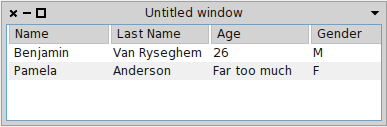
tree roots: { {'Benjamin'.'Van Ryseghem'.'26'.'M'}. {'Pamela'.'Anderson'.'Far too much'.'F'} }
Will produce
<Screen Shot 2013-11-07 at 18.38.21.png>
Right now, you can get the same by - adding MorphTreeAdapter>>#columns: columns: columns self widgetDo: [ :w | w columns: columns. w resizerChanged. w updateList ]
And then evaluating:
tree := TreeModel new. tree openWithSpec.
tree columns: (Array with: (MorphTreeColumn new rowMorphGetSelector: [:node | node item first asString asMorph ]; headerButtonLabel: 'Name' font: nil; yourself) with: (MorphTreeColumn new rowMorphGetSelector: [:node | node item second asString asMorph ]; headerButtonLabel: 'Last Name' font: nil; yourself) with: (MorphTreeColumn new rowMorphGetSelector: [:node | node item third asString asMorph ]; headerButtonLabel: 'Age' font: nil; yourself) with: (MorphTreeColumn new rowMorphGetSelector: [:node | node item fourth asString asMorph ]; headerButtonLabel: 'Gender' font: nil; yourself)).
tree roots: { {'Benjamin'.'Van Ryseghem'.'26'.'M'}. {'Pamela'.'Anderson'.'Far too much'.'F'} }
Ben
On 07 Nov 2013, at 15:54, Clément Bera <bera.clement@gmail.com> wrote:
2013/11/7 Benjamin <Benjamin.VanRyseghem.Pharo@gmail.com> Just a general remark: you should try as much as possible to avoid hard coding width/height :)
there are some methods on ComposableModel you could use like buttonHeight toolbarHeight etc. that you should use instead :)
Ben
On 07 Nov 2013, at 13:22, Bahman Movaqar <Bahman@BahmanM.com> wrote:
On 11/07/2013 12:45, Clément Bera wrote:
Hey,
I don't know what you want exactly.
You can do:
spec <spec> ^ SpecLayout composed newRow: [:row | row newColumn: [ :col | col add: #list width: 135; add: #description ] ]; yourself
and nest that as many times as you want (but I don't know if this was your question).
I just tried this one and it works (see the code below) BUT, the code is so hard to read and understand just for 3 rows and 7 widgets!
<code> defaultSpec ^ SpecLayout composed newColumn: [ :mainColumn | mainColumn newRow: [ :nameRow | nameRow add: #labelName; add: #textName ] height: 25. mainColumn newRow: [ :titleRow | titleRow add: #labelTitle; newRow: [ :titleRadioRow | titleRadioRow add: #radioMr; add: #radioMrs; add: #radioMs ] ] height: 25. mainColumn newRow: [ :buttonRow | buttonRow add: #buttonGreet ] height: 25 ]; yourself </code>
Am I doing it right?
I guess this is right. But I think you need to generate this layout out of collections, not to write it.
Another feature is:
debuggerSpec <spec: #default> ^ SpecLayout composed add: #inspector withSpec: #debuggerSpec; yourself
#inspector being the instance variable name that holds a subclass of ComposableModel that defines class side #debuggerSpec, which answers a SpecLayout.
Does this mean that for every table cell I have to create a new class?
Yeah well I was just pointing out all the choices you had. Depending on what you want to do you could have a class hierarchy similar to this:
SpecTable AbstractSpecColumn SpecColumnA SpecColumnB AbstractSpecCell SpecCellA SpecCellB
SpecTable having column, column having cells. But this may not be the best choice.
Now that you caught my interest, I tried to do a table. I put it in attachment the result. It is a .st file, so drag and drop it in your image, then click file in entire file. Then try to run 'SpecTable new', it opens a table with 3 columns and 5 rows, with no complex layout method. All the code is in SpecTable (Cmd+f,Cmd+c to find a class in nautilus or write the class name in workspace then select it and press Cmd+m), in the method protocol table logic. It's like 6 methods.
However: - vertical splitters are not sync. - I don't know how to color the border of each cell to make it beautiful.
Of course you need to polish it ...
I hope it helped you :)
Not sure if this helped.
All of these questions are for your tutorials ?
2013/11/7 Bahman Movaqar <Bahman@bahmanm.com> Hi all,
Is it possible to nest layouts in Spec? For example can I combine `SpecColumnLayout` and `SpecRowLayout` together?
-- Bahman Movaqar (http://BahmanM.com)
ERP Evaluation, Implementation & Deployment Consultant PGP Key ID: 0x6AB5BD68 (keyserver2.pgp.com) -- Bahman Movaqar (http://BahmanM.com)
ERP Evaluation, Implementation & Deployment Consultant PGP Key ID: 0x6AB5BD68 (keyserver2.pgp.com)
<SpecTable.st>
>From memory:
- 11920 (the valueHolder one)
- 12054 (TreeNode and TreeColumn)
- There is one also about SpecMenu, I do not remember the number

Ben

On 07 Nov 2013, at 21:10, Stéphane Ducasse <stephane.ducasse@inria.fr> wrote:

>
> On Nov 7, 2013, at 6:45 PM, Benjamin <Benjamin.VanRyseghem.Pharo@gmail.com> wrote:
>
>> About table, I have an example which will be running soon in Pharo (the changes are waiting to be integrated)
>
> which ones?
> Because I was crawling all the ones I could?
>
> Stef
>
>
>>
>> tree := TreeModel new.
>> tree openWithSpec.
>>
>> tree columns: (Array
>> 	with: (TreeColumnModel new displayBlock: [:node | node content first asString ]; headerLabel: 'Name'; yourself)
>> 	with: (TreeColumnModel new displayBlock: [:node | node content second asString ]; headerLabel: 'Last Name'; yourself)
>> 	with: (TreeColumnModel new displayBlock: [:node | node content third asString ]; headerLabel: 'Age'; yourself)
>> 	with: (TreeColumnModel new displayBlock: [:node | node content fourth asString ]; headerLabel: 'Gender'; yourself)).
>>
>> tree roots: {
>> 	{'Benjamin'.'Van Ryseghem'.'26'.'M'}.
>> 	{'Pamela'.'Anderson'.'Far too much'.'F'}
>> }
>>
>> Will produce
>>
>> <Screen Shot 2013-11-07 at 18.38.21.png>
>>
>> Right now, you can get the same by
>> 	- adding MorphTreeAdapter>>#columns:
>> 		columns: columns
>> 			 self widgetDo: [ :w |
>> 				w columns: columns.
>>  				w resizerChanged.
>> 				w updateList ]
>>
>> And then evaluating:
>>
>> tree := TreeModel new.
>> tree openWithSpec.
>>
>> tree columns: (Array
>> 	with: (MorphTreeColumn new rowMorphGetSelector: [:node | node item first asString asMorph ]; headerButtonLabel: 'Name' font: nil; yourself)
>> 	with: (MorphTreeColumn new rowMorphGetSelector: [:node | node item second asString asMorph ]; headerButtonLabel: 'Last Name' font: nil; yourself)
>> 	with: (MorphTreeColumn new rowMorphGetSelector: [:node | node item third asString asMorph ]; headerButtonLabel: 'Age' font: nil; yourself)
>> 	with: (MorphTreeColumn new rowMorphGetSelector: [:node | node item fourth asString asMorph ]; headerButtonLabel:  'Gender' font: nil; yourself)).
>>
>> tree roots: {
>> 	{'Benjamin'.'Van Ryseghem'.'26'.'M'}.
>> 	{'Pamela'.'Anderson'.'Far too much'.'F'}
>> }
>>
>> Ben
>>
>> On 07 Nov 2013, at 15:54, Clément Bera <bera.clement@gmail.com> wrote:
>>
>>>
>>> 2013/11/7 Benjamin <Benjamin.VanRyseghem.Pharo@gmail.com>
>>> Just a general remark: you should try as much as possible to avoid hard coding width/height :)
>>>
>>> there are some methods on ComposableModel you could use like buttonHeight toolbarHeight etc. that you should use instead :)
>>>
>>>
>>> Ben
>>>
>>> On 07 Nov 2013, at 13:22, Bahman Movaqar <Bahman@BahmanM.com> wrote:
>>>
>>>> On 11/07/2013 12:45, Clément Bera wrote:
>>>>> Hey,
>>>>>
>>>>> I don't know what you want exactly.
>>>>>
>>>>> You can do:
>>>>>
>>>>> spec
>>>>> <spec>
>>>>> ^ SpecLayout composed
>>>>>  newRow: [:row |
>>>>>  row
>>>>>                                 newColumn: [ :col |
>>>>>                                 col
>>>>>  add: #list width: 135;
>>>>>  add: #description ] ];
>>>>>  yourself
>>>>>
>>>>> and nest that as many times as you want (but I don't know if this was your question).
>>>>
>>>> I just tried this one and it works (see the code below) BUT, the code is so hard to read and understand just for 3 rows and 7 widgets!
>>>>
>>>> <code>
>>>> defaultSpec
>>>>     ^ SpecLayout composed
>>>>         newColumn: [ :mainColumn |
>>>>                     mainColumn
>>>>                         newRow: [ :nameRow |
>>>>                             nameRow
>>>>                                 add: #labelName;
>>>>                                 add: #textName ]
>>>>                         height: 25.
>>>>                     mainColumn
>>>>                         newRow: [ :titleRow |
>>>>                             titleRow
>>>>                                 add: #labelTitle;
>>>>                                 newRow: [ :titleRadioRow |
>>>>                                             titleRadioRow
>>>>                                                 add: #radioMr;
>>>>                                                 add: #radioMrs;
>>>>                                                 add: #radioMs ] ]
>>>>                         height: 25.
>>>>                     mainColumn newRow: [ :buttonRow | buttonRow add: #buttonGreet ] height: 25 ];
>>>>         yourself
>>>> </code>
>>>>
>>>> Am I doing it right?
>>>
>>> I guess this is right. But I think you need to generate this layout out of collections, not to write it.
>>>>
>>>>>
>>>>> Another feature is:
>>>>>
>>>>> debuggerSpec
>>>>>  <spec: #default>
>>>>>  ^ SpecLayout composed
>>>>>  add: #inspector withSpec: #debuggerSpec;
>>>>>  yourself
>>>>>
>>>>> #inspector being the instance variable name that holds a subclass of ComposableModel that defines class side #debuggerSpec, which answers a SpecLayout.
>>>>>
>>>>
>>>> Does this mean that for every table cell I have to create a new class?
>>>
>>> Yeah well I was just pointing out all the choices you had. Depending on what you want to do you could have a class hierarchy similar to this:
>>>
>>> SpecTable
>>> AbstractSpecColumn
>>>     SpecColumnA
>>>     SpecColumnB
>>> AbstractSpecCell
>>>     SpecCellA
>>>     SpecCellB
>>>
>>> SpecTable having column, column having cells.
>>> But this may not be the best choice.
>>>
>>> Now that you caught my interest, I tried to do a table. I put it in attachment the result. It is a .st file, so drag and drop it in your image, then click file in entire file. Then try to run 'SpecTable new', it opens a table with 3 columns and 5 rows, with no complex layout method. All the code is in SpecTable (Cmd+f,Cmd+c to find a class in nautilus or write the class name in workspace then select it and press Cmd+m), in the method protocol table logic. It's like 6 methods.
>>>
>>> However:
>>> - vertical splitters are not sync.
>>> - I don't know how to color the border of each cell to make it beautiful.
>>>
>>> Of course you need to polish it ...
>>>
>>> I hope it helped you :)
>>>
>>>>
>>>>> Not sure if this helped.
>>>>>
>>>>> All of these questions are for your tutorials ?
>>>>>
>>>>>
>>>>>
>>>>>
>>>>> 2013/11/7 Bahman Movaqar <Bahman@bahmanm.com>
>>>>> Hi all,
>>>>>
>>>>> Is it possible to nest layouts in Spec?  For example can I combine
>>>>> `SpecColumnLayout` and `SpecRowLayout` together?
>>>>>
>>>>>
>>>>> --
>>>>> Bahman Movaqar  (http://BahmanM.com)
>>>>>
>>>>> ERP Evaluation, Implementation & Deployment Consultant
>>>>> PGP Key ID: 0x6AB5BD68 (keyserver2.pgp.com)
>>>>> --
>>>>> Bahman Movaqar  (http://BahmanM.com)
>>>>>
>>>>> ERP Evaluation, Implementation & Deployment Consultant
>>>>> PGP Key ID: 0x6AB5BD68 (keyserver2.pgp.com)
>>>
>>>
>>> <SpecTable.st>
>>
>
On Nov 7, 2013, at 10:07 PM, Benjamin <Benjamin.VanRyseghem.Pharo@gmail.com> wrote: integrated
- 11920 (the valueHolder one) - 12054 (TreeNode and TreeColumn) - There is one also about SpecMenu, I do not remember the number
https://pharo.fogbugz.com/f/cases/12051/Add-MenuModels are on work needed but this is unclear to me. I will check and probably integrate it and please let us know. https://pharo.fogbugz.com/f/cases/12050 got integrated Stef
Cool :) As soon as the last piece is integrated I will send a mail to announce it with some explanations, examples, and how to migrate :) Ben On 09 Nov 2013, at 13:41, Stéphane Ducasse <stephane.ducasse@inria.fr> wrote:
On Nov 7, 2013, at 10:07 PM, Benjamin <Benjamin.VanRyseghem.Pharo@gmail.com> wrote:
integrated
- 11920 (the valueHolder one) - 12054 (TreeNode and TreeColumn) - There is one also about SpecMenu, I do not remember the number
https://pharo.fogbugz.com/f/cases/12051/Add-MenuModels are on work needed but this is unclear to me. I will check and probably integrate it and please let us know.
https://pharo.fogbugz.com/f/cases/12050 got integrated
Stef
super! I will integrate it after breakfast :) Stef On Nov 10, 2013, at 12:16 AM, Benjamin <Benjamin.VanRyseghem.Pharo@gmail.com> wrote:
Cool :)
As soon as the last piece is integrated I will send a mail to announce it with some explanations, examples, and how to migrate :)
Ben
On 09 Nov 2013, at 13:41, Stéphane Ducasse <stephane.ducasse@inria.fr> wrote:
On Nov 7, 2013, at 10:07 PM, Benjamin <Benjamin.VanRyseghem.Pharo@gmail.com> wrote:
integrated
- 11920 (the valueHolder one) - 12054 (TreeNode and TreeColumn) - There is one also about SpecMenu, I do not remember the number
https://pharo.fogbugz.com/f/cases/12051/Add-MenuModels are on work needed but this is unclear to me. I will check and probably integrate it and please let us know.
https://pharo.fogbugz.com/f/cases/12050 got integrated
Stef

Don;t have time to try it till later today, but first thoughts... What do you think about usage something like... tree header: {'Name' . 'Last Name' . 'Age' . 'Gender' }; roots: { {'Benjamin'.'Van Ryseghem'.'26'.'M'}. {'Pamela'.'Anderson'.'Far too much'.'F'} }; displaySymbolOrBlocks: { #asString . #asString . [:node|node asString] . [:node|node asString asUpperCase ] }. Or... tree columns: { 'Name' -> #asString. 'Last Name' -> #asString. 'Age' -> [:node|node asString]. 'Gender' -> [:node|ndoe asString asUpperCase ] }; roots: { {'Benjamin'.'Van Ryseghem'.'26'.'M'}. {'Pamela'.'Anderson'.'Far too much'.'F'} }. Ah, the danger of contrived example. So actually now I think on it, that is not so flexible as your example. Maybe then just hiding TreeColumnModel using... tree withColumn: 'Name' display: [:node | node content first asString ]; withColumn: 'LastName' display: [:node | node content second asString ]; withColumn: 'Age' display: #third; "is there a use case that would not always use 'node content' ? Presumes a string" withColumn: 'Gender' displayAsString: #fourth. "does not presume a string. Sends asString for you" cheers -ben Benjamin wrote:
About table, I have an example which will be running soon in Pharo (the changes are waiting to be integrated)
tree := TreeModel new. tree openWithSpec.
tree columns: (Array with: (TreeColumnModel new displayBlock: [:node | node content first asString ]; headerLabel: 'Name'; yourself) with: (TreeColumnModel new displayBlock: [:node | node content second asString ]; headerLabel: 'Last Name'; yourself) with: (TreeColumnModel new displayBlock: [:node | node content third asString ]; headerLabel: 'Age'; yourself) with: (TreeColumnModel new displayBlock: [:node | node content fourth asString ]; headerLabel: 'Gender'; yourself)). tree roots: { {'Benjamin'.'Van Ryseghem'.'26'.'M'}. {'Pamela'.'Anderson'.'Far too much'.'F'} }
Will produce
Right now, you can get the same by - adding MorphTreeAdapter>>#columns: columns: columns self widgetDo: [ :w | w columns: columns. w resizerChanged. w updateList ]
And then evaluating:
tree := TreeModel new. tree openWithSpec.
tree columns: (Array with: (MorphTreeColumn new rowMorphGetSelector: [:node | node item first asString asMorph ]; headerButtonLabel: 'Name' font: nil; yourself) with: (MorphTreeColumn new rowMorphGetSelector: [:node | node item second asString asMorph ]; headerButtonLabel: 'Last Name' font: nil; yourself) with: (MorphTreeColumn new rowMorphGetSelector: [:node | node item third asString asMorph ]; headerButtonLabel: 'Age' font: nil; yourself) with: (MorphTreeColumn new rowMorphGetSelector: [:node | node item fourth asString asMorph ]; headerButtonLabel: 'Gender' font: nil; yourself)). tree roots: { {'Benjamin'.'Van Ryseghem'.'26'.'M'}. {'Pamela'.'Anderson'.'Far too much'.'F'} }
Ben
On 07 Nov 2013, at 15:54, Clément Bera <bera.clement@gmail.com <mailto:bera.clement@gmail.com>> wrote:
2013/11/7 Benjamin <Benjamin.VanRyseghem.Pharo@gmail.com <mailto:Benjamin.VanRyseghem.Pharo@gmail.com>>
Just a general remark: you should try as much as possible to avoid hard coding width/height :)
there are some methods on ComposableModel you could use like buttonHeight toolbarHeight etc. that you should use instead :)
Ben
On 07 Nov 2013, at 13:22, Bahman Movaqar <Bahman@BahmanM.com <mailto:Bahman@BahmanM.com>> wrote:
On 11/07/2013 12:45, Clément Bera wrote:
Hey,
I don't know what you want exactly.
You can do:
spec <spec> ^ SpecLayout composed newRow: [:row | row newColumn: [ :col | col add: #list width: 135; add: #description ] ]; yourself
and nest that as many times as you want (but I don't know if this was your question).
I just tried this one and it works (see the code below) BUT, the code is so hard to read and understand just for 3 rows and 7 widgets!
<code> defaultSpec ^ SpecLayout composed newColumn: [ :mainColumn | mainColumn newRow: [ :nameRow | nameRow add: #labelName; add: #textName ] height: 25. mainColumn newRow: [ :titleRow | titleRow add: #labelTitle; newRow: [ :titleRadioRow | titleRadioRow add: #radioMr; add: #radioMrs; add: #radioMs ] ] height: 25. mainColumn newRow: [ :buttonRow | buttonRow add: #buttonGreet ] height: 25 ]; yourself </code>
Am I doing it right?
I guess this is right. But I think you need to generate this layout out of collections, not to write it.
Another feature is:
debuggerSpec <spec: #default> ^ SpecLayout composed add: #inspector withSpec: #debuggerSpec; yourself
#inspector being the instance variable name that holds a subclass of ComposableModel that defines class side #debuggerSpec, which answers a SpecLayout.
Does this mean that for every table cell I have to create a new class?
Yeah well I was just pointing out all the choices you had. Depending on what you want to do you could have a class hierarchy similar to this:
SpecTable AbstractSpecColumn SpecColumnA SpecColumnB AbstractSpecCell SpecCellA SpecCellB
SpecTable having column, column having cells. But this may not be the best choice.
Now that you caught my interest, I tried to do a table. I put it in attachment the result. It is a .st file, so drag and drop it in your image, then click file in entire file. Then try to run 'SpecTable new', it opens a table with 3 columns and 5 rows, with no complex layout method. All the code is in SpecTable (Cmd+f,Cmd+c to find a class in nautilus or write the class name in workspace then select it and press Cmd+m), in the method protocol table logic. It's like 6 methods.
However: - vertical splitters are not sync. - I don't know how to color the border of each cell to make it beautiful.
Of course you need to polish it ...
I hope it helped you :)
Not sure if this helped.
All of these questions are for your tutorials ?
2013/11/7 Bahman Movaqar <Bahman@bahmanm.com <mailto:Bahman@bahmanm.com>>
Hi all,
Is it possible to nest layouts in Spec? For example can I combine `SpecColumnLayout` and `SpecRowLayout` together?
-- Bahman Movaqar (http://BahmanM.com <http://bahmanm.com/>)
ERP Evaluation, Implementation & Deployment Consultant PGP Key ID: 0x6AB5BD68 (keyserver2.pgp.com <http://keyserver2.pgp.com/>) -- Bahman Movaqar (http://BahmanM.com <http://bahmanm.com/>)
ERP Evaluation, Implementation & Deployment Consultant PGP Key ID: 0x6AB5BD68 (keyserver2.pgp.com <http://keyserver2.pgp.com/>)
<SpecTable.st>
I have two arguments: - there are multiple arguments for TreeColumn and writing down all the combination will result in a lot of method, uselessly polluting the API - you lose the ability to modify the column on the fly since you do not have a pointer to it. But anyway, I think I will introduce a TableModel, because even if you can tweak a TreeModel to act as a Table it is not obvious, and not really expected from a Tree :) Ben On 08 Nov 2013, at 00:06, btc@openinworld.com wrote:
Don;t have time to try it till later today, but first thoughts...
What do you think about usage something like...
tree header: {'Name' . 'Last Name' . 'Age' . 'Gender' }; roots: { {'Benjamin'.'Van Ryseghem'.'26'.'M'}. {'Pamela'.'Anderson'.'Far too much'.'F'} }; displaySymbolOrBlocks: { #asString . #asString . [:node|node asString] . [:node|node asString asUpperCase ] }.
Or...
tree columns: { 'Name' -> #asString. 'Last Name' -> #asString. 'Age' -> [:node|node asString]. 'Gender' -> [:node|ndoe asString asUpperCase ] }; roots: { {'Benjamin'.'Van Ryseghem'.'26'.'M'}. {'Pamela'.'Anderson'.'Far too much'.'F'} }.
Ah, the danger of contrived example. So actually now I think on it, that is not so flexible as your example. Maybe then just hiding TreeColumnModel using...
tree withColumn: 'Name' display: [:node | node content first asString ]; withColumn: 'LastName' display: [:node | node content second asString ]; withColumn: 'Age' display: #third; "is there a use case that would not always use 'node content' ? Presumes a string" withColumn: 'Gender' displayAsString: #fourth. "does not presume a string. Sends asString for you"
cheers -ben
Benjamin wrote:
About table, I have an example which will be running soon in Pharo (the changes are waiting to be integrated)
tree := TreeModel new. tree openWithSpec.
tree columns: (Array with: (TreeColumnModel new displayBlock: [:node | node content first asString ]; headerLabel: 'Name'; yourself) with: (TreeColumnModel new displayBlock: [:node | node content second asString ]; headerLabel: 'Last Name'; yourself) with: (TreeColumnModel new displayBlock: [:node | node content third asString ]; headerLabel: 'Age'; yourself) with: (TreeColumnModel new displayBlock: [:node | node content fourth asString ]; headerLabel: 'Gender'; yourself)). tree roots: { {'Benjamin'.'Van Ryseghem'.'26'.'M'}. {'Pamela'.'Anderson'.'Far too much'.'F'} }
Will produce
Right now, you can get the same by - adding MorphTreeAdapter>>#columns: columns: columns self widgetDo: [ :w | w columns: columns. w resizerChanged. w updateList ]
And then evaluating:
tree := TreeModel new. tree openWithSpec.
tree columns: (Array with: (MorphTreeColumn new rowMorphGetSelector: [:node | node item first asString asMorph ]; headerButtonLabel: 'Name' font: nil; yourself) with: (MorphTreeColumn new rowMorphGetSelector: [:node | node item second asString asMorph ]; headerButtonLabel: 'Last Name' font: nil; yourself) with: (MorphTreeColumn new rowMorphGetSelector: [:node | node item third asString asMorph ]; headerButtonLabel: 'Age' font: nil; yourself) with: (MorphTreeColumn new rowMorphGetSelector: [:node | node item fourth asString asMorph ]; headerButtonLabel: 'Gender' font: nil; yourself)). tree roots: { {'Benjamin'.'Van Ryseghem'.'26'.'M'}. {'Pamela'.'Anderson'.'Far too much'.'F'} }
Ben
On 07 Nov 2013, at 15:54, Clément Bera <bera.clement@gmail.com <mailto:bera.clement@gmail.com>> wrote:
2013/11/7 Benjamin <Benjamin.VanRyseghem.Pharo@gmail.com > <mailto:Benjamin.VanRyseghem.Pharo@gmail.com>>
Just a general remark: you should try as much as possible to avoid hard coding width/height :)
there are some methods on ComposableModel you could use like buttonHeight toolbarHeight etc. that you should use instead :)
Ben
On 07 Nov 2013, at 13:22, Bahman Movaqar <Bahman@BahmanM.com <mailto:Bahman@BahmanM.com>> wrote:
On 11/07/2013 12:45, Clément Bera wrote:
Hey,
I don't know what you want exactly.
You can do:
spec <spec> ^ SpecLayout composed newRow: [:row | >>> row >>> newColumn: [ :col | col add: #list width: 135; add: #description ] ]; yourself
and nest that as many times as you want (but I don't know if this was your question).
I just tried this one and it works (see the code below) BUT, the code is so hard to read and understand just for 3 rows and 7 widgets!
<code> defaultSpec ^ SpecLayout composed newColumn: [ :mainColumn | mainColumn newRow: [ :nameRow | nameRow add: #labelName; add: #textName ] height: 25. mainColumn newRow: [ :titleRow | titleRow add: #labelTitle; newRow: [ :titleRadioRow | titleRadioRow add: #radioMr; add: #radioMrs; add: #radioMs ] ] height: 25. mainColumn newRow: [ :buttonRow | buttonRow add: #buttonGreet ] height: 25 ]; yourself </code>
Am I doing it right? >
I guess this is right. But I think you need to generate this layout out of > collections, not to write it. >
Another feature is:
debuggerSpec <spec: #default> ^ SpecLayout composed add: #inspector withSpec: #debuggerSpec; >>> yourself
#inspector being the instance variable name that holds a subclass of ComposableModel that defines class side #debuggerSpec, which answers a SpecLayout.
Does this mean that for every table cell I have to create a new class?
Yeah well I was just pointing out all the choices you had. Depending on what > you want to do you could have a class hierarchy similar to this:
SpecTable AbstractSpecColumn SpecColumnA SpecColumnB AbstractSpecCell SpecCellA SpecCellB
SpecTable having column, column having cells. But this may not be the best choice.
Now that you caught my interest, I tried to do a table. I put it in attachment > the result. It is a .st file, so drag and drop it in your image, then click > file in entire file. Then try to run 'SpecTable new', it opens a table with 3 > columns and 5 rows, with no complex layout method. All the code is in > SpecTable (Cmd+f,Cmd+c to find a class in nautilus or write the class name in > workspace then select it and press Cmd+m), in the method protocol table logic. > It's like 6 methods.
However: > - vertical splitters are not sync. - I don't know how to color the border of each cell to make it beautiful.
Of course you need to polish it ...
I hope it helped you :)
Not sure if this helped.
All of these questions are for your tutorials ?
2013/11/7 Bahman Movaqar <Bahman@bahmanm.com <mailto:Bahman@bahmanm.com>>
Hi all,
Is it possible to nest layouts in Spec? For example can I combine `SpecColumnLayout` and `SpecRowLayout` together?
-- >>> Bahman Movaqar (http://BahmanM.com <http://bahmanm.com/>)
ERP Evaluation, Implementation & Deployment Consultant PGP Key ID: 0x6AB5BD68 (keyserver2.pgp.com <http://keyserver2.pgp.com/>) -- >>> Bahman Movaqar (http://BahmanM.com <http://bahmanm.com/>)
ERP Evaluation, Implementation & Deployment Consultant PGP Key ID: 0x6AB5BD68 (keyserver2.pgp.com <http://keyserver2.pgp.com/>)
<SpecTable.st>
On 11/07/2013 16:14, Benjamin wrote:
Just a general remark: you should try as much as possible to avoid hard coding width/height :)
there are some methods on ComposableModel you could use like buttonHeight toolbarHeight etc. that you should use instead :)
Correct. Thanks for the pointer. -- Bahman Movaqar (http://BahmanM.com) ERP Evaluation, Implementation & Deployment Consultant PGP Key ID: 0x6AB5BD68 (keyserver2.pgp.com)
participants (6)
-
 Bahman Movaqar
 -
 Benjamin
 -
Benjamin
-
 btc@openinworld.com
 -
 Clément Bera
 -
 Stéphane Ducasse