System Browser "Implementors of..." drill down?

Something I have not figured out how to do easily in the Pharo system browser: I am looking at a method and want to see how a message that is used in this method is implemented. In other Smalltalks (e.g. Cincoms) I use the menu item "Implementors of..." and get a list of all the messages that are used in this method and can choose one to drill down. In Pharo I get an immediate answer but only the implementors of my original method. Why are there those "..." at the end of this menu item indicating some further choice when there is none? How to do this drilling down in Pharo? -- View this message in context: http://forum.world.st/System-Browser-Implementors-of-drill-down-tp4907380.ht... Sent from the Pharo Smalltalk Users mailing list archive at Nabble.com.

This can be achieved by selecting the message/class from the text area and either right clicking and using the menu->submenu "Code search..." or you can use the shortcuts: meta+m for implementors, meta+n for senders, and meta+shift+n for references of it. There is also a shortcut (meta+space) for selecting the whole text between separators from where the cursor is. "meta" is what <OSPlatform current defaultModifier> evaluates to (Ctrl on windows) . Best regards, Henrik -----Original Message----- From: Pharo-users [mailto:pharo-users-bounces@lists.pharo.org] On Behalf Of Norbert Fortelny Sent: Thursday, July 21, 2016 7:55 PM To: pharo-users@lists.pharo.org Subject: [Pharo-users] System Browser "Implementors of..." drill down? Something I have not figured out how to do easily in the Pharo system browser: I am looking at a method and want to see how a message that is used in this method is implemented. In other Smalltalks (e.g. Cincoms) I use the menu item "Implementors of..." and get a list of all the messages that are used in this method and can choose one to drill down. In Pharo I get an immediate answer but only the implementors of my original method. Why are there those "..." at the end of this menu item indicating some further choice when there is none? How to do this drilling down in Pharo? -- View this message in context: http://forum.world.st/System-Browser-Implementors-of-drill-down-tp4907380.ht... Sent from the Pharo Smalltalk Users mailing list archive at Nabble.com.

On Thu, Jul 21, 2016 at 4:03 PM, Henrik Nergaard <henrik.nergaard@uia.no> wrote:
This can be achieved by selecting the message/class from the text area and either right clicking and using the menu->submenu "Code search..." or you can use the shortcuts: meta+m for implementors, meta+n for senders, and meta+shift+n for references of it. There is also a shortcut (meta+space) for selecting the whole text between separators from where the cursor is.
And another shortcut: meta + mouse click
"meta" is what <OSPlatform current defaultModifier> evaluates to (Ctrl on windows) .
Best regards, Henrik
-----Original Message----- From: Pharo-users [mailto:pharo-users-bounces@lists.pharo.org] On Behalf Of Norbert Fortelny Sent: Thursday, July 21, 2016 7:55 PM To: pharo-users@lists.pharo.org Subject: [Pharo-users] System Browser "Implementors of..." drill down?
Something I have not figured out how to do easily in the Pharo system browser: I am looking at a method and want to see how a message that is used in this method is implemented. In other Smalltalks (e.g. Cincoms) I use the menu item "Implementors of..." and get a list of all the messages that are used in this method and can choose one to drill down. In Pharo I get an immediate answer but only the implementors of my original method. Why are there those "..." at the end of this menu item indicating some further choice when there is none? How to do this drilling down in Pharo?
-- View this message in context: http://forum.world.st/System-Browser-Implementors-of-drill-down-tp4907380.ht... Sent from the Pharo Smalltalk Users mailing list archive at Nabble.com.
-- Mariano http://marianopeck.wordpress.com
Thanks! -- View this message in context: http://forum.world.st/System-Browser-Implementors-of-drill-down-tp4907380p49... Sent from the Pharo Smalltalk Users mailing list archive at Nabble.com.

Learn to use GTSpotter , will make your experience 10 times easier and faster. On Fri, 22 Jul 2016 at 08:43, Norbert Fortelny <norbert.fortelny@gmail.com> wrote:
Thanks!
-- View this message in context: http://forum.world.st/System-Browser-Implementors-of-drill-down-tp4907380p49... Sent from the Pharo Smalltalk Users mailing list archive at Nabble.com.
Choosing a programming language is too Nonetheless GTSpotter make the navigation easier, mainly because it works hand in hand with System Browser . So you dont have to choose one or the other, rather find the workflow that fits your needs. Of course that will depend on the specifics of the situation. Another advantage of GTSpotter is that its easier to customise to your needs, I would not be suprised if GTSpotter at some point completely replace System Browser. Actually I would be suprised if it does not. On Fri, Jul 22, 2016 at 10:27 AM Hernán Morales Durand < hernan.morales@gmail.com> wrote:
2016-07-22 3:47 GMT-03:00 Dimitris Chloupis <kilon.alios@gmail.com>:
Learn to use GTSpotter , will make your experience 10 times easier and faster.
And of course, that is completely subjective :)
Hernán

Yes, I know you like GTSpotter. But as difficult as you may find, me (and others possibly) didn't find GTSpotter so cool, or even an usable tool, so we don't feel the love you feel. Why? Well, there was too many discussions about this tool in the mailing list. On the other side, I would be *REALLY* surprised if System Browser gets replaced with Spotter. But I'd also like that you convince the guys which decides which tools goes to official image, because there is no voting here so convincing those guys will be enough, and would be super fun to sit down and read people's reaction when they open a Pharo and didn't find the classic System Browser. Maybe not a great move from the product developement POV, but will be fantastic as a terrible experiment :) Hernán 2016-07-22 7:11 GMT-03:00 Dimitris Chloupis <kilon.alios@gmail.com>:
Choosing a programming language is too
Nonetheless GTSpotter make the navigation easier, mainly because it works hand in hand with System Browser . So you dont have to choose one or the other, rather find the workflow that fits your needs. Of course that will depend on the specifics of the situation.
Another advantage of GTSpotter is that its easier to customise to your needs, I would not be suprised if GTSpotter at some point completely replace System Browser. Actually I would be suprised if it does not.
On Fri, Jul 22, 2016 at 10:27 AM Hernán Morales Durand < hernan.morales@gmail.com> wrote:
2016-07-22 3:47 GMT-03:00 Dimitris Chloupis <kilon.alios@gmail.com>:
Learn to use GTSpotter , will make your experience 10 times easier and faster.
And of course, that is completely subjective :)
Hernán

On Thu, Jul 21, 2016 at 07:03:40PM +0000, Henrik Nergaard wrote:
This can be achieved by selecting the message/class from the text area and either right clicking and using the menu->submenu "Code search..." or you can use the shortcuts: meta+m for implementors, meta+n for senders, and meta+shift+n for references of it. There is also a shortcut (meta+space) for selecting the whole text between separators from where the cursor is.
Personnally I find this inconvenient - a subjective choice, I know. On Fri, Jul 22, 2016 at 06:47:28AM +0000, Dimitris Chloupis wrote:
Learn to use GTSpotter , will make your experience 10 times easier and faster.
This may be true, but I haven't figured it out yet. Until then... My vote would be to replace every instance of Implementers Of... / Senders Of... with a link to the MessageFlowBrowser. :-) Thanks, Alistair

Yes, I know you like GTSpotter.
But as difficult as you may find, me (and others possibly) didn't find GTSpotter so cool, or even an usable tool, so we don't feel the love you feel. Why? Well, there was too many discussions about this tool in the mailing list.
On the other side, I would be *REALLY* surprised if System Browser gets replaced with Spotter. But I'd also like that you convince the guys which decides which tools goes to official image, because there is no voting here so convincing those guys will be enough, and would be super fun to sit down and read people's reaction when they open a Pharo and didn't find the classic System Browser. Maybe not a great move from the product developement POV, but will be fantastic as a terrible experiment :)
;)

On Fri, Jul 22, 2016 at 2:47 PM, Dimitris Chloupis <kilon.alios@gmail.com> wrote:
Learn to use GTSpotter , will make your experience 10 times easier and faster.
Agreed for 90% of what I do, but its RealHard(TM) for a single tool to provide a magic 100% coverage of use cases. The other 10% of the time I find the "Implementors of..." dialog provides something that GTSpotter doesn't - it provides a more permanent list you can scroll through, whereas GTSpotter is a transitory list. Further, I recently used Squeak again and their "Implementors of..." dialog had two additional behaviours missing from Pharo. * In the "Implementors of..." code pane, selecting a message and doing another "Implementors of..." added them as a sub-tree-level in the existing dialog, whereas in Pharo a new "Implementors of..." window is opened. I liked this since it provided structure that I could navigate, instead of loosing the relationship of multiple opened windows as I chase a chain of implementers. I suffer badly from Too Many Windows Syndrome as it is (even if the shakes don't start until I'm onto my third row of the task bar) * On a method in the list pane, menu item "More... > Remove from this browser" allows you you create a nice focused list of method your interested in - and its easy to switch back forth between this methods using arrow keys to quickly compare implementations. cheers -ben
On Fri, 22 Jul 2016 at 08:43, Norbert Fortelny <norbert.fortelny@gmail.com> wrote:
Thanks!
-- View this message in context: http://forum.world.st/System-Browser-Implementors-of-drill-down-tp4907380p49... Sent from the Pharo Smalltalk Users mailing list archive at Nabble.com.
Looks we two have a difficult time disagreeing with each other cause we think alike. Yes it's very hard to put everything in a single tool. The window hell problem is something I have a lot issues with. Windowing systems are notorious for wasting screen estate which why I prefer custom GUIs . A big reason why I prefer GTSpotter too. It's not because I want to cram more info on my screen I actually want less. I am not a big fan of the three column browsing GUI of system browser but as tool is still very useful and very flexible. One tool I miss from Pharo is a bird eye view browser. Similar to the graphs we have seen Roassal people make showing the connection between classes and methods . Both with GTSpotter and System Browser it's easy to forget and lose track which method triggers which method which happens to me often when I study complex code. On the other hand each one of us have different way of thinking so I can definitely relate to why for someone GTSpotter may come nowhere near the 90% you mention. On Fri, 22 Jul 2016 at 15:51, Ben Coman <btc@openinworld.com> wrote:
On Fri, Jul 22, 2016 at 2:47 PM, Dimitris Chloupis <kilon.alios@gmail.com> wrote:
Learn to use GTSpotter , will make your experience 10 times easier and faster.
Agreed for 90% of what I do, but its RealHard(TM) for a single tool to provide a magic 100% coverage of use cases.
The other 10% of the time I find the "Implementors of..." dialog provides something that GTSpotter doesn't - it provides a more permanent list you can scroll through, whereas GTSpotter is a transitory list. Further, I recently used Squeak again and their "Implementors of..." dialog had two additional behaviours missing from Pharo.
* In the "Implementors of..." code pane, selecting a message and doing another "Implementors of..." added them as a sub-tree-level in the existing dialog, whereas in Pharo a new "Implementors of..." window is opened. I liked this since it provided structure that I could navigate, instead of loosing the relationship of multiple opened windows as I chase a chain of implementers. I suffer badly from Too Many Windows Syndrome as it is (even if the shakes don't start until I'm onto my third row of the task bar)
* On a method in the list pane, menu item "More... > Remove from this browser" allows you you create a nice focused list of method your interested in - and its easy to switch back forth between this methods using arrow keys to quickly compare implementations.
cheers -ben
On Fri, 22 Jul 2016 at 08:43, Norbert Fortelny < norbert.fortelny@gmail.com> wrote:
Thanks!
-- View this message in context:
http://forum.world.st/System-Browser-Implementors-of-drill-down-tp4907380p49...
Sent from the Pharo Smalltalk Users mailing list archive at Nabble.com.
Thanks. Indeed this is nice. I would also love to scope and manipulate the scope of the list. For example I would like to only see the sender of a given package. Stef Le 22/7/16 à 14:50, Ben Coman a écrit :
On Fri, Jul 22, 2016 at 2:47 PM, Dimitris Chloupis <kilon.alios@gmail.com> wrote:
Learn to use GTSpotter , will make your experience 10 times easier and faster. Agreed for 90% of what I do, but its RealHard(TM) for a single tool to provide a magic 100% coverage of use cases.
The other 10% of the time I find the "Implementors of..." dialog provides something that GTSpotter doesn't - it provides a more permanent list you can scroll through, whereas GTSpotter is a transitory list. Further, I recently used Squeak again and their "Implementors of..." dialog had two additional behaviours missing from Pharo.
* In the "Implementors of..." code pane, selecting a message and doing another "Implementors of..." added them as a sub-tree-level in the existing dialog, whereas in Pharo a new "Implementors of..." window is opened. I liked this since it provided structure that I could navigate, instead of loosing the relationship of multiple opened windows as I chase a chain of implementers. I suffer badly from Too Many Windows Syndrome as it is (even if the shakes don't start until I'm onto my third row of the task bar)
* On a method in the list pane, menu item "More... > Remove from this browser" allows you you create a nice focused list of method your interested in - and its easy to switch back forth between this methods using arrow keys to quickly compare implementations.
cheers -ben
On Fri, 22 Jul 2016 at 08:43, Norbert Fortelny <norbert.fortelny@gmail.com> wrote:
Thanks!
-- View this message in context: http://forum.world.st/System-Browser-Implementors-of-drill-down-tp4907380p49... Sent from the Pharo Smalltalk Users mailing list archive at Nabble.com.
-----Original Message----- From: Pharo-users [mailto:pharo-users-bounces@lists.pharo.org] On Behalf Of Norbert Fortelny Sent: Thursday, July 21, 2016 7:55 PM To: pharo-users@lists.pharo.org Subject: [Pharo-users] System Browser "Implementors of..." drill down?
Something I have not figured out how to do easily in the Pharo system browser: I am looking at a method and want to see how a message that is used in this method is implemented. In other Smalltalks (e.g. Cincoms) I use the menu item "Implementors of..." and get a list of all the messages that are used in this method and can choose one to drill down. In Pharo I get an immediate answer but only the implementors of my original method. Why are there those "..." at the end of this menu item indicating some further choice when there is none? How to do this drilling down in Pharo?
On Fri, Jul 22, 2016 at 3:03 AM, Henrik Nergaard <henrik.nergaard@uia.no> wrote:
This can be achieved by selecting the message/class from the text area and either right clicking and using the menu->submenu "Code search..." or you can use the shortcuts: meta+m for implementors, meta+n for senders, and meta+shift+n for references of it. There is also a shortcut (meta+space) for selecting the whole text between separators from where the cursor is.
"meta" is what <OSPlatform current defaultModifier> evaluates to (Ctrl on windows) .
Best regards, Henrik
Hi Norbert, As a newcomer, just curious about your impression of the double-key shortcut "Ctrl/Cmd + B + M" shown against the "Implementers of..." menu item? Do you think you would have discovered yourself using meta+m like Henrik describes if that was what was shown as the menu item shortcut instead? cheers -ben
Hi Norbert,
As a newcomer, just curious about your impression of the double-key shortcut "Ctrl/Cmd + B + M" shown against the "Implementers of..." menu item? Do you think you would have discovered yourself using meta+m like Henrik describes if that was what was shown as the menu item shortcut instead?
cheers -ben
No, I wouldn't have, or rather maybe, if I had tried hard enough. As it is in 5.0 this is clear and easy. Being on a Mac it even shows me the â correctly, great! Pharo has come a long way. -- View this message in context: http://forum.world.st/System-Browser-Implementors-of-drill-down-tp4907380p49... Sent from the Pharo Smalltalk Users mailing list archive at Nabble.com.
Indeed it has , future looks very promising On Tue, 26 Jul 2016 at 14:05, Norbert Fortelny <norbert.fortelny@gmail.com> wrote:
Hi Norbert,
As a newcomer, just curious about your impression of the double-key shortcut "Ctrl/Cmd + B + M" shown against the "Implementers of..." menu item? Do you think you would have discovered yourself using meta+m like Henrik describes if that was what was shown as the menu item shortcut instead?
cheers -ben
No, I wouldn't have, or rather maybe, if I had tried hard enough. As it is in 5.0 this is clear and easy. Being on a Mac it even shows me the â correctly, great! Pharo has come a long way.
------------------------------ View this message in context: Re: System Browser "Implementors of..." drill down? <http://forum.world.st/System-Browser-Implementors-of-drill-down-tp4907380p49...> Sent from the Pharo Smalltalk Users mailing list archive <http://forum.world.st/Pharo-Smalltalk-Users-f1310670.html> at Nabble.com.
This was actually implemented in older versions of Pharo (or Squeak), the browser also included very handy buttons in the middle to save precious clicks. The right thing to do is to replace the "..." non-sense with the selected method selector, and to offer another menu item which displays all method selectors of the currently selected method, and let the user to decide which one to browse. Hernán 2016-07-21 14:54 GMT-03:00 Norbert Fortelny <norbert.fortelny@gmail.com>:
Something I have not figured out how to do easily in the Pharo system browser: I am looking at a method and want to see how a message that is used in this method is implemented. In other Smalltalks (e.g. Cincoms) I use the menu item "Implementors of..." and get a list of all the messages that are used in this method and can choose one to drill down. In Pharo I get an immediate answer but only the implementors of my original method. Why are there those "..." at the end of this menu item indicating some further choice when there is none? How to do this drilling down in Pharo?
-- View this message in context: http://forum.world.st/System-Browser-Implementors-of-drill-down-tp4907380.ht... Sent from the Pharo Smalltalk Users mailing list archive at Nabble.com.

I agree - the keyboard shortcuts will work for the initiated, but are not a replacement for the obvious menu entries that even experienced Smalltalkers from other versions will be missing in Pharo. I think it is important to keep the entry barriers low in terms of not hiding useful functionality that people will be used to from other environments. Markus On 22/07/2016 16:54, Hernán Morales Durand wrote:
This was actually implemented in older versions of Pharo (or Squeak), the browser also included very handy buttons in the middle to save precious clicks.
The right thing to do is to replace the "..." non-sense with the selected method selector, and to offer another menu item which displays all method selectors of the currently selected method, and let the user to decide which one to browse.
Hernán
2016-07-21 14:54 GMT-03:00 Norbert Fortelny <norbert.fortelny@gmail.com <mailto:norbert.fortelny@gmail.com>>:
Something I have not figured out how to do easily in the Pharo system browser: I am looking at a method and want to see how a message that is used in this method is implemented. In other Smalltalks (e.g. Cincoms) I use the menu item "Implementors of..." and get a list of all the messages that are used in this method and can choose one to drill down. In Pharo I get an immediate answer but only the implementors of my original method. Why are there those "..." at the end of this menu item indicating some further choice when there is none? How to do this drilling down in Pharo?
-- View this message in context: http://forum.world.st/System-Browser-Implementors-of-drill-down-tp4907380.ht... Sent from the Pharo Smalltalk Users mailing list archive at Nabble.com.
Feel free to improve the tools. This is on my list to improve - method categorizer - finder to use lists instead of trees (because it is way better) - message browser (to make sure that from a scope browser, the env is passed and we do not end up browsing the complete env filter based on packages...) But I'm doing too many things. Stef Le 22/7/16 à 09:47, Markus Stumptner a écrit :
I agree - the keyboard shortcuts will work for the initiated, but are not a replacement for the obvious menu entries that even experienced Smalltalkers from other versions will be missing in Pharo.
I think it is important to keep the entry barriers low in terms of not hiding useful functionality that people will be used to from other environments.
Markus
On 22/07/2016 16:54, Hernán Morales Durand wrote:
This was actually implemented in older versions of Pharo (or Squeak), the browser also included very handy buttons in the middle to save precious clicks.
The right thing to do is to replace the "..." non-sense with the selected method selector, and to offer another menu item which displays all method selectors of the currently selected method, and let the user to decide which one to browse.
Hernán
2016-07-21 14:54 GMT-03:00 Norbert Fortelny <norbert.fortelny@gmail.com>:
Something I have not figured out how to do easily in the Pharo system browser: I am looking at a method and want to see how a message that is used in this method is implemented. In other Smalltalks (e.g. Cincoms) I use the menu item "Implementors of..." and get a list of all the messages that are used in this method and can choose one to drill down. In Pharo I get an immediate answer but only the implementors of my original method. Why are there those "..." at the end of this menu item indicating some further choice when there is none? How to do this drilling down in Pharo?
-- View this message in context: http://forum.world.st/System-Browser-Implementors-of-drill-down-tp4907380.ht... Sent from the Pharo Smalltalk Users mailing list archive at Nabble.com.

2016-07-24 23:21 GMT+02:00 stepharo <stepharo@free.fr>:
Feel free to improve the tools.
This is on my list to improve
- method categorizer
- finder to use lists instead of trees (because it is way better)
- message browser (to make sure that from a scope browser, the env is passed and we do not end up browsing the complete env
filter based on packages...)
I've already done the last two in my environment, and got rid of the first one (replaced the finder result UI by a scoped browser). I can tell you, this is really fun to use... Except that now, I'm unable to use a classical (Nautilus or OmniBrowser) system browser anymore :( Thierry
But I'm doing too many things.
Stef
Le 22/7/16 à 09:47, Markus Stumptner a écrit :
I agree - the keyboard shortcuts will work for the initiated, but are not a replacement for the obvious menu entries that even experienced Smalltalkers from other versions will be missing in Pharo.
I think it is important to keep the entry barriers low in terms of not hiding useful functionality that people will be used to from other environments.
Markus
On 22/07/2016 16:54, Hernán Morales Durand wrote:
This was actually implemented in older versions of Pharo (or Squeak), the browser also included very handy buttons in the middle to save precious clicks.
The right thing to do is to replace the "..." non-sense with the selected method selector, and to offer another menu item which displays all method selectors of the currently selected method, and let the user to decide which one to browse.
Hernán
2016-07-21 14:54 GMT-03:00 Norbert Fortelny <norbert.fortelny@gmail.com>:
Something I have not figured out how to do easily in the Pharo system browser: I am looking at a method and want to see how a message that is used in this method is implemented. In other Smalltalks (e.g. Cincoms) I use the menu item "Implementors of..." and get a list of all the messages that are used in this method and can choose one to drill down. In Pharo I get an immediate answer but only the implementors of my original method. Why are there those "..." at the end of this menu item indicating some further choice when there is none? How to do this drilling down in Pharo?
-- View this message in context: http://forum.world.st/System-Browser-Implementors-of-drill-down-tp4907380.ht... Sent from the Pharo Smalltalk Users mailing list archive at Nabble.com.
Hi hernan Could you send a screenshot so that I understand precisely what you mean? I tend to listen to grumbling people like you and me :) Stef Le 22/7/16 à 09:24, Hernán Morales Durand a écrit :
This was actually implemented in older versions of Pharo (or Squeak), the browser also included very handy buttons in the middle to save precious clicks.
The right thing to do is to replace the "..." non-sense with the selected method selector, and to offer another menu item which displays all method selectors of the currently selected method, and let the user to decide which one to browse.
Hernán
2016-07-21 14:54 GMT-03:00 Norbert Fortelny <norbert.fortelny@gmail.com <mailto:norbert.fortelny@gmail.com>>:
Something I have not figured out how to do easily in the Pharo system browser: I am looking at a method and want to see how a message that is used in this method is implemented. In other Smalltalks (e.g. Cincoms) I use the menu item "Implementors of..." and get a list of all the messages that are used in this method and can choose one to drill down. In Pharo I get an immediate answer but only the implementors of my original method. Why are there those "..." at the end of this menu item indicating some further choice when there is none? How to do this drilling down in Pharo?
-- View this message in context: http://forum.world.st/System-Browser-Implementors-of-drill-down-tp4907380.ht... Sent from the Pharo Smalltalk Users mailing list archive at Nabble.com.
See attachment Hernán 2016-07-24 18:19 GMT-03:00 stepharo <stepharo@free.fr>:
Hi hernan
Could you send a screenshot so that I understand precisely what you mean?
I tend to listen to grumbling people like you and me :)
Stef
Le 22/7/16 à 09:24, Hernán Morales Durand a écrit :
This was actually implemented in older versions of Pharo (or Squeak), the browser also included very handy buttons in the middle to save precious clicks.
The right thing to do is to replace the "..." non-sense with the selected method selector, and to offer another menu item which displays all method selectors of the currently selected method, and let the user to decide which one to browse.
Hernán
2016-07-21 14:54 GMT-03:00 Norbert Fortelny <norbert.fortelny@gmail.com>:
Something I have not figured out how to do easily in the Pharo system browser: I am looking at a method and want to see how a message that is used in this method is implemented. In other Smalltalks (e.g. Cincoms) I use the menu item "Implementors of..." and get a list of all the messages that are used in this method and can choose one to drill down. In Pharo I get an immediate answer but only the implementors of my original method. Why are there those "..." at the end of this menu item indicating some further choice when there is none? How to do this drilling down in Pharo?
-- View this message in context: http://forum.world.st/System-Browser-Implementors-of-drill-down-tp4907380.ht... Sent from the Pharo Smalltalk Users mailing list archive at Nabble.com.
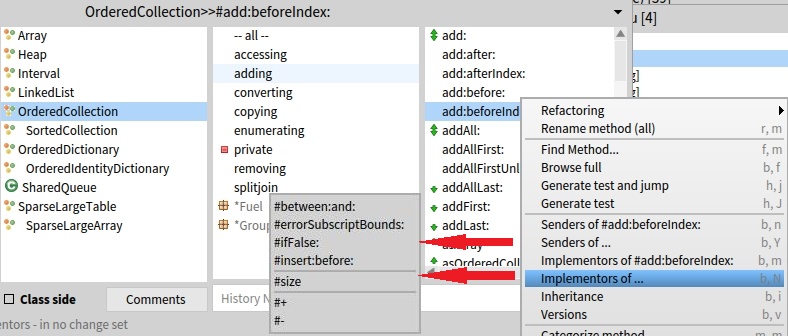
What about just adding the method itself as the first item to the list. Like it is in VW Smalltalk: attached. Could I try my hand on this? Does anyone know about possible pitfalls to be aware of? Old hands: any thoughts? On 26/07/2016 01:50, hernanmd [via Smalltalk] wrote:
See attachment
Hernán
2016-07-24 18:19 GMT-03:00 stepharo <[hidden email] </user/SendEmail.jtp?type=node&node=4907915&i=0>>:
Hi hernan
Could you send a screenshot so that I understand precisely what you mean?
I tend to listen to grumbling people like you and me :)
Stef
Le 22/7/16 à 09:24, Hernán Morales Durand a écrit :
This was actually implemented in older versions of Pharo (or Squeak), the browser also included very handy buttons in the middle to save precious clicks.
The right thing to do is to replace the "..." non-sense with the selected method selector, and to offer another menu item which displays all method selectors of the currently selected method, and let the user to decide which one to browse.
Hernán
2016-07-21 14:54 GMT-03:00 Norbert Fortelny <[hidden email] </user/SendEmail.jtp?type=node&node=4907915&i=1>>:
Something I have not figured out how to do easily in the Pharo system browser: I am looking at a method and want to see how a message that is used in this method is implemented. In other Smalltalks (e.g. Cincoms) I use the menu item "Implementors of..." and get a list of all the messages that are used in this method and can choose one to drill down. In Pharo I get an immediate answer but only the implementors of my original method. Why are there those "..." at the end of this menu item indicating some further choice when there is none? How to do this drilling down in Pharo?
-- View this message in context: http://forum.world.st/System-Browser-Implementors-of-drill-down-tp4907380.ht... Sent from the Pharo Smalltalk Users mailing list archive at Nabble.com.
*CHB1.jpg* (134K) Download Attachment <http://forum.world.st/attachment/4907915/0/CHB1.jpg>
------------------------------------------------------------------------ If you reply to this email, your message will be added to the discussion below: http://forum.world.st/System-Browser-Implementors-of-drill-down-tp4907380p49...
To unsubscribe from System Browser "Implementors of..." drill down?, click here <http://forum.world.st/template/NamlServlet.jtp?macro=unsubscribe_by_code&nod...>. NAML <http://forum.world.st/template/NamlServlet.jtp?macro=macro_viewer&id=instant...>
Senders in VW ST.tiff (1M) <http://forum.world.st/attachment/4907955/0/Senders%20in%20VW%20ST.tiff> -- View this message in context: http://forum.world.st/System-Browser-Implementors-of-drill-down-tp4907380p49... Sent from the Pharo Smalltalk Users mailing list archive at Nabble.com.
I like the that one too. Cannot think of any pitfalls. Hernán 2016-07-26 5:15 GMT-03:00 Norbert Fortelny <norbert.fortelny@gmail.com>:
What about just adding the method itself as the first item to the list. Like it is in VW Smalltalk: attached. Could I try my hand on this? Does anyone know about possible pitfalls to be aware of? Old hands: any thoughts?
On 26/07/2016 01:50, hernanmd [via Smalltalk] wrote:
See attachment
Hernán
2016-07-24 18:19 GMT-03:00 stepharo <[hidden email] </user/SendEmail.jtp?type=node&node=4907915&i=0>>:
Hi hernan
Could you send a screenshot so that I understand precisely what you mean?
I tend to listen to grumbling people like you and me :)
Stef
Le 22/7/16 à 09:24, Hernán Morales Durand a écrit :
This was actually implemented in older versions of Pharo (or Squeak), the browser also included very handy buttons in the middle to save precious clicks.
The right thing to do is to replace the "..." non-sense with the selected method selector, and to offer another menu item which displays all method selectors of the currently selected method, and let the user to decide which one to browse.
Hernán
2016-07-21 14:54 GMT-03:00 Norbert Fortelny <[hidden email] </user/SendEmail.jtp?type=node&node=4907915&i=1>>:
Something I have not figured out how to do easily in the Pharo system browser: I am looking at a method and want to see how a message that is used in this method is implemented. In other Smalltalks (e.g. Cincoms) I use the menu item "Implementors of..." and get a list of all the messages that are used in this method and can choose one to drill down. In Pharo I get an immediate answer but only the implementors of my original method. Why are there those "..." at the end of this menu item indicating some further choice when there is none? How to do this drilling down in Pharo?
-- View this message in context:
http://forum.world.st/System-Browser-Implementors-of-drill-down-tp4907380.ht...
Sent from the Pharo Smalltalk Users mailing list archive at Nabble.com.
*CHB1.jpg* (134K) Download Attachment <http://forum.world.st/attachment/4907915/0/CHB1.jpg>
------------------------------------------------------------------------ If you reply to this email, your message will be added to the discussion below:
http://forum.world.st/System-Browser-Implementors-of-drill-down-tp4907380p49...
To unsubscribe from System Browser "Implementors of..." drill down?, click here < NAML <
http://forum.world.st/template/NamlServlet.jtp?macro=macro_viewer&id=instant...>
*Senders in VW ST.tiff* (1M) Download Attachment <http://forum.world.st/attachment/4907955/0/Senders%20in%20VW%20ST.tiff>
------------------------------ View this message in context: Re: System Browser "Implementors of..." drill down? <http://forum.world.st/System-Browser-Implementors-of-drill-down-tp4907380p49...>
Sent from the Pharo Smalltalk Users mailing list archive <http://forum.world.st/Pharo-Smalltalk-Users-f1310670.html> at Nabble.com.
On Tue, Jul 26, 2016 at 4:15 PM, Norbert Fortelny < norbert.fortelny@gmail.com> wrote:
What about just adding the method itself as the first item to the list. Like it is in VW Smalltalk: attached. Could I try my hand on this? Does anyone know about possible pitfalls to be aware of? Old hands: any thoughts?
I'm trying to hard to think whether I'd like that or not - but I'm not sure. If no one really objects, you should give it a go. Nothing like jumping in feet first to get to know a platform. cheers -ben
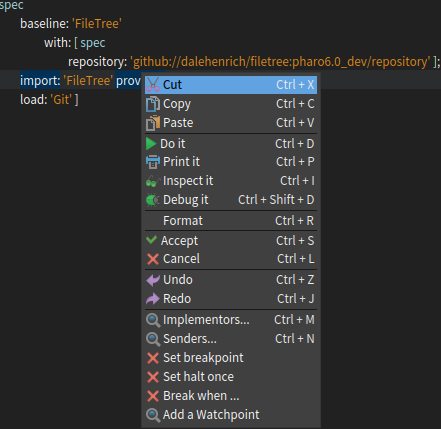
I prefer direct manipulation: - shorten the menu in a code pane, add implementors based on the selected / where cursor is in text (aka smart suggestion): below is the menu for the cursor inside #import:provides:. [image: Images intégrées 1] 2016-07-26 1:33 GMT+02:00 Hernán Morales Durand <hernan.morales@gmail.com>:
See attachment
Hernán
2016-07-24 18:19 GMT-03:00 stepharo <stepharo@free.fr>:
Hi hernan
Could you send a screenshot so that I understand precisely what you mean?
I tend to listen to grumbling people like you and me :)
Stef
Le 22/7/16 à 09:24, Hernán Morales Durand a écrit :
This was actually implemented in older versions of Pharo (or Squeak), the browser also included very handy buttons in the middle to save precious clicks.
The right thing to do is to replace the "..." non-sense with the selected method selector, and to offer another menu item which displays all method selectors of the currently selected method, and let the user to decide which one to browse.
Hernán
2016-07-21 14:54 GMT-03:00 Norbert Fortelny <norbert.fortelny@gmail.com>:
Something I have not figured out how to do easily in the Pharo system browser: I am looking at a method and want to see how a message that is used in this method is implemented. In other Smalltalks (e.g. Cincoms) I use the menu item "Implementors of..." and get a list of all the messages that are used in this method and can choose one to drill down. In Pharo I get an immediate answer but only the implementors of my original method. Why are there those "..." at the end of this menu item indicating some further choice when there is none? How to do this drilling down in Pharo?
-- View this message in context: http://forum.world.st/System-Browser-Implementors-of-drill-down-tp4907380.ht... Sent from the Pharo Smalltalk Users mailing list archive at Nabble.com.
participants (10)
-
 Alistair Grant
 -
 Ben Coman
 -
 Dimitris Chloupis
 -
 Henrik Nergaard
 -
 Hernán Morales Durand
 -
 Mariano Martinez Peck
 -
 Markus Stumptner
 -
 Norbert Fortelny
 -
 stepharo
 -
 Thierry Goubier