
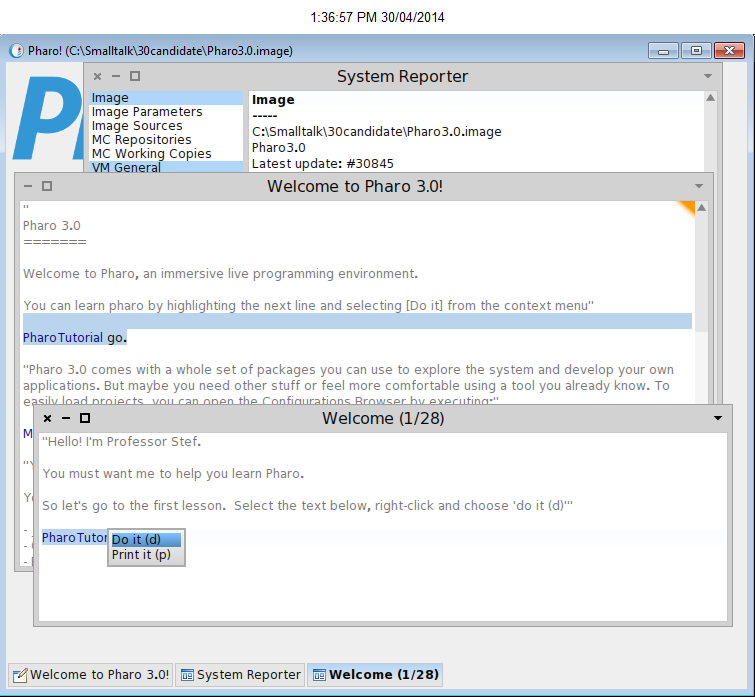
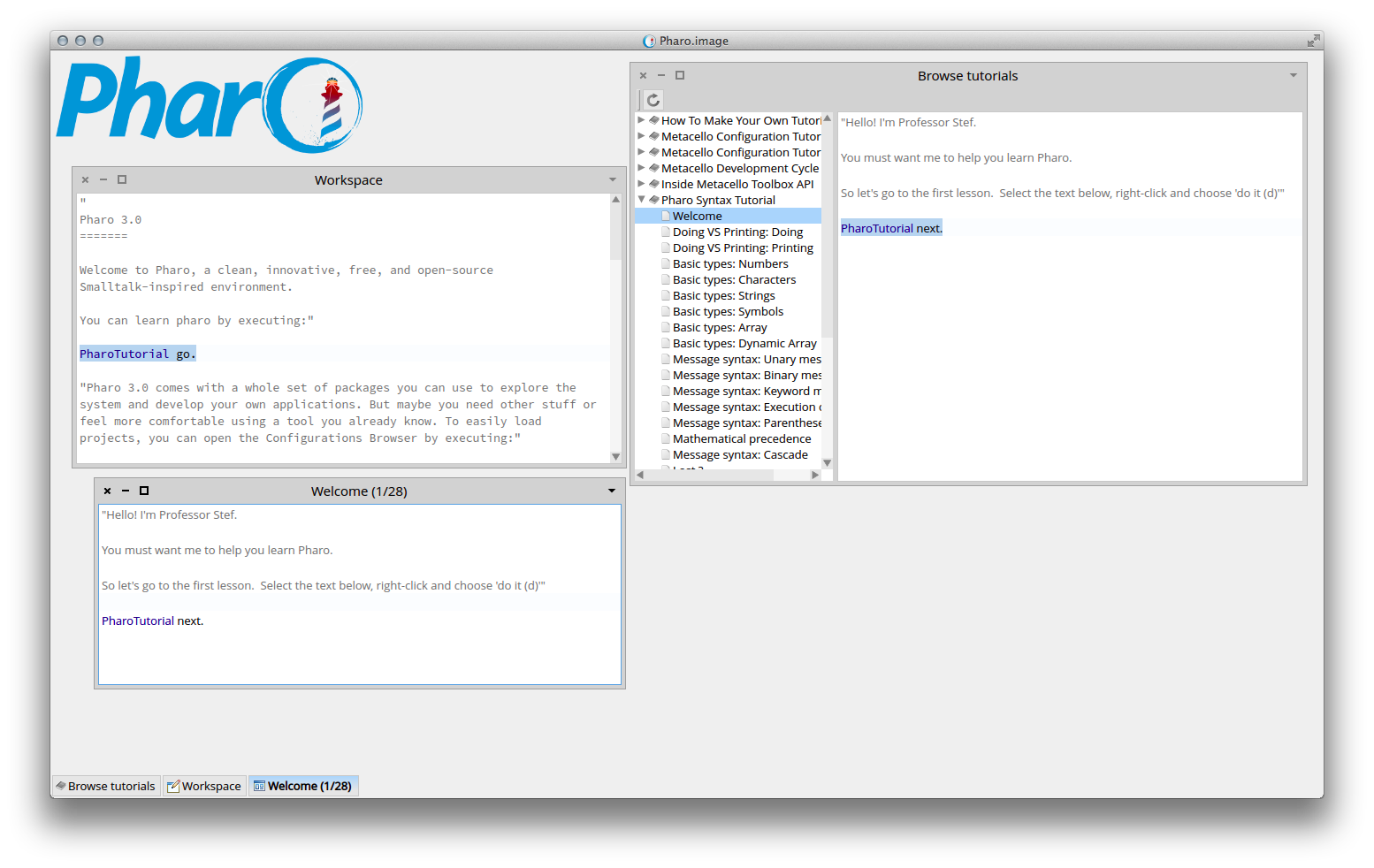
I reported a problem with the mouse right-click under Windows 7Â last January and the 30845 update still exhibits the same behavior. Selected Pharo Tutorials from the World menu. Expanded Pharo Syntax Tutorial. Clicked Welcome. Highlighted 'PharoTutorial next.' Right-click of mouse does nothing. Fortunately, Alt-D does perform the do-it action. Once the new tutorial window opens, then right-click works as advertised. It is just that first panel where it is non-functional. Unfortunately, that panel tells the user "right-click and choose 'do it (d)'"Â Â Â Â Â Â Â Â Â Â Â Â Â Â Â Â


Ben,

He is right, it is a problem when you go to the tutorial via the Browse tutorial tool:


And yes there is already an issue but it was temporary closed because the welcome space's first expression helps a bit.

On 30 Apr 2014, at 07:43, Ben Coman <btc@openInWorld.com> wrote:

> David Harris wrote:
>> I reported a problem with the mouse right-click under Windows 7 last January and the 30845 update still exhibits the same behavior.
>>
>> Selected Pharo Tutorials from the World menu. Expanded Pharo Syntax Tutorial. Clicked Welcome. Highlighted 'PharoTutorial next.' Right-click of mouse does nothing. Fortunately, Alt-D does perform the do-it action. Once the new tutorial window opens, then right-click works as advertised. It is just that first panel where it is non-functional. Unfortunately, that panel tells the user "right-click and choose 'do it (d)'"
> That is strange, it works for me on Windows 7 Home Premium SP1 64-bit with freshly downloaded VM+image
> I did this...
> 1. Downloaded and unzipped http://files.pharo.org/platform/Pharo3.0-win.zip (dated 2014-04-29).
> 2. Double clicked pharo.exe
> 3. World Menu > System > System Reporter
> 4. In Welcome, highlighted "PharoTutorial go" > right-click > Do it
> 5. In Tutorial, highlighted "PharoTutorial next" > right-click ---> took the attached snapshot
>
> cheers -ben
>
> btw do you have the case number?
> <PharoTutorial-right-click.png>
Hi Ben,

I hacked a bit on this today, inspired by your lead:

https://pharo.fogbugz.com/f/cases/13201/Hard-to-start-a-tutorial-in-Pharo

===
Name: SLICE-Issue-13201-SLICE-Issue-13201-Hard-to-start-a-tutorial-in-Pharo-SvenVanCaekenberghe.1
Author: SvenVanCaekenberghe
Time: 30 April 2014, 4:49:11.694825 pm
UUID: 02f94c7a-1998-4364-a7d8-ddbe4c5c3973
Ancestors:
Dependencies: HelpSystem-Core-SvenVanCaekenberghe.109, ProfStef-Core-SvenVanCaekenberghe.37

Improve the user experience of running the Pharo[Syntax]Tutorial aka ProfStef by:

- adding a simplified (do it/print it/inspect it) menu to the HelpBrowser contents view
- adding inspect it to the LessonView menu
- adding a lesson about inspection, PharoSyntaxTutorial>>#inspecting
- change the doing/printing/inspecting lesson titles
- make PharoTutorial/ProfStef #next and #previous work for both the standalone LessonView and the tree based HelpBrowser (apart and together) without opening a new one
- make HelpBrowser>>#onItemClicked: deselect in the text view

This needs a review; some hacking was involved.
===

Sven

On 30 Apr 2014, at 12:43, Ben Coman <btc@openInWorld.com> wrote:

> Sven Van Caekenberghe wrote:
>> Ben,
>>
>> He is right, it is a problem when you go to the tutorial via the Browse tutorial tool:
>>
>> And yes there is already an issue but it was temporary closed because the welcome space's first expression helps a bit.
>
> I had a little look at it. I naively tried...
>     HelpBrowser>>initWindow
>          contentMorph := self defaultViewerClass on: self
>             text: nil
>             accept: nil
>             readSelection: nil
>             menu: #codePaneMenu:shifted:.  "<--replaces nil"
>
>     HelpBrowser>>codePaneMenu: aMenu
>             ^ aMenu addAllFrom: SmalltalkEditor yellowButtonMenu
>
> But while it shows a menu, the DoIt opens a new window rather than changing the text in the help browser.  Digging further, HelpBrowser >> helpTopic eventually uses PharoTutorialHelpTutorialBuilder to convert Lessons into HelpTopics - and so with the current architecture there seems not possible for the #next sent to PharoTutorial to change the HelpTopic displayed in the HelpBrowser.
>
> The options I can guess are:
> 1. Strip the "PharoTutorial next" from the bottom of each lesson and have the LessonView >> showLesson:withTitle: append "PharoTutorial next" to the text of each Lesson.
> 2. Lessons are not converted to HelpTopics. Instead use or wrap PharoTutorial directly and link its #lessonView:  to  the HelpBrowser somehow.
> 3. Somehow use announcements.
>
> cheers -ben
>>
>> On 30 Apr 2014, at 07:43, Ben Coman <btc@openInWorld.com> wrote:
>>
>>> David Harris wrote:
>>>> I reported a problem with the mouse right-click under Windows 7 last January and the 30845 update still exhibits the same behavior.
>>>>
>>>> Selected Pharo Tutorials from the World menu. Expanded Pharo Syntax Tutorial. Clicked Welcome. Highlighted 'PharoTutorial next.' Right-click of mouse does nothing. Fortunately, Alt-D does perform the do-it action. Once the new tutorial window opens, then right-click works as advertised. It is just that first panel where it is non-functional. Unfortunately, that panel tells the user "right-click and choose 'do it (d)'"
>>> That is strange, it works for me on Windows 7 Home Premium SP1 64-bit with freshly downloaded VM+image
>>> I did this...
>>> 1. Downloaded and unzipped http://files.pharo.org/platform/Pharo3.0-win.zip (dated 2014-04-29).
>>> 2. Double clicked pharo.exe
>>> 3. World Menu > System > System Reporter
>>> 4. In Welcome, highlighted "PharoTutorial go" > right-click > Do it
>>> 5. In Tutorial, highlighted "PharoTutorial next" > right-click ---> took the attached snapshot
>>>
>>> cheers -ben
>>>
>>> btw do you have the case number?
>>> <PharoTutorial-right-click.png>
>>
>

On 30 Apr 2014, at 17:01, Ben Coman <btc@openInWorld.com> wrote:
Its nice to be inspiring ;) Thanks for having a go at it. I'm interested in what you came up with but I am tied up till the weekend. I'll have a look then.
no, thanks you for taking the time and correct our mistakes (or enhance our not-so-good explanations) :) cheers, Esteban
cheers -ben
Sven Van Caekenberghe wrote:
Hi Ben,
I hacked a bit on this today, inspired by your lead:
https://pharo.fogbugz.com/f/cases/13201/Hard-to-start-a-tutorial-in-Pharo
=== Name: SLICE-Issue-13201-SLICE-Issue-13201-Hard-to-start-a-tutorial-in-Pharo-SvenVanCaekenberghe.1 Author: SvenVanCaekenberghe Time: 30 April 2014, 4:49:11.694825 pm UUID: 02f94c7a-1998-4364-a7d8-ddbe4c5c3973 Ancestors: Dependencies: HelpSystem-Core-SvenVanCaekenberghe.109, ProfStef-Core-SvenVanCaekenberghe.37
Improve the user experience of running the Pharo[Syntax]Tutorial aka ProfStef by:
- adding a simplified (do it/print it/inspect it) menu to the HelpBrowser contents view - adding inspect it to the LessonView menu - adding a lesson about inspection, PharoSyntaxTutorial>>#inspecting - change the doing/printing/inspecting lesson titles - make PharoTutorial/ProfStef #next and #previous work for both the standalone LessonView and the tree based HelpBrowser (apart and together) without opening a new one - make HelpBrowser>>#onItemClicked: deselect in the text view
This needs a review; some hacking was involved. ===
Sven
On 30 Apr 2014, at 12:43, Ben Coman <btc@openInWorld.com> wrote:
Sven Van Caekenberghe wrote:
Ben,
He is right, it is a problem when you go to the tutorial via the Browse tutorial tool:
And yes there is already an issue but it was temporary closed because the welcome space's first expression helps a bit.
I had a little look at it. I naively tried... HelpBrowser>>initWindow contentMorph := self defaultViewerClass on: self text: nil accept: nil readSelection: nil menu: #codePaneMenu:shifted:. "<--replaces nil"
HelpBrowser>>codePaneMenu: aMenu ^ aMenu addAllFrom: SmalltalkEditor yellowButtonMenu
But while it shows a menu, the DoIt opens a new window rather than changing the text in the help browser. Digging further, HelpBrowser >> helpTopic eventually uses PharoTutorialHelpTutorialBuilder to convert Lessons into HelpTopics - and so with the current architecture there seems not possible for the #next sent to PharoTutorial to change the HelpTopic displayed in the HelpBrowser.
The options I can guess are: 1. Strip the "PharoTutorial next" from the bottom of each lesson and have the LessonView >> showLesson:withTitle: append "PharoTutorial next" to the text of each Lesson. 2. Lessons are not converted to HelpTopics. Instead use or wrap PharoTutorial directly and link its #lessonView: to the HelpBrowser somehow. 3. Somehow use announcements.
cheers -ben
On 30 Apr 2014, at 07:43, Ben Coman <btc@openInWorld.com> wrote:
David Harris wrote:
I reported a problem with the mouse right-click under Windows 7 last January and the 30845 update still exhibits the same behavior.
Selected Pharo Tutorials from the World menu. Expanded Pharo Syntax Tutorial. Clicked Welcome. Highlighted 'PharoTutorial next.' Right-click of mouse does nothing. Fortunately, Alt-D does perform the do-it action. Once the new tutorial window opens, then right-click works as advertised. It is just that first panel where it is non-functional. Unfortunately, that panel tells the user "right-click and choose 'do it (d)'"
That is strange, it works for me on Windows 7 Home Premium SP1 64-bit with freshly downloaded VM+image I did this... 1. Downloaded and unzipped http://files.pharo.org/platform/Pharo3.0-win.zip (dated 2014-04-29). 2. Double clicked pharo.exe 3. World Menu > System > System Reporter 4. In Welcome, highlighted "PharoTutorial go" > right-click > Do it 5. In Tutorial, highlighted "PharoTutorial next" > right-click ---> took the attached snapshot
cheers -ben
btw do you have the case number? <PharoTutorial-right-click.png>
participants (4)
-
 Ben Coman
 -
 David Harris
 -
 Esteban Lorenzano
 -
 Sven Van Caekenberghe