Problem reinstalling PharoLauncher under macOS arm64

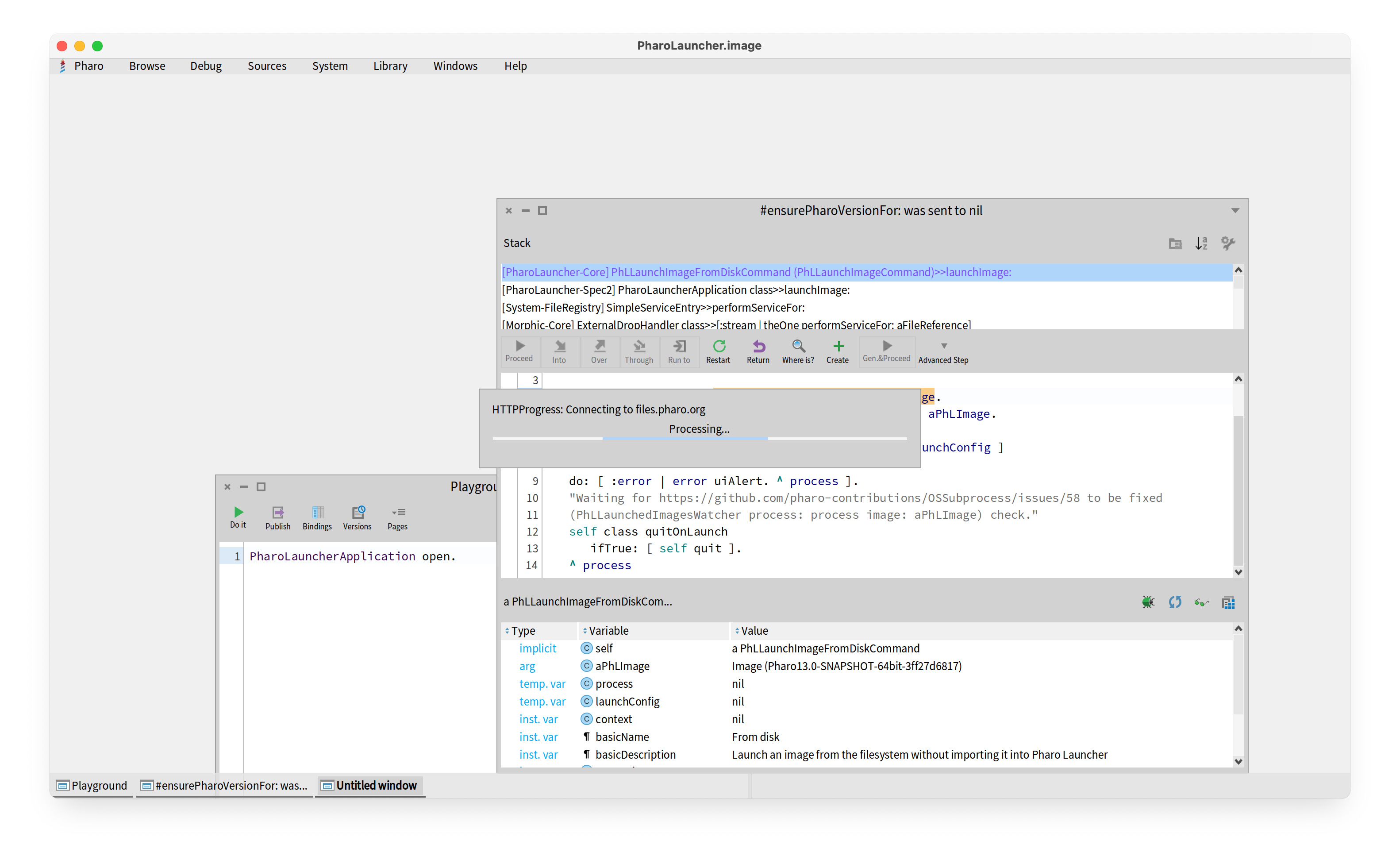
Hi Iâm having trouble reinstalling PharoLauncher on an M3 MacBook Air running Sequoia 15.6.1. I uninstalled a working version of PharoLauncher (long story) and then downloaded and installed a new version. On launch, a Pharo window opens and then it hangs trying to connect to âfiles.pharo.orgâ. Iâd be grateful for any help. Phil

Hi Phil, I understand youâre having trouble with PharoLauncher on your M3 MacBook Air, hanging when trying to connect to files.pharo.org. Here are several steps that usually help resolve this issue: 1. Check your network connection Open Terminal and run: curl -I https://files.pharo.org ⢠If it returns HTTP/2 200, the connection is fine. ⢠If it fails, try switching Wi-Fi networks or disconnecting from VPN. ⢠Also check that you can open https://files.pharo.org in your browser. 2. Clear PharoLauncher cache Old settings or caches can cause the launcher to hang: mv ~/Library/Application\ Support/PharoLauncher ~/Library/Application\ Support/PharoLauncher.bak Then restart PharoLauncher. It will create fresh settings. 3. Manually download a Pharo image ⢠Go to https://files.pharo.org and download the image you need (e.g., Pharo 10 latest stable). ⢠Unzip the .zip file, which will contain a .image and .changes file. ⢠In PharoLauncher, use Add Local Image to select the .image file and start it. 4. Check macOS security & firewall ⢠Go to System Settings â Network â Firewall. ⢠Make sure PharoLauncher is allowed to connect. ⢠If using Intel (x86) binaries on Apple Silicon, consider using the native ARM64 version. 5. Apple Silicon specific note ⢠Make sure you downloaded the ARM64 version of PharoLauncher for your M3 Mac. ⢠You can test by launching from Terminal: arch -arm64 /Applications/PharoLauncher.app/Contents/MacOS/PharoLauncher 6. Debugging Launch PharoLauncher from Terminal to see logs and connection errors: /Applications/PharoLauncher.app/Contents/MacOS/PharoLauncher If network issues persist, manually downloading the image and using the local image option is a reliable workaround. I hope this helps! Let me know if you run into any further issues. Best regards, Masaya
On Oct 15, 2025, at 21:49, Phil Gray via Pharo-users <pharo-users@lists.pharo.org> wrote:
Hi
Iâm having trouble reinstalling PharoLauncher on an M3 MacBook Air running Sequoia 15.6.1.
I uninstalled a working version of PharoLauncher (long story) and then downloaded and installed a new version. On launch, a Pharo window opens and then it hangs trying to connect to âfiles.pharo.orgâ.
Iâd be grateful for any help.
Phil
Hi Masaya, Many thanks for your message. Iâve gone through the steps you suggest, but I still have problems. Hereâs what happened with each of your numbered steps: (1) Curl returned âHTTP/1.1 200 OKâ. I assume version 1.1 is ok. I was able to access files.pharo.org ok. (2) When I looked for the PharoLauncher file in /Library/Application Support, no file was there. I tried launching PharoLauncher again, but still no file. (3) This wasnât relevant as PharoLauncher never reached a state where I could select an image file. (4) I set the firewall to allow PharoLauncher to accept connections. (5) I was able to execute using the âarch -arm64â command. Same result as before. (6) Launching from a command line generated no errors. The application just hangs. Iâve attached a screen dump of the PharoLauncher window. I hope you can help! Thanks, Phil On 15 Oct 2025 at 17:05:20, IDEGUTI Masaya via Pharo-users < pharo-users@lists.pharo.org> wrote:
Hi Phil,
I understand youâre having trouble with PharoLauncher on your M3 MacBook Air, hanging when trying to connect to files.pharo.org. Here are several steps that usually help resolve this issue:
1. Check your network connection Open Terminal and run: curl -I https://files.pharo.org
⢠If it returns HTTP/2 200, the connection is fine. ⢠If it fails, try switching Wi-Fi networks or disconnecting from VPN. ⢠Also check that you can open https://files.pharo.org in your browser.
2. Clear PharoLauncher cache Old settings or caches can cause the launcher to hang: mv ~/Library/Application\ Support/PharoLauncher ~/Library/Application\ Support/PharoLauncher.bak
Then restart PharoLauncher. It will create fresh settings.
3. Manually download a Pharo image ⢠Go to https://files.pharo.org and download the image you need (e.g., Pharo 10 latest stable). ⢠Unzip the .zip file, which will contain a .image and .changes file. ⢠In PharoLauncher, use Add Local Image to select the .image file and start it.
4. Check macOS security & firewall ⢠Go to System Settings â Network â Firewall. ⢠Make sure PharoLauncher is allowed to connect. ⢠If using Intel (x86) binaries on Apple Silicon, consider using the native ARM64 version.
5. Apple Silicon specific note ⢠Make sure you downloaded the ARM64 version of PharoLauncher for your M3 Mac. ⢠You can test by launching from Terminal: arch -arm64 /Applications/PharoLauncher.app/Contents/MacOS/PharoLauncher
6. Debugging Launch PharoLauncher from Terminal to see logs and connection errors: /Applications/PharoLauncher.app/Contents/MacOS/PharoLauncher
If network issues persist, manually downloading the image and using the local image option is a reliable workaround. I hope this helps! Let me know if you run into any further issues.
Best regards, Masaya
On Oct 15, 2025, at 21:49, Phil Gray via Pharo-users < pharo-users@lists.pharo.org> wrote:
Hi
Iâm having trouble reinstalling PharoLauncher on an M3 MacBook Air running Sequoia 15.6.1.
I uninstalled a working version of PharoLauncher (long story) and then downloaded and installed a new version. On launch, a Pharo window opens and then it hangs trying to connect to âfiles.pharo.orgâ.
Iâd be grateful for any help.
Phil
Hi Phil, Thanks for your message. Iâm afraid I donât have a perfect solution at the moment, but I can share what Iâve observed: - The latest PharoLauncher 3.4.1 seems to have an issue: it hangs immediately on startup, both on Sequoia (your environment) and Tahoe (my environment). - PharoLauncher 3.2-2024.05.24 starts up, but trying to launch a Pharo 12.0 image produces a PhLTranslatedModeWarning and fails to open (tested on Tahoe). - Selecting a Pharo 13.0 image with 3.2-2024.05.24 works (tested on Tahoe). So unfortunately, the âgeneral solutionsâ I mentioned earlier donât really help in the current situation. I wish I could offer a clearer fix, but for now this is all Iâve observed. Sorry I canât be more helpful at the moment! Best, Masaya
On Oct 16, 2025, at 19:44, Phil Gray via Pharo-users <pharo-users@lists.pharo.org> wrote:
Hi Masaya,
Many thanks for your message. Iâve gone through the steps you suggest, but I still have problems. Hereâs what happened with each of your numbered steps: (1) Curl returned âHTTP/1.1 200 OKâ. I assume version 1.1 is ok. I was able to access files.pharo.org <http://files.pharo.org/> ok. (2) When I looked for the PharoLauncher file in /Library/Application Support, no file was there. I tried launching PharoLauncher again, but still no file. (3) This wasnât relevant as PharoLauncher never reached a state where I could select an image file. (4) I set the firewall to allow PharoLauncher to accept connections. (5) I was able to execute using the âarch -arm64â command. Same result as before. (6) Launching from a command line generated no errors. The application just hangs. Iâve attached a screen dump of the PharoLauncher window.
I hope you can help! Thanks, Phil
On 15 Oct 2025 at 17:05:20, IDEGUTI Masaya via Pharo-users <pharo-users@lists.pharo.org <mailto:pharo-users@lists.pharo.org>> wrote:
Hi Phil,
I understand youâre having trouble with PharoLauncher on your M3 MacBook Air, hanging when trying to connect to files.pharo.org <http://files.pharo.org/>. Here are several steps that usually help resolve this issue:
1. Check your network connection Open Terminal and run: curl -I https://files.pharo.org <https://files.pharo.org/>
⢠If it returns HTTP/2 200, the connection is fine. ⢠If it fails, try switching Wi-Fi networks or disconnecting from VPN. ⢠Also check that you can open https://files.pharo.org <https://files.pharo.org/> in your browser.
2. Clear PharoLauncher cache Old settings or caches can cause the launcher to hang: mv ~/Library/Application\ Support/PharoLauncher ~/Library/Application\ Support/PharoLauncher.bak
Then restart PharoLauncher. It will create fresh settings.
3. Manually download a Pharo image ⢠Go to https://files.pharo.org <https://files.pharo.org/> and download the image you need (e.g., Pharo 10 latest stable). ⢠Unzip the .zip file, which will contain a .image and .changes file. ⢠In PharoLauncher, use Add Local Image to select the .image file and start it.
4. Check macOS security & firewall ⢠Go to System Settings â Network â Firewall. ⢠Make sure PharoLauncher is allowed to connect. ⢠If using Intel (x86) binaries on Apple Silicon, consider using the native ARM64 version.
5. Apple Silicon specific note ⢠Make sure you downloaded the ARM64 version of PharoLauncher for your M3 Mac. ⢠You can test by launching from Terminal: arch -arm64 /Applications/PharoLauncher.app/Contents/MacOS/PharoLauncher
6. Debugging Launch PharoLauncher from Terminal to see logs and connection errors: /Applications/PharoLauncher.app/Contents/MacOS/PharoLauncher
If network issues persist, manually downloading the image and using the local image option is a reliable workaround. I hope this helps! Let me know if you run into any further issues.
Best regards, Masaya
On Oct 15, 2025, at 21:49, Phil Gray via Pharo-users <pharo-users@lists.pharo.org <mailto:pharo-users@lists.pharo.org>> wrote:
Hi
Iâm having trouble reinstalling PharoLauncher on an M3 MacBook Air running Sequoia 15.6.1.
I uninstalled a working version of PharoLauncher (long story) and then downloaded and installed a new version. On launch, a Pharo window opens and then it hangs trying to connect to âfiles.pharo.org <http://files.pharo.org/>â.
Iâd be grateful for any help.
Phil
<PharoLauncherScreenDump.jpg>

Phil and Masaya, I also tried PharoLauncher 3.4.1 on my Tahoe 26.0.1. When I open PharoLauncher 3.4.1 alone, it runs as I expect. When I open an older version (3.2) and try to open also 3.4.1, 3.4.1 fails to connect to files.pharo.org. I don't know what's the cause nor how to fix it, but I hope this info could help digging the issue. --- tomo 2025å¹´10æ17æ¥(é) 2:53 IDEGUTI Masaya via Pharo-users <pharo-users@lists.pharo.org>:
Hi Phil,
Thanks for your message. Iâm afraid I donât have a perfect solution at the moment, but I can share what Iâve observed:
- The latest PharoLauncher 3.4.1 seems to have an issue: it hangs immediately on startup, both on Sequoia (your environment) and Tahoe (my environment). - PharoLauncher 3.2-2024.05.24 starts up, but trying to launch a Pharo 12.0 image produces a PhLTranslatedModeWarning and fails to open (tested on Tahoe). - Selecting a Pharo 13.0 image with 3.2-2024.05.24 works (tested on Tahoe).
So unfortunately, the âgeneral solutionsâ I mentioned earlier donât really help in the current situation. I wish I could offer a clearer fix, but for now this is all Iâve observed.
Sorry I canât be more helpful at the moment!
Best, Masaya
On Oct 16, 2025, at 19:44, Phil Gray via Pharo-users <pharo-users@lists.pharo.org> wrote:
Hi Masaya,
Many thanks for your message. Iâve gone through the steps you suggest, but I still have problems. Hereâs what happened with each of your numbered steps: (1) Curl returned âHTTP/1.1 200 OKâ. I assume version 1.1 is ok. I was able to access files.pharo.org ok. (2) When I looked for the PharoLauncher file in /Library/Application Support, no file was there. I tried launching PharoLauncher again, but still no file. (3) This wasnât relevant as PharoLauncher never reached a state where I could select an image file. (4) I set the firewall to allow PharoLauncher to accept connections. (5) I was able to execute using the âarch -arm64â command. Same result as before. (6) Launching from a command line generated no errors. The application just hangs. Iâve attached a screen dump of the PharoLauncher window.
I hope you can help! Thanks, Phil
On 15 Oct 2025 at 17:05:20, IDEGUTI Masaya via Pharo-users <pharo-users@lists.pharo.org> wrote:
Hi Phil,
I understand youâre having trouble with PharoLauncher on your M3 MacBook Air, hanging when trying to connect to files.pharo.org. Here are several steps that usually help resolve this issue:
1. Check your network connection Open Terminal and run: curl -I https://files.pharo.org
⢠If it returns HTTP/2 200, the connection is fine. ⢠If it fails, try switching Wi-Fi networks or disconnecting from VPN. ⢠Also check that you can open https://files.pharo.org in your browser.
2. Clear PharoLauncher cache Old settings or caches can cause the launcher to hang: mv ~/Library/Application\ Support/PharoLauncher ~/Library/Application\ Support/PharoLauncher.bak
Then restart PharoLauncher. It will create fresh settings.
3. Manually download a Pharo image ⢠Go to https://files.pharo.org and download the image you need (e.g., Pharo 10 latest stable). ⢠Unzip the .zip file, which will contain a .image and .changes file. ⢠In PharoLauncher, use Add Local Image to select the .image file and start it.
4. Check macOS security & firewall ⢠Go to System Settings â Network â Firewall. ⢠Make sure PharoLauncher is allowed to connect. ⢠If using Intel (x86) binaries on Apple Silicon, consider using the native ARM64 version.
5. Apple Silicon specific note ⢠Make sure you downloaded the ARM64 version of PharoLauncher for your M3 Mac. ⢠You can test by launching from Terminal: arch -arm64 /Applications/PharoLauncher.app/Contents/MacOS/PharoLauncher
6. Debugging Launch PharoLauncher from Terminal to see logs and connection errors: /Applications/PharoLauncher.app/Contents/MacOS/PharoLauncher
If network issues persist, manually downloading the image and using the local image option is a reliable workaround. I hope this helps! Let me know if you run into any further issues.
Best regards, Masaya
On Oct 15, 2025, at 21:49, Phil Gray via Pharo-users <pharo-users@lists.pharo.org> wrote:
Hi
Iâm having trouble reinstalling PharoLauncher on an M3 MacBook Air running Sequoia 15.6.1.
I uninstalled a working version of PharoLauncher (long story) and then downloaded and installed a new version. On launch, a Pharo window opens and then it hangs trying to connect to âfiles.pharo.orgâ.
Iâd be grateful for any help.
Phil
<PharoLauncherScreenDump.jpg>
participants (3)
-
 IDEGUTI Masaya
 -
 Phil Gray
 -
 Tomohiro Oda