[Ann] DragPanels: Floating palette windows with drag-and-drop in Morphic

Morphic offers everything needed to create highly interactive applications in Pharo. It is however, difficult to find out how to actually create those applications. Morphic tutorials provide a starting point, and are not very good at showing how the different features interact and are supposed to be used together. Morph has lots of methods, and some of them are not in the method category where you might expect them. The result is that most Morphs in Pharo do not use much of what Morphic has to offer. Wouldn't it be great if there would be some sample code, showing how Morphic can be used to great effect? Well, here is some code that takes a first step towards that goal. DragPanels shows how to create a floating palette, filled with wells that support dragging a property towards a target. It shows how to combine drag-and drop with click: and context menu actions, and show to give UI feedback when over a well and when holding the mouse down over an element that reacts to click:. You can see the code in action here: https://vimeo.com/131889858 The color panel shows some colors. If you don't set the allowDropBlock, it will work with any morph that responds to #color: (like the world). By clicking on the plus, you can add more colors to the panel. The panel has a context menu to restore the default values. ColorPanel withSevenPaleColors allowDropBlock: [ :source :target | target class = CardMorph ]; openInHand The people panel shows avatars belonging to an email addres. By default it uses gravatar for them, and caches the images. PeoplePanel new defaultValues: #('stephan@stack.nl' 'serge.stinckwich@gmail.com' 'nicolas.anquetil@inria.fr' 'thierry.goubier@gmail.com' 'stephane.ducasse@inria.fr' 'marcus.denker@inria.fr'); allowDropBlock: [ :source :target | target class = CardMorph ]; openInHand When dropping, the dragSource sends #color: resp. #email: to the target by default. By setting the dropSelector of the DragWell this can be overridden. You can try the code by do-ing Gofer new smalltalkhubUser: 'StephanEggermont' project: 'Dragpanels' package: 'DragPanels'; load. It is used in (a work in progress) Gofer new smalltalkhubUser: 'StephanEggermont' project: 'Documentation' package: 'CardsMorphic'; load. Stephan p.s. On the wishlist are - add more color palettes - add a dark theme, refactoring the colors - add a small close cross in the title bar of the palette - define the dropSelector in the panel, not the well - support different sized wells, refactoring the sizes - make the mouseOver rectangle color content dependent - add pharo contributors as an avatar source - add a configuration
On 26-06-15 18:15, Stephan Eggermont wrote:
> On the wishlist are
- migrate to Bloc
- make sure the panels stay behind spotter
- replace the dialogs by something in the same style
- use the panels in MorphicDraw

Stephan

Very cool. Thanks Stephan. Thierry Le 26 juin 2015 6:17 PM, "Stephan Eggermont" <stephan@stack.nl> a écrit :
Morphic offers everything needed to create highly interactive applications in Pharo. It is however, difficult to find out how to actually create those applications. Morphic tutorials provide a starting point, and are not very good at showing how the different features interact and are supposed to be used together. Morph has lots of methods, and some of them are not in the method category where you might expect them. The result is that most Morphs in Pharo do not use much of what Morphic has to offer.
Wouldn't it be great if there would be some sample code, showing how Morphic can be used to great effect?
Well, here is some code that takes a first step towards that goal. DragPanels shows how to create a floating palette, filled with wells that support dragging a property towards a target. It shows how to combine drag-and drop with click: and context menu actions, and show to give UI feedback when over a well and when holding the mouse down over an element that reacts to click:.
You can see the code in action here: https://vimeo.com/131889858
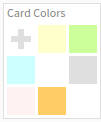
The color panel shows some colors. If you don't set the allowDropBlock, it will work with any morph that responds to #color: (like the world). By clicking on the plus, you can add more colors to the panel. The panel has a context menu to restore the default values.
ColorPanel withSevenPaleColors allowDropBlock: [ :source :target | target class = CardMorph ]; openInHand
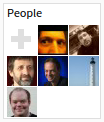
The people panel shows avatars belonging to an email addres. By default it uses gravatar for them, and caches the images.
PeoplePanel new defaultValues: #('stephan@stack.nl' 'serge.stinckwich@gmail.com' 'nicolas.anquetil@inria.fr' 'thierry.goubier@gmail.com' 'stephane.ducasse@inria.fr' 'marcus.denker@inria.fr'); allowDropBlock: [ :source :target | target class = CardMorph ]; openInHand
When dropping, the dragSource sends #color: resp. #email: to the target by default. By setting the dropSelector of the DragWell this can be overridden.
You can try the code by do-ing
Gofer new smalltalkhubUser: 'StephanEggermont' project: 'Dragpanels' package: 'DragPanels'; load.
It is used in (a work in progress)
Gofer new smalltalkhubUser: 'StephanEggermont' project: 'Documentation' package: 'CardsMorphic'; load.
Stephan
p.s.
On the wishlist are - add more color palettes - add a dark theme, refactoring the colors - add a small close cross in the title bar of the palette - define the dropSelector in the panel, not the well - support different sized wells, refactoring the sizes - make the mouseOver rectangle color content dependent - add pharo contributors as an avatar source - add a configuration

yes great! thanks Cheers Alain
On 27 Jun 2015, at 00:30, Thierry Goubier <thierry.goubier@gmail.com> wrote:
Very cool. Thanks Stephan.
Thierry
Le 26 juin 2015 6:17 PM, "Stephan Eggermont" <stephan@stack.nl <mailto:stephan@stack.nl>> a écrit : Morphic offers everything needed to create highly interactive applications in Pharo. It is however, difficult to find out how to actually create those applications. Morphic tutorials provide a starting point, and are not very good at showing how the different features interact and are supposed to be used together. Morph has lots of methods, and some of them are not in the method category where you might expect them. The result is that most Morphs in Pharo do not use much of what Morphic has to offer.
Wouldn't it be great if there would be some sample code, showing how Morphic can be used to great effect?
Well, here is some code that takes a first step towards that goal. DragPanels shows how to create a floating palette, filled with wells that support dragging a property towards a target. It shows how to combine drag-and drop with click: and context menu actions, and show to give UI feedback when over a well and when holding the mouse down over an element that reacts to click:.
You can see the code in action here: https://vimeo.com/131889858 <https://vimeo.com/131889858>
The color panel shows some colors. If you don't set the allowDropBlock, it will work with any morph that responds to #color: (like the world). By clicking on the plus, you can add more colors to the panel. The panel has a context menu to restore the default values.
ColorPanel withSevenPaleColors allowDropBlock: [ :source :target | target class = CardMorph ]; openInHand
The people panel shows avatars belonging to an email addres. By default it uses gravatar for them, and caches the images.
PeoplePanel new defaultValues: #('stephan@stack.nl <mailto:stephan@stack.nl>' 'serge.stinckwich@gmail.com <mailto:serge.stinckwich@gmail.com>' 'nicolas.anquetil@inria.fr <mailto:nicolas.anquetil@inria.fr>' 'thierry.goubier@gmail.com <mailto:thierry.goubier@gmail.com>' 'stephane.ducasse@inria.fr <mailto:stephane.ducasse@inria.fr>' 'marcus.denker@inria.fr <mailto:marcus.denker@inria.fr>'); allowDropBlock: [ :source :target | target class = CardMorph ]; openInHand
When dropping, the dragSource sends #color: resp. #email: to the target by default. By setting the dropSelector of the DragWell this can be overridden.
You can try the code by do-ing
Gofer new smalltalkhubUser: 'StephanEggermont' project: 'Dragpanels' package: 'DragPanels'; load.
It is used in (a work in progress)
Gofer new smalltalkhubUser: 'StephanEggermont' project: 'Documentation' package: 'CardsMorphic'; load.
Stephan
p.s.
On the wishlist are - add more color palettes - add a dark theme, refactoring the colors - add a small close cross in the title bar of the palette - define the dropSelector in the panel, not the well - support different sized wells, refactoring the sizes - make the mouseOver rectangle color content dependent - add pharo contributors as an avatar source - add a configuration

Thank you, Stephan, for providing a well worked out example continuing where Morphic tutorials normally end. This is a real need to unearth functions which have been there fore years but mostly unused. The two video clips document the use cases of the code nicely. A question not answered yet is: How do I export the panel with the cards as an SVG file? --Hannes -- View this message in context: http://forum.world.st/Ann-DragPanels-Floating-palette-windows-with-drag-and-... Sent from the Pharo Smalltalk Users mailing list archive at Nabble.com.
On 29-06-15 10:26, Hannes Hirzel wrote:
Thank you, Stephan, for providing a well worked out example continuing where Morphic tutorials normally end. This is a real need to unearth functions which have been there fore years but mostly unused.
The two video clips document the use cases of the code nicely.
A question not answered yet is: How do I export the panel with the cards as an SVG file?
Hmm. What would be the best way to do that? - I assume in Bloc with Cairo I should be able to use an SVGCanvas? - SVG is pretty simple, I could just walk the morph tree and generate a file. - Roassal2 has SVG export. I could generate a Roassal image and export that. Stephan

On Mon, Jun 29, 2015 at 12:16 PM, Stephan Eggermont <stephan@stack.nl> wrote:
On 29-06-15 10:26, Hannes Hirzel wrote:
Thank you, Stephan, for providing a well worked out example continuing where Morphic tutorials normally end. This is a real need to unearth functions which have been there fore years but mostly unused.
The two video clips document the use cases of the code nicely.
A question not answered yet is: How do I export the panel with the cards as an SVG file?
Hmm. What would be the best way to do that? - I assume in Bloc with Cairo I should be able to use an SVGCanvas?
I thought that this was already possible with Morph>>drawOnAthensCanvas:

2015-06-29 12:55 GMT+02:00 Peter Uhnák <i.uhnak@gmail.com>:
On Mon, Jun 29, 2015 at 12:16 PM, Stephan Eggermont <stephan@stack.nl> wrote:
On 29-06-15 10:26, Hannes Hirzel wrote:
Thank you, Stephan, for providing a well worked out example continuing where Morphic tutorials normally end. This is a real need to unearth functions which have been there fore years but mostly unused.
The two video clips document the use cases of the code nicely.
A question not answered yet is: How do I export the panel with the cards as an SVG file?
Hmm. What would be the best way to do that? - I assume in Bloc with Cairo I should be able to use an SVGCanvas?
I thought that this was already possible with Morph>>drawOnAthensCanvas:
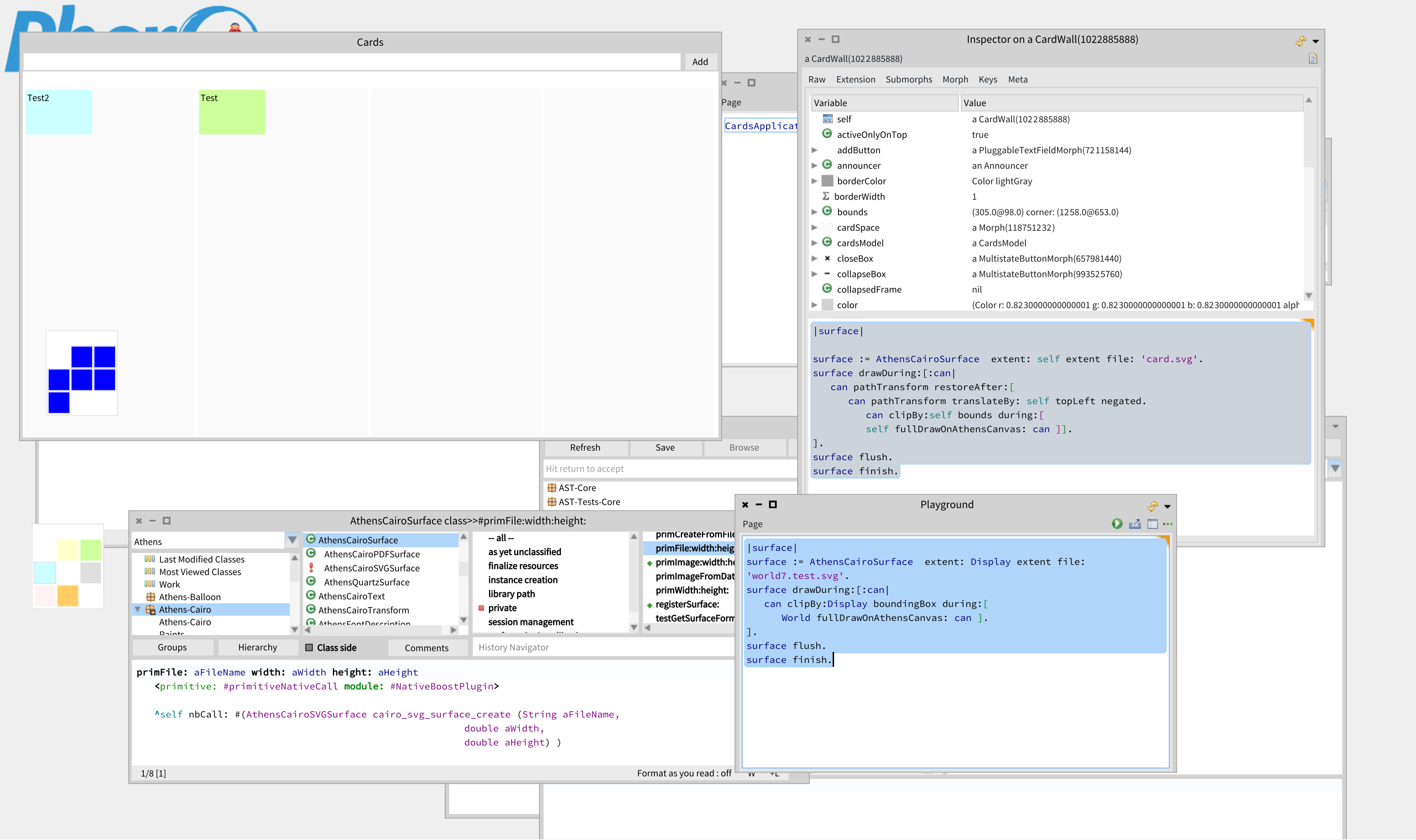
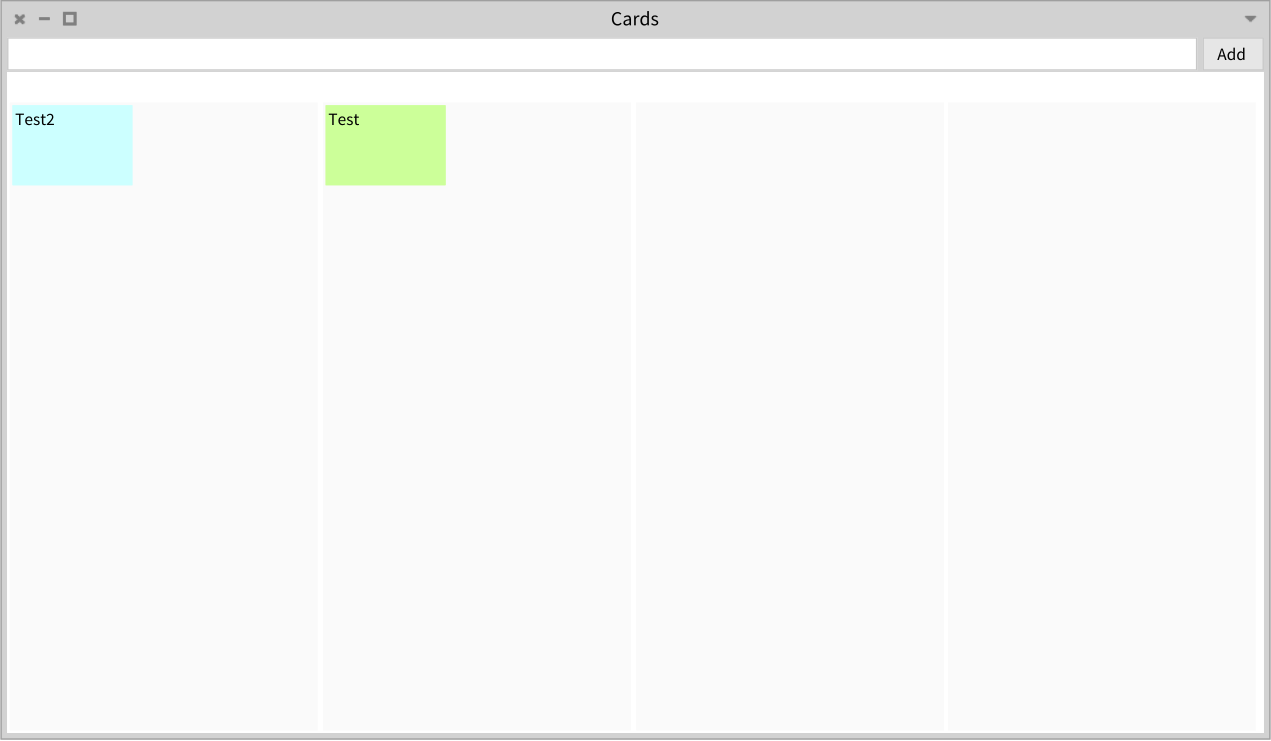
That does not imply it can be used to generate svg elements on the fly. Athens backend is based on a vector "drawing" library that does not mean it can generate any vector drawing files ... luckily, cairo can ! And with just a couple of native function calls, we can add this support to athens (see attached svg images)
On 6/29/15, Nicolai Hess <nicolaihess@web.de> wrote:
2015-06-29 12:55 GMT+02:00 Peter Uhnák <i.uhnak@gmail.com>:
On Mon, Jun 29, 2015 at 12:16 PM, Stephan Eggermont <stephan@stack.nl> wrote:
On 29-06-15 10:26, Hannes Hirzel wrote:
Thank you, Stephan, for providing a well worked out example continuing where Morphic tutorials normally end. This is a real need to unearth functions which have been there fore years but mostly unused.
The two video clips document the use cases of the code nicely.
A question not answered yet is: How do I export the panel with the cards as an SVG file?
Hmm. What would be the best way to do that? - I assume in Bloc with Cairo I should be able to use an SVGCanvas?
I thought that this was already possible with Morph>>drawOnAthensCanvas:
That does not imply it can be used to generate svg elements on the fly. Athens backend is based on a vector "drawing" library that does not mean it can generate any vector drawing files ... luckily, cairo can ! And with just a couple of native function calls,
What are these calls? we
can add this support to athens (see attached svg images)
Unfortunately the svg file does not contain the text of the cards. E.g. searching for 'Test2' gives no result.
2015-06-29 14:52 GMT+02:00 H. Hirzel <hannes.hirzel@gmail.com>:
On 6/29/15, Nicolai Hess <nicolaihess@web.de> wrote:
2015-06-29 12:55 GMT+02:00 Peter Uhnák <i.uhnak@gmail.com>:
On Mon, Jun 29, 2015 at 12:16 PM, Stephan Eggermont <stephan@stack.nl> wrote:
On 29-06-15 10:26, Hannes Hirzel wrote:
Thank you, Stephan, for providing a well worked out example continuing where Morphic tutorials normally end. This is a real need to unearth functions which have been there fore years but mostly unused.
The two video clips document the use cases of the code nicely.
A question not answered yet is: How do I export the panel with the cards as an SVG file?
Hmm. What would be the best way to do that? - I assume in Bloc with Cairo I should be able to use an SVGCanvas?
I thought that this was already possible with Morph>>drawOnAthensCanvas:
That does not imply it can be used to generate svg elements on the fly. Athens backend is based on a vector "drawing" library that does not mean it can generate any vector drawing files ... luckily, cairo can ! And with just a couple of native function calls,
What are these calls?
we
can add this support to athens (see attached svg images)
Unfortunately the svg file does not contain the text of the cards. E.g. searching for 'Test2' gives no result.
That's bad. Yes, it looks like string characters are converted to svg-paths.
2015-06-29 12:16 GMT+02:00 Stephan Eggermont <stephan@stack.nl>:
On 29-06-15 10:26, Hannes Hirzel wrote:
Thank you, Stephan, for providing a well worked out example continuing where Morphic tutorials normally end. This is a real need to unearth functions which have been there fore years but mostly unused.
The two video clips document the use cases of the code nicely.
A question not answered yet is: How do I export the panel with the cards as an SVG file?
Hmm. What would be the best way to do that? - I assume in Bloc with Cairo I should be able to use an SVGCanvas?
There is no SVGCanvas. Only AthensCanvas with different possible backends (only cairo and balloon for now)
- SVG is pretty simple, I could just walk the morph tree and generate a file.
Yes, but clipping may be an issue, and any Morph with a slightly more advanded drawing method (like lists) may be more difficult. And you need a way to convert patterns/images to something that can be included in a svg file.
- Roassal2 has SVG export. I could generate a Roassal image and export that.
Roassal is based on its own drawing/shape library (Trachel). Yes Trachel uses Athens, but trachels svg export does not (AFAIK).
Stephan
On 29-06-15 14:38, Nicolai Hess wrote:
Yes, but clipping may be an issue, and any Morph with a slightly more advanded drawing method (like lists) may be more difficult. And you need a way to convert patterns/images to something that can be included in a svg file.
Clipping paths in svg seem easy to use. Embedding images is simple, according to SO. Base64 encoded. An issue is of course that you might want to have a different layout on-screen than in SVG. Hannes: I assume you want SVG for display on a webpage? Stephan
On 6/29/15, Stephan Eggermont <stephan@stack.nl> wrote:
On 29-06-15 14:38, Nicolai Hess wrote:
Yes, but clipping may be an issue, and any Morph with a slightly more advanded drawing method (like lists) may be more difficult. And you need a way to convert patterns/images to something that can be included in a svg file.
Clipping paths in svg seem easy to use. Embedding images is simple, according to SO. Base64 encoded. An issue is of course that you might want to have a different layout on-screen than in SVG.
Hannes: I assume you want SVG for display on a webpage? Yes, please.
Stephan
The export as SVG is indeed easy. I've added this helper class to CardsMorphic-StephanEggermont.56 It is not well-factored, and for now ignores font families. A class helper method to directly create a file: CardSvgWriter class>newFile: aString on: aCardWall ^self new write: aCardWall to: (aString asFileReference writeStream ) Write a SVG header, the size and then the contents of the cardwall, finally close the SVG. CardSvgWriter>>write: aWall to: aStream stream := aStream. stream nextPutAll: self fileHeader. self fileSized: aWall fullFrame. stream cr. aWall cardSpace submorphsDo: [ :column | self writeColumn: column]. stream nextPutAll: '</svg>'. stream close SVG is an XML format CardSvgWriter>>fileHeader ^'<?xml version="1.0" standalone="no"?> <!DOCTYPE svg PUBLIC "-//W3C//DTD SVG 1.1//EN" "http://www.w3.org/Graphics/SVG/1.1/DTD/svg11.dtd"> ' Take the SVG size from the CardWall morph. Two namespaces are needed, the second one to make the images work. CardSvgWriter>>fileSized: frame stream nextPutAll: '<svg xmlns="http://www.w3.org/2000/svg" xmlns:xlink="http://www.w3.org/1999/xlink" viewBox = "', (frame left) asString,' ', (frame top) asString,' ', (frame width) asString,' ', (frame height) asString,'" version = "1.1">' For each column, write the title and a gray background CardSvgWriter>>writeColumn: aColumn |background| stream nextPutAll: '<text x="',(aColumn left+2) asString,'" y="',(aColumn top+2) asString,'" fill="gray" font-size= "11">'. stream nextPutAll: aColumn title. stream nextPutAll: '</text>'. stream cr. background := aColumn submorphs first. stream nextPutAll: '<rect x= "',(background left) asString, '" y="',(background top) asString, '" width="',(background width) asString, '" height="',(background height) asString, '" fill="rgb(250,250,250)" />'. stream cr. background submorphsDo: [ :card | self writeCard: card ]. for each card, write its components CardSvgWriter>>writeCard: aCard self writeCardRectangle: aCard. self writeCardText: aCard. self writeCardImage: aCard The rectangle still has hardcoded border and borderColor CardSvgWriter>>writeCardRectangle: aCard stream nextPutAll: '<rect x= "',(aCard left) asString, '" y="',(aCard top) asString, '" width="',(aCard width) asString, '" height="',(aCard height) asString, '" stroke="','rgb(240,240,240)'"aCard borderColor asHTMLColor", '" stroke-width="', '1',"aCard borderWidth asString," '" fill="',aCard color asHTMLColor,'" />'. stream cr. Positioning of text is different in SVG and Morphic. In SVG, it is the left-bottom, vs left-top in Morphic. CardSVGWriter>>writeCardText: aCard stream nextPutAll: '<text x="',(aCard left+2) asString,'" y="',(aCard top+12) asString,'" fill="black" font-size= "10">'. stream nextPutAll: aCard title. stream nextPutAll: '</text>'. stream cr. The avatars are jpegs. they need to be base64 encoded. Here they are repeated for each card, they should be written once and linked. CardSVGWriter>writeCardImage: aCard aCard person ifNotNil: [ stream nextPutAll: '<image x="',(aCard right-32) asString,'" y="',(aCard bottom-32) asString,'" width="32" height="32" xlink:href="data:image/jpg;base64,', (ZnUtils encodeBase64: (ByteArray streamContents: [:s | PluginBasedJPEGReadWriter putForm: (AvatarCache default imageFor: aCard person) onStream: s])) ,'"/>'. stream cr]
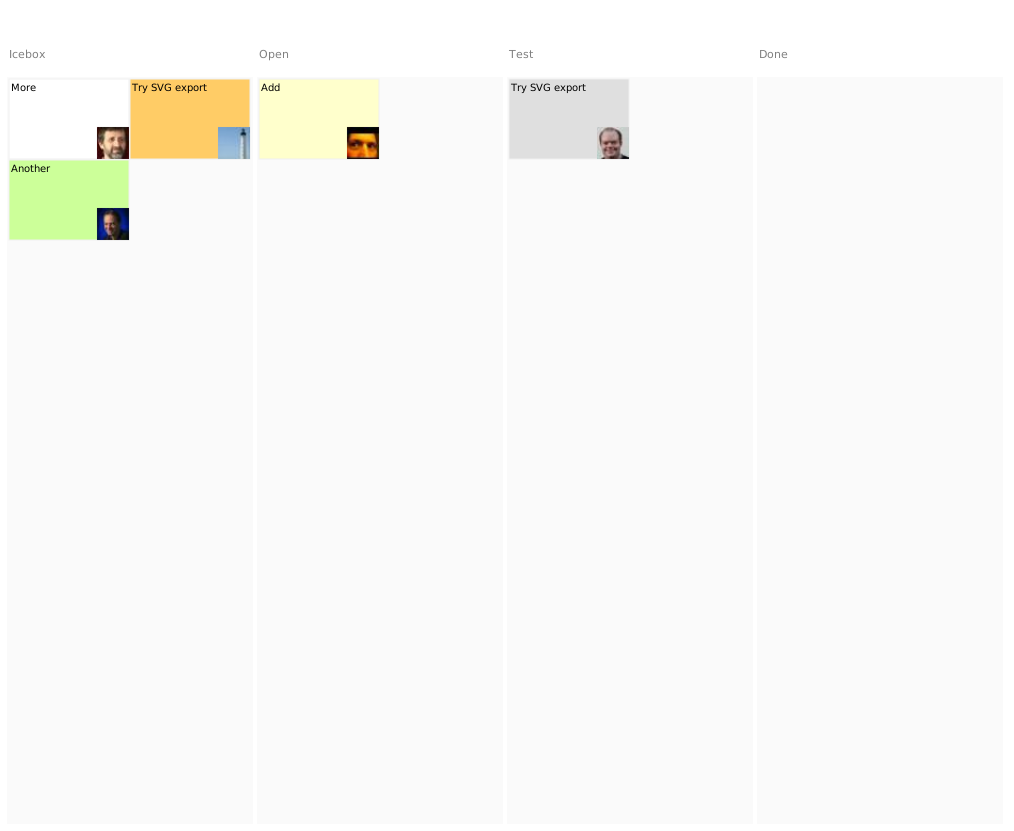
Thank you for the custom made class CardsSvgWriter I loaded it from http://smalltalkhub.com/#!/~StephanEggermont/Documentation CardsMorphic-StephanEggermont.57 through the Monticello Browser. BTW Gofer new smalltalkhubUser: 'StephanEggermont' project: 'Documentation' package: 'CardsMorphic'; load. taken from above gives an error message. I understand that there is no menu command yet to do the export so I did CardsSvgWriter newFile: 'cards.svg' on: (CardWall allInstances at: 1) in a playground workspace window. I suggest to include that the context menu. Texts are preserved in the svg file, so search is possible. Fontsize is an issue: in the exported SVG file it is much smaller than in the CardWall panel. Adding a card by just typing the card text and hitting '<ENTER>' would be nice. --Hannes On 6/30/15, Stephan Eggermont <stephan@stack.nl> wrote:
The export as SVG is indeed easy. I've added this helper class to CardsMorphic-StephanEggermont.56 It is not well-factored, and for now ignores font families.
A class helper method to directly create a file:
CardSvgWriter class>newFile: aString on: aCardWall ^self new write: aCardWall to: (aString asFileReference writeStream )
Write a SVG header, the size and then the contents of the cardwall, finally close the SVG.
CardSvgWriter>>write: aWall to: aStream stream := aStream. stream nextPutAll: self fileHeader. self fileSized: aWall fullFrame. stream cr. aWall cardSpace submorphsDo: [ :column | self writeColumn: column]. stream nextPutAll: '</svg>'. stream close
SVG is an XML format
CardSvgWriter>>fileHeader ^'<?xml version="1.0" standalone="no"?> <!DOCTYPE svg PUBLIC "-//W3C//DTD SVG 1.1//EN" "http://www.w3.org/Graphics/SVG/1.1/DTD/svg11.dtd"> '
Take the SVG size from the CardWall morph. Two namespaces are needed, the second one to make the images work.
CardSvgWriter>>fileSized: frame stream nextPutAll: '<svg xmlns="http://www.w3.org/2000/svg" xmlns:xlink="http://www.w3.org/1999/xlink" viewBox = "', (frame left) asString,' ', (frame top) asString,' ', (frame width) asString,' ', (frame height) asString,'" version = "1.1">'
For each column, write the title and a gray background
CardSvgWriter>>writeColumn: aColumn |background| stream nextPutAll: '<text x="',(aColumn left+2) asString,'" y="',(aColumn top+2) asString,'" fill="gray" font-size= "11">'. stream nextPutAll: aColumn title. stream nextPutAll: '</text>'. stream cr. background := aColumn submorphs first. stream nextPutAll: '<rect x= "',(background left) asString, '" y="',(background top) asString, '" width="',(background width) asString, '" height="',(background height) asString, '" fill="rgb(250,250,250)" />'. stream cr. background submorphsDo: [ :card | self writeCard: card ].
for each card, write its components
CardSvgWriter>>writeCard: aCard self writeCardRectangle: aCard. self writeCardText: aCard. self writeCardImage: aCard
The rectangle still has hardcoded border and borderColor
CardSvgWriter>>writeCardRectangle: aCard stream nextPutAll: '<rect x= "',(aCard left) asString, '" y="',(aCard top) asString, '" width="',(aCard width) asString, '" height="',(aCard height) asString, '" stroke="','rgb(240,240,240)'"aCard borderColor asHTMLColor", '" stroke-width="', '1',"aCard borderWidth asString," '" fill="',aCard color asHTMLColor,'" />'. stream cr.
Positioning of text is different in SVG and Morphic. In SVG, it is the left-bottom, vs left-top in Morphic.
CardSVGWriter>>writeCardText: aCard stream nextPutAll: '<text x="',(aCard left+2) asString,'" y="',(aCard top+12) asString,'" fill="black" font-size= "10">'. stream nextPutAll: aCard title. stream nextPutAll: '</text>'. stream cr.
The avatars are jpegs. they need to be base64 encoded. Here they are repeated for each card, they should be written once and linked.
CardSVGWriter>writeCardImage: aCard aCard person ifNotNil: [ stream nextPutAll: '<image x="',(aCard right-32) asString,'" y="',(aCard bottom-32) asString,'" width="32" height="32" xlink:href="data:image/jpg;base64,', (ZnUtils encodeBase64: (ByteArray streamContents: [:s | PluginBasedJPEGReadWriter putForm: (AvatarCache default imageFor: aCard person) onStream: s])) ,'"/>'. stream cr]
On 01/07/15 13:00, H. Hirzel wrote:
BTW
Gofer new smalltalkhubUser: 'StephanEggermont' project: 'Documentation' package: 'CardsMorphic'; load.
taken from above gives an error message.
Needs a configuration, depends on DragPanels and WebSocket from Zinc.
I understand that there is no menu command yet to do the export so I did
CardsSvgWriter newFile: 'cards.svg' on: (CardWall allInstances at: 1)
in a playground workspace window. I suggest to include that the context menu.
You noticed the websocket client?
Texts are preserved in the svg file, so search is possible.
Fontsize is an issue: in the exported SVG file it is much smaller than in the CardWall panel.
Is it? I didn't define a font in SVG, and most fonts look smaller than the one I used in the panel. Including fonts looks more painful than including pictures.
Adding a card by just typing the card text and hitting '<ENTER>' would be nice.
There is a shortcut Alt-A defined in CardsApplication. I tried defining <enter> but that seems to be intercepted somewhere. Stephan
On 7/1/15, Stephan Eggermont <stephan@stack.nl> wrote:
On 01/07/15 13:00, H. Hirzel wrote:
BTW
Gofer new smalltalkhubUser: 'StephanEggermont' project: 'Documentation' package: 'CardsMorphic'; load.
taken from above gives an error message.
Needs a configuration, depends on DragPanels and WebSocket from Zinc.
OK, so load order is 1. WebSocket 2. Dragpanel 3. Documentation
I understand that there is no menu command yet to do the export so I did
CardsSvgWriter newFile: 'cards.svg' on: (CardWall allInstances at: 1)
in a playground workspace window. I suggest to include that the context menu.
You noticed the websocket client?
No, how do I use it with the Cards application?
Texts are preserved in the svg file, so search is possible.
Fontsize is an issue: in the exported SVG file it is much smaller than in the CardWall panel.
Is it? I didn't define a font in SVG, and most fonts look smaller than the one I used in the panel. Including fonts looks more painful than including pictures.
I do not mean they should be included, just a larger font size. And the text in the card should wrap around and not go out of the card.
Adding a card by just typing the card text and hitting '<ENTER>' would be nice.
There is a shortcut Alt-A defined in CardsApplication. I tried defining <enter> but that seems to be intercepted somewhere.
OK
Stephan
2015-06-29 10:26 GMT+02:00 Hannes Hirzel <hannes.hirzel@gmail.com>:
Thank you, Stephan, for providing a well worked out example continuing where Morphic tutorials normally end. This is a real need to unearth functions which have been there fore years but mostly unused.
The two video clips document the use cases of the code nicely.
A question not answered yet is: How do I export the panel with the cards as an SVG file?
Really, SVG? why would you want to do that? Exporting a morph as png or jpg file works easy.
--Hannes
-- View this message in context: http://forum.world.st/Ann-DragPanels-Floating-palette-windows-with-drag-and-... Sent from the Pharo Smalltalk Users mailing list archive at Nabble.com.
On 6/29/15, Nicolai Hess <nicolaihess@web.de> wrote:
2015-06-29 10:26 GMT+02:00 Hannes Hirzel <hannes.hirzel@gmail.com>:
Thank you, Stephan, for providing a well worked out example continuing where Morphic tutorials normally end. This is a real need to unearth functions which have been there fore years but mostly unused.
The two video clips document the use cases of the code nicely.
A question not answered yet is: How do I export the panel with the cards as an SVG file?
Really, SVG? why would you want to do that? Exporting a morph as png or jpg file works easy.
Yes, png is a workaound, but only SVG may be searched for text.
--Hannes
-- View this message in context: http://forum.world.st/Ann-DragPanels-Floating-palette-windows-with-drag-and-... Sent from the Pharo Smalltalk Users mailing list archive at Nabble.com.
participants (7)
-
 Alain Plantec
 -
 H. Hirzel
 -
Hannes Hirzel
-
 Nicolai Hess
 -
 Peter Uhnák
 -
 Stephan Eggermont
 -
 Thierry Goubier