Can I control the location of the PharoDebug.log

It appears that the PharoDebug.log can be dropped into the directory from which a Pharo image is launched ... I would have expected it to be dropped into the local directory, but that does not appear to be the case ... I've looked in the Settings Browser and there does not appear to be a way to influence the location of the PharoDebug.log. I am currently using the `st` command line handler if that is important. I've googled for PharoDebug.log to no avail. Any help will be appreciated, Dale

I think Smalltalk logFileName: is what you want On Wed, Jul 31, 2019, 20:58 Dale Henrichs <dale.henrichs@gemtalksystems.com> wrote:
It appears that the PharoDebug.log can be dropped into the directory from which a Pharo image is launched ... I would have expected it to be dropped into the local directory, but that does not appear to be the case ...
I've looked in the Settings Browser and there does not appear to be a way to influence the location of the PharoDebug.log.
I am currently using the `st` command line handler if that is important.
I've googled for PharoDebug.log to no avail.
Any help will be appreciated,
Dale
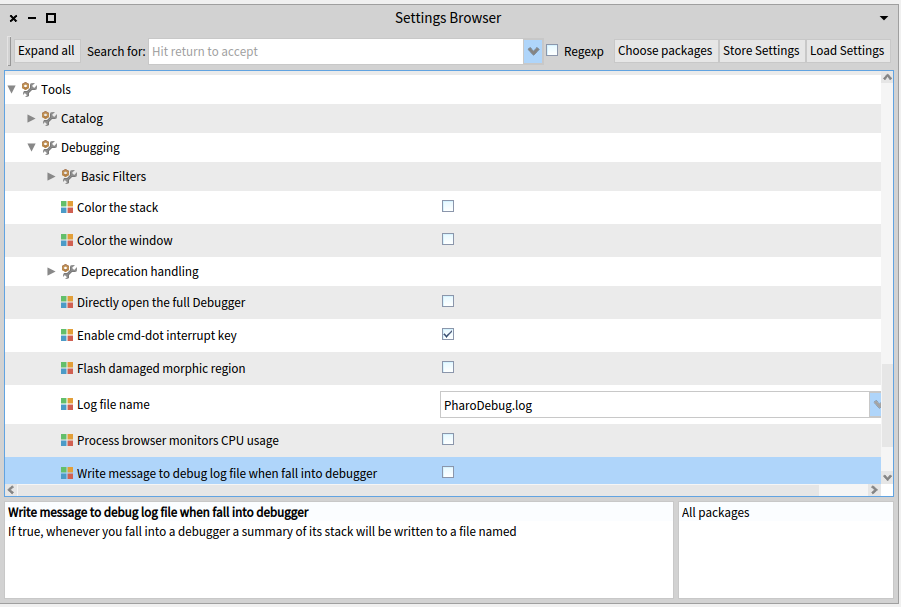
I've finally been able to answer my own question. Execute the following and no more PharoDebug.log and no more stack dump to stdout/stderr (I'm not exactly sure which debugger is being used, so I set both for good luck): Â Â Â DebugSession logDebuggerStackToFile: false. Â Â Â GTGenericStackDebugger logDebuggerStackToFile: false. While writing this message I found that there does appear to be a setting that controls this (I used the double click trick on "Log file name" and followed it to the above messages), but I haven't actually tested it:): On 7/31/19 4:58 PM, Dale Henrichs wrote:
It appears that the PharoDebug.log can be dropped into the directory from which a Pharo image is launched ... I would have expected it to be dropped into the local directory, but that does not appear to be the case ...
I've looked in the Settings Browser and there does not appear to be a way to influence the location of the PharoDebug.log.
I am currently using the `st` command line handler if that is important.
I've googled for PharoDebug.log to no avail.
Any help will be appreciated,
Dale

Dale wrote:
I used the double click trick on "Log file name" and followed it to the above messages
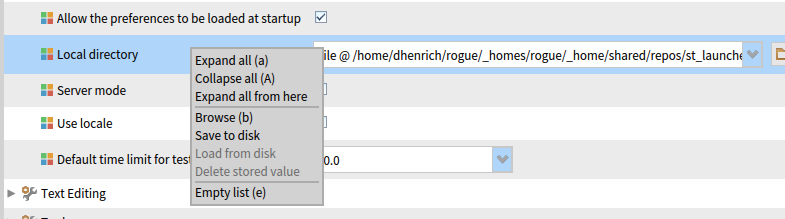
for the records: Beside double click you can also right click on a setting and select "Browse" to find where it is implemented. You can then also "Save" the current settings. The settings framework is described here: http://pharobooks.gforge.inria.fr/PharoByExampleTwo-Eng/latest/Settings.pdf Bye T.
On 8/7/19 11:32 AM, Torsten Bergmann wrote:
Dale wrote:
I used the double click trick on "Log file name" and followed it to the above messages for the records:
Beside double click you can also right click on a setting and select "Browse" to find where it is implemented. You can then also "Save" the current settings.
The settings framework is described here: http://pharobooks.gforge.inria.fr/PharoByExampleTwo-Eng/latest/Settings.pdf
Bye T.
Thanks for the additional information Torsten ... now that you point out the Browse menu, I see that it and double click do the same thing: Back when I was looking for help with the my weird local directory problem and remembered the "double click trick", I interpreted the 'browse` menu item to be mean 'browse the local directory' not 'browse the code the code that implements the settings' ... my bad:) Dale Dale
participants (3)
-
 Dale Henrichs
 -
 Julián Maestri
 -
 Torsten Bergmann