Small background picture extension for DesktopManager

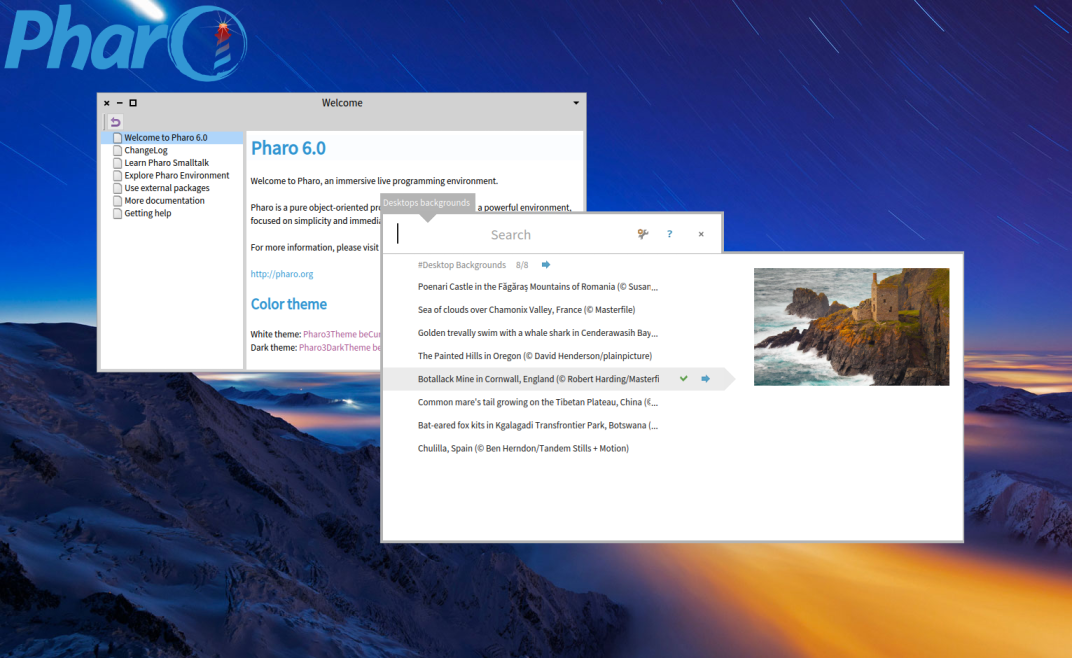
Hi, In latest DesktopManager (available from catalog) package you can now also easily choose a background picture from the "Bing.com" collection in a custom spotter and apply it to the current desktop. See the attached screenshot for an example. The magic key combination is to hit CTRL+ D (like Desktop) followed by CTRL+B (like Background) There is also CTRL + D followed by CTRL + DââââDesktop Displayâ to display all desktops CTRL + D followed by CTRL + AââââDesktop Addâ to add a new desktop CTRL + D followed by CTRL + NââââDesktop Nextâ to go to next desktop CTRL + D followed by CTRL + PââââDesktop Previousâ to go to previous desktop Have fun T.

Torsten Bergmann wrote
In latest DesktopManagerâ¦
Sounds interesting! How does your project compare to TilingWindowManager? ----- Cheers, Sean -- Sent from: http://forum.world.st/Pharo-Smalltalk-Users-f1310670.html

Hi torsten sweet :) Once we will have bloc and brick I would really like to see if we can pay a graphical guy to design a beautiful UI look. Now the background is a step in the direction that it is important to make Pharo looks cool. Stef On Sat, Sep 2, 2017 at 3:09 PM, Sean P. DeNigris <sean@clipperadams.com> wrote:
Torsten Bergmann wrote
In latest DesktopManagerâ¦
Sounds interesting! How does your project compare to TilingWindowManager?
----- Cheers, Sean -- Sent from: http://forum.world.st/Pharo-Smalltalk-Users-f1310670.html
participants (3)
-
 Sean P. DeNigris
 -
 Stephane Ducasse
 -
 Torsten Bergmann