
Hi, I need some testing on Mac OS and Windows, Linux should be fine, of a new bundle for drgeo. It is there https://www.dropbox.com/s/z2acnw1yi77q4ps/DrGeo.app-19.03a.zip?dl=0 I just need to know if it running or not. Thanks Hilaire -- Dr. Geo http://drgeo.eu

Windows 8.1 is ok Cheers, Hernán El lun., 4 feb. 2019 a las 18:46, Hilaire (<hilaire@drgeo.eu>) escribió:
Hi,
I need some testing on Mac OS and Windows, Linux should be fine, of a new bundle for drgeo.
It is there https://www.dropbox.com/s/z2acnw1yi77q4ps/DrGeo.app-19.03a.zip?dl=0
I just need to know if it running or not.
Thanks
Hilaire
-- Dr. Geo http://drgeo.eu

It works fine on Win 10 Pro (Version 10.0.17134 Build 17134). Tomaz -- Sent from: http://forum.world.st/Pharo-Smalltalk-Users-f1310670.html

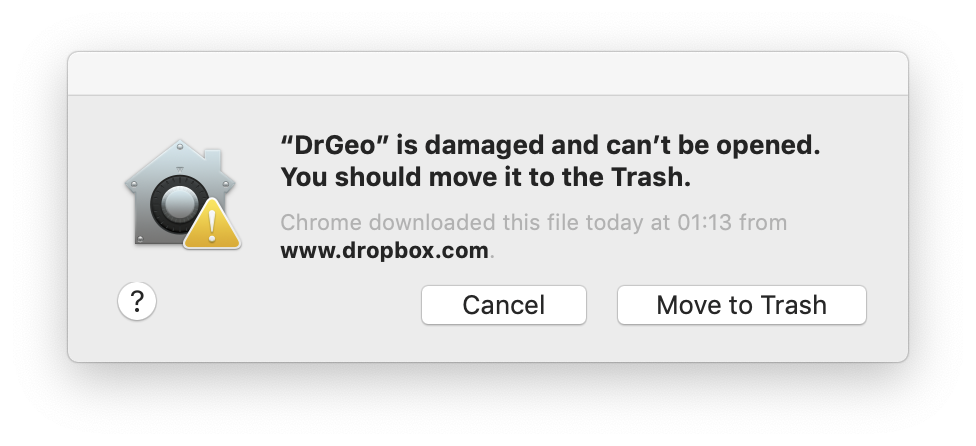
On MaxOS Mojave, the bundle is corrupt [image: Screen Shot 2019-02-05 at 01.20.41.png] On Tue, Feb 5, 2019 at 1:04 AM eftomi <tomaz.turk@ef.uni-lj.si> wrote:
It works fine on Win 10 Pro (Version 10.0.17134 Build 17134).
Tomaz
-- Sent from: http://forum.world.st/Pharo-Smalltalk-Users-f1310670.html

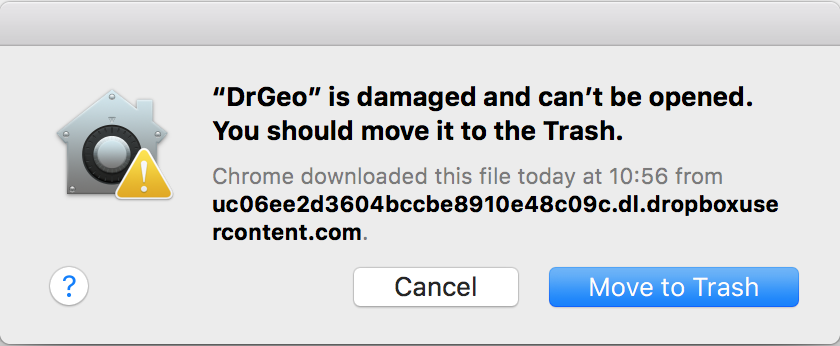
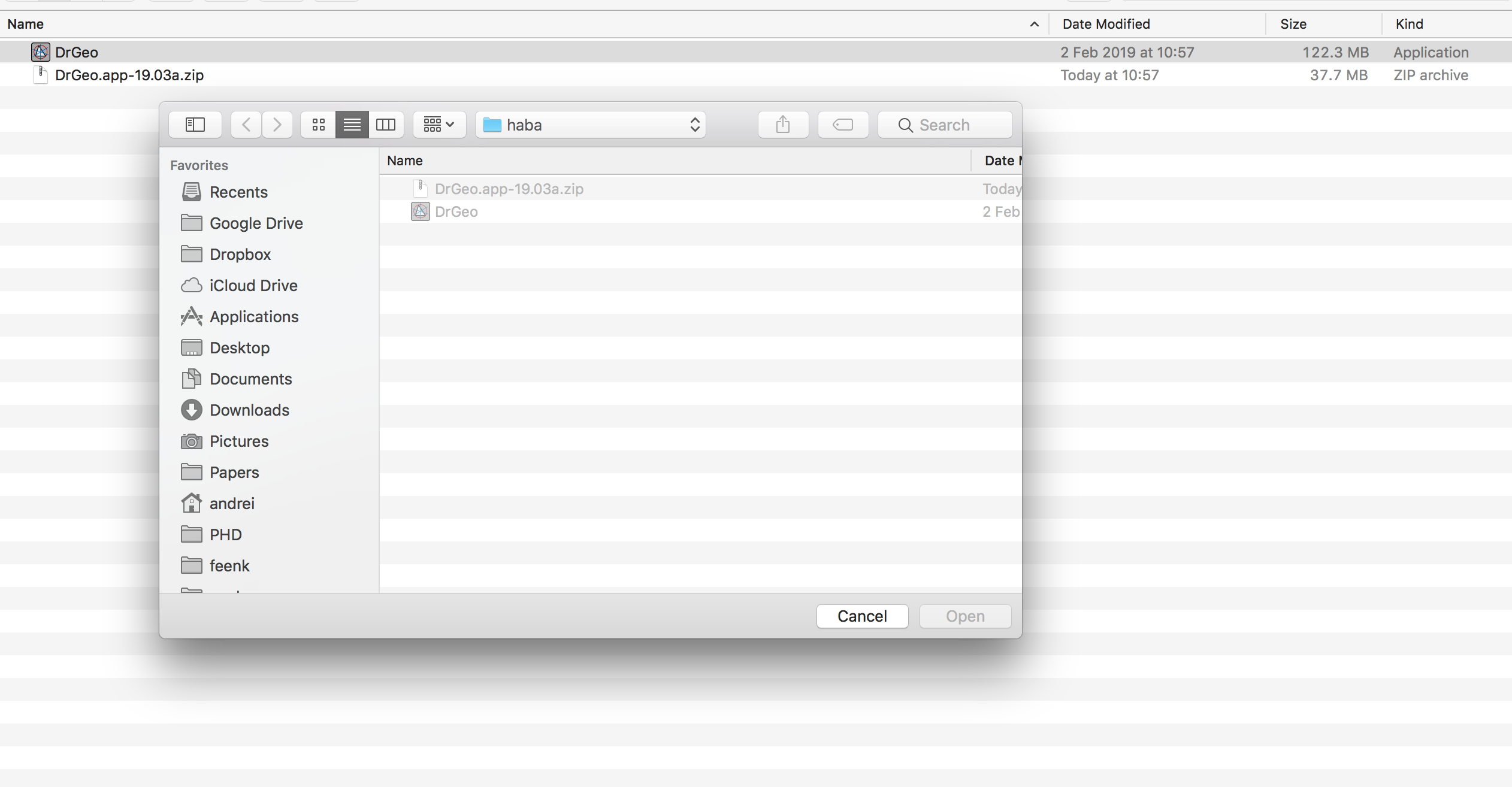
Also broken on macOS High Sierra. [image: Screen Shot 2019-02-05 at 10.56.42.png] But this happens only if I click the download link and use the web browser to download it. If I use wget I can open it but it does not find the image: wget https://www.dropbox.com/s/z2acnw1yi77q4ps/DrGeo.app-19.03a.zip\?dl\=1 [image: Screen Shot 2019-02-05 at 10.58.46.png] I guess the problem is Gatekeeper. It flags dowloaded apps and if they contain executables that are not signed they will be marked as corrupted. If I disable Gatekeeper (spctl --master-disable) then I can also run the zip that I downloaded from the web browser. Cheers, Andrei On Tue, Feb 5, 2019 at 10:26 AM john pfersich <jpfersich@gmail.com> wrote:
On MaxOS Mojave, the bundle is corrupt
[image: Screen Shot 2019-02-05 at 01.20.41.png]
On Tue, Feb 5, 2019 at 1:04 AM eftomi <tomaz.turk@ef.uni-lj.si> wrote:
It works fine on Win 10 Pro (Version 10.0.17134 Build 17134).
Tomaz
-- Sent from: http://forum.world.st/Pharo-Smalltalk-Users-f1310670.html
Thanks John and Andrei. And if you drag the app in the application folder does it work? Le 05/02/2019 à 11:06, Andrei Chis a écrit :
But this happens only if I click the download link and use the web browser to download it.
If I use wget I can open it but it does not find the image:
-- Dr. Geo http://drgeo.eu
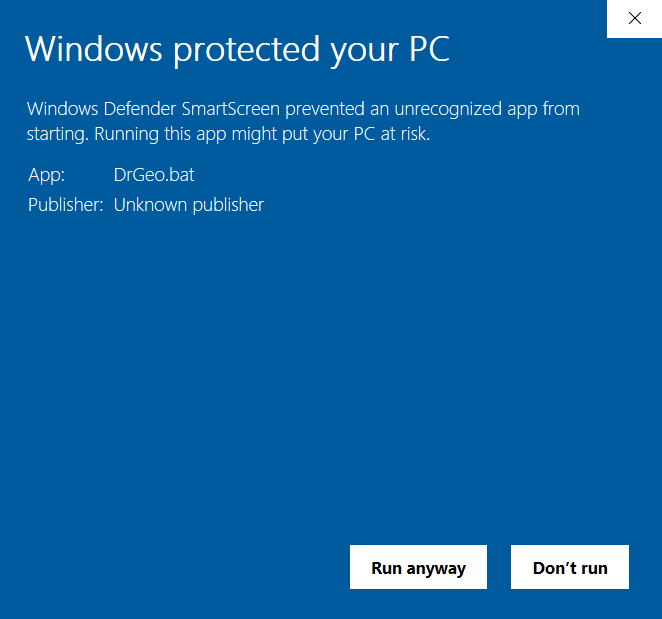
BTW, on Windows 10 the Defender is also not happy at first. Best wishes Tomaz ------ Original Message ------ From: "Hilaire" <hilaire@drgeo.eu> To: pharo-users@lists.pharo.org Sent: 5. 02. 2019 18:50:07 Subject: Re: [Pharo-users] Running test
Thanks John and Andrei.
And if you drag the app in the application folder does it work?
Le 05/02/2019 à 11:06, Andrei Chis a écrit :
But this happens only if I click the download link and use the web browser to download it.
If I use wget I can open it but it does not find the image:
-- Dr. Geo http://drgeo.eu
At least on MacOS Mojave, I had moved the app to the Application folder. /*âââââââââââââââââ-*/ Sent from my iPhone https://boincstats.com/signature/-1/user/51616339056/sig.png See https://objectnets.net and https://objectnets.org
On Feb 5, 2019, at 09:50, Hilaire <hilaire@drgeo.eu> wrote:
Thanks John and Andrei.
And if you drag the app in the application folder does it work?
Le 05/02/2019 à 11:06, Andrei Chis a écrit : But this happens only if I click the download link and use the web browser to download it.
If I use wget I can open it but it does not find the image:
-- Dr. Geo http://drgeo.eu
In the first place? Le 06/02/2019 à 00:45, john pfersich a écrit :
At least on MacOS Mojave, I had moved the app to the Application folder.
-- Dr. Geo http://drgeo.eu
In my case if I download the app using the web browser and put it in the Applications folder I still get `âDrGeoâ is damaged and canât be opened. You should move it to the Trash*.*` On Tue, Feb 5, 2019 at 6:55 PM Hilaire <hilaire@drgeo.eu> wrote:
Thanks John and Andrei.
And if you drag the app in the application folder does it work?
Le 05/02/2019 à 11:06, Andrei Chis a écrit :
But this happens only if I click the download link and use the web browser to download it.
If I use wget I can open it but it does not find the image:
-- Dr. Geo http://drgeo.eu
Can Mac OSX provides more usefull message? Le 06/02/2019 à 14:53, Andrei Chis a écrit :
In my case if I download the app using the web browser and put it in the Applications folder I still get `âDrGeoâ is damaged and canât be opened. You should move it to the Trash*.*`
-- Dr. Geo http://drgeo.eu
In the other hand, I am suspecting this Mac VM[1] downloaded from the Pharo download page may have issue. After all the Linux VM from this same page is defunct as I already report it. I had to get one from the Pharo Launcher. The Windows VM from this same Pharo download page is functional, though. Can someone with an Apple Macintosh confirm this Mac VM[1] is ok? Thanks Hilaire [1] https://files.pharo.org/get-files/70/pharo-mac-stable.zip Le 06/02/2019 à 17:19, Hilaire a écrit :
Can Mac OSX provides more usefull message?
-- Dr. Geo http://drgeo.eu
The Pharo VM works fine for me. My understanding is that the problem is in the DrGeo.app The app packages together two things: - the Pharo VM with is signed - other files/folders that are not signed If gatekeeper (https://developer.apple.com/developer-id/) detects this the it marks the app as damaged. Gatekeeper wants the apps that you download from internet using a web browser to be signed. On Wed, Feb 6, 2019 at 6:07 PM Hilaire <hilaire@drgeo.eu> wrote:
In the other hand, I am suspecting this Mac VM[1] downloaded from the Pharo download page may have issue.
After all the Linux VM from this same page is defunct as I already report it. I had to get one from the Pharo Launcher. The Windows VM from this same Pharo download page is functional, though.
Can someone with an Apple Macintosh confirm this Mac VM[1] is ok?
Thanks
Hilaire
[1] https://files.pharo.org/get-files/70/pharo-mac-stable.zip
Le 06/02/2019 à 17:19, Hilaire a écrit :
Can Mac OSX provides more usefull message?
-- Dr. Geo http://drgeo.eu

For OS X (and possibly Windows) itâs worth understanding how Pharo Launcher creates its installation program as thatâs the way to solve this properly and it makes it look much more polished as well. I think itâs not too hard too do, and you can copy those steps? Tim Sent from my iPhone
On 6 Feb 2019, at 18:11, Andrei Chis <chisvasileandrei@gmail.com> wrote:
The Pharo VM works fine for me.
My understanding is that the problem is in the DrGeo.app The app packages together two things: - the Pharo VM with is signed - other files/folders that are not signed If gatekeeper (https://developer.apple.com/developer-id/) detects this the it marks the app as damaged. Gatekeeper wants the apps that you download from internet using a web browser to be signed.
On Wed, Feb 6, 2019 at 6:07 PM Hilaire <hilaire@drgeo.eu> wrote: In the other hand, I am suspecting this Mac VM[1] downloaded from the Pharo download page may have issue.
After all the Linux VM from this same page is defunct as I already report it. I had to get one from the Pharo Launcher. The Windows VM from this same Pharo download page is functional, though.
Can someone with an Apple Macintosh confirm this Mac VM[1] is ok?
Thanks
Hilaire
[1] https://files.pharo.org/get-files/70/pharo-mac-stable.zip
Le 06/02/2019 à 17:19, Hilaire a écrit :
Can Mac OSX provides more usefull message?
-- Dr. Geo http://drgeo.eu
Can signing the bundle content be done from Linux? Or is it mandatory to do it from OS X?
From what I looked at the Linux Pharo Launcher, I can only fetch image and associated VM for Linux but I may have miss something.
Hilaire Le 06/02/2019 à 21:41, Tim Mackinnon a écrit :
For OS X (and possibly Windows) itâs worth understanding how Pharo Launcher creates its installation program as thatâs the way to solve this properly and it makes it look much more polished as well.
I think itâs not too hard too do, and you can copy those steps?
-- Dr. Geo http://drgeo.eu
I think this is where having a build pipeline might be worth investigating - I think Smalltalk CI might let you automatically build on different machines, such that you can package each build on its native environment in an automated fashion. Maybe Christophe might chip in about how he builds Pharo Launcher? If you can make it automated and based on your git repo - it should simplify a lot for you, and make reliable builds much easier. (If not Smalltalk CI, then there might be others you can use) Tim
On 7 Feb 2019, at 09:40, Hilaire <hilaire@drgeo.eu> wrote:
Can signing the bundle content be done from Linux? Or is it mandatory to do it from OS X?
From what I looked at the Linux Pharo Launcher, I can only fetch image and associated VM for Linux but I may have miss something.
Hilaire
Le 06/02/2019 à 21:41, Tim Mackinnon a écrit :
For OS X (and possibly Windows) itâs worth understanding how Pharo Launcher creates its installation program as thatâs the way to solve this properly and it makes it look much more polished as well.
I think itâs not too hard too do, and you can copy those steps?
-- Dr. Geo http://drgeo.eu
What is Smalltalk CI? Related to Chistophe? Thanks Le 07/02/2019 à 12:05, Tim Mackinnon a écrit :
I think this is where having a build pipeline might be worth investigating - I think Smalltalk CI might let you automatically build on different machines, such that you can package each build on its native environment in an automated fashion. Maybe Christophe might chip in about how he builds Pharo Launcher? If you can make it automated and based on your git repo - it should simplify a lot for you, and make reliable builds much easier. (If not Smalltalk CI, then there might be others you can use)
Tim
-- Dr. Geo http://drgeo.eu
Yes before I tried to start it. /*âââââââââââââââââ-*/ Sent from my iPhone https://boincstats.com/signature/-1/user/51616339056/sig.png See https://objectnets.net and https://objectnets.org
On Feb 6, 2019, at 05:53, Andrei Chis <chisvasileandrei@gmail.com> wrote:
In my case if I download the app using the web browser and put it in the Applications folder I still get `âDrGeoâ is damaged and canât be opened. You should move it to the Trash.`
On Tue, Feb 5, 2019 at 6:55 PM Hilaire <hilaire@drgeo.eu> wrote: Thanks John and Andrei.
And if you drag the app in the application folder does it work?
Le 05/02/2019 à 11:06, Andrei Chis a écrit :
But this happens only if I click the download link and use the web browser to download it.
If I use wget I can open it but it does not find the image:
-- Dr. Geo http://drgeo.eu
I get another different feedback, while not good, it exposes a plugin error. https://twitter.com/gl_4/status/1093004875733106688 First should be to get a starting app with signature warning, then Le 06/02/2019 à 22:02, john pfersich a écrit :
Yes before I tried to start it.Â
-- Dr. Geo http://drgeo.eu
...then look at how signing the functionnal bundle. The 18.06 bundle[1] is not signed and from feedback I got it can start once dragged in the Application folder. [1] https://launchpad.net/drgeo/trunk/18.06/+download/DrGeo.app-18.06a.zip -- Dr. Geo http://drgeo.eu
Ok, one more thing that could be helpful to try and to give me indication: remove the folder DrGeo.app/Contents/_CodeSignature and start again DrGeo.app from the Application folder. What OS X says? Thanks Le 06/02/2019 à 22:02, john pfersich a écrit :
Yes before I tried to start it.Â
-- Dr. Geo http://drgeo.eu
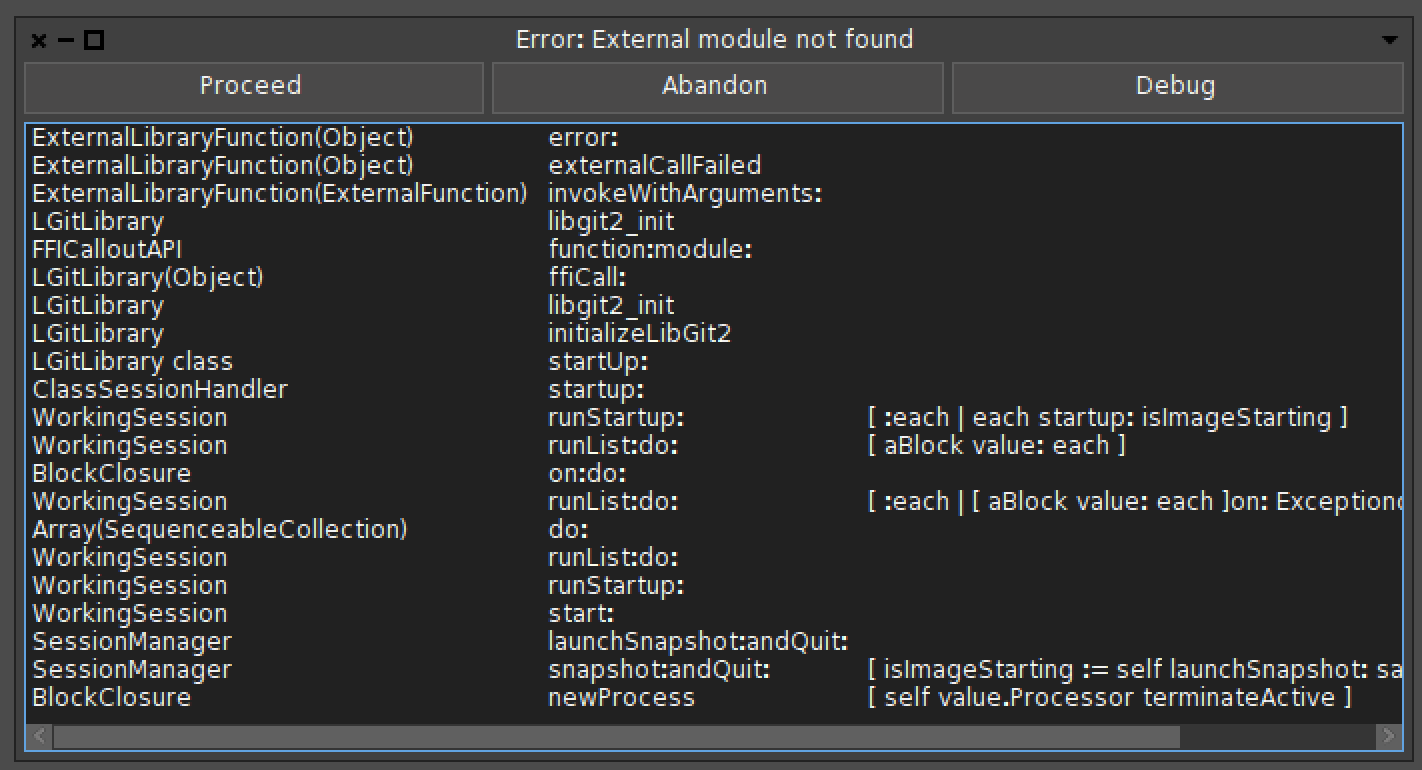
I tried the following: - download DrGeo.app-19.03a.zip <https://www.dropbox.com/s/z2acnw1yi77q4ps/DrGeo.app-19.03a.zip?dl=0> from the web browser, place it in Application and remove _CodeSignature; then it still appears as broken. - download DrGeo.app-19.03a.zip <https://www.dropbox.com/s/z2acnw1yi77q4ps/DrGeo.app-19.03a.zip?dl=0> using wget, place it in Applications and remove _CodeSignature: then it opens and asks for an image. But if I open it I get an error related to libgit. [image: Screen Shot 2019-02-07 at 12.09.21.png] For DrGeo.app-18.06a.zip <https://launchpad.net/drgeo/trunk/18.06/+download/DrGeo.app-18.06a.zip> I get the warning that it is from an unidentified developer but it works fine if I place it in the application folder. To sign an app you need to use MacOS as you need some xcode tool from what I remember. On Thu, Feb 7, 2019 at 11:06 AM Hilaire <hilaire@drgeo.eu> wrote:
Ok, one more thing that could be helpful to try and to give me indication: remove the folder DrGeo.app/Contents/_CodeSignature and start again DrGeo.app from the Application folder.
What OS X says?
Thanks
Le 06/02/2019 à 22:02, john pfersich a écrit :
Yes before I tried to start it.
-- Dr. Geo http://drgeo.eu
On 7 Feb 2019, at 11:15, Andrei Chis <chisvasileandrei@gmail.com> wrote:
To sign an app you need to use MacOS as you need some xcode tool from what I remember.
Its worth checking with Christophe, as he may have automated this (there are tools that can do it - I recall). If Smalltalk CI canât do it - then something like DrGeo might benefit from something like: https://azure.microsoft.com/en-gb/services/devops/pipelines/?&OCID=AID736752... <https://azure.microsoft.com/en-gb/services/devops/pipelines/?&OCID=AID736752...> Free for open source - does linux, windows, osx build pipelines - presumably you can automate this once and for all and save yourself some of this hassle. It seems to suck a lot of your time from the fun stuff otherwise. Tim
So beside the signing problem, I have a problem with the OS X vm. The error is the same I got from the Linux VM referenced in the Pharo download page... I think someone should double check these VMs are ok or not. I will check again the mac os vm in these drgeo bundle. Hilaire Le 07/02/2019 à 12:15, Andrei Chis a écrit :
I tried the following: - download DrGeo.app-19.03a.zip <https://www.dropbox.com/s/z2acnw1yi77q4ps/DrGeo.app-19.03a.zip?dl=0> from the web browser, place it in Application and remove _CodeSignature; then it still appears as broken. - download DrGeo.app-19.03a.zip <https://www.dropbox.com/s/z2acnw1yi77q4ps/DrGeo.app-19.03a.zip?dl=0> using wget, place it in Applications and remove _CodeSignature: then it opens and asks for an image.
But if I open it I get an error related to libgit.
For DrGeo.app-18.06a.zip <https://launchpad.net/drgeo/trunk/18.06/+download/DrGeo.app-18.06a.zip> I get the warning that it is from an unidentified developer but it works fine if I place it in the application folder.
-- Dr. Geo http://drgeo.eu
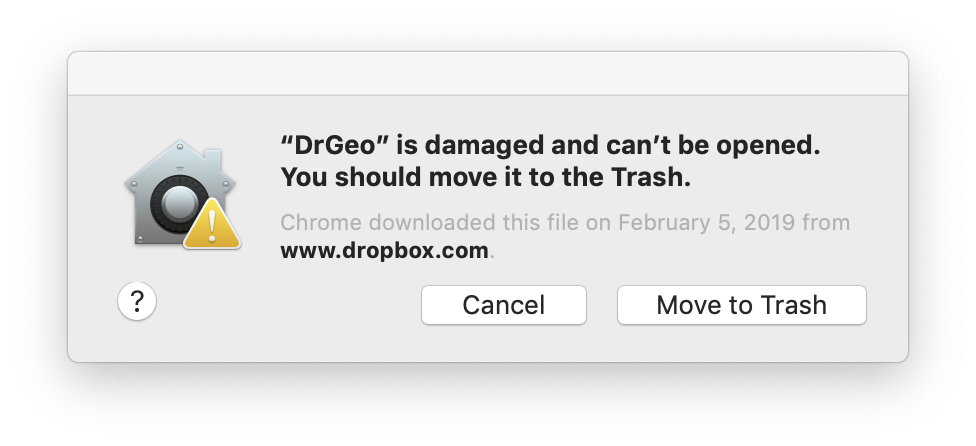
from Mac OS Mojave, i get the following after I delete the _CodeSignature folder: [image: Screen Shot 2019-02-07 at 14.58.56.png] On Thu, Feb 7, 2019 at 2:06 AM Hilaire <hilaire@drgeo.eu> wrote:
Ok, one more thing that could be helpful to try and to give me indication: remove the folder DrGeo.app/Contents/_CodeSignature and start again DrGeo.app from the Application folder.
What OS X says?
Thanks
Le 06/02/2019 à 22:02, john pfersich a écrit :
Yes before I tried to start it.
-- Dr. Geo http://drgeo.eu
Guys, I am voiceless but thanks for your feedback! Regarding some of your feedbacks (plugin error with libgit), I have doubt about this Mac OS VM[1]. Will you be kind enough to confirm this VM works on your system? So I can stand on a solid ground to find a solution for the DrGeo bundle. Thanks Hilaire [1] https://files.pharo.org/get-files/70/pharo-mac-stable.zip PS: I have no Mac or Windows so I am proceeding blindly, as I always did by the way. -- Dr. Geo http://drgeo.eu

On Sun, 10 Feb 2019 at 00:59, Hilaire <hilaire@drgeo.eu> wrote:
Guys, I am voiceless but thanks for your feedback!
Regarding some of your feedbacks (plugin error with libgit), I have doubt about this Mac OS VM[1]. Will you be kind enough to confirm this VM works on your system? So I can stand on a solid ground to find a solution for the DrGeo bundle.
Thanks
Hilaire
[1] https://files.pharo.org/get-files/70/pharo-mac-stable.zip
PS: I have no Mac or Windows so I am proceeding blindly, as I always did by the way.
I've not tried it directly, but an option could be remoting to a Windows cloud box... https://docs.aws.amazon.com/AWSEC2/latest/WindowsGuide/connecting_to_windows... Free tier - 750 hours a month for 12 months... https://aws.amazon.com/ec2/?ft=n cheers -ben
Windows part is fine now, although no signed build. Hilaire Le 10/02/2019 à 02:00, Ben Coman a écrit :
I've not tried it directly, but an option could be remoting to a Windows cloud box... https://docs.aws.amazon.com/AWSEC2/latest/WindowsGuide/connecting_to_windows_instance.htmlÂ
-- Dr. Geo http://drgeo.eu
I have been able to test the VM referenced bellow with drgeo image: drgeo starts but the VM suffers this libgit plugin error, as it is the case for the Linux VM. Is there another working VM to look at? I could try to fetch one from PharoLuncher on Mac OSX, but I only have intermittent access to mac computer. Hilaire Le 09/02/2019 à 17:58, Hilaire a écrit :
Guys, I am voiceless but thanks for your feedback!
Regarding some of your feedbacks (plugin error with libgit), I have doubt about this Mac OS VM[1]. Will you be kind enough to confirm this VM works on your system? So I can stand on a solid ground to find a solution for the DrGeo bundle.
Thanks
Hilaire
[1] https://files.pharo.org/get-files/70/pharo-mac-stable.zip
PS: I have no Mac or Windows so I am proceeding blindly, as I always did by the way.
-- Dr. Geo http://drgeo.eu

HilaireFernandes wrote
I could try to fetch one from PharoLuncher on Mac OSX
I just dl-ed the new Launcher on Mojave and it seems that I had to temporarily disable Gatekeeper via command line to get around a similar error. ----- Cheers, Sean -- Sent from: http://forum.world.st/Pharo-Smalltalk-Users-f1310670.html
You mean the same libgit plugin error? Hilaire Le 13/02/2019 à 03:38, Sean P. DeNigris a écrit :
HilaireFernandes wrote
I could try to fetch one from PharoLuncher on Mac OSX I just dl-ed the new Launcher on Mojave and it seems that I had to temporarily disable Gatekeeper via command line to get around a similar error.
-- Dr. Geo http://drgeo.eu
HilaireFernandes wrote
You mean the same libgit plugin error?
Sorry, I meant the bundle is damaged error ----- Cheers, Sean -- Sent from: http://forum.world.st/Pharo-Smalltalk-Users-f1310670.html
Ok, that sounds as a serious problem then. I am surprised the MacOS X PharoLauncher has problem too. The Linux one is working ok. For drgeo I think I will make three different packages for each os. Le 13/02/2019 à 16:28, Sean P. DeNigris a écrit :
HilaireFernandes wrote
You mean the same libgit plugin error? Sorry, I meant the bundle is damaged error
-- Dr. Geo http://drgeo.eu
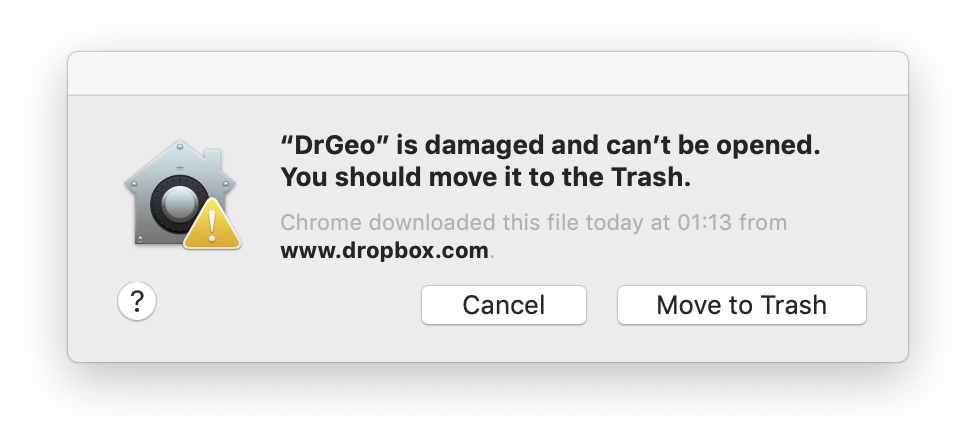
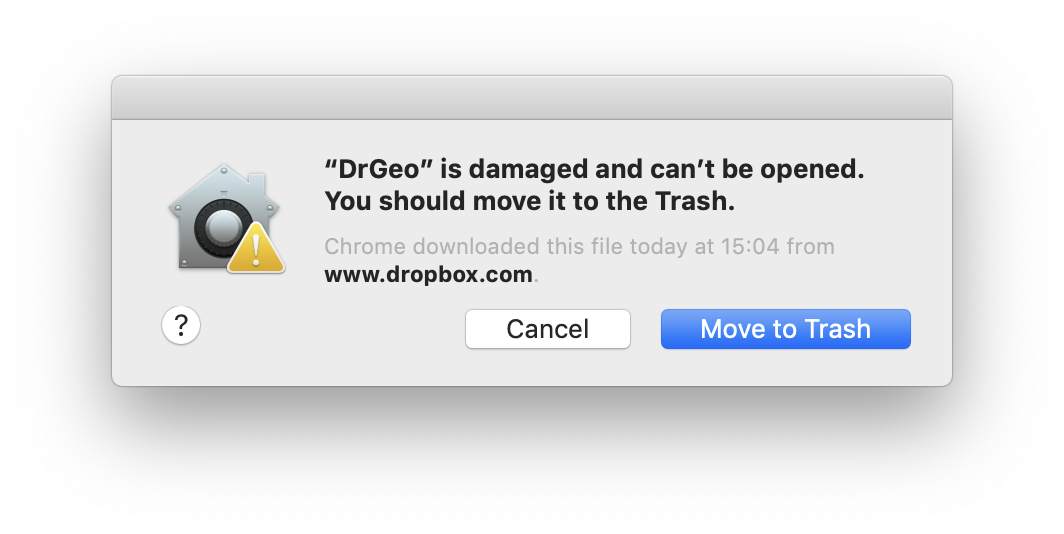
Still get same error message with the new download, can't tell if anything changed in the download. [image: Screen Shot 2019-02-07 at 15.07.48.png] On Mon, Feb 4, 2019 at 1:46 PM Hilaire <hilaire@drgeo.eu> wrote:
Hi,
I need some testing on Mac OS and Windows, Linux should be fine, of a new bundle for drgeo.
It is there https://www.dropbox.com/s/z2acnw1yi77q4ps/DrGeo.app-19.03a.zip?dl=0
I just need to know if it running or not.
Thanks
Hilaire
-- Dr. Geo http://drgeo.eu
Are you running from /Applications? You might also have to right click and select open instead of double clicking. Mac security can make it a bit of a PITA ----- Cheers, Sean -- Sent from: http://forum.world.st/Pharo-Smalltalk-Users-f1310670.html
Yeah, Iâm running DrGeo from Applications. Trying open gives you the same result. Yes, Mojave security is a PITA. But other apps downloaded from the web donât have this problem. But I donât develop on the Mac because of Appleâs paranoid behavior. Iâll stick to Unix, thanks. /*âââââââââââââââââ-*/ Sent from my iPhone https://boincstats.com/signature/-1/user/51616339056/sig.png See https://objectnets.net and https://objectnets.org
On Feb 7, 2019, at 18:25, Sean P. DeNigris <sean@clipperadams.com> wrote:
Are you running from /Applications? You might also have to right click and select open instead of double clicking. Mac security can make it a bit of a PITA
----- Cheers, Sean -- Sent from: http://forum.world.st/Pharo-Smalltalk-Users-f1310670.html
participants (9)
-
 Andrei Chis
 -
 Ben Coman
 -
 eftomi
 -
 Hernán Morales Durand
 -
 Hilaire
 -
 john pfersich
 -
 Sean P. DeNigris
 -
 Tim Mackinnon
 -
Tomaž Turk