On 12 Nov 2013, at 04:11, Bahman Movaqar <Bahman@BahmanM.com> wrote:
On 11/11/2013 22:52, Benjamin wrote:
I do not get the image, but I know what happened :)
Oops! Corrected that.
No problem :)
On 11 Nov 2013, at 20:08, Bahman Movaqar <Bahman@BahmanM.com <mailto:Bahman@BahmanM.com>> wrote:
When a window is resized, every Row/ColumnLayoutdistributes the width and height evenly among any widget or nested layouts it contains. In turn, widgets try to fill as much space as possible. Therefore after resizing text box and button have become so huge and the space between the radio buttons has increased so much. Is that correct?
Itâs correct in the sense it is expected regarding to the layout you use :)
If yes, I have a couple of points to mention:
1. A text box, specially in the case of TextModel and TextInputFieldModel, where it's basically a single line entry (ENTER is not allowed), should not change height (growing width is understandable and desired). The height of a text box (specially a single line one) should only be calculated based on the font family and font size.
TextModel is for more that one line :) TextInputField could eventually be forced to be one line, but I think itâs too much of a restriction.
I am 100% sure I didn't tell TextInputField to accept one line. It doesn't accept ENTER and I don't understand how a "multi-line" text entry widget can work without accepting new line character :-) Yes, TextInputField wraps the text but that's doesn't count as multi-line entry :-) More importantly it is unexpected behaviour from user's PoV; I have never seen a single text entry widget wrap the text.
Or maybe I'm doing something wrong?
I do not understand sorry :(
1.
2. A button should not change height and width, unless specifically mentioned otherwise.
Why ?
Because if the button changes height/width it loses the visual element which users use to recognise buttons across a screen. Just like a single-line text entry, a button's height, if not manually set, is determined only by the font family and font size. And regarding changing the button width, I've very rarely seen applications that resize their buttons when the screen is resized. Usually people put constraints over this. I'm not stating that this definitely should be some UI framework's internal mehcanism. Perhaps a simple method like `isCalculatedSize: aBoolean` with a TRUE default is enough.
Thatâs true changing the size is often not desired. Adding a flag can be a solution :) But as it brings some more complexity in the layouting ( which is already quite too complex and too big) it was not considered until now :)
3. It's not usually desirable that the spacing between radio buttons change.
Thatâs true :) But how to know that two radio buttons are close one to the other ?
Right. That's the reason radio button groups are, AFAIK, always implemented as widgets.
Yes, but morphic do not do that :P Myabe I should introduce a model for that, and have my own encapsulation :)
4. Usually there's a way to specify how to distribute the width/height between layouts and widgets inside a layout (usually based on a percentage).
There in spec as well :) You can have a look at: add:origin:corner:offsetOrigin:offsetCorner:
Hmm...couldn't figure out the logic. Though it seems simple when looking at the code :-)
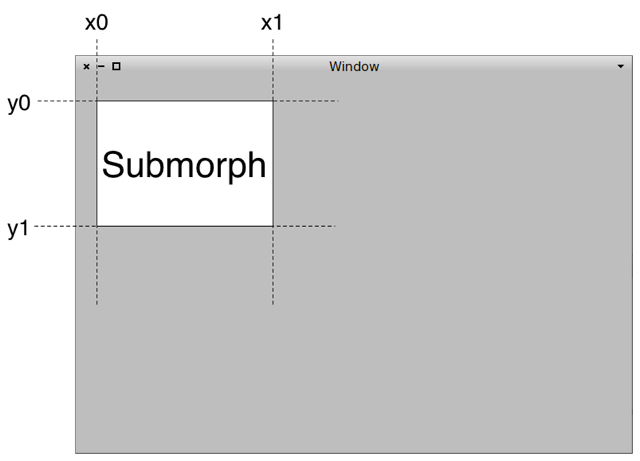
Here you entrer in some twilight zone :P add:origin:corner:offsetOrigin:offsetCorner: This screen shows an origin in x0,y0 and a corner in x1,y1. Their values are between 0 and 1, and represent a _proportional_ value of the container. Then, each of this corners can be shifted in x and y by a _fixed_ value (in pixels) Ben
The best case I could get was a button with fixed width but a variable height. Could you please help me out a bit here?
-- Bahman Movaqar (http://BahmanM.com)
ERP Evaluation, Implementation & Deployment Consultant PGP Key ID: 0x6AB5BD68 (keyserver2.pgp.com)