I was used to "format & accept", it was Ctrl+Shift+S (Accept/Save was Ctrl+S). Ctrl+F is a commonly used shortcut for "Format code". I tend to use the dialect formatter by default when saving, because that way everytime I do a refactoring the resulting code will have the same formatting rules as the original one. So my vote goes for Ctrl+Shift+S (or Cmd+Shift+S). Regards. Esteban A. Maringolo 2013/6/12 Mariano Martinez Peck <marianopeck@gmail.com>
hheheh sorry, I forgot to be clearer ;) I was asking a shortcut for that, besides the menu entry :) Thanks sven!
On Wed, Jun 12, 2013 at 9:18 AM, Sven Van Caekenberghe <sven@beta9.be>wrote:
On 12 Jun 2013, at 14:10, Mariano Martinez Peck <marianopeck@gmail.com> wrote:
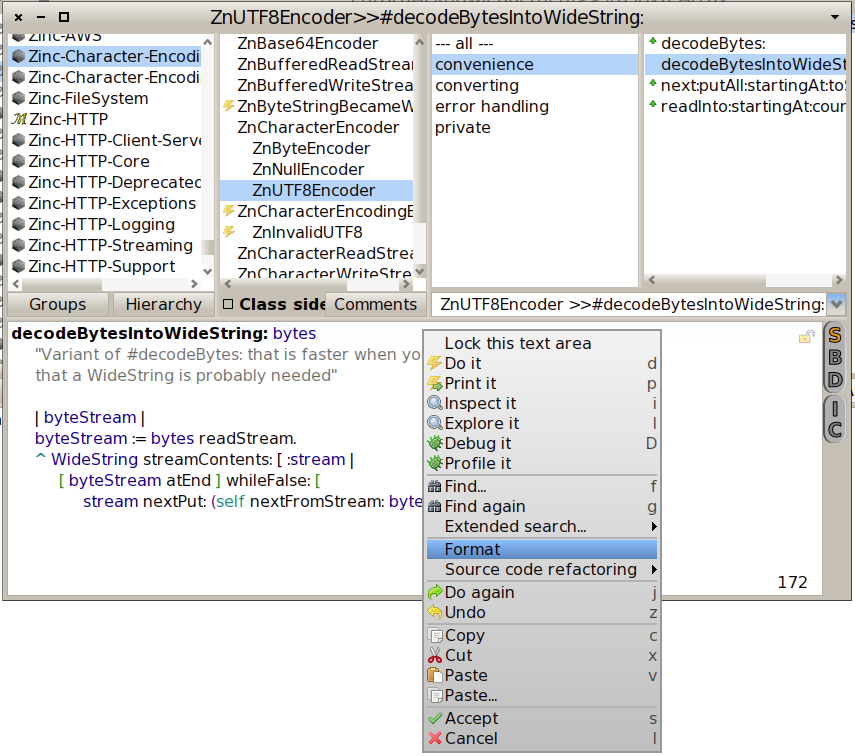
And what about the simple "format" which used to be with ctrl+r ? Is it somehow available in Nautilus in Pharo 2.0?
You are getting old Mariano, it is right there:
;-)
On Wed, Jun 12, 2013 at 4:31 AM, Guillermo Polito < guillermopolito@gmail.com> wrote: I'd love to have a setting enabling that! <3
On Tue, Jun 11, 2013 at 11:39 PM, Stéphane Ducasse < stephane.ducasse@inria.fr> wrote: not that I know but I would really like to experiment with such feature.
On Jun 11, 2013, at 7:05 PM, Paul DeBruicker <pdebruic@gmail.com> wrote:
Is there a way to set the browser to auto format on save or display in pharo 2?
Thanks
-- Mariano http://marianopeck.wordpress.com
-- Mariano http://marianopeck.wordpress.com