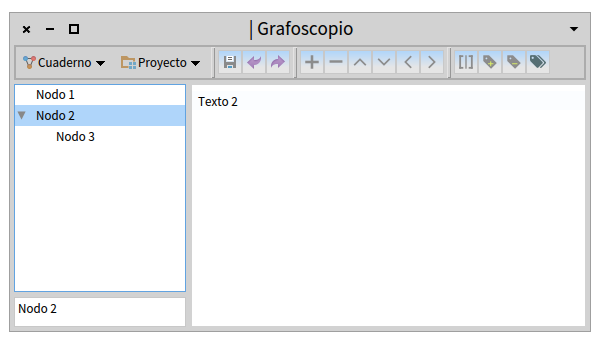
Hi, Thanks to NIcolai's help with his minimalist example I'm on track now and finally I have started to understand better the events in Spec. My problem was in the incorrect use of whenHighlightedItemChanged. Now the code its working fine and I can browse the tree and see the related contents on the respective UI panels (see attached screenshot and code at [*] at the end to see how was solved). Now I'm facing another issue: As you can see in the attached screenshot the UI has four parts: A tool bar above all, a tree with the node title (called node header) at left and a bigger panel at right with node contents (called node body). I would like to make the node body behave in a similar way as in my previous non-Spec interface, so it can react differently according to the node tags. If the node is tagged as code, it will become a playground with node contents inside such playground. If node is not tagged it will be a text like now (this is already working). So my questions are: 1) How can I populate a Spec-Glamour playground with a particular text code? 2) How can I initializeWidgets with some kind of conditions depending on the kind of selection I have done on the tree? At this moment my initializeWidgets look like this: ==[2a]=========== GrafoscopioGUI>>initializeWidgets "Buils graphical interface elements" windowMainMenu := self windowMainMenu. tree := self tree. nodeHeader := self newTextInput. nodeBody := tree selectedItem notNil ifTrue: [ self updateBody ] ifFalse: [nodeBody := self newText]. windowMainMenu applyTo: self. self focusOrder add: windowMainMenu; add: tree; add: nodeHeader; add: nodeBody. ================ and my updataBody (where I think that this conditional behavior could be looks like this: ==[2b]=========== GrafoscopioGUI>>updateBody "update the displayed content associated to the body of a node" (tree selectedItem content tags = 'código') ifTrue: [ ^ nodeBody text: 'I should be playground because I am tagged as ', tree selectedItem content tags ] ifFalse: [ ^ nodeBody text: tree selectedItem content body ] ================ So, more precisely, what I need to put in the ifTrue part of [2b] to make the interface to return a playground with pre-populated code? (is it the proper place?) Finally, here is the code that made the tree update properly, just for the curious ones. ==[*]============ GrafoscopioGUI>>tree | notebook | notebook := GrafoscopioNode new becomeDefaultTestTree. tree := TreeModel new. tree roots: notebook children; childrenBlock: [:node | node children]; displayBlock: [:node | node title ]. tree whenHighlightedItemChanged: [tree selectedItem notNil ifTrue: [ self updateHeader. self updateBody. ] ]. ^ tree ================ Cheers, Offray On 03/01/16 18:33, Offray Vladimir Luna Cárdenas wrote:
Thanks again Nicolai! I will start from here :-).
Offray
On 03/01/16 18:20, Nicolai Hess wrote:
2016-01-03 23:52 GMT+01:00 Offray Vladimir Luna Cárdenas <offray@riseup.net>:
Hi,
On 03/01/16 08:45, Nicolai Hess wrote:
There is any way to run a minimal GUI with a tree using your example? I'm still missing a key concept on how to use spec and binding between widgets.
what is missing ? this is a minimal gui with a tree component.
Ohh, what is missing is not in the example, but in my understanding on how to use/start it. I would expect for something like "example openWithSpec" to start deconstructing it, but I'm still lost about it. I will be working on it today and tomorrow to see if I can come with better questions.
Ok, for this example you can just start it with:
TreeDemo new openWithSpec
It opens a window with two panes, the upper pane shows a tree with some nodes (subclasses of class Morph) The lower pane shows the text(name) of the selected node. You can change and accept (cmd+s) the text in the lower pane, which will update the name of the tree node.
Cheers,
Offray