Ben Coman <mailto:btc@openInWorld.com> 24 May 2014 4:51 pm I discovered that instead of modifying PRLaTeXCommand>>name: , that in PRLaTeXWriter>>visitAnnotatedParagraph: I could do... 'dothis' = anAnnotatedParagraph annotation asLowercase ifTrue: [ canvas newLine. "<----THIS LINE ADDED" ^ canvas command name: 'dothis' ; parameter: [ super visitAnnotatedParagraph: anAnnotatedParagraph ] ]. which seems better, but maybe still not the best. cheers -ben
Damien Cassou <mailto:damien.cassou@gmail.com> 24 May 2014 8:24 pm
that's the right way I guess, thank you for your contribution. Please add related unit tests.
-- Damien Cassou http://damiencassou.seasidehosting.st
"Success is the ability to go from one failure to another without losing enthusiasm." Winston Churchill
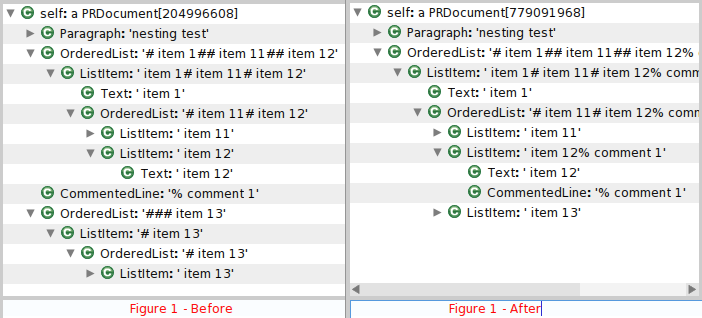
I started looking into the unit tests and it is interesting how the tests seem to be structured to align with the visitor pattern, with PRDocumentWriterTest defining many tests once which refer to methods returning requirements-strings that are overridden in subclasses. Now PRDocumentWriterTest currently has no test for annotations, and PRMarkdown>>visitAnnotatedParagraph: says "Pier seems to lack consistency here ...", so I thought I might have a go at ironing that out. To learn a bit more about the system I tried each of the exporters and found a problem with comments where they break lists, which is a bit constraining. This can be demonstrated with the following file "test.pier"... nesting test # item 1 ## item 11 ## item 12 % comment 1 ## item 13 with the shell command... pharo pillar.image pillar export --to=pillar test.pier which produces... nesting test # item 1 ## item 11 ## item 12 % comment 1 # ## item 13 which is different from the original with the addition of the second last line. I would expect the output to be the same. Tracing through, I observe the #add: in the last line of... PRCommentedLine class >> parse: aString with: aParser | stream content | stream := aString readStream. stream next: self markup size. content := stream upToEnd. ^ aParser add: (self content: content) puts the CommentedLine under the first level of the PRDocument and a new OrderedList is created (Figure 1 - Before). Now by changing that last line to... ^ aParser addNested: (self content: content) the CommentedLine is placed under the ListItem and a new OrderedList is not created (Figure 1 - After), and --to=pillar produces... nesting test # item 1 ## item 11 ## item 12 % comment 1 ## item 13 identical to the original. In the attached MCZ I added... PRDocumentParser >> addNested: anObject self addNested: anObject to: self document PRDocumentParser >> addNested: anObject to: aGroup aGroup children isEmpty ifTrue: [ ^ aGroup add: anObject ]. aGroup children last isGroup ifTrue: [ ^ self addNested: anObject to: aGroup children last ] . ^ aGroup add: anObject. PRDocumentItem >> isGroup ^false PRDocumentGroup >> isGroup ^true For completeness, here are the other output formats. --to=markdown before produces... nesting test 1. item 1 1. item 11 2. item 12 1. 1. item 13 --to=markdown after produces... nesting test 1. item 1 1. item 11 2. item 12 3. item 13 --to=text before produces... nesting test 1. item 1 1. item 11 2. item 12 1. 1. item 13 --to=text after produces... nesting test 1. item 1 1. item 11 2. item 12 3. item 13 --to=latex before produces... \begin{document} nesting test \begin{enumerate} \item item 1 \begin{enumerate} \item item 11 \item item 12 \end{enumerate} \end{enumerate} \begin{enumerate} \item \begin{enumerate} \item item 13 \end{enumerate} \end{enumerate} \end{document} --to=latex after produces... \begin{document} nesting test \begin{enumerate} \item item 1 \begin{enumerate} \item item 11 \item item 12 \item item 13 \end{enumerate} \end{enumerate} \end{document} --to=html before produces... <div class="container"> <p>nesting test</p> <ol><li> item 1 <ol> <li>item 11</li> <li>item 12</li> </ol> </li></ol> <ol><li> <ol><li>item 13</li></ol> </li></ol> </div> --to=html after produces... <div class="container"> <p>nesting test</p> <ol><li>item 1 <ol> <li>item 11</li> <li>item 12</li> <li> item 13</li> </ol> </li></ol> </div> So, thats a small start. Anything obvious it might break? cheers -ben