Here is what Ubuntu 14.04 running under VMWare 10 on Windows 8.1 gives (using 3D hardware acceleration): philippeback@ubuntu:~$ /usr/lib/nux/unity_support_test -p OpenGL vendor string: VMware, Inc. OpenGL renderer string: Gallium 0.4 on SVGA3D; build: RELEASE; OpenGL version string: 2.1 Mesa 10.3.2 Not software rendered: yes Not blacklisted: yes GLX fbconfig: yes GLX texture from pixmap: yes GL npot or rect textures: yes GL vertex program: yes GL fragment program: yes GL vertex buffer object: yes GL framebuffer object: yes GL version is 1.4+: yes Unity 3D supported: yes Phl On Sat, Nov 28, 2015 at 11:13 PM, Ronie Salgado <roniesalg@gmail.com> wrote:
Hi Stef,
I think that this is important that people can pick different
("compatible") driver/framework back-end. You see if Woden is only built to work on something that does not run on mac or windows then it will be limited.
The problem is not Window or Mac. The problem is Linux.
We are having some discussion on this with Alex on this. I am going to try to remove the requirement on that extension by providing a fallback method for the selection, that does not require that extension. Then I will test it in my laptop by selecting the Intel driver (My laptop has the integrated Intel card in the CPU and a dedicated AMD graphics cards).
However Woden-Roassal relies a lot on hardware instancing support to be able to draw a lot of dynamic cubes. The alternative is to use a vertex buffer and index buffer that holds all of the transformed visible geometry that is updated on each frame in the worst case scenario. In the best case scenario (static cubes or objects), they are updated only once. This relies a lot on the CPU because all of the transformations has to be done manually on the CPU.
This is not a hardware problem, this is a drivers problem because OpenGL is huge, complex, unefficient, does not represent the graphics hardware. The Mesa Open Source guys are not able to keep pace with the extension hell known as OpenGL. In Ubuntu 14.04 Mesa supports up until OpenGL 3.0 compatibility profile, and OpenGL 3.1 core profile. The current version of OpenGL is 4.5. Each version of OpenGL has a different version of GLSL (OpenGL Shader Language), which makes harder to stick with one reasonable subset and then support features depending on which hardware you are running. In contrast, if you are developing for Direct3D in Windows, you only need to choose between Direct3D 9(Windows XP), 11(Vista I think/7/8), 12(Windows 10) and thats it. In Direct3D you do not have to deal with hardware vendor extensions because there are not extensions.
By using instancing, I have a buffer with the geometry of a single cube or shape. Then I have another buffer with the transformation and color of each cube or simple shape. When updating the position, size or color of an element I only have to change a single entry in this buffer.
The original Roassal 3D used a draw call per element. This more flexible, but a lot slower. 20.000 cubes in Roassal3D vs 300.000-600.000 in Woden-Roassal visibles at the same time. The overhead of a draw call is produced because some validations are made by the OpenGL driver for each draw call.
A draw call per-element is only reasonable when using Direct3D 12(Window), Metal(iOS, OS X) or Vulkan (Linux, Windows and mobiles) because there are designed to remove the overhead of draw calls. This is the approach that I am going to use in Woden 2 via an abstraction layer that I am making in C/C++ above the graphics API. Currently I have a backend for Direct3D 12 and OpenGL 4.x (it should be possible to use OpenGL 3.3, but I need to test it). I made the OpenGL backend because Vulkan has not been released yet. It is impossible to get the best performance by using the OpenGL backend because of its design. In theory it should be possible to make a backend for OpenGL 2.0 and OpenGL 2.0 ES, but it will be really hard to do. And it will not have a good performance.
Greetings, Ronie
2015-11-28 14:41 GMT-03:00 stepharo <stepharo@free.fr>:
Ronie
I think that this is important that people can pick different ("compatible") driver/framework back-end. You see if Woden is only built to work on something that does not run on mac or windows then it will be limited.
Stef
Le 25/11/15 00:14, Ronie Salgado a écrit :
What do you mean with "modern"?
By modern I mean a graphics card a with graphics driver that supports at least OpenGL 4.x. That Intel HD graphics card is capable of supporting at least OpenGL 4.2, but the Open Source Mesa driver gives you support up until OpenGL 3.1. Unfortunately, unlike with AMD or NVIDIA graphics cards, the open source driver is the official driver.
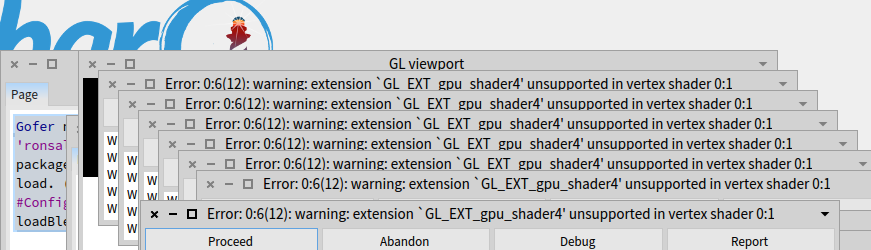
Woden-Roassal requires integer arithmetic in shaders which is used to support the selection of objects. Integer arithmetics in shaders requires at least OpenGL 3.3, or the missing extension for which you are receiving the error.
It is not required by the Woden-Core api, so you should be able to try the following in a workspace:
WDFPSSimpleExample6 new open
My notebook with an HD Graphics 4400 has no problems with all "three.js"
demos found here http://threejs.org/.
Three.js or any WebGL based example is a bad test for that graphics card. WebGL is based in OpenGL ES 2.0 which is a subset of OpenGL 2.0. This is a very old technology for that graphics card.
Woden will be using Vulkan in the future. According to this Phoronix article ( http://www.phoronix.com/scan.php?page=news_item&px=LunarG-Vulkan-AMA), Valve has already made a proper Vulkan driver for the Intel graphics cards. We only need an official release of the Vulkan spec.
Best regards Ronie
2015-11-24 18:50 GMT-03:00 Volkert <volkert@komponentenwerkstatt.de>:
My notebook with an HD Graphics 4400 has no problems with all "three.js" demos found here http://threejs.org/.
What do you mean with "modern"?
On 24.11.2015 22:25, Ronie Salgado wrote:
You need a modern graphics card. Open source graphics drivers are not supported because there are very behind in their implementations of OpenGL.
2015-11-24 17:28 GMT-03:00 Volkert < <volkert@komponentenwerkstatt.de> volkert@komponentenwerkstatt.de>:
But not on my linux box .... ubuntu 14.04 :-(
On 24.11.2015 21:03, Alexandre Bergel wrote:
Woden works in Pharo 5.0 I have just tried.
Alexandre -- _,.;:~^~:;._,.;:~^~:;._,.;:~^~:;._,.;:~^~:;._,.;: Alexandre Bergel <http://www.bergel.eu>http://www.bergel.eu ^~:;._,.;:~^~:;._,.;:~^~:;._,.;:~^~:;._,.;:~^~:;.
On Nov 24, 2015, at 3:15 PM, Volkert < <volkert@komponentenwerkstatt.de>volkert@komponentenwerkstatt.de> wrote:
Cool ...
Which Pharo Version? I tried Pharo 4.0 and got this error:
<edcefcdd.png>
On 24.11.2015 12:50, Alexandre Bergel wrote:
Do we have a tutorial? i found only <http://woden.ronie.cl> http://woden.ronie.cl.
What about mouse control and object selection. It that possible?
Yes.
To load Woden:
Gofer new smalltalkhubUser: 'ronsaldo' project: 'Woden'; package: 'ConfigurationOfWoden'; load. (Smalltalk at: #ConfigurationOfWoden) loadBleedingEdge.
Try: =-=-=-==-=-=-==-=-=-==-=-=-= v := RWView new.
1 to: 100 do: [ :i | e := RWCube element. e when: RWMouseButtonDown do: [ :ev | ev element shape color: WDColor green. ev element changed. ]. v add: e. ]. RWXZGridLayout on: v elements. v addInteraction: RWMouseKeyControl. v camera position: (WDVector3 x: 0.0 y: 0.0 z: 3.0). v open =-=-=-==-=-=-==-=-=-==-=-=-= Use the keys A S D W and the moose to navigate. Click on cube to make them green
<Mail Attachment.png>
Cheers, Alexandre
BW, Volkert
On 22.11.2015 21:10, Alexandre Bergel wrote:
We have also put quite some effort on Woden, a 3d engine for Pharoâ¦
Cheers, Alexandre
On Nov 22, 2015, at 2:56 PM, Dimitris Chloupis < <kilon.alios@gmail.com>kilon.alios@gmail.com> wrote:
its possible via my Ephestos project, to render to video or real time but the project is still very much a WIP. Its doable but require some python knowledge and knowledge of Blender UI and API. I will be making a true Pharo API for it fairly soon but as you can imagine these things take time.
On Sun, Nov 22, 2015 at 6:35 PM Volkert < <volkert@komponentenwerkstatt.de>volkert@komponentenwerkstatt.de> wrote: Is this possible with Pharo?
<http://www.asterank.com/3d/>http://www.asterank.com/3d/
BW, Volkert