Hey, I wrote a six line README on https://github.com/pillar-markup/Pillar.tmbundle and you miss the latest step apparently ;-) - Open TextMate preferences and add these 2 shell variables : - PHARO_VM that gives the absolute path to the PharoVM Example: /Users/bob/Pharo/VirtualMachines/pharo - PILLAR_IMAGE that gives the absolute path to the image to use for processing Pillar files Example: /Users/bob/Repositories/PharoBooks/BookSkeleton.git/Pharo.image #Luc 2015-04-25 22:15 GMT+02:00 stepharo <stepharo@free.fr>:
hi luc
I did
git clone https://github.com/pillar-markup/Pillar.tmbundle cd Pillar.tmbundle open . and mate asked me if I want to plugin did yes
commd-R
Typeset and view: line 15: pillar: command not found cat: /Users/ducasse/Workspace/FirstCircle/MyBooks/Bk-Writing/PharoBooks/FunWithPharo/TinyChat/TinyChat.pillar.html: No such file or directory
What is the pillar command?
Stef
Le 25/4/15 11:42, Cyril Ferlicot a écrit :
Thank you ! :)
Le samedi 25 avril 2015, Luc Fabresse <luc.fabresse@gmail.com> a écrit :
Hi Happy Pharoers,
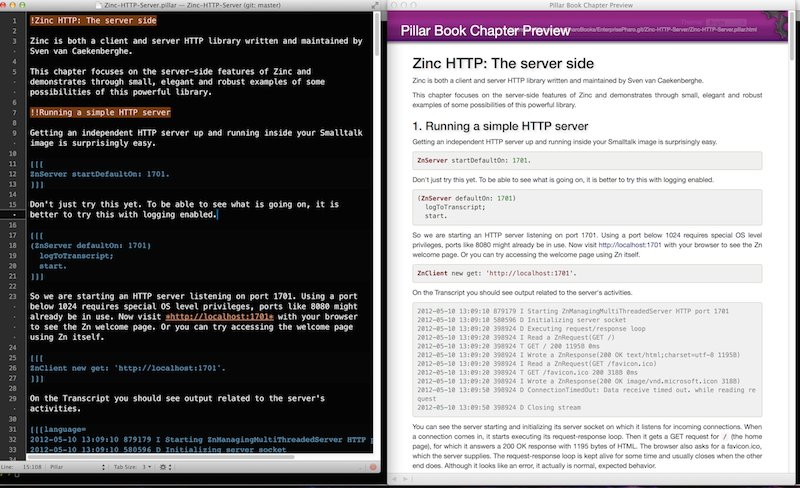
Since I am editing more and more Pillar files these days, I enhanced the Pillar TextMate2 plugin made by Uko (thanks ;-)) to easily have a web preview (just by pressing âR).
The plugin is here: https://github.com/pillar-markup/Pillar.tmbundle
Have fun,
#Luc
[image: Images intégrées 2]Hi
-- Cheers Cyril Ferlicot