[Pharo-project] SmartSuggestions - Prototype 0

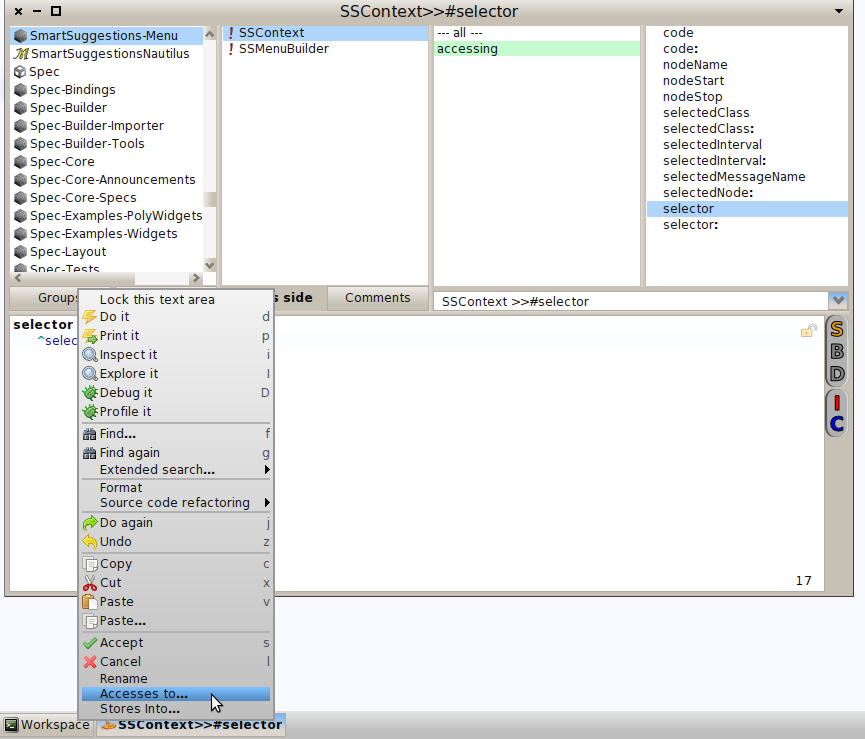
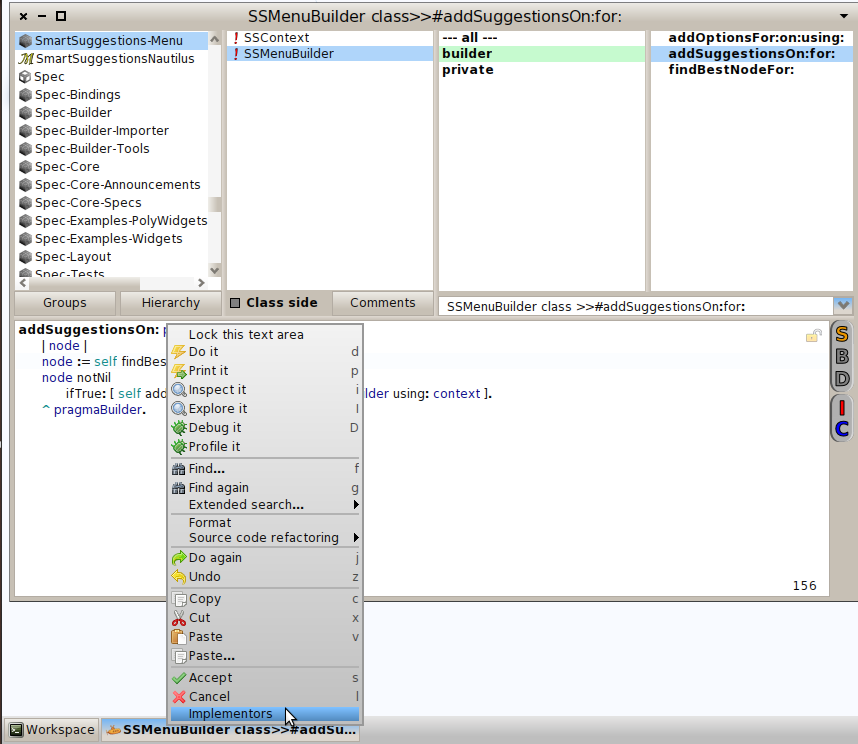
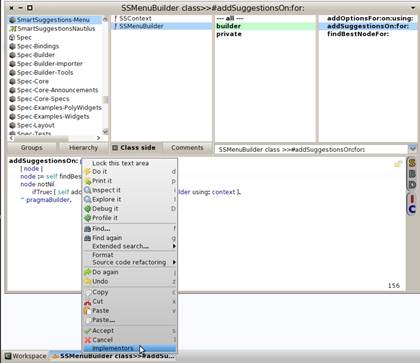
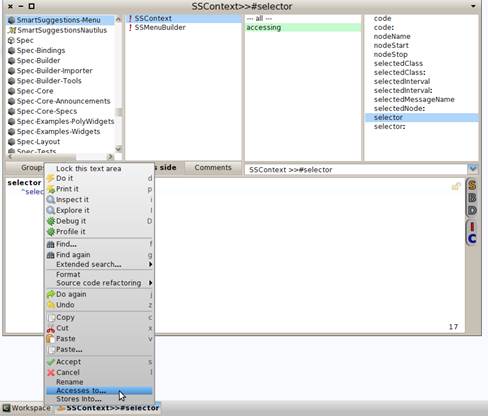
Hello, I've been working in a prototype for adding some suggestions to the menu depending on what it's selected with the cursor. (The same feature that ALT-Browser has, but now in Nautilus). It's just a little piece of code and has a lot of pending work, right now you can press right click over a message send and offers you browse implementors: [image: Imágenes integradas 1] And if you are in an instance variable name and then right click: [image: Imágenes integradas 2] (The same that ALT-Browser is doing, but in Nautilus) I developed in the latest 2.0 image. So, if you want to load in your image, play a little and then give me some feedback... Gofer it smalltalkhubUser: 'gisela' project: 'SmartSuggestions'; package: 'SmartSuggestions'; package: 'SmartSuggestionsNautilus'; load. :)

cool On Wed, Apr 10, 2013 at 2:18 PM, Gisela Decuzzi <giseladecuzzi@gmail.com>wrote:
Hello, I've been working in a prototype for adding some suggestions to the menu depending on what it's selected with the cursor. (The same feature that ALT-Browser has, but now in Nautilus).
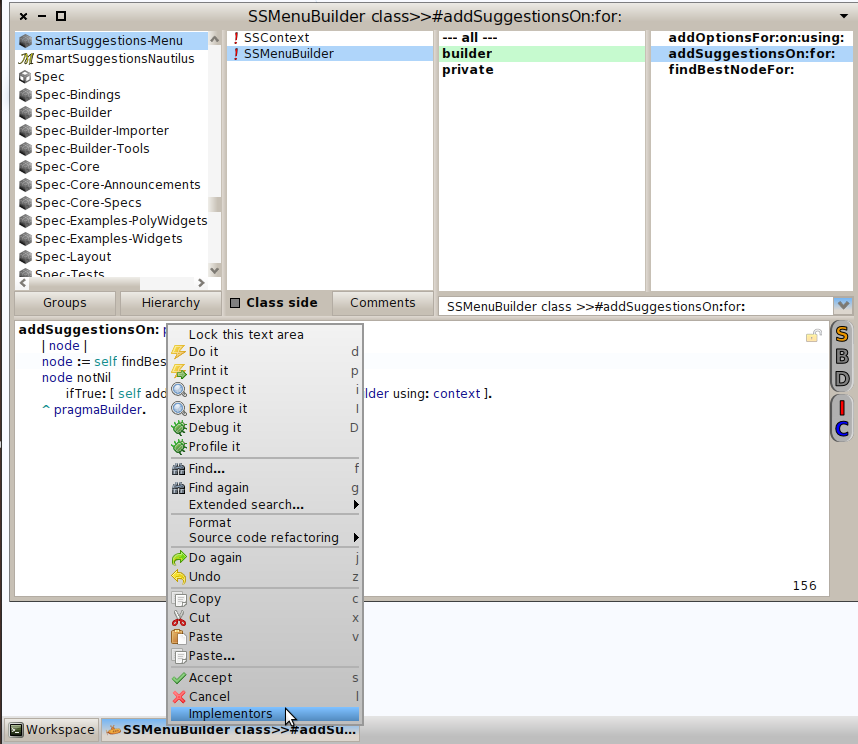
It's just a little piece of code and has a lot of pending work, right now you can press right click over a message send and offers you browse implementors: [image: Imágenes integradas 1]
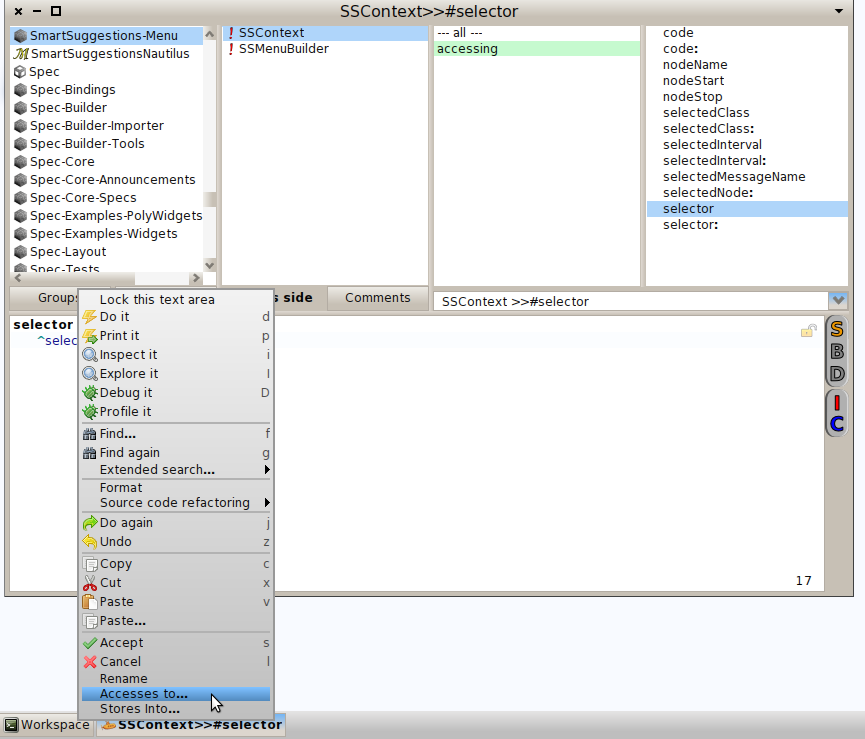
And if you are in an instance variable name and then right click: [image: Imágenes integradas 2] (The same that ALT-Browser is doing, but in Nautilus)
I developed in the latest 2.0 image.
So, if you want to load in your image, play a little and then give me some feedback...
Gofer it smalltalkhubUser: 'gisela' project: 'SmartSuggestions'; package: 'SmartSuggestions'; package: 'SmartSuggestionsNautilus'; load.
:)

+1 We will have a little shiny system :) We are getting there. :) lallalalallala and Spring is finally arriving
cool
On Wed, Apr 10, 2013 at 2:18 PM, Gisela Decuzzi <giseladecuzzi@gmail.com> wrote: Hello, I've been working in a prototype for adding some suggestions to the menu depending on what it's selected with the cursor. (The same feature that ALT-Browser has, but now in Nautilus).
It's just a little piece of code and has a lot of pending work, right now you can press right click over a message send and offers you browse implementors: <Implementors.png>
And if you are in an instance variable name and then right click: <InstanceVariablesOptions.png> (The same that ALT-Browser is doing, but in Nautilus)
I developed in the latest 2.0 image.
So, if you want to load in your image, play a little and then give me some feedback...
Gofer it smalltalkhubUser: 'gisela' project: 'SmartSuggestions'; package: 'SmartSuggestions'; package: 'SmartSuggestionsNautilus'; load.
:)

Nice job Gisela! Lorenzo Da: pharo-project-bounces@lists.gforge.inria.fr [mailto:pharo-project-bounces@lists.gforge.inria.fr] Per conto di Gisela Decuzzi Inviato: mercoledì 10 aprile 2013 14:18 A: Pharo-project@lists.gforge.inria.fr Oggetto: [Pharo-project] SmartSuggestions - Prototype 0 Hello, I've been working in a prototype for adding some suggestions to the menu depending on what it's selected with the cursor. (The same feature that ALT-Browser has, but now in Nautilus). It's just a little piece of code and has a lot of pending work, right now you can press right click over a message send and offers you browse implementors: Imágenes integradas 1 And if you are in an instance variable name and then right click: Imágenes integradas 2 (The same that ALT-Browser is doing, but in Nautilus) I developed in the latest 2.0 image. So, if you want to load in your image, play a little and then give me some feedback... Gofer it smalltalkhubUser: 'gisela' project: 'SmartSuggestions'; package: 'SmartSuggestions'; package: 'SmartSuggestionsNautilus'; load. :)

Hi Gisela, Currently, Nautilus is not really smart at giving a contextual menu. Consider the following screenshot: I have selected the class ROElement, and Nautilus still offers me to look for the implementors Another screenshot: I have selected the method startingPointOf: I like the idea of easily accessing Implementors. Currently, if I click on "implementors of it" or in your menu "Implementors", I have a new window. Well.. why do I need a new window? Why not simply give the list of the implementors? You can easily turn your menu entry "Implementors" as a submenu (as for "Extended search...") that gives the six implementors of this method directly. Alexandre On Apr 10, 2013, at 8:18 AM, Gisela Decuzzi <giseladecuzzi@gmail.com> wrote:
Hello, I've been working in a prototype for adding some suggestions to the menu depending on what it's selected with the cursor. (The same feature that ALT-Browser has, but now in Nautilus).
It's just a little piece of code and has a lot of pending work, right now you can press right click over a message send and offers you browse implementors: <Implementors.png>
And if you are in an instance variable name and then right click: <InstanceVariablesOptions.png> (The same that ALT-Browser is doing, but in Nautilus)
I developed in the latest 2.0 image.
So, if you want to load in your image, play a little and then give me some feedback...
Gofer it smalltalkhubUser: 'gisela' project: 'SmartSuggestions'; package: 'SmartSuggestions'; package: 'SmartSuggestionsNautilus'; load.
:)
-- _,.;:~^~:;._,.;:~^~:;._,.;:~^~:;._,.;:~^~:;._,.;: Alexandre Bergel http://www.bergel.eu ^~:;._,.;:~^~:;._,.;:~^~:;._,.;:~^~:;._,.;:~^~:;.
May be I did not understand but how can we get a list of implementors = methods defined in several classes without spawing a list of methods? On Apr 10, 2013, at 11:56 PM, Alexandre Bergel <alexandre.bergel@me.com> wrote:
Hi Gisela,
Currently, Nautilus is not really smart at giving a contextual menu.
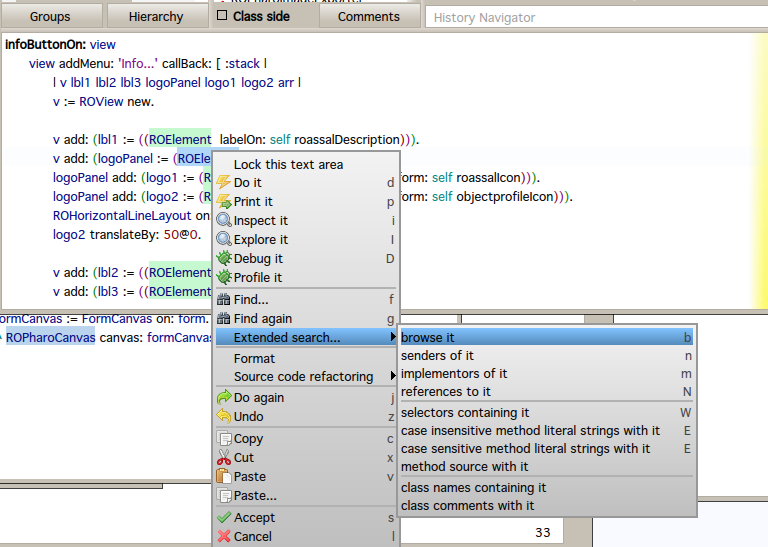
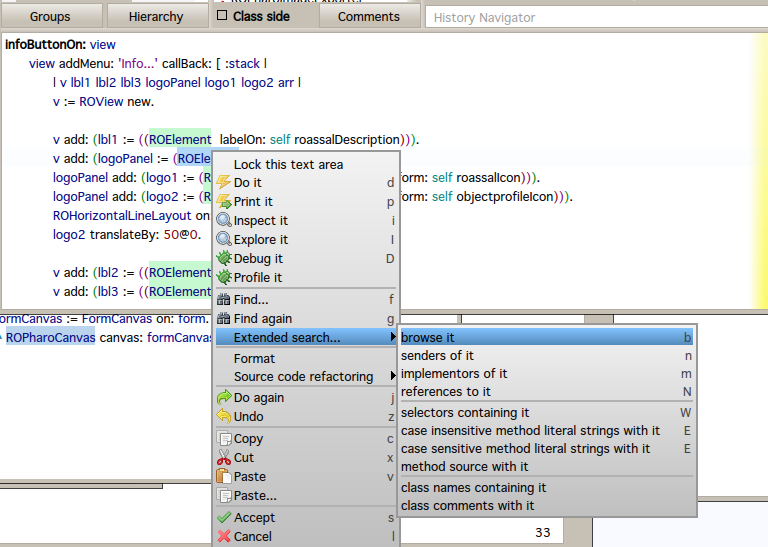
Consider the following screenshot: <Screen Shot 2013-04-10 at 5.45.51 PM.png>
I have selected the class ROElement, and Nautilus still offers me to look for the implementors
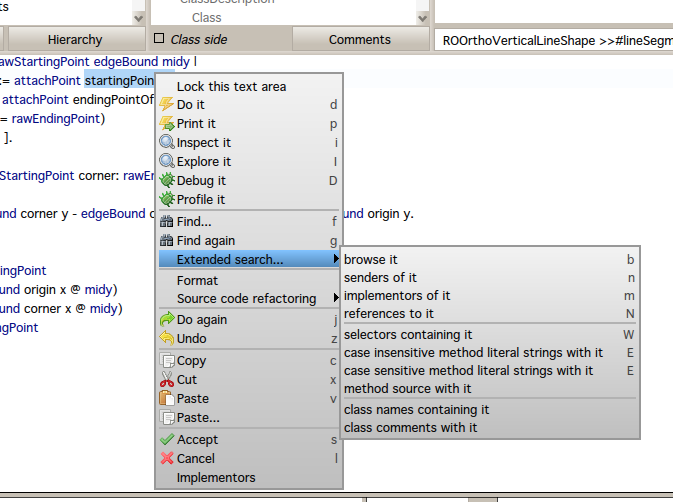
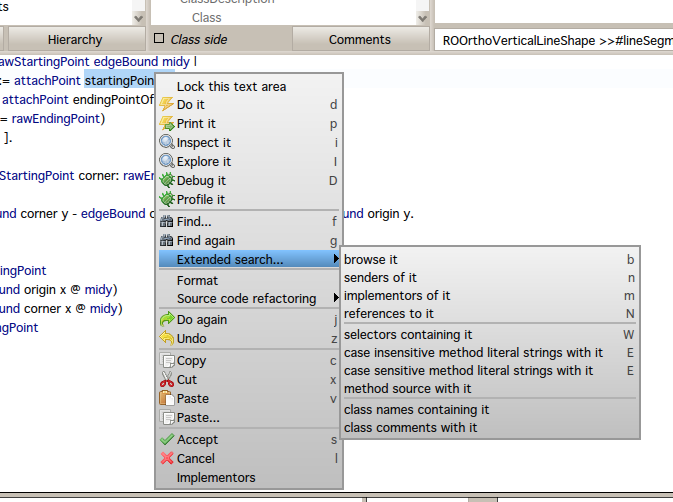
Another screenshot: <Screen Shot 2013-04-10 at 5.49.32 PM.png>
I have selected the method startingPointOf:
I like the idea of easily accessing Implementors. Currently, if I click on "implementors of it" or in your menu "Implementors", I have a new window. Well.. why do I need a new window? Why not simply give the list of the implementors? You can easily turn your menu entry "Implementors" as a submenu (as for "Extended search...") that gives the six implementors of this method directly.
Alexandre
On Apr 10, 2013, at 8:18 AM, Gisela Decuzzi <giseladecuzzi@gmail.com> wrote:
Hello, I've been working in a prototype for adding some suggestions to the menu depending on what it's selected with the cursor. (The same feature that ALT-Browser has, but now in Nautilus).
It's just a little piece of code and has a lot of pending work, right now you can press right click over a message send and offers you browse implementors: <Implementors.png>
And if you are in an instance variable name and then right click: <InstanceVariablesOptions.png> (The same that ALT-Browser is doing, but in Nautilus)
I developed in the latest 2.0 image.
So, if you want to load in your image, play a little and then give me some feedback...
Gofer it smalltalkhubUser: 'gisela' project: 'SmartSuggestions'; package: 'SmartSuggestions'; package: 'SmartSuggestionsNautilus'; load.
:)
-- _,.;:~^~:;._,.;:~^~:;._,.;:~^~:;._,.;:~^~:;._,.;: Alexandre Bergel http://www.bergel.eu ^~:;._,.;:~^~:;._,.;:~^~:;._,.;:~^~:;._,.;:~^~:;.

Guys , you should be less demanding! Some people using command-line and vim, and living happy with it.. and you demanding something which is completely unnecessary for real hardcore programmer(s). ;) (i am in a very good mood today ;) On 10 April 2013 23:13, stephane ducasse <stephane.ducasse@free.fr> wrote:
May be I did not understand but how can we get a list of implementors = methods defined in several classes without spawing a list of methods?
On Apr 10, 2013, at 11:56 PM, Alexandre Bergel <alexandre.bergel@me.com> wrote:
Hi Gisela,
Currently, Nautilus is not really smart at giving a contextual menu.
Consider the following screenshot: <Screen Shot 2013-04-10 at 5.45.51 PM.png>
I have selected the class ROElement, and Nautilus still offers me to look for the implementors
Another screenshot: <Screen Shot 2013-04-10 at 5.49.32 PM.png>
I have selected the method startingPointOf:
I like the idea of easily accessing Implementors. Currently, if I click on "implementors of it" or in your menu "Implementors", I have a new window. Well.. why do I need a new window? Why not simply give the list of the implementors? You can easily turn your menu entry "Implementors" as a submenu (as for "Extended search...") that gives the six implementors of this method directly.
Alexandre
On Apr 10, 2013, at 8:18 AM, Gisela Decuzzi <giseladecuzzi@gmail.com> wrote:
Hello, I've been working in a prototype for adding some suggestions to the menu depending on what it's selected with the cursor. (The same feature that ALT-Browser has, but now in Nautilus).
It's just a little piece of code and has a lot of pending work, right now you can press right click over a message send and offers you browse implementors: <Implementors.png>
And if you are in an instance variable name and then right click: <InstanceVariablesOptions.png> (The same that ALT-Browser is doing, but in Nautilus)
I developed in the latest 2.0 image.
So, if you want to load in your image, play a little and then give me some feedback...
Gofer it smalltalkhubUser: 'gisela' project: 'SmartSuggestions'; package: 'SmartSuggestions'; package: 'SmartSuggestionsNautilus'; load.
:)
-- _,.;:~^~:;._,.;:~^~:;._,.;:~^~:;._,.;:~^~:;._,.;: Alexandre Bergel http://www.bergel.eu ^~:;._,.;:~^~:;._,.;:~^~:;._,.;:~^~:;._,.;:~^~:;.
-- Best regards, Igor Stasenko.
May be I did not understand but how can we get a list of implementors = methods defined in several classes without spawing a list of methods?
Not easy to explain. I had the following scenario in mind: 1 - In nautilus, I select startingPointOf: in the code pane 2 - I right click and I see the menu Implementors 3 - Moving the mouse over this submenu gives me a submenu with all the implementors of the selector. A window less compared with what we have right now. Alexandre
On Apr 10, 2013, at 11:56 PM, Alexandre Bergel <alexandre.bergel@me.com> wrote:
Hi Gisela,
Currently, Nautilus is not really smart at giving a contextual menu.
Consider the following screenshot: <Screen Shot 2013-04-10 at 5.45.51 PM.png>
I have selected the class ROElement, and Nautilus still offers me to look for the implementors
Another screenshot: <Screen Shot 2013-04-10 at 5.49.32 PM.png>
I have selected the method startingPointOf:
I like the idea of easily accessing Implementors. Currently, if I click on "implementors of it" or in your menu "Implementors", I have a new window. Well.. why do I need a new window? Why not simply give the list of the implementors? You can easily turn your menu entry "Implementors" as a submenu (as for "Extended search...") that gives the six implementors of this method directly.
Alexandre
On Apr 10, 2013, at 8:18 AM, Gisela Decuzzi <giseladecuzzi@gmail.com> wrote:
Hello, I've been working in a prototype for adding some suggestions to the menu depending on what it's selected with the cursor. (The same feature that ALT-Browser has, but now in Nautilus).
It's just a little piece of code and has a lot of pending work, right now you can press right click over a message send and offers you browse implementors: <Implementors.png>
And if you are in an instance variable name and then right click: <InstanceVariablesOptions.png> (The same that ALT-Browser is doing, but in Nautilus)
I developed in the latest 2.0 image.
So, if you want to load in your image, play a little and then give me some feedback...
Gofer it smalltalkhubUser: 'gisela' project: 'SmartSuggestions'; package: 'SmartSuggestions'; package: 'SmartSuggestionsNautilus'; load.
:)
-- _,.;:~^~:;._,.;:~^~:;._,.;:~^~:;._,.;:~^~:;._,.;: Alexandre Bergel http://www.bergel.eu ^~:;._,.;:~^~:;._,.;:~^~:;._,.;:~^~:;._,.;:~^~:;.
-- _,.;:~^~:;._,.;:~^~:;._,.;:~^~:;._,.;:~^~:;._,.;: Alexandre Bergel http://www.bergel.eu ^~:;._,.;:~^~:;._,.;:~^~:;._,.;:~^~:;._,.;:~^~:;.
I thought: (with a lot of imagination in my "draw") ______________________________ __________________ | Implementors of specialCommands > | RBProgramNode | ______________________________ | RBMessageNode | | RBVariableNode | __________________ And when you select one then you go to the usual method editor. Similar to the actual one but smaller and not so easy to see all implementations at once. Is that what you proposed? 2013/4/11 Alexandre Bergel <alexandre.bergel@me.com>
May be I did not understand but how can we get a list of implementors = methods defined in several classes without spawing a list of methods?
Not easy to explain. I had the following scenario in mind:
1 - In nautilus, I select startingPointOf: in the code pane 2 - I right click and I see the menu Implementors 3 - Moving the mouse over this submenu gives me a submenu with all the implementors of the selector.
A window less compared with what we have right now.
Alexandre
On Apr 10, 2013, at 11:56 PM, Alexandre Bergel <alexandre.bergel@me.com>
wrote:
Hi Gisela,
Currently, Nautilus is not really smart at giving a contextual menu.
Consider the following screenshot: <Screen Shot 2013-04-10 at 5.45.51 PM.png>
I have selected the class ROElement, and Nautilus still offers me to
look for the implementors
Another screenshot: <Screen Shot 2013-04-10 at 5.49.32 PM.png>
I have selected the method startingPointOf:
I like the idea of easily accessing Implementors. Currently, if I click
on "implementors of it" or in your menu "Implementors", I have a new window. Well.. why do I need a new window? Why not simply give the list of the implementors? You can easily turn your menu entry "Implementors" as a submenu (as for "Extended search...") that gives the six implementors of this method directly.
Alexandre
On Apr 10, 2013, at 8:18 AM, Gisela Decuzzi <giseladecuzzi@gmail.com>
wrote:
Hello, I've been working in a prototype for adding some suggestions to
the menu depending on what it's selected with the cursor. (The same feature that ALT-Browser has, but now in Nautilus).
It's just a little piece of code and has a lot of pending work, right
now you can press right click over a message send and offers you browse implementors:
<Implementors.png>
And if you are in an instance variable name and then right click: <InstanceVariablesOptions.png> (The same that ALT-Browser is doing, but in Nautilus)
I developed in the latest 2.0 image.
So, if you want to load in your image, play a little and then give me some feedback...
Gofer it smalltalkhubUser: 'gisela' project: 'SmartSuggestions'; package: 'SmartSuggestions'; package: 'SmartSuggestionsNautilus'; load.
:)
-- _,.;:~^~:;._,.;:~^~:;._,.;:~^~:;._,.;:~^~:;._,.;: Alexandre Bergel http://www.bergel.eu ^~:;._,.;:~^~:;._,.;:~^~:;._,.;:~^~:;._,.;:~^~:;.
-- _,.;:~^~:;._,.;:~^~:;._,.;:~^~:;._,.;:~^~:;._,.;: Alexandre Bergel http://www.bergel.eu ^~:;._,.;:~^~:;._,.;:~^~:;._,.;:~^~:;._,.;:~^~:;.
On Apr 11, 2013, at 12:31 AM, Alexandre Bergel <alexandre.bergel@me.com> wrote:
May be I did not understand but how can we get a list of implementors = methods defined in several classes without spawing a list of methods?
Not easy to explain. I had the following scenario in mind:
1 - In nautilus, I select startingPointOf: in the code pane 2 - I right click and I see the menu Implementors 3 - Moving the mouse over this submenu gives me a submenu with all the implementors of the selector.
A window less compared with what we have right now.
Ah . For now we should reduce the number of items in the menu and make sure that everything works and is integrated into pharo. Then the extras :) And it will not be difficult to do. Now we should pay attention that you can get 50 or more implementor/senders. Stef
Alexandre
On Apr 10, 2013, at 11:56 PM, Alexandre Bergel <alexandre.bergel@me.com> wrote:
Hi Gisela,
Currently, Nautilus is not really smart at giving a contextual menu.
Consider the following screenshot: <Screen Shot 2013-04-10 at 5.45.51 PM.png>
I have selected the class ROElement, and Nautilus still offers me to look for the implementors
Another screenshot: <Screen Shot 2013-04-10 at 5.49.32 PM.png>
I have selected the method startingPointOf:
I like the idea of easily accessing Implementors. Currently, if I click on "implementors of it" or in your menu "Implementors", I have a new window. Well.. why do I need a new window? Why not simply give the list of the implementors? You can easily turn your menu entry "Implementors" as a submenu (as for "Extended search...") that gives the six implementors of this method directly.
Alexandre
On Apr 10, 2013, at 8:18 AM, Gisela Decuzzi <giseladecuzzi@gmail.com> wrote:
Hello, I've been working in a prototype for adding some suggestions to the menu depending on what it's selected with the cursor. (The same feature that ALT-Browser has, but now in Nautilus).
It's just a little piece of code and has a lot of pending work, right now you can press right click over a message send and offers you browse implementors: <Implementors.png>
And if you are in an instance variable name and then right click: <InstanceVariablesOptions.png> (The same that ALT-Browser is doing, but in Nautilus)
I developed in the latest 2.0 image.
So, if you want to load in your image, play a little and then give me some feedback...
Gofer it smalltalkhubUser: 'gisela' project: 'SmartSuggestions'; package: 'SmartSuggestions'; package: 'SmartSuggestionsNautilus'; load.
:)
-- _,.;:~^~:;._,.;:~^~:;._,.;:~^~:;._,.;:~^~:;._,.;: Alexandre Bergel http://www.bergel.eu ^~:;._,.;:~^~:;._,.;:~^~:;._,.;:~^~:;._,.;:~^~:;.
-- _,.;:~^~:;._,.;:~^~:;._,.;:~^~:;._,.;:~^~:;._,.;: Alexandre Bergel http://www.bergel.eu ^~:;._,.;:~^~:;._,.;:~^~:;._,.;:~^~:;._,.;:~^~:;.
Hi Alexandre,
I have selected the class ROElement, and Nautilus still offers me to look for the implementors There aren't suggestion for a class currently implemented so it won't offer you nothing yet. But something we can do it's to figure it out witch options would be nice to have, I was thinking in: - Class references - Hierarchy - Browse the class So tell me your ideas and I will try to make a command for that and then add it as a suggestion, if you browse #specialCommands (the message I'm using to find the available actions for the selected code) you will see that the only real implementors are the RBVariableNode and RBMessageNode. I think that the actions you want are for RBClassReference (I will check it). But tell me what would you expect to see as a quick action over a class reference :)
About the suggestion... the "smart ones" are at the end of the menu, the other ones are the default, it will be very cool to replace the hole menu (it's something that I have in my todolist) but for a 0 prototype I've just focused on adding more options. In fact I surely will be commiting some changes for display just a suggestions menu using a short cut (alt+t) tomorrow.
Well.. why do I need a new window? Why not simply give the list of the implementors? You can easily turn your menu entry "Implementors" as a submenu (as for "Extended search...") that gives the six implementors of this method directly.
This is just the default behavior for implementors, since I'm using the same action, I will do some performace test in that and will check if I can add it as a task for my todo. Maybe searching for implementors isn't so fast and I wouldn't like to keep waiting a lot of time just to display a menu because maybe you don't even want to search implementors. But it's a good point for navigation improvements that I also want to make :) Thanks for the review and let me know about witch suggestions would you like to have depending what you have selected, I will implement as many as possible and try to finish with an easy way to add more options. 2013/4/10 Alexandre Bergel <alexandre.bergel@me.com>
Hi Gisela,
Currently, Nautilus is not really smart at giving a contextual menu.
Consider the following screenshot:
I have selected the class ROElement, and Nautilus still offers me to look for the implementors
Another screenshot:
I have selected the method startingPointOf:
I like the idea of easily accessing Implementors. Currently, if I click on "implementors of it" or in your menu "Implementors", I have a new window. Well.. why do I need a new window? Why not simply give the list of the implementors? You can easily turn your menu entry "Implementors" as a submenu (as for "Extended search...") that gives the six implementors of this method directly.
Alexandre
On Apr 10, 2013, at 8:18 AM, Gisela Decuzzi <giseladecuzzi@gmail.com> wrote:
Hello, I've been working in a prototype for adding some suggestions to the menu depending on what it's selected with the cursor. (The same feature that ALT-Browser has, but now in Nautilus).
It's just a little piece of code and has a lot of pending work, right now you can press right click over a message send and offers you browse implementors: <Implementors.png>
And if you are in an instance variable name and then right click: <InstanceVariablesOptions.png> (The same that ALT-Browser is doing, but in Nautilus)
I developed in the latest 2.0 image.
So, if you want to load in your image, play a little and then give me some feedback...
Gofer it smalltalkhubUser: 'gisela' project: 'SmartSuggestions'; package: 'SmartSuggestions'; package: 'SmartSuggestionsNautilus'; load.
:)
-- _,.;:~^~:;._,.;:~^~:;._,.;:~^~:;._,.;:~^~:;._,.;: Alexandre Bergel http://www.bergel.eu ^~:;._,.;:~^~:;._,.;:~^~:;._,.;:~^~:;._,.;:~^~:;.
gisela about command you should sit with ben to also see what we do we do in general. Do we provide a command hierarchy that can be shared among tools (message listâ¦) Stef On Apr 11, 2013, at 12:16 AM, Gisela Decuzzi <giseladecuzzi@gmail.com> wrote:
Hi Alexandre,
I have selected the class ROElement, and Nautilus still offers me to look for the implementors There aren't suggestion for a class currently implemented so it won't offer you nothing yet. But something we can do it's to figure it out witch options would be nice to have, I was thinking in: - Class references - Hierarchy - Browse the class So tell me your ideas and I will try to make a command for that and then add it as a suggestion, if you browse #specialCommands (the message I'm using to find the available actions for the selected code) you will see that the only real implementors are the RBVariableNode and RBMessageNode. I think that the actions you want are for RBClassReference (I will check it). But tell me what would you expect to see as a quick action over a class reference :)
About the suggestion... the "smart ones" are at the end of the menu, the other ones are the default, it will be very cool to replace the hole menu (it's something that I have in my todolist) but for a 0 prototype I've just focused on adding more options. In fact I surely will be commiting some changes for display just a suggestions menu using a short cut (alt+t) tomorrow.
Well.. why do I need a new window? Why not simply give the list of the implementors? You can easily turn your menu entry "Implementors" as a submenu (as for "Extended search...") that gives the six implementors of this method directly.
This is just the default behavior for implementors, since I'm using the same action, I will do some performace test in that and will check if I can add it as a task for my todo. Maybe searching for implementors isn't so fast and I wouldn't like to keep waiting a lot of time just to display a menu because maybe you don't even want to search implementors. But it's a good point for navigation improvements that I also want to make :)
Thanks for the review and let me know about witch suggestions would you like to have depending what you have selected, I will implement as many as possible and try to finish with an easy way to add more options.
2013/4/10 Alexandre Bergel <alexandre.bergel@me.com> Hi Gisela,
Currently, Nautilus is not really smart at giving a contextual menu.
Consider the following screenshot: <Screen Shot 2013-04-10 at 5.45.51 PM.png>
I have selected the class ROElement, and Nautilus still offers me to look for the implementors
Another screenshot: <Screen Shot 2013-04-10 at 5.49.32 PM.png>
I have selected the method startingPointOf:
I like the idea of easily accessing Implementors. Currently, if I click on "implementors of it" or in your menu "Implementors", I have a new window. Well.. why do I need a new window? Why not simply give the list of the implementors? You can easily turn your menu entry "Implementors" as a submenu (as for "Extended search...") that gives the six implementors of this method directly.
Alexandre
On Apr 10, 2013, at 8:18 AM, Gisela Decuzzi <giseladecuzzi@gmail.com> wrote:
Hello, I've been working in a prototype for adding some suggestions to the menu depending on what it's selected with the cursor. (The same feature that ALT-Browser has, but now in Nautilus).
It's just a little piece of code and has a lot of pending work, right now you can press right click over a message send and offers you browse implementors: <Implementors.png>
And if you are in an instance variable name and then right click: <InstanceVariablesOptions.png> (The same that ALT-Browser is doing, but in Nautilus)
I developed in the latest 2.0 image.
So, if you want to load in your image, play a little and then give me some feedback...
Gofer it smalltalkhubUser: 'gisela' project: 'SmartSuggestions'; package: 'SmartSuggestions'; package: 'SmartSuggestionsNautilus'; load.
:)
-- _,.;:~^~:;._,.;:~^~:;._,.;:~^~:;._,.;:~^~:;._,.;: Alexandre Bergel http://www.bergel.eu ^~:;._,.;:~^~:;._,.;:~^~:;._,.;:~^~:;._,.;:~^~:;.

Le 11/04/2013 00:16, Gisela Decuzzi a écrit :
Hi Alexandre,
I have selected the class ROElement, and Nautilus still offers me to look for the implementors There aren't suggestion for a class currently implemented so it won't offer you nothing yet. But something we can do it's to figure it out witch options would be nice to have, I was thinking in: - Class references - Hierarchy - Browse the class So tell me your ideas and I will try to make a command for that and then add it as a suggestion, if you browse #specialCommands (the message I'm using to find the available actions for the selected code) you will see that the only real implementors are the RBVariableNode and RBMessageNode. I think that the actions you want are for RBClassReference (I will check it). But tell me what would you expect to see as a quick action over a class reference :)
It maybe that you need to check the binding associated with the RBVariableNode to get that this is a Class reference. Ok. I added a debug command to AltBrowser to inspect the AST of a method, it may help. With that it shows that a Class is a RBVariableNode with a RBLiteralBinding name. Just change the RBVariableNode commands shown in that case. Thierry
About the suggestion... the "smart ones" are at the end of the menu, the other ones are the default, it will be very cool to replace the hole menu (it's something that I have in my todolist) but for a 0 prototype I've just focused on adding more options. In fact I surely will be commiting some changes for display just a suggestions menu using a short cut (alt+t) tomorrow.
Well.. why do I need a new window? Why not simply give the list of the implementors? You can easily turn your menu entry "Implementors" as a submenu (as for "Extended search...") that gives the six implementors of this method directly.
This is just the default behavior for implementors, since I'm using the same action, I will do some performace test in that and will check if I can add it as a task for my todo. Maybe searching for implementors isn't so fast and I wouldn't like to keep waiting a lot of time just to display a menu because maybe you don't even want to search implementors. But it's a good point for navigation improvements that I also want to make :)
Thanks for the review and let me know about witch suggestions would you like to have depending what you have selected, I will implement as many as possible and try to finish with an easy way to add more options.
2013/4/10 Alexandre Bergel <alexandre.bergel@me.com <mailto:alexandre.bergel@me.com>>
Hi Gisela,
Currently, Nautilus is not really smart at giving a contextual menu.
Consider the following screenshot:
I have selected the class ROElement, and Nautilus still offers me to look for the implementors
Another screenshot:
I have selected the method startingPointOf:
I like the idea of easily accessing Implementors. Currently, if I click on "implementors of it" or in your menu "Implementors", I have a new window. Well.. why do I need a new window? Why not simply give the list of the implementors? You can easily turn your menu entry "Implementors" as a submenu (as for "Extended search...") that gives the six implementors of this method directly.
Alexandre
On Apr 10, 2013, at 8:18 AM, Gisela Decuzzi <giseladecuzzi@gmail.com <mailto:giseladecuzzi@gmail.com>> wrote:
Hello, I've been working in a prototype for adding some suggestions to the menu depending on what it's selected with the cursor. (The same feature that ALT-Browser has, but now in Nautilus).
It's just a little piece of code and has a lot of pending work, right now you can press right click over a message send and offers you browse implementors: <Implementors.png>
And if you are in an instance variable name and then right click: <InstanceVariablesOptions.png> (The same that ALT-Browser is doing, but in Nautilus)
I developed in the latest 2.0 image.
So, if you want to load in your image, play a little and then give me some feedback...
Gofer it smalltalkhubUser: 'gisela' project: 'SmartSuggestions'; package: 'SmartSuggestions'; package: 'SmartSuggestionsNautilus'; load.
:)
-- _,.;:~^~:;._,.;:~^~:;._,.;:~^~:;._,.;:~^~:;._,.;: Alexandre Bergel http://www.bergel.eu ^~:;._,.;:~^~:;._,.;:~^~:;._,.;:~^~:;._,.;:~^~:;.
-- Thierry Goubier CEA list Laboratoire des Fondations des Systèmes Temps Réel Embarqués 91191 Gif sur Yvette Cedex France Phone/Fax: +33 (0) 1 69 08 32 92 / 83 95
participants (7)
-
 Alexandre Bergel
 -
 Gisela Decuzzi
 -
 Goubier Thierry
 -
 Guillermo Polito
 -
 Igor Stasenko
 -
 Lorenzo Schiavina
 -
 stephane ducasse