[Pharo-project] Vim Keys?

Hi all. I'm extremely new to Smalltalk, but I was wondering if there was a way to make Pharo have vi-keys (or even better, vim-keys)? Thanks! ââ

Le 29/11/2012 20:52, âking a écrit :
Hi all. I'm extremely new to Smalltalk, but I was wondering if there was a way to make Pharo have vi-keys (or even better, vim-keys)?
Thanks! ââ
It's underway. The infrastructure is moving to a better (unified) way of specifying and handling shortcuts, and then vi and vim-keys and emacs and others should become available. Bad point: I should help with that effort, but given my deadlines for the end of the year, not sure I'll be of much help :(. Thierry -- Thierry Goubier CEA list Laboratoire des Fondations des Systèmes Temps Réel Embarqués 91191 Gif sur Yvette Cedex France Phone/Fax: +33 (0) 1 69 08 32 92 / 83 95

When we are at it... how do shortcuts in Pharo 2 currently work? In Pharo 1.4, in the class browser, I used to hit Ctrl-F to open "Find Class", but it has no effect in Pharo 2. 2012/11/30 Goubier Thierry <thierry.goubier@cea.fr>:
Le 29/11/2012 20:52, âking a écrit :
Hi all. I'm extremely new to Smalltalk, but I was wondering if there was a way to make Pharo have vi-keys (or even better, vim-keys)?
Thanks! ââ
It's underway. The infrastructure is moving to a better (unified) way of specifying and handling shortcuts, and then vi and vim-keys and emacs and others should become available.
Bad point: I should help with that effort, but given my deadlines for the end of the year, not sure I'll be of much help :(.
Thierry -- Thierry Goubier CEA list Laboratoire des Fondations des Systèmes Temps Réel Embarqués 91191 Gif sur Yvette Cedex France Phone/Fax: +33 (0) 1 69 08 32 92 / 83 95
Le 30/11/2012 09:57, Sebastian Nozzi a écrit :
When we are at it... how do shortcuts in Pharo 2 currently work?
Ouch. I can describe what I know about key event processing, and maybe you will understand what's happening. It will be a good exercise for me to see if I got that stuff right. From first to process to last to process, once the key event is generated and given to the Morph which has the focus: 1 - The morph keymapping dispatch. This one is multilevel in nature. Here, so it goes (simplified, I'm not listing where platform differences are taken in account). The key event is matched against shortcuts defined in keymaps (and a partial match is possible if it is a multi-key shortcut). 1.1 - Direct keymapping : shortcuts added by on: do: to the KMDispatcher of the Morph instance. 1.2 - Named keymaps. Keymaps defined elsewhere and attached to that morph keymap dispatcher. 1.3 - Global named keymaps. Keymaps associated with the morph Class or one of it's superclass (i.e. a Morph class global keymap will apply to all morphs). 1.4 - If no match, go to 1.1 with the owner of the morph and repeat. Do that until you reach the World (Pharo top-level window). There, if keymapping hasn't matched, go to 2. 2 - The morph keyStroke: handling. Normal keys, navigation keys, hardcoded shortcuts (TextMorph for example). -- In some cases (some! No, often :(!) keystrokes are sent to other objects or Morphs: navigation, shortcuts, etc... 3 - The morph eventHandler : here a model can trap any key event or shortcut. If a match happen in any of those, the key event is usually said to be processed and we go out of the processing loop (no more matches) So, for a given shortcut being processed, it may be hard to find where it has been caught. Only the Keymapping dispatch has a debugging feature (with KMLog).
In Pharo 1.4, in the class browser, I used to hit Ctrl-F to open "Find Class", but it has no effect in Pharo 2.
This one is easier. In Nautilus, there is a shortcut browser which lists all the defined shortcuts. I believe that the find class is a multi-key shortcut.
2012/11/30 Goubier Thierry <thierry.goubier@cea.fr>:
Le 29/11/2012 20:52, âking a écrit :
Hi all. I'm extremely new to Smalltalk, but I was wondering if there was a way to make Pharo have vi-keys (or even better, vim-keys)?
Thanks! ââ
It's underway. The infrastructure is moving to a better (unified) way of specifying and handling shortcuts, and then vi and vim-keys and emacs and others should become available.
Bad point: I should help with that effort, but given my deadlines for the end of the year, not sure I'll be of much help :(.
Thierry -- Thierry Goubier CEA list Laboratoire des Fondations des Systèmes Temps Réel Embarqués 91191 Gif sur Yvette Cedex France Phone/Fax: +33 (0) 1 69 08 32 92 / 83 95
-- Thierry Goubier CEA list Laboratoire des Fondations des Systèmes Temps Réel Embarqués 91191 Gif sur Yvette Cedex France Phone/Fax: +33 (0) 1 69 08 32 92 / 83 95

On Nov 30, 2012, at 10:25 AM, Goubier Thierry wrote:
Le 30/11/2012 09:57, Sebastian Nozzi a écrit :
When we are at it... how do shortcuts in Pharo 2 currently work?
Ouch. I can describe what I know about key event processing, and maybe you will understand what's happening. It will be a good exercise for me to see if I got that stuff right.
From first to process to last to process, once the key event is generated and given to the Morph which has the focus:
1 - The morph keymapping dispatch. This one is multilevel in nature. Here, so it goes (simplified, I'm not listing where platform differences are taken in account). The key event is matched against shortcuts defined in keymaps (and a partial match is possible if it is a multi-key shortcut). 1.1 - Direct keymapping : shortcuts added by on: do: to the KMDispatcher of the Morph instance. 1.2 - Named keymaps. Keymaps defined elsewhere and attached to that morph keymap dispatcher. 1.3 - Global named keymaps. Keymaps associated with the morph Class or one of it's superclass (i.e. a Morph class global keymap will apply to all morphs). 1.4 - If no match, go to 1.1 with the owner of the morph and repeat. Do that until you reach the World (Pharo top-level window). There, if keymapping hasn't matched, go to 2.
2 - The morph keyStroke: handling. Normal keys, navigation keys, hardcoded shortcuts (TextMorph for example). -- In some cases (some! No, often :(!) keystrokes are sent to other objects or Morphs: navigation, shortcuts, etc...
3 - The morph eventHandler : here a model can trap any key event or shortcut.
If a match happen in any of those, the key event is usually said to be processed and we go out of the processing loop (no more matches)
So, for a given shortcut being processed, it may be hard to find where it has been caught. Only the Keymapping dispatch has a debugging feature (with KMLog).
In Pharo 1.4, in the class browser, I used to hit Ctrl-F to open "Find Class", but it has no effect in Pharo 2.
This one is easier. In Nautilus, there is a shortcut browser which lists all the defined shortcuts. I believe that the find class is a multi-key shortcut.
Indeed , cmd+f,c Ben :)
2012/11/30 Goubier Thierry <thierry.goubier@cea.fr>:
Le 29/11/2012 20:52, âking a écrit :
Hi all. I'm extremely new to Smalltalk, but I was wondering if there was a way to make Pharo have vi-keys (or even better, vim-keys)?
Thanks! ââ
It's underway. The infrastructure is moving to a better (unified) way of specifying and handling shortcuts, and then vi and vim-keys and emacs and others should become available.
Bad point: I should help with that effort, but given my deadlines for the end of the year, not sure I'll be of much help :(.
Thierry -- Thierry Goubier CEA list Laboratoire des Fondations des Systèmes Temps Réel Embarqués 91191 Gif sur Yvette Cedex France Phone/Fax: +33 (0) 1 69 08 32 92 / 83 95
-- Thierry Goubier CEA list Laboratoire des Fondations des Systèmes Temps Réel Embarqués 91191 Gif sur Yvette Cedex France Phone/Fax: +33 (0) 1 69 08 32 92 / 83 95
Thanks for the whole information! Actually I just wanted to know the key-combination (I expressed myself wrong), but will keep this info for future reference. 2012/11/30 Benjamin <benjamin.vanryseghem.pharo@gmail.com>:
On Nov 30, 2012, at 10:25 AM, Goubier Thierry wrote:
Le 30/11/2012 09:57, Sebastian Nozzi a écrit :
When we are at it... how do shortcuts in Pharo 2 currently work?
Ouch. I can describe what I know about key event processing, and maybe you will understand what's happening. It will be a good exercise for me to see if I got that stuff right.
From first to process to last to process, once the key event is generated and given to the Morph which has the focus:
1 - The morph keymapping dispatch. This one is multilevel in nature. Here, so it goes (simplified, I'm not listing where platform differences are taken in account). The key event is matched against shortcuts defined in keymaps (and a partial match is possible if it is a multi-key shortcut). 1.1 - Direct keymapping : shortcuts added by on: do: to the KMDispatcher of the Morph instance. 1.2 - Named keymaps. Keymaps defined elsewhere and attached to that morph keymap dispatcher. 1.3 - Global named keymaps. Keymaps associated with the morph Class or one of it's superclass (i.e. a Morph class global keymap will apply to all morphs). 1.4 - If no match, go to 1.1 with the owner of the morph and repeat. Do that until you reach the World (Pharo top-level window). There, if keymapping hasn't matched, go to 2.
2 - The morph keyStroke: handling. Normal keys, navigation keys, hardcoded shortcuts (TextMorph for example). -- In some cases (some! No, often :(!) keystrokes are sent to other objects or Morphs: navigation, shortcuts, etc...
3 - The morph eventHandler : here a model can trap any key event or shortcut.
If a match happen in any of those, the key event is usually said to be processed and we go out of the processing loop (no more matches)
So, for a given shortcut being processed, it may be hard to find where it has been caught. Only the Keymapping dispatch has a debugging feature (with KMLog).
In Pharo 1.4, in the class browser, I used to hit Ctrl-F to open "Find Class", but it has no effect in Pharo 2.
This one is easier. In Nautilus, there is a shortcut browser which lists all the defined shortcuts. I believe that the find class is a multi-key shortcut.
Indeed , cmd+f,c
Ben :)
2012/11/30 Goubier Thierry <thierry.goubier@cea.fr>:
Le 29/11/2012 20:52, âking a écrit :
Hi all. I'm extremely new to Smalltalk, but I was wondering if there was a way to make Pharo have vi-keys (or even better, vim-keys)?
Thanks! ââ
It's underway. The infrastructure is moving to a better (unified) way of specifying and handling shortcuts, and then vi and vim-keys and emacs and others should become available.
Bad point: I should help with that effort, but given my deadlines for the end of the year, not sure I'll be of much help :(.
Thierry -- Thierry Goubier CEA list Laboratoire des Fondations des Systèmes Temps Réel Embarqués 91191 Gif sur Yvette Cedex France Phone/Fax: +33 (0) 1 69 08 32 92 / 83 95
-- Thierry Goubier CEA list Laboratoire des Fondations des Systèmes Temps Réel Embarqués 91191 Gif sur Yvette Cedex France Phone/Fax: +33 (0) 1 69 08 32 92 / 83 95

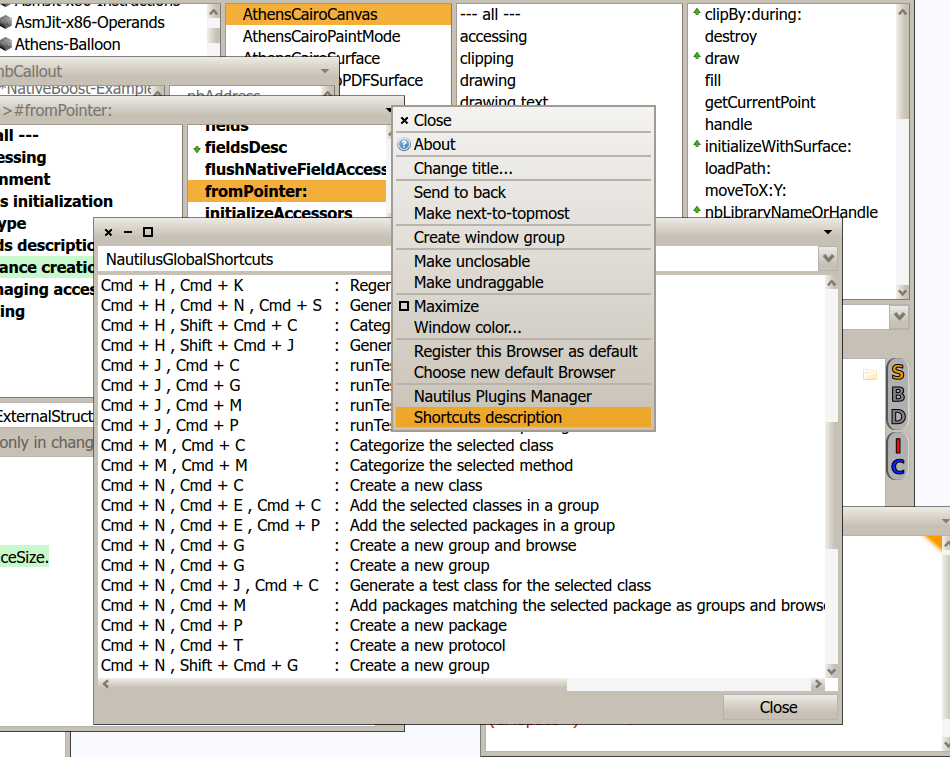
click on the top-right arrow in browser window and find "shortcuts description" menu item. On 30 November 2012 13:29, Sebastian Nozzi <sebnozzi@gmail.com> wrote:
Thanks for the whole information! Actually I just wanted to know the key-combination (I expressed myself wrong), but will keep this info for future reference.
2012/11/30 Benjamin <benjamin.vanryseghem.pharo@gmail.com>:
On Nov 30, 2012, at 10:25 AM, Goubier Thierry wrote:
Le 30/11/2012 09:57, Sebastian Nozzi a écrit :
When we are at it... how do shortcuts in Pharo 2 currently work?
Ouch. I can describe what I know about key event processing, and maybe you will understand what's happening. It will be a good exercise for me to see if I got that stuff right.
From first to process to last to process, once the key event is generated and given to the Morph which has the focus:
1 - The morph keymapping dispatch. This one is multilevel in nature. Here, so it goes (simplified, I'm not listing where platform differences are taken in account). The key event is matched against shortcuts defined in keymaps (and a partial match is possible if it is a multi-key shortcut). 1.1 - Direct keymapping : shortcuts added by on: do: to the KMDispatcher of the Morph instance. 1.2 - Named keymaps. Keymaps defined elsewhere and attached to that morph keymap dispatcher. 1.3 - Global named keymaps. Keymaps associated with the morph Class or one of it's superclass (i.e. a Morph class global keymap will apply to all morphs). 1.4 - If no match, go to 1.1 with the owner of the morph and repeat. Do that until you reach the World (Pharo top-level window). There, if keymapping hasn't matched, go to 2.
2 - The morph keyStroke: handling. Normal keys, navigation keys, hardcoded shortcuts (TextMorph for example). -- In some cases (some! No, often :(!) keystrokes are sent to other objects or Morphs: navigation, shortcuts, etc...
3 - The morph eventHandler : here a model can trap any key event or shortcut.
If a match happen in any of those, the key event is usually said to be processed and we go out of the processing loop (no more matches)
So, for a given shortcut being processed, it may be hard to find where it has been caught. Only the Keymapping dispatch has a debugging feature (with KMLog).
In Pharo 1.4, in the class browser, I used to hit Ctrl-F to open "Find Class", but it has no effect in Pharo 2.
This one is easier. In Nautilus, there is a shortcut browser which lists all the defined shortcuts. I believe that the find class is a multi-key shortcut.
Indeed , cmd+f,c
Ben :)
2012/11/30 Goubier Thierry <thierry.goubier@cea.fr>:
Le 29/11/2012 20:52, âking a écrit :
Hi all. I'm extremely new to Smalltalk, but I was wondering if there was a way to make Pharo have vi-keys (or even better, vim-keys)?
Thanks! ââ
It's underway. The infrastructure is moving to a better (unified) way of specifying and handling shortcuts, and then vi and vim-keys and emacs and others should become available.
Bad point: I should help with that effort, but given my deadlines for the end of the year, not sure I'll be of much help :(.
Thierry -- Thierry Goubier CEA list Laboratoire des Fondations des Systèmes Temps Réel Embarqués 91191 Gif sur Yvette Cedex France Phone/Fax: +33 (0) 1 69 08 32 92 / 83 95
-- Thierry Goubier CEA list Laboratoire des Fondations des Systèmes Temps Réel Embarqués 91191 Gif sur Yvette Cedex France Phone/Fax: +33 (0) 1 69 08 32 92 / 83 95
-- Best regards, Igor Stasenko.

On Nov 30, 2012, at 9:57 AM, Sebastian Nozzi wrote:
When we are at it... how do shortcuts in Pharo 2 currently work?
In Pharo 1.4, in the class browser, I used to hit Ctrl-F to open "Find Class", but it has no effect in Pharo 2.
for now but we are discussing it :) ctrl-f + ctrl c => find class
2012/11/30 Goubier Thierry <thierry.goubier@cea.fr>:
Le 29/11/2012 20:52, âking a écrit :
Hi all. I'm extremely new to Smalltalk, but I was wondering if there was a way to make Pharo have vi-keys (or even better, vim-keys)?
Thanks! ââ
It's underway. The infrastructure is moving to a better (unified) way of specifying and handling shortcuts, and then vi and vim-keys and emacs and others should become available.
Bad point: I should help with that effort, but given my deadlines for the end of the year, not sure I'll be of much help :(.
Thierry -- Thierry Goubier CEA list Laboratoire des Fondations des Systèmes Temps Réel Embarqués 91191 Gif sur Yvette Cedex France Phone/Fax: +33 (0) 1 69 08 32 92 / 83 95
On 11/30/2012 02:15 AM, Goubier Thierry wrote:
It's underway. The infrastructure is moving to a better (unified) way of specifying and handling shortcuts, and then vi and vim-keys and emacs and others should become available.
I have a radical question that I'd like to float. What about making vi keys not only possible, but the *default* for Pharo? They generally don't conflict with anything, because they're all "Namespaced" under sequences that you hit Escape for. This means you could continue to edit exactly as you do, but when you hit Esc you get some bonus functionality. And just because vi keys are the most hardcore interface ever of all time, that doesn't mean it has to be for neckbeards-only. We could make it so the text box has a status indicator, with help available and everything. Imagine a bar at the bottom that says, "Vi Command Mode", which can be clicked for a full help, then the rest of the bar has hints about common commands. It could even be adaptive, like learn to tell you commands that you haven't used much. The same bar could also say "Stop this crazy feature I don't like it". ââ

On Nov 30, 2012, at 5:41 PM, âking <rkingdesk@sharpsaw.org> wrote:
On 11/30/2012 02:15 AM, Goubier Thierry wrote:
It's underway. The infrastructure is moving to a better (unified) way of specifying and handling shortcuts, and then vi and vim-keys and emacs and others should become available.
I have a radical question that I'd like to float.
What about making vi keys not only possible, but the *default* for Pharo?
I am sure the Emacs user will be violently against it. Another thing is that I personally think that one of the things that Smalltalk did very early is to not have modes for editing⦠Are editing modes really something people want in 2012? (and no, I am not a vi user. I know one vi command and that is esc : q ! to get out of thereâ¦) Marcus
On 11/30/2012 10:48 AM, Marcus Denker wrote:
I am sure the Emacs user will be violently against it.
Actually, that's the thing: Namespacing. You could install vi keys on emacs and an emacs user would never notice without hitting the Escape key. Emacs keys, on the other hand, *do* conflict with existing Pharo bindings.
Another thing is that I personally think that one of the things that Smalltalk did very early is to not have modes for editingâ¦
Are editing modes really something people want in 2012?
Think of modes as a monkey that sits by your keyboard. Every time you bop him on the head (that is, you hit Escape), he obediently reaches over and holds down a special keyboard modifier for you, and continues to do so until you tell him to stop. Since bopping him on the head takes no more time than hitting the modifier key itself, hitting [Bop],[Key] is always going to be an equally concise way of entering a string of commands compared to chording [Modifier+Key]. But generally it's more concise, because you tend to do big sequences of one or the other: edit a bunch, or input a bunch. That is, in real life you do [Bop],[Key],[Key2],[Key],[Key3], which is better than [Modifier1+Key],[Modifier2+Key2],[Modifier1+Key],[Ctrl+Alt+Shift+Modifier+TurboDrive+Footpedal+â+Key3] The critical point is that users that don't enter command mode would never be bothered by it. Users who do stumble upon it could get an additional leg up with the help text, and they don't even really have to know it's "Vi Keys", just that it's a non-chorded interface. I know it's radical, but that's how we roll. (Right?) ââ
On 30 November 2012 18:23, âking <rkingdesk@sharpsaw.org> wrote:
On 11/30/2012 10:48 AM, Marcus Denker wrote:
I am sure the Emacs user will be violently against it.
Actually, that's the thing: Namespacing.
You could install vi keys on emacs and an emacs user would never notice without hitting the Escape key.
Emacs keys, on the other hand, *do* conflict with existing Pharo bindings.
Another thing is that I personally think that one of the things that Smalltalk did very early is to not have modes for editingâ¦
Are editing modes really something people want in 2012?
Think of modes as a monkey that sits by your keyboard.
Every time you bop him on the head (that is, you hit Escape), he obediently reaches over and holds down a special keyboard modifier for you, and continues to do so until you tell him to stop.
Since bopping him on the head takes no more time than hitting the modifier key itself, hitting [Bop],[Key] is always going to be an equally concise way of entering a string of commands compared to chording [Modifier+Key]. But generally it's more concise, because you tend to do big sequences of one or the other: edit a bunch, or input a bunch. That is, in real life you do [Bop],[Key],[Key2],[Key],[Key3], which is better than [Modifier1+Key],[Modifier2+Key2],[Modifier1+Key],[Ctrl+Alt+Shift+Modifier+TurboDrive+Footpedal+â+Key3]
well, what you explaining here is not just about handling keyboard typing, but also requires changes in UI (showing command line, black & white color scheme, 80x25 text mode ;) ) etc.. i think, if vi would contest for "best obscure editor", i guess it would get 1st prize. i don't really care why you like it , just can you (or someone else) explain me, why you think it is best possible way of doing things? Since i can't see it. What exactly commands/shortcuts you wanna have there? And wouldn't it be better to focus UI design towards avoiding the need for shortcuts/modes alltogether? Also, i going to repeat same over again: we don't need a full-fledged text editor(s) in smalltalk IDE. In smalltalk you will find yourself rarely need to edit more than 10 lines of code at time.
From that perspective, do you think it is wise to invest people's energy into that? I think it should be a call for those who miss it: if you want it - make it.
After all, you can run vi/emacs/<put your favorite> in separate window, and can always copy-paste text between, and enjoy your lovely keyboard shortcuts. Sorry, maybe i miss something and don't see full picture, but i really don't understand what is so cool in having vi/emacs shortcuts in pharo..
The critical point is that users that don't enter command mode would never be bothered by it. Users who do stumble upon it could get an additional leg up with the help text, and they don't even really have to know it's "Vi Keys", just that it's a non-chorded interface.
I know it's radical, but that's how we roll. (Right?)
ââ
-- Best regards, Igor Stasenko.

Even though I agree with your Igor , text editing is not per se required by existing smalltalk users, though even that is debatable, introducing vim and emacs mapping, in a completely optional state, will be definitely a motivation for vim and emacs user to join pharo. For example if you enter the pharo channel in irc you will be happy to find one person talking to himself, squeak channel more or less the same. Both #emacs and #vim show how popular both of these text editors are, why not pharo attract that crowd. Let me throw a crazy idea on the table why smalltalk cannot be a more ultimate text editor than those. Sure its ton of work and definetly you or I should not do , but I am sure if we provide minimum means of people to do this we will see more and more people porting vim and emacs features to pharo. Also your point that we dont need text editing that much in pharo , is vaild from one side, however you should not forget that even though vim and emacs might appear radically diffirent from pharo those diffirences are skin deep. All of them have IDE tools , code navigation tools, debuging tools etc ... so I am not that convinced that for example using system browsers via shortcuts cannot be improved. I am actually in the process of learning elisp code to port some of the features of emacs to pharo. ________________________________ From: Igor Stasenko <siguctua@gmail.com> To: Pharo-project@lists.gforge.inria.fr Sent: Friday, 30 November 2012, 20:13 Subject: Re: [Pharo-project] Vim Keys? On 30 November 2012 18:23, âking <rkingdesk@sharpsaw.org> wrote:
On 11/30/2012 10:48 AM, Marcus Denker wrote:
I am sure the Emacs user will be violently against it.
Actually, that's the thing: Namespacing.
You could install vi keys on emacs and an emacs user would never notice without hitting the Escape key.
Emacs keys, on the other hand, *do* conflict with existing Pharo bindings.
Another thing is that I personally think that one of the things that Smalltalk did very early is to not have modes for editingâ¦
Are editing modes really something people want in 2012?
Think of modes as a monkey that sits by your keyboard.
Every time you bop him on the head (that is, you hit Escape), he obediently reaches over and holds down a special keyboard modifier for you, and continues to do so until you tell him to stop.
Since bopping him on the head takes no more time than hitting the modifier key itself, hitting [Bop],[Key] is always going to be an equally concise way of entering a string of commands compared to chording [Modifier+Key]. But generally it's more concise, because you tend to do big sequences of one or the other: edit a bunch, or input a bunch. That is, in real life you do [Bop],[Key],[Key2],[Key],[Key3], which is better than [Modifier1+Key],[Modifier2+Key2],[Modifier1+Key],[Ctrl+Alt+Shift+Modifier+TurboDrive+Footpedal+â+Key3]
well, what you explaining here is not just about handling keyboard typing, but also requires changes in UI (showing command line, black & white color scheme, 80x25 text mode ;) ) etc.. i think, if vi would contest for "best obscure editor", i guess it would get 1st prize. i don't really care why you like it , just can you (or someone else) explain me, why you think it is best possible way of doing things? Since i can't see it. What exactly commands/shortcuts you wanna have there? And wouldn't it be better to focus UI design towards avoiding the need for shortcuts/modes alltogether? Also, i going to repeat same over again: we don't need a full-fledged text editor(s) in smalltalk IDE. In smalltalk you will find yourself rarely need to edit more than 10 lines of code at time.
From that perspective, do you think it is wise to invest people's energy into that? I think it should be a call for those who miss it: if you want it - make it.
After all, you can run vi/emacs/<put your favorite> in separate window, and can always copy-paste text between, and enjoy your lovely keyboard shortcuts. Sorry, maybe i miss something and don't see full picture, but i really don't understand what is so cool in having vi/emacs shortcuts in pharo..
The critical point is that users that don't enter command mode would never be bothered by it. Users who do stumble upon it could get an additional leg up with the help text, and they don't even really have to know it's "Vi Keys", just that it's a non-chorded interface.
I know it's radical, but that's how we roll. (Right?)
ââ
-- Best regards, Igor Stasenko.
On 11/30/2012 01:25 PM, dimitris chloupis wrote:
Both #emacs and #vim show how popular both of these text editors are, why not pharo attract that crowd.
Another part of this is just making UIs for editing non-Smalltalk code. If I had a good editor widget available, I could use it to make any number of powerful other tools. ââ
On 30 November 2012 22:16, âking <rkingdesk@sharpsaw.org> wrote:
On 11/30/2012 01:25 PM, dimitris chloupis wrote:
Both #emacs and #vim show how popular both of these text editors are, why not pharo attract that crowd.
Another part of this is just making UIs for editing non-Smalltalk code.
If I had a good editor widget available, I could use it to make any number of powerful other tools.
But then you started from wrong end, isn't? You're free to implement own full blown text editor using smalltalk, as well as any other language. with any shortcuts you may like.. but you trying to sell it as "vi shortcuts for pharo".. which a bit strange. Because what is not clear to me, is where is the gain concretely for Pharo IDE and its tools. And don't take me wrong: i would be happy to have good rich-text editor widget with configurable shortcuts. But i just see key thing: it does not looks like absolute necessity to me (as for smalltalk developer). And if i would be a book writer or html "writer" you may get different opinion. But that's the point: there's already tons of text editors specialized for anything (but smalltalk).. which you can use right now, without need to wait till someone will implement it. So, why not use them?
ââ
-- Best regards, Igor Stasenko.
On 30 November 2012 20:25, dimitris chloupis <thekilon@yahoo.co.uk> wrote:
Even though I agree with your Igor , text editing is not per se required by existing smalltalk users, though even that is debatable, introducing vim and emacs mapping, in a completely optional state, will be definitely a motivation for vim and emacs user to join pharo. For example if you enter the pharo channel in irc you will be happy to find one person talking to himself, squeak channel more or less the same. Both #emacs and #vim show how popular both of these text editors are, why not pharo attract that crowd. Let me throw a crazy idea on the table why smalltalk cannot be a more ultimate text editor than those. Sure its ton of work and definetly you or I should not do , but I am sure if we provide minimum means of people to do this we will see more and more people porting vim and emacs features to pharo.
i am not against it. I just a bit tired of seeing this recurring topic appear again and again and no action. Come on, people. Pharo is open-source project. If you need it so badly, then do it. Don't wait till someone, one day do it for you, and stop wasting time, repeating same arguments over and over again, how good vi/emacs mappings are comparing to what we having now.
Also your point that we dont need text editing that much in pharo , is vaild from one side, however you should not forget that even though vim and emacs might appear radically diffirent from pharo those diffirences are skin deep. All of them have IDE tools , code navigation tools, debuging tools etc ... so I am not that convinced that for example using system browsers via shortcuts cannot be improved.
it can and should be improved. Absolutely. But pharo environment is much more than text editing, and so, asking if it can provide "vi mapping" to me sounds similar to "can photoshop provide vi/emacs mapping" , i.e. makes no sense at all. apart from this is implementing a full-fledged text editor/word processor: it is doable and been done before (like Sophie project did). But this is completely orthogonal to IDE: i simply do not see how shortcuts like making text "bold" or "italic" could significantly improve my daily coding experience. For coding i concerned about completely different things: code navigation, browser etc.. And here is where shortcuts come in handy.. Now if someone tell me how "senders of it" action shortcut (to browse senders of selector) which i often using by pressing 'Cmd-n' can be ton times more convenient to use, once we will use vi shortcut for it (btw, what is default vi shortcut for such action?)... i am all ears.
I am actually in the process of learning elisp code to port some of the features of emacs to pharo.
-- Best regards, Igor Stasenko.

On 30 Nov 2012, at 23:06, Igor Stasenko <siguctua@gmail.com> wrote:
And here is where shortcuts come in handy..
Igor, you are not even using Command-Enter to search for classes/methods last time we sat together⦠;-) Like Command-Click on Class/method names, so cool and technically not keyboard shortcuts ! -- Sven Van Caekenberghe http://stfx.eu Smalltalk is the Red Pill
On 30 November 2012 23:13, Sven Van Caekenberghe <sven@stfx.eu> wrote:
On 30 Nov 2012, at 23:06, Igor Stasenko <siguctua@gmail.com> wrote:
And here is where shortcuts come in handy..
Igor, you are not even using Command-Enter to search for classes/methods last time we sat together⦠;-)
the explanation is much easier than you think: in my dev image, which i didn't updated for a while, this function is non-existent. i find myself that, time to time i pressing this magic key combination, get nothing.. and then enduring and continue the old way. :) but from other side, i bet you're not using my little patch to treat multiple white-space characters as a single entity for cursor movement, while i enjoying it :)
Like Command-Click on Class/method names, so cool and technically not keyboard shortcuts !
yes i like it.. but same issue: i do not change images that often.
-- Sven Van Caekenberghe http://stfx.eu Smalltalk is the Red Pill
-- Best regards, Igor Stasenko.
the explanation is much easier than you think: in my dev image, which i didn't updated for a while, this function is non-existent. i find myself that, time to time i pressing this magic key combination, get nothing.. and then enduring and continue the old way. :)
good try to find an excuse :) You should build more often your image :)
but from other side, i bet you're not using my little patch to treat multiple white-space characters as a single entity for cursor movement, while i enjoying it :)
Soon we will introduce it. By the way does it impact just the smalltalkEditor or the textEditor? Since we want to see how AST can help.
Like Command-Click on Class/method names, so cool and technically not keyboard shortcuts !
yes i like it.. but same issue: i do not change images that often.
-- Sven Van Caekenberghe http://stfx.eu Smalltalk is the Red Pill
-- Best regards, Igor Stasenko.
And here is where shortcuts come in handy..
Igor, you are not even using Command-Enter to search for classes/methods last time we sat together⦠;-)
:-) Imagine igor do not used refactoring :)
Like Command-Click on Class/method names, so cool and technically not keyboard shortcuts !

Igor Stasenko wrote
Pharo is open-source project. If you need it so badly, then do it
+100. This is really all there is to say. I *really* want vi bindings, because I am far more productive with them, so I started coding them (http://ss3.gemstone.com/ss/VimPharo.html). <rant> Of course, the instant I touched Paragraph/XxxEditor, and friends I got lost down the rabbit hole of incomprehensibility... like Paragraph, which draws the cursor and keeps track of the selection, obviously... not! wtf ?! Quick definition... paragraph |ËparÉËgraf| noun a distinct section of a piece of writing, usually dealing with a single theme and indicated by a new line, indentation, or numbering. Where, tell me, does it say anything about cursors and selections?? </rant> But Pharo is: - a gift - infinitely better than anything else I've ever worked with - and I've been told that the editor objects have been cleaned and were originally way more confusing So it is what it is. I'm taking a break, and will get back to it eventually. Any help is welcome and appreciated. Cheers, Sean -- View this message in context: http://forum.world.st/Re-Vim-Keys-tp4657381p4657594.html Sent from the Pharo Smalltalk mailing list archive at Nabble.com.
On Dec 1, 2012, at 6:10 PM, Sean P. DeNigris wrote:
Igor Stasenko wrote
Pharo is open-source project. If you need it so badly, then do it
+100. This is really all there is to say. I *really* want vi bindings, because I am far more productive with them, so I started coding them (http://ss3.gemstone.com/ss/VimPharo.html).
<rant> Of course, the instant I touched Paragraph/XxxEditor, and friends I got lost down the rabbit hole of incomprehensibility... like Paragraph, which draws the cursor and keeps track of the selection, obviously... not! wtf ?!
Quick definition... paragraph |ËparÉËgraf| noun a distinct section of a piece of writing, usually dealing with a single theme and indicated by a new line, indentation, or numbering.
Where, tell me, does it say anything about cursors and selections?? </rant>
One day we will hang and bury paragraph editor. When I did BotsInc I got burned also :) We will have to fix it for real :)
But Pharo is: - a gift - infinitely better than anything else I've ever worked with - and I've been told that the editor objects have been cleaned and were originally way more confusing So it is what it is.
I'm taking a break, and will get back to it eventually. Any help is welcome and appreciated.
Cheers, Sean
-- View this message in context: http://forum.world.st/Re-Vim-Keys-tp4657381p4657594.html Sent from the Pharo Smalltalk mailing list archive at Nabble.com.
thank you Sean will definitely take a look at your code and see what I can learn from it. ________________________________ From: Sean P. DeNigris <sean@clipperadams.com> To: pharo-project@lists.gforge.inria.fr Sent: Saturday, 1 December 2012, 19:10 Subject: Re: [Pharo-project] Vim Keys? Igor Stasenko wrote
Pharo is open-source project. If you need it so badly, then do it
+100. This is really all there is to say. I *really* want vi bindings, because I am far more productive with them, so I started coding them (http://ss3.gemstone.com/ss/VimPharo.html). <rant> Of course, the instant I touched Paragraph/XxxEditor, and friends I got lost down the rabbit hole of incomprehensibility... like Paragraph, which draws the cursor and keeps track of the selection, obviously... not! wtf ?! Quick definition... paragraph |ËparÉËgraf| noun a distinct section of a piece of writing, usually dealing with a single theme and indicated by a new line, indentation, or numbering. Where, tell me, does it say anything about cursors and selections?? </rant> But Pharo is: - a gift - infinitely better than anything else I've ever worked with - and I've been told that the editor objects have been cleaned and were originally way more confusing So it is what it is. I'm taking a break, and will get back to it eventually. Any help is welcome and appreciated. Cheers, Sean -- View this message in context: http://forum.world.st/Re-Vim-Keys-tp4657381p4657594.html Sent from the Pharo Smalltalk mailing list archive at Nabble.com.
Le 01/12/2012 18:10, Sean P. DeNigris a écrit :
Igor Stasenko wrote
Pharo is open-source project. If you need it so badly, then do it
+100. This is really all there is to say. I *really* want vi bindings, because I am far more productive with them, so I started coding them (http://ss3.gemstone.com/ss/VimPharo.html).
Yes, and I looked at that and my own shortcuts code, and I tried to push compatible changes.
<rant> Of course, the instant I touched Paragraph/XxxEditor, and friends I got lost down the rabbit hole of incomprehensibility... like Paragraph, which draws the cursor and keeps track of the selection, obviously... not! wtf ?!
Quick definition... paragraph |ËparÉËgraf| noun a distinct section of a piece of writing, usually dealing with a single theme and indicated by a new line, indentation, or numbering.
Where, tell me, does it say anything about cursors and selections?? </rant>
But Pharo is: - a gift - infinitely better than anything else I've ever worked with - and I've been told that the editor objects have been cleaned and were originally way more confusing So it is what it is.
I'm taking a break, and will get back to it eventually. Any help is welcome and appreciated.
Well, it's allmost there. The only thing that I didn't manage to push was the removal of the global, class-linked maps (it was rejected)... This is the only step missing for your vim shortcuts to work. (there is a question about doing global shortcuts without those global maps... I described how to define them as shortcuts on the world morph instead, but I'm not sure my design is sound). Thierry -- Thierry Goubier CEA list Laboratoire des Fondations des Systèmes Temps Réel Embarqués 91191 Gif sur Yvette Cedex France Phone/Fax: +33 (0) 1 69 08 32 92 / 83 95

Well, it's allmost there. The only thing that I didn't manage to push was the removal of the global, class-linked maps (it was rejected)... This is the only step missing for your vim shortcuts to work.
Maybe I can revive the discussion here, sadly it died on the tracker :/. I would really love to see your changes in the image! However it slightly (changes/breaks depending on the viewer :P) some focus-cycling in certain tools. Is there a way to come up with a more or less compatible things as the focus list? Aka a nice and simple interface on top of your changes to achieve the same thing? We desperately need this refactoring, and if we don't use it, just because of the focus list, I think it will take another year until they make it into the image :(
Le 03/12/2012 13:31, Camillo Bruni a écrit :
Well, it's allmost there. The only thing that I didn't manage to push was the removal of the global, class-linked maps (it was rejected)... This is the only step missing for your vim shortcuts to work.
Maybe I can revive the discussion here, sadly it died on the tracker :/.
I would really love to see your changes in the image! However it slightly (changes/breaks depending on the viewer :P) some focus-cycling in certain tools.
There is two different issues : vim-like shortcuts and focus. First, vim-like (and emacs, and whatever); this requires cutting off matching of the default shortcuts (since those often conflicts). These defaults being non configurable, Sean (for vim) and I (for my dynamically loaded / matched to current menu shortcuts), had to disconnect from matching the default class-based keymaps by on-the-fly patching of a target Morph KMDispatcher :() Hugly hack, this one. Second, keyboard focus navigation. First, what I did is the following : correct a bug or two in the Morphic based focus navigation code. And, second, move the focus navigation shortcuts to Keymapping. Nothing else. However, this exposed one fact about Morphic: that the way to add submorphs is LIGT (Last In Goes to Top i.e: in front of the previous submorphs). This is great for a drawing editor, and bad for an UI design tool, such as Spec. So Spec loads in an apparent reverse order (at least relative to the focus order), and this is what you see.
Is there a way to come up with a more or less compatible things as the focus list? Aka a nice and simple interface on top of your changes to achieve the same thing?
Yes. Just have Spec use on:do: (or load the right keymap) for focus change, instead of using eventHandler. I do believe this change is just around the corner... Once this is done, any focus order you set in Spec will apply first when focus tabbing. However, you may then see design faults : if you forget one element in your focus ordering in Spec, you will never manage to focus it by the keyboard. Whereas the Morphic one will always tab through all elements whatever way you build the GUI. IMO, the best would be Spec being able to order submorphs correctly and to then rely on the Morphic focus code. But there must be a good reason for Spec not doing it. I just don't know why? I tried changing a bit Spec for that (changing the default ordering where I could see it, then changing a few Specs here and there to make sure the GUI would build and tab right) and couldn't find anything wrong with it, but I just checked on a few GUI samples. (This is also because the focus switch code in Morphic is a lot shorter than the Spec one, and I tend to believe the shorter the better (and no duplication). But that's just me:)).
We desperately need this refactoring, and if we don't use it, just because of the focus list, I think it will take another year until they make it into the image :(
I thought it was integrated. I'll check. It is integrated; what I guess is missing is the Spec override. Thierry -- Thierry Goubier CEA list Laboratoire des Fondations des Systèmes Temps Réel Embarqués 91191 Gif sur Yvette Cedex France Phone/Fax: +33 (0) 1 69 08 32 92 / 83 95
On 2012-12-03, at 10:02, Goubier Thierry <thierry.goubier@cea.fr> wrote:
Le 03/12/2012 13:31, Camillo Bruni a écrit :
Well, it's allmost there. The only thing that I didn't manage to push was the removal of the global, class-linked maps (it was rejected)... This is the only step missing for your vim shortcuts to work.
Maybe I can revive the discussion here, sadly it died on the tracker :/.
I would really love to see your changes in the image! However it slightly (changes/breaks depending on the viewer :P) some focus-cycling in certain tools.
There is two different issues :
vim-like shortcuts and focus.
First, vim-like (and emacs, and whatever); this requires cutting off matching of the default shortcuts (since those often conflicts). These defaults being non configurable, Sean (for vim) and I (for my dynamically loaded / matched to current menu shortcuts), had to disconnect from matching the default class-based keymaps by on-the-fly patching of a target Morph KMDispatcher :() Hugly hack, this one.
I think that should be fine. I remember I did something similar once with Keymapping (in the early days). Doru needed the very same for Moose, so we tried to make it work. I ended up with creating a subclass of KMDispatcher or so, which has a local key-mapping. So there are more or less elegant solutions to this problem (making it work is the main priority :P)
Second, keyboard focus navigation. First, what I did is the following : correct a bug or two in the Morphic based focus navigation code. And, second, move the focus navigation shortcuts to Keymapping. Nothing else.
yeah this is how it is supposed to be, no special trickery needed otherwise. neat!
However, this exposed one fact about Morphic: that the way to add submorphs is LIGT (Last In Goes to Top i.e: in front of the previous submorphs). This is great for a drawing editor, and bad for an UI design tool, such as Spec. So Spec loads in an apparent reverse order (at least relative to the focus order), and this is what you see.
right
Is there a way to come up with a more or less compatible things as the focus list? Aka a nice and simple interface on top of your changes to achieve the same thing?
Yes. Just have Spec use on:do: (or load the right keymap) for focus change, instead of using eventHandler. I do believe this change is just around the corner...
Once this is done, any focus order you set in Spec will apply first when focus tabbing.
However, you may then see design faults : if you forget one element in your focus ordering in Spec, you will never manage to focus it by the keyboard. Whereas the Morphic one will always tab through all elements whatever way you build the GUI.
right
IMO, the best would be Spec being able to order submorphs correctly and to then rely on the Morphic focus code. But there must be a good reason for Spec not doing it. I just don't know why? I tried changing a bit Spec for that (changing the default ordering where I could see it, then changing a few Specs here and there to make sure the GUI would build and tab right) and couldn't find anything wrong with it, but I just checked on a few GUI samples.
I think the only thing with major focus issues was the refactoring-changes browser. - do a class-rename with the refactoring menu - try to tab through the changes in the list
(This is also because the focus switch code in Morphic is a lot shorter than the Spec one, and I tend to believe the shorter the better (and no duplication). But that's just me:)).
I think I don't know enough of the internal details, but I saw the 2 sides of the discussion: - Ben said that it won't work without an explicit focus-order list - I loaded your code, and roughly all tools still worked :) (minor issues with the changes browser for instance) Conclusion: - Your approach seems to make sense as an approximation of the common case, which is important. - But we need custom control in certain cases.
We desperately need this refactoring, and if we don't use it, just because of the focus list, I think it will take another year until they make it into the image :(
I thought it was integrated. I'll check. It is integrated; what I guess is missing is the Spec override.
http://code.google.com/p/pharo/issues/detail?id=6736 http://code.google.com/p/pharo/issues/detail?id=6657 thanks for looking into it!
Le 03/12/2012 15:23, Camillo Bruni a écrit :
On 2012-12-03, at 10:02, Goubier Thierry <thierry.goubier@cea.fr> wrote:
Le 03/12/2012 13:31, Camillo Bruni a écrit :
Well, it's allmost there. The only thing that I didn't manage to push was the removal of the global, class-linked maps (it was rejected)... This is the only step missing for your vim shortcuts to work.
Maybe I can revive the discussion here, sadly it died on the tracker :/.
I would really love to see your changes in the image! However it slightly (changes/breaks depending on the viewer :P) some focus-cycling in certain tools.
There is two different issues :
vim-like shortcuts and focus.
First, vim-like (and emacs, and whatever); this requires cutting off matching of the default shortcuts (since those often conflicts). These defaults being non configurable, Sean (for vim) and I (for my dynamically loaded / matched to current menu shortcuts), had to disconnect from matching the default class-based keymaps by on-the-fly patching of a target Morph KMDispatcher :() Hugly hack, this one.
I think that should be fine. I remember I did something similar once with Keymapping (in the early days). Doru needed the very same for Moose, so we tried to make it work. I ended up with creating a subclass of KMDispatcher or so, which has a local key-mapping. So there are more or less elegant solutions to this problem (making it work is the main priority :P)
Yes, but, still, the code to find the right KMDispatcher to replace is ugly, especially for PluggableTextMorph (since you have not one, but two KMDispatcher to replace). Once done, it works perfectly. You just keep that knowledge somewhere to be able to recreate it (PluggableTextMorph... Hum... Two KMDispatcher to find and replace; MorphTreeMorph... one KMDispatcher instance to replace :) ).
Second, keyboard focus navigation. First, what I did is the following : correct a bug or two in the Morphic based focus navigation code. And, second, move the focus navigation shortcuts to Keymapping. Nothing else.
yeah this is how it is supposed to be, no special trickery needed otherwise. neat!
However, this exposed one fact about Morphic: that the way to add submorphs is LIGT (Last In Goes to Top i.e: in front of the previous submorphs). This is great for a drawing editor, and bad for an UI design tool, such as Spec. So Spec loads in an apparent reverse order (at least relative to the focus order), and this is what you see.
right
Is there a way to come up with a more or less compatible things as the focus list? Aka a nice and simple interface on top of your changes to achieve the same thing?
Yes. Just have Spec use on:do: (or load the right keymap) for focus change, instead of using eventHandler. I do believe this change is just around the corner...
Once this is done, any focus order you set in Spec will apply first when focus tabbing.
However, you may then see design faults : if you forget one element in your focus ordering in Spec, you will never manage to focus it by the keyboard. Whereas the Morphic one will always tab through all elements whatever way you build the GUI.
right
IMO, the best would be Spec being able to order submorphs correctly and to then rely on the Morphic focus code. But there must be a good reason for Spec not doing it. I just don't know why? I tried changing a bit Spec for that (changing the default ordering where I could see it, then changing a few Specs here and there to make sure the GUI would build and tab right) and couldn't find anything wrong with it, but I just checked on a few GUI samples.
I think the only thing with major focus issues was the refactoring-changes browser. - do a class-rename with the refactoring menu - try to tab through the changes in the list
And what is happening then? Do you tab out the list?
(This is also because the focus switch code in Morphic is a lot shorter than the Spec one, and I tend to believe the shorter the better (and no duplication). But that's just me:)).
I think I don't know enough of the internal details, but I saw the 2 sides of the discussion: - Ben said that it won't work without an explicit focus-order list
There is maybe something about Spec component-based approach and composing focus navigation there. The next focus code in Spec is fairly complex when you look at it from the composition angle. Another issue is : do you need to have Spec handling the focus navigation for Spec to work well on multi targets (Morphic, Amber, HTML5, etc...) ? This would be a very important question for me if this multi-toolkit aspect is one of the design goal for Spec.
- I loaded your code, and roughly all tools still worked :) (minor issues with the changes browser for instance)
And, since then, you were bypassing Spec focus order allmost everywhere :)
Conclusion: - Your approach seems to make sense as an approximation of the common case, which is important. - But we need custom control in certain cases.
Yes. This is possible in both (either with the Morphic one or the Spec focus order) by setting the focus yourself when you want it. Just call takeKeyboardFocus on the Morph you want. You just have to take care that you don't throw the focus code in an endless loop by shortcutting the order (that was the bug in Morphic : it would loop forever because of a send navigation key to an owner Morph somewhere :( ).
We desperately need this refactoring, and if we don't use it, just because of the focus list, I think it will take another year until they make it into the image :(
I thought it was integrated. I'll check. It is integrated; what I guess is missing is the Spec override.
http://code.google.com/p/pharo/issues/detail?id=6736 http://code.google.com/p/pharo/issues/detail?id=6657
thanks for looking into it!
It's a pleasure to work in Pharo, you know that feeling :) Thierry -- Thierry Goubier CEA list Laboratoire des Fondations des Systèmes Temps Réel Embarqués 91191 Gif sur Yvette Cedex France Phone/Fax: +33 (0) 1 69 08 32 92 / 83 95
Goubier Thierry wrote
the removal of the global, class-linked maps (it was rejected)... This is the only step missing for your vim shortcuts to work.
Yes!!! That's exactly what was holding me up... From http://forum.world.st/Keymapping-Class-vs-Instance-Targets-tp4639863p4640220... : Sean P. DeNigris wrote
Guillermo Polito wrote
- static shortcuts (per class) - dynamic category shortcuts ( you build a category and attach it to an instance) The thing is that these two conflict. If I add a category to a class in the "static shortcuts" (which I consider to be "default shortcuts" - I think that's more useful), and then I want to remove that category for an instance, I can't.
What I want is: each instance gets its own copy of all its maps. If the morph instance doesn't have any per-instance customizations, this can point to the class defaults to save space (but I think this would be premature optimization). However, as soon as the instance differs at all from the class defaults, it /must/ have it's own local copy of all the maps. I don't want to have to override each shortcut of a category attached to the class. I want to detach the category /for just this instance/.
-- View this message in context: http://forum.world.st/Re-Vim-Keys-tp4657381p4657920.html Sent from the Pharo Smalltalk mailing list archive at Nabble.com.
Le 03/12/2012 23:17, Sean P. DeNigris a écrit :
Goubier Thierry wrote
the removal of the global, class-linked maps (it was rejected)... This is the only step missing for your vim shortcuts to work.
Yes!!! That's exactly what was holding me up... From http://forum.world.st/Keymapping-Class-vs-Instance-Targets-tp4639863p4640220... :
What I introduced is kind of what you are asking : - An initialization method in a Morph which adds default maps to the KMDispatcher instance, called #initializeShortcuts:. Its called when the KMDispatcher instance is created. It is used by the focus navigation, which loads the #MorphFocusCtrlNavigation category. But I didn't remember that conversation when I did it :( Thierry
Sean P. DeNigris wrote
Guillermo Polito wrote
- static shortcuts (per class) - dynamic category shortcuts ( you build a category and attach it to an instance) The thing is that these two conflict. If I add a category to a class in the "static shortcuts" (which I consider to be "default shortcuts" - I think that's more useful), and then I want to remove that category for an instance, I can't.
What I want is: each instance gets its own copy of all its maps. If the morph instance doesn't have any per-instance customizations, this can point to the class defaults to save space (but I think this would be premature optimization). However, as soon as the instance differs at all from the class defaults, it /must/ have it's own local copy of all the maps. I don't want to have to override each shortcut of a category attached to the class. I want to detach the category /for just this instance/.
-- View this message in context: http://forum.world.st/Re-Vim-Keys-tp4657381p4657920.html Sent from the Pharo Smalltalk mailing list archive at Nabble.com.
-- Thierry Goubier CEA list Laboratoire des Fondations des Systèmes Temps Réel Embarqués 91191 Gif sur Yvette Cedex France Phone/Fax: +33 (0) 1 69 08 32 92 / 83 95

+1 -- Cheers, Peter. On 30 nov 2012, at 19:13, Igor Stasenko <siguctua@gmail.com> wrote:
On 30 November 2012 18:23, âking <rkingdesk@sharpsaw.org> wrote:
On 11/30/2012 10:48 AM, Marcus Denker wrote:
I am sure the Emacs user will be violently against it.
Actually, that's the thing: Namespacing.
You could install vi keys on emacs and an emacs user would never notice without hitting the Escape key.
Emacs keys, on the other hand, *do* conflict with existing Pharo bindings.
Another thing is that I personally think that one of the things that Smalltalk did very early is to not have modes for editingâ¦
Are editing modes really something people want in 2012?
Think of modes as a monkey that sits by your keyboard.
Every time you bop him on the head (that is, you hit Escape), he obediently reaches over and holds down a special keyboard modifier for you, and continues to do so until you tell him to stop.
Since bopping him on the head takes no more time than hitting the modifier key itself, hitting [Bop],[Key] is always going to be an equally concise way of entering a string of commands compared to chording [Modifier+Key]. But generally it's more concise, because you tend to do big sequences of one or the other: edit a bunch, or input a bunch. That is, in real life you do [Bop],[Key],[Key2],[Key],[Key3], which is better than [Modifier1+Key],[Modifier2+Key2],[Modifier1+Key],[Ctrl+Alt+Shift+Modifier+TurboDrive+Footpedal+â+Key3]
well, what you explaining here is not just about handling keyboard typing, but also requires changes in UI (showing command line, black & white color scheme, 80x25 text mode ;) ) etc..
i think, if vi would contest for "best obscure editor", i guess it would get 1st prize. i don't really care why you like it , just can you (or someone else) explain me, why you think it is best possible way of doing things? Since i can't see it.
What exactly commands/shortcuts you wanna have there? And wouldn't it be better to focus UI design towards avoiding the need for shortcuts/modes alltogether?
Also, i going to repeat same over again: we don't need a full-fledged text editor(s) in smalltalk IDE. In smalltalk you will find yourself rarely need to edit more than 10 lines of code at time. From that perspective, do you think it is wise to invest people's energy into that? I think it should be a call for those who miss it: if you want it - make it.
After all, you can run vi/emacs/<put your favorite> in separate window, and can always copy-paste text between, and enjoy your lovely keyboard shortcuts.
Sorry, maybe i miss something and don't see full picture, but i really don't understand what is so cool in having vi/emacs shortcuts in pharo..
The critical point is that users that don't enter command mode would never be bothered by it. Users who do stumble upon it could get an additional leg up with the help text, and they don't even really have to know it's "Vi Keys", just that it's a non-chorded interface.
I know it's radical, but that's how we roll. (Right?)
ââ
-- Best regards, Igor Stasenko.
On 11/30/2012 12:13 PM, Igor Stasenko wrote:
well, what you explaining here is not just about handling keyboard typing, but also requires changes in UI (showing command line, black & white color scheme, 80x25 text mode ;) ) etc..
I know you're joking, but limiting one's self to 80 columns is generally a good way to maximize screen space. Step back and look at code that runs with really long lines, and you'll see a vast emptiness on most lines.
i think, if vi would contest for "best obscure editor", i guess it would get 1st prize. i don't really care why you like it , just can you (or someone else) explain me, why you think it is best possible way of doing things? Since i can't see it.
Monkey-bopping not a compelling argument? I mean, the goal is to make a fluid interface. The subtitle of one of the vim books is "Edit at the Speed of Thought". That's the key thing. When I'm coding with vi keys, the text just goes where I want it, and quickly, with very little stopping to think about it.
What exactly commands/shortcuts you wanna have there? And wouldn't it be better to focus UI design towards avoiding the need for shortcuts/modes alltogether?
Possibly. I'll think about that.
After all, you can run vi/emacs/<put your favorite> in separate window, and can always copy-paste text between, and enjoy your lovely keyboard shortcuts.
This is something that Pentadactyl (a amazing Firefox plugin that makes the browser vim-like) does. You can hit Ctrl+i on any text field, and it pops up a gvim window with that text. Perhaps something like this is sufficient. We'll see. My problem right now is that I have dozens of projects that steal my free time from getting into Smalltalk, but I'll fix that as soon as I can. ââ
On 30 November 2012 22:17, âking <rkingdesk@sharpsaw.org> wrote:
On 11/30/2012 12:13 PM, Igor Stasenko wrote:
well, what you explaining here is not just about handling keyboard typing, but also requires changes in UI (showing command line, black & white color scheme, 80x25 text mode ;) ) etc..
I know you're joking, but limiting one's self to 80 columns is generally a good way to maximize screen space. Step back and look at code that runs with really long lines, and you'll see a vast emptiness on most lines.
yeah yeah. I can even remember that Bill Gates once said that 640kb of RAM is more than enough for any application. and, btw do you know that color of a blue sky is bad for your sight? :)
i think, if vi would contest for "best obscure editor", i guess it would get 1st prize. i don't really care why you like it , just can you (or someone else) explain me, why you think it is best possible way of doing things? Since i can't see it.
Monkey-bopping not a compelling argument?
In that sense, a software which works is the only compelling argument to me :) But since i knowing a bit about VI style of text editing, what you propose is not quite compelling to me. Once i tried hard to become 'pro' vi user and tried to remember all its commands/shortcuts.. but failed miserably after a while.. It looks like i am too spoiled by modeless text editors.. and nothing can change my brain patterns. Because the very first text editor for coding, which i was using around '86 was like hundred times more convenient comparing to what i seen in vim once first time i tried to learn it around 2000's.
I mean, the goal is to make a fluid interface. The subtitle of one of the vim books is "Edit at the Speed of Thought". That's the key thing.
i am quite happy with the speed at which i editing right now. :) besides 'fluid interface' is too vague, and adding 'vi' label to it sounds even more fuzzy to me. What i understand that you want to see/make certain improvements in Pharo. And i appreciate that.
When I'm coding with vi keys, the text just goes where I want it, and quickly, with very little stopping to think about it.
same here, except that i don't use vi keys :)
What exactly commands/shortcuts you wanna have there? And wouldn't it be better to focus UI design towards avoiding the need for shortcuts/modes alltogether?
Possibly. I'll think about that.
After all, you can run vi/emacs/<put your favorite> in separate window, and can always copy-paste text between, and enjoy your lovely keyboard shortcuts.
This is something that Pentadactyl (a amazing Firefox plugin that makes the browser vim-like) does. You can hit Ctrl+i on any text field, and it pops up a gvim window with that text. Perhaps something like this is sufficient.
We'll see. My problem right now is that I have dozens of projects that steal my free time from getting into Smalltalk, but I'll fix that as soon as I can.
ââ
-- Best regards, Igor Stasenko.
We'll see. My problem right now is that I have dozens of projects that steal my free time from getting into Smalltalk, but I'll fix that as soon as I can.
one a good attempt is invest in pharo and try to make money with projects you will build. We are really building bricks to support that. Stef
On 30 November 2012 17:48, Marcus Denker <marcus.denker@inria.fr> wrote:
On Nov 30, 2012, at 5:41 PM, âking <rkingdesk@sharpsaw.org> wrote:
On 11/30/2012 02:15 AM, Goubier Thierry wrote:
It's underway. The infrastructure is moving to a better (unified) way of specifying and handling shortcuts, and then vi and vim-keys and emacs and others should become available.
I have a radical question that I'd like to float.
What about making vi keys not only possible, but the *default* for Pharo?
I am sure the Emacs user will be violently against it.
Another thing is that I personally think that one of the things that Smalltalk did very early is to not have modes for editingâ¦
Are editing modes really something people want in 2012?
(and no, I am not a vi user. I know one vi command and that is esc : q ! to get out of thereâ¦)
i know a bit more. but that's my favorite :) as to me, it is ok if pharo could have key bindings for anything, as long as it does not interfere with my workflow and does not forcing me to "do it right way".
Marcus
-- Best regards, Igor Stasenko.
What we want is to clean all the hardcoded short cut and rethink all the them using key mapper Then people can define some maps and install them at wish. For example I miss end of line start of line (emacs like :)). I would like to have esc esc to select an expression so that I can do esc esc + cmd D and get done :) Stef
Le 01/12/2012 18:59, Stéphane Ducasse a écrit :
What we want is to clean all the hardcoded short cut and rethink all the them using key mapper Then people can define some maps and install them at wish.
TextMorph apart, this is not that difficult and it can be done Morph by Morph without disrupting the system... Volunteers, please! (I did it for SimpleHierarchicalListMorph and that has been integrated, but I now noticed I haven't finished removing the old, hardcoded shortcuts code :( ).
For example I miss end of line start of line (emacs like :)). I would like to have esc esc to select an expression so that I can do esc esc + cmd D and get done :)
Stef
Any suggestions on a global scheme for user-configurable keymaps ? Thierry -- Thierry Goubier CEA list Laboratoire des Fondations des Systèmes Temps Réel Embarqués 91191 Gif sur Yvette Cedex France Phone/Fax: +33 (0) 1 69 08 32 92 / 83 95
On Dec 3, 2012, at 9:30 AM, Goubier Thierry wrote:
Le 01/12/2012 18:59, Stéphane Ducasse a écrit :
What we want is to clean all the hardcoded short cut and rethink all the them using key mapper Then people can define some maps and install them at wish.
TextMorph apart, this is not that difficult and it can be done Morph by Morph without disrupting the system... Volunteers, please!
(I did it for SimpleHierarchicalListMorph and that has been integrated, but I now noticed I haven't finished removing the old, hardcoded shortcuts code :( ).
For example I miss end of line start of line (emacs like :)). I would like to have esc esc to select an expression so that I can do esc esc + cmd D and get done :)
Stef
Any suggestions on a global scheme for user-configurable keycaps ?
I will discuss with guillermo about that because this is time to really tart to do it for 3.0 Right now I will focus on fixing 20 bugs Stef
Thierry -- Thierry Goubier CEA list Laboratoire des Fondations des Systèmes Temps Réel Embarqués 91191 Gif sur Yvette Cedex France Phone/Fax: +33 (0) 1 69 08 32 92 / 83 95

There is a package (for an ancester of Pharo) that added VIM keys (and Emacs, apparently) to the editors at: http://www.squeaksource.com/SVI.html You may be able to load this in and it will work, or the code may have drifted quite a bit to the point where it just doesn't work anymore. I have not tried using it for years, myself. -Chris On Thu, Nov 29, 2012 at 11:52 AM, âking <rkingdesk@sharpsaw.org> wrote:
Hi all. I'm extremely new to Smalltalk, but I was wondering if there was a way to make Pharo have vi-keys (or even better, vim-keys)?
Thanks! ââ
participants (13)
-
 Benjamin
 -
 Camillo Bruni
 -
 Chris Cunningham
 -
 dimitris chloupis
 -
 Goubier Thierry
 -
 Igor Stasenko
 -
 Marcus Denker
 -
 Peter Hugosson-Miller
 -
 Sean P. DeNigris
 -
 Sebastian Nozzi
 -
 Stéphane Ducasse
 -
 Sven Van Caekenberghe
 -
 âking
âking