[Pharo-project] Unresponsive 1.4 image

Hi guys, Well, this bug is something you should finally find and solve ASAP, because it certainly don't give a confidence to the Pharo for serious work. So, I just have again an image unresponsive to keyboard and mouse input. Built from latest 1.4 OneClick. If someone wants it for debugging, I'm happy to send you the whole image. Image became unresponsive after I started it again. Image was otherwise snapshoted in background every hour. Is this maybe a reason? Best regards Janko -- Janko Mivšek Aida/Web Smalltalk Web Application Server http://www.aidaweb.si

I have been experiencing such freezes as well. Example: with a textmorph being resized through a corner down the bottom of the screen, there is a freeze. Also with full screen I had a lock with a 1.3 I have no clue on how to diagnose. If there are pointers, I am ready to search. I was thinking of running a VM under the debugger to check where things were going south . It happens to be with a StackVM or a CogVM or a NBCogVM. No crash but a freeze. Is there a way to instrument the loading process so that we can track what's failing? I second you on the 'trustable' platform bit. Phil 2012/4/20 Janko Mivšek <janko.mivsek@eranova.si>
Hi guys,
Well, this bug is something you should finally find and solve ASAP, because it certainly don't give a confidence to the Pharo for serious work.
So, I just have again an image unresponsive to keyboard and mouse input. Built from latest 1.4 OneClick. If someone wants it for debugging, I'm happy to send you the whole image.
Image became unresponsive after I started it again. Image was otherwise snapshoted in background every hour. Is this maybe a reason?
Best regards Janko
-- Janko Mivšek Aida/Web Smalltalk Web Application Server http://www.aidaweb.si
-- Philippe Back "Helping you hit the top 3 outcomes you really want to achieve" Mob: +32(0) 478 650 140 | Fax: +32 (0) 70 408 027 Mail: phil@highoctane.be| Web: http://philippeback.eu | Blog: http://philippeback.be High Octane SPRL rue cour Boisacq 101 1301 Bierges

Hi Janko, Can you tell on which OS? best cami On 2012-04-20, at 19:04, Janko Mivšek wrote:
Hi guys,
Well, this bug is something you should finally find and solve ASAP, because it certainly don't give a confidence to the Pharo for serious work.
So, I just have again an image unresponsive to keyboard and mouse input. Built from latest 1.4 OneClick. If someone wants it for debugging, I'm happy to send you the whole image.
Image became unresponsive after I started it again. Image was otherwise snapshoted in background every hour. Is this maybe a reason?
Best regards Janko
-- Janko Mivšek Aida/Web Smalltalk Web Application Server http://www.aidaweb.si
Hi Cami, on Linux. Dne 20. 04. 2012 19:32, piše Camillo Bruni:
Hi Janko,
Can you tell on which OS?
best cami
On 2012-04-20, at 19:04, Janko Mivšek wrote:
Hi guys,
Well, this bug is something you should finally find and solve ASAP, because it certainly don't give a confidence to the Pharo for serious work.
So, I just have again an image unresponsive to keyboard and mouse input. Built from latest 1.4 OneClick. If someone wants it for debugging, I'm happy to send you the whole image.
Image became unresponsive after I started it again. Image was otherwise snapshoted in background every hour. Is this maybe a reason?
Best regards Janko
-- Janko Mivšek Aida/Web Smalltalk Web Application Server http://www.aidaweb.si
-- Janko Mivšek Aida/Web Smalltalk Web Application Server http://www.aidaweb.si
On Win XP SP3 2012/4/20 Janko Mivšek <janko.mivsek@eranova.si>
Hi Cami, on Linux.
Dne 20. 04. 2012 19:32, piše Camillo Bruni:
Hi Janko,
Can you tell on which OS?
best cami
On 2012-04-20, at 19:04, Janko Mivšek wrote:
Hi guys,
Well, this bug is something you should finally find and solve ASAP, because it certainly don't give a confidence to the Pharo for serious work.
So, I just have again an image unresponsive to keyboard and mouse input. Built from latest 1.4 OneClick. If someone wants it for debugging, I'm happy to send you the whole image.
Image became unresponsive after I started it again. Image was otherwise snapshoted in background every hour. Is this maybe a reason?
Best regards Janko
-- Janko Mivšek Aida/Web Smalltalk Web Application Server http://www.aidaweb.si
-- Janko Mivšek Aida/Web Smalltalk Web Application Server http://www.aidaweb.si
-- Philippe Back "Helping you hit the top 3 outcomes you really want to achieve" Mob: +32(0) 478 650 140 | Fax: +32 (0) 70 408 027 Mail: phil@highoctane.be| Web: http://philippeback.eu | Blog: http://philippeback.be High Octane SPRL rue cour Boisacq 101 1301 Bierges
linux who ;)? can you check if there is already a bug entry in the issue tracker? if not: - add one with a precise description on how you got the bug - give the OS (at best with version number / issue) best cami On 2012-04-20, at 19:36, Janko Mivšek wrote:
Hi Cami, on Linux.
Dne 20. 04. 2012 19:32, piše Camillo Bruni:
Hi Janko,
Can you tell on which OS?
best cami
On 2012-04-20, at 19:04, Janko Mivšek wrote:
Hi guys,
Well, this bug is something you should finally find and solve ASAP, because it certainly don't give a confidence to the Pharo for serious work.
So, I just have again an image unresponsive to keyboard and mouse input. Built from latest 1.4 OneClick. If someone wants it for debugging, I'm happy to send you the whole image.
Image became unresponsive after I started it again. Image was otherwise snapshoted in background every hour. Is this maybe a reason?
Best regards Janko
-- Janko Mivšek Aida/Web Smalltalk Web Application Server http://www.aidaweb.si
-- Janko Mivšek Aida/Web Smalltalk Web Application Server http://www.aidaweb.si

I just experienced a freeze when opening the history navigator list in Nautilus. Is there anything in your debug log, Janko? Here's the top part of mine: MessageNotUnderstood: receiver of "fontIndexOf:" is nil 20 April 2012 1:42:37.065 pm VM: Mac OS - intel - 1073 - CoInterpreter VMMaker-oscog-EstebanLorenzano.139 uuid: 5aa53979-d7d8-4ca3-91fe-cfc3b4109c33 Mar 28 2012, StackToRegisterMappingCogit VMMaker-oscog-EstebanLorenzano.139 uuid: 5aa53979-d7d8-4ca3-91fe-cfc3b4109c33 Mar 28 2012, https://git.gitorious.org/cogvm/blessed.git Commit: e2cad7fb37808cf449802e3e1f80979f0422165b Date: Wed Mar 21 18:02:28 2012 +0100 By: Camillo Bruni <camillobruni@gmail.com> Image: Pharo1.4 [Latest update: #14438] UndefinedObject(Object)>>doesNotUnderstand: #fontIndexOf: Receiver: nil Arguments and temporary variables: aMessage: fontIndexOf: a StrikeFont(Bitmap DejaVu Sans 9I 14) exception: MessageNotUnderstood: receiver of "fontIndexOf:" is nil resumeValue: nil Receiver's instance variables: nil StringMorphAttributeScanner>>initializeFromStringMorph: Receiver: a StringMorphAttributeScanner Arguments and temporary variables: aStringMorph: a GoBackStringMorph(990380032)'G: Work ' style: nil Receiver's instance variables: fontNumber: 1 textColor: nil emphasis: 2 alignment: nil actualFont: a StrikeFont(Bitmap DejaVu Sans 9I 14) indent: 0 kern: 0 -- View this message in context: http://forum.world.st/Unresponsive-1-4-image-tp4574693p4574814.html Sent from the Pharo Smalltalk mailing list archive at Nabble.com.

on which os? Stef On Apr 20, 2012, at 7:47 PM, Sean P. DeNigris wrote:
I just experienced a freeze when opening the history navigator list in Nautilus. Is there anything in your debug log, Janko? Here's the top part of mine:
MessageNotUnderstood: receiver of "fontIndexOf:" is nil 20 April 2012 1:42:37.065 pm
VM: Mac OS - intel - 1073 - CoInterpreter VMMaker-oscog-EstebanLorenzano.139 uuid: 5aa53979-d7d8-4ca3-91fe-cfc3b4109c33 Mar 28 2012, StackToRegisterMappingCogit VMMaker-oscog-EstebanLorenzano.139 uuid: 5aa53979-d7d8-4ca3-91fe-cfc3b4109c33 Mar 28 2012, https://git.gitorious.org/cogvm/blessed.git Commit: e2cad7fb37808cf449802e3e1f80979f0422165b Date: Wed Mar 21 18:02:28 2012 +0100 By: Camillo Bruni <camillobruni@gmail.com> Image: Pharo1.4 [Latest update: #14438]
UndefinedObject(Object)>>doesNotUnderstand: #fontIndexOf: Receiver: nil Arguments and temporary variables: aMessage: fontIndexOf: a StrikeFont(Bitmap DejaVu Sans 9I 14) exception: MessageNotUnderstood: receiver of "fontIndexOf:" is nil resumeValue: nil Receiver's instance variables: nil
StringMorphAttributeScanner>>initializeFromStringMorph: Receiver: a StringMorphAttributeScanner Arguments and temporary variables: aStringMorph: a GoBackStringMorph(990380032)'G: Work ' style: nil Receiver's instance variables: fontNumber: 1 textColor: nil emphasis: 2 alignment: nil actualFont: a StrikeFont(Bitmap DejaVu Sans 9I 14) indent: 0 kern: 0
-- View this message in context: http://forum.world.st/Unresponsive-1-4-image-tp4574693p4574814.html Sent from the Pharo Smalltalk mailing list archive at Nabble.com.
Stéphane Ducasse wrote
on which os?
Mac Lion 10.7.3 -- View this message in context: http://forum.world.st/Unresponsive-1-4-image-tp4574693p4575049.html Sent from the Pharo Smalltalk mailing list archive at Nabble.com.
Ok may be nautilus bug. It should be different than janko problem. Stef On Apr 20, 2012, at 9:39 PM, Sean P. DeNigris wrote:
Stéphane Ducasse wrote
on which os?
Mac Lion 10.7.3
-- View this message in context: http://forum.world.st/Unresponsive-1-4-image-tp4574693p4575049.html Sent from the Pharo Smalltalk mailing list archive at Nabble.com.
Hi guys, It seems that writing to Transcript from background process causes my freeze after restart. And yes, I have Transcript window open. This is a code snippet in question: AIDASite class>>imageSnapshot ... elapsed := Time millisecondsToRun: [SmalltalkImage current saveSession]. Transcript show: ' in ', (elapsed // 1000) printString, 's '. If I comment out the last line, snapshot doesn't block the image after restart. This is not necessary 1.4 specific problem, because I noticed similar problem in 1.3 also. Just that on 1.3 input freezes immediately while on 1.4 it freezes after restart. Let me investigate a bit further, what if Transcript window is not open? Best regards Janko Dne 20. 04. 2012 21:42, piše Stéphane Ducasse:
Ok may be nautilus bug. It should be different than janko problem.
Stef
On Apr 20, 2012, at 9:39 PM, Sean P. DeNigris wrote:
Stéphane Ducasse wrote
on which os?
Mac Lion 10.7.3
-- View this message in context: http://forum.world.st/Unresponsive-1-4-image-tp4574693p4575049.html Sent from the Pharo Smalltalk mailing list archive at Nabble.com.
-- Janko Mivšek Aida/Web Smalltalk Web Application Server http://www.aidaweb.si

So, this is related to thread-safe transcript code.. which using semaphore to synchronize access to transcript stream. I guess what happens is that a semaphore is blocked in another process, but for some strange reason never released. This leads to situation, that any other process which will attempt to write to transcript will be blocked as well.. forever. 2012/4/21 Janko Mivšek <janko.mivsek@eranova.si>:
Hi guys,
It seems that writing to Transcript from background process causes my freeze after restart. And yes, I have Transcript window open.
This is a code snippet in question:
AIDASite class>>imageSnapshot  ...  elapsed := Time millisecondsToRun:   [SmalltalkImage current saveSession].  Transcript show: ' in ', (elapsed // 1000) printString, 's '.
If I comment out the last line, snapshot doesn't block the image after restart.
This is not necessary 1.4 specific problem, because I noticed similar problem in 1.3 also. Just that on 1.3 input freezes immediately while on 1.4 it freezes after restart.
Let me investigate a bit further, what if Transcript window is not open?
Best regards Janko
Dne 20. 04. 2012 21:42, piše Stéphane Ducasse:
Ok may be nautilus bug. It should be different than janko problem.
Stef
On Apr 20, 2012, at 9:39 PM, Sean P. DeNigris wrote:
Stéphane Ducasse wrote
on which os?
Mac Lion 10.7.3
-- View this message in context: http://forum.world.st/Unresponsive-1-4-image-tp4574693p4575049.html Sent from the Pharo Smalltalk mailing list archive at Nabble.com.
-- Janko Mivšek Aida/Web Smalltalk Web Application Server http://www.aidaweb.si
-- Best regards, Igor Stasenko.
Hi guys, This code reproduces the blockade in fresh 1.4 OneClick (with or without Transcript window open): [ (Delay forSeconds: 5) wait. SmalltalkImage current saveSession. ] forkAt: Processor userBackgroundPriority Note that fork on default priority does not block while on user background priority it blocks. It does not always block immediately (sometimes yes sometimes not) but it after image restart it is always blocked. But if you periodically write to Transcript from process on user background priority, it does not block, even if you heavily browse around, write to transcript, do manual snapshot: [ [true] whileTrue: [(Delay forMilliseconds: 500) wait. Transcript show: '.tst.'] ] forkAt: Processor userBackgroundPriority So, it seems not only thread-safe Transcript but something with snapshot (from a background priority, why?) is in play here. SmalltalkImage>>snapshot:andQuit: , shouldnât run it on highest priority to block all other processes during the preparation for snapshot? Hope this helps a bit more Janko Dne 21. 04. 2012 11:48, piÅ¡e Igor Stasenko:
So, this is related to thread-safe transcript code.. which using semaphore to synchronize access to transcript stream. I guess what happens is that a semaphore is blocked in another process, but for some strange reason never released. This leads to situation, that any other process which will attempt to write to transcript will be blocked as well.. forever.
Why is input not blocked immediately but after image restart? More investigation: 1. correction: image blocks in any case after restart, regardless if there is additional writing to Transcript or not. Snapshot namely writes to Transcript by itself and this is enough to block. 1. even if Transcript is closed the image blocks after restart This simulated snapshot from the background does NOT block after restart: [ (Delay forSeconds: 5) wait. SmalltalkImage current saveSession. ] fork This one also not: [ | elapsed | (Delay forSeconds: 5) wait. elapsed := Time millisecondsToRun: [SmalltalkImage current saveSession]. Transcript show: ' in ', (elapsed // 1000) printString, 's '. ] forkAt: Processor userBackgroundPriority
2012/4/21 Janko Mivšek <janko.mivsek@eranova.si>:
Hi guys,
It seems that writing to Transcript from background process causes my freeze after restart. And yes, I have Transcript window open.
This is a code snippet in question:
AIDASite class>>imageSnapshot ... elapsed := Time millisecondsToRun: [SmalltalkImage current saveSession]. Transcript show: ' in ', (elapsed // 1000) printString, 's '.
If I comment out the last line, snapshot doesn't block the image after restart.
This is not necessary 1.4 specific problem, because I noticed similar problem in 1.3 also. Just that on 1.3 input freezes immediately while on 1.4 it freezes after restart.
Let me investigate a bit further, what if Transcript window is not open?
Best regards Janko
Dne 20. 04. 2012 21:42, piše Stéphane Ducasse:
Ok may be nautilus bug. It should be different than janko problem.
Stef
On Apr 20, 2012, at 9:39 PM, Sean P. DeNigris wrote:
Stéphane Ducasse wrote
on which os?
Mac Lion 10.7.3
-- View this message in context: http://forum.world.st/Unresponsive-1-4-image-tp4574693p4575049.html Sent from the Pharo Smalltalk mailing list archive at Nabble.com.
-- Janko Mivšek Aida/Web Smalltalk Web Application Server http://www.aidaweb.si
-- Janko Mivšek Aida/Web Smalltalk Web Application Server http://www.aidaweb.si
janko open an issue with such cases so that we do not forget it. Stef On Apr 21, 2012, at 2:54 PM, Janko Mivšek wrote:
Hi guys,
This code reproduces the blockade in fresh 1.4 OneClick (with or without Transcript window open):
[ (Delay forSeconds: 5) wait. SmalltalkImage current saveSession. ] forkAt: Processor userBackgroundPriority
Note that fork on default priority does not block while on user background priority it blocks. It does not always block immediately (sometimes yes sometimes not) but it after image restart it is always blocked.
But if you periodically write to Transcript from process on user background priority, it does not block, even if you heavily browse around, write to transcript, do manual snapshot:
[ [true] whileTrue: [(Delay forMilliseconds: 500) wait. Transcript show: '.tst.'] ] forkAt: Processor userBackgroundPriority
So, it seems not only thread-safe Transcript but something with snapshot (from a background priority, why?) is in play here.
SmalltalkImage>>snapshot:andQuit: , shouldnât run it on highest priority to block all other processes during the preparation for snapshot?
Hope this helps a bit more Janko
Dne 21. 04. 2012 11:48, piše Igor Stasenko:
So, this is related to thread-safe transcript code.. which using semaphore to synchronize access to transcript stream. I guess what happens is that a semaphore is blocked in another process, but for some strange reason never released. This leads to situation, that any other process which will attempt to write to transcript will be blocked as well.. forever.
Why is input not blocked immediately but after image restart?
More investigation:
1. correction: image blocks in any case after restart, regardless if there is additional writing to Transcript or not. Snapshot namely writes to Transcript by itself and this is enough to block.
1. even if Transcript is closed the image blocks after restart
This simulated snapshot from the background does NOT block after restart:
[ (Delay forSeconds: 5) wait. SmalltalkImage current saveSession. ] fork
This one also not:
[ | elapsed | (Delay forSeconds: 5) wait. elapsed := Time millisecondsToRun: [SmalltalkImage current saveSession]. Transcript show: ' in ', (elapsed // 1000) printString, 's '. ] forkAt: Processor userBackgroundPriority
2012/4/21 Janko Mivšek <janko.mivsek@eranova.si>:
Hi guys,
It seems that writing to Transcript from background process causes my freeze after restart. And yes, I have Transcript window open.
This is a code snippet in question:
AIDASite class>>imageSnapshot ... elapsed := Time millisecondsToRun: [SmalltalkImage current saveSession]. Transcript show: ' in ', (elapsed // 1000) printString, 's '.
If I comment out the last line, snapshot doesn't block the image after restart.
This is not necessary 1.4 specific problem, because I noticed similar problem in 1.3 also. Just that on 1.3 input freezes immediately while on 1.4 it freezes after restart.
Let me investigate a bit further, what if Transcript window is not open?
Best regards Janko
Dne 20. 04. 2012 21:42, piše Stéphane Ducasse:
Ok may be nautilus bug. It should be different than janko problem.
Stef
On Apr 20, 2012, at 9:39 PM, Sean P. DeNigris wrote:
Stéphane Ducasse wrote
on which os?
Mac Lion 10.7.3
-- View this message in context: http://forum.world.st/Unresponsive-1-4-image-tp4574693p4575049.html Sent from the Pharo Smalltalk mailing list archive at Nabble.com.
-- Janko Mivšek Aida/Web Smalltalk Web Application Server http://www.aidaweb.si
-- Janko Mivšek Aida/Web Smalltalk Web Application Server http://www.aidaweb.si
Dne 21. 04. 2012 19:10, piše Stéphane Ducasse:
janko open an issue with such cases so that we do not forget it.
Done: http://code.google.com/p/pharo/issues/detail?id=5663
Stef
On Apr 21, 2012, at 2:54 PM, Janko Mivšek wrote:
Hi guys,
This code reproduces the blockade in fresh 1.4 OneClick (with or without Transcript window open):
[ (Delay forSeconds: 5) wait. SmalltalkImage current saveSession. ] forkAt: Processor userBackgroundPriority
Note that fork on default priority does not block while on user background priority it blocks. It does not always block immediately (sometimes yes sometimes not) but it after image restart it is always blocked.
But if you periodically write to Transcript from process on user background priority, it does not block, even if you heavily browse around, write to transcript, do manual snapshot:
[ [true] whileTrue: [(Delay forMilliseconds: 500) wait. Transcript show: '.tst.'] ] forkAt: Processor userBackgroundPriority
So, it seems not only thread-safe Transcript but something with snapshot (from a background priority, why?) is in play here.
SmalltalkImage>>snapshot:andQuit: , shouldnât run it on highest priority to block all other processes during the preparation for snapshot?
Hope this helps a bit more Janko
Dne 21. 04. 2012 11:48, piše Igor Stasenko:
So, this is related to thread-safe transcript code.. which using semaphore to synchronize access to transcript stream. I guess what happens is that a semaphore is blocked in another process, but for some strange reason never released. This leads to situation, that any other process which will attempt to write to transcript will be blocked as well.. forever.
Why is input not blocked immediately but after image restart?
More investigation:
1. correction: image blocks in any case after restart, regardless if there is additional writing to Transcript or not. Snapshot namely writes to Transcript by itself and this is enough to block.
1. even if Transcript is closed the image blocks after restart
This simulated snapshot from the background does NOT block after restart:
[ (Delay forSeconds: 5) wait. SmalltalkImage current saveSession. ] fork
This one also not:
[ | elapsed | (Delay forSeconds: 5) wait. elapsed := Time millisecondsToRun: [SmalltalkImage current saveSession]. Transcript show: ' in ', (elapsed // 1000) printString, 's '. ] forkAt: Processor userBackgroundPriority
2012/4/21 Janko Mivšek <janko.mivsek@eranova.si>:
Hi guys,
It seems that writing to Transcript from background process causes my freeze after restart. And yes, I have Transcript window open.
This is a code snippet in question:
AIDASite class>>imageSnapshot ... elapsed := Time millisecondsToRun: [SmalltalkImage current saveSession]. Transcript show: ' in ', (elapsed // 1000) printString, 's '.
If I comment out the last line, snapshot doesn't block the image after restart.
This is not necessary 1.4 specific problem, because I noticed similar problem in 1.3 also. Just that on 1.3 input freezes immediately while on 1.4 it freezes after restart.
Let me investigate a bit further, what if Transcript window is not open?
Best regards Janko
Dne 20. 04. 2012 21:42, piše Stéphane Ducasse:
Ok may be nautilus bug. It should be different than janko problem.
Stef
On Apr 20, 2012, at 9:39 PM, Sean P. DeNigris wrote:
Stéphane Ducasse wrote
on which os?
Mac Lion 10.7.3
-- View this message in context: http://forum.world.st/Unresponsive-1-4-image-tp4574693p4575049.html Sent from the Pharo Smalltalk mailing list archive at Nabble.com.
-- Janko Mivšek Aida/Web Smalltalk Web Application Server http://www.aidaweb.si
-- Janko Mivšek Aida/Web Smalltalk Web Application Server http://www.aidaweb.si
-- Janko Mivšek Aida/Web Smalltalk Web Application Server http://www.aidaweb.si
Hi guys, Fortunately this error is reproducible: 1. Pharo 1.4 OneClick 2. rm any PharoDebug.log 3. start image 4. load Aida: Gofer new url: 'http://mc.aidaweb.si/Aida'; package: 'ConfigurationOfAida'; load. (Smalltalk at: #ConfigurationOfAida) load. 5. wait until Aida do a hourly snapshot at xx:00 6. quit 7. restart image After Ctrl-C in command prompt there is no new PharoDebug.log. I'm working on openSuse 12.1 (x86_64), kernel 3.1.9-1.4-desktop Hope this helps a bit Janko Dne 20. 04. 2012 19:04, piše Janko Mivšek:
Hi guys,
Well, this bug is something you should finally find and solve ASAP, because it certainly don't give a confidence to the Pharo for serious work.
So, I just have again an image unresponsive to keyboard and mouse input. Built from latest 1.4 OneClick. If someone wants it for debugging, I'm happy to send you the whole image.
Image became unresponsive after I started it again. Image was otherwise snapshoted in background every hour. Is this maybe a reason?
Best regards Janko
-- Janko Mivšek Aida/Web Smalltalk Web Application Server http://www.aidaweb.si

Janko Mivšek wrote
After Ctrl-C in command prompt there is no new PharoDebug.log.
Instead of Crtl-C do you get anything if you find the process and kill it with: kill -s SIGUSR1 <pid> ? (assuming you're using Cog ) -- View this message in context: http://forum.world.st/Unresponsive-1-4-image-tp4574693p4575089.html Sent from the Pharo Smalltalk mailing list archive at Nabble.com.
To freeze 1.4 on Win XP SP3, you can try this one out: | tm border | tm := TextMorph new. tm contentsWrapped: ''; extent: 100 @ 20. "this is the important stuff" (border := AlignmentMorph newRow) position: 200 @ 200; borderWidth: 1; borderColor: Color black; hResizing: #shrinkWrap; vResizing: #shrinkWrap; addMorph: tm. "this just makes the TextMorph easier =to see" World addMorph: border. Then fill in the TextMorph with some text and newlines. Then call the halos and resize the right corner for a while, especially letting it go out of screen at the bottom. The system will come unresponsive, not obey Cmd-. etc. Sometimes it comes back to life but most of the time I've got to kill the process. CogVM or StackVM make no difference. Maybe there is a huge GC going on but there is no memory display thing (manuia) anymore in 1.4 so I can't tell. Hope it helps. Phil 2012/4/20 Paul DeBruicker <pdebruic@gmail.com>
Janko Mivšek wrote
After Ctrl-C in command prompt there is no new PharoDebug.log.
Instead of Crtl-C do you get anything if you find the process and kill it with:
kill -s SIGUSR1 <pid>
? (assuming you're using Cog )
-- View this message in context: http://forum.world.st/Unresponsive-1-4-image-tp4574693p4575089.html Sent from the Pharo Smalltalk mailing list archive at Nabble.com.
-- Philippe Back "Helping you hit the top 3 outcomes you really want to achieve" Mob: +32(0) 478 650 140 | Fax: +32 (0) 70 408 027 Mail: phil@highoctane.be| Web: http://philippeback.eu | Blog: http://philippeback.be High Octane SPRL rue cour Boisacq 101 1301 Bierges
thanks I'm currently checking some strange behavior with mroph properties. Stef On Apr 21, 2012, at 2:01 AM, phil@highoctane.be wrote:
To freeze 1.4 on Win XP SP3, you can try this one out:
| tm border | tm := TextMorph new. tm contentsWrapped: ''; extent: 100 @ 20. "this is the important stuff" (border := AlignmentMorph newRow) position: 200 @ 200; borderWidth: 1; borderColor: Color black; hResizing: #shrinkWrap; vResizing: #shrinkWrap; addMorph: tm. "this just makes the TextMorph easier =to see" World addMorph: border.
Then fill in the TextMorph with some text and newlines.
Then call the halos and resize the right corner for a while, especially letting it go out of screen at the bottom.
The system will come unresponsive, not obey Cmd-. etc.
Sometimes it comes back to life but most of the time I've got to kill the process.
CogVM or StackVM make no difference.
Maybe there is a huge GC going on but there is no memory display thing (manuia) anymore in 1.4 so I can't tell.
Hope it helps.
Phil
2012/4/20 Paul DeBruicker <pdebruic@gmail.com>
Janko Mivšek wrote
After Ctrl-C in command prompt there is no new PharoDebug.log.
Instead of Crtl-C do you get anything if you find the process and kill it with:
kill -s SIGUSR1 <pid>
? (assuming you're using Cog )
-- View this message in context: http://forum.world.st/Unresponsive-1-4-image-tp4574693p4575089.html Sent from the Pharo Smalltalk mailing list archive at Nabble.com.
-- Philippe Back "Helping you hit the top 3 outcomes you really want to achieve"
Mob: +32(0) 478 650 140 | Fax: +32 (0) 70 408 027 Mail: phil@highoctane.be | Web: http://philippeback.eu | Blog: http://philippeback.be
High Octane SPRL rue cour Boisacq 101 1301 Bierges
I guess that we have a showstopper for 1.4 :) Because when I take 1.4 and modify a method in the implementor pane I can also freeze the systemâ¦. I will repeat it to be sure. Stef On Apr 21, 2012, at 2:01 AM, phil@highoctane.be wrote:
To freeze 1.4 on Win XP SP3, you can try this one out:
| tm border | tm := TextMorph new. tm contentsWrapped: ''; extent: 100 @ 20. "this is the important stuff" (border := AlignmentMorph newRow) position: 200 @ 200; borderWidth: 1; borderColor: Color black; hResizing: #shrinkWrap; vResizing: #shrinkWrap; addMorph: tm. "this just makes the TextMorph easier =to see" World addMorph: border.
Then fill in the TextMorph with some text and newlines.
Then call the halos and resize the right corner for a while, especially letting it go out of screen at the bottom.
The system will come unresponsive, not obey Cmd-. etc.
Sometimes it comes back to life but most of the time I've got to kill the process.
CogVM or StackVM make no difference.
Maybe there is a huge GC going on but there is no memory display thing (manuia) anymore in 1.4 so I can't tell.
Hope it helps.
Phil
2012/4/20 Paul DeBruicker <pdebruic@gmail.com>
Janko Mivšek wrote
After Ctrl-C in command prompt there is no new PharoDebug.log.
Instead of Crtl-C do you get anything if you find the process and kill it with:
kill -s SIGUSR1 <pid>
? (assuming you're using Cog )
-- View this message in context: http://forum.world.st/Unresponsive-1-4-image-tp4574693p4575089.html Sent from the Pharo Smalltalk mailing list archive at Nabble.com.
-- Philippe Back "Helping you hit the top 3 outcomes you really want to achieve"
Mob: +32(0) 478 650 140 | Fax: +32 (0) 70 408 027 Mail: phil@highoctane.be | Web: http://philippeback.eu | Blog: http://philippeback.be
High Octane SPRL rue cour Boisacq 101 1301 Bierges
On Apr 21, 2012, at 7:18 PM, Stéphane Ducasse wrote:
I guess that we have a showstopper for 1.4 :) Because when I take 1.4 and modify a method in the implementor pane I can also freeze the systemâ¦. I will repeat it to be sure.
In fact this is not related to the implementor but more a problem with morph property like resist to delete or something like thatâ¦. Investigating
Stef
On Apr 21, 2012, at 2:01 AM, phil@highoctane.be wrote:
To freeze 1.4 on Win XP SP3, you can try this one out:
| tm border | tm := TextMorph new. tm contentsWrapped: ''; extent: 100 @ 20. "this is the important stuff" (border := AlignmentMorph newRow) position: 200 @ 200; borderWidth: 1; borderColor: Color black; hResizing: #shrinkWrap; vResizing: #shrinkWrap; addMorph: tm. "this just makes the TextMorph easier =to see" World addMorph: border.
Then fill in the TextMorph with some text and newlines.
Then call the halos and resize the right corner for a while, especially letting it go out of screen at the bottom.
The system will come unresponsive, not obey Cmd-. etc.
Sometimes it comes back to life but most of the time I've got to kill the process.
CogVM or StackVM make no difference.
Maybe there is a huge GC going on but there is no memory display thing (manuia) anymore in 1.4 so I can't tell.
Hope it helps.
Phil
2012/4/20 Paul DeBruicker <pdebruic@gmail.com>
Janko Mivšek wrote
After Ctrl-C in command prompt there is no new PharoDebug.log.
Instead of Crtl-C do you get anything if you find the process and kill it with:
kill -s SIGUSR1 <pid>
? (assuming you're using Cog )
-- View this message in context: http://forum.world.st/Unresponsive-1-4-image-tp4574693p4575089.html Sent from the Pharo Smalltalk mailing list archive at Nabble.com.
-- Philippe Back "Helping you hit the top 3 outcomes you really want to achieve"
Mob: +32(0) 478 650 140 | Fax: +32 (0) 70 408 027 Mail: phil@highoctane.be | Web: http://philippeback.eu | Blog: http://philippeback.be
High Octane SPRL rue cour Boisacq 101 1301 Bierges
Apparently the properties work well for Morph such as BorderedMorph new openInWorld but they do not work well for workspace or browser. I will investigate SystemWindow. Stef On Apr 21, 2012, at 9:29 PM, Stéphane Ducasse wrote:
On Apr 21, 2012, at 7:18 PM, Stéphane Ducasse wrote:
I guess that we have a showstopper for 1.4 :) Because when I take 1.4 and modify a method in the implementor pane I can also freeze the systemâ¦. I will repeat it to be sure.
In fact this is not related to the implementor but more a problem with morph property like resist to delete or something like thatâ¦. Investigating
Stef
On Apr 21, 2012, at 2:01 AM, phil@highoctane.be wrote:
To freeze 1.4 on Win XP SP3, you can try this one out:
| tm border | tm := TextMorph new. tm contentsWrapped: ''; extent: 100 @ 20. "this is the important stuff" (border := AlignmentMorph newRow) position: 200 @ 200; borderWidth: 1; borderColor: Color black; hResizing: #shrinkWrap; vResizing: #shrinkWrap; addMorph: tm. "this just makes the TextMorph easier =to see" World addMorph: border.
Then fill in the TextMorph with some text and newlines.
Then call the halos and resize the right corner for a while, especially letting it go out of screen at the bottom.
The system will come unresponsive, not obey Cmd-. etc.
Sometimes it comes back to life but most of the time I've got to kill the process.
CogVM or StackVM make no difference.
Maybe there is a huge GC going on but there is no memory display thing (manuia) anymore in 1.4 so I can't tell.
Hope it helps.
Phil
2012/4/20 Paul DeBruicker <pdebruic@gmail.com>
Janko Mivšek wrote
After Ctrl-C in command prompt there is no new PharoDebug.log.
Instead of Crtl-C do you get anything if you find the process and kill it with:
kill -s SIGUSR1 <pid>
? (assuming you're using Cog )
-- View this message in context: http://forum.world.st/Unresponsive-1-4-image-tp4574693p4575089.html Sent from the Pharo Smalltalk mailing list archive at Nabble.com.
-- Philippe Back "Helping you hit the top 3 outcomes you really want to achieve"
Mob: +32(0) 478 650 140 | Fax: +32 (0) 70 408 027 Mail: phil@highoctane.be | Web: http://philippeback.eu | Blog: http://philippeback.be
High Octane SPRL rue cour Boisacq 101 1301 Bierges
I tried and I cannot making it freezing. Phil you can systematically do it? Stef On Apr 21, 2012, at 2:01 AM, phil@highoctane.be wrote:
To freeze 1.4 on Win XP SP3, you can try this one out:
| tm border | tm := TextMorph new. tm contentsWrapped: ''; extent: 100 @ 20. "this is the important stuff" (border := AlignmentMorph newRow) position: 200 @ 200; borderWidth: 1; borderColor: Color black; hResizing: #shrinkWrap; vResizing: #shrinkWrap; addMorph: tm. "this just makes the TextMorph easier =to see" World addMorph: border.
Then fill in the TextMorph with some text and newlines.
Then call the halos and resize the right corner for a while, especially letting it go out of screen at the bottom.
The system will come unresponsive, not obey Cmd-. etc.
Sometimes it comes back to life but most of the time I've got to kill the process.
CogVM or StackVM make no difference.
Maybe there is a huge GC going on but there is no memory display thing (manuia) anymore in 1.4 so I can't tell.
Hope it helps.
Phil
2012/4/20 Paul DeBruicker <pdebruic@gmail.com>
Janko Mivšek wrote
After Ctrl-C in command prompt there is no new PharoDebug.log.
Instead of Crtl-C do you get anything if you find the process and kill it with:
kill -s SIGUSR1 <pid>
? (assuming you're using Cog )
-- View this message in context: http://forum.world.st/Unresponsive-1-4-image-tp4574693p4575089.html Sent from the Pharo Smalltalk mailing list archive at Nabble.com.
-- Philippe Back "Helping you hit the top 3 outcomes you really want to achieve"
Mob: +32(0) 478 650 140 | Fax: +32 (0) 70 408 027 Mail: phil@highoctane.be | Web: http://philippeback.eu | Blog: http://philippeback.be
High Octane SPRL rue cour Boisacq 101 1301 Bierges
Every single time. Copy this in the little green box, call the halos, and drag the little yellow corner down the screen and swing it around left and right for 5 secs: Freeze. sdvsvdsdvsdvsdvsd s dv sd v sdvslkdvsdnvlnsdklvnkldsvnksdnvlnsdvlsdvklnskldvnlsnvdlkskndvknsdvlndlvnnsksdmvmsdvsd sdvlksnvdklsdnvkdsnkvnlsdvnksndkvlnsdklvnklsdnvklsdnvklsdnvklsnvklsdklvnksdnvkldsnvksnvklnsklvnskldvnksdvnklsndvl sdvlm,sldv,lmsdv,mls,dv sdvklmnsdvnmsdvnsmvdnsmd sdvklsnvksnvlkds sdvlmsvd,lmsdv,lms,dvls,dvsvd,lmsdv,lmsd,vls,dvlms,dvlms,dvlms,dlv svsdvsvdvsdvsdvdvvsv 2012/4/21 Stéphane Ducasse <stephane.ducasse@inria.fr>
I tried and I cannot making it freezing. Phil you can systematically do it?
Stef
On Apr 21, 2012, at 2:01 AM, phil@highoctane.be wrote:
To freeze 1.4 on Win XP SP3, you can try this one out:
| tm border | tm := TextMorph new. tm contentsWrapped: ''; extent: 100 @ 20. "this is the important stuff" (border := AlignmentMorph newRow) position: 200 @ 200; borderWidth: 1; borderColor: Color black; hResizing: #shrinkWrap; vResizing: #shrinkWrap; addMorph: tm. "this just makes the TextMorph easier =to see" World addMorph: border.
Then fill in the TextMorph with some text and newlines.
Then call the halos and resize the right corner for a while, especially letting it go out of screen at the bottom.
The system will come unresponsive, not obey Cmd-. etc.
Sometimes it comes back to life but most of the time I've got to kill the process.
CogVM or StackVM make no difference.
Maybe there is a huge GC going on but there is no memory display thing (manuia) anymore in 1.4 so I can't tell.
Hope it helps.
Phil
2012/4/20 Paul DeBruicker <pdebruic@gmail.com>
Janko Mivšek wrote
After Ctrl-C in command prompt there is no new PharoDebug.log.
Instead of Crtl-C do you get anything if you find the process and kill it with:
kill -s SIGUSR1 <pid>
? (assuming you're using Cog )
-- View this message in context: http://forum.world.st/Unresponsive-1-4-image-tp4574693p4575089.html Sent from the Pharo Smalltalk mailing list archive at Nabble.com.
-- Philippe Back "Helping you hit the top 3 outcomes you really want to achieve"
Mob: +32(0) 478 650 140 | Fax: +32 (0) 70 408 027 Mail: phil@highoctane.be | Web: http://philippeback.eu | Blog: http://philippeback.be
High Octane SPRL rue cour Boisacq 101 1301 Bierges
-- Philippe Back "Helping you hit the top 3 outcomes you really want to achieve" Mob: +32(0) 478 650 140 | Fax: +32 (0) 70 408 027 Mail: phil@highoctane.be| Web: http://philippeback.eu | Blog: http://philippeback.be High Octane SPRL rue cour Boisacq 101 1301 Bierges
Not sure if this is related but: "The size is computed incorrectly." TextMorph new contents: (Text string: 'this is something longer than normal' attribute: TextEmphasis italic); fontName: #DejaVuSans size: 24; openInHand. doesn't computes the size right (see screenshot) Phil 2012/4/21 Stéphane Ducasse <stephane.ducasse@inria.fr>
I tried and I cannot making it freezing. Phil you can systematically do it?
Stef
On Apr 21, 2012, at 2:01 AM, phil@highoctane.be wrote:
To freeze 1.4 on Win XP SP3, you can try this one out:
| tm border | tm := TextMorph new. tm contentsWrapped: ''; extent: 100 @ 20. "this is the important stuff" (border := AlignmentMorph newRow) position: 200 @ 200; borderWidth: 1; borderColor: Color black; hResizing: #shrinkWrap; vResizing: #shrinkWrap; addMorph: tm. "this just makes the TextMorph easier =to see" World addMorph: border.
Then fill in the TextMorph with some text and newlines.
Then call the halos and resize the right corner for a while, especially letting it go out of screen at the bottom.
The system will come unresponsive, not obey Cmd-. etc.
Sometimes it comes back to life but most of the time I've got to kill the process.
CogVM or StackVM make no difference.
Maybe there is a huge GC going on but there is no memory display thing (manuia) anymore in 1.4 so I can't tell.
Hope it helps.
Phil
2012/4/20 Paul DeBruicker <pdebruic@gmail.com>
Janko Mivšek wrote
After Ctrl-C in command prompt there is no new PharoDebug.log.
Instead of Crtl-C do you get anything if you find the process and kill it with:
kill -s SIGUSR1 <pid>
? (assuming you're using Cog )
-- View this message in context: http://forum.world.st/Unresponsive-1-4-image-tp4574693p4575089.html Sent from the Pharo Smalltalk mailing list archive at Nabble.com.
-- Philippe Back "Helping you hit the top 3 outcomes you really want to achieve"
Mob: +32(0) 478 650 140 | Fax: +32 (0) 70 408 027 Mail: phil@highoctane.be | Web: http://philippeback.eu | Blog: http://philippeback.be
High Octane SPRL rue cour Boisacq 101 1301 Bierges
-- Philippe Back "Helping you hit the top 3 outcomes you really want to achieve" Mob: +32(0) 478 650 140 | Fax: +32 (0) 70 408 027 Mail: phil@highoctane.be| Web: http://philippeback.eu | Blog: http://philippeback.be High Octane SPRL rue cour Boisacq 101 1301 Bierges
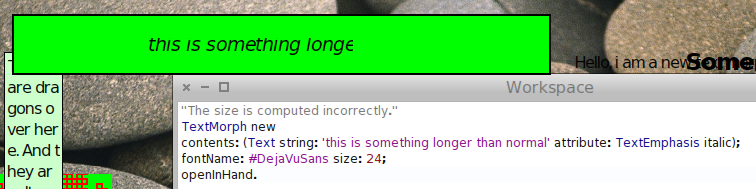
philippeback wrote
Not sure if this is related but:
"The size is computed incorrectly." ...fontName: #DejaVuSans size: 24;
When you mentioned this problem with a big font, I zeroed in on the issue about slow tools at: http://forum.world.st/Pharo-1-4-browse-slow-td4532473.html#a4533467 http://forum.world.st/The-tools-are-dreadfully-slow-in-1-4-td4173491.html Opening a browser got much slower the bigger I made my fonts, esp. the code font it seemed. Here were the results of evaluating "[ SystemBrowser defaultOpenBrowser ] timeProfile", which in this case is Nautilus, with the following predefined font styles set from the settings browser: small -> 212 msec huge -> 1491 msec huge and Helvetica Neue for code -> 2218 msec my custom preferences [1] -> 3171 msec (of course, the longest, lol) Small (fastest) statistics: **Memory** old +6,163,916 bytes young -1,056,972 bytes used +5,106,944 bytes free +1,076,236 bytes **GCs** full 1 totalling 81ms (3.0% uptime), avg 81.0ms incr 361 totalling 865ms (27.0% uptime), avg 2.0ms tenures 133 (avg 2 GCs/tenure) root table 0 overflows my prefs (slowest) statistics: 30.7% {973ms} WeakArray class>>finalizationProcess 58.9% {1866ms} NautilusWindow(Morph)>>doLayoutIn: **Memory** old +1,563,220 bytes young +1,067,008 bytes used +2,630,228 bytes free -402,812 bytes **GCs** full 0 totalling 0ms (0.0% uptime) incr 15 totalling 26ms (12.0% uptime), avg 2.0ms tenures 15 (avg 1 GCs/tenure) root table 0 overflows [1] The script for my custom prefs is: | fontName regularSize smallSize smallFont regularFont | FreeTypeFontProvider current updateFromSystem. fontName := 'Helvetica Neue'. regularSize := 18. smallSize := 14. regularFont := LogicalFont familyName: fontName pointSize: regularSize. smallFont := LogicalFont familyName: fontName pointSize: smallSize. #(defaultFont: codeFont: listFont: menuFont: windowTitleFont: buttonFont:) do: [ :e | StandardFonts perform: e with: regularFont ]. #(balloonFont: haloFont:) do: [ :e | StandardFonts perform: e with: smallFont ]. HTH, Sean -- View this message in context: http://forum.world.st/Unresponsive-1-4-image-tp4574693p4577273.html Sent from the Pharo Smalltalk mailing list archive at Nabble.com.
Sean P. DeNigris wrote
small -> 212 msec huge -> 1491 msec
I should've also mentioned: very large -> 232 msec huge, but code font at 18pt - 241 msec - **GCs**... incr 17 totalling 27ms (12.0% uptime), avg 2.0ms - 8.3% {19ms} NautilusWindow(Morph)>>fullBounds very large, but code font at 24pt - 1551 msec - **GCs**... incr 174 totalling 383ms (25.0% uptime), avg 2.0ms - 59.5% {923ms} NautilusWindow(Morph)>>doLayoutIn: So having a "huge" i.e. 24pt code font is definitely one of the issues... -- View this message in context: http://forum.world.st/Unresponsive-1-4-image-tp4574693p4577286.html Sent from the Pharo Smalltalk mailing list archive at Nabble.com.
So much for people with accessibility issues (like me). Strike fonts have a future... I was playing with Cuis 4 and there seems to be no problem with big font in there. Nor speed. Damn. 2012/4/22 Sean P. DeNigris <sean@clipperadams.com>
Sean P. DeNigris wrote
small -> 212 msec huge -> 1491 msec
I should've also mentioned: very large -> 232 msec huge, but code font at 18pt - 241 msec - **GCs**... incr 17 totalling 27ms (12.0% uptime), avg 2.0ms - 8.3% {19ms} NautilusWindow(Morph)>>fullBounds very large, but code font at 24pt - 1551 msec - **GCs**... incr 174 totalling 383ms (25.0% uptime), avg 2.0ms - 59.5% {923ms} NautilusWindow(Morph)>>doLayoutIn:
So having a "huge" i.e. 24pt code font is definitely one of the issues...
-- View this message in context: http://forum.world.st/Unresponsive-1-4-image-tp4574693p4577286.html Sent from the Pharo Smalltalk mailing list archive at Nabble.com.
-- Philippe Back "Helping you hit the top 3 outcomes you really want to achieve" Mob: +32(0) 478 650 140 | Fax: +32 (0) 70 408 027 Mail: phil@highoctane.be| Web: http://philippeback.eu | Blog: http://philippeback.be High Octane SPRL rue cour Boisacq 101 1301 Bierges
So much for people with accessibility issues (like me).
Strike fonts have a future... I was playing with Cuis 4 and there seems to be no problem with big font in there. Nor speed.
May be this is just a problem with the cache size. Open a bug entry so that we do not forget. Stef
Damn.
2012/4/22 Sean P. DeNigris <sean@clipperadams.com>
Sean P. DeNigris wrote
small -> 212 msec huge -> 1491 msec
I should've also mentioned: very large -> 232 msec huge, but code font at 18pt - 241 msec - **GCs**... incr 17 totalling 27ms (12.0% uptime), avg 2.0ms - 8.3% {19ms} NautilusWindow(Morph)>>fullBounds very large, but code font at 24pt - 1551 msec - **GCs**... incr 174 totalling 383ms (25.0% uptime), avg 2.0ms - 59.5% {923ms} NautilusWindow(Morph)>>doLayoutIn:
So having a "huge" i.e. 24pt code font is definitely one of the issues...
-- View this message in context: http://forum.world.st/Unresponsive-1-4-image-tp4574693p4577286.html Sent from the Pharo Smalltalk mailing list archive at Nabble.com.
-- Philippe Back "Helping you hit the top 3 outcomes you really want to achieve"
Mob: +32(0) 478 650 140 | Fax: +32 (0) 70 408 027 Mail: phil@highoctane.be | Web: http://philippeback.eu | Blog: http://philippeback.be
High Octane SPRL rue cour Boisacq 101 1301 Bierges
http://code.google.com/p/pharo/issues/detail?id=5654 2012/4/22 Stéphane Ducasse <stephane.ducasse@inria.fr>
So much for people with accessibility issues (like me).
Strike fonts have a future... I was playing with Cuis 4 and there seems to be no problem with big font in there. Nor speed.
May be this is just a problem with the cache size. Open a bug entry so that we do not forget.
Stef
Damn.
2012/4/22 Sean P. DeNigris <sean@clipperadams.com>
Sean P. DeNigris wrote
small -> 212 msec huge -> 1491 msec
I should've also mentioned: very large -> 232 msec huge, but code font at 18pt - 241 msec - **GCs**... incr 17 totalling 27ms (12.0% uptime), avg 2.0ms - 8.3% {19ms} NautilusWindow(Morph)>>fullBounds very large, but code font at 24pt - 1551 msec - **GCs**... incr 174 totalling 383ms (25.0% uptime), avg 2.0ms - 59.5% {923ms} NautilusWindow(Morph)>>doLayoutIn:
So having a "huge" i.e. 24pt code font is definitely one of the issues...
-- View this message in context: http://forum.world.st/Unresponsive-1-4-image-tp4574693p4577286.html Sent from the Pharo Smalltalk mailing list archive at Nabble.com.
-- Philippe Back "Helping you hit the top 3 outcomes you really want to achieve"
Mob: +32(0) 478 650 140 | Fax: +32 (0) 70 408 027 Mail: phil@highoctane.be | Web: http://philippeback.eu | Blog: http://philippeback.be
High Octane SPRL rue cour Boisacq 101 1301 Bierges
-- Philippe Back "Helping you hit the top 3 outcomes you really want to achieve" Mob: +32(0) 478 650 140 | Fax: +32 (0) 70 408 027 Mail: phil@highoctane.be| Web: http://philippeback.eu | Blog: http://philippeback.be High Octane SPRL rue cour Boisacq 101 1301 Bierges
Sean P. DeNigris wrote
Opening a browser got much slower the bigger I made my fonts, esp. the code font it seemed...
Opened issue http://code.google.com/p/pharo/issues/detail?id=5656 ... this seems like a different problem than the freezing... Sean -- View this message in context: http://forum.world.st/Unresponsive-1-4-image-tp4574693p4577994.html Sent from the Pharo Smalltalk mailing list archive at Nabble.com.
participants (7)
-
 Camillo Bruni
 -
 Igor Stasenko
 -
 Janko Mivšek
 -
 Paul DeBruicker
 -
 phil@highoctane.be
 -
 Sean P. DeNigris
 -
 Stéphane Ducasse