
Hello, I found that pasting in a workspace a right to left language sentence bring an error. Do we have a way to render such languages? Thanks Hilaire -- Dr. Geo - http://drgeo.eu iStoa - http://istao.drgeo.eu

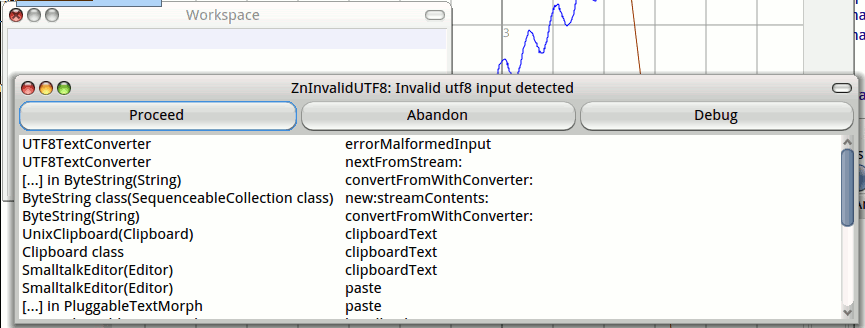
Too bad. May be a temporary solution, if not a the while UI level, will be to just be able to render right to left string. It could be a first start. I will try to look at this. Thanks Hilaire Le 11/08/2014 14:37, stepharo a écrit :
Hi hilaire
I do not think that there is support for right to left language.
On 11/8/14 03:07, Hilaire wrote:
Hello,
I found that pasting in a workspace a right to left language sentence bring an error. Do we have a way to render such languages?
Thanks
Hilaire
-- Dr. Geo - http://drgeo.eu iStoa - http://istao.drgeo.eu

On 11 Aug 2014, at 3:07 , Hilaire <hilaire@drgeo.eu> wrote:
Hello,
I found that pasting in a workspace a right to left language sentence bring an error. Do we have a way to render such languages?
Thanks
Hilaire
-- Dr. Geo - http://drgeo.eu iStoa - http://istao.drgeo.eu <rightToLeft.png>
Although Pharo doesnât support RTL renderin, thatâs not a rendering error though, but a mismatch between the encoding of the text in clipboard, and that expected by the image. (R2L text isnât *stored* RTL, so that should have no impact). Could it be youâre using a non-Unicode locale? Any chance you could find what OS/locale settings/source text this happens for? Cheers, Henry
Le 11/08/2014 18:23, Henrik Johansen a écrit :
Although Pharo doesnât support RTL renderin, thatâs not a rendering error though, but a mismatch between the encoding of the text in clipboard, and that expected by the image. (R2L text isnât*stored* RTL, so that should have no impact).
Could it be youâre using a non-Unicode locale? Any chance you could find what OS/locale settings/source text this happens for?
No I just copy and paste from the iStoa web translation tool some hebrew messages[1] in Pharo. Then I try to copy paste by the intermediate of a text editor with UTF-8 encoding same error (I noted that when pasting in the text editor, the message was right aligned). When I try to copy and paste a single character same error. So we may have an issue in the UTF-8 converter. Hilaire [1] https://translations.launchpad.net/istoa/trunk/+pots/istoa/he/+translate?sta... -- Dr. Geo - http://drgeo.eu iStoa - http://istao.drgeo.eu

I took the characters that you pasted in the issue you just made, and on Mac OS X, with a proper a Unicode font set, Arial Unicode MS, I get this: Is that correct ? There will be a left-to-right issue, but it is not a UTF-8 / Unicode problem I think. On 11 Aug 2014, at 16:39, Hilaire <hilaire@drgeo.eu> wrote:
Le 11/08/2014 18:23, Henrik Johansen a écrit :
Although Pharo doesnât support RTL renderin, thatâs not a rendering error though, but a mismatch between the encoding of the text in clipboard, and that expected by the image. (R2L text isnât*stored* RTL, so that should have no impact).
Could it be youâre using a non-Unicode locale? Any chance you could find what OS/locale settings/source text this happens for?
No I just copy and paste from the iStoa web translation tool some hebrew messages[1] in Pharo. Then I try to copy paste by the intermediate of a text editor with UTF-8 encoding same error (I noted that when pasting in the text editor, the message was right aligned). When I try to copy and paste a single character same error. So we may have an issue in the UTF-8 converter.
Hilaire
[1] https://translations.launchpad.net/istoa/trunk/+pots/istoa/he/+translate?sta...
-- Dr. Geo - http://drgeo.eu iStoa - http://istao.drgeo.eu
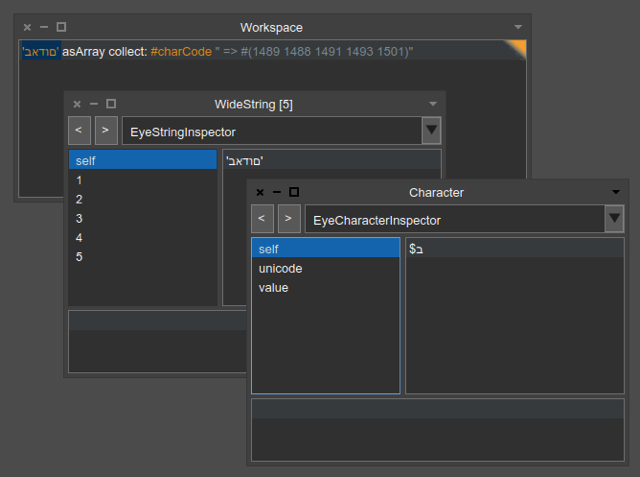
Yes strange, probably my test image. It looks correctly rendered in reverse order. Btw, do we have tool to help to pickup the right font given the pharo locale? Thanks Hilaire Le 11/08/2014 22:50, Sven Van Caekenberghe a écrit :
I took the characters that you pasted in the issue you just made, and on Mac OS X, with a proper a Unicode font set, Arial Unicode MS, I get this:
Is that correct ?
There will be a left-to-right issue, but it is not a UTF-8 / Unicode problem I think.
On 11 Aug 2014, at 16:39, Hilaire <hilaire@drgeo.eu <mailto:hilaire@drgeo.eu>> wrote:
Le 11/08/2014 18:23, Henrik Johansen a écrit :
Although Pharo doesnât support RTL renderin, thatâs not a rendering error though, but a mismatch between the encoding of the text in clipboard, and that expected by the image. (R2L text isnât*stored* RTL, so that should have no impact).
Could it be youâre using a non-Unicode locale? Any chance you could find what OS/locale settings/source text this happens for?
No I just copy and paste from the iStoa web translation tool some hebrew messages[1] in Pharo. Then I try to copy paste by the intermediate of a text editor with UTF-8 encoding same error (I noted that when pasting in the text editor, the message was right aligned). When I try to copy and paste a single character same error. So we may have an issue in the UTF-8 converter.
Hilaire
[1] https://translations.launchpad.net/istoa/trunk/+pots/istoa/he/+translate?sta...
-- Dr. Geo - http://drgeo.eu iStoa - http://istao.drgeo.eu
-- Dr. Geo - http://drgeo.eu iStoa - http://istao.drgeo.eu
On 11 Aug 2014, at 5:14 , Hilaire <hilaire@drgeo.eu> wrote:
Yes strange, probably my test image.
Or you could just be on a different platform, the Clipboard VM source for Linux/Windows is⦠something else entirely. On OSX, it asks for the text in UTF8 specifically; ExternalClipboard >> clipboardText ... bytes := self primReadClipboardData: clipboard format: 'public.utf8-plain-text'. (whatâs the valid formats other than that you ask? Darned if I know, probably need to read the VM sources) On Unix/Windows, it works differently, you donât use a primitive where you specifically set the encoding you want for clipboard text entering the image. My memory is a bit hazy, but IIRC, the Windows primitive code will also return utf8 consistently, so the code in Clipboard >> clipboardText will work correctly. While on *nix, the bytes returned will be converted either to the current localeâs default encoding (which is why I asked for it), or the one specified by the vmâs -locale parameter when it was launched, I canât quite remember the details. So if youâre on Linux it *might* help if you start the VM with an -encoding UTF8 parameter set, or use a system locale which returns #utf8.
It looks correctly rendered in reverse order. Btw, do we have tool to help to pickup the right font given the pharo locale?
Thanks
Hilaire
Itâs not rendered in reverse order, when one does the same as Sven did with example text #2 («Ready to continue?»), the String will render in Pharo with the question mark at the end. Cheers, Henry
participants (4)
-
 Henrik Johansen
 -
 Hilaire
 -
 stepharo
 -
 Sven Van Caekenberghe