request for improvements in GTInspector or debugger

Here is my scenario. I have a field that contains aCZWhatever the inspector shows me a list field aCZWhatever I can edit the aCZWhatever since I can click on it and get an input fiedl (or what I thought is an input field). I can select CZWhatever but I cannot do browse on it. So I have to use Spotter. Stef

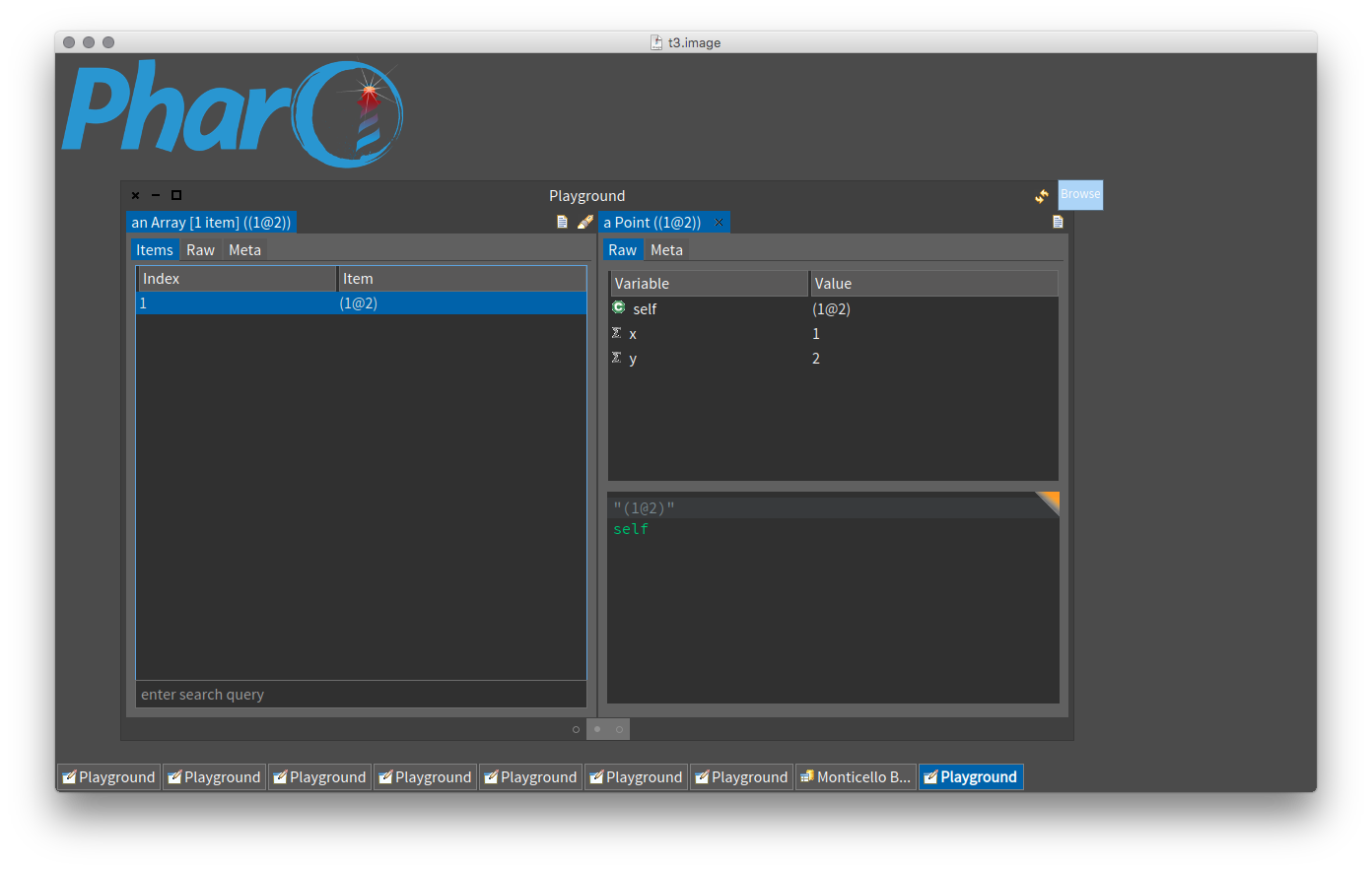
You can already do that: click the icon at the top right of the window 'Browse':
On 09 Aug 2016, at 19:23, stepharo <stepharo@free.fr> wrote:
Here is my scenario.
I have a field that contains aCZWhatever
the inspector shows me a list
field aCZWhatever
I can edit the aCZWhatever since I can click on it and get an input fiedl (or what I thought is an input field).
I can select CZWhatever but I cannot do browse on it. So I have to use Spotter.
Stef
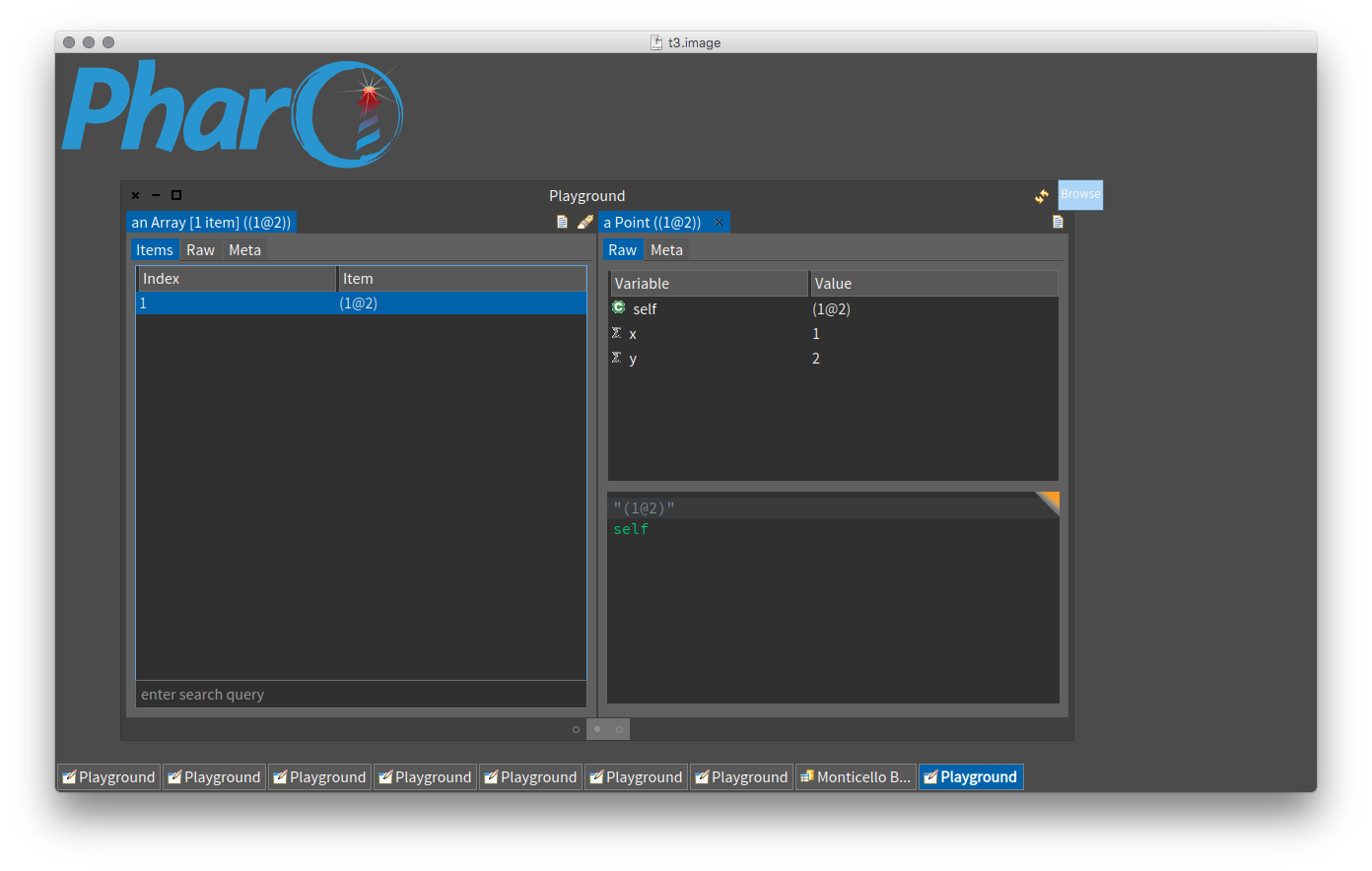

Hi, In which presentation are you? As Sven said, you can browse by clicking on the top right icon of the next pane. You can also browse right in place with the Meta presentation from the next pane. Also, if you are in the Raw view, you get the browse menu for an instance variable. However, this menu is hardcoded and for other presentations, this menu is indeed not available. I think this is a missing feature. In fact, we already have that in Moose and it works quite well: an omni-present object menu. The idea is that once we declare object actions (those available on the top right of an object pane), we could also offer them as a menu, and add them throughout the interface. Would this address your issue? Cheers, Doru
On Aug 9, 2016, at 7:44 PM, Sven Van Caekenberghe <sven@stfx.eu> wrote:
You can already do that: click the icon at the top right of the window 'Browse':
<Screen Shot 2016-08-09 at 19.43.10.png>
On 09 Aug 2016, at 19:23, stepharo <stepharo@free.fr> wrote:
Here is my scenario.
I have a field that contains aCZWhatever
the inspector shows me a list
field aCZWhatever
I can edit the aCZWhatever since I can click on it and get an input fiedl (or what I thought is an input field).
I can select CZWhatever but I cannot do browse on it. So I have to use Spotter.
Stef
-- www.tudorgirba.com www.feenk.com "Innovation comes in the least expected form. That is, if it is expected, it already happened."
Hi sven This is not the same. I do not need a menu or a button. I took the class of the instance as an example. Check deeply what I mentioned: - you have text - what can we do on text usually: edit, change and more important use it to query the system hyperfast (and here suddenly we cannot we can select edit the text but not use shortcut to navigate no senders/imp/class). This is a question of interface and the uniformity of the interface (this is like the grab icon in mac for file on the window). In Pharo in any text pane of the tools we can query and this is an important property. For example I can select a comment in the monticello pane and browse look for code - no need for Spotter. The text is under my nose and I can get to the class instantaneously. Now if the vision of Pharo is not to follow this tradition to immediate and superclose access to code, let me know because this is an important (crucial) aspect for me and I used it all the time. Stef Le 9/8/16 à 19:44, Sven Van Caekenberghe a écrit :
You can already do that: click the icon at the top right of the window 'Browse':
On 09 Aug 2016, at 19:23, stepharo <stepharo@free.fr <mailto:stepharo@free.fr>> wrote:
Here is my scenario.
I have a field that contains aCZWhatever
the inspector shows me a list
field aCZWhatever
I can edit the aCZWhatever since I can click on it and get an input fiedl (or what I thought is an input field).
I can select CZWhatever but I cannot do browse on it. So I have to use Spotter.
Stef
I too think that selecting some arbitrary text should make it possible to do useful things with it, like looking it up as class, method, ... - I like Command-Click rather a lot for this. In the last years, some panes where switched away from code panes, maybe that does not help. Apart from that, I think there should be an option to invoke Spotter directly on a selection (or even auto select something and search).
On 10 Aug 2016, at 09:43, stepharo <stepharo@free.fr> wrote:
Hi sven
This is not the same. I do not need a menu or a button. I took the class of the instance as an example. Check deeply what I mentioned:
- you have text
- what can we do on text usually: edit, change and more important use it to query the system
hyperfast (and here suddenly we cannot we can select edit the text but not use shortcut to navigate no senders/imp/class).
This is a question of interface and the uniformity of the interface (this is like the grab icon in mac for file on the window).
In Pharo in any text pane of the tools we can query and this is an important property. For example I can select a comment in the monticello pane and browse look for code - no need for Spotter. The text is under my nose and I can get to the class instantaneously. Now if the vision of Pharo is not to follow this tradition to immediate and superclose access to code, let me know
because this is an important (crucial) aspect for me and I used it all the time.
Stef
Le 9/8/16 à 19:44, Sven Van Caekenberghe a écrit :
You can already do that: click the icon at the top right of the window 'Browse':
<Mail Attachment.png>
On 09 Aug 2016, at 19:23, stepharo <stepharo@free.fr> wrote:
Here is my scenario.
I have a field that contains aCZWhatever
the inspector shows me a list
field aCZWhatever
I can edit the aCZWhatever since I can click on it and get an input fiedl (or what I thought is an input field).
I can select CZWhatever but I cannot do browse on it. So I have to use Spotter.
Stef
Hi Stef, I agree with what you say in this mail, and I am not sure where this is not the case. And I also do not understand how this relates to the previous message which was about manipulating the list of items (I guess in a collection). Nobody argues that you have to go through Spotter if you have what you want in front of you :). Spotter, in its current form, is meant for finding an entry into the system if you do not have it. The end goal is to have as much direct manipulation of objects as possible, and if we find a place where this is not the case, we have to improve it. Could you re-detail the original problem? Cheers, Doru
On Aug 10, 2016, at 9:43 AM, stepharo <stepharo@free.fr> wrote:
Hi sven
This is not the same. I do not need a menu or a button. I took the class of the instance as an example. Check deeply what I mentioned:
- you have text
- what can we do on text usually: edit, change and more important use it to query the system
hyperfast (and here suddenly we cannot we can select edit the text but not use shortcut to navigate no senders/imp/class).
This is a question of interface and the uniformity of the interface (this is like the grab icon in mac for file on the window).
In Pharo in any text pane of the tools we can query and this is an important property. For example I can select a comment in the monticello pane and browse look for code - no need for Spotter. The text is under my nose and I can get to the class instantaneously. Now if the vision of Pharo is not to follow this tradition to immediate and superclose access to code, let me know
because this is an important (crucial) aspect for me and I used it all the time.
Stef
Le 9/8/16 à 19:44, Sven Van Caekenberghe a écrit :
You can already do that: click the icon at the top right of the window 'Browse':
<Mail Attachment.png>
On 09 Aug 2016, at 19:23, stepharo <stepharo@free.fr> wrote:
Here is my scenario.
I have a field that contains aCZWhatever
the inspector shows me a list
field aCZWhatever
I can edit the aCZWhatever since I can click on it and get an input fiedl (or what I thought is an input field).
I can select CZWhatever but I cannot do browse on it. So I have to use Spotter.
Stef
-- www.tudorgirba.com www.feenk.com "Obvious things are difficult to teach."

Hi,
Le 10 août 2016 à 14:11, Tudor Girba <tudor@tudorgirba.com> a écrit :
Hi Stef,
I agree with what you say in this mail, and I am not sure where this is not the case.
By example, it is not available in a String presentation of GTInspector. This one always forces me to go to the raw presentation and use the comment. Would it be possible to use global shortcuts in String presentation (cmd+B, cmd+M, cmd+N, etc.)? Christophe

2016-08-11 13:44 GMT+02:00 Christophe Demarey <christophe.demarey@inria.fr>:
Hi,
Le 10 août 2016 à 14:11, Tudor Girba <tudor@tudorgirba.com> a écrit :
Hi Stef,
I agree with what you say in this mail, and I am not sure where this is not the case.
By example, it is not available in a String presentation of GTInspector. This one always forces me to go to the raw presentation and use the comment. Would it be possible to use global shortcuts in String presentation (cmd+B, cmd+M, cmd+N, etc.)?
Christophe
You could change GLMMorphicRubricTextRenderer>>#morph to act with smalltalk comment mode morph ^ RubScrolledTextMorph new getSelectionSelector: #primarySelectionInterval; color: Smalltalk ui theme backgroundColor; textColor: Smalltalk ui theme textColor; textFont: StandardFonts defaultFont; model: textModel; beForSmalltalkComment; yourself. This way, it behaves like the comment pane in Nautilus, it renders the text as "text" with the default font, no menu, but allows the common code mode shortcuts cmd+b cmd+M, ( and some that doesn't make sense for every selection, like cmd+i for inspect).
Hi, Nice one. But, I do not want to change the default text presentation. Instead I would add another presentation. We can call it pharoText. Could you please open an issue for this? Doru
On Aug 11, 2016, at 2:12 PM, Nicolai Hess <nicolaihess@gmail.com> wrote:
2016-08-11 13:44 GMT+02:00 Christophe Demarey <christophe.demarey@inria.fr>: Hi,
Le 10 août 2016 à 14:11, Tudor Girba <tudor@tudorgirba.com> a écrit :
Hi Stef,
I agree with what you say in this mail, and I am not sure where this is not the case.
By example, it is not available in a String presentation of GTInspector. This one always forces me to go to the raw presentation and use the comment. Would it be possible to use global shortcuts in String presentation (cmd+B, cmd+M, cmd+N, etc.)?
Christophe
You could change GLMMorphicRubricTextRenderer>>#morph to act with smalltalk comment mode
morph ^ RubScrolledTextMorph new getSelectionSelector: #primarySelectionInterval; color: Smalltalk ui theme backgroundColor; textColor: Smalltalk ui theme textColor; textFont: StandardFonts defaultFont; model: textModel; beForSmalltalkComment; yourself.
This way, it behaves like the comment pane in Nautilus, it renders the text as "text" with the default font, no menu, but allows the common code mode shortcuts cmd+b cmd+M, ( and some that doesn't make sense for every selection, like cmd+i for inspect).
-- www.tudorgirba.com www.feenk.com "Quality cannot be an afterthought."
Hi Doru, Will the new presentation be the default one? If the new presentation will not be the default presentation for a String, it wonât be useful as we can already use the raw presentation.
Le 12 août 2016 à 06:22, Tudor Girba <tudor@tudorgirba.com> a écrit :
Hi,
Nice one.
But, I do not want to change the default text presentation. Instead I would add another presentation. We can call it pharoText. Could you please open an issue for this?
Doru
On Aug 11, 2016, at 2:12 PM, Nicolai Hess <nicolaihess@gmail.com> wrote:
2016-08-11 13:44 GMT+02:00 Christophe Demarey <christophe.demarey@inria.fr>: Hi,
Le 10 août 2016 à 14:11, Tudor Girba <tudor@tudorgirba.com> a écrit :
Hi Stef,
I agree with what you say in this mail, and I am not sure where this is not the case.
By example, it is not available in a String presentation of GTInspector. This one always forces me to go to the raw presentation and use the comment. Would it be possible to use global shortcuts in String presentation (cmd+B, cmd+M, cmd+N, etc.)?
Christophe
You could change GLMMorphicRubricTextRenderer>>#morph to act with smalltalk comment mode
morph ^ RubScrolledTextMorph new getSelectionSelector: #primarySelectionInterval; color: Smalltalk ui theme backgroundColor; textColor: Smalltalk ui theme textColor; textFont: StandardFonts defaultFont; model: textModel; beForSmalltalkComment; yourself.
This way, it behaves like the comment pane in Nautilus, it renders the text as "text" with the default font, no menu, but allows the common code mode shortcuts cmd+b cmd+M, ( and some that doesn't make sense for every selection, like cmd+i for inspect).
-- www.tudorgirba.com www.feenk.com
"Quality cannot be an afterthought."
Hi, We will change the presentation for String to use the new one :) Doru
On Aug 12, 2016, at 9:23 AM, Christophe Demarey <christophe.demarey@inria.fr> wrote:
Hi Doru,
Will the new presentation be the default one? If the new presentation will not be the default presentation for a String, it wonât be useful as we can already use the raw presentation.
Le 12 août 2016 à 06:22, Tudor Girba <tudor@tudorgirba.com> a écrit :
Hi,
Nice one.
But, I do not want to change the default text presentation. Instead I would add another presentation. We can call it pharoText. Could you please open an issue for this?
Doru
On Aug 11, 2016, at 2:12 PM, Nicolai Hess <nicolaihess@gmail.com> wrote:
2016-08-11 13:44 GMT+02:00 Christophe Demarey <christophe.demarey@inria.fr>: Hi,
Le 10 août 2016 à 14:11, Tudor Girba <tudor@tudorgirba.com> a écrit :
Hi Stef,
I agree with what you say in this mail, and I am not sure where this is not the case.
By example, it is not available in a String presentation of GTInspector. This one always forces me to go to the raw presentation and use the comment. Would it be possible to use global shortcuts in String presentation (cmd+B, cmd+M, cmd+N, etc.)?
Christophe
You could change GLMMorphicRubricTextRenderer>>#morph to act with smalltalk comment mode
morph ^ RubScrolledTextMorph new getSelectionSelector: #primarySelectionInterval; color: Smalltalk ui theme backgroundColor; textColor: Smalltalk ui theme textColor; textFont: StandardFonts defaultFont; model: textModel; beForSmalltalkComment; yourself.
This way, it behaves like the comment pane in Nautilus, it renders the text as "text" with the default font, no menu, but allows the common code mode shortcuts cmd+b cmd+M, ( and some that doesn't make sense for every selection, like cmd+i for inspect).
-- www.tudorgirba.com www.feenk.com
"Quality cannot be an afterthought."
-- www.tudorgirba.com www.feenk.com "The coherence of a trip is given by the clearness of the goal."
participants (5)
-
 Christophe Demarey
 -
 Nicolai Hess
 -
 stepharo
 -
 Sven Van Caekenberghe
 -
 Tudor Girba