Feedback request: Editor with highlighting message-sends on mouse over

I opened an issue 18901 <https://pharo.fogbugz.com/f/cases/18901/Highlight-message-send-selector-on-m...> Highlight message send selector on mouse over with an experimental implementation. Just load the slice, enable the setting: RubAbstractTextArea highlightMessageSend: true. Now open a code editor (nautilus/MessageBrowser) and move the mouse over a message send. Or evaluate this code, it opens a text editor on a method, where it is difficult to see which part of the code belongs to which method: evaluate: TextModel new beForCode; aboutToStyle:true;behavior: MorphTreeMorph;text:(MorphTreeMorph>>#drawLinesOn:) sourceCode;openWithSpec. feedback welcome. nicolai

Hi Nicolai Good idea! I like it and it works well. I now wonder if it should not be enabled as default. For that, maybe the highlight should be styled a bit (e.g. lighter colors) to do not perturb the user when not really needed but still easy to see. Another idea would be to show it only if you press a key while mouse over (e.g shift). thanks
Le 10 août 2016 à 16:48, Nicolai Hess <nicolaihess@gmail.com> a écrit :
I opened an issue
18901 <https://pharo.fogbugz.com/f/cases/18901/Highlight-message-send-selector-on-m...> Highlight message send selector on mouse over
with an experimental implementation.
Just load the slice, enable the setting: RubAbstractTextArea highlightMessageSend: true.
Now open a code editor (nautilus/MessageBrowser) and move the mouse over a message send.
Or evaluate this code, it opens a text editor on a method, where it is difficult to see which part of the code belongs to which method:
evaluate: TextModel new beForCode; aboutToStyle:true;behavior: MorphTreeMorph;text:(MorphTreeMorph>>#drawLinesOn:) sourceCode;openWithSpec.
feedback welcome.
nicolai
2016-08-11 13:57 GMT+02:00 Christophe Demarey <christophe.demarey@inria.fr>:
Hi Nicolai
Good idea! I like it and it works well. I now wonder if it should not be enabled as default. For that, maybe the highlight should be styled a bit (e.g. lighter colors) to do not perturb the user when not really needed but still easy to see. Another idea would be to show it only if you press a key while mouse over (e.g shift).
Thanks for your feedback. Yes, using shift is a good idea
thanks
Le 10 août 2016 à 16:48, Nicolai Hess <nicolaihess@gmail.com> a écrit :
I opened an issue
18901 <https://pharo.fogbugz.com/f/cases/18901/Highlight-message-send-selector-on-m...> Highlight message send selector on mouse over
with an experimental implementation.
Just load the slice, enable the setting: RubAbstractTextArea highlightMessageSend: true.
Now open a code editor (nautilus/MessageBrowser) and move the mouse over a message send.
Or evaluate this code, it opens a text editor on a method, where it is difficult to see which part of the code belongs to which method:
evaluate: TextModel new beForCode; aboutToStyle:true;behavior: MorphTreeMorph;text:(MorphTreeMorph>>#drawLinesOn:) sourceCode;openWithSpec.
feedback welcome.
nicolai

2016-08-11 13:57 GMT+02:00 Christophe Demarey <christophe.demarey@inria.fr>:
Good idea! I like it and it works well. I now wonder if it should not be enabled as default. For that, maybe the highlight should be styled a bit (e.g. lighter colors) to do not perturb the user when not really needed but still easy to see. Another idea would be to show it only if you press a key while mouse over (e.g shift).
I remember another nice idea to underline keyword messages with different colors.
2016-08-11 21:23 GMT+02:00 Denis Kudriashov <dionisiydk@gmail.com>:
2016-08-11 13:57 GMT+02:00 Christophe Demarey <christophe.demarey@inria.fr
:
Good idea! I like it and it works well. I now wonder if it should not be enabled as default. For that, maybe the highlight should be styled a bit (e.g. lighter colors) to do not perturb the user when not really needed but still easy to see. Another idea would be to show it only if you press a key while mouse over (e.g shift).
I remember another nice idea to underline keyword messages with different colors.
Another idea, instead of highlighting the whole message with arguments, only underline the keywords. This is nice too, but the code to do so (using rubrics text segements) is much more complex, because I had to use multiple text segments (one per keyword part). Doing the underline for all keyword message is easier with using ordinary text style attributes. And let the syntax highligher set the proper attributes. I already did this once, but not for underlining the keywords but for emphase variable assignments.
2016-08-11 21:54 GMT+02:00 Nicolai Hess <nicolaihess@gmail.com>:
2016-08-11 21:23 GMT+02:00 Denis Kudriashov <dionisiydk@gmail.com>:
2016-08-11 13:57 GMT+02:00 Christophe Demarey < christophe.demarey@inria.fr>:
Good idea! I like it and it works well. I now wonder if it should not be enabled as default. For that, maybe the highlight should be styled a bit (e.g. lighter colors) to do not perturb the user when not really needed but still easy to see. Another idea would be to show it only if you press a key while mouse over (e.g shift).
I remember another nice idea to underline keyword messages with different colors.
Another idea, instead of highlighting the whole message with arguments, only underline the keywords. This is nice too, but the code to do so (using rubrics text segements) is much more complex, because I had to use multiple text segments (one per keyword part).
Doing the underline for all keyword message is easier with using ordinary text style attributes. And let the syntax highligher set the proper attributes. I already did this once, but not for underlining the keywords but for emphase variable assignments.
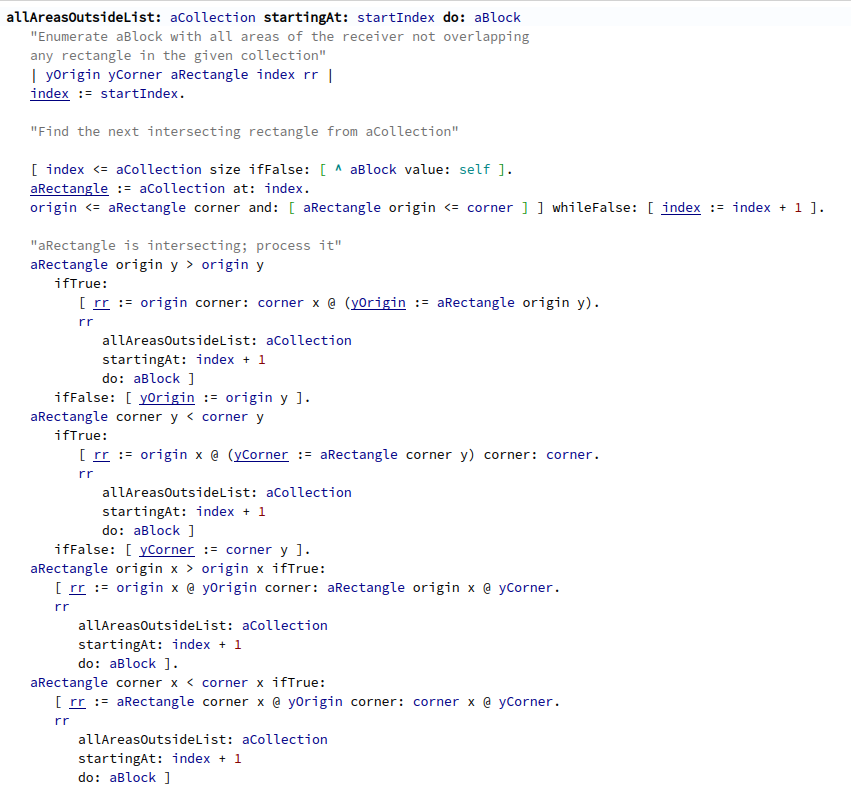
This is the changed styler to underline assignments. This makes it easer to spot places in long methods, where variables are changed. (on the other hand, of course, methods shouldn't be that big :) )
2016-08-11 22:19 GMT+02:00 Nicolai Hess <nicolaihess@gmail.com>:
This is the changed styler to underline assignments. This makes it easer to spot places in long methods, where variables are changed. (on the other hand, of course, methods shouldn't be that big :) )
Let's integrate it. It looks so good
2016-08-11 23:11 GMT+02:00 Denis Kudriashov <dionisiydk@gmail.com>:
2016-08-11 22:19 GMT+02:00 Nicolai Hess <nicolaihess@gmail.com>:
This is the changed styler to underline assignments. This makes it easer to spot places in long methods, where variables are changed. (on the other hand, of course, methods shouldn't be that big :) )
Let's integrate it. It looks so good
This is not part of the change, just an experiment. I need to change the style tables for this, and before we integrate that change, I would like to make it configurable.
That's nice 2016-08-10 16:48 GMT+02:00 Nicolai Hess <nicolaihess@gmail.com>:
I opened an issue
18901 <https://pharo.fogbugz.com/f/cases/18901/Highlight-message-send-selector-on-m...> Highlight message send selector on mouse over
with an experimental implementation.
Just load the slice, enable the setting: RubAbstractTextArea highlightMessageSend: true.
Now open a code editor (nautilus/MessageBrowser) and move the mouse over a message send.
Or evaluate this code, it opens a text editor on a method, where it is difficult to see which part of the code belongs to which method:
evaluate: TextModel new beForCode; aboutToStyle:true;behavior: MorphTreeMorph;text:(MorphTreeMorph>>#drawLinesOn:) sourceCode;openWithSpec.
feedback welcome.
nicolai
2016-08-10 16:48 GMT+02:00 Nicolai Hess <nicolaihess@gmail.com>:
I opened an issue
18901 <https://pharo.fogbugz.com/f/cases/18901/Highlight-message-send-selector-on-m...> Highlight message send selector on mouse over
with an experimental implementation.
Just load the slice, enable the setting: RubAbstractTextArea highlightMessageSend: true.
Now open a code editor (nautilus/MessageBrowser) and move the mouse over a message send.
Or evaluate this code, it opens a text editor on a method, where it is difficult to see which part of the code belongs to which method:
evaluate: TextModel new beForCode; aboutToStyle:true;behavior: MorphTreeMorph;text:(MorphTreeMorph>>#drawLinesOn:) sourceCode;openWithSpec.
feedback welcome.
nicolai
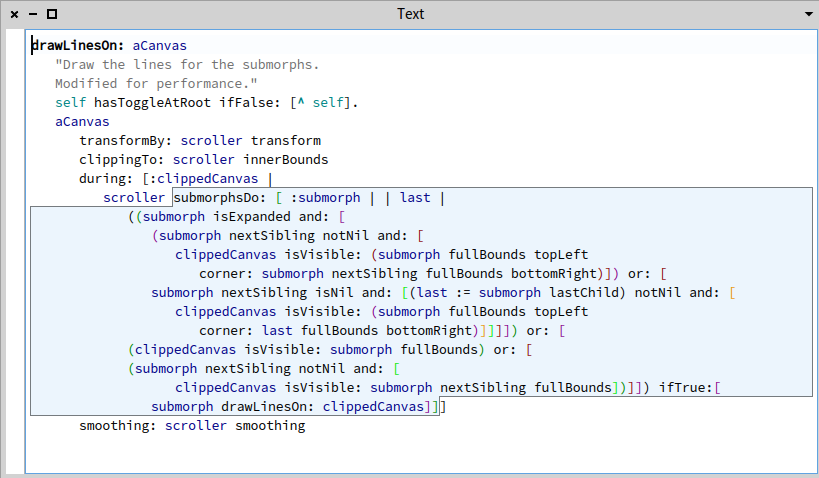
Attached a screenshot. The mouse cursor is over the #submorphsDo: message, the highlighter highlights the message and all that is part of its arguments (the big block).

Hi nicolai It is nice. I would not put the border in black. What is needed to integrate it. Stef Le 10/8/16 à 16:48, Nicolai Hess a écrit :
I opened an issue
18901 <https://pharo.fogbugz.com/f/cases/18901/Highlight-message-send-selector-on-m...> Highlight message send selector on mouse over
with an experimental implementation.
Just load the slice, enable the setting: RubAbstractTextArea highlightMessageSend: true.
Now open a code editor (nautilus/MessageBrowser) and move the mouse over a message send.
Or evaluate this code, it opens a text editor on a method, where it is difficult to see which part of the code belongs to which method:
evaluate: TextModel new beForCode; aboutToStyle:true;behavior: MorphTreeMorph;text:(MorphTreeMorph>>#drawLinesOn:) sourceCode;openWithSpec.
feedback welcome.
nicolai
2016-08-12 19:09 GMT+02:00 stepharo <stepharo@free.fr>:
Hi nicolai
It is nice. I would not put the border in black.
What is needed to integrate it.
I put the issue to "Resolved ", so the monkey can check. The background color is the same as for "secondary selection" and the border color is the same "muchDarker". Of course, we can integrate it and change the color later.
Stef Le 10/8/16 à 16:48, Nicolai Hess a écrit :
I opened an issue
18901 <https://pharo.fogbugz.com/f/cases/18901/Highlight-message-send-selector-on-m...> Highlight message send selector on mouse over
with an experimental implementation.
Just load the slice, enable the setting: RubAbstractTextArea highlightMessageSend: true.
Now open a code editor (nautilus/MessageBrowser) and move the mouse over a message send.
Or evaluate this code, it opens a text editor on a method, where it is difficult to see which part of the code belongs to which method:
evaluate: TextModel new beForCode; aboutToStyle:true;behavior: MorphTreeMorph;text:(MorphTreeMorph>>#drawLinesOn:) sourceCode;openWithSpec.
feedback welcome.
nicolai
I like the idea to use shift to activate it. Le 12/8/16 à 19:19, Nicolai Hess a écrit :
2016-08-12 19:09 GMT+02:00 stepharo <stepharo@free.fr <mailto:stepharo@free.fr>>:
Hi nicolai
It is nice. I would not put the border in black.
What is needed to integrate it.
I put the issue to "Resolved ", so the monkey can check. The background color is the same as for "secondary selection" and the border color is the same "muchDarker".
Of course, we can integrate it and change the color later.
Stef
Le 10/8/16 à 16:48, Nicolai Hess a écrit :
I opened an issue
18901 <https://pharo.fogbugz.com/f/cases/18901/Highlight-message-send-selector-on-m...> Highlight message send selector on mouse over
with an experimental implementation.
Just load the slice, enable the setting: RubAbstractTextArea highlightMessageSend: true.
Now open a code editor (nautilus/MessageBrowser) and move the mouse over a message send.
Or evaluate this code, it opens a text editor on a method, where it is difficult to see which part of the code belongs to which method:
evaluate: TextModel new beForCode; aboutToStyle:true;behavior: MorphTreeMorph;text:(MorphTreeMorph>>#drawLinesOn:) sourceCode;openWithSpec.
feedback welcome.
nicolai
2016-08-12 19:31 GMT+02:00 stepharo <stepharo@free.fr>:
I like the idea to use shift to activate it.
Ok, I 'll can change it.
Le 12/8/16 à 19:19, Nicolai Hess a écrit :
2016-08-12 19:09 GMT+02:00 stepharo <stepharo@free.fr>:
Hi nicolai
It is nice. I would not put the border in black.
What is needed to integrate it.
I put the issue to "Resolved ", so the monkey can check. The background color is the same as for "secondary selection" and the border color is the same "muchDarker".
Of course, we can integrate it and change the color later.
Stef Le 10/8/16 à 16:48, Nicolai Hess a écrit :
I opened an issue
18901 <https://pharo.fogbugz.com/f/cases/18901/Highlight-message-send-selector-on-m...> Highlight message send selector on mouse over
with an experimental implementation.
Just load the slice, enable the setting: RubAbstractTextArea highlightMessageSend: true.
Now open a code editor (nautilus/MessageBrowser) and move the mouse over a message send.
Or evaluate this code, it opens a text editor on a method, where it is difficult to see which part of the code belongs to which method:
evaluate: TextModel new beForCode; aboutToStyle:true;behavior: MorphTreeMorph;text:(MorphTreeMorph>>#drawLinesOn:) sourceCode;openWithSpec.
feedback welcome.
nicolai
participants (4)
-
 Christophe Demarey
 -
 Denis Kudriashov
 -
 Nicolai Hess
 -
 stepharo