[Pharo-project] When using Autotest + TilingWindowManager, the sarch dialog is unaccesible

Hi (alain?). When using Autotest + TilingWindowManager , if I then I am in the system browser and press cmd + f, the search dialog is too much in the top left of the screen. I cannot type in there, and I cannot move it. Look the attached screenshot. So... any ideas how we can fix that? what about just giving focus (bring to front) to the search windows just after opening it ? thanks in advance, -- Mariano http://marianopeck.wordpress.com
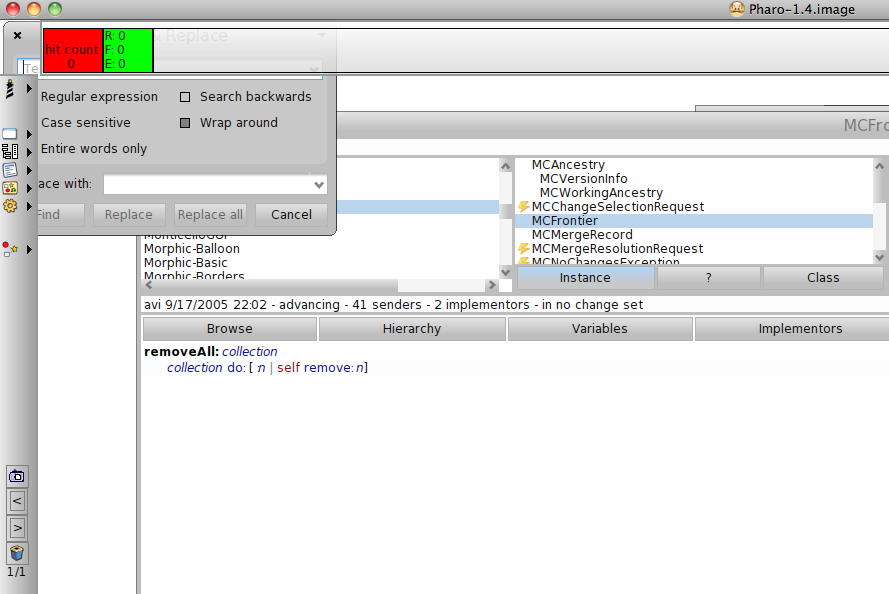

On Thu, Oct 27, 2011 at 2:26 PM, Mariano Martinez Peck < marianopeck@gmail.com> wrote:
Hi (alain?). When using Autotest + TilingWindowManager , if I then I am in the system browser and press cmd + f, the search dialog is too much in the top left of the screen. I cannot type in there, and I cannot move it. Look the attached screenshot. So... any ideas how we can fix that? what about just giving focus (bring to front) to the search windows just after opening it ?
Hi, I'm not aware of the consequences, but if you remove: EditorFindReplaceDialogWindow>>open (thus using SystemWindow>>open instead) the dialog is placed the same way as SystemWindows and does not open behind docked bars. Laurent
thanks in advance,
-- Mariano http://marianopeck.wordpress.com

I'm sure I had some fixes for this... must find! Regards, Gary ----- Original Message ----- From: laurent laffont To: Pharo-project@lists.gforge.inria.fr Sent: Thursday, October 27, 2011 5:51 PM Subject: Re: [Pharo-project] When using Autotest + TilingWindowManager, the sarch dialog is unaccesible On Thu, Oct 27, 2011 at 2:26 PM, Mariano Martinez Peck <marianopeck@gmail.com> wrote: Hi (alain?). When using Autotest + TilingWindowManager , if I then I am in the system browser and press cmd + f, the search dialog is too much in the top left of the screen. I cannot type in there, and I cannot move it. Look the attached screenshot. So... any ideas how we can fix that? what about just giving focus (bring to front) to the search windows just after opening it ? Hi, I'm not aware of the consequences, but if you remove: EditorFindReplaceDialogWindow>>open (thus using SystemWindow>>open instead) the dialog is placed the same way as SystemWindows and does not open behind docked bars. Laurent thanks in advance, -- Mariano http://marianopeck.wordpress.com
On Thu, Oct 27, 2011 at 7:07 PM, Gary Chambers <gazzaguru2@btinternet.com>wrote:
** I'm sure I had some fixes for this... must find!
please please :)
Regards, Gary
----- Original Message ----- *From:* laurent laffont <laurent.laffont@gmail.com> *To:* Pharo-project@lists.gforge.inria.fr *Sent:* Thursday, October 27, 2011 5:51 PM *Subject:* Re: [Pharo-project] When using Autotest + TilingWindowManager, the sarch dialog is unaccesible
On Thu, Oct 27, 2011 at 2:26 PM, Mariano Martinez Peck < marianopeck@gmail.com> wrote:
Hi (alain?). When using Autotest + TilingWindowManager , if I then I am in the system browser and press cmd + f, the search dialog is too much in the top left of the screen. I cannot type in there, and I cannot move it. Look the attached screenshot. So... any ideas how we can fix that? what about just giving focus (bring to front) to the search windows just after opening it ?
Hi,
I'm not aware of the consequences, but if you remove: EditorFindReplaceDialogWindow>>open
(thus using SystemWindow>>open instead)
the dialog is placed the same way as SystemWindows and does not open behind docked bars.
Laurent
thanks in advance,
-- Mariano http://marianopeck.wordpress.com
-- Mariano http://marianopeck.wordpress.com
See post of 30/8/2011... Though only on initialize (as user can place afterwards), might need to be more aggressive (in open). Wonder if any of those fixes got in... Regards, Gary ----- Original Message ----- From: Mariano Martinez Peck To: Pharo-project@lists.gforge.inria.fr Sent: Thursday, October 27, 2011 6:19 PM Subject: Re: [Pharo-project] When using Autotest + TilingWindowManager, the sarch dialog is unaccesible On Thu, Oct 27, 2011 at 7:07 PM, Gary Chambers <gazzaguru2@btinternet.com> wrote: I'm sure I had some fixes for this... must find! please please :) Regards, Gary ----- Original Message ----- From: laurent laffont To: Pharo-project@lists.gforge.inria.fr Sent: Thursday, October 27, 2011 5:51 PM Subject: Re: [Pharo-project] When using Autotest + TilingWindowManager, the sarch dialog is unaccesible On Thu, Oct 27, 2011 at 2:26 PM, Mariano Martinez Peck <marianopeck@gmail.com> wrote: Hi (alain?). When using Autotest + TilingWindowManager , if I then I am in the system browser and press cmd + f, the search dialog is too much in the top left of the screen. I cannot type in there, and I cannot move it. Look the attached screenshot. So... any ideas how we can fix that? what about just giving focus (bring to front) to the search windows just after opening it ? Hi, I'm not aware of the consequences, but if you remove: EditorFindReplaceDialogWindow>>open (thus using SystemWindow>>open instead) the dialog is placed the same way as SystemWindows and does not open behind docked bars. Laurent thanks in advance, -- Mariano http://marianopeck.wordpress.com -- Mariano http://marianopeck.wordpress.com

Let us know if we missed something. It is probable. Stef On Oct 27, 2011, at 7:22 PM, Gary Chambers wrote:
See post of 30/8/2011...
Though only on initialize (as user can place afterwards), might need to be more aggressive (in open). Wonder if any of those fixes got in...
Regards, Gary ----- Original Message ----- From: Mariano Martinez Peck To: Pharo-project@lists.gforge.inria.fr Sent: Thursday, October 27, 2011 6:19 PM Subject: Re: [Pharo-project] When using Autotest + TilingWindowManager, the sarch dialog is unaccesible
On Thu, Oct 27, 2011 at 7:07 PM, Gary Chambers <gazzaguru2@btinternet.com> wrote: I'm sure I had some fixes for this... must find!
please please :)
Regards, Gary ----- Original Message ----- From: laurent laffont To: Pharo-project@lists.gforge.inria.fr Sent: Thursday, October 27, 2011 5:51 PM Subject: Re: [Pharo-project] When using Autotest + TilingWindowManager, the sarch dialog is unaccesible
On Thu, Oct 27, 2011 at 2:26 PM, Mariano Martinez Peck <marianopeck@gmail.com> wrote: Hi (alain?). When using Autotest + TilingWindowManager , if I then I am in the system browser and press cmd + f, the search dialog is too much in the top left of the screen. I cannot type in there, and I cannot move it. Look the attached screenshot. So... any ideas how we can fix that? what about just giving focus (bring to front) to the search windows just after opening it ?
Hi,
I'm not aware of the consequences, but if you remove: EditorFindReplaceDialogWindow>>open
(thus using SystemWindow>>open instead)
the dialog is placed the same way as SystemWindows and does not open behind docked bars.
Laurent
thanks in advance,
-- Mariano http://marianopeck.wordpress.com
-- Mariano http://marianopeck.wordpress.com
On Thu, Oct 27, 2011 at 6:51 PM, laurent laffont <laurent.laffont@gmail.com>wrote:
On Thu, Oct 27, 2011 at 2:26 PM, Mariano Martinez Peck < marianopeck@gmail.com> wrote:
Hi (alain?). When using Autotest + TilingWindowManager , if I then I am in the system browser and press cmd + f, the search dialog is too much in the top left of the screen. I cannot type in there, and I cannot move it. Look the attached screenshot. So... any ideas how we can fix that? what about just giving focus (bring to front) to the search windows just after opening it ?
Hi,
I'm not aware of the consequences, but if you remove: EditorFindReplaceDialogWindow>>open
(thus using SystemWindow>>open instead)
the dialog is placed the same way as SystemWindows and does not open behind docked bars.
Good. Thanks Laurent, at least I have a workarround :)
Laurent
thanks in advance,
-- Mariano http://marianopeck.wordpress.com
-- Mariano http://marianopeck.wordpress.com
participants (4)
-
 Gary Chambers
 -
 laurent laffont
 -
 Mariano Martinez Peck
 -
 Stéphane Ducasse