
Hi! Apparently, the width (in pixels) of a stroke in athens seems to vary with the size of the path. Am I right? For example, I have the following rendering: There is just one code to draw a box, which is: athensCanvas pathTransform restoreAfter: [ athensCanvas pathTransform translateBy: rectangle center; scaleBy: rectangle extent / 2. athensCanvas setPaint: color; drawShape: self path. strokePaint ifNotNil: [ (athensCanvas setStrokePaint: strokePaint) width: 0.1. athensCanvas drawShape: path ] ] Having a width of 1 makes a very large border. Do I miss something? Cheers, Alexandre -- _,.;:~^~:;._,.;:~^~:;._,.;:~^~:;._,.;:~^~:;._,.;: Alexandre Bergel http://www.bergel.eu ^~:;._,.;:~^~:;._,.;:~^~:;._,.;:~^~:;._,.;:~^~:;.

On 03 Jan 2014, at 1:58 , Alexandre Bergel <alexandre.bergel@me.com> wrote:
Hi!
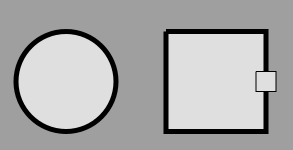
Apparently, the width (in pixels) of a stroke in athens seems to vary with the size of the path. Am I right?
For example, I have the following rendering:
<Screen Shot 2014-01-03 at 9.54.29 AM.png>
There is just one code to draw a box, which is:
athensCanvas pathTransform restoreAfter: [ athensCanvas pathTransform translateBy: rectangle center; scaleBy: rectangle extent / 2.
athensCanvas setPaint: color; drawShape: self path.
strokePaint ifNotNil: [ (athensCanvas setStrokePaint: strokePaint) width: 0.1. athensCanvas drawShape: path ] ]
Having a width of 1 makes a very large border. Do I miss something?
Cheers, Alexandre -- _,.;:~^~:;._,.;:~^~:;._,.;:~^~:;._,.;:~^~:;._,.;: Alexandre Bergel http://www.bergel.eu ^~:;._,.;:~^~:;._,.;:~^~:;._,.;:~^~:;._,.;:~^~:;.
Well yes, you are using scaleBy:. That scaling applies to the stroke width of the path as well, Iâd imagine... Cheers, Henry
Very true! looks like to be the thing. Thanks! Alexandre On Jan 3, 2014, at 11:12 AM, Henrik Johansen <henrik.s.johansen@veloxit.no> wrote:
On 03 Jan 2014, at 1:58 , Alexandre Bergel <alexandre.bergel@me.com> wrote:
Hi!
Apparently, the width (in pixels) of a stroke in athens seems to vary with the size of the path. Am I right?
For example, I have the following rendering:
<Screen Shot 2014-01-03 at 9.54.29 AM.png>
There is just one code to draw a box, which is:
athensCanvas pathTransform restoreAfter: [ athensCanvas pathTransform translateBy: rectangle center; scaleBy: rectangle extent / 2.
athensCanvas setPaint: color; drawShape: self path.
strokePaint ifNotNil: [ (athensCanvas setStrokePaint: strokePaint) width: 0.1. athensCanvas drawShape: path ] ]
Having a width of 1 makes a very large border. Do I miss something?
Cheers, Alexandre -- _,.;:~^~:;._,.;:~^~:;._,.;:~^~:;._,.;:~^~:;._,.;: Alexandre Bergel http://www.bergel.eu ^~:;._,.;:~^~:;._,.;:~^~:;._,.;:~^~:;._,.;:~^~:;.
Well yes, you are using scaleBy:. That scaling applies to the stroke width of the path as well, Iâd imagine...
Cheers, Henry
-- _,.;:~^~:;._,.;:~^~:;._,.;:~^~:;._,.;:~^~:;._,.;: Alexandre Bergel http://www.bergel.eu ^~:;._,.;:~^~:;._,.;:~^~:;._,.;:~^~:;._,.;:~^~:;.

Right: scaling scales everything not just geometry. this is intentionally done so, that you have a uniform way to scale up/down whole scenery i.e. if you want to render same scene but 2 times bigger , just put 'scaleBy: 2' before and you done, and it will be exactly 2 times bigger (as if you zoomed-in the image in your graphics editor, except from losing picture quality and having aliasing effects ;) . On 3 January 2014 16:11, Alexandre Bergel <alexandre.bergel@me.com> wrote:
Very true! looks like to be the thing. Thanks!
Alexandre
On Jan 3, 2014, at 11:12 AM, Henrik Johansen <henrik.s.johansen@veloxit.no> wrote:
On 03 Jan 2014, at 1:58 , Alexandre Bergel <alexandre.bergel@me.com>
wrote:
Hi!
Apparently, the width (in pixels) of a stroke in athens seems to vary
with the size of the path. Am I right?
For example, I have the following rendering:
<Screen Shot 2014-01-03 at 9.54.29 AM.png>
There is just one code to draw a box, which is:
athensCanvas pathTransform restoreAfter: [ athensCanvas pathTransform translateBy: rectangle center; scaleBy: rectangle extent / 2.
athensCanvas setPaint: color; drawShape: self path.
strokePaint ifNotNil: [ (athensCanvas setStrokePaint: strokePaint) width: 0.1. athensCanvas drawShape: path ] ]
Having a width of 1 makes a very large border. Do I miss something?
Cheers, Alexandre -- _,.;:~^~:;._,.;:~^~:;._,.;:~^~:;._,.;:~^~:;._,.;: Alexandre Bergel http://www.bergel.eu ^~:;._,.;:~^~:;._,.;:~^~:;._,.;:~^~:;._,.;:~^~:;.
Well yes, you are using scaleBy:. That scaling applies to the stroke width of the path as well, Iâd imagine...
Cheers, Henry
-- _,.;:~^~:;._,.;:~^~:;._,.;:~^~:;._,.;:~^~:;._,.;: Alexandre Bergel http://www.bergel.eu ^~:;._,.;:~^~:;._,.;:~^~:;._,.;:~^~:;._,.;:~^~:;.
-- Best regards, Igor Stasenko.
to make stroke width unaffected by scale, you obviously will need to scale it down by same factor as you scaled geometry i.e.: canvas pathTransform scaleBy: factor. strokePaint width: myWidth/factor. On 3 January 2014 17:08, Igor Stasenko <siguctua@gmail.com> wrote:
Right: scaling scales everything not just geometry. this is intentionally done so, that you have a uniform way to scale up/down whole scenery i.e. if you want to render same scene but 2 times bigger , just put 'scaleBy: 2' before and you done, and it will be exactly 2 times bigger (as if you zoomed-in the image in your graphics editor, except from losing picture quality and having aliasing effects ;) .
On 3 January 2014 16:11, Alexandre Bergel <alexandre.bergel@me.com> wrote:
Very true! looks like to be the thing. Thanks!
Alexandre
On Jan 3, 2014, at 11:12 AM, Henrik Johansen < henrik.s.johansen@veloxit.no> wrote:
On 03 Jan 2014, at 1:58 , Alexandre Bergel <alexandre.bergel@me.com>
wrote:
Hi!
Apparently, the width (in pixels) of a stroke in athens seems to vary
with the size of the path. Am I right?
For example, I have the following rendering:
<Screen Shot 2014-01-03 at 9.54.29 AM.png>
There is just one code to draw a box, which is:
athensCanvas pathTransform restoreAfter: [ athensCanvas pathTransform translateBy: rectangle center; scaleBy: rectangle extent / 2.
athensCanvas setPaint: color; drawShape: self path.
strokePaint ifNotNil: [ (athensCanvas setStrokePaint: strokePaint) width: 0.1. athensCanvas drawShape: path ] ]
Having a width of 1 makes a very large border. Do I miss something?
Cheers, Alexandre -- _,.;:~^~:;._,.;:~^~:;._,.;:~^~:;._,.;:~^~:;._,.;: Alexandre Bergel http://www.bergel.eu ^~:;._,.;:~^~:;._,.;:~^~:;._,.;:~^~:;._,.;:~^~:;.
Well yes, you are using scaleBy:. That scaling applies to the stroke width of the path as well, Iâd imagine...
Cheers, Henry
-- _,.;:~^~:;._,.;:~^~:;._,.;:~^~:;._,.;:~^~:;._,.;: Alexandre Bergel http://www.bergel.eu ^~:;._,.;:~^~:;._,.;:~^~:;._,.;:~^~:;._,.;:~^~:;.
-- Best regards, Igor Stasenko.
-- Best regards, Igor Stasenko.
to make stroke width unaffected by scale, you obviously will need to scale it down by same factor as you scaled geometry i.e.:
canvas pathTransform scaleBy: factor.
strokePaint width: myWidth/factor.
Thanks Igor! This works like a charm. I have been intensively working with Athens for a bit more than 3 weeks. I enjoy it very very much. Thanks Igor for all this excellent work! Alexandre
On 3 January 2014 17:08, Igor Stasenko <siguctua@gmail.com> wrote: Right: scaling scales everything not just geometry. this is intentionally done so, that you have a uniform way to scale up/down whole scenery i.e. if you want to render same scene but 2 times bigger , just put 'scaleBy: 2' before and you done, and it will be exactly 2 times bigger (as if you zoomed-in the image in your graphics editor, except from losing picture quality and having aliasing effects ;) .
On 3 January 2014 16:11, Alexandre Bergel <alexandre.bergel@me.com> wrote: Very true! looks like to be the thing. Thanks!
Alexandre
On Jan 3, 2014, at 11:12 AM, Henrik Johansen <henrik.s.johansen@veloxit.no> wrote:
On 03 Jan 2014, at 1:58 , Alexandre Bergel <alexandre.bergel@me.com> wrote:
Hi!
Apparently, the width (in pixels) of a stroke in athens seems to vary with the size of the path. Am I right?
For example, I have the following rendering:
<Screen Shot 2014-01-03 at 9.54.29 AM.png>
There is just one code to draw a box, which is:
athensCanvas pathTransform restoreAfter: [ athensCanvas pathTransform translateBy: rectangle center; scaleBy: rectangle extent / 2.
athensCanvas setPaint: color; drawShape: self path.
strokePaint ifNotNil: [ (athensCanvas setStrokePaint: strokePaint) width: 0.1. athensCanvas drawShape: path ] ]
Having a width of 1 makes a very large border. Do I miss something?
Cheers, Alexandre -- _,.;:~^~:;._,.;:~^~:;._,.;:~^~:;._,.;:~^~:;._,.;: Alexandre Bergel http://www.bergel.eu ^~:;._,.;:~^~:;._,.;:~^~:;._,.;:~^~:;._,.;:~^~:;.
Well yes, you are using scaleBy:. That scaling applies to the stroke width of the path as well, Iâd imagine...
Cheers, Henry
-- _,.;:~^~:;._,.;:~^~:;._,.;:~^~:;._,.;:~^~:;._,.;: Alexandre Bergel http://www.bergel.eu ^~:;._,.;:~^~:;._,.;:~^~:;._,.;:~^~:;._,.;:~^~:;.
-- Best regards, Igor Stasenko.
-- Best regards, Igor Stasenko.
-- _,.;:~^~:;._,.;:~^~:;._,.;:~^~:;._,.;:~^~:;._,.;: Alexandre Bergel http://www.bergel.eu ^~:;._,.;:~^~:;._,.;:~^~:;._,.;:~^~:;._,.;:~^~:;.
participants (3)
-
 Alexandre Bergel
 -
 Henrik Johansen
 -
 Igor Stasenko