athens font rendering bug

This still happens I don't know why and it does not happens always. (fresh pharo 40437image)
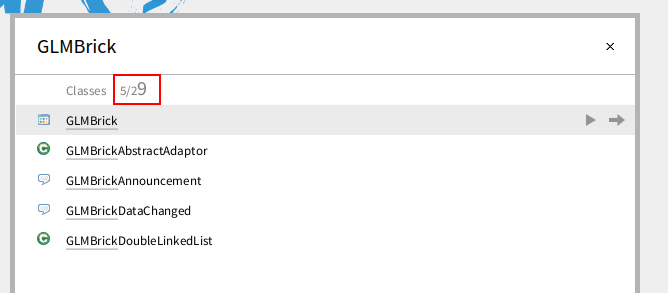

In Roassal I solved this problem by using a scale of 1.0001 Alexandre
On Jan 9, 2015, at 5:17 AM, Nicolai Hess <nicolaihess@web.de> wrote:
This still happens I don't know why and it does not happens always. (fresh pharo 40437image) <font_character_mix.png>
-- _,.;:~^~:;._,.;:~^~:;._,.;:~^~:;._,.;:~^~:;._,.;: Alexandre Bergel http://www.bergel.eu ^~:;._,.;:~^~:;._,.;:~^~:;._,.;:~^~:;._,.;:~^~:;.

Thank you Alex! :) Cheers, Alex On Fri, Jan 9, 2015 at 1:04 PM, Alexandre Bergel <alexandre.bergel@me.com> wrote:
In Roassal I solved this problem by using a scale of 1.0001
Alexandre
On Jan 9, 2015, at 5:17 AM, Nicolai Hess <nicolaihess@web.de> wrote:
This still happens I don't know why and it does not happens always. (fresh pharo 40437image) <font_character_mix.png>
-- _,.;:~^~:;._,.;:~^~:;._,.;:~^~:;._,.;:~^~:;._,.;: Alexandre Bergel http://www.bergel.eu ^~:;._,.;:~^~:;._,.;:~^~:;._,.;:~^~:;._,.;:~^~:;.
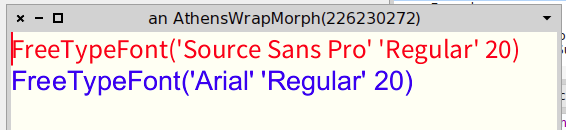
You can "force" the wrong font characters if you try to use a font that is not known to the fontregistry: Open a fresh image (40463) and execute the code: |text font1 font2 string1 string2| font1:=(LogicalFont familyName:'Source Sans Pro' pointSize:20). font2:=(LogicalFont familyName:'Arial' pointSize:20). string1 := font1 realFont asString. string2 := font2 realFont asString. text := TxModel new. text at:text startPosition insert:(string1, String cr, string2). (text startPosition selectTo: text startPosition + string1 size) applyAttribute:(TxForeColorAttribute with: Color red); applyAttribute:(TxFontAttribute with:font1). ((text startPosition + 1 + string1 size) selectTo: text endPosition) applyAttribute:(TxForeColorAttribute with: Color blue); applyAttribute:(TxFontAttribute with:font2). TxTextEditorMorph openInWindowWithText:text. Or am I the only one ? This is, how it looks for me:


Looks the same here, Pharo 4, Mac OS X
On 26 Jan 2015, at 23:18, Nicolai Hess <nicolaihess@web.de> wrote:
You can "force" the wrong font characters if you try to use a font that is not known to the fontregistry: Open a fresh image (40463) and execute the code:
|text font1 font2 string1 string2| font1:=(LogicalFont familyName:'Source Sans Pro' pointSize:20). font2:=(LogicalFont familyName:'Arial' pointSize:20). string1 := font1 realFont asString. string2 := font2 realFont asString. text := TxModel new. text at:text startPosition insert:(string1, String cr, string2). (text startPosition selectTo: text startPosition + string1 size) applyAttribute:(TxForeColorAttribute with: Color red); applyAttribute:(TxFontAttribute with:font1). ((text startPosition + 1 + string1 size) selectTo: text endPosition) applyAttribute:(TxForeColorAttribute with: Color blue); applyAttribute:(TxFontAttribute with:font2). TxTextEditorMorph openInWindowWithText:text.
Or am I the only one ? This is, how it looks for me:
<PharoScreenshot.png>

it seems ok here (also in Pharo 4, Mac OS X) Alain
Le 26 janv. 2015 à 23:45, Sven Van Caekenberghe <sven@stfx.eu> a écrit :
Looks the same here, Pharo 4, Mac OS X
On 26 Jan 2015, at 23:18, Nicolai Hess <nicolaihess@web.de> wrote:
You can "force" the wrong font characters if you try to use a font that is not known to the fontregistry: Open a fresh image (40463) and execute the code:
|text font1 font2 string1 string2| font1:=(LogicalFont familyName:'Source Sans Pro' pointSize:20). font2:=(LogicalFont familyName:'Arial' pointSize:20). string1 := font1 realFont asString. string2 := font2 realFont asString. text := TxModel new. text at:text startPosition insert:(string1, String cr, string2). (text startPosition selectTo: text startPosition + string1 size) applyAttribute:(TxForeColorAttribute with: Color red); applyAttribute:(TxFontAttribute with:font1). ((text startPosition + 1 + string1 size) selectTo: text endPosition) applyAttribute:(TxForeColorAttribute with: Color blue); applyAttribute:(TxFontAttribute with:font2). TxTextEditorMorph openInWindowWithText:text.
Or am I the only one ? This is, how it looks for me:
<PharoScreenshot.png>
Is this really a fresh image? Because, opening a fresh image on windows does not automatically load all installed fonts. 2015-01-27 0:04 GMT+01:00 Alain Plantec <alain.plantec@yahoo.com>:
it seems ok here (also in Pharo 4, Mac OS X) Alain
Le 26 janv. 2015 à 23:45, Sven Van Caekenberghe <sven@stfx.eu> a écrit :
Looks the same here, Pharo 4, Mac OS X
On 26 Jan 2015, at 23:18, Nicolai Hess <nicolaihess@web.de> wrote:
You can "force" the wrong font characters if you try to use a font that is not known to the fontregistry: Open a fresh image (40463) and execute the code:
|text font1 font2 string1 string2| font1:=(LogicalFont familyName:'Source Sans Pro' pointSize:20). font2:=(LogicalFont familyName:'Arial' pointSize:20). string1 := font1 realFont asString. string2 := font2 realFont asString. text := TxModel new. text at:text startPosition insert:(string1, String cr, string2). (text startPosition selectTo: text startPosition + string1 size) applyAttribute:(TxForeColorAttribute with: Color red); applyAttribute:(TxFontAttribute with:font1). ((text startPosition + 1 + string1 size) selectTo: text endPosition) applyAttribute:(TxForeColorAttribute with: Color blue); applyAttribute:(TxFontAttribute with:font2). TxTextEditorMorph openInWindowWithText:text.
Or am I the only one ? This is, how it looks for me:
<PharoScreenshot.png>
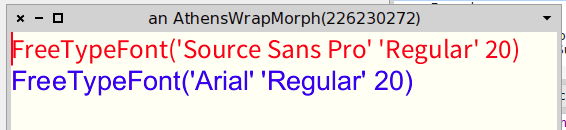
Iâve dig a little bit to understand why it is working in my image. Something is weird with the default âsource Sans Proâ setting. With a fresh Pharo 4 #40463, Mac OS Iâve the same bad result. Now, the Source Sans Pro line (the first one) is rendered as expected after the following: - open the setting browser - open Standard fonts/Default, click on the first button and choose 'Source code proâ instead of âSource sans proâ - click on the 'force allâ button. - new try of Andrei example -> then the first line with âSource sans proâ is ok the second line with Arial turns ok if I update the free fonts (Update button from the font chooser). After, the result remains ok whatever font is defined as default, comprising âsource Sans Proâ. So, I guess the default source sans pro font setting is broken somewhere in the initial image Cheers Alain
Le 27 janv. 2015 à 00:04, Alain Plantec <alain.plantec@yahoo.com> a écrit :
it seems ok here (also in Pharo 4, Mac OS X) Alain
<Capture dâeÌcran 2015-01-27 aÌ 00.02.35.png>
Le 26 janv. 2015 à 23:45, Sven Van Caekenberghe <sven@stfx.eu <mailto:sven@stfx.eu>> a écrit :
Looks the same here, Pharo 4, Mac OS X
On 26 Jan 2015, at 23:18, Nicolai Hess <nicolaihess@web.de <mailto:nicolaihess@web.de>> wrote:
You can "force" the wrong font characters if you try to use a font that is not known to the fontregistry: Open a fresh image (40463) and execute the code:
|text font1 font2 string1 string2| font1:=(LogicalFont familyName:'Source Sans Pro' pointSize:20). font2:=(LogicalFont familyName:'Arial' pointSize:20). string1 := font1 realFont asString. string2 := font2 realFont asString. text := TxModel new. text at:text startPosition insert:(string1, String cr, string2). (text startPosition selectTo: text startPosition + string1 size) applyAttribute:(TxForeColorAttribute with: Color red); applyAttribute:(TxFontAttribute with:font1). ((text startPosition + 1 + string1 size) selectTo: text endPosition) applyAttribute:(TxForeColorAttribute with: Color blue); applyAttribute:(TxFontAttribute with:font2). TxTextEditorMorph openInWindowWithText:text.
Or am I the only one ? This is, how it looks for me:
<PharoScreenshot.png>
of Nicolai example, not Andrei ⦠:) Cheers Alain
Le 27 janv. 2015 à 08:57, Alain Plantec <alain.plantec@yahoo.com> a écrit :
Iâve dig a little bit to understand why it is working in my image.
Something is weird with the default âsource Sans Proâ setting.
With a fresh Pharo 4 #40463, Mac OS Iâve the same bad result.
Now, the Source Sans Pro line (the first one) is rendered as expected after the following: - open the setting browser - open Standard fonts/Default, click on the first button and choose 'Source code proâ instead of âSource sans proâ - click on the 'force allâ button. - new try of Andrei example -> then the first line with âSource sans proâ is ok
the second line with Arial turns ok if I update the free fonts (Update button from the font chooser). After, the result remains ok whatever font is defined as default, comprising âsource Sans Proâ.
So, I guess the default source sans pro font setting is broken somewhere in the initial image
Cheers Alain
Le 27 janv. 2015 à 00:04, Alain Plantec <alain.plantec@yahoo.com <mailto:alain.plantec@yahoo.com>> a écrit :
it seems ok here (also in Pharo 4, Mac OS X) Alain
<Capture dâeÌcran 2015-01-27 aÌ 00.02.35.png>
Le 26 janv. 2015 à 23:45, Sven Van Caekenberghe <sven@stfx.eu <mailto:sven@stfx.eu>> a écrit :
Looks the same here, Pharo 4, Mac OS X
On 26 Jan 2015, at 23:18, Nicolai Hess <nicolaihess@web.de <mailto:nicolaihess@web.de>> wrote:
You can "force" the wrong font characters if you try to use a font that is not known to the fontregistry: Open a fresh image (40463) and execute the code:
|text font1 font2 string1 string2| font1:=(LogicalFont familyName:'Source Sans Pro' pointSize:20). font2:=(LogicalFont familyName:'Arial' pointSize:20). string1 := font1 realFont asString. string2 := font2 realFont asString. text := TxModel new. text at:text startPosition insert:(string1, String cr, string2). (text startPosition selectTo: text startPosition + string1 size) applyAttribute:(TxForeColorAttribute with: Color red); applyAttribute:(TxFontAttribute with:font1). ((text startPosition + 1 + string1 size) selectTo: text endPosition) applyAttribute:(TxForeColorAttribute with: Color blue); applyAttribute:(TxFontAttribute with:font2). TxTextEditorMorph openInWindowWithText:text.
Or am I the only one ? This is, how it looks for me:
<PharoScreenshot.png>
participants (5)
-
 Alain Plantec
 -
 Alexandre Bergel
 -
 Aliaksei Syrel
 -
 Nicolai Hess
 -
 Sven Van Caekenberghe