Re: [Pharo-project] out of memory - cog on windows

Hi again,
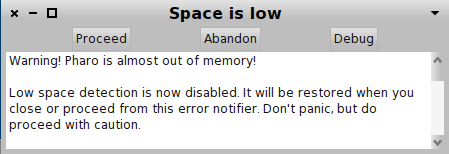
I did not say what the problem was :). The problem was that when opening the image on Windows, he got a Space is low message and the image was not usable (see attachment). On Mac it worked just fine.
Cheers, Doru
On 21 Apr 2011, at 12:52, Tudor Girba wrote:
Hi,
I received a question from someone running a 200MB image on Windows using Cog 2361.
If I open the image on Mac, it works just fine. Unfortunately, I do not have a Windows machine around, and I cannot test but I believe it should be solvable by increasing the allocated memory.
On Mac, I would run it with: ./Croquet -memory 1500m
Can anyone help me with the right incantation for Windows?
Cheers, Doru
-- www.tudorgirba.com
"What we can governs what we wish."
<Space is low.png>
-- www.tudorgirba.com
"Yesterday is a fact. Tomorrow is a possibility. Today is a challenge."

On Thu, Apr 21, 2011 at 1:58 PM, Tudor Girba <tudor.girba@gmail.com> wrote:
Hi again,
I did not say what the problem was :). The problem was that when opening the image on Windows, he got a Space is low message and the image was not usable (see attachment).
That's weird. Does moose have something on the startup list? something that can be bothering there?
On Mac it worked just fine.
Cheers, Doru
On 21 Apr 2011, at 12:52, Tudor Girba wrote:
Hi,
I received a question from someone running a 200MB image on Windows
using Cog 2361.
If I open the image on Mac, it works just fine. Unfortunately, I do not
have a Windows machine around, and I cannot test but I believe it should be solvable by increasing the allocated memory.
On Mac, I would run it with: ./Croquet -memory 1500m
Can anyone help me with the right incantation for Windows?
Cheers, Doru
-- www.tudorgirba.com
"What we can governs what we wish."
<Space is low.png>
-- www.tudorgirba.com
"Yesterday is a fact. Tomorrow is a possibility. Today is a challenge."
-- Mariano http://marianopeck.wordpress.com
Hi, On Apr 21, 2011, at 14:06, Mariano Martinez Peck <marianopeck@gmail.com> wrote:
On Thu, Apr 21, 2011 at 1:58 PM, Tudor Girba <tudor.girba@gmail.com> wrote:
Hi again,
I did not say what the problem was :). The problem was that when opening the image on Windows, he got a Space is low message and the image was not usable (see attachment).
That's weird. Does moose have something on the startup list? something that can be bothering there?
Not that I know of. Is there a way to check this? Actually, using exactly the same process some days ago he produced an image of 190MB. This one works just fine on Windows. The only difference between the two is the size of the loaded data. It would be really bad news if the Windows vm would be so severely limited in terms of memory. Cheers, Doru
On Mac it worked just fine.
Cheers, Doru
On 21 Apr 2011, at 12:52, Tudor Girba wrote:
Hi,
I received a question from someone running a 200MB image on Windows using Cog 2361.
If I open the image on Mac, it works just fine. Unfortunately, I do not have a Windows machine around, and I cannot test but I believe it should be solvable by increasing the allocated memory.
On Mac, I would run it with: ./Croquet -memory 1500m
Can anyone help me with the right incantation for Windows?
Cheers, Doru
-- www.tudorgirba.com
"What we can governs what we wish."
<Space is low.png>
-- www.tudorgirba.com
"Yesterday is a fact. Tomorrow is a possibility. Today is a challenge."
-- Mariano http://marianopeck.wordpress.com

Hi Doru, 2011/4/21 Tudor Girba <tudor.girba@gmail.com>
Hi,
On Apr 21, 2011, at 14:06, Mariano Martinez Peck <marianopeck@gmail.com> wrote:
On Thu, Apr 21, 2011 at 1:58 PM, Tudor Girba < <tudor.girba@gmail.com> tudor.girba@gmail.com> wrote:
Hi again,
I did not say what the problem was :). The problem was that when opening the image on Windows, he got a Space is low message and the image was not usable (see attachment).
That's weird. Does moose have something on the startup list? something that can be bothering there?
Not that I know of. Is there a way to check this?
Classes should be registered using Smalltlak addToStartUpList: aClass Then aClass class>>#startUp: is executed at startup. So implementors of #startUp: on Moose classes should give you the answer. #Luc
Actually, using exactly the same process some days ago he produced an image of 190MB. This one works just fine on Windows. The only difference between the two is the size of the loaded data.
It would be really bad news if the Windows vm would be so severely limited in terms of memory.
Cheers, Doru
On Mac it worked just fine.
Cheers, Doru
On 21 Apr 2011, at 12:52, Tudor Girba wrote:
Hi,
I received a question from someone running a 200MB image on Windows
using Cog 2361.
If I open the image on Mac, it works just fine. Unfortunately, I do not
have a Windows machine around, and I cannot test but I believe it should be solvable by increasing the allocated memory.
On Mac, I would run it with: ./Croquet -memory 1500m
Can anyone help me with the right incantation for Windows?
Cheers, Doru
-- <http://www.tudorgirba.com>www.tudorgirba.com
"What we can governs what we wish."
<Space is low.png>
-- <http://www.tudorgirba.com>www.tudorgirba.com
"Yesterday is a fact. Tomorrow is a possibility. Today is a challenge."
-- Mariano <http://marianopeck.wordpress.com>http://marianopeck.wordpress.com
Hi, We have no specific startUp: methods in Moose. In any case, the issue with opening the image does not seem to be related to startUp:. Is it really true that the Cog VM is limited to 512MB of memory? Cheers, Doru On 21 Apr 2011, at 14:27, Luc Fabresse wrote:
Hi Doru,
2011/4/21 Tudor Girba <tudor.girba@gmail.com> Hi,
On Apr 21, 2011, at 14:06, Mariano Martinez Peck <marianopeck@gmail.com> wrote:
On Thu, Apr 21, 2011 at 1:58 PM, Tudor Girba <tudor.girba@gmail.com> wrote:
Hi again,
I did not say what the problem was :). The problem was that when opening the image on Windows, he got a Space is low message and the image was not usable (see attachment).
That's weird. Does moose have something on the startup list? something that can be bothering there?
Not that I know of. Is there a way to check this?
Classes should be registered using Smalltlak addToStartUpList: aClass Then aClass class>>#startUp: is executed at startup. So implementors of #startUp: on Moose classes should give you the answer.
#Luc
Actually, using exactly the same process some days ago he produced an image of 190MB. This one works just fine on Windows. The only difference between the two is the size of the loaded data.
It would be really bad news if the Windows vm would be so severely limited in terms of memory.
Cheers, Doru
On Mac it worked just fine.
Cheers, Doru
On 21 Apr 2011, at 12:52, Tudor Girba wrote:
Hi,
I received a question from someone running a 200MB image on Windows using Cog 2361.
If I open the image on Mac, it works just fine. Unfortunately, I do not have a Windows machine around, and I cannot test but I believe it should be solvable by increasing the allocated memory.
On Mac, I would run it with: ./Croquet -memory 1500m
Can anyone help me with the right incantation for Windows?
Cheers, Doru
-- www.tudorgirba.com
"What we can governs what we wish."
<Space is low.png>
-- www.tudorgirba.com
"Yesterday is a fact. Tomorrow is a possibility. Today is a challenge."
-- Mariano http://marianopeck.wordpress.com
-- www.tudorgirba.com "Beauty is where we see it."

Hi Tudor, There is a constant in sqWin32Alloc.h (platforms\win32\vm) : #define MAX_VIRTUAL_MEMORY 512*1024*1024 you can change it to whatever you want and rebuild the vm, for exzmple give all the available memory less 256 M . HTH Regards Alain "Tudor Girba" <tudor.girba@gmail.com> a écrit dans le message de news: 03B9389F-C719-44D0-B106-2AC78B120F56@gmail.com... Hi, We have no specific startUp: methods in Moose. In any case, the issue with opening the image does not seem to be related to startUp:. Is it really true that the Cog VM is limited to 512MB of memory? Cheers, Doru On 21 Apr 2011, at 14:27, Luc Fabresse wrote:
Hi Doru,
2011/4/21 Tudor Girba <tudor.girba@gmail.com> Hi,
On Apr 21, 2011, at 14:06, Mariano Martinez Peck <marianopeck@gmail.com> wrote:
On Thu, Apr 21, 2011 at 1:58 PM, Tudor Girba <tudor.girba@gmail.com> wrote:
Hi again,
I did not say what the problem was :). The problem was that when opening the image on Windows, he got a Space is low message and the image was not usable (see attachment).
That's weird. Does moose have something on the startup list? something that can be bothering there?
Not that I know of. Is there a way to check this?
Classes should be registered using Smalltlak addToStartUpList: aClass Then aClass class>>#startUp: is executed at startup. So implementors of #startUp: on Moose classes should give you the answer.
#Luc
Actually, using exactly the same process some days ago he produced an image of 190MB. This one works just fine on Windows. The only difference between the two is the size of the loaded data.
It would be really bad news if the Windows vm would be so severely limited in terms of memory.
Cheers, Doru
On Mac it worked just fine.
Cheers, Doru
On 21 Apr 2011, at 12:52, Tudor Girba wrote:
Hi,
I received a question from someone running a 200MB image on Windows using Cog 2361.
If I open the image on Mac, it works just fine. Unfortunately, I do not have a Windows machine around, and I cannot test but I believe it should be solvable by increasing the allocated memory.
On Mac, I would run it with: ./Croquet -memory 1500m
Can anyone help me with the right incantation for Windows?
Cheers, Doru
-- www.tudorgirba.com
"What we can governs what we wish."
<Space is low.png>
-- www.tudorgirba.com
"Yesterday is a fact. Tomorrow is a possibility. Today is a challenge."
-- Mariano http://marianopeck.wordpress.com
-- www.tudorgirba.com "Beauty is where we see it."
Hi, Should I to understand that the only way to enable more memory is to recompile the VM? Does that mean that there is no way to pass this information as a parameter like we can on Mac? The problem is that I cannot recompile the VM because I have no access to a Windows machine. Is there one available that provides more memory? Cheers, Doru On 21 Apr 2011, at 22:09, Alain_Rastoul wrote:
Hi Tudor,
There is a constant in sqWin32Alloc.h (platforms\win32\vm) : #define MAX_VIRTUAL_MEMORY 512*1024*1024 you can change it to whatever you want and rebuild the vm, for exzmple give all the available memory less 256 M .
HTH
Regards Alain
"Tudor Girba" <tudor.girba@gmail.com> a écrit dans le message de news: 03B9389F-C719-44D0-B106-2AC78B120F56@gmail.com... Hi,
We have no specific startUp: methods in Moose. In any case, the issue with opening the image does not seem to be related to startUp:.
Is it really true that the Cog VM is limited to 512MB of memory?
Cheers, Doru
On 21 Apr 2011, at 14:27, Luc Fabresse wrote:
Hi Doru,
2011/4/21 Tudor Girba <tudor.girba@gmail.com> Hi,
On Apr 21, 2011, at 14:06, Mariano Martinez Peck <marianopeck@gmail.com> wrote:
On Thu, Apr 21, 2011 at 1:58 PM, Tudor Girba <tudor.girba@gmail.com> wrote:
Hi again,
I did not say what the problem was :). The problem was that when opening the image on Windows, he got a Space is low message and the image was not usable (see attachment).
That's weird. Does moose have something on the startup list? something that can be bothering there?
Not that I know of. Is there a way to check this?
Classes should be registered using Smalltlak addToStartUpList: aClass Then aClass class>>#startUp: is executed at startup. So implementors of #startUp: on Moose classes should give you the answer.
#Luc
Actually, using exactly the same process some days ago he produced an image of 190MB. This one works just fine on Windows. The only difference between the two is the size of the loaded data.
It would be really bad news if the Windows vm would be so severely limited in terms of memory.
Cheers, Doru
On Mac it worked just fine.
Cheers, Doru
On 21 Apr 2011, at 12:52, Tudor Girba wrote:
Hi,
I received a question from someone running a 200MB image on Windows using Cog 2361.
If I open the image on Mac, it works just fine. Unfortunately, I do not have a Windows machine around, and I cannot test but I believe it should be solvable by increasing the allocated memory.
On Mac, I would run it with: ./Croquet -memory 1500m
Can anyone help me with the right incantation for Windows?
Cheers, Doru
-- www.tudorgirba.com
"What we can governs what we wish."
<Space is low.png>
-- www.tudorgirba.com
"Yesterday is a fact. Tomorrow is a possibility. Today is a challenge."
-- Mariano http://marianopeck.wordpress.com
-- www.tudorgirba.com
"Beauty is where we see it."
-- www.tudorgirba.com "If you interrupt the barber while he is cutting your hair, you will end up with a messy haircut."
On Thu, Apr 21, 2011 at 10:21 PM, Tudor Girba <tudor.girba@gmail.com> wrote:
Hi,
Should I to understand that the only way to enable more memory is to recompile the VM? Does that mean that there is no way to pass this information as a parameter like we can on Mac?
As far as I know you can pass a parameter, but even so, it won't be able to allocate more than 512MB. I can compile the VM for you with this change in 5 minutes. But I am not sure that such simple code would make it work. I think such limit is there because of something. Otherwise, it sounds stupid imposing a limit just because. The problem is that I cannot recompile the VM because I have no access to a
Windows machine. Is there one available that provides more memory?
I don't think so, but start cc'ing the VM mailing list. You'd probably receive more help. Cheers Mariano
Cheers, Doru
On 21 Apr 2011, at 22:09, Alain_Rastoul wrote:
Hi Tudor,
There is a constant in sqWin32Alloc.h (platforms\win32\vm) : #define MAX_VIRTUAL_MEMORY 512*1024*1024 you can change it to whatever you want and rebuild the vm, for exzmple give all the available memory less 256 M .
HTH
Regards Alain
"Tudor Girba" <tudor.girba@gmail.com> a écrit dans le message de news: 03B9389F-C719-44D0-B106-2AC78B120F56@gmail.com. .. Hi,
We have no specific startUp: methods in Moose. In any case, the issue with opening the image does not seem to be related to startUp:.
Is it really true that the Cog VM is limited to 512MB of memory?
Cheers, Doru
On 21 Apr 2011, at 14:27, Luc Fabresse wrote:
Hi Doru,
2011/4/21 Tudor Girba <tudor.girba@gmail.com> Hi,
On Apr 21, 2011, at 14:06, Mariano Martinez Peck <marianopeck@gmail.com> wrote:
On Thu, Apr 21, 2011 at 1:58 PM, Tudor Girba <tudor.girba@gmail.com> wrote:
Hi again,
I did not say what the problem was :). The problem was that when opening the image on Windows, he got a Space is low message and the image was not usable (see attachment).
That's weird. Does moose have something on the startup list?
something
that can be bothering there?
Not that I know of. Is there a way to check this?
Classes should be registered using Smalltlak addToStartUpList: aClass Then aClass class>>#startUp: is executed at startup. So implementors of #startUp: on Moose classes should give you the answer.
#Luc
Actually, using exactly the same process some days ago he produced an image of 190MB. This one works just fine on Windows. The only difference between the two is the size of the loaded data.
It would be really bad news if the Windows vm would be so severely limited in terms of memory.
Cheers, Doru
On Mac it worked just fine.
Cheers, Doru
On 21 Apr 2011, at 12:52, Tudor Girba wrote:
Hi,
I received a question from someone running a 200MB image on Windows using Cog 2361.
If I open the image on Mac, it works just fine. Unfortunately, I do not have a Windows machine around, and I cannot test but I believe it should be solvable by increasing the allocated memory.
On Mac, I would run it with: ./Croquet -memory 1500m
Can anyone help me with the right incantation for Windows?
Cheers, Doru
-- www.tudorgirba.com
"What we can governs what we wish."
<Space is low.png>
-- www.tudorgirba.com
"Yesterday is a fact. Tomorrow is a possibility. Today is a challenge."
-- Mariano http://marianopeck.wordpress.com
-- www.tudorgirba.com
"Beauty is where we see it."
-- www.tudorgirba.com
"If you interrupt the barber while he is cutting your hair, you will end up with a messy haircut."
-- Mariano http://marianopeck.wordpress.com
Apparently, the vm allocates MAX_VIRTUAL_MEMORY and reduces by steps of 128M until it succeeds. so I suppose it could be possible to allocate 2Gb and see how it runs on a 1Gb system and if this is not too much stress for the system (thinking of the pagefile) ? Tudor is your vm a cog or non cog vm ? "Mariano Martinez Peck" <marianopeck@gmail.com> a écrit dans le message de news: BANLkTi=Tved13_KL7quOzemOXPnCcfWw+g@mail.gmail.com... ------------------------------------------------------------------------------ On Thu, Apr 21, 2011 at 10:21 PM, Tudor Girba <tudor.girba@gmail.com> wrote: Hi, Should I to understand that the only way to enable more memory is to recompile the VM? Does that mean that there is no way to pass this information as a parameter like we can on Mac? As far as I know you can pass a parameter, but even so, it won't be able to allocate more than 512MB. I can compile the VM for you with this change in 5 minutes. But I am not sure that such simple code would make it work. I think such limit is there because of something. Otherwise, it sounds stupid imposing a limit just because. The problem is that I cannot recompile the VM because I have no access to a Windows machine. Is there one available that provides more memory? I don't think so, but start cc'ing the VM mailing list. You'd probably receive more help. Cheers Mariano Cheers, Doru On 21 Apr 2011, at 22:09, Alain_Rastoul wrote: > Hi Tudor, > > There is a constant in sqWin32Alloc.h (platforms\win32\vm) : > #define MAX_VIRTUAL_MEMORY 512*1024*1024 > you can change it to whatever you want and rebuild the vm, > for exzmple give all the available memory less 256 M . > > HTH > > Regards > Alain > > "Tudor Girba" <tudor.girba@gmail.com> a écrit > dans le message de news: 03B9389F-C719-44D0-B106-2AC78B120F56@gmail.com... > Hi, > > We have no specific startUp: methods in Moose. In any case, the issue with > opening the image does not seem to be related to startUp:. > > Is it really true that the Cog VM is limited to 512MB of memory? > > Cheers, > Doru > > > On 21 Apr 2011, at 14:27, Luc Fabresse wrote: > >> Hi Doru, >> >> 2011/4/21 Tudor Girba >> <tudor.girba@gmail.com> >> Hi, >> >> >> >> On Apr 21, 2011, at 14:06, Mariano Martinez Peck >> <marianopeck@gmail.com> wrote: >> >>> >>> >>> On Thu, Apr 21, 2011 at 1:58 PM, Tudor Girba >>> <tudor.girba@gmail.com> wrote: >>>> Hi again, >>>> >>>> I did not say what the problem was :). The problem was that when >>>> opening the image on Windows, he got a Space is low message and the >>>> image was not usable (see attachment). >>> >>> That's weird. Does moose have something on the startup list? something >>> that can be bothering there? >> >> Not that I know of. Is there a way to check this? >> >> Classes should be registered using Smalltlak addToStartUpList: aClass >> Then aClass class>>#startUp: is executed at startup. >> So implementors of #startUp: on Moose classes should give you the answer. >> >> #Luc >> >> >> Actually, using exactly the same process some days ago he produced an >> image of 190MB. This one works just fine on Windows. The only difference >> between the two is the size of the loaded data. >> >> It would be really bad news if the Windows vm would be so severely limited >> in terms of memory. >> >> Cheers, >> Doru >> >> >>> >>> On Mac it worked just fine. >>>> >>>> Cheers, >>>> Doru >>>> >>>> >>> >>>> >>>> >>>> >>>> On 21 Apr 2011, at 12:52, Tudor Girba wrote: >>>> >>>>> Hi, >>>>> >>>>> I received a question from someone running a 200MB image on Windows >>>>> using Cog 2361. >>>>> >>>>> If I open the image on Mac, it works just fine. Unfortunately, I do >>>>> not have a Windows machine around, and I cannot test but I believe it >>>>> should be solvable by increasing the allocated memory. >>>>> >>>>> On Mac, I would run it with: ./Croquet -memory 1500m >>>>> >>>>> Can anyone help me with the right incantation for Windows? >>>>> >>>>> Cheers, >>>>> Doru >>>>> >>>>> >>>>> -- >>>>> www.tudorgirba.com >>>>> >>>>> "What we can governs what we wish." >>>>> >>>>> >>>>> >>>>> <Space is low.png> >>>> >>>> -- >>>> www.tudorgirba.com >>>> >>>> "Yesterday is a fact. >>>> Tomorrow is a possibility. >>>> Today is a challenge." >>>> >>>> >>>> >>> >>> >>> >>> >>> -- >>> Mariano >>> http://marianopeck.wordpress.com >>> >> > > -- > www.tudorgirba.com > > "Beauty is where we see it." > > > > > > > > -- www.tudorgirba.com "If you interrupt the barber while he is cutting your hair, you will end up with a messy haircut." -- Mariano http://marianopeck.wordpress.com
On Thu, Apr 21, 2011 at 10:44 PM, Alain_Rastoul <alr.dev@free.fr> wrote:
Apparently, the vm allocates MAX_VIRTUAL_MEMORY and reduces by steps of 128M until it succeeds. so I suppose it could be possible to allocate 2Gb and see how it runs on a 1Gb system and if this is not too much stress for the system (thinking of the pagefile) ? Tudor is your vm a cog or non cog vm ?
Cog
"Mariano Martinez Peck" <marianopeck@gmail.com> a écrit dans le message de news: BANLkTi=Tved13_KL7quOzemOXPnCcfWw+g@mail.gmail.com...
------------------------------
On Thu, Apr 21, 2011 at 10:21 PM, Tudor Girba <tudor.girba@gmail.com>wrote:
Hi,
Should I to understand that the only way to enable more memory is to recompile the VM? Does that mean that there is no way to pass this information as a parameter like we can on Mac?
As far as I know you can pass a parameter, but even so, it won't be able to allocate more than 512MB. I can compile the VM for you with this change in 5 minutes. But I am not sure that such simple code would make it work. I think such limit is there because of something. Otherwise, it sounds stupid imposing a limit just because.
The problem is that I cannot recompile the VM because I have no access to a
Windows machine. Is there one available that provides more memory?
I don't think so, but start cc'ing the VM mailing list. You'd probably receive more help.
Cheers
Mariano
Cheers, Doru
On 21 Apr 2011, at 22:09, Alain_Rastoul wrote:
Hi Tudor,
There is a constant in sqWin32Alloc.h (platforms\win32\vm) : #define MAX_VIRTUAL_MEMORY 512*1024*1024 you can change it to whatever you want and rebuild the vm, for exzmple give all the available memory less 256 M .
HTH
Regards Alain
"Tudor Girba" <tudor.girba@gmail.com> a écrit dans le message de news: 03B9389F-C719-44D0-B106-2AC78B120F56@gmail.com. .. Hi,
We have no specific startUp: methods in Moose. In any case, the issue with opening the image does not seem to be related to startUp:.
Is it really true that the Cog VM is limited to 512MB of memory?
Cheers, Doru
On 21 Apr 2011, at 14:27, Luc Fabresse wrote:
Hi Doru,
2011/4/21 Tudor Girba <tudor.girba@gmail.com> Hi,
On Apr 21, 2011, at 14:06, Mariano Martinez Peck <marianopeck@gmail.com> wrote:
On Thu, Apr 21, 2011 at 1:58 PM, Tudor Girba <tudor.girba@gmail.com> wrote:
Hi again,
I did not say what the problem was :). The problem was that when opening the image on Windows, he got a Space is low message and the image was not usable (see attachment).
That's weird. Does moose have something on the startup list?
something
that can be bothering there?
Not that I know of. Is there a way to check this?
Classes should be registered using Smalltlak addToStartUpList: aClass Then aClass class>>#startUp: is executed at startup. So implementors of #startUp: on Moose classes should give you the answer.
#Luc
Actually, using exactly the same process some days ago he produced an image of 190MB. This one works just fine on Windows. The only difference between the two is the size of the loaded data.
It would be really bad news if the Windows vm would be so severely limited in terms of memory.
Cheers, Doru
On Mac it worked just fine.
Cheers, Doru
On 21 Apr 2011, at 12:52, Tudor Girba wrote:
Hi,
I received a question from someone running a 200MB image on Windows using Cog 2361.
If I open the image on Mac, it works just fine. Unfortunately, I do not have a Windows machine around, and I cannot test but I believe
it
should be solvable by increasing the allocated memory.
On Mac, I would run it with: ./Croquet -memory 1500m
Can anyone help me with the right incantation for Windows?
Cheers, Doru
-- www.tudorgirba.com
"What we can governs what we wish."
<Space is low.png>
-- www.tudorgirba.com
"Yesterday is a fact. Tomorrow is a possibility. Today is a challenge."
-- Mariano http://marianopeck.wordpress.com
-- www.tudorgirba.com
"Beauty is where we see it."
-- www.tudorgirba.com
"If you interrupt the barber while he is cutting your hair, you will end up with a messy haircut."
-- Mariano http://marianopeck.wordpress.com
-- Mariano http://marianopeck.wordpress.com

Yeah, not all operating systems and application environments are the same. What happens when you let a 512mb image loose in an environment where you have 10 images running on a 4gb machine? Ouch. What happens when you let a 2gb image loose in a 1gb machine and you get an infinite recursion bug? Ouch. But, at the same time, a 512mb limit can be useful precisely to prevent an infinite recursion from killing your machine. I hate to brag, but I have been working on memory policies and memory management for quite a while on VisualWorks, and the edge cases do matter a lot. It's not so simple as to "let's just increase the max memory to 4gb". Also, you can recompile your VMs with different settings and what not, but how do you know they will work? Is the compilation environment standardized somewhere so that I can reproduce an "official" VM build if I want? On 4/21/11 13:44 , Alain_Rastoul wrote:
Apparently, the vm allocates MAX_VIRTUAL_MEMORY and reduces by steps of 128M until it succeeds. so I suppose it could be possible to allocate 2Gb and see how it runs on a 1Gb system and if this is not too much stress for the system (thinking of the pagefile) ? Tudor is your vm a cog or non cog vm ?
"Mariano Martinez Peck" <marianopeck@gmail.com <mailto:marianopeck@gmail.com>> a écrit dans le message de news: BANLkTi=Tved13_KL7quOzemOXPnCcfWw+g@mail.gmail.com <mailto:BANLkTi=Tved13_KL7quOzemOXPnCcfWw+g@mail.gmail.com>...
------------------------------------------------------------------------
On Thu, Apr 21, 2011 at 10:21 PM, Tudor Girba <tudor.girba@gmail.com <mailto:tudor.girba@gmail.com>> wrote:
Hi,
Should I to understand that the only way to enable more memory is to recompile the VM? Does that mean that there is no way to pass this information as a parameter like we can on Mac?
As far as I know you can pass a parameter, but even so, it won't be able to allocate more than 512MB. I can compile the VM for you with this change in 5 minutes. But I am not sure that such simple code would make it work. I think such limit is there because of something. Otherwise, it sounds stupid imposing a limit just because.
The problem is that I cannot recompile the VM because I have no access to a Windows machine. Is there one available that provides more memory?
I don't think so, but start cc'ing the VM mailing list. You'd probably receive more help.
Cheers
Mariano
Cheers, Doru
On 21 Apr 2011, at 22:09, Alain_Rastoul wrote:
> Hi Tudor, > > There is a constant in sqWin32Alloc.h (platforms\win32\vm) : > #define MAX_VIRTUAL_MEMORY 512*1024*1024 > you can change it to whatever you want and rebuild the vm, > for exzmple give all the available memory less 256 M . > > HTH > > Regards > Alain > > "Tudor Girba" <tudor.girba@gmail.com <mailto:tudor.girba@gmail.com>> a écrit > dans le message de news: 03B9389F-C719-44D0-B106-2AC78B120F56@gmail.com... > Hi, > > We have no specific startUp: methods in Moose. In any case, the issue with > opening the image does not seem to be related to startUp:. > > Is it really true that the Cog VM is limited to 512MB of memory? > > Cheers, > Doru > > > On 21 Apr 2011, at 14:27, Luc Fabresse wrote: > >> Hi Doru, >> >> 2011/4/21 Tudor Girba >> <tudor.girba@gmail.com <mailto:tudor.girba@gmail.com>> >> Hi, >> >> >> >> On Apr 21, 2011, at 14:06, Mariano Martinez Peck >> <marianopeck@gmail.com <mailto:marianopeck@gmail.com>> wrote: >> >>> >>> >>> On Thu, Apr 21, 2011 at 1:58 PM, Tudor Girba >>> <tudor.girba@gmail.com <mailto:tudor.girba@gmail.com>> wrote: >>>> Hi again, >>>> >>>> I did not say what the problem was :). The problem was that when >>>> opening the image on Windows, he got a Space is low message and the >>>> image was not usable (see attachment). >>> >>> That's weird. Does moose have something on the startup list? something >>> that can be bothering there? >> >> Not that I know of. Is there a way to check this? >> >> Classes should be registered using Smalltlak addToStartUpList: aClass >> Then aClass class>>#startUp: is executed at startup. >> So implementors of #startUp: on Moose classes should give you the answer. >> >> #Luc >> >> >> Actually, using exactly the same process some days ago he produced an >> image of 190MB. This one works just fine on Windows. The only difference >> between the two is the size of the loaded data. >> >> It would be really bad news if the Windows vm would be so severely limited >> in terms of memory. >> >> Cheers, >> Doru >> >> >>> >>> On Mac it worked just fine. >>>> >>>> Cheers, >>>> Doru >>>> >>>> >>> >>>> >>>> >>>> >>>> On 21 Apr 2011, at 12:52, Tudor Girba wrote: >>>> >>>>> Hi, >>>>> >>>>> I received a question from someone running a 200MB image on Windows >>>>> using Cog 2361. >>>>> >>>>> If I open the image on Mac, it works just fine. Unfortunately, I do >>>>> not have a Windows machine around, and I cannot test but I believe it >>>>> should be solvable by increasing the allocated memory. >>>>> >>>>> On Mac, I would run it with: ./Croquet -memory 1500m >>>>> >>>>> Can anyone help me with the right incantation for Windows? >>>>> >>>>> Cheers, >>>>> Doru >>>>> >>>>> >>>>> -- >>>>> www.tudorgirba.com <http://www.tudorgirba.com> >>>>> >>>>> "What we can governs what we wish." >>>>> >>>>> >>>>> >>>>> <Space is low.png> >>>> >>>> -- >>>> www.tudorgirba.com <http://www.tudorgirba.com> >>>> >>>> "Yesterday is a fact. >>>> Tomorrow is a possibility. >>>> Today is a challenge." >>>> >>>> >>>> >>> >>> >>> >>> >>> -- >>> Mariano >>> http://marianopeck.wordpress.com >>> >> > > -- > www.tudorgirba.com <http://www.tudorgirba.com> > > "Beauty is where we see it." > > > > > > > >
-- www.tudorgirba.com <http://www.tudorgirba.com>
"If you interrupt the barber while he is cutting your hair, you will end up with a messy haircut."
-- Mariano http://marianopeck.wordpress.com
Hi Andres, Of course you are right , in that particular case it's just to help Tudor recovering an image. Having an argument -memory would be helpful for such cases, but I think it has been superseeded with a#define. You can build a vm very easily once you have your build environment set. This is described in http://book.pharo-project.org/book/Virtual-Machine/Building/BuildVMOnWindows... and (didn't try it but seems very well done and perhaps more up to date - thanks Mariano!): http://marianopeck.wordpress.com/tag/build/ See also the HowToBuild note in the vm sources. On Unix, the build tools are here you just need to download the vm sources (see the url in previous documents) and run make. For Mac, I don't have a Mac I don't know Regards, Alain "Andres Valloud" <avalloud@smalltalk.comcastbiz.net> a écrit dans le message de news: 4DB0C591.3080903@smalltalk.comcastbiz.net...
Yeah, not all operating systems and application environments are the same. What happens when you let a 512mb image loose in an environment where you have 10 images running on a 4gb machine? Ouch. What happens when you let a 2gb image loose in a 1gb machine and you get an infinite recursion bug? Ouch.
But, at the same time, a 512mb limit can be useful precisely to prevent an infinite recursion from killing your machine. I hate to brag, but I have been working on memory policies and memory management for quite a while on VisualWorks, and the edge cases do matter a lot. It's not so simple as to "let's just increase the max memory to 4gb".
Also, you can recompile your VMs with different settings and what not, but how do you know they will work? Is the compilation environment standardized somewhere so that I can reproduce an "official" VM build if I want?
On 4/21/11 13:44 , Alain_Rastoul wrote:
Apparently, the vm allocates MAX_VIRTUAL_MEMORY and reduces by steps of 128M until it succeeds. so I suppose it could be possible to allocate 2Gb and see how it runs on a 1Gb system and if this is not too much stress for the system (thinking of the pagefile) ? Tudor is your vm a cog or non cog vm ?
"Mariano Martinez Peck" <marianopeck@gmail.com <mailto:marianopeck@gmail.com>> a écrit dans le message de news:
BANLkTi=Tved13_KL7quOzemOXPnCcfWw+g@mail.gmail.com
<mailto:BANLkTi=Tved13_KL7quOzemOXPnCcfWw+g@mail.gmail.com>...
------------------------------------------------------------------------
On Thu, Apr 21, 2011 at 10:21 PM, Tudor Girba <tudor.girba@gmail.com <mailto:tudor.girba@gmail.com>> wrote:
Hi,
Should I to understand that the only way to enable more memory is to recompile the VM? Does that mean that there is no way to pass this information as a parameter like we can on Mac?
As far as I know you can pass a parameter, but even so, it won't be able to allocate more than 512MB. I can compile the VM for you with this change in 5 minutes. But I am not sure that such simple code would make it work. I think such limit is there because of something. Otherwise, it sounds stupid imposing a limit just because.
The problem is that I cannot recompile the VM because I have no access to a Windows machine. Is there one available that provides more memory?
I don't think so, but start cc'ing the VM mailing list. You'd probably receive more help.
Cheers
Mariano
Cheers, Doru
On 21 Apr 2011, at 22:09, Alain_Rastoul wrote:
> Hi Tudor, > > There is a constant in sqWin32Alloc.h (platforms\win32\vm) : > #define MAX_VIRTUAL_MEMORY 512*1024*1024 > you can change it to whatever you want and rebuild the vm, > for exzmple give all the available memory less 256 M . > > HTH > > Regards > Alain > > "Tudor Girba" <tudor.girba@gmail.com <mailto:tudor.girba@gmail.com>> a écrit > dans le message de news:
03B9389F-C719-44D0-B106-2AC78B120F56@gmail.com... > Hi, > > We have no specific startUp: methods in Moose. In any case, the issue with > opening the image does not seem to be related to startUp:. > > Is it really true that the Cog VM is limited to 512MB of memory? > > Cheers, > Doru > > > On 21 Apr 2011, at 14:27, Luc Fabresse wrote: > >> Hi Doru, >> >> 2011/4/21 Tudor Girba >> <tudor.girba@gmail.com <mailto:tudor.girba@gmail.com>> >> Hi, >> >> >> >> On Apr 21, 2011, at 14:06, Mariano Martinez Peck >> <marianopeck@gmail.com <mailto:marianopeck@gmail.com>> wrote: >> >>> >>> >>> On Thu, Apr 21, 2011 at 1:58 PM, Tudor Girba >>> <tudor.girba@gmail.com <mailto:tudor.girba@gmail.com>> wrote: >>>> Hi again, >>>> >>>> I did not say what the problem was :). The problem was that when >>>> opening the image on Windows, he got a Space is low message and the >>>> image was not usable (see attachment). >>> >>> That's weird. Does moose have something on the startup list? something >>> that can be bothering there? >> >> Not that I know of. Is there a way to check this? >> >> Classes should be registered using Smalltlak addToStartUpList: aClass >> Then aClass class>>#startUp: is executed at startup. >> So implementors of #startUp: on Moose classes should give you the answer. >> >> #Luc >> >> >> Actually, using exactly the same process some days ago he produced an >> image of 190MB. This one works just fine on Windows. The only difference >> between the two is the size of the loaded data. >> >> It would be really bad news if the Windows vm would be so severely limited >> in terms of memory. >> >> Cheers, >> Doru >> >> >>> >>> On Mac it worked just fine. >>>> >>>> Cheers, >>>> Doru >>>> >>>> >>> >>>> >>>> >>>> >>>> On 21 Apr 2011, at 12:52, Tudor Girba wrote: >>>> >>>>> Hi, >>>>> >>>>> I received a question from someone running a 200MB image on Windows >>>>> using Cog 2361. >>>>> >>>>> If I open the image on Mac, it works just fine. Unfortunately, I do >>>>> not have a Windows machine around, and I cannot test but I believe it >>>>> should be solvable by increasing the allocated memory. >>>>> >>>>> On Mac, I would run it with: ./Croquet -memory 1500m >>>>> >>>>> Can anyone help me with the right incantation for Windows? >>>>> >>>>> Cheers, >>>>> Doru >>>>> >>>>> >>>>> -- >>>>> www.tudorgirba.com <http://www.tudorgirba.com> >>>>> >>>>> "What we can governs what we wish." >>>>> >>>>> >>>>> >>>>> <Space is low.png> >>>> >>>> -- >>>> www.tudorgirba.com <http://www.tudorgirba.com> >>>> >>>> "Yesterday is a fact. >>>> Tomorrow is a possibility. >>>> Today is a challenge." >>>> >>>> >>>> >>> >>> >>> >>> >>> -- >>> Mariano >>> http://marianopeck.wordpress.com >>> >> > > -- > www.tudorgirba.com <http://www.tudorgirba.com> > > "Beauty is where we see it." > > > > > > > >
-- www.tudorgirba.com <http://www.tudorgirba.com>
"If you interrupt the barber while he is cutting your hair, you will end up with a messy haircut."
-- Mariano http://marianopeck.wordpress.com
It's nice to see how to set up one's environment. The specific compiler versions, as well as versions of the relevant SDKs, should be well documented so that anyone can reproduce an "official" build. IMHO, it seems a bit weird that a command line switch was superceded with a #define. On 4/22/11 8:17 , Alain_Rastoul wrote:
Hi Andres,
Of course you are right , in that particular case it's just to help Tudor recovering an image. Having an argument -memory would be helpful for such cases, but I think it has been superseeded with a#define.
You can build a vm very easily once you have your build environment set. This is described in http://book.pharo-project.org/book/Virtual-Machine/Building/BuildVMOnWindows... and (didn't try it but seems very well done and perhaps more up to date - thanks Mariano!): http://marianopeck.wordpress.com/tag/build/ See also the HowToBuild note in the vm sources. On Unix, the build tools are here you just need to download the vm sources (see the url in previous documents) and run make. For Mac, I don't have a Mac I don't know
Regards, Alain
"Andres Valloud" <avalloud@smalltalk.comcastbiz.net> a écrit dans le message de news: 4DB0C591.3080903@smalltalk.comcastbiz.net...
Yeah, not all operating systems and application environments are the same. What happens when you let a 512mb image loose in an environment where you have 10 images running on a 4gb machine? Ouch. What happens when you let a 2gb image loose in a 1gb machine and you get an infinite recursion bug? Ouch.
But, at the same time, a 512mb limit can be useful precisely to prevent an infinite recursion from killing your machine. I hate to brag, but I have been working on memory policies and memory management for quite a while on VisualWorks, and the edge cases do matter a lot. It's not so simple as to "let's just increase the max memory to 4gb".
Also, you can recompile your VMs with different settings and what not, but how do you know they will work? Is the compilation environment standardized somewhere so that I can reproduce an "official" VM build if I want?
On 4/21/11 13:44 , Alain_Rastoul wrote:
Apparently, the vm allocates MAX_VIRTUAL_MEMORY and reduces by steps of 128M until it succeeds. so I suppose it could be possible to allocate 2Gb and see how it runs on a 1Gb system and if this is not too much stress for the system (thinking of the pagefile) ? Tudor is your vm a cog or non cog vm ?
"Mariano Martinez Peck" <marianopeck@gmail.com <mailto:marianopeck@gmail.com>> a écrit dans le message de news:
BANLkTi=Tved13_KL7quOzemOXPnCcfWw+g@mail.gmail.com
<mailto:BANLkTi=Tved13_KL7quOzemOXPnCcfWw+g@mail.gmail.com>...
------------------------------------------------------------------------
On Thu, Apr 21, 2011 at 10:21 PM, Tudor Girba <tudor.girba@gmail.com <mailto:tudor.girba@gmail.com>> wrote:
Hi,
Should I to understand that the only way to enable more memory is to recompile the VM? Does that mean that there is no way to pass this information as a parameter like we can on Mac?
As far as I know you can pass a parameter, but even so, it won't be able to allocate more than 512MB. I can compile the VM for you with this change in 5 minutes. But I am not sure that such simple code would make it work. I think such limit is there because of something. Otherwise, it sounds stupid imposing a limit just because.
The problem is that I cannot recompile the VM because I have no access to a Windows machine. Is there one available that provides more memory?
I don't think so, but start cc'ing the VM mailing list. You'd probably receive more help.
Cheers
Mariano
Cheers, Doru
On 21 Apr 2011, at 22:09, Alain_Rastoul wrote:
> Hi Tudor, > > There is a constant in sqWin32Alloc.h (platforms\win32\vm) : > #define MAX_VIRTUAL_MEMORY 512*1024*1024 > you can change it to whatever you want and rebuild the vm, > for exzmple give all the available memory less 256 M . > > HTH > > Regards > Alain > > "Tudor Girba" <tudor.girba@gmail.com <mailto:tudor.girba@gmail.com>> a écrit > dans le message de news:
03B9389F-C719-44D0-B106-2AC78B120F56@gmail.com... > Hi, > > We have no specific startUp: methods in Moose. In any case, the issue with > opening the image does not seem to be related to startUp:. > > Is it really true that the Cog VM is limited to 512MB of memory? > > Cheers, > Doru > > > On 21 Apr 2011, at 14:27, Luc Fabresse wrote: > >> Hi Doru, >> >> 2011/4/21 Tudor Girba >> <tudor.girba@gmail.com <mailto:tudor.girba@gmail.com>> >> Hi, >> >> >> >> On Apr 21, 2011, at 14:06, Mariano Martinez Peck >> <marianopeck@gmail.com <mailto:marianopeck@gmail.com>> wrote: >> >>> >>> >>> On Thu, Apr 21, 2011 at 1:58 PM, Tudor Girba >>> <tudor.girba@gmail.com <mailto:tudor.girba@gmail.com>> wrote: >>>> Hi again, >>>> >>>> I did not say what the problem was :). The problem was that when >>>> opening the image on Windows, he got a Space is low message and the >>>> image was not usable (see attachment). >>> >>> That's weird. Does moose have something on the startup list? something >>> that can be bothering there? >> >> Not that I know of. Is there a way to check this? >> >> Classes should be registered using Smalltlak addToStartUpList: aClass >> Then aClass class>>#startUp: is executed at startup. >> So implementors of #startUp: on Moose classes should give you the answer. >> >> #Luc >> >> >> Actually, using exactly the same process some days ago he produced an >> image of 190MB. This one works just fine on Windows. The only difference >> between the two is the size of the loaded data. >> >> It would be really bad news if the Windows vm would be so severely limited >> in terms of memory. >> >> Cheers, >> Doru >> >> >>> >>> On Mac it worked just fine. >>>> >>>> Cheers, >>>> Doru >>>> >>>> >>> >>>> >>>> >>>> >>>> On 21 Apr 2011, at 12:52, Tudor Girba wrote: >>>> >>>>> Hi, >>>>> >>>>> I received a question from someone running a 200MB image on Windows >>>>> using Cog 2361. >>>>> >>>>> If I open the image on Mac, it works just fine. Unfortunately, I do >>>>> not have a Windows machine around, and I cannot test but I believe it >>>>> should be solvable by increasing the allocated memory. >>>>> >>>>> On Mac, I would run it with: ./Croquet -memory 1500m >>>>> >>>>> Can anyone help me with the right incantation for Windows? >>>>> >>>>> Cheers, >>>>> Doru >>>>> >>>>> >>>>> -- >>>>> www.tudorgirba.com<http://www.tudorgirba.com> >>>>> >>>>> "What we can governs what we wish." >>>>> >>>>> >>>>> >>>>> <Space is low.png> >>>> >>>> -- >>>> www.tudorgirba.com<http://www.tudorgirba.com> >>>> >>>> "Yesterday is a fact. >>>> Tomorrow is a possibility. >>>> Today is a challenge." >>>> >>>> >>>> >>> >>> >>> >>> >>> -- >>> Mariano >>> http://marianopeck.wordpress.com >>> >> > > -- > www.tudorgirba.com<http://www.tudorgirba.com> > > "Beauty is where we see it." > > > > > > > >
-- www.tudorgirba.com<http://www.tudorgirba.com>
"If you interrupt the barber while he is cutting your hair, you will end up with a messy haircut."
-- Mariano http://marianopeck.wordpress.com
.

On 22 April 2011 22:48, Andres Valloud <avalloud@smalltalk.comcastbiz.net> wrote:
It's nice to see how to set up one's environment. Â The specific compiler versions, as well as versions of the relevant SDKs, should be well documented so that anyone can reproduce an "official" build.
Indeed. That's the idea.
IMHO, it seems a bit weird that a command line switch was superceded with a #define.
i'm not sure if there was such switch on windoze. -- Best regards, Igor Stasenko AKA sig.
Hi Igor I'm sure it it was in windows vm ... years ago I used to specify it with squeak vm because of long startup time. and the code seems to be still here in sqWin32Intel.c , but I don' t think it is used anymore , because there is also sqAllocateMemory in sqWin32Alloc.c (did not investigate much). sqWin32Intel.c: { ARG_UINT, &dwMemorySize, "-memory:" }, /* megabyte of memory to use */ ... #ifdef NO_VIRTUAL_MEMORY if(!dwMemorySize) { dwMemorySize = 4; virtualMemory = (int)imageSize + max(imageSize, dwMemorySize * 0x00100000); } else { virtualMemory = (int)dwMemorySize * 0x00100000; } #else /* initial commit size = imageSize + 4MB */ virtualMemory = imageSize + 0x00400000; #endif Regards, Alain "Igor Stasenko" <siguctua@gmail.com> a écrit dans le message de news: BANLkTim6HXhBxJOV24hxQrdJZz1QRZyGOA@mail.gmail.com... On 22 April 2011 22:48, Andres Valloud <avalloud@smalltalk.comcastbiz.net> wrote:
It's nice to see how to set up one's environment. The specific compiler versions, as well as versions of the relevant SDKs, should be well documented so that anyone can reproduce an "official" build.
Indeed. That's the idea.
IMHO, it seems a bit weird that a command line switch was superceded with a #define.
i'm not sure if there was such switch on windoze. -- Best regards, Igor Stasenko AKA sig.
Mmm, you are right, in old squeak versions, there was a parameter -memory: xx (xx inMB) but I don't know if it is still in use. BTW there must be some hanging references in memory and perhaps youd should do some PointerFinder on it. A very handy script I found (on Ramon Leon's blog or elsewhere I don't remember) could help you. You can try it in a workspace and see if it reduces your memory usage (after save and quit) comment unknown or unwanted commands : | tasks | tasks := OrderedCollection new add: [MCFileBasedRepository flushAllCaches]; add: [WARegistry clearAllHandlers]; " add: [SMSqueakMap default clearCaches];" add: [Smalltalk removeEmptyMessageCategories]; add: [Workspace allSubInstancesDo: [:each | each setBindings: Dictionary new]]; " add: [Undeclared removeUnreferencedKeys];" " add: [Categorizer sortAllCategories];" add: [ODBCConnection cleanAll]; add: [Symbol compactSymbolTable]; " add: [ReleaseBuilderDeveloper new fixObsoleteReferences];" add: [Smalltalk garbageCollectMost]; add: [Smalltalk garbageCollect ]; add: [Smalltalk garbageCollect ]; add: [Smalltalk garbageCollect ]; add: [EventManager actionMaps keys do: [:each| EventManager releaseActionMapFor: each] ]; add: [Debugger closeAllDebuggers]; add:[Debugger allInstances do: [ :d | d release ] ]; yourself. UIManager default informUserDuring: [:bar | tasks do: [:block | bar value: block printString. [block value] on: Error do: [:error | Transcript show: error; cr]]]. Regards Alain "Tudor Girba" <tudor.girba@gmail.com> a écrit dans le message de news: 6AA1F065-3996-433B-AB7C-1640C08D5A7B@gmail.com... Hi, Should I to understand that the only way to enable more memory is to recompile the VM? Does that mean that there is no way to pass this information as a parameter like we can on Mac? The problem is that I cannot recompile the VM because I have no access to a Windows machine. Is there one available that provides more memory? Cheers, Doru On 21 Apr 2011, at 22:09, Alain_Rastoul wrote:
Hi Tudor,
There is a constant in sqWin32Alloc.h (platforms\win32\vm) : #define MAX_VIRTUAL_MEMORY 512*1024*1024 you can change it to whatever you want and rebuild the vm, for exzmple give all the available memory less 256 M .
HTH
Regards Alain
"Tudor Girba" <tudor.girba@gmail.com> a écrit dans le message de news: 03B9389F-C719-44D0-B106-2AC78B120F56@gmail.com... Hi,
We have no specific startUp: methods in Moose. In any case, the issue with opening the image does not seem to be related to startUp:.
Is it really true that the Cog VM is limited to 512MB of memory?
Cheers, Doru
On 21 Apr 2011, at 14:27, Luc Fabresse wrote:
Hi Doru,
2011/4/21 Tudor Girba <tudor.girba@gmail.com> Hi,
On Apr 21, 2011, at 14:06, Mariano Martinez Peck <marianopeck@gmail.com> wrote:
On Thu, Apr 21, 2011 at 1:58 PM, Tudor Girba <tudor.girba@gmail.com> wrote:
Hi again,
I did not say what the problem was :). The problem was that when opening the image on Windows, he got a Space is low message and the image was not usable (see attachment).
That's weird. Does moose have something on the startup list? something that can be bothering there?
Not that I know of. Is there a way to check this?
Classes should be registered using Smalltlak addToStartUpList: aClass Then aClass class>>#startUp: is executed at startup. So implementors of #startUp: on Moose classes should give you the answer.
#Luc
Actually, using exactly the same process some days ago he produced an image of 190MB. This one works just fine on Windows. The only difference between the two is the size of the loaded data.
It would be really bad news if the Windows vm would be so severely limited in terms of memory.
Cheers, Doru
On Mac it worked just fine.
Cheers, Doru
On 21 Apr 2011, at 12:52, Tudor Girba wrote:
Hi,
I received a question from someone running a 200MB image on Windows using Cog 2361.
If I open the image on Mac, it works just fine. Unfortunately, I do not have a Windows machine around, and I cannot test but I believe it should be solvable by increasing the allocated memory.
On Mac, I would run it with: ./Croquet -memory 1500m
Can anyone help me with the right incantation for Windows?
Cheers, Doru
-- www.tudorgirba.com
"What we can governs what we wish."
<Space is low.png>
-- www.tudorgirba.com
"Yesterday is a fact. Tomorrow is a possibility. Today is a challenge."
-- Mariano http://marianopeck.wordpress.com
-- www.tudorgirba.com
"Beauty is where we see it."
-- www.tudorgirba.com "If you interrupt the barber while he is cutting your hair, you will end up with a messy haircut."
Alain: as far as I understood, he cannot even start the image...so he won't be able to open a workspace and evaluate something. Doru, if you can evaluate something in a workspace, you may also try SpaceTally new printSpaceAnalysis and then check the STspace.text that is next to the image. That way you acn see if there are certain classes that have a lot of instances. Can you evaluate "Smalltalk garbageCollect " and tell me the answer? just curious.... thanks mariano On Thu, Apr 21, 2011 at 10:36 PM, Alain_Rastoul <alr.dev@free.fr> wrote:
Mmm, you are right, in old squeak versions, there was a parameter -memory: xx (xx inMB) but I don't know if it is still in use.
BTW there must be some hanging references in memory and perhaps youd should do some PointerFinder on it. A very handy script I found (on Ramon Leon's blog or elsewhere I don't remember) could help you. You can try it in a workspace and see if it reduces your memory usage (after save and quit) comment unknown or unwanted commands : | tasks | tasks := OrderedCollection new add: [MCFileBasedRepository flushAllCaches]; add: [WARegistry clearAllHandlers]; " add: [SMSqueakMap default clearCaches];" add: [Smalltalk removeEmptyMessageCategories]; add: [Workspace allSubInstancesDo: [:each | each setBindings: Dictionary new]]; " add: [Undeclared removeUnreferencedKeys];" " add: [Categorizer sortAllCategories];" add: [ODBCConnection cleanAll]; add: [Symbol compactSymbolTable]; " add: [ReleaseBuilderDeveloper new fixObsoleteReferences];" add: [Smalltalk garbageCollectMost]; add: [Smalltalk garbageCollect ]; add: [Smalltalk garbageCollect ]; add: [Smalltalk garbageCollect ]; add: [EventManager actionMaps keys do: [:each| EventManager releaseActionMapFor: each] ]; add: [Debugger closeAllDebuggers]; add:[Debugger allInstances do: [ :d | d release ] ];
yourself. UIManager default informUserDuring: [:bar | tasks do: [:block | bar value: block printString. [block value] on: Error do: [:error | Transcript show: error; cr]]].
Regards Alain
"Tudor Girba" <tudor.girba@gmail.com> a écrit dans le message de news: 6AA1F065-3996-433B-AB7C-1640C08D5A7B@gmail.com... Hi,
Should I to understand that the only way to enable more memory is to recompile the VM? Does that mean that there is no way to pass this information as a parameter like we can on Mac?
The problem is that I cannot recompile the VM because I have no access to a Windows machine. Is there one available that provides more memory?
Cheers, Doru
On 21 Apr 2011, at 22:09, Alain_Rastoul wrote:
Hi Tudor,
There is a constant in sqWin32Alloc.h (platforms\win32\vm) : #define MAX_VIRTUAL_MEMORY 512*1024*1024 you can change it to whatever you want and rebuild the vm, for exzmple give all the available memory less 256 M .
HTH
Regards Alain
"Tudor Girba" <tudor.girba@gmail.com> a écrit dans le message de news: 03B9389F-C719-44D0-B106-2AC78B120F56@gmail.com... Hi,
We have no specific startUp: methods in Moose. In any case, the issue with opening the image does not seem to be related to startUp:.
Is it really true that the Cog VM is limited to 512MB of memory?
Cheers, Doru
On 21 Apr 2011, at 14:27, Luc Fabresse wrote:
Hi Doru,
2011/4/21 Tudor Girba <tudor.girba@gmail.com> Hi,
On Apr 21, 2011, at 14:06, Mariano Martinez Peck <marianopeck@gmail.com> wrote:
On Thu, Apr 21, 2011 at 1:58 PM, Tudor Girba <tudor.girba@gmail.com> wrote:
Hi again,
I did not say what the problem was :). The problem was that when opening the image on Windows, he got a Space is low message and the image was not usable (see attachment).
That's weird. Does moose have something on the startup list?
something
that can be bothering there?
Not that I know of. Is there a way to check this?
Classes should be registered using Smalltlak addToStartUpList: aClass Then aClass class>>#startUp: is executed at startup. So implementors of #startUp: on Moose classes should give you the answer.
#Luc
Actually, using exactly the same process some days ago he produced an image of 190MB. This one works just fine on Windows. The only difference between the two is the size of the loaded data.
It would be really bad news if the Windows vm would be so severely limited in terms of memory.
Cheers, Doru
On Mac it worked just fine.
Cheers, Doru
On 21 Apr 2011, at 12:52, Tudor Girba wrote:
Hi,
I received a question from someone running a 200MB image on Windows using Cog 2361.
If I open the image on Mac, it works just fine. Unfortunately, I do not have a Windows machine around, and I cannot test but I believe it should be solvable by increasing the allocated memory.
On Mac, I would run it with: ./Croquet -memory 1500m
Can anyone help me with the right incantation for Windows?
Cheers, Doru
-- www.tudorgirba.com
"What we can governs what we wish."
<Space is low.png>
-- www.tudorgirba.com
"Yesterday is a fact. Tomorrow is a possibility. Today is a challenge."
-- Mariano http://marianopeck.wordpress.com
-- www.tudorgirba.com
"Beauty is where we see it."
-- www.tudorgirba.com
"If you interrupt the barber while he is cutting your hair, you will end up with a messy haircut."
-- Mariano http://marianopeck.wordpress.com
I thought he was able to start it on a Mac that's why I suggested to this on a Mac and see if memory consumption was reduced. BTW I have rebuild a cog vm with 2Gb ram for MAX_MEMORY and it runs ok on my 1Gb netbook "Mariano Martinez Peck" <marianopeck@gmail.com> a écrit dans le message de news: BANLkTikuk1jRV34=u2pzTFx5+2qWgjrbCQ@mail.gmail.com... Alain: as far as I understood, he cannot even start the image...so he won't be able to open a workspace and evaluate something. Doru, if you can evaluate something in a workspace, you may also try SpaceTally new printSpaceAnalysis and then check the STspace.text that is next to the image. That way you acn see if there are certain classes that have a lot of instances. Can you evaluate "Smalltalk garbageCollect " and tell me the answer? just curious.... thanks mariano On Thu, Apr 21, 2011 at 10:36 PM, Alain_Rastoul <alr.dev@free.fr> wrote: Mmm, you are right, in old squeak versions, there was a parameter -memory: xx (xx inMB) but I don't know if it is still in use. BTW there must be some hanging references in memory and perhaps youd should do some PointerFinder on it. A very handy script I found (on Ramon Leon's blog or elsewhere I don't remember) could help you. You can try it in a workspace and see if it reduces your memory usage (after save and quit) comment unknown or unwanted commands : | tasks | tasks := OrderedCollection new add: [MCFileBasedRepository flushAllCaches]; add: [WARegistry clearAllHandlers]; " add: [SMSqueakMap default clearCaches];" add: [Smalltalk removeEmptyMessageCategories]; add: [Workspace allSubInstancesDo: [:each | each setBindings: Dictionary new]]; " add: [Undeclared removeUnreferencedKeys];" " add: [Categorizer sortAllCategories];" add: [ODBCConnection cleanAll]; add: [Symbol compactSymbolTable]; " add: [ReleaseBuilderDeveloper new fixObsoleteReferences];" add: [Smalltalk garbageCollectMost]; add: [Smalltalk garbageCollect ]; add: [Smalltalk garbageCollect ]; add: [Smalltalk garbageCollect ]; add: [EventManager actionMaps keys do: [:each| EventManager releaseActionMapFor: each] ]; add: [Debugger closeAllDebuggers]; add:[Debugger allInstances do: [ :d | d release ] ]; yourself. UIManager default informUserDuring: [:bar | tasks do: [:block | bar value: block printString. [block value] on: Error do: [:error | Transcript show: error; cr]]]. Regards Alain "Tudor Girba" <tudor.girba@gmail.com> a écrit dans le message de news: 6AA1F065-3996-433B-AB7C-1640C08D5A7B@gmail.com... Hi, Should I to understand that the only way to enable more memory is to recompile the VM? Does that mean that there is no way to pass this information as a parameter like we can on Mac? The problem is that I cannot recompile the VM because I have no access to a Windows machine. Is there one available that provides more memory? Cheers, Doru On 21 Apr 2011, at 22:09, Alain_Rastoul wrote: > Hi Tudor, > > There is a constant in sqWin32Alloc.h (platforms\win32\vm) : > #define MAX_VIRTUAL_MEMORY 512*1024*1024 > you can change it to whatever you want and rebuild the vm, > for exzmple give all the available memory less 256 M . > > HTH > > Regards > Alain > > "Tudor Girba" <tudor.girba@gmail.com> a > écrit > dans le message de news: > 03B9389F-C719-44D0-B106-2AC78B120F56-Re5JQEeQqe9Ui4FbrNnSJA@public.gmane.org > Hi, > > We have no specific startUp: methods in Moose. In any case, the issue with > opening the image does not seem to be related to startUp:. > > Is it really true that the Cog VM is limited to 512MB of memory? > > Cheers, > Doru > > > On 21 Apr 2011, at 14:27, Luc Fabresse wrote: > >> Hi Doru, >> >> 2011/4/21 Tudor Girba >> <tudor.girba@gmail.com> >> Hi, >> >> >> >> On Apr 21, 2011, at 14:06, Mariano Martinez Peck >> <marianopeck@gmail.com> wrote: >> >>> >>> >>> On Thu, Apr 21, 2011 at 1:58 PM, Tudor Girba >>> <tudor.girba@gmail.com> wrote: >>>> Hi again, >>>> >>>> I did not say what the problem was :). The problem was that when >>>> opening the image on Windows, he got a Space is low message and the >>>> image was not usable (see attachment). >>> >>> That's weird. Does moose have something on the startup list? something >>> that can be bothering there? >> >> Not that I know of. Is there a way to check this? >> >> Classes should be registered using Smalltlak addToStartUpList: aClass >> Then aClass class>>#startUp: is executed at startup. >> So implementors of #startUp: on Moose classes should give you the answer. >> >> #Luc >> >> >> Actually, using exactly the same process some days ago he produced an >> image of 190MB. This one works just fine on Windows. The only difference >> between the two is the size of the loaded data. >> >> It would be really bad news if the Windows vm would be so severely >> limited >> in terms of memory. >> >> Cheers, >> Doru >> >> >>> >>> On Mac it worked just fine. >>>> >>>> Cheers, >>>> Doru >>>> >>>> >>> >>>> >>>> >>>> >>>> On 21 Apr 2011, at 12:52, Tudor Girba wrote: >>>> >>>>> Hi, >>>>> >>>>> I received a question from someone running a 200MB image on Windows >>>>> using Cog 2361. >>>>> >>>>> If I open the image on Mac, it works just fine. Unfortunately, I do >>>>> not have a Windows machine around, and I cannot test but I believe it >>>>> should be solvable by increasing the allocated memory. >>>>> >>>>> On Mac, I would run it with: ./Croquet -memory 1500m >>>>> >>>>> Can anyone help me with the right incantation for Windows? >>>>> >>>>> Cheers, >>>>> Doru >>>>> >>>>> >>>>> -- >>>>> www.tudorgirba.com >>>>> >>>>> "What we can governs what we wish." >>>>> >>>>> >>>>> >>>>> <Space is low.png> >>>> >>>> -- >>>> www.tudorgirba.com >>>> >>>> "Yesterday is a fact. >>>> Tomorrow is a possibility. >>>> Today is a challenge." >>>> >>>> >>>> >>> >>> >>> >>> >>> -- >>> Mariano >>> http://marianopeck.wordpress.com >>> >> > > -- > www.tudorgirba.com > > "Beauty is where we see it." > > > > > > > > -- www.tudorgirba.com "If you interrupt the barber while he is cutting your hair, you will end up with a messy haircut." -- Mariano http://marianopeck.wordpress.com
(And of course Tudor, I forgot to mention it but I can send you this vm if you need) "Alain_Rastoul" <alr.dev@free.fr> a écrit dans le message de news: ioq86o$69j$1@dough.gmane.org... I thought he was able to start it on a Mac that's why I suggested to this on a Mac and see if memory consumption was reduced. BTW I have rebuild a cog vm with 2Gb ram for MAX_MEMORY and it runs ok on my 1Gb netbook "Mariano Martinez Peck" <marianopeck@gmail.com> a écrit dans le message de news: BANLkTikuk1jRV34=u2pzTFx5+2qWgjrbCQ-JsoAwUIsXosN+BqQ9rBEUg@public.gmane.org... Alain: as far as I understood, he cannot even start the image...so he won't be able to open a workspace and evaluate something. Doru, if you can evaluate something in a workspace, you may also try SpaceTally new printSpaceAnalysis and then check the STspace.text that is next to the image. That way you acn see if there are certain classes that have a lot of instances. Can you evaluate "Smalltalk garbageCollect " and tell me the answer? just curious.... thanks mariano On Thu, Apr 21, 2011 at 10:36 PM, Alain_Rastoul <alr.dev@free.fr> wrote: Mmm, you are right, in old squeak versions, there was a parameter -memory: xx (xx inMB) but I don't know if it is still in use. BTW there must be some hanging references in memory and perhaps youd should do some PointerFinder on it. A very handy script I found (on Ramon Leon's blog or elsewhere I don't remember) could help you. You can try it in a workspace and see if it reduces your memory usage (after save and quit) comment unknown or unwanted commands : | tasks | tasks := OrderedCollection new add: [MCFileBasedRepository flushAllCaches]; add: [WARegistry clearAllHandlers]; " add: [SMSqueakMap default clearCaches];" add: [Smalltalk removeEmptyMessageCategories]; add: [Workspace allSubInstancesDo: [:each | each setBindings: Dictionary new]]; " add: [Undeclared removeUnreferencedKeys];" " add: [Categorizer sortAllCategories];" add: [ODBCConnection cleanAll]; add: [Symbol compactSymbolTable]; " add: [ReleaseBuilderDeveloper new fixObsoleteReferences];" add: [Smalltalk garbageCollectMost]; add: [Smalltalk garbageCollect ]; add: [Smalltalk garbageCollect ]; add: [Smalltalk garbageCollect ]; add: [EventManager actionMaps keys do: [:each| EventManager releaseActionMapFor: each] ]; add: [Debugger closeAllDebuggers]; add:[Debugger allInstances do: [ :d | d release ] ]; yourself. UIManager default informUserDuring: [:bar | tasks do: [:block | bar value: block printString. [block value] on: Error do: [:error | Transcript show: error; cr]]]. Regards Alain "Tudor Girba" <tudor.girba@gmail.com> a écrit dans le message de news: 6AA1F065-3996-433B-AB7C-1640C08D5A7B-Re5JQEeQqe9Ui4FbrNnSJA@public.gmane.org Hi, Should I to understand that the only way to enable more memory is to recompile the VM? Does that mean that there is no way to pass this information as a parameter like we can on Mac? The problem is that I cannot recompile the VM because I have no access to a Windows machine. Is there one available that provides more memory? Cheers, Doru On 21 Apr 2011, at 22:09, Alain_Rastoul wrote: > Hi Tudor, > > There is a constant in sqWin32Alloc.h (platforms\win32\vm) : > #define MAX_VIRTUAL_MEMORY 512*1024*1024 > you can change it to whatever you want and rebuild the vm, > for exzmple give all the available memory less 256 M . > > HTH > > Regards > Alain > > "Tudor Girba" <tudor.girba@gmail.com> a > écrit > dans le message de news: > 03B9389F-C719-44D0-B106-2AC78B120F56-Re5JQEeQqe9Ui4FbrNnSJA-XMD5yJDbdMRG2NFembrH+g@public.gmane.orgorg > Hi, > > We have no specific startUp: methods in Moose. In any case, the issue with > opening the image does not seem to be related to startUp:. > > Is it really true that the Cog VM is limited to 512MB of memory? > > Cheers, > Doru > > > On 21 Apr 2011, at 14:27, Luc Fabresse wrote: > >> Hi Doru, >> >> 2011/4/21 Tudor Girba >> <tudor.girba@gmail.com> >> Hi, >> >> >> >> On Apr 21, 2011, at 14:06, Mariano Martinez Peck >> <marianopeck@gmail.com> wrote: >> >>> >>> >>> On Thu, Apr 21, 2011 at 1:58 PM, Tudor Girba >>> <tudor.girba@gmail.com> wrote: >>>> Hi again, >>>> >>>> I did not say what the problem was :). The problem was that when >>>> opening the image on Windows, he got a Space is low message and the >>>> image was not usable (see attachment). >>> >>> That's weird. Does moose have something on the startup list? something >>> that can be bothering there? >> >> Not that I know of. Is there a way to check this? >> >> Classes should be registered using Smalltlak addToStartUpList: aClass >> Then aClass class>>#startUp: is executed at startup. >> So implementors of #startUp: on Moose classes should give you the answer. >> >> #Luc >> >> >> Actually, using exactly the same process some days ago he produced an >> image of 190MB. This one works just fine on Windows. The only difference >> between the two is the size of the loaded data. >> >> It would be really bad news if the Windows vm would be so severely >> limited >> in terms of memory. >> >> Cheers, >> Doru >> >> >>> >>> On Mac it worked just fine. >>>> >>>> Cheers, >>>> Doru >>>> >>>> >>> >>>> >>>> >>>> >>>> On 21 Apr 2011, at 12:52, Tudor Girba wrote: >>>> >>>>> Hi, >>>>> >>>>> I received a question from someone running a 200MB image on Windows >>>>> using Cog 2361. >>>>> >>>>> If I open the image on Mac, it works just fine. Unfortunately, I do >>>>> not have a Windows machine around, and I cannot test but I believe it >>>>> should be solvable by increasing the allocated memory. >>>>> >>>>> On Mac, I would run it with: ./Croquet -memory 1500m >>>>> >>>>> Can anyone help me with the right incantation for Windows? >>>>> >>>>> Cheers, >>>>> Doru >>>>> >>>>> >>>>> -- >>>>> www.tudorgirba.com >>>>> >>>>> "What we can governs what we wish." >>>>> >>>>> >>>>> >>>>> <Space is low.png> >>>> >>>> -- >>>> www.tudorgirba.com >>>> >>>> "Yesterday is a fact. >>>> Tomorrow is a possibility. >>>> Today is a challenge." >>>> >>>> >>>> >>> >>> >>> >>> >>> -- >>> Mariano >>> http://marianopeck.wordpress.com >>> >> > > -- > www.tudorgirba.com > > "Beauty is where we see it." > > > > > > > > -- www.tudorgirba.com "If you interrupt the barber while he is cutting your hair, you will end up with a messy haircut." -- Mariano http://marianopeck.wordpress.com
Hi Alain, Thanks. I would indeed be interested in your compiled VM. Regarding running it on Mac, indeed I can do that, but I will have to wait until next week to get access to the image due to holidays. Another bit of information is that the image was built and saved without a problem on the same machine where now it does not work anymore. Cheers, Doru On 21 Apr 2011, at 23:52, Alain_Rastoul wrote:
(And of course Tudor, I forgot to mention it but I can send you this vm if you need)
"Alain_Rastoul" <alr.dev-GANU6spQydw@public.gmane.org> a écrit dans le message de news: ioq86o$69j$1@dough.gmane.org... I thought he was able to start it on a Mac that's why I suggested to this on a Mac and see if memory consumption was reduced. BTW I have rebuild a cog vm with 2Gb ram for MAX_MEMORY and it runs ok on my 1Gb netbook
"Mariano Martinez Peck" <marianopeck@gmail.com> a écrit dans le message de news:BANLkTikuk1jRV34=u2pzTFx5+2qWgjrbCQ-JsoAwUIsXosN+BqQ9rBEUg@public.gmane.org... Alain: as far as I understood, he cannot even start the image...so he won't be able to open a workspace and evaluate something.
Doru, if you can evaluate something in a workspace, you may also try SpaceTally new printSpaceAnalysis and then check the STspace.text that is next to the image. That way you acn see if there are certain classes that have a lot of instances.
Can you evaluate "Smalltalk garbageCollect " and tell me the answer? just curious....
thanks
mariano
On Thu, Apr 21, 2011 at 10:36 PM, Alain_Rastoul <alr.dev@free.fr> wrote: Mmm, you are right, in old squeak versions, there was a parameter -memory: xx (xx inMB) but I don't know if it is still in use.
BTW there must be some hanging references in memory and perhaps youd should do some PointerFinder on it. A very handy script I found (on Ramon Leon's blog or elsewhere I don't remember) could help you. You can try it in a workspace and see if it reduces your memory usage (after save and quit) comment unknown or unwanted commands : | tasks | tasks := OrderedCollection new add: [MCFileBasedRepository flushAllCaches]; add: [WARegistry clearAllHandlers]; " add: [SMSqueakMap default clearCaches];" add: [Smalltalk removeEmptyMessageCategories]; add: [Workspace allSubInstancesDo: [:each | each setBindings: Dictionary new]]; " add: [Undeclared removeUnreferencedKeys];" " add: [Categorizer sortAllCategories];" add: [ODBCConnection cleanAll]; add: [Symbol compactSymbolTable]; " add: [ReleaseBuilderDeveloper new fixObsoleteReferences];" add: [Smalltalk garbageCollectMost]; add: [Smalltalk garbageCollect ]; add: [Smalltalk garbageCollect ]; add: [Smalltalk garbageCollect ]; add: [EventManager actionMaps keys do: [:each| EventManager releaseActionMapFor: each] ]; add: [Debugger closeAllDebuggers]; add:[Debugger allInstances do: [ :d | d release ] ];
yourself. UIManager default informUserDuring: [:bar | tasks do: [:block | bar value: block printString. [block value] on: Error do: [:error | Transcript show: error; cr]]].
Regards Alain
"Tudor Girba" <tudor.girba@gmail.com> a écrit dans le message de news: 6AA1F065-3996-433B-AB7C-1640C08D5A7B-Re5JQEeQqe9Ui4FbrNnSJA@public.gmane.org Hi,
Should I to understand that the only way to enable more memory is to recompile the VM? Does that mean that there is no way to pass this information as a parameter like we can on Mac?
The problem is that I cannot recompile the VM because I have no access to a Windows machine. Is there one available that provides more memory?
Cheers, Doru
On 21 Apr 2011, at 22:09, Alain_Rastoul wrote:
Hi Tudor,
There is a constant in sqWin32Alloc.h (platforms\win32\vm) : #define MAX_VIRTUAL_MEMORY 512*1024*1024 you can change it to whatever you want and rebuild the vm, for exzmple give all the available memory less 256 M .
HTH
Regards Alain
"Tudor Girba" <tudor.girba@gmail.com> a écrit dans le message de news: 03B9389F-C719-44D0-B106-2AC78B120F56-Re5JQEeQqe9Ui4FbrNnSJA-XMD5yJDbdMRG2NFembrH+g@public.gmane.orgorg Hi,
We have no specific startUp: methods in Moose. In any case, the issue with opening the image does not seem to be related to startUp:.
Is it really true that the Cog VM is limited to 512MB of memory?
Cheers, Doru
On 21 Apr 2011, at 14:27, Luc Fabresse wrote:
Hi Doru,
2011/4/21 Tudor Girba <tudor.girba@gmail.com> Hi,
On Apr 21, 2011, at 14:06, Mariano Martinez Peck <marianopeck@gmail.com> wrote:
On Thu, Apr 21, 2011 at 1:58 PM, Tudor Girba <tudor.girba@gmail.com> wrote:
Hi again,
I did not say what the problem was :). The problem was that when opening the image on Windows, he got a Space is low message and the image was not usable (see attachment).
That's weird. Does moose have something on the startup list? something that can be bothering there?
Not that I know of. Is there a way to check this?
Classes should be registered using Smalltlak addToStartUpList: aClass Then aClass class>>#startUp: is executed at startup. So implementors of #startUp: on Moose classes should give you the answer.
#Luc
Actually, using exactly the same process some days ago he produced an image of 190MB. This one works just fine on Windows. The only difference between the two is the size of the loaded data.
It would be really bad news if the Windows vm would be so severely limited in terms of memory.
Cheers, Doru
On Mac it worked just fine.
Cheers, Doru
On 21 Apr 2011, at 12:52, Tudor Girba wrote:
Hi,
I received a question from someone running a 200MB image on Windows using Cog 2361.
If I open the image on Mac, it works just fine. Unfortunately, I do not have a Windows machine around, and I cannot test but I believe it should be solvable by increasing the allocated memory.
On Mac, I would run it with: ./Croquet -memory 1500m
Can anyone help me with the right incantation for Windows?
Cheers, Doru
-- www.tudorgirba.com
"What we can governs what we wish."
<Space is low.png>
-- www.tudorgirba.com
"Yesterday is a fact. Tomorrow is a possibility. Today is a challenge."
-- Mariano http://marianopeck.wordpress.com
-- www.tudorgirba.com
"Beauty is where we see it."
-- www.tudorgirba.com
"If you interrupt the barber while he is cutting your hair, you will end up with a messy haircut."
-- Mariano http://marianopeck.wordpress.com
-- www.tudorgirba.com "We can create beautiful models in a vacuum. But, to get them effective we have to deal with the inconvenience of reality."
On 22 April 2011 10:32, Tudor Girba <tudor.girba@gmail.com> wrote:
Hi Alain,
Thanks. I would indeed be interested in your compiled VM.
Regarding running it on Mac, indeed I can do that, but I will have to wait until next week to get access to the image due to holidays.
Another bit of information is that the image was built and saved without a problem on the same machine where now it does not work anymore.
pass the image to me. i can play with it on windoze.
Cheers, Doru
On 21 Apr 2011, at 23:52, Alain_Rastoul wrote:
(And of course Tudor, I forgot to mention it but I can send you this vm if you need)
"Alain_Rastoul" <alr.dev-GANU6spQydw@public.gmane.org> a écrit dans le message de news: ioq86o$69j$1@dough.gmane.org... I thought he was able to start it on a Mac that's why I suggested to this on a Mac and see if memory consumption was reduced. BTW I have rebuild a cog vm with 2Gb ram for MAX_MEMORY and it runs ok on my 1Gb netbook
"Mariano Martinez Peck" <marianopeck@gmail.com> a écrit dans le message de news:BANLkTikuk1jRV34=u2pzTFx5+2qWgjrbCQ-JsoAwUIsXosN+BqQ9rBEUg@public.gmane.org... Alain: as far as I understood, he cannot even start the image...so he won't be able to open a workspace and evaluate something.
Doru, if you can evaluate something in a workspace, you may also try SpaceTally new printSpaceAnalysis and then check the STspace.text  that is next to the image. That way you acn see if there are certain classes that have a lot of instances.
Can you evaluate "Smalltalk garbageCollect " and tell me the answer? Â just curious....
thanks
mariano
On Thu, Apr 21, 2011 at 10:36 PM, Alain_Rastoul <alr.dev@free.fr> wrote: Mmm, you are right, in old squeak versions, there was a parameter -memory: xx (xx inMB) but I don't know if it is still in use.
BTW there must be some hanging references in memory and perhaps youd should do some PointerFinder on it. A very handy script I found (on Ramon Leon's blog or elsewhere I don't remember) could help you. You can try it in a workspace and see if it reduces your memory usage (after save and quit) comment unknown or unwanted commands :  | tasks |   tasks := OrderedCollection new         add: [MCFileBasedRepository flushAllCaches];         add: [WARegistry clearAllHandlers];        " add: [SMSqueakMap default clearCaches];"         add: [Smalltalk removeEmptyMessageCategories];         add: [Workspace             allSubInstancesDo: [:each | each setBindings: Dictionary new]];        " add: [Undeclared removeUnreferencedKeys];"        " add: [Categorizer sortAllCategories];"         add: [ODBCConnection cleanAll];         add: [Symbol compactSymbolTable];        " add: [ReleaseBuilderDeveloper new fixObsoleteReferences];"         add: [Smalltalk garbageCollectMost];         add: [Smalltalk garbageCollect ];         add: [Smalltalk garbageCollect ];         add: [Smalltalk garbageCollect ];  add: [EventManager actionMaps keys do: [:each| EventManager releaseActionMapFor: each] ];  add: [Debugger closeAllDebuggers];  add:[Debugger allInstances do: [ :d | d release ] ];
        yourself.   UIManager default     informUserDuring: [:bar | tasks         do: [:block |           bar value: block printString.           [block value]             on: Error             do: [:error | Transcript show: error;                 cr]]].
Regards Alain
"Tudor Girba" <tudor.girba@gmail.com> a écrit dans le message de news: 6AA1F065-3996-433B-AB7C-1640C08D5A7B-Re5JQEeQqe9Ui4FbrNnSJA@public.gmane.org Hi,
Should I to understand that the only way to enable more memory is to recompile the VM? Does that mean that there is no way to pass this information as a parameter like we can on Mac?
The problem is that I cannot recompile the VM because I have no access to a Windows machine. Is there one available that provides more memory?
Cheers, Doru
On 21 Apr 2011, at 22:09, Alain_Rastoul wrote:
Hi Tudor,
There is a constant in sqWin32Alloc.h (platforms\win32\vm) : #define MAX_VIRTUAL_MEMORY 512*1024*1024 you can change it to whatever you want and rebuild the vm, for exzmple give all the available memory less 256 M .
HTH
Regards Alain
"Tudor Girba" <tudor.girba@gmail.com> a écrit dans le message de news: 03B9389F-C719-44D0-B106-2AC78B120F56-Re5JQEeQqe9Ui4FbrNnSJA-XMD5yJDbdMRG2NFembrH+g@public.gmane.orgorg Hi,
We have no specific startUp: methods in Moose. In any case, the issue with opening the image does not seem to be related to startUp:.
Is it really true that the Cog VM is limited to 512MB of memory?
Cheers, Doru
On 21 Apr 2011, at 14:27, Luc Fabresse wrote:
Hi Doru,
2011/4/21 Tudor Girba <tudor.girba@gmail.com> Hi,
On Apr 21, 2011, at 14:06, Mariano Martinez Peck <marianopeck@gmail.com> wrote:
On Thu, Apr 21, 2011 at 1:58 PM, Tudor Girba <tudor.girba@gmail.com> wrote:
Hi again,
I did not say what the problem was :). The problem was that when opening the image on Windows, he got a Space is low message and the image was not usable (see attachment).
That's weird. Does moose have something on the startup list? Â something that can be bothering there?
Not that I know of. Is there a way to check this?
Classes should be registered using Smalltlak addToStartUpList: aClass Then aClass class>>#startUp: is executed at startup. So implementors of #startUp: on Moose classes should give you the answer.
#Luc
Actually, using exactly the same process some days ago he produced an image of 190MB. This one works just fine on Windows. The only difference between the two is the size of the loaded data.
It would be really bad news if the Windows vm would be so severely limited in terms of memory.
Cheers, Doru
On Mac it worked just fine.
Cheers, Doru
On 21 Apr 2011, at 12:52, Tudor Girba wrote:
Hi,
I received a question from someone running a 200MB image on Windows using Cog 2361.
If I open the image on Mac, it works just fine. Unfortunately, I do not have a Windows machine around, and I cannot test but I believe it should be solvable by increasing the allocated memory.
On Mac, I would run it with: ./Croquet -memory 1500m
Can anyone help me with the right incantation for Windows?
Cheers, Doru
-- www.tudorgirba.com
"What we can governs what we wish."
<Space is low.png>
-- www.tudorgirba.com
"Yesterday is a fact. Tomorrow is a possibility. Today is a challenge."
-- Mariano http://marianopeck.wordpress.com
-- www.tudorgirba.com
"Beauty is where we see it."
-- www.tudorgirba.com
"If you interrupt the barber while he is cutting your hair, you will end up with a messy haircut."
-- Mariano http://marianopeck.wordpress.com
-- www.tudorgirba.com
"We can create beautiful models in a vacuum. But, to get them effective we have to deal with the inconvenience of reality."
-- Best regards, Igor Stasenko AKA sig.
Hi Alain, Thanks for the VM with more memory. I tried it, but it looks like we still get the same message. Where else can the problem be? Cheers, Doru On 21 Apr 2011, at 23:52, Alain_Rastoul wrote:
(And of course Tudor, I forgot to mention it but I can send you this vm if you need)
"Alain_Rastoul" <alr.dev-GANU6spQydw@public.gmane.org> a écrit dans le message de news: ioq86o$69j$1@dough.gmane.org... I thought he was able to start it on a Mac that's why I suggested to this on a Mac and see if memory consumption was reduced. BTW I have rebuild a cog vm with 2Gb ram for MAX_MEMORY and it runs ok on my 1Gb netbook
"Mariano Martinez Peck" <marianopeck@gmail.com> a écrit dans le message de news:BANLkTikuk1jRV34=u2pzTFx5+2qWgjrbCQ-JsoAwUIsXosN+BqQ9rBEUg@public.gmane.org... Alain: as far as I understood, he cannot even start the image...so he won't be able to open a workspace and evaluate something.
Doru, if you can evaluate something in a workspace, you may also try SpaceTally new printSpaceAnalysis and then check the STspace.text that is next to the image. That way you acn see if there are certain classes that have a lot of instances.
Can you evaluate "Smalltalk garbageCollect " and tell me the answer? just curious....
thanks
mariano
On Thu, Apr 21, 2011 at 10:36 PM, Alain_Rastoul <alr.dev@free.fr> wrote: Mmm, you are right, in old squeak versions, there was a parameter -memory: xx (xx inMB) but I don't know if it is still in use.
BTW there must be some hanging references in memory and perhaps youd should do some PointerFinder on it. A very handy script I found (on Ramon Leon's blog or elsewhere I don't remember) could help you. You can try it in a workspace and see if it reduces your memory usage (after save and quit) comment unknown or unwanted commands : | tasks | tasks := OrderedCollection new add: [MCFileBasedRepository flushAllCaches]; add: [WARegistry clearAllHandlers]; " add: [SMSqueakMap default clearCaches];" add: [Smalltalk removeEmptyMessageCategories]; add: [Workspace allSubInstancesDo: [:each | each setBindings: Dictionary new]]; " add: [Undeclared removeUnreferencedKeys];" " add: [Categorizer sortAllCategories];" add: [ODBCConnection cleanAll]; add: [Symbol compactSymbolTable]; " add: [ReleaseBuilderDeveloper new fixObsoleteReferences];" add: [Smalltalk garbageCollectMost]; add: [Smalltalk garbageCollect ]; add: [Smalltalk garbageCollect ]; add: [Smalltalk garbageCollect ]; add: [EventManager actionMaps keys do: [:each| EventManager releaseActionMapFor: each] ]; add: [Debugger closeAllDebuggers]; add:[Debugger allInstances do: [ :d | d release ] ];
yourself. UIManager default informUserDuring: [:bar | tasks do: [:block | bar value: block printString. [block value] on: Error do: [:error | Transcript show: error; cr]]].
Regards Alain
"Tudor Girba" <tudor.girba@gmail.com> a écrit dans le message de news: 6AA1F065-3996-433B-AB7C-1640C08D5A7B-Re5JQEeQqe9Ui4FbrNnSJA@public.gmane.org Hi,
Should I to understand that the only way to enable more memory is to recompile the VM? Does that mean that there is no way to pass this information as a parameter like we can on Mac?
The problem is that I cannot recompile the VM because I have no access to a Windows machine. Is there one available that provides more memory?
Cheers, Doru
On 21 Apr 2011, at 22:09, Alain_Rastoul wrote:
Hi Tudor,
There is a constant in sqWin32Alloc.h (platforms\win32\vm) : #define MAX_VIRTUAL_MEMORY 512*1024*1024 you can change it to whatever you want and rebuild the vm, for exzmple give all the available memory less 256 M .
HTH
Regards Alain
"Tudor Girba" <tudor.girba@gmail.com> a écrit dans le message de news: 03B9389F-C719-44D0-B106-2AC78B120F56-Re5JQEeQqe9Ui4FbrNnSJA-XMD5yJDbdMRG2NFembrH+g@public.gmane.orgorg Hi,
We have no specific startUp: methods in Moose. In any case, the issue with opening the image does not seem to be related to startUp:.
Is it really true that the Cog VM is limited to 512MB of memory?
Cheers, Doru
On 21 Apr 2011, at 14:27, Luc Fabresse wrote:
Hi Doru,
2011/4/21 Tudor Girba <tudor.girba@gmail.com> Hi,
On Apr 21, 2011, at 14:06, Mariano Martinez Peck <marianopeck@gmail.com> wrote:
On Thu, Apr 21, 2011 at 1:58 PM, Tudor Girba <tudor.girba@gmail.com> wrote:
Hi again,
I did not say what the problem was :). The problem was that when opening the image on Windows, he got a Space is low message and the image was not usable (see attachment).
That's weird. Does moose have something on the startup list? something that can be bothering there?
Not that I know of. Is there a way to check this?
Classes should be registered using Smalltlak addToStartUpList: aClass Then aClass class>>#startUp: is executed at startup. So implementors of #startUp: on Moose classes should give you the answer.
#Luc
Actually, using exactly the same process some days ago he produced an image of 190MB. This one works just fine on Windows. The only difference between the two is the size of the loaded data.
It would be really bad news if the Windows vm would be so severely limited in terms of memory.
Cheers, Doru
On Mac it worked just fine.
Cheers, Doru
On 21 Apr 2011, at 12:52, Tudor Girba wrote:
Hi,
I received a question from someone running a 200MB image on Windows using Cog 2361.
If I open the image on Mac, it works just fine. Unfortunately, I do not have a Windows machine around, and I cannot test but I believe it should be solvable by increasing the allocated memory.
On Mac, I would run it with: ./Croquet -memory 1500m
Can anyone help me with the right incantation for Windows?
Cheers, Doru
-- www.tudorgirba.com
"What we can governs what we wish."
<Space is low.png>
-- www.tudorgirba.com
"Yesterday is a fact. Tomorrow is a possibility. Today is a challenge."
-- Mariano http://marianopeck.wordpress.com
-- www.tudorgirba.com
"Beauty is where we see it."
-- www.tudorgirba.com
"If you interrupt the barber while he is cutting your hair, you will end up with a messy haircut."
-- Mariano http://marianopeck.wordpress.com
-- www.tudorgirba.com "Live like you mean it."
Hi Tudor, Sad that it didn't help you :-(. You should contact Igor and see if he is still ok to play with your image, he may certainly be able to find something. I will try to find this too, because I experienced a similar problem loading an image saved with the vm I sent you (2G) in the standard vm (512M) after I've loaded data from odbc , the saved image was about 300 Mo and I had a memory error loading it with the standard vm. Unfortunatly I didn't keep this image, I reopend it with the 2G vm, found the hanging references and reduced it to 40M, but I think I could reproduce it. You can also send me your image (upload at at http://dl.free.fr with a notification email - see the web page) , I'll have a try with your image too. Cheers, Alain. "Tudor Girba" <tudor.girba@gmail.com> a écrit dans le message de news: 3D8DCC66-E9DD-4AEB-AEC0-E10C615387C7@gmail.com... Hi Alain, Thanks for the VM with more memory. I tried it, but it looks like we still get the same message. Where else can the problem be? Cheers, Doru On 21 Apr 2011, at 23:52, Alain_Rastoul wrote:
(And of course Tudor, I forgot to mention it but I can send you this vm if you need)
"Alain_Rastoul" <alr.dev-GANU6spQydw@public.gmane.org> a écrit dans le message de news: ioq86o$69j$1@dough.gmane.org... I thought he was able to start it on a Mac that's why I suggested to this on a Mac and see if memory consumption was reduced. BTW I have rebuild a cog vm with 2Gb ram for MAX_MEMORY and it runs ok on my 1Gb netbook
"Mariano Martinez Peck" <marianopeck@gmail.com> a écrit dans le message de news:BANLkTikuk1jRV34=u2pzTFx5+2qWgjrbCQ@mail.gmail.com... Alain: as far as I understood, he cannot even start the image...so he won't be able to open a workspace and evaluate something.
Doru, if you can evaluate something in a workspace, you may also try SpaceTally new printSpaceAnalysis and then check the STspace.text that is next to the image. That way you acn see if there are certain classes that have a lot of instances.
Can you evaluate "Smalltalk garbageCollect " and tell me the answer? just curious....
thanks
mariano
On Thu, Apr 21, 2011 at 10:36 PM, Alain_Rastoul <alr.dev@free.fr> wrote: Mmm, you are right, in old squeak versions, there was a parameter -memory: xx (xx inMB) but I don't know if it is still in use.
BTW there must be some hanging references in memory and perhaps youd should do some PointerFinder on it. A very handy script I found (on Ramon Leon's blog or elsewhere I don't remember) could help you. You can try it in a workspace and see if it reduces your memory usage (after save and quit) comment unknown or unwanted commands : | tasks | tasks := OrderedCollection new add: [MCFileBasedRepository flushAllCaches]; add: [WARegistry clearAllHandlers]; " add: [SMSqueakMap default clearCaches];" add: [Smalltalk removeEmptyMessageCategories]; add: [Workspace allSubInstancesDo: [:each | each setBindings: Dictionary new]]; " add: [Undeclared removeUnreferencedKeys];" " add: [Categorizer sortAllCategories];" add: [ODBCConnection cleanAll]; add: [Symbol compactSymbolTable]; " add: [ReleaseBuilderDeveloper new fixObsoleteReferences];" add: [Smalltalk garbageCollectMost]; add: [Smalltalk garbageCollect ]; add: [Smalltalk garbageCollect ]; add: [Smalltalk garbageCollect ]; add: [EventManager actionMaps keys do: [:each| EventManager releaseActionMapFor: each] ]; add: [Debugger closeAllDebuggers]; add:[Debugger allInstances do: [ :d | d release ] ];
yourself. UIManager default informUserDuring: [:bar | tasks do: [:block | bar value: block printString. [block value] on: Error do: [:error | Transcript show: error; cr]]].
Regards Alain
"Tudor Girba" <tudor.girba@gmail.com> a écrit dans le message de news: 6AA1F065-3996-433B-AB7C-1640C08D5A7B-Re5JQEeQqe9Ui4FbrNnSJA@public.gmane.org Hi,
Should I to understand that the only way to enable more memory is to recompile the VM? Does that mean that there is no way to pass this information as a parameter like we can on Mac?
The problem is that I cannot recompile the VM because I have no access to a Windows machine. Is there one available that provides more memory?
Cheers, Doru
On 21 Apr 2011, at 22:09, Alain_Rastoul wrote:
Hi Tudor,
There is a constant in sqWin32Alloc.h (platforms\win32\vm) : #define MAX_VIRTUAL_MEMORY 512*1024*1024 you can change it to whatever you want and rebuild the vm, for exzmple give all the available memory less 256 M .
HTH
Regards Alain
"Tudor Girba" <tudor.girba@gmail.com> a écrit dans le message de news: 03B9389F-C719-44D0-B106-2AC78B120F56-Re5JQEeQqe9Ui4FbrNnSJA-XMD5yJDbdMRG2NFembrH+g@public.gmane.orgorg Hi,
We have no specific startUp: methods in Moose. In any case, the issue with opening the image does not seem to be related to startUp:.
Is it really true that the Cog VM is limited to 512MB of memory?
Cheers, Doru
On 21 Apr 2011, at 14:27, Luc Fabresse wrote:
Hi Doru,
2011/4/21 Tudor Girba <tudor.girba@gmail.com> Hi,
On Apr 21, 2011, at 14:06, Mariano Martinez Peck <marianopeck@gmail.com> wrote:
On Thu, Apr 21, 2011 at 1:58 PM, Tudor Girba <tudor.girba@gmail.com> wrote:
Hi again,
I did not say what the problem was :). The problem was that when opening the image on Windows, he got a Space is low message and the image was not usable (see attachment).
That's weird. Does moose have something on the startup list? something that can be bothering there?
Not that I know of. Is there a way to check this?
Classes should be registered using Smalltlak addToStartUpList: aClass Then aClass class>>#startUp: is executed at startup. So implementors of #startUp: on Moose classes should give you the answer.
#Luc
Actually, using exactly the same process some days ago he produced an image of 190MB. This one works just fine on Windows. The only difference between the two is the size of the loaded data.
It would be really bad news if the Windows vm would be so severely limited in terms of memory.
Cheers, Doru
On Mac it worked just fine.
Cheers, Doru
On 21 Apr 2011, at 12:52, Tudor Girba wrote:
Hi,
I received a question from someone running a 200MB image on Windows using Cog 2361.
If I open the image on Mac, it works just fine. Unfortunately, I do not have a Windows machine around, and I cannot test but I believe it should be solvable by increasing the allocated memory.
On Mac, I would run it with: ./Croquet -memory 1500m
Can anyone help me with the right incantation for Windows?
Cheers, Doru
-- www.tudorgirba.com
"What we can governs what we wish."
<Space is low.png>
-- www.tudorgirba.com
"Yesterday is a fact. Tomorrow is a possibility. Today is a challenge."
-- Mariano http://marianopeck.wordpress.com
-- www.tudorgirba.com
"Beauty is where we see it."
-- www.tudorgirba.com
"If you interrupt the barber while he is cutting your hair, you will end up with a messy haircut."
-- Mariano http://marianopeck.wordpress.com
-- www.tudorgirba.com "Live like you mean it."
Hi, I am back with some more input on the matter. We played with it, and found that basically any image that goes beyond something like 200MB limit (or maybe it's the number of objects), will not open on Windows. I would need some help on this. Has nobody else hit this wall, or is it that I am doing something wrong? One scenario that we used to reproduce the problem looks like this: 1. Take a Moose image: http://hudson.moosetechnology.org/job/moose-latest-dev/lastSuccessfulBuild/a... 2. Run: 1 to: 3 do: [ :i | MooseScripts createModelForConfigurationOfMoose ] This will basically create some 850000 objects and will get the image to some 400+MB 3. Save and quit the image 4. Reopen it A ready-made image with the result of this can be found here: http://dl.dropbox.com/u/18323746/Tmp/moose-case-study-windows-problem.zip This works well on Mac, but on Windows when you reopen the image, you get the out of memory message. Cheers, Doru On 27 Apr 2011, at 21:52, Alain_Rastoul wrote:
Hi Tudor,
Sad that it didn't help you :-(. You should contact Igor and see if he is still ok to play with your image, he may certainly be able to find something. I will try to find this too, because I experienced a similar problem loading an image saved with the vm I sent you (2G) in the standard vm (512M) after I've loaded data from odbc , the saved image was about 300 Mo and I had a memory error loading it with the standard vm. Unfortunatly I didn't keep this image, I reopend it with the 2G vm, found the hanging references and reduced it to 40M, but I think I could reproduce it. You can also send me your image (upload at at http://dl.free.fr with a notification email - see the web page) , I'll have a try with your image too.
Cheers, Alain.
"Tudor Girba" <tudor.girba@gmail.com> a écrit dans le message de news: 3D8DCC66-E9DD-4AEB-AEC0-E10C615387C7@gmail.com... Hi Alain,
Thanks for the VM with more memory. I tried it, but it looks like we still get the same message.
Where else can the problem be?
Cheers, Doru
On 21 Apr 2011, at 23:52, Alain_Rastoul wrote:
(And of course Tudor, I forgot to mention it but I can send you this vm if you need)
"Alain_Rastoul" <alr.dev-GANU6spQydw@public.gmane.org> a écrit dans le message de news: ioq86o$69j$1@dough.gmane.org... I thought he was able to start it on a Mac that's why I suggested to this on a Mac and see if memory consumption was reduced. BTW I have rebuild a cog vm with 2Gb ram for MAX_MEMORY and it runs ok on my 1Gb netbook
"Mariano Martinez Peck" <marianopeck@gmail.com> a écrit dans le message de news:BANLkTikuk1jRV34=u2pzTFx5+2qWgjrbCQ@mail.gmail.com... Alain: as far as I understood, he cannot even start the image...so he won't be able to open a workspace and evaluate something.
Doru, if you can evaluate something in a workspace, you may also try SpaceTally new printSpaceAnalysis and then check the STspace.text that is next to the image. That way you acn see if there are certain classes that have a lot of instances.
Can you evaluate "Smalltalk garbageCollect " and tell me the answer? just curious....
thanks
mariano
On Thu, Apr 21, 2011 at 10:36 PM, Alain_Rastoul <alr.dev@free.fr> wrote: Mmm, you are right, in old squeak versions, there was a parameter -memory: xx (xx inMB) but I don't know if it is still in use.
BTW there must be some hanging references in memory and perhaps youd should do some PointerFinder on it. A very handy script I found (on Ramon Leon's blog or elsewhere I don't remember) could help you. You can try it in a workspace and see if it reduces your memory usage (after save and quit) comment unknown or unwanted commands : | tasks | tasks := OrderedCollection new add: [MCFileBasedRepository flushAllCaches]; add: [WARegistry clearAllHandlers]; " add: [SMSqueakMap default clearCaches];" add: [Smalltalk removeEmptyMessageCategories]; add: [Workspace allSubInstancesDo: [:each | each setBindings: Dictionary new]]; " add: [Undeclared removeUnreferencedKeys];" " add: [Categorizer sortAllCategories];" add: [ODBCConnection cleanAll]; add: [Symbol compactSymbolTable]; " add: [ReleaseBuilderDeveloper new fixObsoleteReferences];" add: [Smalltalk garbageCollectMost]; add: [Smalltalk garbageCollect ]; add: [Smalltalk garbageCollect ]; add: [Smalltalk garbageCollect ]; add: [EventManager actionMaps keys do: [:each| EventManager releaseActionMapFor: each] ]; add: [Debugger closeAllDebuggers]; add:[Debugger allInstances do: [ :d | d release ] ];
yourself. UIManager default informUserDuring: [:bar | tasks do: [:block | bar value: block printString. [block value] on: Error do: [:error | Transcript show: error; cr]]].
Regards Alain
"Tudor Girba" <tudor.girba@gmail.com> a écrit dans le message de news: 6AA1F065-3996-433B-AB7C-1640C08D5A7B-Re5JQEeQqe9Ui4FbrNnSJA@public.gmane.org Hi,
Should I to understand that the only way to enable more memory is to recompile the VM? Does that mean that there is no way to pass this information as a parameter like we can on Mac?
The problem is that I cannot recompile the VM because I have no access to a Windows machine. Is there one available that provides more memory?
Cheers, Doru
On 21 Apr 2011, at 22:09, Alain_Rastoul wrote:
Hi Tudor,
There is a constant in sqWin32Alloc.h (platforms\win32\vm) : #define MAX_VIRTUAL_MEMORY 512*1024*1024 you can change it to whatever you want and rebuild the vm, for exzmple give all the available memory less 256 M .
HTH
Regards Alain
"Tudor Girba" <tudor.girba@gmail.com> a écrit dans le message de news: 03B9389F-C719-44D0-B106-2AC78B120F56-Re5JQEeQqe9Ui4FbrNnSJA-XMD5yJDbdMRG2NFembrH+g@public.gmane.orgorg Hi,
We have no specific startUp: methods in Moose. In any case, the issue with opening the image does not seem to be related to startUp:.
Is it really true that the Cog VM is limited to 512MB of memory?
Cheers, Doru
On 21 Apr 2011, at 14:27, Luc Fabresse wrote:
Hi Doru,
2011/4/21 Tudor Girba <tudor.girba@gmail.com> Hi,
On Apr 21, 2011, at 14:06, Mariano Martinez Peck <marianopeck@gmail.com> wrote:
On Thu, Apr 21, 2011 at 1:58 PM, Tudor Girba <tudor.girba@gmail.com> wrote:
Hi again,
I did not say what the problem was :). The problem was that when opening the image on Windows, he got a Space is low message and the image was not usable (see attachment).
That's weird. Does moose have something on the startup list? something that can be bothering there?
Not that I know of. Is there a way to check this?
Classes should be registered using Smalltlak addToStartUpList: aClass Then aClass class>>#startUp: is executed at startup. So implementors of #startUp: on Moose classes should give you the answer.
#Luc
Actually, using exactly the same process some days ago he produced an image of 190MB. This one works just fine on Windows. The only difference between the two is the size of the loaded data.
It would be really bad news if the Windows vm would be so severely limited in terms of memory.
Cheers, Doru
On Mac it worked just fine.
Cheers, Doru
On 21 Apr 2011, at 12:52, Tudor Girba wrote:
Hi,
I received a question from someone running a 200MB image on Windows using Cog 2361.
If I open the image on Mac, it works just fine. Unfortunately, I do not have a Windows machine around, and I cannot test but I believe it should be solvable by increasing the allocated memory.
On Mac, I would run it with: ./Croquet -memory 1500m
Can anyone help me with the right incantation for Windows?
Cheers, Doru
-- www.tudorgirba.com
"What we can governs what we wish."
<Space is low.png>
-- www.tudorgirba.com
"Yesterday is a fact. Tomorrow is a possibility. Today is a challenge."
-- Mariano http://marianopeck.wordpress.com
-- www.tudorgirba.com
"Beauty is where we see it."
-- www.tudorgirba.com
"If you interrupt the barber while he is cutting your hair, you will end up with a messy haircut."
-- Mariano http://marianopeck.wordpress.com
-- www.tudorgirba.com
"Live like you mean it."
-- www.tudorgirba.com "What is more important: To be happy, or to make happy?"
On 10 May 2011 09:34, Tudor Girba <tudor.girba@gmail.com> wrote:
Hi,
I am back with some more input on the matter. We played with it, and found that basically any image that goes beyond something like 200MB limit (or maybe it's the number of objects), will not open on Windows.
I would need some help on this. Has nobody else hit this wall, or is it that I am doing something wrong?
One scenario that we used to reproduce the problem looks like this: 1. Take a Moose image: http://hudson.moosetechnology.org/job/moose-latest-dev/lastSuccessfulBuild/a... 2. Run: 1 to: 3 do: [ :i | MooseScripts createModelForConfigurationOfMoose ] This will basically create some 850000 objects and will get the image to some 400+MB 3. Save and quit the image 4. Reopen it
A ready-made image with the result of this can be found here: http://dl.dropbox.com/u/18323746/Tmp/moose-case-study-windows-problem.zip
This works well on Mac, but on Windows when you reopen the image, you get the out of memory message.
Cheers, Doru
I using latest VMs built by cmake on windows, and everytime i run this image, it opens a 'Space is low' dialog and then image not reacting on anything. VM not crashing however and responds to windows events.. But because UI process is broken an image simply not reacts to anything. I think that the problem is that this dialog are shown at early image startup time, before everything is properly initialized, and because of that UI stalls somewhere. Next things which i tried is to increase a virtual memory limit in sqWin32Alloc.h #ifndef MAX_VIRTUAL_MEMORY #define MAX_VIRTUAL_MEMORY 512*1024*1024 #endif first i raised it to 768 Mbytes.. same behavior. then i raised it to 1Gb and again same behavior.. So, either this constant is overridden somewhere or it actually doesn't affecting the low-space detection mechanism as i would expect. Any suggestions? I will continue looking , what happens on VM side, but in addition to that, i think we should do something on image side as well: - a low space watcher should not pop up before passing image startup, because if preempted process is UI process (and in 99.99% cases it is), then it means that low space watcher blocks UI process and as a consequence, your image stops handling events. Also, i thinking about different approach for signaling a low space condition. Instead of signaling a low space semaphore, what VM could do is to fail an allocation primitive and set the error code to "low memory warning" then a primitive failure code could actually throw an exception, which then could be handled as usual... so you could write a code, like: [ self allocateSomethingReallyHuge ] on: LowMemoryWarning do: [:err | self shouldWeReallyCare ifFalse: [ self tellVMThatItsOk. err resume ] ifTrue: [ err pass ] ] Because by preempting a currently active process, which "possibly" causing a memory problems is not a solution, as you can see, if it happens during startup phase, then you it just stucks and image hangs. But if we could use exceptions, we could just ignore this warning (or do something else) during image startup, instead of blocking UI process , showing a useless popup message and letting image hang like that. -- Best regards, Igor Stasenko AKA sig.
Hi Igor, Thanks a lot for looking into this. For us (around Moose), this is a critical issue because we play with our models in memory and regularly have images of several hundred megabytes. While most of us work on Mac without a problem, some other people work on Windows and this is a bottleneck. Unfortunately, I do not have enough know-how to dive into the VM, but I would be gladly help in any way I can. Cheers, Doru On 16 May 2011, at 10:50, Igor Stasenko wrote:
On 10 May 2011 09:34, Tudor Girba <tudor.girba@gmail.com> wrote:
Hi,
I am back with some more input on the matter. We played with it, and found that basically any image that goes beyond something like 200MB limit (or maybe it's the number of objects), will not open on Windows.
I would need some help on this. Has nobody else hit this wall, or is it that I am doing something wrong?
One scenario that we used to reproduce the problem looks like this: 1. Take a Moose image: http://hudson.moosetechnology.org/job/moose-latest-dev/lastSuccessfulBuild/a... 2. Run: 1 to: 3 do: [ :i | MooseScripts createModelForConfigurationOfMoose ] This will basically create some 850000 objects and will get the image to some 400+MB 3. Save and quit the image 4. Reopen it
A ready-made image with the result of this can be found here: http://dl.dropbox.com/u/18323746/Tmp/moose-case-study-windows-problem.zip
This works well on Mac, but on Windows when you reopen the image, you get the out of memory message.
Cheers, Doru
I using latest VMs built by cmake on windows, and everytime i run this image, it opens a 'Space is low' dialog and then image not reacting on anything. VM not crashing however and responds to windows events.. But because UI process is broken an image simply not reacts to anything.
I think that the problem is that this dialog are shown at early image startup time, before everything is properly initialized, and because of that UI stalls somewhere.
Next things which i tried is to increase a virtual memory limit in sqWin32Alloc.h
#ifndef MAX_VIRTUAL_MEMORY #define MAX_VIRTUAL_MEMORY 512*1024*1024 #endif
first i raised it to 768 Mbytes.. same behavior. then i raised it to 1Gb and again same behavior..
So, either this constant is overridden somewhere or it actually doesn't affecting the low-space detection mechanism as i would expect. Any suggestions?
I will continue looking , what happens on VM side, but in addition to that, i think we should do something on image side as well: - a low space watcher should not pop up before passing image startup, because if preempted process is UI process (and in 99.99% cases it is), then it means that low space watcher blocks UI process and as a consequence, your image stops handling events.
Also, i thinking about different approach for signaling a low space condition. Instead of signaling a low space semaphore, what VM could do is to fail an allocation primitive and set the error code to "low memory warning" then a primitive failure code could actually throw an exception, which then could be handled as usual... so you could write a code, like:
[ self allocateSomethingReallyHuge ] on: LowMemoryWarning do: [:err | self shouldWeReallyCare ifFalse: [ self tellVMThatItsOk. err resume ] ifTrue: [ err pass ] ]
Because by preempting a currently active process, which "possibly" causing a memory problems is not a solution, as you can see, if it happens during startup phase, then you it just stucks and image hangs. But if we could use exceptions, we could just ignore this warning (or do something else) during image startup, instead of blocking UI process , showing a useless popup message and letting image hang like that.
-- Best regards, Igor Stasenko AKA sig.
-- www.tudorgirba.com "If you interrupt the barber while he is cutting your hair, you will end up with a messy haircut."
Hi, Is there a possibility to have any sort of answer on this topic? It looks to me like this bug is critical given that it prevents us to work with images larger than some 200M. Cheers, Tudor On 16 May 2011, at 11:06, Tudor Girba wrote:
Hi Igor,
Thanks a lot for looking into this. For us (around Moose), this is a critical issue because we play with our models in memory and regularly have images of several hundred megabytes. While most of us work on Mac without a problem, some other people work on Windows and this is a bottleneck.
Unfortunately, I do not have enough know-how to dive into the VM, but I would be gladly help in any way I can.
Cheers, Doru
On 16 May 2011, at 10:50, Igor Stasenko wrote:
On 10 May 2011 09:34, Tudor Girba <tudor.girba@gmail.com> wrote:
Hi,
I am back with some more input on the matter. We played with it, and found that basically any image that goes beyond something like 200MB limit (or maybe it's the number of objects), will not open on Windows.
I would need some help on this. Has nobody else hit this wall, or is it that I am doing something wrong?
One scenario that we used to reproduce the problem looks like this: 1. Take a Moose image: http://hudson.moosetechnology.org/job/moose-latest-dev/lastSuccessfulBuild/a... 2. Run: 1 to: 3 do: [ :i | MooseScripts createModelForConfigurationOfMoose ] This will basically create some 850000 objects and will get the image to some 400+MB 3. Save and quit the image 4. Reopen it
A ready-made image with the result of this can be found here: http://dl.dropbox.com/u/18323746/Tmp/moose-case-study-windows-problem.zip
This works well on Mac, but on Windows when you reopen the image, you get the out of memory message.
Cheers, Doru
I using latest VMs built by cmake on windows, and everytime i run this image, it opens a 'Space is low' dialog and then image not reacting on anything. VM not crashing however and responds to windows events.. But because UI process is broken an image simply not reacts to anything.
I think that the problem is that this dialog are shown at early image startup time, before everything is properly initialized, and because of that UI stalls somewhere.
Next things which i tried is to increase a virtual memory limit in sqWin32Alloc.h
#ifndef MAX_VIRTUAL_MEMORY #define MAX_VIRTUAL_MEMORY 512*1024*1024 #endif
first i raised it to 768 Mbytes.. same behavior. then i raised it to 1Gb and again same behavior..
So, either this constant is overridden somewhere or it actually doesn't affecting the low-space detection mechanism as i would expect. Any suggestions?
I will continue looking , what happens on VM side, but in addition to that, i think we should do something on image side as well: - a low space watcher should not pop up before passing image startup, because if preempted process is UI process (and in 99.99% cases it is), then it means that low space watcher blocks UI process and as a consequence, your image stops handling events.
Also, i thinking about different approach for signaling a low space condition. Instead of signaling a low space semaphore, what VM could do is to fail an allocation primitive and set the error code to "low memory warning" then a primitive failure code could actually throw an exception, which then could be handled as usual... so you could write a code, like:
[ self allocateSomethingReallyHuge ] on: LowMemoryWarning do: [:err | self shouldWeReallyCare ifFalse: [ self tellVMThatItsOk. err resume ] ifTrue: [ err pass ] ]
Because by preempting a currently active process, which "possibly" causing a memory problems is not a solution, as you can see, if it happens during startup phase, then you it just stucks and image hangs. But if we could use exceptions, we could just ignore this warning (or do something else) during image startup, instead of blocking UI process , showing a useless popup message and letting image hang like that.
-- Best regards, Igor Stasenko AKA sig.
-- www.tudorgirba.com
"If you interrupt the barber while he is cutting your hair, you will end up with a messy haircut."
-- www.tudorgirba.com "Obvious things are difficult to teach."
participants (6)
-
 Alain_Rastoul
 -
 Andres Valloud
 -
 Igor Stasenko
 -
 Luc Fabresse
 -
 Mariano Martinez Peck
 -
 Tudor Girba