[Pharo-project] beta 1.4 documentation online

finally, after the 100th attempt I managed to export the documentation on 1.4 http://pharo.gforge.inria.fr/doc/1.4 this weekend I will tackle 2.0 :) and of course, it still needs some love!

On Tue, Mar 12, 2013 at 2:18 PM, Camillo Bruni <camillobruni@gmail.com>wrote:
finally, after the 100th attempt I managed to export the documentation on 1.4
http://pharo.gforge.inria.fr/doc/1.4
this weekend I will tackle 2.0 :) and of course, it still needs some love!
- How can I export it myself too? - We should report issues about it in the foogzbuz (or whatever it is called I cannot reproduce yet :P).
BTW, cool :) On Tue, Mar 12, 2013 at 2:49 PM, Guillermo Polito <guillermopolito@gmail.com
wrote:
On Tue, Mar 12, 2013 at 2:18 PM, Camillo Bruni <camillobruni@gmail.com>wrote:
finally, after the 100th attempt I managed to export the documentation on 1.4
http://pharo.gforge.inria.fr/doc/1.4
this weekend I will tackle 2.0 :) and of course, it still needs some love!
- How can I export it myself too? - We should report issues about it in the foogzbuz (or whatever it is called I cannot reproduce yet :P).
On 2013-03-12, at 14:49, Guillermo Polito <guillermopolito@gmail.com> wrote:
On Tue, Mar 12, 2013 at 2:18 PM, Camillo Bruni <camillobruni@gmail.com>wrote:
finally, after the 100th attempt I managed to export the documentation on 1.4
http://pharo.gforge.inria.fr/doc/1.4
this weekend I will tackle 2.0 :) and of course, it still needs some love!
- How can I export it myself too?
currently work in progress, but there is a configuration for it: Gofer new url: 'http://smalltalkhub.com/mc/dh83/webdoc/main' configurationOf: 'WebDoc'; loadDevelopment. And I think you have to manually start up a seaside adapter, once that is done: http://localhost:8080/doc should do the trick.
- We should report issues about it in the foogzbuz (or whatever it is called I cannot reproduce yet :P).
yes, maybe let's wait until next weekend :) since it doesn't run under 2.0 yet :P. I won't work on during the day :P that is reserved for Guido and the paper...

http://pharo.gforge.inria.fr/doc/1.4/doc/package/undefined RSArrayNode. 2013/3/12 Camillo Bruni <camillobruni@gmail.com>:
On 2013-03-12, at 14:49, Guillermo Polito <guillermopolito@gmail.com> wrote:
On Tue, Mar 12, 2013 at 2:18 PM, Camillo Bruni <camillobruni@gmail.com>wrote:
finally, after the 100th attempt I managed to export the documentation on 1.4
http://pharo.gforge.inria.fr/doc/1.4
this weekend I will tackle 2.0 :) and of course, it still needs some love!
- How can I export it myself too?
currently work in progress, but there is a configuration for it:
Gofer new url: 'http://smalltalkhub.com/mc/dh83/webdoc/main' configurationOf: 'WebDoc'; loadDevelopment.
And I think you have to manually start up a seaside adapter, once that is done:
should do the trick.
- We should report issues about it in the foogzbuz (or whatever it is called I cannot reproduce yet :P).
yes, maybe let's wait until next weekend :) since it doesn't run under 2.0 yet :P. I won't work on during the day :P that is reserved for Guido and the paper...

impressive!! On Tue, Mar 12, 2013 at 3:06 PM, phil@highoctane.be <phil@highoctane.be> wrote:
http://pharo.gforge.inria.fr/doc/1.4/doc/package/undefined
RSArrayNode.
2013/3/12 Camillo Bruni <camillobruni@gmail.com>:
On 2013-03-12, at 14:49, Guillermo Polito <guillermopolito@gmail.com> wrote:
On Tue, Mar 12, 2013 at 2:18 PM, Camillo Bruni <camillobruni@gmail.com>wrote:
finally, after the 100th attempt I managed to export the documentation on 1.4
http://pharo.gforge.inria.fr/doc/1.4
this weekend I will tackle 2.0 :) and of course, it still needs some love!
- How can I export it myself too?
currently work in progress, but there is a configuration for it:
Gofer new url: 'http://smalltalkhub.com/mc/dh83/webdoc/main' configurationOf: 'WebDoc'; loadDevelopment.
And I think you have to manually start up a seaside adapter, once that is done:
should do the trick.
- We should report issues about it in the foogzbuz (or whatever it is called I cannot reproduce yet :P).
yes, maybe let's wait until next weekend :) since it doesn't run under 2.0 yet :P. I won't work on during the day :P that is reserved for Guido and the paper...
BTW, an interesting additional ./vm.sh command would be: $./vm.sh clone Pharo WebDocExperiment which would do a copy of Pharo.image and Pharo.changes to the WebDoc.image and WebDoc.changes Phil 2013/3/12 Martin Dias <tinchodias@gmail.com>:
impressive!!
On Tue, Mar 12, 2013 at 3:06 PM, phil@highoctane.be <phil@highoctane.be> wrote:
http://pharo.gforge.inria.fr/doc/1.4/doc/package/undefined
RSArrayNode.
2013/3/12 Camillo Bruni <camillobruni@gmail.com>:
On 2013-03-12, at 14:49, Guillermo Polito <guillermopolito@gmail.com> wrote:
On Tue, Mar 12, 2013 at 2:18 PM, Camillo Bruni <camillobruni@gmail.com>wrote:
finally, after the 100th attempt I managed to export the documentation on 1.4
http://pharo.gforge.inria.fr/doc/1.4
this weekend I will tackle 2.0 :) and of course, it still needs some love!
- How can I export it myself too?
currently work in progress, but there is a configuration for it:
Gofer new url: 'http://smalltalkhub.com/mc/dh83/webdoc/main' configurationOf: 'WebDoc'; loadDevelopment.
And I think you have to manually start up a seaside adapter, once that is done:
should do the trick.
- We should report issues about it in the foogzbuz (or whatever it is called I cannot reproduce yet :P).
yes, maybe let's wait until next weekend :) since it doesn't run under 2.0 yet :P. I won't work on during the day :P that is reserved for Guido and the paper...

That already exists no ? $ ./vm.sh Pharo.image save Foo will do a 'Save As..' to Foo.[image|changes] On 12 Mar 2013, at 16:45, "phil@highoctane.be" <phil@highoctane.be> wrote:
BTW, an interesting additional ./vm.sh command would be:
$./vm.sh clone Pharo WebDocExperiment
which would do a copy of Pharo.image and Pharo.changes to the WebDoc.image and WebDoc.changes
Phil 2013/3/12 Martin Dias <tinchodias@gmail.com>:
impressive!!
On Tue, Mar 12, 2013 at 3:06 PM, phil@highoctane.be <phil@highoctane.be> wrote:
http://pharo.gforge.inria.fr/doc/1.4/doc/package/undefined
RSArrayNode.
2013/3/12 Camillo Bruni <camillobruni@gmail.com>:
On 2013-03-12, at 14:49, Guillermo Polito <guillermopolito@gmail.com> wrote:
On Tue, Mar 12, 2013 at 2:18 PM, Camillo Bruni <camillobruni@gmail.com>wrote:
finally, after the 100th attempt I managed to export the documentation on 1.4
http://pharo.gforge.inria.fr/doc/1.4
this weekend I will tackle 2.0 :) and of course, it still needs some love!
- How can I export it myself too?
currently work in progress, but there is a configuration for it:
Gofer new url: 'http://smalltalkhub.com/mc/dh83/webdoc/main' configurationOf: 'WebDoc'; loadDevelopment.
And I think you have to manually start up a seaside adapter, once that is done:
should do the trick.
- We should report issues about it in the foogzbuz (or whatever it is called I cannot reproduce yet :P).
yes, maybe let's wait until next weekend :) since it doesn't run under 2.0 yet :P. I won't work on during the day :P that is reserved for Guido and the paper...
These are the standard installed handlers: $ ../vm.sh Pharo.image --list Currently installed Command Line Handlers: st Loads and executes .st source files Fuel Loads fuel files config Install and inspect Metacello Configurations from the command line save Rename the image and changes file test A command line test runner update Load updates printVersion Print image version eval Directly evaluates passed in one line scripts for each of them you can do --help $ ../vm.sh Pharo.image save --help Usage: save <imageBaseName> [--delete-old] <imageName> a base name for the image --delete-old remove the old image and changes file Documentation: Saves the image and changes file under a new name. Examples: # create a 'bar.image' and 'foo.changes' $PHAROVM Foo.image saveAs bar # create the same file as in the previous example but delete Foo.image and Foo.changes $PHAROVM Foo.image saveAs bar --delete-old Sven On 12 Mar 2013, at 16:48, Sven Van Caekenberghe <sven@stfx.eu> wrote:
That already exists no ?
$ ./vm.sh Pharo.image save Foo
will do a 'Save As..' to Foo.[image|changes]
On 12 Mar 2013, at 16:45, "phil@highoctane.be" <phil@highoctane.be> wrote:
BTW, an interesting additional ./vm.sh command would be:
$./vm.sh clone Pharo WebDocExperiment
which would do a copy of Pharo.image and Pharo.changes to the WebDoc.image and WebDoc.changes
Phil 2013/3/12 Martin Dias <tinchodias@gmail.com>:
impressive!!
On Tue, Mar 12, 2013 at 3:06 PM, phil@highoctane.be <phil@highoctane.be> wrote:
http://pharo.gforge.inria.fr/doc/1.4/doc/package/undefined
RSArrayNode.
2013/3/12 Camillo Bruni <camillobruni@gmail.com>:
On 2013-03-12, at 14:49, Guillermo Polito <guillermopolito@gmail.com> wrote:
On Tue, Mar 12, 2013 at 2:18 PM, Camillo Bruni <camillobruni@gmail.com>wrote:
finally, after the 100th attempt I managed to export the documentation on 1.4
http://pharo.gforge.inria.fr/doc/1.4
this weekend I will tackle 2.0 :) and of course, it still needs some love!
- How can I export it myself too?
currently work in progress, but there is a configuration for it:
Gofer new url: 'http://smalltalkhub.com/mc/dh83/webdoc/main' configurationOf: 'WebDoc'; loadDevelopment.
And I think you have to manually start up a seaside adapter, once that is done:
should do the trick.
- We should report issues about it in the foogzbuz (or whatever it is called I cannot reproduce yet :P).
yes, maybe let's wait until next weekend :) since it doesn't run under 2.0 yet :P. I won't work on during the day :P that is reserved for Guido and the paper...
On 2013-03-12, at 16:51, Sven Van Caekenberghe <sven@stfx.eu> wrote:
These are the standard installed handlers:
$ ../vm.sh Pharo.image --list Currently installed Command Line Handlers: st Loads and executes .st source files Fuel Loads fuel files config Install and inspect Metacello Configurations from the command line save Rename the image and changes file test A command line test runner update Load updates printVersion Print image version eval Directly evaluates passed in one line scripts
for each of them you can do --help
$ ../vm.sh Pharo.image save --help Usage: save <imageBaseName> [--delete-old] <imageName> a base name for the image --delete-old remove the old image and changes file
Documentation: Saves the image and changes file under a new name.
Examples: # create a 'bar.image' and 'foo.changes' $PHAROVM Foo.image saveAs bar # create the same file as in the previous example but delete Foo.image and Foo.changes $PHAROVM Foo.image saveAs bar --delete-old
Sven
ups, typos, typos: saveAs => save :/ I'll open an issue
On 12 Mar 2013, at 16:48, Sven Van Caekenberghe <sven@stfx.eu> wrote:
That already exists no ?
$ ./vm.sh Pharo.image save Foo
will do a 'Save As..' to Foo.[image|changes]
On 12 Mar 2013, at 16:45, "phil@highoctane.be" <phil@highoctane.be> wrote:
BTW, an interesting additional ./vm.sh command would be:
$./vm.sh clone Pharo WebDocExperiment
which would do a copy of Pharo.image and Pharo.changes to the WebDoc.image and WebDoc.changes
Phil 2013/3/12 Martin Dias <tinchodias@gmail.com>:
impressive!!
On Tue, Mar 12, 2013 at 3:06 PM, phil@highoctane.be <phil@highoctane.be> wrote:
http://pharo.gforge.inria.fr/doc/1.4/doc/package/undefined
RSArrayNode.
2013/3/12 Camillo Bruni <camillobruni@gmail.com>:
On 2013-03-12, at 14:49, Guillermo Polito <guillermopolito@gmail.com> wrote:
On Tue, Mar 12, 2013 at 2:18 PM, Camillo Bruni <camillobruni@gmail.com>wrote:
finally, after the 100th attempt I managed to export the documentation on 1.4
http://pharo.gforge.inria.fr/doc/1.4
this weekend I will tackle 2.0 :) and of course, it still needs some love!
- How can I export it myself too?
currently work in progress, but there is a configuration for it:
Gofer new url: 'http://smalltalkhub.com/mc/dh83/webdoc/main' configurationOf: 'WebDoc'; loadDevelopment.
And I think you have to manually start up a seaside adapter, once that is done:
should do the trick.
- We should report issues about it in the foogzbuz (or whatever it is called I cannot reproduce yet :P).
yes, maybe let's wait until next weekend :) since it doesn't run under 2.0 yet :P. I won't work on during the day :P that is reserved for Guido and the paper...
Ah, one critter less! 2013/3/12 Camillo Bruni <camillobruni@gmail.com>:
On 2013-03-12, at 16:51, Sven Van Caekenberghe <sven@stfx.eu> wrote:
These are the standard installed handlers:
$ ../vm.sh Pharo.image --list Currently installed Command Line Handlers: st Loads and executes .st source files Fuel Loads fuel files config Install and inspect Metacello Configurations from the command line save Rename the image and changes file test A command line test runner update Load updates printVersion Print image version eval Directly evaluates passed in one line scripts
for each of them you can do --help
$ ../vm.sh Pharo.image save --help Usage: save <imageBaseName> [--delete-old] <imageName> a base name for the image --delete-old remove the old image and changes file
Documentation: Saves the image and changes file under a new name.
Examples: # create a 'bar.image' and 'foo.changes' $PHAROVM Foo.image saveAs bar # create the same file as in the previous example but delete Foo.image and Foo.changes $PHAROVM Foo.image saveAs bar --delete-old
Sven
ups, typos, typos: saveAs => save :/ I'll open an issue
On 12 Mar 2013, at 16:48, Sven Van Caekenberghe <sven@stfx.eu> wrote:
That already exists no ?
$ ./vm.sh Pharo.image save Foo
will do a 'Save As..' to Foo.[image|changes]
On 12 Mar 2013, at 16:45, "phil@highoctane.be" <phil@highoctane.be> wrote:
BTW, an interesting additional ./vm.sh command would be:
$./vm.sh clone Pharo WebDocExperiment
which would do a copy of Pharo.image and Pharo.changes to the WebDoc.image and WebDoc.changes
Phil 2013/3/12 Martin Dias <tinchodias@gmail.com>:
impressive!!
On Tue, Mar 12, 2013 at 3:06 PM, phil@highoctane.be <phil@highoctane.be> wrote:
http://pharo.gforge.inria.fr/doc/1.4/doc/package/undefined
RSArrayNode.
2013/3/12 Camillo Bruni <camillobruni@gmail.com>:
On 2013-03-12, at 14:49, Guillermo Polito <guillermopolito@gmail.com> wrote:
On Tue, Mar 12, 2013 at 2:18 PM, Camillo Bruni <camillobruni@gmail.com>wrote:
finally, after the 100th attempt I managed to export the documentation on 1.4
http://pharo.gforge.inria.fr/doc/1.4
this weekend I will tackle 2.0 :) and of course, it still needs some love!
- How can I export it myself too?
currently work in progress, but there is a configuration for it:
Gofer new url: 'http://smalltalkhub.com/mc/dh83/webdoc/main' configurationOf: 'WebDoc'; loadDevelopment.
And I think you have to manually start up a seaside adapter, once that is done:
should do the trick.
- We should report issues about it in the foogzbuz (or whatever it is called I cannot reproduce yet :P).
yes, maybe let's wait until next weekend :) since it doesn't run under 2.0 yet :P. I won't work on during the day :P that is reserved for Guido and the paper...
<imageName> defaults to `Squeak.image'. WHAT?! PhilMac:~/Documents/Smalltalk/2-MyWorkspaces/workspaceZeroConf20130312 philippeback$] ./vm.sh --help unknown option: --help Usage: [<option>...] [<imageName> [<argument>...]] [<option>...] -- [<argument>...] Common <option>s: -help print this help message, then exit -memory <size>[mk] use fixed heap size (added to image size) -headless run in headless (no window) mode (default: false) Notes: <imageName> defaults to `Squeak.image'. If `-memory' is not specified then the heap will grow dynamically. <argument>s are ignored, but are processed by the Squeak image. The first <argument> normally names a Squeak `script' to execute. Precede <arguments> by `--' to use default image. 2013/3/12 Camillo Bruni <camillobruni@gmail.com>:
On 2013-03-12, at 16:51, Sven Van Caekenberghe <sven@stfx.eu> wrote:
These are the standard installed handlers:
$ ../vm.sh Pharo.image --list Currently installed Command Line Handlers: st Loads and executes .st source files Fuel Loads fuel files config Install and inspect Metacello Configurations from the command line save Rename the image and changes file test A command line test runner update Load updates printVersion Print image version eval Directly evaluates passed in one line scripts
for each of them you can do --help
$ ../vm.sh Pharo.image save --help Usage: save <imageBaseName> [--delete-old] <imageName> a base name for the image --delete-old remove the old image and changes file
Documentation: Saves the image and changes file under a new name.
Examples: # create a 'bar.image' and 'foo.changes' $PHAROVM Foo.image saveAs bar # create the same file as in the previous example but delete Foo.image and Foo.changes $PHAROVM Foo.image saveAs bar --delete-old
Sven
ups, typos, typos: saveAs => save :/ I'll open an issue
On 12 Mar 2013, at 16:48, Sven Van Caekenberghe <sven@stfx.eu> wrote:
That already exists no ?
$ ./vm.sh Pharo.image save Foo
will do a 'Save As..' to Foo.[image|changes]
On 12 Mar 2013, at 16:45, "phil@highoctane.be" <phil@highoctane.be> wrote:
BTW, an interesting additional ./vm.sh command would be:
$./vm.sh clone Pharo WebDocExperiment
which would do a copy of Pharo.image and Pharo.changes to the WebDoc.image and WebDoc.changes
Phil 2013/3/12 Martin Dias <tinchodias@gmail.com>:
impressive!!
On Tue, Mar 12, 2013 at 3:06 PM, phil@highoctane.be <phil@highoctane.be> wrote:
http://pharo.gforge.inria.fr/doc/1.4/doc/package/undefined
RSArrayNode.
2013/3/12 Camillo Bruni <camillobruni@gmail.com>:
On 2013-03-12, at 14:49, Guillermo Polito <guillermopolito@gmail.com> wrote:
On Tue, Mar 12, 2013 at 2:18 PM, Camillo Bruni <camillobruni@gmail.com>wrote:
finally, after the 100th attempt I managed to export the documentation on 1.4
http://pharo.gforge.inria.fr/doc/1.4
this weekend I will tackle 2.0 :) and of course, it still needs some love!
- How can I export it myself too?
currently work in progress, but there is a configuration for it:
Gofer new url: 'http://smalltalkhub.com/mc/dh83/webdoc/main' configurationOf: 'WebDoc'; loadDevelopment.
And I think you have to manually start up a seaside adapter, once that is done:
should do the trick.
- We should report issues about it in the foogzbuz (or whatever it is called I cannot reproduce yet :P).
yes, maybe let's wait until next weekend :) since it doesn't run under 2.0 yet :P. I won't work on during the day :P that is reserved for Guido and the paper...
And it is not even true <imageName> defaults to `Squeak.image'. as I get a file dialog when such an image is in the folder. (Duly created with the save command) Phil 2013/3/12 Camillo Bruni <camillobruni@gmail.com>:
On 2013-03-12, at 16:51, Sven Van Caekenberghe <sven@stfx.eu> wrote:
These are the standard installed handlers:
$ ../vm.sh Pharo.image --list Currently installed Command Line Handlers: st Loads and executes .st source files Fuel Loads fuel files config Install and inspect Metacello Configurations from the command line save Rename the image and changes file test A command line test runner update Load updates printVersion Print image version eval Directly evaluates passed in one line scripts
for each of them you can do --help
$ ../vm.sh Pharo.image save --help Usage: save <imageBaseName> [--delete-old] <imageName> a base name for the image --delete-old remove the old image and changes file
Documentation: Saves the image and changes file under a new name.
Examples: # create a 'bar.image' and 'foo.changes' $PHAROVM Foo.image saveAs bar # create the same file as in the previous example but delete Foo.image and Foo.changes $PHAROVM Foo.image saveAs bar --delete-old
Sven
ups, typos, typos: saveAs => save :/ I'll open an issue
On 12 Mar 2013, at 16:48, Sven Van Caekenberghe <sven@stfx.eu> wrote:
That already exists no ?
$ ./vm.sh Pharo.image save Foo
will do a 'Save As..' to Foo.[image|changes]
On 12 Mar 2013, at 16:45, "phil@highoctane.be" <phil@highoctane.be> wrote:
BTW, an interesting additional ./vm.sh command would be:
$./vm.sh clone Pharo WebDocExperiment
which would do a copy of Pharo.image and Pharo.changes to the WebDoc.image and WebDoc.changes
Phil 2013/3/12 Martin Dias <tinchodias@gmail.com>:
impressive!!
On Tue, Mar 12, 2013 at 3:06 PM, phil@highoctane.be <phil@highoctane.be> wrote:
http://pharo.gforge.inria.fr/doc/1.4/doc/package/undefined
RSArrayNode.
2013/3/12 Camillo Bruni <camillobruni@gmail.com>:
On 2013-03-12, at 14:49, Guillermo Polito <guillermopolito@gmail.com> wrote:
On Tue, Mar 12, 2013 at 2:18 PM, Camillo Bruni <camillobruni@gmail.com>wrote:
finally, after the 100th attempt I managed to export the documentation on 1.4
http://pharo.gforge.inria.fr/doc/1.4
this weekend I will tackle 2.0 :) and of course, it still needs some love!
- How can I export it myself too?
currently work in progress, but there is a configuration for it:
Gofer new url: 'http://smalltalkhub.com/mc/dh83/webdoc/main' configurationOf: 'WebDoc'; loadDevelopment.
And I think you have to manually start up a seaside adapter, once that is done:
should do the trick.
- We should report issues about it in the foogzbuz (or whatever it is called I cannot reproduce yet :P).
yes, maybe let's wait until next weekend :) since it doesn't run under 2.0 yet :P. I won't work on during the day :P that is reserved for Guido and the paper...
how I hate the options of the VM |( no --help, -help exits unsuccessful .... grml grml grml On 2013-03-12, at 17:20, "phil@highoctane.be" <phil@highoctane.be> wrote:
And it is not even true
<imageName> defaults to `Squeak.image'.
as I get a file dialog when such an image is in the folder. (Duly created with the save command)
Phil
2013/3/12 Camillo Bruni <camillobruni@gmail.com>:
On 2013-03-12, at 16:51, Sven Van Caekenberghe <sven@stfx.eu> wrote:
These are the standard installed handlers:
$ ../vm.sh Pharo.image --list Currently installed Command Line Handlers: st Loads and executes .st source files Fuel Loads fuel files config Install and inspect Metacello Configurations from the command line save Rename the image and changes file test A command line test runner update Load updates printVersion Print image version eval Directly evaluates passed in one line scripts
for each of them you can do --help
$ ../vm.sh Pharo.image save --help Usage: save <imageBaseName> [--delete-old] <imageName> a base name for the image --delete-old remove the old image and changes file
Documentation: Saves the image and changes file under a new name.
Examples: # create a 'bar.image' and 'foo.changes' $PHAROVM Foo.image saveAs bar # create the same file as in the previous example but delete Foo.image and Foo.changes $PHAROVM Foo.image saveAs bar --delete-old
Sven
ups, typos, typos: saveAs => save :/ I'll open an issue
On 12 Mar 2013, at 16:48, Sven Van Caekenberghe <sven@stfx.eu> wrote:
That already exists no ?
$ ./vm.sh Pharo.image save Foo
will do a 'Save As..' to Foo.[image|changes]
On 12 Mar 2013, at 16:45, "phil@highoctane.be" <phil@highoctane.be> wrote:
BTW, an interesting additional ./vm.sh command would be:
$./vm.sh clone Pharo WebDocExperiment
which would do a copy of Pharo.image and Pharo.changes to the WebDoc.image and WebDoc.changes
Phil 2013/3/12 Martin Dias <tinchodias@gmail.com>:
impressive!!
On Tue, Mar 12, 2013 at 3:06 PM, phil@highoctane.be <phil@highoctane.be> wrote:
http://pharo.gforge.inria.fr/doc/1.4/doc/package/undefined
RSArrayNode.
2013/3/12 Camillo Bruni <camillobruni@gmail.com>:
On 2013-03-12, at 14:49, Guillermo Polito <guillermopolito@gmail.com> wrote:
On Tue, Mar 12, 2013 at 2:18 PM, Camillo Bruni <camillobruni@gmail.com>wrote:
finally, after the 100th attempt I managed to export the documentation on 1.4
http://pharo.gforge.inria.fr/doc/1.4
this weekend I will tackle 2.0 :) and of course, it still needs some love!
- How can I export it myself too?
currently work in progress, but there is a configuration for it:
Gofer new url: 'http://smalltalkhub.com/mc/dh83/webdoc/main' configurationOf: 'WebDoc'; loadDevelopment.
And I think you have to manually start up a seaside adapter, once that is done:
should do the trick.
- We should report issues about it in the foogzbuz (or whatever it is called I cannot reproduce yet :P).
yes, maybe let's wait until next weekend :) since it doesn't run under 2.0 yet :P. I won't work on during the day :P that is reserved for Guido and the paper...

Why don't we add a link in the Pharo website with such an online help? It would be nice if this is indexable by Google. Thanks Cami!!! Nice job On Tue, Mar 12, 2013 at 2:00 PM, Camillo Bruni <camillobruni@gmail.com>wrote:
how I hate the options of the VM |(
no --help, -help exits unsuccessful .... grml grml grml
On 2013-03-12, at 17:20, "phil@highoctane.be" <phil@highoctane.be> wrote:
And it is not even true
<imageName> defaults to `Squeak.image'.
as I get a file dialog when such an image is in the folder. (Duly created with the save command)
Phil
2013/3/12 Camillo Bruni <camillobruni@gmail.com>:
On 2013-03-12, at 16:51, Sven Van Caekenberghe <sven@stfx.eu> wrote:
These are the standard installed handlers:
$ ../vm.sh Pharo.image --list Currently installed Command Line Handlers: st Loads and executes .st source files Fuel Loads fuel files config Install and inspect Metacello Configurations from
the command line
save Rename the image and changes file test A command line test runner update Load updates printVersion Print image version eval Directly evaluates passed in one line scripts
for each of them you can do --help
$ ../vm.sh Pharo.image save --help Usage: save <imageBaseName> [--delete-old] <imageName> a base name for the image --delete-old remove the old image and changes file
Documentation: Saves the image and changes file under a new name.
Examples: # create a 'bar.image' and 'foo.changes' $PHAROVM Foo.image saveAs bar # create the same file as in the previous example but delete Foo.image and Foo.changes $PHAROVM Foo.image saveAs bar --delete-old
Sven
ups, typos, typos: saveAs => save :/ I'll open an issue
On 12 Mar 2013, at 16:48, Sven Van Caekenberghe <sven@stfx.eu> wrote:
That already exists no ?
$ ./vm.sh Pharo.image save Foo
will do a 'Save As..' to Foo.[image|changes]
On 12 Mar 2013, at 16:45, "phil@highoctane.be" <phil@highoctane.be> wrote:
BTW, an interesting additional ./vm.sh command would be:
$./vm.sh clone Pharo WebDocExperiment
which would do a copy of Pharo.image and Pharo.changes to the WebDoc.image and WebDoc.changes
Phil 2013/3/12 Martin Dias <tinchodias@gmail.com>:
impressive!!
On Tue, Mar 12, 2013 at 3:06 PM, phil@highoctane.be < phil@highoctane.be> wrote:
http://pharo.gforge.inria.fr/doc/1.4/doc/package/undefined
RSArrayNode.
2013/3/12 Camillo Bruni <camillobruni@gmail.com>:
On 2013-03-12, at 14:49, Guillermo Polito <
guillermopolito@gmail.com> wrote:
On Tue, Mar 12, 2013 at 2:18 PM, Camillo Bruni <
camillobruni@gmail.com>wrote:
finally, after the 100th attempt I managed to export the
documentation on
1.4
http://pharo.gforge.inria.fr/doc/1.4
this weekend I will tackle 2.0 :) and of course, it still needs some love!
- How can I export it myself too?
currently work in progress, but there is a configuration for it:
Gofer new url: 'http://smalltalkhub.com/mc/dh83/webdoc/main' configurationOf: 'WebDoc'; loadDevelopment.
And I think you have to manually start up a seaside adapter, once that is done:
should do the trick.
- We should report issues about it in the foogzbuz (or whatever it is called I cannot reproduce yet :P).
yes, maybe let's wait until next weekend :) since it doesn't run under 2.0 yet :P. I won't work on during the day :P that is reserved for Guido and the paper...
-- Mariano http://marianopeck.wordpress.com
On 2013-03-12, at 19:39, Mariano Martinez Peck <marianopeck@gmail.com> wrote:
Why don't we add a link in the Pharo website with such an online help? It would be nice if this is indexable by Google.
once I fixed the rough edges of this new export, yes :), google will be happy and everybody can search for code snippets online! :)
Thanks Cami!!! Nice job
On Tue, Mar 12, 2013 at 2:00 PM, Camillo Bruni <camillobruni@gmail.com>wrote:
how I hate the options of the VM |(
no --help, -help exits unsuccessful .... grml grml grml
On 2013-03-12, at 17:20, "phil@highoctane.be" <phil@highoctane.be> wrote:
And it is not even true
<imageName> defaults to `Squeak.image'.
as I get a file dialog when such an image is in the folder. (Duly created with the save command)
Phil
2013/3/12 Camillo Bruni <camillobruni@gmail.com>:
On 2013-03-12, at 16:51, Sven Van Caekenberghe <sven@stfx.eu> wrote:
These are the standard installed handlers:
$ ../vm.sh Pharo.image --list Currently installed Command Line Handlers: st Loads and executes .st source files Fuel Loads fuel files config Install and inspect Metacello Configurations from
the command line
save Rename the image and changes file test A command line test runner update Load updates printVersion Print image version eval Directly evaluates passed in one line scripts
for each of them you can do --help
$ ../vm.sh Pharo.image save --help Usage: save <imageBaseName> [--delete-old] <imageName> a base name for the image --delete-old remove the old image and changes file
Documentation: Saves the image and changes file under a new name.
Examples: # create a 'bar.image' and 'foo.changes' $PHAROVM Foo.image saveAs bar # create the same file as in the previous example but delete Foo.image and Foo.changes $PHAROVM Foo.image saveAs bar --delete-old
Sven
ups, typos, typos: saveAs => save :/ I'll open an issue
On 12 Mar 2013, at 16:48, Sven Van Caekenberghe <sven@stfx.eu> wrote:
That already exists no ?
$ ./vm.sh Pharo.image save Foo
will do a 'Save As..' to Foo.[image|changes]
On 12 Mar 2013, at 16:45, "phil@highoctane.be" <phil@highoctane.be> wrote:
BTW, an interesting additional ./vm.sh command would be:
$./vm.sh clone Pharo WebDocExperiment
which would do a copy of Pharo.image and Pharo.changes to the WebDoc.image and WebDoc.changes
Phil 2013/3/12 Martin Dias <tinchodias@gmail.com>:
impressive!!
On Tue, Mar 12, 2013 at 3:06 PM, phil@highoctane.be < phil@highoctane.be> wrote:
http://pharo.gforge.inria.fr/doc/1.4/doc/package/undefined
RSArrayNode.
2013/3/12 Camillo Bruni <camillobruni@gmail.com>:
On 2013-03-12, at 14:49, Guillermo Polito <
guillermopolito@gmail.com> wrote:
On Tue, Mar 12, 2013 at 2:18 PM, Camillo Bruni <
camillobruni@gmail.com>wrote:
finally, after the 100th attempt I managed to export the
documentation on
1.4
http://pharo.gforge.inria.fr/doc/1.4
this weekend I will tackle 2.0 :) and of course, it still needs some love!
- How can I export it myself too?
currently work in progress, but there is a configuration for it:
Gofer new url: 'http://smalltalkhub.com/mc/dh83/webdoc/main' configurationOf: 'WebDoc'; loadDevelopment.
And I think you have to manually start up a seaside adapter, once that is done:
should do the trick.
- We should report issues about it in the foogzbuz (or whatever it is called I cannot reproduce yet :P).
yes, maybe let's wait until next weekend :) since it doesn't run under 2.0 yet :P. I won't work on during the day :P that is reserved for Guido and the paper...
-- Mariano http://marianopeck.wordpress.com

On Mar 12, 2013, at 9:01 PM, Camillo Bruni <camillobruni@gmail.com> wrote:
On 2013-03-12, at 19:39, Mariano Martinez Peck <marianopeck@gmail.com> wrote:
Why don't we add a link in the Pharo website with such an online help? It would be nice if this is indexable by Google.
once I fixed the rough edges of this new export, yes :), google will be happy and everybody can search for code snippets online! :)
:) and the chapter too ;) Stef
Thanks Cami!!! Nice job
On Tue, Mar 12, 2013 at 2:00 PM, Camillo Bruni <camillobruni@gmail.com>wrote:
how I hate the options of the VM |(
no --help, -help exits unsuccessful .... grml grml grml
On 2013-03-12, at 17:20, "phil@highoctane.be" <phil@highoctane.be> wrote:
And it is not even true
<imageName> defaults to `Squeak.image'.
as I get a file dialog when such an image is in the folder. (Duly created with the save command)
Phil
2013/3/12 Camillo Bruni <camillobruni@gmail.com>:
On 2013-03-12, at 16:51, Sven Van Caekenberghe <sven@stfx.eu> wrote:
These are the standard installed handlers:
$ ../vm.sh Pharo.image --list Currently installed Command Line Handlers: st Loads and executes .st source files Fuel Loads fuel files config Install and inspect Metacello Configurations from
the command line
save Rename the image and changes file test A command line test runner update Load updates printVersion Print image version eval Directly evaluates passed in one line scripts
for each of them you can do --help
$ ../vm.sh Pharo.image save --help Usage: save <imageBaseName> [--delete-old] <imageName> a base name for the image --delete-old remove the old image and changes file
Documentation: Saves the image and changes file under a new name.
Examples: # create a 'bar.image' and 'foo.changes' $PHAROVM Foo.image saveAs bar # create the same file as in the previous example but delete Foo.image and Foo.changes $PHAROVM Foo.image saveAs bar --delete-old
Sven
ups, typos, typos: saveAs => save :/ I'll open an issue
On 12 Mar 2013, at 16:48, Sven Van Caekenberghe <sven@stfx.eu> wrote:
That already exists no ?
$ ./vm.sh Pharo.image save Foo
will do a 'Save As..' to Foo.[image|changes]
On 12 Mar 2013, at 16:45, "phil@highoctane.be" <phil@highoctane.be> wrote:
BTW, an interesting additional ./vm.sh command would be:
$./vm.sh clone Pharo WebDocExperiment
which would do a copy of Pharo.image and Pharo.changes to the WebDoc.image and WebDoc.changes
Phil 2013/3/12 Martin Dias <tinchodias@gmail.com>:
impressive!!
On Tue, Mar 12, 2013 at 3:06 PM, phil@highoctane.be < phil@highoctane.be> wrote:
http://pharo.gforge.inria.fr/doc/1.4/doc/package/undefined
RSArrayNode.
2013/3/12 Camillo Bruni <camillobruni@gmail.com>:
On 2013-03-12, at 14:49, Guillermo Polito <
guillermopolito@gmail.com> wrote:
On Tue, Mar 12, 2013 at 2:18 PM, Camillo Bruni <
camillobruni@gmail.com>wrote:
finally, after the 100th attempt I managed to export the
documentation on
1.4
http://pharo.gforge.inria.fr/doc/1.4
this weekend I will tackle 2.0 :) and of course, it still needs some love!
- How can I export it myself too?
currently work in progress, but there is a configuration for it:
Gofer new url: 'http://smalltalkhub.com/mc/dh83/webdoc/main' configurationOf: 'WebDoc'; loadDevelopment.
And I think you have to manually start up a seaside adapter, once that is done:
should do the trick.
- We should report issues about it in the foogzbuz (or whatever it is called I cannot reproduce yet :P).
yes, maybe let's wait until next weekend :) since it doesn't run under 2.0 yet :P. I won't work on during the day :P that is reserved for Guido and the paper...
-- Mariano http://marianopeck.wordpress.com
On 2013-03-12, at 16:48, Sven Van Caekenberghe <sven@stfx.eu> wrote:
That already exists no ?
$ ./vm.sh Pharo.image save Foo
exactly! :) I usally use: ./vm.sh Pharo.image save MyProject --delete-old so I have less mess around
will do a 'Save As..' to Foo.[image|changes]
On 12 Mar 2013, at 16:45, "phil@highoctane.be" <phil@highoctane.be> wrote:
BTW, an interesting additional ./vm.sh command would be:
$./vm.sh clone Pharo WebDocExperiment
which would do a copy of Pharo.image and Pharo.changes to the WebDoc.image and WebDoc.changes
I think I will sit with Benjamin this weekend to hack on a per-project documentation solution: ./vm.sh MyProject.image docment --output-dir=doc MyPackage-Foo "MyPackage-Bar.*" and you will get a nice doc folder with a more or less ready to ship pharo documentation a la javadoc :) but with a source code navigation that rocks!
Oh, thank you! Didn't notice that. Phil 2013/3/12 Sven Van Caekenberghe <sven@stfx.eu>:
That already exists no ?
$ ./vm.sh Pharo.image save Foo
will do a 'Save As..' to Foo.[image|changes]
On 12 Mar 2013, at 16:45, "phil@highoctane.be" <phil@highoctane.be> wrote:
BTW, an interesting additional ./vm.sh command would be:
$./vm.sh clone Pharo WebDocExperiment
which would do a copy of Pharo.image and Pharo.changes to the WebDoc.image and WebDoc.changes
Phil 2013/3/12 Martin Dias <tinchodias@gmail.com>:
impressive!!
On Tue, Mar 12, 2013 at 3:06 PM, phil@highoctane.be <phil@highoctane.be> wrote:
http://pharo.gforge.inria.fr/doc/1.4/doc/package/undefined
RSArrayNode.
2013/3/12 Camillo Bruni <camillobruni@gmail.com>:
On 2013-03-12, at 14:49, Guillermo Polito <guillermopolito@gmail.com> wrote:
On Tue, Mar 12, 2013 at 2:18 PM, Camillo Bruni <camillobruni@gmail.com>wrote:
finally, after the 100th attempt I managed to export the documentation on 1.4
http://pharo.gforge.inria.fr/doc/1.4
this weekend I will tackle 2.0 :) and of course, it still needs some love!
- How can I export it myself too?
currently work in progress, but there is a configuration for it:
Gofer new url: 'http://smalltalkhub.com/mc/dh83/webdoc/main' configurationOf: 'WebDoc'; loadDevelopment.
And I think you have to manually start up a seaside adapter, once that is done:
should do the trick.
- We should report issues about it in the foogzbuz (or whatever it is called I cannot reproduce yet :P).
yes, maybe let's wait until next weekend :) since it doesn't run under 2.0 yet :P. I won't work on during the day :P that is reserved for Guido and the paper...
On 12 Mar 2013, at 14:18, Camillo Bruni <camillobruni@gmail.com> wrote:
finally, after the 100th attempt I managed to export the documentation on 1.4
Beautiful !
this weekend I will tackle 2.0 :) and of course, it still needs some love!
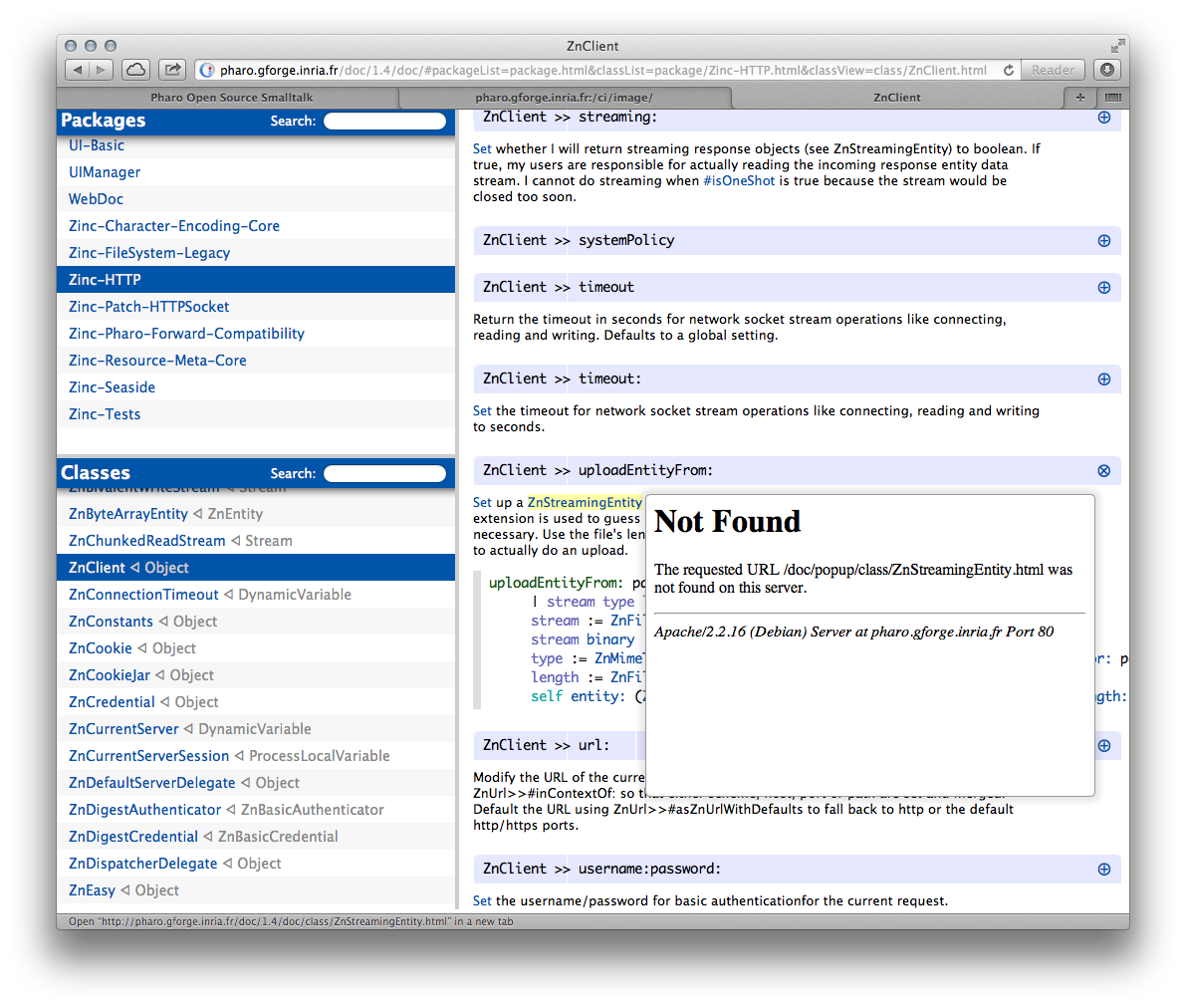
Looking forward to it. For me (Safari on Mac OS X) the embedded links / popups are not working: -- Sven Van Caekenberghe http://stfx.eu Smalltalk is the Red Pill
On 2013-03-12, at 14:53, Sven Van Caekenberghe <sven@stfx.eu> wrote:
On 12 Mar 2013, at 14:18, Camillo Bruni <camillobruni@gmail.com> wrote:
finally, after the 100th attempt I managed to export the documentation on 1.4
Beautiful !
this weekend I will tackle 2.0 :) and of course, it still needs some love!
Looking forward to it.
For me (Safari on Mac OS X) the embedded links / popups are not working:
yeah I forgot to export the selector popups, plus there is a bug in the javascript which fiddles with the URLs :P. And making seaside work with relative URLs was more than one hack |(
Other than that, awesome. Packages metadata will come in handy! Phil 2013/3/12 Camillo Bruni <camillobruni@gmail.com>:
On 2013-03-12, at 14:53, Sven Van Caekenberghe <sven@stfx.eu> wrote:
On 12 Mar 2013, at 14:18, Camillo Bruni <camillobruni@gmail.com> wrote:
finally, after the 100th attempt I managed to export the documentation on 1.4
Beautiful !
this weekend I will tackle 2.0 :) and of course, it still needs some love!
Looking forward to it.
For me (Safari on Mac OS X) the embedded links / popups are not working:
yeah I forgot to export the selector popups, plus there is a bug in the javascript which fiddles with the URLs :P. And making seaside work with relative URLs was more than one hack |(

just found that no matter which package i selected, if i click on a first class in list, it always goes to http://pharo.gforge.inria.fr/doc/1.4/doc/package/undefined (however when you hover over the link it shows different url) looks like some js trouble On 12 March 2013 14:18, Camillo Bruni <camillobruni@gmail.com> wrote:
finally, after the 100th attempt I managed to export the documentation on 1.4
http://pharo.gforge.inria.fr/doc/1.4
this weekend I will tackle 2.0 :) and of course, it still needs some love!
-- Best regards, Igor Stasenko.
participants (8)
-
 Camillo Bruni
 -
 Guillermo Polito
 -
 Igor Stasenko
 -
 Mariano Martinez Peck
 -
 Martin Dias
 -
 phil@highoctane.be
 -
 stephane ducasse
 -
 Sven Van Caekenberghe