On 14 Jul 2016, at 23:49, Peter Uhnák <i.uhnak@gmail.com> wrote:
Hi Sven,
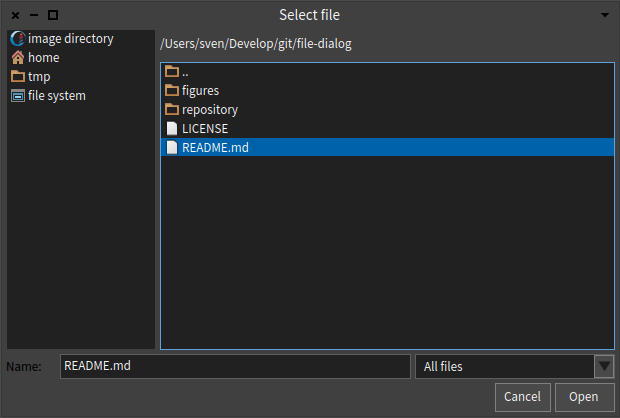
What I am missing in the UI is some indication of the path that leads to the current selected file. Right now, I am wondering where exactly I am, I feel a bit lost (this is of course from the technical standpoint of a path in a tree). This could be done with a popup, a trail, a pop-over.
I've added this couple of days ago (as I was missing this too), I just forgot to push the update to github (one downside compared to smalltalkhub :)).
The only problem is that the image directory name is usually really long (the longest I have is 110 characters as it includes the build's name), so it doesn't exactly fit in. There is some shortening happening based on the window's width but it's not perfect.
I had another look. Yes, this is cool. If you truncate, you could put the full, non truncated path in a pop over, that would be a cheap way to solve that problem, no ? In any case, in my testing there was enough space. Maybe also add a trailing / to indicate that it represents the directory and not the selection ? Also when I tested it, using FDOpenFileDialog new openModal. the path is initially blank, it only fills when I start clicking. BTW, could it be that FDMorphicUIManager becomes default automatically ? And related to github filetree, what is the proper way to get a new version once you loaded the code ?
What I like is what zenity does (clickable path)⦠but it automatically widens the window
<zenity.png> â Peter
We should have some more discussions about this, it could make a great addition to Pharo.
Sven
On 11 Jun 2016, at 02:45, Peter Uhnák <i.uhnak@gmail.com> wrote:
Hi,
last week I stitched together a simple file dialog replacement and today I managed to somewhat finish it.
There is still a lot to be desired, but right now it supports things that were the most pain for me:
* list of most common places (home, root, image directory, temp) * custom bookmarks by dragging folders from file-pane to bookmark-pane * toggle hidden files (right-click on file listing) * preset file name * filtering files by extensions or patterns and toggling between filters * synchronous and asynchronous mode
<file-dialog-3.png> â You can use it independently of Pharo's native dialogs
FDOpenFileDialog new extensionFilters: {'STON files' -> #(ston). 'All files' -> #()}; defaultFolder: FileLocator imageDirectory asFileReference; openModal
Or if you feel brave, I have an extended UIManager that will use thisâ¦, and then you can use regular manager commands
UIManager default chooseFileMatching: #('*.ston')
but you can always go back
FDMorphicUIManager new beDefault. "use new dialogs" MorphicUIManager new beDefault. "use old dialogs"
and of course the installation itself (I'll add it to catalog soon after I find a way to autogenerate configurations from git tags)
Metacello new baseline: 'FileDialog'; repository: 'github://peteruhnak/file-dialog/repository'; load.
More info and docs on GitHub https://github.com/peteruhnak/file-dialog
Any comments/feedback/bug reports is appreciated.
Peter